 ChecklistGuro
 Automated Property Valuation Workflow
Streamline your real estate decision-making with our Automated Property Valuation Workflow. Eliminate manual errors and accelerate appraisals by instantly generating accurate, data-driven property estimates. Perfect for agents and investors looking to automate market analysis, track property trends, and optimize investment strategies with seamless, real-time valuation insights.
Diese Vorlage wurde 5 Mal installiert.
Start
Start des Workflows/Prozesses.
1. Initiate Valuation Request
Create a new 'Valuation Request' entry in the Valuation Data Model with property details.
2. Retrieve Property Records
Fetch historical sales data and property tax records from the Property Database.
3. Get Market Comparables
Retrieve recent 'Sold' listings from the Comps Data Model within a specific radius.
4. Calculate Average Comparable Price
Calculate the average price per square foot from the retrieved comparable properties.
5. Aggregate Market Trends
Calculate the Max and Min price trends in the local area from the market data entries.
6. Assign Field Inspector
Create a task for a Field Agent to perform a physical site inspection of the property.
7. Perform Physical Inspection Checklist
Create a task with a detailed checklist for inspecting structural integrity, interior condition, and amenities.
8. Update Inspection Findings
Update the Valuation Request entry with the notes and photos provided by the Field Inspector.
9. Calculate Adjusted Valuation
Execute a formula applying depreciation or premium multipliers to the base market price based on inspection findings.
10. Finalize Valuation Report Data
Update the final estimated value and confidence score in the Valuation Request entry.
11. Generate Valuation Certificate
Generate a formal PDF Valuation Report based on the aggregated data and inspection notes.
12. Notify Client of Valuation
Send an email to the property owner containing the final valuation summary and the generated report.
13. Alert Agent of Completion
Send an SMS to the assigned Agent notifying them that the valuation process is closed.
14. Cleanup Temporary Data
Delete temporary calculation logs or transient session entries used during the valuation process.
Ende
Ende des Arbeitsablaufs/Prozesses.
Start des Workflows/Prozesses.
Create a new 'Valuation Request' entry in the Valuation Data Model with property details.
Fetch historical sales data and property tax records from the Property Database.
Retrieve recent 'Sold' listings from the Comps Data Model within a specific radius.
Calculate the average price per square foot from the retrieved comparable properties.
Calculate the Max and Min price trends in the local area from the market data entries.
Create a task for a Field Agent to perform a physical site inspection of the property.
Create a task with a detailed checklist for inspecting structural integrity, interior condition, and amenities.
Update the Valuation Request entry with the notes and photos provided by the Field Inspector.
Execute a formula applying depreciation or premium multipliers to the base market price based on inspection findings.
Update the final estimated value and confidence score in the Valuation Request entry.
Generate a formal PDF Valuation Report based on the aggregated data and inspection notes.
Send an email to the property owner containing the final valuation summary and the generated report.
Send an SMS to the assigned Agent notifying them that the valuation process is closed.
Delete temporary calculation logs or transient session entries used during the valuation process.
Ende des Arbeitsablaufs/Prozesses.
Kommentare
Bisher gibt es keine Kommentare. Seien Sie der Erste, der einen hinzufügt!
Demonstration der Lösung für das Immobilienmanagement
Vereinfachen Sie Ihre Immobilienverwaltung! ChecklistGuro optimiert die Verwaltung von Immobilien, die Verlängerung von Mietverträgen und Wartungsanfragen. Steigern Sie die Zufriedenheit der Mieter und maximieren Sie den Kapitalertrag. Verwalten Sie alles mit unserer Work OS.
Verwandte Workflow-Vorlagen

Real Estate Agent Performance Tracking Process

Property Inventory and Asset Management Workflow

Real Estate Referral Management Process

Property Tax and Compliance Management Workflow

Tenant Move-in and Move-out Workflow

Real Estate Market Analysis and Reporting Process

Property Showing and Tour Scheduling Workflow
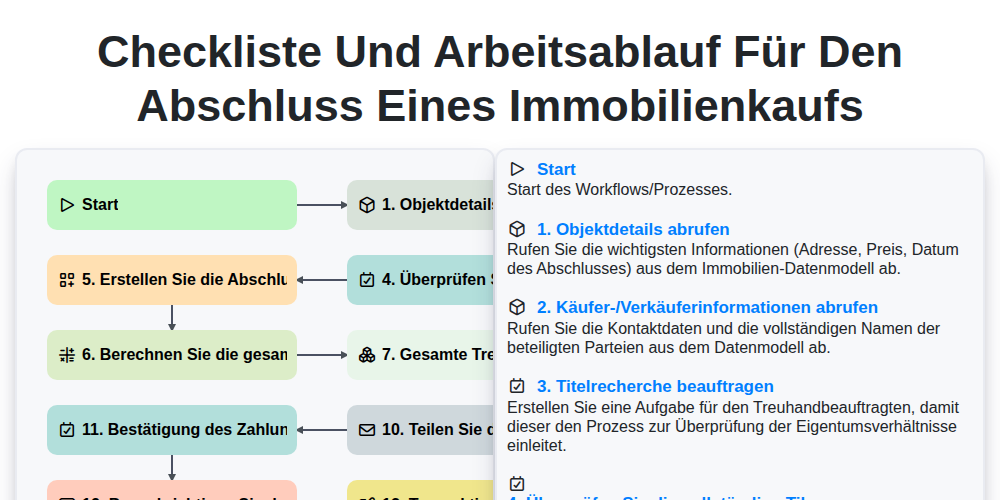
Checkliste und Arbeitsablauf für den Abschluss eines Immobilienkaufs
Gemeinsam schaffen wir das
Benötigen Sie Hilfe bei Checklisten?
Haben Sie eine Frage? Wir helfen Ihnen gerne. Bitte senden Sie uns Ihre Anfrage, und wir werden Ihnen umgehend antworten.