 ChecklistGuro
 Property Listing and Marketing Automation
Streamline your real estate operations with our Property Listing and Marketing Automation workflow. Eliminate manual data entry and scale your reach by automatically synchronizing new listings across multiple platforms, generating instant property descriptions, and launching targeted social media campaigns. Optimize your workflow to capture more leads, reduce time-to-market, and ensure every property gets the spotlight it deserves.
Diese Vorlage wurde 1 Mal installiert.
Start
Start des Workflows/Prozesses.
1. Fetch New Property Listing
Retrieve the details of the newly submitted property entry from the Property Data Model.
2. Calculate Commission Split
Calculate the agent's commission percentage based on the property price and fixed fee variables.
3. Create Marketing Campaign Entry
Create a new entry in the Marketing Campaigns data model linked to the specific property.
4. Assign Professional Photography
Create a task for the Operations Team to schedule a photographer for the property.
5. Content Writing Task
Create a task for the Copywriter to draft the property description and ad copy.
6. Update Listing Status
Update the property entry status to 'Active/Marketing' once photography is complete.
7. Calculate Total Portfolio Value
Sum the values of all 'Active' property entries to calculate total inventory value.
8. Notify Owner of Live Listing
Send an automated email to the Property Owner confirming that their listing is now live on the market.
9. Alert Agent of New Lead
Send an SMS to the assigned Real Estate Agent when a potential buyer inquires about the listing.
10. Social Media Deployment
Create a task for the Social Media Manager to post the listing on Facebook, Instagram, and LinkedIn.
11. Fetch Lead Contact Info
Retrieve contact details from the Leads Data Model for interested parties.
12. Send Property Brochure to Lead
Send an automated email containing the property PDF brochure to the interested lead.
13. Calculate Days on Market
Calculate the difference between the 'Listing Date' and 'Current Date'.
14. Weekly Marketing Performance Report
Generate a report summarizing clicks, views, and inquiries for all active property listings.
15. Log Inquiry to Property
Update the Property entry to increment the 'Total Inquiries' counter.
Ende
Ende des Arbeitsablaufs/Prozesses.
Start des Workflows/Prozesses.
Retrieve the details of the newly submitted property entry from the Property Data Model.
Calculate the agent's commission percentage based on the property price and fixed fee variables.
Create a new entry in the Marketing Campaigns data model linked to the specific property.
Create a task for the Operations Team to schedule a photographer for the property.
Create a task for the Copywriter to draft the property description and ad copy.
Update the property entry status to 'Active/Marketing' once photography is complete.
Sum the values of all 'Active' property entries to calculate total inventory value.
Send an automated email to the Property Owner confirming that their listing is now live on the market.
Send an SMS to the assigned Real Estate Agent when a potential buyer inquires about the listing.
Create a task for the Social Media Manager to post the listing on Facebook, Instagram, and LinkedIn.
Retrieve contact details from the Leads Data Model for interested parties.
Send an automated email containing the property PDF brochure to the interested lead.
Calculate the difference between the 'Listing Date' and 'Current Date'.
Generate a report summarizing clicks, views, and inquiries for all active property listings.
Update the Property entry to increment the 'Total Inquiries' counter.
Ende des Arbeitsablaufs/Prozesses.
Hat Ihnen diese Workflow-Vorlage geholfen?
Kommentare
Bisher gibt es keine Kommentare. Seien Sie der Erste, der einen hinzufügt!
Demonstration der Lösung für das Immobilienmanagement
Vereinfachen Sie Ihre Immobilienverwaltung! ChecklistGuro optimiert die Verwaltung von Immobilien, die Verlängerung von Mietverträgen und Wartungsanfragen. Steigern Sie die Zufriedenheit der Mieter und maximieren Sie den Kapitalertrag. Verwalten Sie alles mit unserer Work OS.
Verwandte Workflow-Vorlagen

Real Estate Agent Performance Tracking Process

Property Inventory and Asset Management Workflow

Real Estate Referral Management Process

Property Tax and Compliance Management Workflow

Tenant Move-in and Move-out Workflow

Real Estate Market Analysis and Reporting Process

Property Showing and Tour Scheduling Workflow
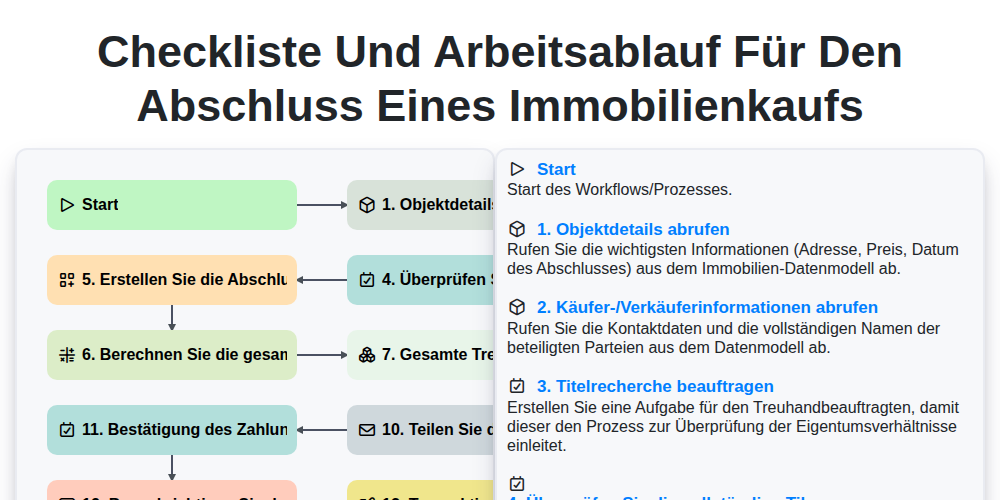
Checkliste und Arbeitsablauf für den Abschluss eines Immobilienkaufs
Gemeinsam schaffen wir das
Benötigen Sie Hilfe bei Checklisten?
Haben Sie eine Frage? Wir helfen Ihnen gerne. Bitte senden Sie uns Ihre Anfrage, und wir werden Ihnen umgehend antworten.