 ChecklistGuro
 Real Estate Agent Onboarding Process
Streamline your brokerage growth with our comprehensive Real Estate Agent Onboarding Process. From initial recruitment and contract signing to tech setup and training, this step-by-step workflow ensures a seamless, professional integration for every new agent, maximizing productivity and retention from day one.
Diese Vorlage wurde 3 Mal installiert.
Start
Start des Workflows/Prozesses.
1. Create Agent Profile
Create a new entry in the 'Agents' data model to initialize the onboarding record.
2. Fetch Agent Documents
Retrieve existing uploaded files (ID, License, Contract) from the Documents data model.
3. Verify Legal Compliance
Assign a task to the Legal Department to verify the agent's real estate license and background check.
4. Update License Status
Update the 'License Verified' boolean field in the Agent Profile entry after legal review.
5. Setup CRM Access
Assign a task to the IT Department to provision CRM and email credentials.
6. Create System Credentials Entry
Create a record in the 'IT Assets' data model containing the new agent's username and access levels.
7. Assign Office Equipment
Assign a task to the Operations team to prepare laptop, business cards, and office keys.
8. Calculate Commission Split
Calculate the agent's net commission percentage based on their contract terms and company overhead variables.
9. Update Commission Structure
Update the 'Commission Rate' field in the Agent Profile with the calculated value.
10. Send Welcome Email
Send an automated welcome email to the new agent with their onboarding handbook and login instructions.
11. Notify Agent of Completion
Send an SMS to the agent's phone number informing them that their onboarding is complete and they are active.
12. Retrieve Training Requirements
Get a list of mandatory training modules from the 'Training Catalog' data model.
13. Assign Mandatory Training
Create tasks for the new agent to complete specific compliance and sales training modules.
14. Calculate Training Progress
Aggregate completed training modules vs. total required modules to determine the percentage of completion.
15. Generate Onboarding Summary Report
Create a final report summarizing the agent's onboarding timeline, completed tasks, and verified documents.
16. Set Agent Status to 'Active'
Update the final status field in the Agent Profile to 'Active' once all tasks are verified.
Ende
Ende des Arbeitsablaufs/Prozesses.
Start des Workflows/Prozesses.
Create a new entry in the 'Agents' data model to initialize the onboarding record.
Retrieve existing uploaded files (ID, License, Contract) from the Documents data model.
Assign a task to the Legal Department to verify the agent's real estate license and background check.
Update the 'License Verified' boolean field in the Agent Profile entry after legal review.
Assign a task to the IT Department to provision CRM and email credentials.
Create a record in the 'IT Assets' data model containing the new agent's username and access levels.
Assign a task to the Operations team to prepare laptop, business cards, and office keys.
Calculate the agent's net commission percentage based on their contract terms and company overhead variables.
Update the 'Commission Rate' field in the Agent Profile with the calculated value.
Send an automated welcome email to the new agent with their onboarding handbook and login instructions.
Send an SMS to the agent's phone number informing them that their onboarding is complete and they are active.
Get a list of mandatory training modules from the 'Training Catalog' data model.
Create tasks for the new agent to complete specific compliance and sales training modules.
Aggregate completed training modules vs. total required modules to determine the percentage of completion.
Create a final report summarizing the agent's onboarding timeline, completed tasks, and verified documents.
Update the final status field in the Agent Profile to 'Active' once all tasks are verified.
Ende des Arbeitsablaufs/Prozesses.
Hat Ihnen diese Workflow-Vorlage geholfen?
Kommentare
Bisher gibt es keine Kommentare. Seien Sie der Erste, der einen hinzufügt!
Demonstration der Lösung für das Immobilienmanagement
Vereinfachen Sie Ihre Immobilienverwaltung! ChecklistGuro optimiert die Verwaltung von Immobilien, die Verlängerung von Mietverträgen und Wartungsanfragen. Steigern Sie die Zufriedenheit der Mieter und maximieren Sie den Kapitalertrag. Verwalten Sie alles mit unserer Work OS.
Verwandte Workflow-Vorlagen

Real Estate Agent Performance Tracking Process

Property Inventory and Asset Management Workflow

Real Estate Referral Management Process

Property Tax and Compliance Management Workflow

Tenant Move-in and Move-out Workflow

Real Estate Market Analysis and Reporting Process

Property Showing and Tour Scheduling Workflow
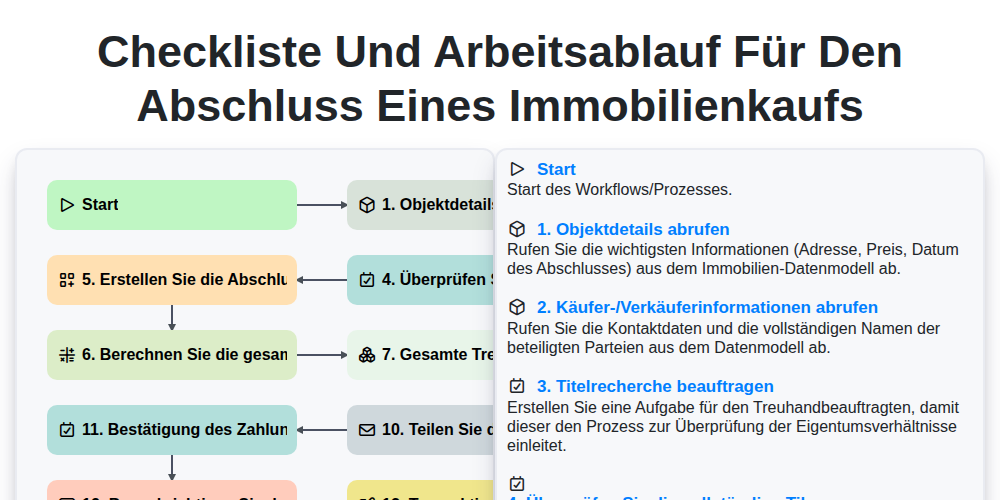
Checkliste und Arbeitsablauf für den Abschluss eines Immobilienkaufs
Gemeinsam schaffen wir das
Benötigen Sie Hilfe bei Checklisten?
Haben Sie eine Frage? Wir helfen Ihnen gerne. Bitte senden Sie uns Ihre Anfrage, und wir werden Ihnen umgehend antworten.