 ChecklistGuro
 Medical Coding and Billing Accuracy Process
Optimize revenue cycles and minimize claim denials with our Medical Coding and Billing Accuracy Process. This streamlined healthcare workflow ensures precise ICD-10, CPT, and HCPCS coding, reducing human error and accelerating reimbursement cycles through rigorous audit protocols and automated validation techniques.
Diese Vorlage wurde 2 Mal installiert.
Start
Start des Workflows/Prozesses.
1. Fetch Unbilled Claims
Retrieve all entries from the 'Claims' data model where status is 'Encoded' and billing status is 'Pending'.
2. Retrieve Patient Records
Get patient demographic and encounter details from the 'Patient' and 'Encounters' data models to verify coding accuracy.
3. Calculate Denial Rate
Calculate the percentage of denied claims versus total claims submitted in the current period.
4. Sum Total Reimbursable Value
Aggregate the 'Expected Reimbursement' field from all selected claims to calculate total revenue potential.
5. Coding Audit Task
Create a task for a Senior Medical Coder to review the ICD-10 and CPT codes for accuracy against the clinical documentation.
6. Billing Verification Task
Create a task for the Billing Specialist to verify that all modifiers and insurance identifiers are correctly applied.
7. Update Claim Status to 'Audited'
Update the status of the processed claims in the 'Claims' data model to indicate the audit phase is complete.
8. Create Discrepancy Log
Create a new entry in the 'Audit Discrepancies' data model whenever a coding error is identified during the task.
9. Notify Provider of Coding Error
Send an email to the attending physician if a discrepancy is found that requires documentation clarification.
10. Update Claim for Submission
Update the 'Claims' data model entry to change status from 'Audited' to 'Ready for Submission'.
11. Generate Claim Submission Batch
Create a new entry in the 'Billing Batches' data model to group all verified claims for the day.
12. Submit Batch to Clearinghouse
Send an automated email notification to the clearinghouse service with the batch details.
13. Daily Accuracy Report
Create a summary report containing the total claims processed, error rate, and total value audited for the day.
14. Remove Duplicate Entries
Delete any duplicate claim entries identified during the reconciliation process.
15. Urgent Denial Alert
Send an SMS to the Billing Manager if a high-value claim is flagged with a critical rejection error.
Ende
Ende des Arbeitsablaufs/Prozesses.
Start des Workflows/Prozesses.
Retrieve all entries from the 'Claims' data model where status is 'Encoded' and billing status is 'Pending'.
Get patient demographic and encounter details from the 'Patient' and 'Encounters' data models to verify coding accuracy.
Calculate the percentage of denied claims versus total claims submitted in the current period.
Aggregate the 'Expected Reimbursement' field from all selected claims to calculate total revenue potential.
Create a task for a Senior Medical Coder to review the ICD-10 and CPT codes for accuracy against the clinical documentation.
Create a task for the Billing Specialist to verify that all modifiers and insurance identifiers are correctly applied.
Update the status of the processed claims in the 'Claims' data model to indicate the audit phase is complete.
Create a new entry in the 'Audit Discrepancies' data model whenever a coding error is identified during the task.
Send an email to the attending physician if a discrepancy is found that requires documentation clarification.
Update the 'Claims' data model entry to change status from 'Audited' to 'Ready for Submission'.
Create a new entry in the 'Billing Batches' data model to group all verified claims for the day.
Send an automated email notification to the clearinghouse service with the batch details.
Create a summary report containing the total claims processed, error rate, and total value audited for the day.
Delete any duplicate claim entries identified during the reconciliation process.
Send an SMS to the Billing Manager if a high-value claim is flagged with a critical rejection error.
Ende des Arbeitsablaufs/Prozesses.
Hat Ihnen diese Workflow-Vorlage geholfen?
Kommentare
Bisher gibt es keine Kommentare. Seien Sie der Erste, der einen hinzufügt!
Demonstration der Managementlösung für das Gesundheitswesen
Optimierung der Abläufe im Gesundheitswesen und Verbesserung der Patientenversorgung? ChecklistGuro's Work OS Plattform vereinfacht alles, von der Patientenplanung und Abrechnung bis hin zur Einhaltung von Vorschriften und Personalmanagement. Steigern Sie die Effizienz, reduzieren Sie den Verwaltungsaufwand und konzentrieren Sie sich auf das, was am wichtigsten ist: Ihre Patienten. Erfahren Sie, wie ChecklistGuro Ihre Gesundheitseinrichtung verändern kann!
Verwandte Workflow-Vorlagen

Disaster Recovery and Emergency Response Plan

Healthcare Facility Management and Maintenance

Radiology Imaging Workflow and Management

Immunization Tracking and Record Management

Patient Feedback and Satisfaction Management

Compliance Auditing and Regulatory Reporting

Healthcare Data Analytics and Reporting Process
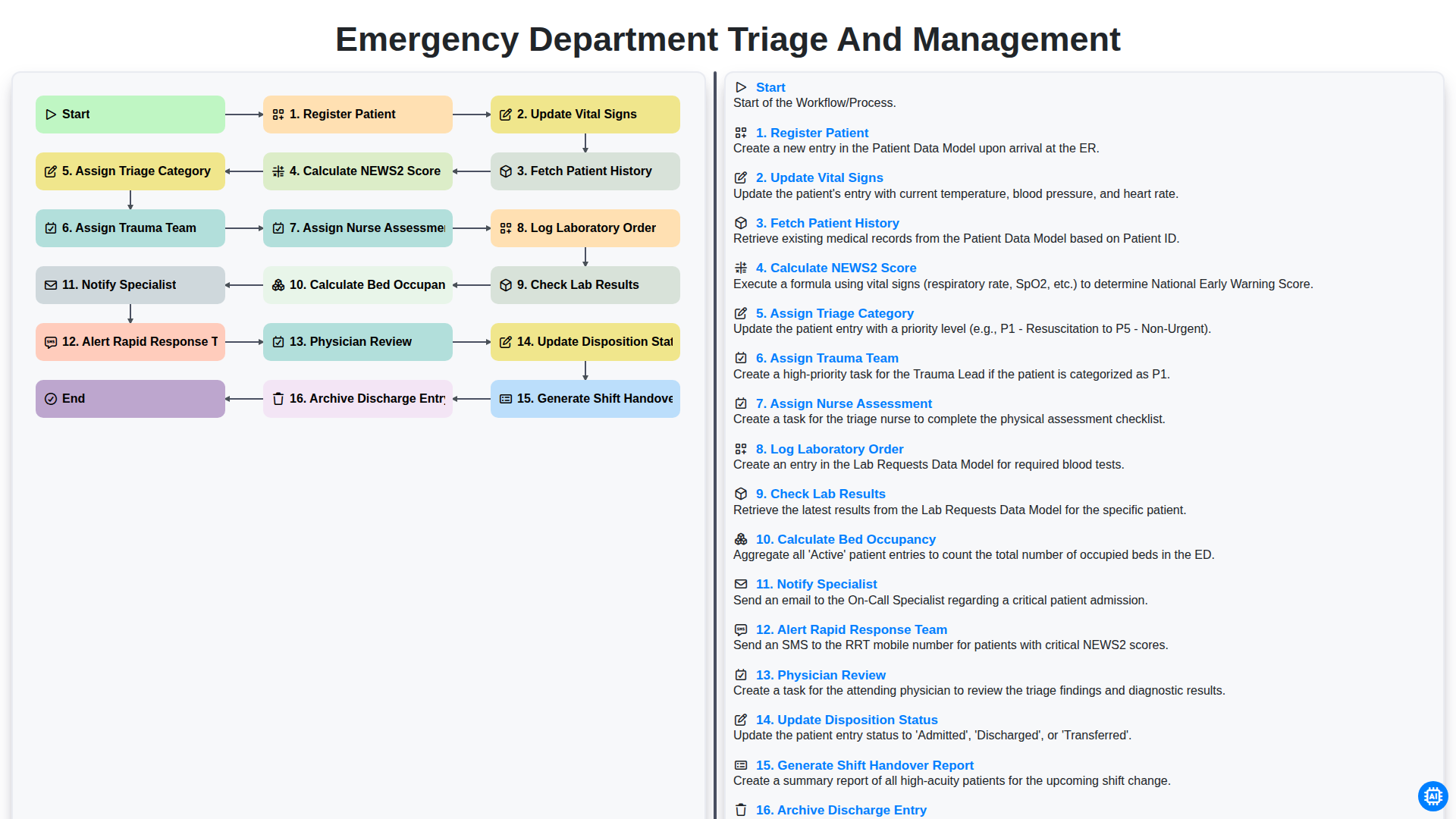
Emergency Department Triage and Management
Gemeinsam schaffen wir das
Benötigen Sie Hilfe bei Checklisten?
Haben Sie eine Frage? Wir helfen Ihnen gerne. Bitte senden Sie uns Ihre Anfrage, und wir werden Ihnen umgehend antworten.