 ChecklistGuro
 Healthcare Facility Management and Maintenance
Streamline your clinical operations with our comprehensive Healthcare Facility Management and Maintenance workflow. Discover expert strategies for optimizing medical equipment upkeep, ensuring regulatory compliance, and maintaining sterile, safe environments to enhance patient care and operational efficiency.
Diese Vorlage wurde 2 Mal installiert.
Start
Start des Workflows/Prozesses.
1. Retrieve Equipment Inventory
Fetch all active medical devices and machinery from the Equipment Data Model to check maintenance schedules.
2. Check Technician Availability
Retrieve staff entries from the Personnel Data Model to identify available maintenance engineers.
3. Update Equipment Status
Update the status of a specific machine entry to 'Under Maintenance' or 'Out of Order' in the Equipment Data Model.
4. Log Maintenance Incident
Create a new entry in the Maintenance Log Data Model when a fault is reported.
5. Generate Work Order
Create a new entry in the Work Order Data Model containing the repair details and assigned technician.
6. Assign Repair Task
Create a task for the assigned technician to perform the physical inspection and repair.
7. Safety Inspection Task
Create a task for the Safety Officer to verify that the facility meets compliance standards after repair.
8. Calculate Days Since Last Service
Calculate the delta between the current date and the 'Last Maintenance Date' field to determine if service is overdue.
9. Calculate Maintenance Cost
Calculate the total cost of the maintenance event by summing parts and labor.
10. Total Monthly Maintenance Spend
Aggregate all maintenance entries from the current month to calculate the total expenditure.
11. Average Downtime Duration
Calculate the average time between 'Issue Reported' and 'Issue Resolved' across all recent work orders.
12. Notify Facility Manager
Send an email alert to the Facility Manager when a critical piece of equipment is marked as 'Out of Order'.
13. Alert Technician
Send an SMS notification to the assigned technician when a new high-priority Work Order is assigned to them.
14. Monthly Compliance Report
Generate a periodic report summarizing all completed inspections and any failed safety checks for regulatory auditing.
15. Archive Completed Records
Remove or move old, completed maintenance entries from the active view to the archive data model.
Ende
Ende des Arbeitsablaufs/Prozesses.
Start des Workflows/Prozesses.
Fetch all active medical devices and machinery from the Equipment Data Model to check maintenance schedules.
Retrieve staff entries from the Personnel Data Model to identify available maintenance engineers.
Update the status of a specific machine entry to 'Under Maintenance' or 'Out of Order' in the Equipment Data Model.
Create a new entry in the Maintenance Log Data Model when a fault is reported.
Create a new entry in the Work Order Data Model containing the repair details and assigned technician.
Create a task for the assigned technician to perform the physical inspection and repair.
Create a task for the Safety Officer to verify that the facility meets compliance standards after repair.
Calculate the delta between the current date and the 'Last Maintenance Date' field to determine if service is overdue.
Calculate the total cost of the maintenance event by summing parts and labor.
Aggregate all maintenance entries from the current month to calculate the total expenditure.
Calculate the average time between 'Issue Reported' and 'Issue Resolved' across all recent work orders.
Send an email alert to the Facility Manager when a critical piece of equipment is marked as 'Out of Order'.
Send an SMS notification to the assigned technician when a new high-priority Work Order is assigned to them.
Generate a periodic report summarizing all completed inspections and any failed safety checks for regulatory auditing.
Remove or move old, completed maintenance entries from the active view to the archive data model.
Ende des Arbeitsablaufs/Prozesses.
Hat Ihnen diese Workflow-Vorlage geholfen?
Kommentare
Bisher gibt es keine Kommentare. Seien Sie der Erste, der einen hinzufügt!
Demonstration der Managementlösung für das Gesundheitswesen
Optimierung der Abläufe im Gesundheitswesen und Verbesserung der Patientenversorgung? ChecklistGuro's Work OS Plattform vereinfacht alles, von der Patientenplanung und Abrechnung bis hin zur Einhaltung von Vorschriften und Personalmanagement. Steigern Sie die Effizienz, reduzieren Sie den Verwaltungsaufwand und konzentrieren Sie sich auf das, was am wichtigsten ist: Ihre Patienten. Erfahren Sie, wie ChecklistGuro Ihre Gesundheitseinrichtung verändern kann!
Verwandte Workflow-Vorlagen

Disaster Recovery and Emergency Response Plan

Medical Coding and Billing Accuracy Process

Radiology Imaging Workflow and Management

Immunization Tracking and Record Management

Patient Feedback and Satisfaction Management

Compliance Auditing and Regulatory Reporting

Healthcare Data Analytics and Reporting Process
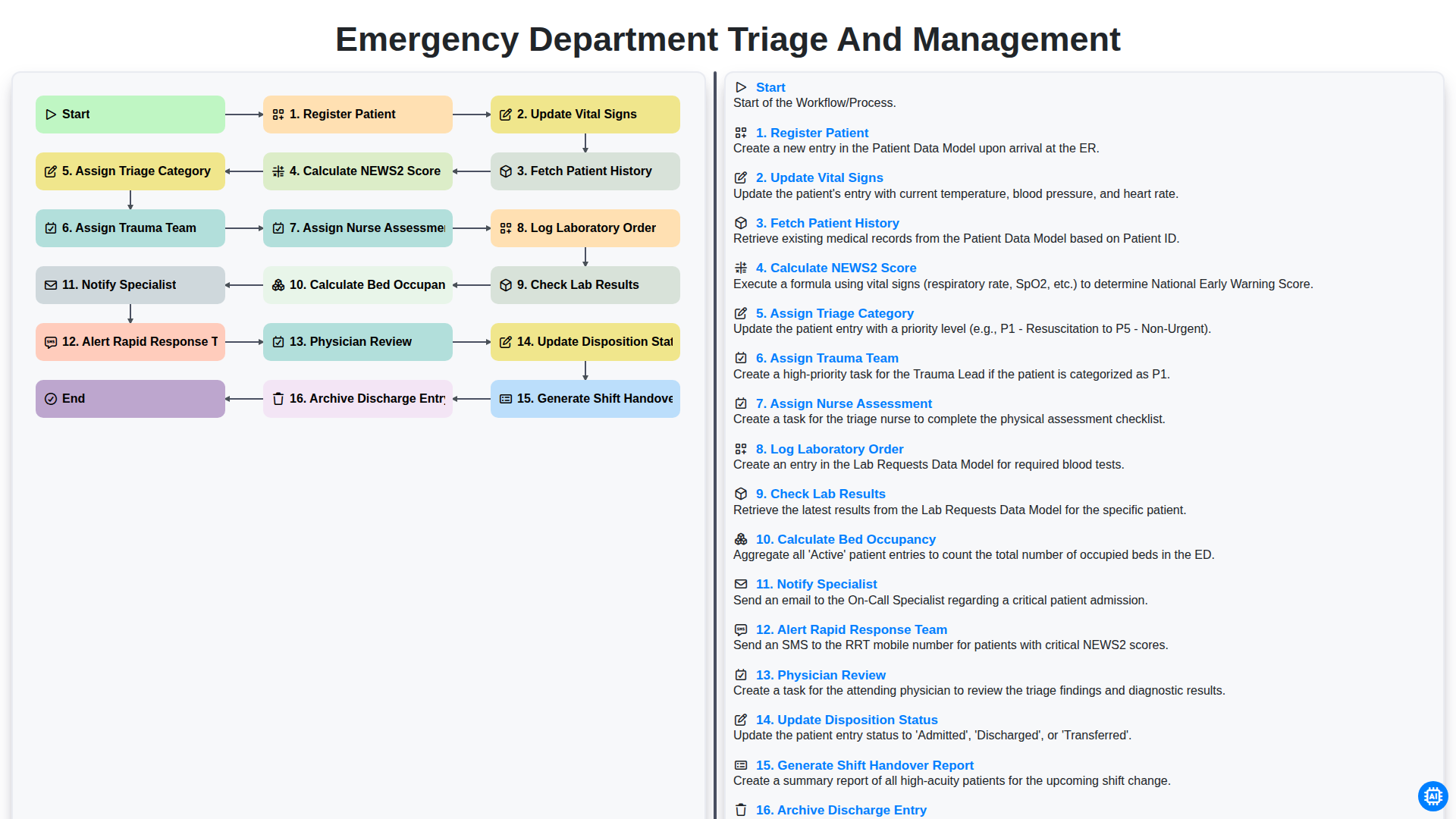
Emergency Department Triage and Management
Gemeinsam schaffen wir das
Benötigen Sie Hilfe bei Checklisten?
Haben Sie eine Frage? Wir helfen Ihnen gerne. Bitte senden Sie uns Ihre Anfrage, und wir werden Ihnen umgehend antworten.