 ChecklistGuro
 Property Portfolio Management Workflow
Streamline your real estate investments with our comprehensive Property Portfolio Management Workflow. Master the art of scaling your assets by automating property tracking, lease management, maintenance scheduling, and financial reporting. Designed for property managers and investors, this optimized process eliminates manual errors, enhances operational efficiency, and ensures maximum ROI across your entire real estate portfolio.
Diese Vorlage wurde 2 Mal installiert.
Start
Start des Workflows/Prozesses.
1. Fetch Property Details
Retrieve existing property data, including address, type, and owner information from the Property Data Model.
2. Retrieve Lease Agreements
Fetch all active lease entries associated with the selected property to check for upcoming expiration dates.
3. Calculate Monthly Gross Income
Sum all rent entries and ancillary income entries to determine total monthly revenue for the property.
4. Calculate Net Operating Income (NOI)
Subtract total operating expenses from the calculated Gross Income.
5. Aggregate Total Maintenance Costs
Sum all maintenance expense entries for the current fiscal year to monitor budget variance.
6. Update Property Status
Update the 'Status' field in the Property Data Model (e.g., changing from 'Vacant' to 'Occupied').
7. Schedule Annual Inspection
Create a task for the Property Manager to conduct a physical walkthrough and safety check.
8. Initiate Lease Renewal Process
Create a task for the Leasing Agent when a lease expiration is detected within 90 days.
9. Assign Maintenance Repair
Create a task for the Maintenance Technician when a new repair entry is submitted.
10. Log Maintenance Incident
Create a new entry in the Maintenance Log data model whenever a new issue is reported.
11. Generate Rent Invoice
Create a new entry in the Invoicing data model for the upcoming month's rent collection.
12. Notify Tenant of Inspection
Send an automated email to the tenant contact address regarding the scheduled inspection date.
13. Send Late Rent Alert
Send an email to the tenant when a payment entry is marked as 'Overdue'.
14. Urgent Repair Alert
Send an SMS to the Property Manager for high-priority/emergency maintenance tasks.
15. Monthly Portfolio Performance Report
Generate a comprehensive report summarizing occupancy rates, total income, and expenses for the month.
16. Archive Expired Lease
Delete or move expired lease entries from the 'Active Leases' view to the 'Archive' data model.
Ende
Ende des Arbeitsablaufs/Prozesses.
Start des Workflows/Prozesses.
Retrieve existing property data, including address, type, and owner information from the Property Data Model.
Fetch all active lease entries associated with the selected property to check for upcoming expiration dates.
Sum all rent entries and ancillary income entries to determine total monthly revenue for the property.
Subtract total operating expenses from the calculated Gross Income.
Sum all maintenance expense entries for the current fiscal year to monitor budget variance.
Update the 'Status' field in the Property Data Model (e.g., changing from 'Vacant' to 'Occupied').
Create a task for the Property Manager to conduct a physical walkthrough and safety check.
Create a task for the Leasing Agent when a lease expiration is detected within 90 days.
Create a task for the Maintenance Technician when a new repair entry is submitted.
Create a new entry in the Maintenance Log data model whenever a new issue is reported.
Create a new entry in the Invoicing data model for the upcoming month's rent collection.
Send an automated email to the tenant contact address regarding the scheduled inspection date.
Send an email to the tenant when a payment entry is marked as 'Overdue'.
Send an SMS to the Property Manager for high-priority/emergency maintenance tasks.
Generate a comprehensive report summarizing occupancy rates, total income, and expenses for the month.
Delete or move expired lease entries from the 'Active Leases' view to the 'Archive' data model.
Ende des Arbeitsablaufs/Prozesses.
Kommentare
Bisher gibt es keine Kommentare. Seien Sie der Erste, der einen hinzufügt!
Demonstration der Lösung für das Immobilienmanagement
Vereinfachen Sie Ihre Immobilienverwaltung! ChecklistGuro optimiert die Verwaltung von Immobilien, die Verlängerung von Mietverträgen und Wartungsanfragen. Steigern Sie die Zufriedenheit der Mieter und maximieren Sie den Kapitalertrag. Verwalten Sie alles mit unserer Work OS.
Verwandte Workflow-Vorlagen

Real Estate Agent Performance Tracking Process

Property Inventory and Asset Management Workflow

Real Estate Referral Management Process

Property Tax and Compliance Management Workflow

Tenant Move-in and Move-out Workflow

Real Estate Market Analysis and Reporting Process

Property Showing and Tour Scheduling Workflow
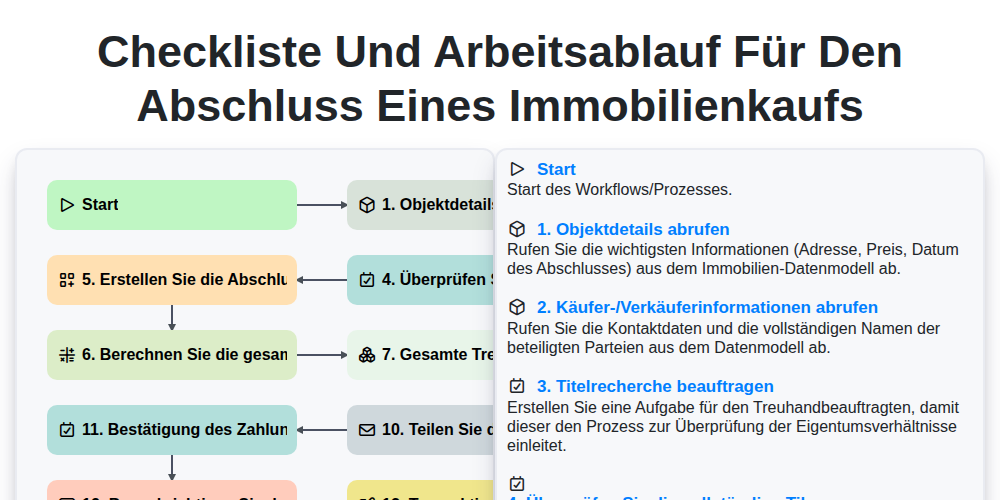
Checkliste und Arbeitsablauf für den Abschluss eines Immobilienkaufs
Gemeinsam schaffen wir das
Benötigen Sie Hilfe bei Checklisten?
Haben Sie eine Frage? Wir helfen Ihnen gerne. Bitte senden Sie uns Ihre Anfrage, und wir werden Ihnen umgehend antworten.