 ChecklistGuro
 Construction Labor Management and Tracking
Streamline your jobsite productivity with our Construction Labor Management and Tracking workflow. Eliminate manual errors and optimize workforce allocation by tracking real-time hours, monitoring crew performance, and managing subcontractor productivity in one centralized process. Designed for project managers and site supervisors, this solution ensures accurate labor costing, reduces downtime, and keeps your construction projects on schedule and under budget.
Esta plantilla se instaló 1 veces.
Inicio
Inicio del flujo de trabajo/proceso.
1. Register New Worker
Create a new entry in the 'Workers' data model with personal details, certifications, and contact info.
2. Log Daily Timesheet
Create a new entry in the 'Timesheets' data model recording hours worked, site location, and date.
3. Fetch Worker Certification Status
Retrieve specific worker records from the 'Certifications' data model to verify if safety training is valid.
4. Update Shift Status
Update the 'Active Shift' status in the 'Daily Schedule' data model when a worker clocks in.
5. Calculate Total Man-Hours
Sum the 'hours_worked' property from all 'Timesheet' entries for a specific project/date.
6. Calculate Daily Labor Cost
Execute a formula: (Total Man-Hours * Hourly Rate) + Overtime Multiplier.
7. Assign Site Safety Inspection
Create a task for the Safety Officer to perform a site walk-through based on the new project start.
8. Assign Weekly Payroll Review
Create a task for the Payroll Manager to verify completed timesheets for the week.
9. Notify Worker of Schedule Change
Send an email to the worker's email address recorded in the 'Workers' data model regarding updates to their shift.
10. Urgent Site Alert
Send an SMS to all active workers on-site regarding weather delays or emergency site closures.
11. Remove Expired Certifications
Delete entries from the 'Certifications' data model that have reached their expiration date and are no longer valid.
12. Generate Weekly Labor Productivity Report
Create a report aggregating man-hours vs. completed task milestones for stakeholders.
13. Check Equipment Availability
Retrieve entries from 'Equipment' data model to ensure tools needed for the assigned task are not checked out.
14. Update Project Budget Consumption
Update the 'Project Budget' data model by adding the calculated daily labor cost to the 'Total Spent' field.
Fin
Fin del flujo de trabajo/proceso.
Inicio del flujo de trabajo/proceso.
Create a new entry in the 'Workers' data model with personal details, certifications, and contact info.
Create a new entry in the 'Timesheets' data model recording hours worked, site location, and date.
Retrieve specific worker records from the 'Certifications' data model to verify if safety training is valid.
Update the 'Active Shift' status in the 'Daily Schedule' data model when a worker clocks in.
Sum the 'hours_worked' property from all 'Timesheet' entries for a specific project/date.
Execute a formula: (Total Man-Hours * Hourly Rate) + Overtime Multiplier.
Create a task for the Safety Officer to perform a site walk-through based on the new project start.
Create a task for the Payroll Manager to verify completed timesheets for the week.
Send an email to the worker's email address recorded in the 'Workers' data model regarding updates to their shift.
Send an SMS to all active workers on-site regarding weather delays or emergency site closures.
Delete entries from the 'Certifications' data model that have reached their expiration date and are no longer valid.
Create a report aggregating man-hours vs. completed task milestones for stakeholders.
Retrieve entries from 'Equipment' data model to ensure tools needed for the assigned task are not checked out.
Update the 'Project Budget' data model by adding the calculated daily labor cost to the 'Total Spent' field.
Fin del flujo de trabajo/proceso.
¿Le resultó útil esta plantilla de flujo de trabajo?
Comentarios
Aún no hay comentarios. ¡Sé el primero en añadir uno!
Demostración de la solución de gestión de la construcción
¡Construye de forma más inteligente, no más ardua! ChecklistGuro optimiza los proyectos de construcción, desde la planificación hasta la finalización. Gestiona tareas, inspecciones, protocolos de seguridad y mucho más, todo en un solo lugar. Reduce los retrasos, mejora la comunicación y entrega proyectos a tiempo y dentro del presupuesto.
Plantillas de flujo de trabajo relacionadas

Construction Post-Project Review and Lessons Learned Process

Construction Project Handover and Commissioning Workflow

Construction Waste Management and Sustainability Process

Subcontractor Compliance and Insurance Tracking

Construction Documentation and Record Keeping Workflow

Construction Risk Management and Mitigation Workflow

Construction Supply Chain Management Process
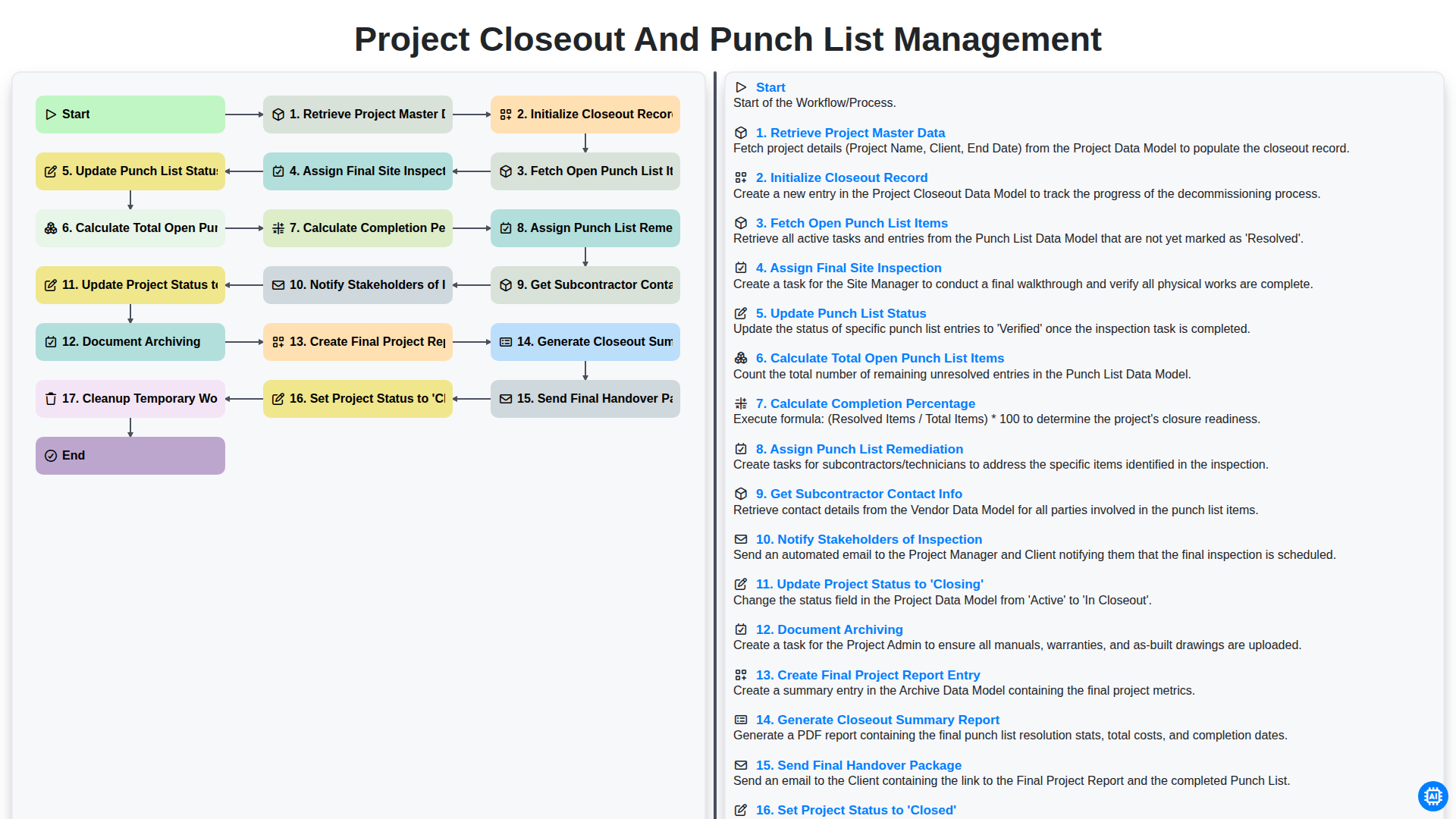
Project Closeout and Punch List Management
Podemos hacerlo juntos
¿Necesita ayuda con las listas de verificación?
¿Tienes alguna pregunta? Estamos aquí para ayudarte. Envía tu consulta y te responderemos a la brevedad.