 ChecklistGuro
 Spare Parts Inventory Management Process
Optimize your maintenance operations and eliminate costly downtime with our streamlined Spare Parts Inventory Management Process. Master the art of tracking, procurement, and stock replenishment to ensure critical components are always available when needed. Perfect for maintenance managers looking to reduce waste, prevent stockouts, and boost operational efficiency through automated workflows and precision auditing.
Diese Vorlage wurde 4 Mal installiert.
Start
Start des Workflows/Prozesses.
1. Check Current Stock Levels
Retrieve existing inventory records to check quantity on hand for specific part numbers.
2. Calculate Total Inventory Value
Sum the value (unit_price * quantity) of all parts in the inventory data model.
3. Determine Reorder Necessity
Compare current stock levels against the defined minimum threshold (reorder_point) to identify shortages.
4. Create Purchase Requisition Task
Assign a task to the Procurement Officer to initiate the buying process for identified low-stock parts.
5. Create Purchase Order Entry
Generate a new entry in the Purchase Orders data model containing part details and requested quantities.
6. Notify Vendor of Order
Send an email to the supplier's contact address with the details of the new Purchase Order.
7. Assign Goods Receipt Task
Create a task for the Warehouse Clerk to inspect and log incoming parts upon delivery.
8. Verify Received Items
Fetch the original Purchase Order entry to compare delivered quantities against ordered quantities.
9. Update Stock Quantities
Update the 'Quantity on Hand' field in the Inventory Data Model after successful goods receipt.
10. Update PO Status
Change the status of the Purchase Order entry from 'Pending' to 'Fulfilled'.
11. Log Inventory Discrepancy
If received quantity does not match ordered quantity, create an entry in the Discrepancy Log model.
12. Alert Procurement of Discrepancy
Send an email to the Procurement Manager if a mismatch is detected during the receiving process.
13. Calculate Inventory Turnover Ratio
Execute formula to calculate turnover based on Cost of Goods Sold and Average Inventory value.
14. Generate Monthly Stock Valuation Report
Create a comprehensive report summarizing total asset value, low stock alerts, and recent movements.
15. Remove Obsolete Part Records
Delete entries from the inventory model for parts that have been officially decommissioned or scrapped.
Ende
Ende des Arbeitsablaufs/Prozesses.
Start des Workflows/Prozesses.
Retrieve existing inventory records to check quantity on hand for specific part numbers.
Sum the value (unit_price * quantity) of all parts in the inventory data model.
Compare current stock levels against the defined minimum threshold (reorder_point) to identify shortages.
Assign a task to the Procurement Officer to initiate the buying process for identified low-stock parts.
Generate a new entry in the Purchase Orders data model containing part details and requested quantities.
Send an email to the supplier's contact address with the details of the new Purchase Order.
Create a task for the Warehouse Clerk to inspect and log incoming parts upon delivery.
Fetch the original Purchase Order entry to compare delivered quantities against ordered quantities.
Update the 'Quantity on Hand' field in the Inventory Data Model after successful goods receipt.
Change the status of the Purchase Order entry from 'Pending' to 'Fulfilled'.
If received quantity does not match ordered quantity, create an entry in the Discrepancy Log model.
Send an email to the Procurement Manager if a mismatch is detected during the receiving process.
Execute formula to calculate turnover based on Cost of Goods Sold and Average Inventory value.
Create a comprehensive report summarizing total asset value, low stock alerts, and recent movements.
Delete entries from the inventory model for parts that have been officially decommissioned or scrapped.
Ende des Arbeitsablaufs/Prozesses.
Kommentare
Bisher gibt es keine Kommentare. Seien Sie der Erste, der einen hinzufügt!
Demo der Wartungsmanagementlösung
Maximieren Sie die Betriebsdauer Ihrer Anlagen und reduzieren Sie Kosten! ChecklistGuro optimiert die Wartungsplanung, die Arbeitsauftragsverwaltung und die Anlagenverfolgung. Verhindern Sie Ausfälle, optimieren Sie die Leistung und verlängern Sie die Lebensdauer Ihrer Geräte. Verwalten Sie all das mit unserem Work OS.
Verwandte Workflow-Vorlagen
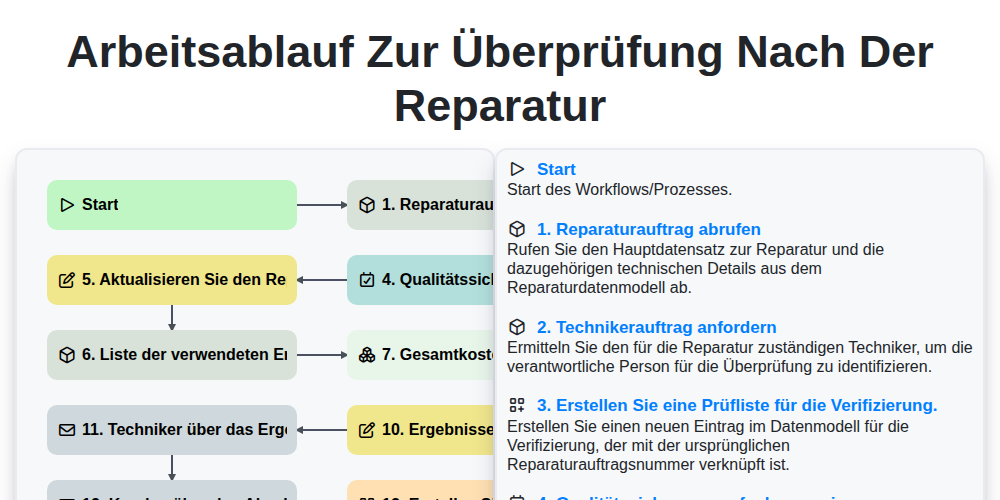
Arbeitsablauf zur Überprüfung nach der Reparatur

Maintenance Training and Certification Process

Predictive Failure Analysis Workflow

Mobile Maintenance Work Order Process

MRO Inventory Control Workflow

Maintenance KPI Reporting Process

Asset Inspection and Audit Workflow

Annual Maintenance Budgeting Workflow
Gemeinsam schaffen wir das
Benötigen Sie Hilfe bei Checklisten?
Haben Sie eine Frage? Wir helfen Ihnen gerne. Bitte senden Sie uns Ihre Anfrage, und wir werden Ihnen umgehend antworten.