 ChecklistGuro
 Claims Reserve Management Workflow
Streamline your insurance operations with our automated Claims Reserve Management Workflow. Optimize accuracy, reduce leakage, and ensure regulatory compliance through real-time monitoring of loss reserves, automated adequacy checks, and seamless adjuster approvals. Master your financial stability by eliminating manual errors and accelerating the claims lifecycle from notification to settlement.
Esta plantilla se instaló 4 veces.
Inicio
Inicio del flujo de trabajo/proceso.
1. Fetch New Claim Details
Retrieve the initial claim entry and associated incident data from the Claims Data Model.
2. Retrieve Historical Reserve Data
Get previous reserve entries for the same claim ID to identify changes in reserve amounts.
3. Calculate Reserve Variance
Calculate the difference between the new proposed reserve and the current existing reserve.
4. Sum Total Outstanding Reserves
Aggregate all open reserve entries across the portfolio to calculate total financial exposure.
5. Assign Claims Adjuster Review
Create a task for the assigned Claims Adjuster to validate the new reserve amount.
6. Update Claim Status to 'Under Review'
Update the main Claim entry status to reflect that a reserve change is being processed.
7. Manager Approval Task
If the variance exceeds a specific threshold, create an approval task for the Claims Manager.
8. Create Reserve Transaction Record
Create a new entry in the Reserve Transactions data model to log the new amount.
9. Update Master Claim Record
Update the total 'Incurred Amount' on the main Claim entry to include the new reserve.
10. Notify Adjuster of Approval
Send an email to the Adjuster confirming the reserve change has been approved and processed.
11. Notify Stakeholders of High-Value Change
Send an email to the Finance Department for any reserve updates exceeding the high-value threshold.
12. Generate Monthly Reserve Report
Create a summary report of all reserve movements processed during this period.
13. Cleanup Temporary Calculation Logs
Delete temporary data entries used for intermediate calculation steps during the workflow.
14. Urgent Alert to Manager
Send an SMS to the Claims Manager if a reserve increase is flagged as 'Critical' or 'Urgent'.
Fin
Fin del flujo de trabajo/proceso.
Inicio del flujo de trabajo/proceso.
Retrieve the initial claim entry and associated incident data from the Claims Data Model.
Get previous reserve entries for the same claim ID to identify changes in reserve amounts.
Calculate the difference between the new proposed reserve and the current existing reserve.
Aggregate all open reserve entries across the portfolio to calculate total financial exposure.
Create a task for the assigned Claims Adjuster to validate the new reserve amount.
Update the main Claim entry status to reflect that a reserve change is being processed.
If the variance exceeds a specific threshold, create an approval task for the Claims Manager.
Create a new entry in the Reserve Transactions data model to log the new amount.
Update the total 'Incurred Amount' on the main Claim entry to include the new reserve.
Send an email to the Adjuster confirming the reserve change has been approved and processed.
Send an email to the Finance Department for any reserve updates exceeding the high-value threshold.
Create a summary report of all reserve movements processed during this period.
Delete temporary data entries used for intermediate calculation steps during the workflow.
Send an SMS to the Claims Manager if a reserve increase is flagged as 'Critical' or 'Urgent'.
Fin del flujo de trabajo/proceso.
¿Le resultó útil esta plantilla de flujo de trabajo?
Comentarios
Aún no hay comentarios. ¡Sé el primero en añadir uno!
Demostración de la Solución de Gestión de Seguros
Gestionar pólizas, reclamaciones y el cumplimiento normativo en la industria de seguros es complejo. La plataforma Work OS de ChecklistGuro optimiza sus operaciones, desde la suscripción y las renovaciones hasta el procesamiento de reclamaciones y la elaboración de informes. Mejore la eficiencia, reduzca los errores y mejore la satisfacción del cliente. ¡Descubra cómo ChecklistGuro puede transformar su negocio de seguros!
Plantillas de flujo de trabajo relacionadas

Policy Lifecycle Management Workflow

Insurance Renewal Quote Automation

Agent Performance Tracking Workflow

Insurance Renewal Management Process

Insurance Regulatory Reporting Process

Insurance Quote Generation Process

Policy Cancellation and Lapsed Workflow
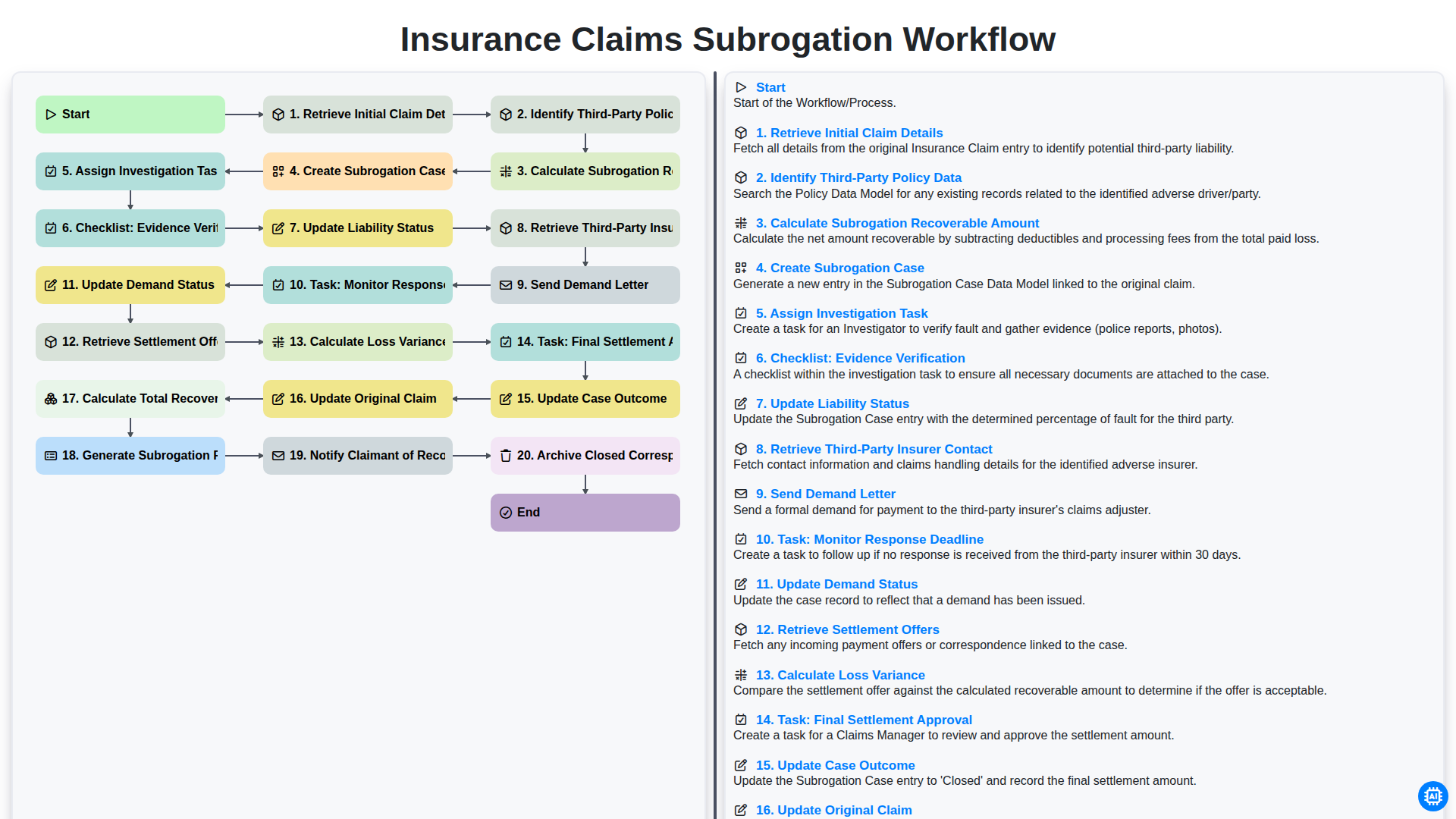
Flujo de trabajo para la gestión de reclamaciones de seguros y la subrogación.
Podemos hacerlo juntos
¿Necesita ayuda con las listas de verificación?
¿Tienes alguna pregunta? Estamos aquí para ayudarte. Envía tu consulta y te responderemos a la brevedad.