 ChecklistGuro
 Landed Cost Tracking Process
Master your supply chain margins with our comprehensive Landed Cost Tracking Process. Learn how to seamlessly integrate freight, customs, insurance, and handling fees into your WMS to achieve pinpoint inventory valuation and true product profitability. Optimize your warehouse operations by eliminating hidden costs and streamlining landed cost calculations for every shipment.
Ten szablon został zainstalowany 1 razy.
Rozpoczęcie
Rozpoczęcie przepływu pracy/procesu.
1. Retrieve Purchase Order Details
Fetch the initial shipment details and item quantities from the Purchase Order data model.
2. Retrieve Shipping Documentation
Get all related freight invoices, customs duties, and insurance documents linked to the shipment.
3. Initialize Landed Cost Record
Create a new Landed Cost Entry record to begin tracking costs for the specific shipment ID.
4. Input Freight Charges
Update the Landed Cost record with freight, fuel surcharges, and handling fees once invoiced.
5. Input Customs & Duties
Update the record with customs clearance fees, import duties, and taxes paid.
6. Input Logistics Extras
Update the record with secondary costs like warehousing, inspections, or documentation fees.
7. Sum Total Ancillary Costs
Aggregate all individual cost line items (freight, duty, fees) to calculate the total additional cost.
8. Calculate Total Landed Cost
Execute formula: Original Product Cost + Total Ancillary Costs.
9. Calculate Unit Cost Variance
Calculate the difference between the original estimated unit cost and the new calculated landed unit cost.
10. Finalize Landed Cost Entry
Update the final calculated total and the updated unit cost back into the primary record.
11. Financial Audit Task
Create a task for the Finance Controller to verify the accuracy of the landed cost against bank statements.
12. Notify Procurement Team
Send an email to the Procurement Manager notifying them that the final landed cost is available for review.
13. Generate Monthly Landed Cost Variance Report
Create a report summarizing cost deviations across all shipments for the current month.
14. Create Cost Variance Log
Create an entry in the Cost Variance Data Model if the deviation exceeds a predefined threshold.
Koniec
Koniec przepływu pracy/procesu.
Rozpoczęcie przepływu pracy/procesu.
Fetch the initial shipment details and item quantities from the Purchase Order data model.
Get all related freight invoices, customs duties, and insurance documents linked to the shipment.
Create a new Landed Cost Entry record to begin tracking costs for the specific shipment ID.
Update the Landed Cost record with freight, fuel surcharges, and handling fees once invoiced.
Update the record with customs clearance fees, import duties, and taxes paid.
Update the record with secondary costs like warehousing, inspections, or documentation fees.
Aggregate all individual cost line items (freight, duty, fees) to calculate the total additional cost.
Execute formula: Original Product Cost + Total Ancillary Costs.
Calculate the difference between the original estimated unit cost and the new calculated landed unit cost.
Update the final calculated total and the updated unit cost back into the primary record.
Create a task for the Finance Controller to verify the accuracy of the landed cost against bank statements.
Send an email to the Procurement Manager notifying them that the final landed cost is available for review.
Create a report summarizing cost deviations across all shipments for the current month.
Create an entry in the Cost Variance Data Model if the deviation exceeds a predefined threshold.
Koniec przepływu pracy/procesu.
Czy ten szablon przepływu pracy okazał się pomocny?
Demonstracja rozwiązania WMS - System zarządzania magazynem
Zoptymalizuj działanie magazynu i zwiększ efektywność! System WMS firmy ChecklistGuro upraszcza zarządzanie zapasami, realizację zamówień i wysyłkę. Zmniejsz błędy, popraw dokładność i zmaksymalizuj wykorzystanie przestrzeni. Zarządzaj wszystkim za pomocą naszej platformy Work OS.
Powiązane Szablony Pracy

Supply Chain Visibility and Tracking Process

Warehouse Task Management Workflow

Manifesting and Shipping Documentation Workflow

Label Printing and Barcode Management Process

Warehouse Space Utilization Workflow

Order Fulfillment Lifecycle

Cross-Docking Management Workflow
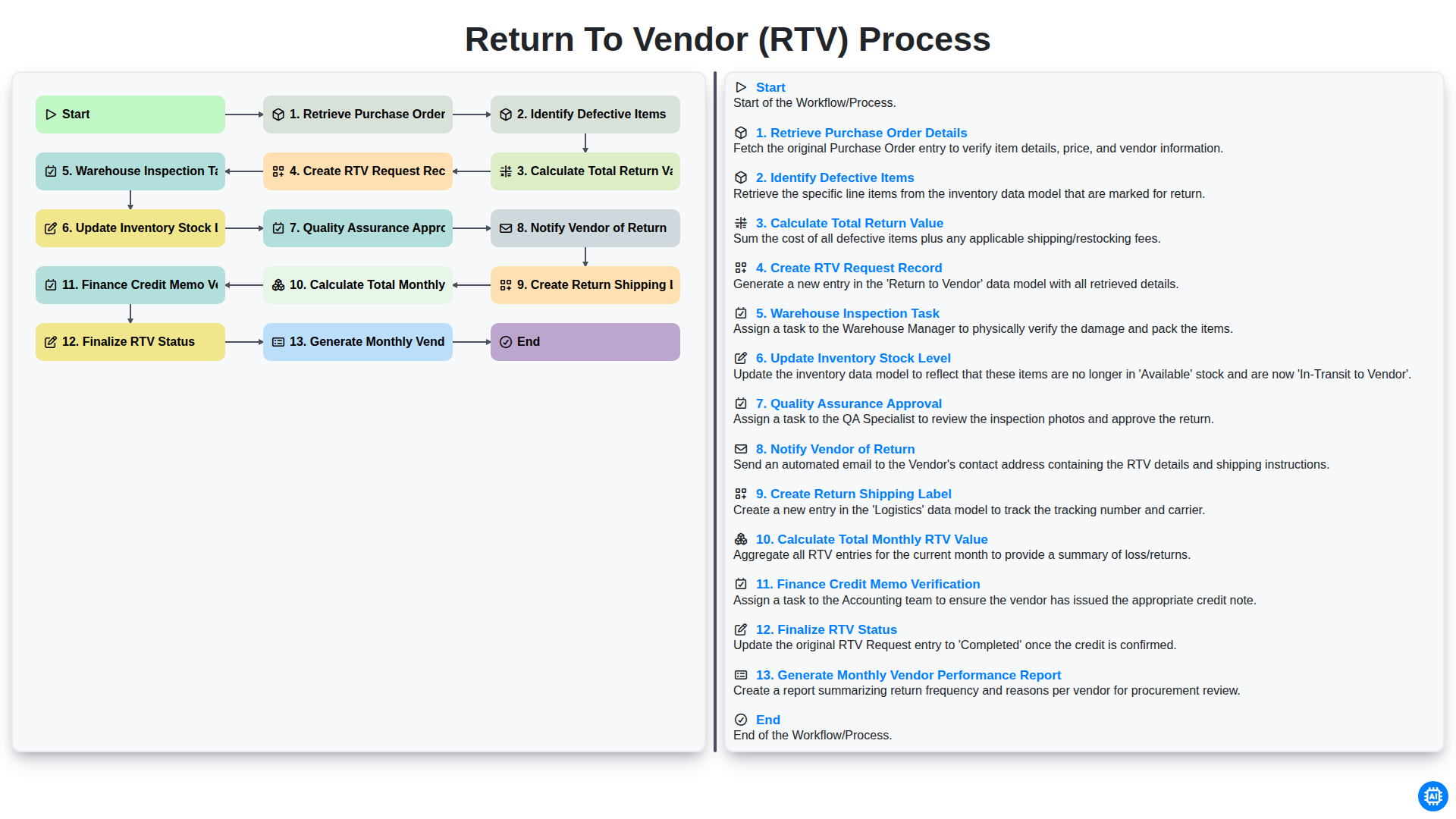
Return to Vendor (RTV) Process
Możemy to zrobić razem
Potrzebujesz pomocy z listami kontrolnymi?
Masz pytanie? Jesteśmy tu, aby pomóc. Prześlij zapytanie, a my szybko na nie odpowiemy.