 ChecklistGuro
 Automated Rent Collection and Payment Process
Streamline your property management with our Automated Rent Collection and Payment Process. Eliminate manual follow-ups, reduce late payments, and enhance tenant satisfaction through a seamless, end-to-end digital workflow designed to automate invoicing, track receivables, and sync payments instantly. Optimize your real estate cash flow and reclaim your time with this hands-free rental automation solution.
Este modelo foi instalado 4 vezes.
Começar
Início do fluxo de trabalho/processo.
1. Fetch Active Leases
Retrieve all entries from the 'Lease' data model where the status is 'Active'.
2. Fetch Monthly Rent Rates
Retrieve the 'Monthly_Rent' field from all active lease entries.
3. Calculate Total Expected Revenue
Sum the 'Monthly_Rent' values from all retrieved active leases to calculate total monthly inflow.
4. Create Monthly Invoice
Generate a new entry in the 'Invoices' data model for each lease, linking it to the corresponding Lease ID.
5. Calculate Late Fee
Apply a formula to the rent amount (e.g., Rent * 0.05) to determine the penalty if the due date has passed.
6. Send Rent Due Notification
Send an automated email to the Tenant's email address notifying them that the invoice has been generated.
7. Assign Payment Verification Task
Create a task for the 'Accountant' user to verify incoming bank transfers against the Invoice entries.
8. Update Invoice Status to 'Pending'
Set the status of the newly created Invoice entries to 'Unpaid/Pending'.
9. Identify Overdue Payments
Retrieve all Invoice entries where 'Status' is 'Unpaid' and 'Due_Date' is less than the current date.
10. Send Overdue SMS Alert
Send a text message to the Tenant's phone number regarding the overdue balance.
11. Apply Late Fee to Invoice
Update the 'Total_Amount' field in the Invoice entry to include the calculated late fee.
12. Mark Invoice as Paid
Update the 'Status' of an Invoice entry to 'Paid' once the payment verification task is completed.
13. Create Late Payment Follow-up Task
Create a task for the 'Property Manager' to contact tenants with payments overdue by more than 7 days.
14. Generate Monthly Collection Report
Create a summary report showing Total Collected vs. Total Expected revenue for the month.
Fim
Fim do fluxo de trabalho/processo.
Início do fluxo de trabalho/processo.
Retrieve all entries from the 'Lease' data model where the status is 'Active'.
Retrieve the 'Monthly_Rent' field from all active lease entries.
Sum the 'Monthly_Rent' values from all retrieved active leases to calculate total monthly inflow.
Generate a new entry in the 'Invoices' data model for each lease, linking it to the corresponding Lease ID.
Apply a formula to the rent amount (e.g., Rent * 0.05) to determine the penalty if the due date has passed.
Send an automated email to the Tenant's email address notifying them that the invoice has been generated.
Create a task for the 'Accountant' user to verify incoming bank transfers against the Invoice entries.
Set the status of the newly created Invoice entries to 'Unpaid/Pending'.
Retrieve all Invoice entries where 'Status' is 'Unpaid' and 'Due_Date' is less than the current date.
Send a text message to the Tenant's phone number regarding the overdue balance.
Update the 'Total_Amount' field in the Invoice entry to include the calculated late fee.
Update the 'Status' of an Invoice entry to 'Paid' once the payment verification task is completed.
Create a task for the 'Property Manager' to contact tenants with payments overdue by more than 7 days.
Create a summary report showing Total Collected vs. Total Expected revenue for the month.
Fim do fluxo de trabalho/processo.
Comentários
Ainda não existem comentários. Seja o primeiro a adicionar um!
Demonstração da Solução de Gestão Imobiliária
Simplifique as suas operações imobiliárias! O ChecklistGuro otimiza a gestão de propriedades, as renovações de contratos de arrendamento e os pedidos de manutenção. Melhore a satisfação dos inquilinos e maximize o retorno sobre o investimento. Gerencie tudo com o nosso sistema operativo de trabalho.
Modelos de Fluxo de Trabalho Relacionados

Real Estate Agent Performance Tracking Process

Property Inventory and Asset Management Workflow

Real Estate Referral Management Process

Property Tax and Compliance Management Workflow

Tenant Move-in and Move-out Workflow

Real Estate Market Analysis and Reporting Process

Property Showing and Tour Scheduling Workflow
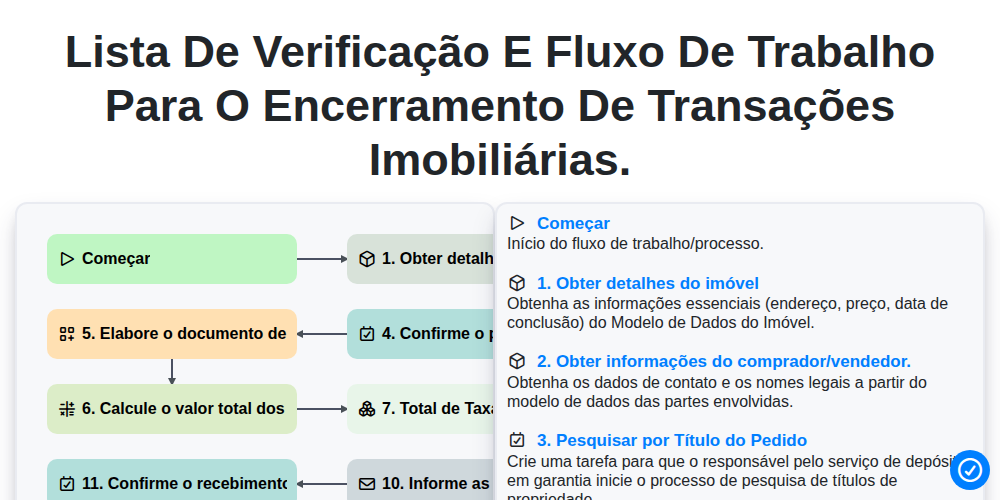
Lista de verificação e fluxo de trabalho para o encerramento de transações imobiliárias.
Podemos fazer isso juntos.
Precisa de ajuda com o(a) Imobiliário?
Tem alguma dúvida? Estamos aqui para ajudar. Envie a sua questão e responderemos o mais breve possível.