 ChecklistGuro
 Kit Assembly and Bundle Management Workflow
Streamline your operations with our Kit Assembly and Bundle Management Workflow. Master the complexity of multi-level BOMs, automate picking lists, and ensure real-time accuracy for product bundles and kitted items. Optimize inventory tracking, reduce picking errors, and boost fulfillment efficiency with seamless, automated workflows designed for scalable inventory management.
Ce modèle a été installé 2 fois.
Début
Début du flux de travail/processus.
1. Fetch Master Kit Definition
Retrieve the master kit template from the Kit Models data model to identify required components.
2. Check Component Inventory
Retrieve current stock levels for all parts listed in the Kit Definition.
3. Calculate Shortage Quantity
Calculate the difference between required quantity and available inventory for each component.
4. Update Inventory Reservation
Update the status of specific component entries to 'Reserved' to prevent double-allocation.
5. Create Assembly Order
Create a new entry in the Assembly Orders data model to initiate the physical assembly process.
6. Assign Picking Task
Create a task for the Warehouse Operator to pick the required components from the shelves.
7. Assign Assembly Task
Create a task for the Technician to physically assemble the kit based on the checklist.
8. Sum Total Kit Weight
Aggregate the weights of all individual components to determine the total shipping weight of the bundle.
9. Update Order Status to 'In Assembly'
Update the Assembly Order entry status to reflect that work has commenced.
10. Verify Quality Control Checklist
Retrieve the predefined QC checklist associated with the specific Kit Type.
11. Assign Quality Inspection
Create a task for the QC Manager to verify the completed bundle against the checklist.
12. Log QC Results
Update the Assembly Order entry with the pass/fail result from the inspection.
13. Generate Bundle Serial Number
Create a unique serial number entry for the newly completed bundle for traceability.
14. Update Finished Goods Inventory
Update the Finished Goods data model to increase the count of the completed Kit bundle.
15. Notify Shipping Department
Send an email to the logistics team notifying them that the bundle is ready for packing and dispatch.
16. Create Shipping Label Data
Create a new entry in the Shipping Manifest data model for the completed bundle.
17. Generate Assembly Completion Report
Create a summary report detailing the time taken, components used, and QC results for the session.
18. Alert Inventory Manager of Low Stock
Send an SMS to the manager if the component shortage calculation exceeds a specific threshold.
19. Remove Temporary Pick List
Delete the temporary pick list entry once the picking task is marked as complete.
Fin
Fin du flux de travail/processus.
Début du flux de travail/processus.
Retrieve the master kit template from the Kit Models data model to identify required components.
Retrieve current stock levels for all parts listed in the Kit Definition.
Calculate the difference between required quantity and available inventory for each component.
Update the status of specific component entries to 'Reserved' to prevent double-allocation.
Create a new entry in the Assembly Orders data model to initiate the physical assembly process.
Create a task for the Warehouse Operator to pick the required components from the shelves.
Create a task for the Technician to physically assemble the kit based on the checklist.
Aggregate the weights of all individual components to determine the total shipping weight of the bundle.
Update the Assembly Order entry status to reflect that work has commenced.
Retrieve the predefined QC checklist associated with the specific Kit Type.
Create a task for the QC Manager to verify the completed bundle against the checklist.
Update the Assembly Order entry with the pass/fail result from the inspection.
Create a unique serial number entry for the newly completed bundle for traceability.
Update the Finished Goods data model to increase the count of the completed Kit bundle.
Send an email to the logistics team notifying them that the bundle is ready for packing and dispatch.
Create a new entry in the Shipping Manifest data model for the completed bundle.
Create a summary report detailing the time taken, components used, and QC results for the session.
Send an SMS to the manager if the component shortage calculation exceeds a specific threshold.
Delete the temporary pick list entry once the picking task is marked as complete.
Fin du flux de travail/processus.
Commentaires
Aucun commentaire n'a été publié pour le moment. Soyez le premier à en ajouter un !
Démonstration de la solution de gestion des stocks
Optimisez votre inventaire et augmentez votre rentabilité ! ChecklistGuro rationalise le suivi, la commande et l'exécution. Réduisez le gaspillage, minimisez les ruptures de stock et améliorez l'efficacité. Gérez tout cela grâce à notre plateforme Work OS.
Modèles de flux de travail associés

Inventory Turnover Ratio Analysis Process

Inventory Movement and Log Tracking Process

Low Stock Alert and Alert Management Workflow

Backorder Management and Notification Process

Vendor Managed Inventory (VMI) Workflow

E-commerce Order Fulfillment Process

Inventory Reconciliation and Discrepancy Process
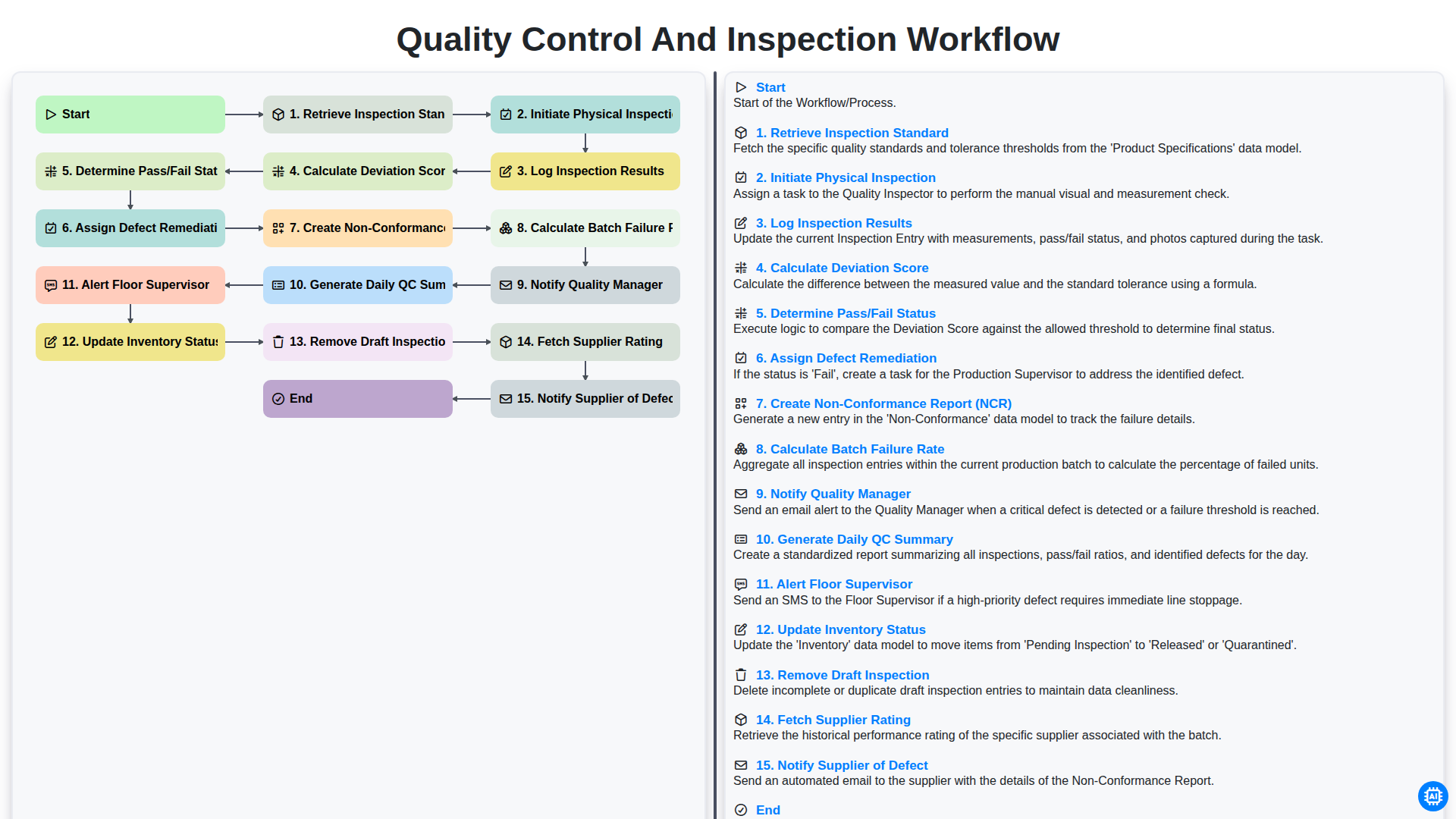
Quality Control and Inspection Workflow
Nous pouvons le faire ensemble
Besoin d'aide avec les listes de contrôle?
Vous avez une question ? Nous sommes là pour vous aider. Veuillez soumettre votre demande et nous vous répondrons rapidement.