 ChecklistGuro
 Seasonal Vehicle Inspection Workflow
Boost customer retention and drive service revenue with our Seasonal Vehicle Inspection Workflow. Streamline your auto repair shop's operations by implementing a standardized, repeatable process for multi-point inspections during seasonal transitions. This optimized workflow helps technicians identify critical maintenance needs, provides transparent digital inspections for clients, and ensures your shop stays ahead of seasonal trends like winter prep or summer AC checks. Perfect for shop owners looking to automate preventative maintenance marketing and increase average repair orders (ARO) through professional, data-driven vehicle health reports.
Този шаблон е инсталиран 4 пъти.
Старт
Начало на работния поток/процеса.
1. Fetch Vehicle Fleet
Retrieve all active vehicle records from the Vehicle Data Model to identify which need inspection.
2. Get Inspection Schedule
Retrieve the predefined seasonal inspection schedule and deadline dates.
3. Calculate Days Until Deadline
Calculate the remaining days between the current date and the inspection due date.
4. Set Inspection Status to 'Pending'
Update the status of the selected vehicle entries to 'Scheduled' for the current season.
5. Assign Inspection Task
Create a new task assigned to the Fleet Technician to perform the physical inspection.
6. Create Checklist for Technician
Generate a standardized seasonal checklist (tires, fluids, brakes, lights) within the inspection task.
7. Retrieve Inspection Results
Fetch the completed inspection data entries and checklist responses.
8. Calculate Maintenance Score
Calculate a health score based on the number of 'Fail' vs 'Pass' items in the checklist.
9. Summarize Fleet Health
Aggregate all inspection results to calculate the percentage of the fleet that passed the inspection.
10. Create Maintenance Work Order
If failures are detected, create a new entry in the Maintenance Work Order data model.
11. Update Vehicle Maintenance Record
Update the 'Last Inspected Date' and 'Maintenance Needed' flag in the Vehicle Data Model.
12. Notify Fleet Manager
Send an email report to the Fleet Manager summarizing the inspection outcomes and critical failures.
13. Alert Technician of Urgent Repairs
Send an SMS to the lead mechanic if a critical safety failure is identified during the inspection.
14. Generate Seasonal Compliance Report
Create a comprehensive PDF report containing all inspection results for regulatory compliance.
15. Archive Completed Inspection Logs
Remove temporary inspection draft entries from the active workspace to maintain system cleanliness.
Край
Край на работния поток/процеса.
Начало на работния поток/процеса.
Retrieve all active vehicle records from the Vehicle Data Model to identify which need inspection.
Retrieve the predefined seasonal inspection schedule and deadline dates.
Calculate the remaining days between the current date and the inspection due date.
Update the status of the selected vehicle entries to 'Scheduled' for the current season.
Create a new task assigned to the Fleet Technician to perform the physical inspection.
Generate a standardized seasonal checklist (tires, fluids, brakes, lights) within the inspection task.
Fetch the completed inspection data entries and checklist responses.
Calculate a health score based on the number of 'Fail' vs 'Pass' items in the checklist.
Aggregate all inspection results to calculate the percentage of the fleet that passed the inspection.
If failures are detected, create a new entry in the Maintenance Work Order data model.
Update the 'Last Inspected Date' and 'Maintenance Needed' flag in the Vehicle Data Model.
Send an email report to the Fleet Manager summarizing the inspection outcomes and critical failures.
Send an SMS to the lead mechanic if a critical safety failure is identified during the inspection.
Create a comprehensive PDF report containing all inspection results for regulatory compliance.
Remove temporary inspection draft entries from the active workspace to maintain system cleanliness.
Край на работния поток/процеса.
Коментари
Все още няма коментари. Бъдете първият, който добави!
Демонстрация на решението за управление на автосервиз
Подобрете автосервиза си и увеличете печалбата! ChecklistGuro опростява проследяването на поръчки, управлението на инвентара и комуникацията с клиентите. Подобрете ефективността, намалете грешките и подобрете удовлетвореността на клиентите. Управлявайте всичко това с нашата платформа Work OS.
Свързани шаблони за работни потоци

End-of-Day Shop Reporting and Reconciliation Workflow

Automotive Workshop Staff Scheduling Process

Pre-Paid Service Plan Management Process

Customer Feedback and Review Management Workflow

Automotive Workshop Equipment Maintenance Schedule

Shop Supplies and Consumables Inventory Process

Workshop Technician Time Tracking Workflow
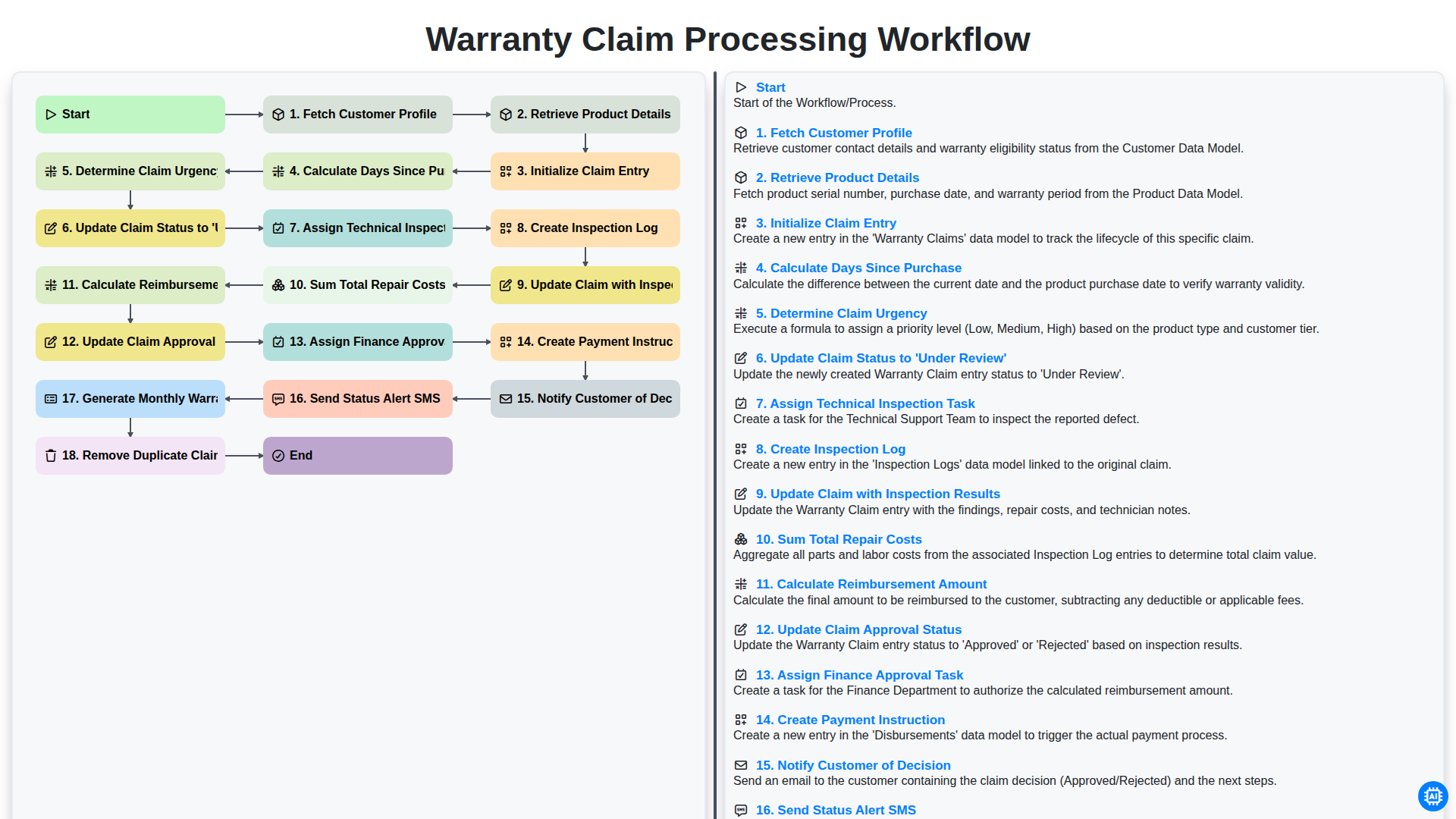
Warranty Claim Processing Workflow
Можем да го направим заедно
Нуждаете се от помощ с
Управление на Автосервиз?
Имате въпрос? Тук сме, за да помогнем. Моля, изпратете запитването си и ние ще отговорим своевременно.