 ChecklistGuro
 Event Follow-up and Post-Event Nurturing Process
Maximize your event's ROI and turn attendees into lifelong advocates with our Event Follow-up and Post-Event Nurturing Process. This streamlined workflow automates thank-you sequences, feedback collection, and personalized lead nurturing to ensure no connection goes cold after the lights go down. Optimize your post-event engagement, capture actionable insights, and build lasting community momentum with ease.
Този шаблон е инсталиран 5 пъти.
Старт
Начало на работния поток/процеса.
1. Retrieve Attendee List
Fetch all entries from the 'Event Attendees' data model for the specific event ID.
2. Create Post-Event Summary Entry
Create a new entry in the 'Event Reports' data model to serve as the master record for this follow-up cycle.
3. Calculate Total Attendance
Sum the number of 'Checked-in' attendees from the Attendee list to get total event reach.
4. Calculate Average Satisfaction Score
Calculate the average of 'Survey Score' fields from attendee feedback entries.
5. Calculate ROI Metric
Execute a formula comparing 'Total Event Cost' vs 'Estimated Lead Value' gathered from attendee data.
6. Assign Feedback Analysis Task
Create a task for the Marketing Manager to review and categorize qualitative survey comments.
7. Assign Thank You Note Task
Create a task for the Account Executive to send personalized follow-ups to VIP attendees.
8. Update Event Status
Update the status of the 'Event' data entry from 'Live' to 'Post-Event Processing'.
9. Send Mass Thank You Email
Send a standardized 'Thank You for Attending' email to all entries retrieved in the Attendee List.
10. Send Speaker Appreciation Email
Send a personalized email to the speakers listed in the Event Data Model.
11. Create Content Repurposing Task
Create a task for the Content Team to turn event recordings/photos into social media posts.
12. Fetch High-Value Leads
Filter the attendee list to identify entries marked with 'High Intent' or 'Decision Maker' status.
13. Send Targeted Sales Nurture
Send a specific follow-up email containing a whitepaper or demo link to the High-Value Leads identified.
14. Send Event Summary SMS
Send a short text message to VIP attendees with a link to the event photo gallery.
15. Generate Post-Event Performance Report
Generate a formal report summarizing attendance, satisfaction, and ROI for stakeholders.
16. Update Lead Status in CRM
Update the 'Lead Status' field in the Lead Data Model to 'Nurturing' for all attendees.
17. Schedule Post-Mortem Meeting
Create a task to schedule an internal team meeting to discuss event learnings.
18. Cleanup Temporary Workshop Data
Delete temporary session-specific data entries that are no longer needed after the event concludes.
Край
Край на работния поток/процеса.
Начало на работния поток/процеса.
Fetch all entries from the 'Event Attendees' data model for the specific event ID.
Create a new entry in the 'Event Reports' data model to serve as the master record for this follow-up cycle.
Sum the number of 'Checked-in' attendees from the Attendee list to get total event reach.
Calculate the average of 'Survey Score' fields from attendee feedback entries.
Execute a formula comparing 'Total Event Cost' vs 'Estimated Lead Value' gathered from attendee data.
Create a task for the Marketing Manager to review and categorize qualitative survey comments.
Create a task for the Account Executive to send personalized follow-ups to VIP attendees.
Update the status of the 'Event' data entry from 'Live' to 'Post-Event Processing'.
Send a standardized 'Thank You for Attending' email to all entries retrieved in the Attendee List.
Send a personalized email to the speakers listed in the Event Data Model.
Create a task for the Content Team to turn event recordings/photos into social media posts.
Filter the attendee list to identify entries marked with 'High Intent' or 'Decision Maker' status.
Send a specific follow-up email containing a whitepaper or demo link to the High-Value Leads identified.
Send a short text message to VIP attendees with a link to the event photo gallery.
Generate a formal report summarizing attendance, satisfaction, and ROI for stakeholders.
Update the 'Lead Status' field in the Lead Data Model to 'Nurturing' for all attendees.
Create a task to schedule an internal team meeting to discuss event learnings.
Delete temporary session-specific data entries that are no longer needed after the event concludes.
Край на работния поток/процеса.
Коментари
Все още няма коментари. Бъдете първият, който добави!
Демонстрация на решението за управление на организация на събития
Планирайте безпроблемни събития с лекота! ChecklistGuro опростява планирането на събития - от управление на доставчици до проследяване на бюджета и комуникация с гостите. Останете организирани, намалете стреса и осигурете незабравими преживявания. Управлявайте всичко това с нашата платформа Work OS.
Свързани шаблони за работни потоци

Event Compliance and Permit Acquisition Process

Event Content Management and Speaker Asset Workflow

Event Rehearsal and Technical Run-Through Workflow

Event Collateral and Swag Production Process

Event Mobile App and Digital Experience Workflow

Event Sustainability and Waste Management Process

Event Design and Decor Planning Process
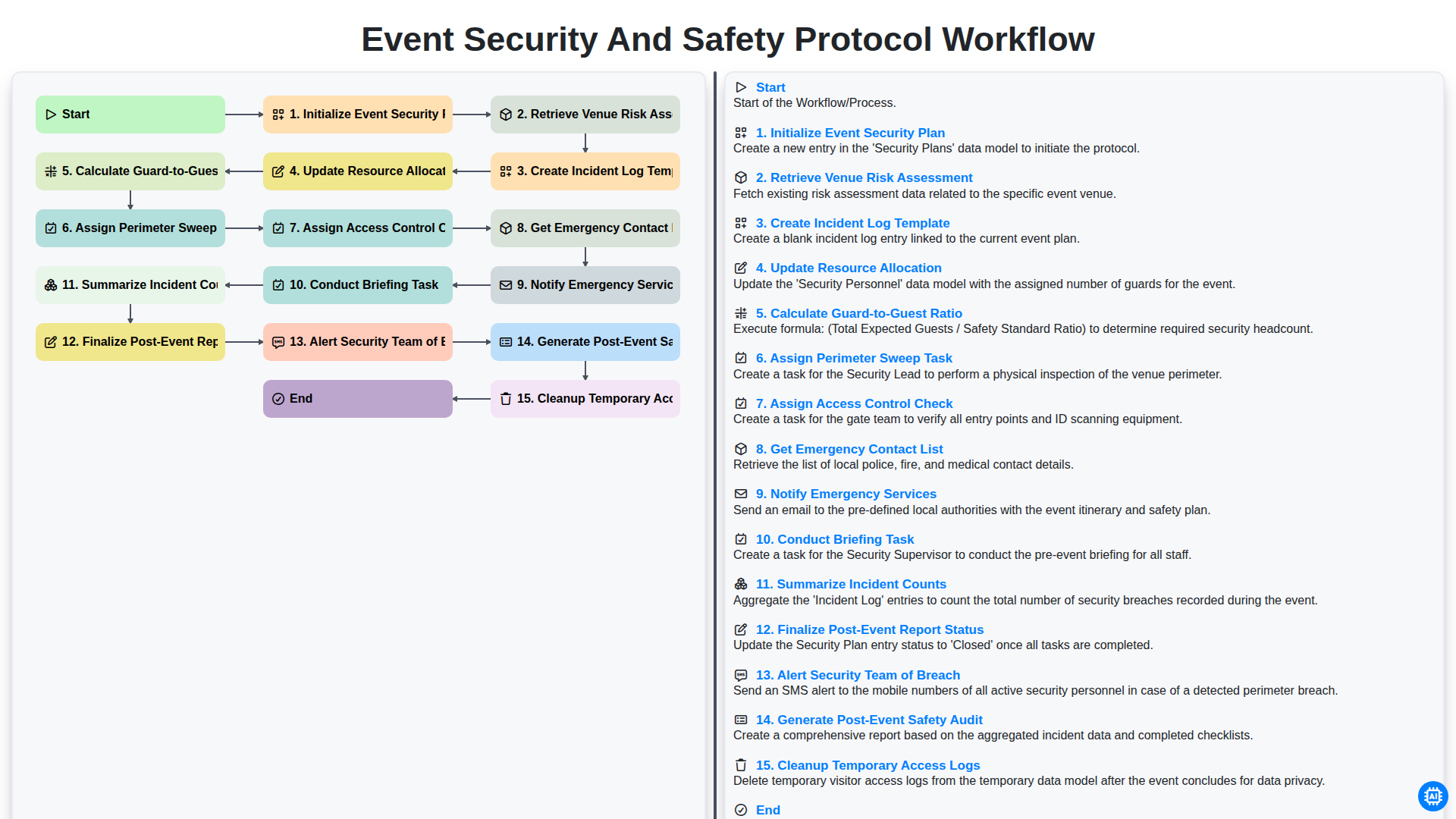
Event Security and Safety Protocol Workflow
Можем да го направим заедно
Нуждаете се от помощ с
Управление на организация на събития?
Имате въпрос? Тук сме, за да помогнем. Моля, изпратете запитването си и ние ще отговорим своевременно.