Task Management
Get organized & boost productivity! ChecklistGuro simplifies task management, prioritization, & progress tracking. Achieve more, stress less, & hit your goals. Manage it all with our Work OS.
No credit card or cancellation needed.
Centralize Task Management, Eliminate Chaos
Stop juggling spreadsheets, emails, and sticky notes. ChecklistGuro brings all your tasks into a single, unified view. Assign tasks, set due dates, track progress, and collaborate seamlessly - all in one place.
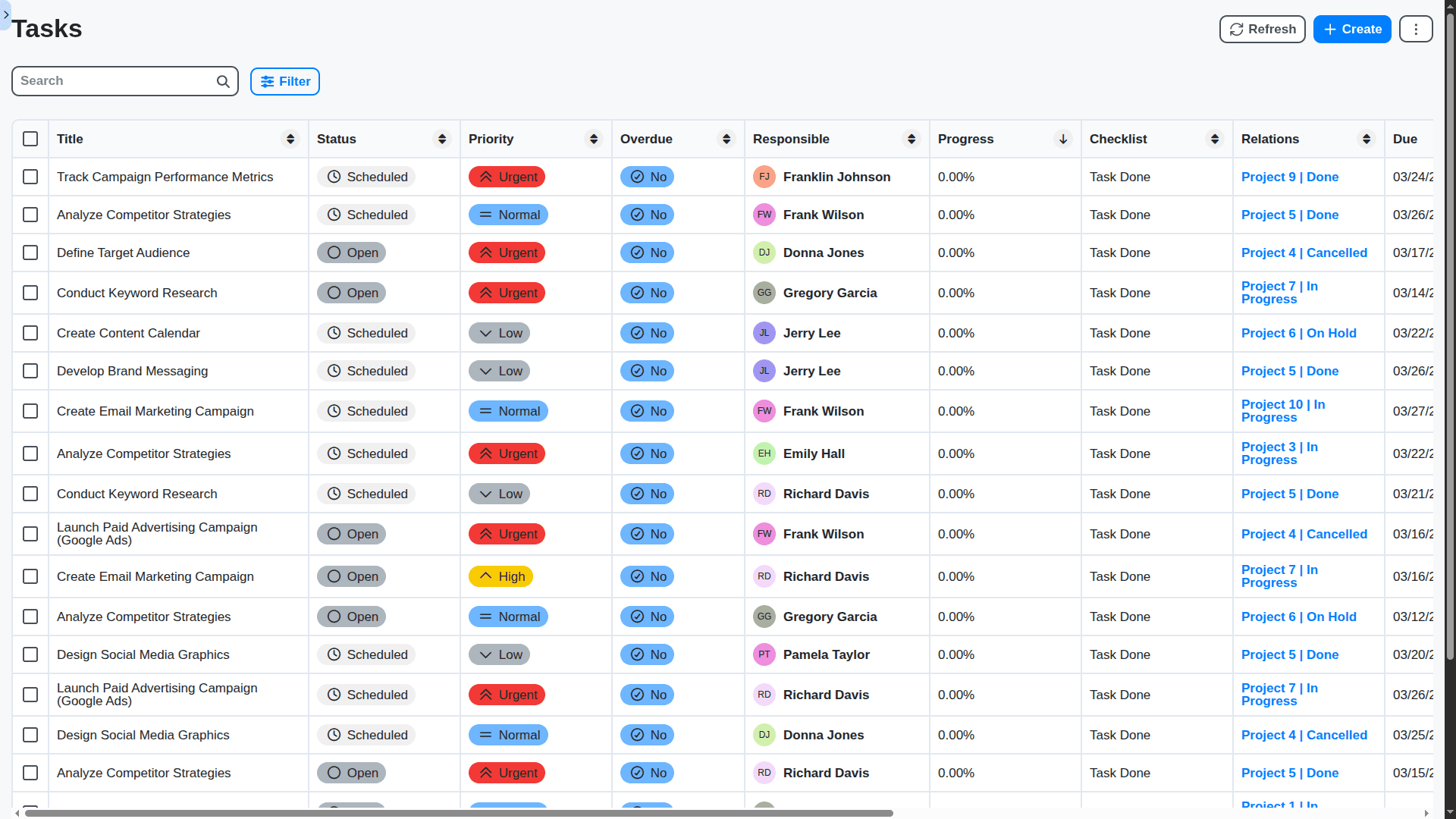
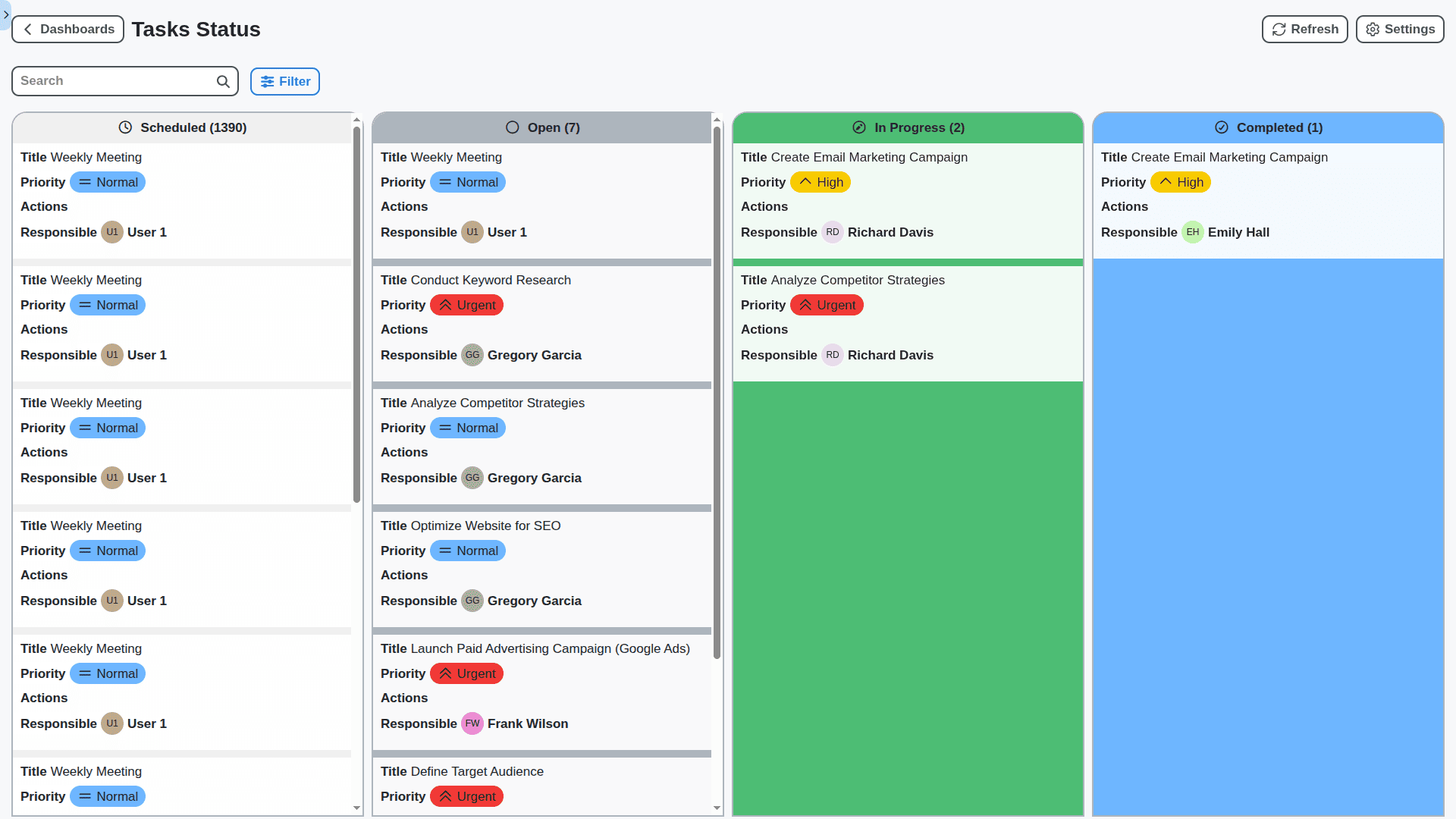
Visualize Your Workflow: Kanban Boards & List Views
Choose the view that works best for your team. Whether you prefer the flexibility of Kanban boards to map out stages of a process or the clarity of a traditional list view, ChecklistGuro adapts to your needs.
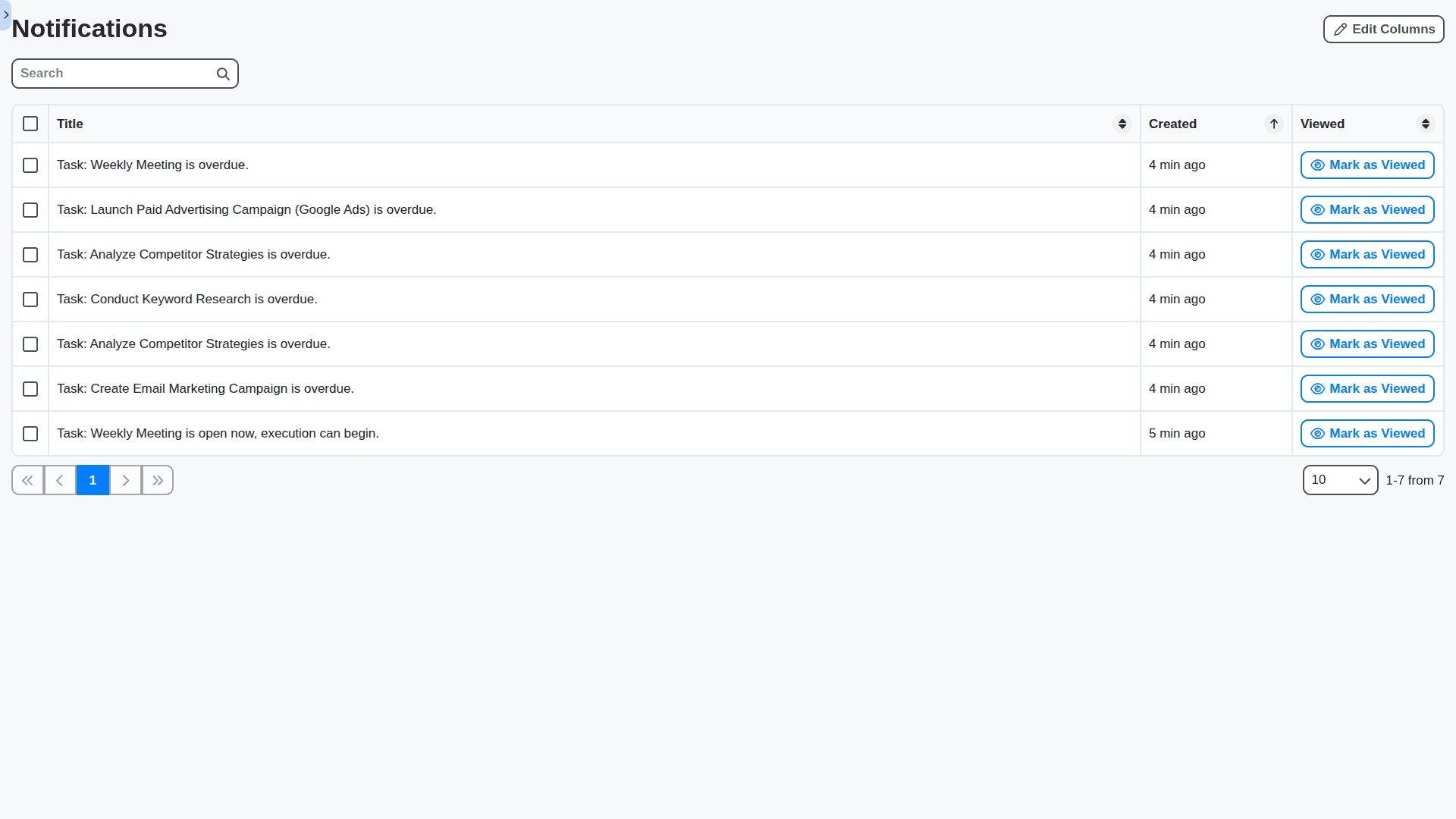
Automated Reminders & Notifications: Never Miss a Deadline
Stay informed and proactive. ChecklistGuro automates reminders and notifications, ensuring your team is always aware of upcoming deadlines and task updates. Reduce the risk of missed assignments and delays.
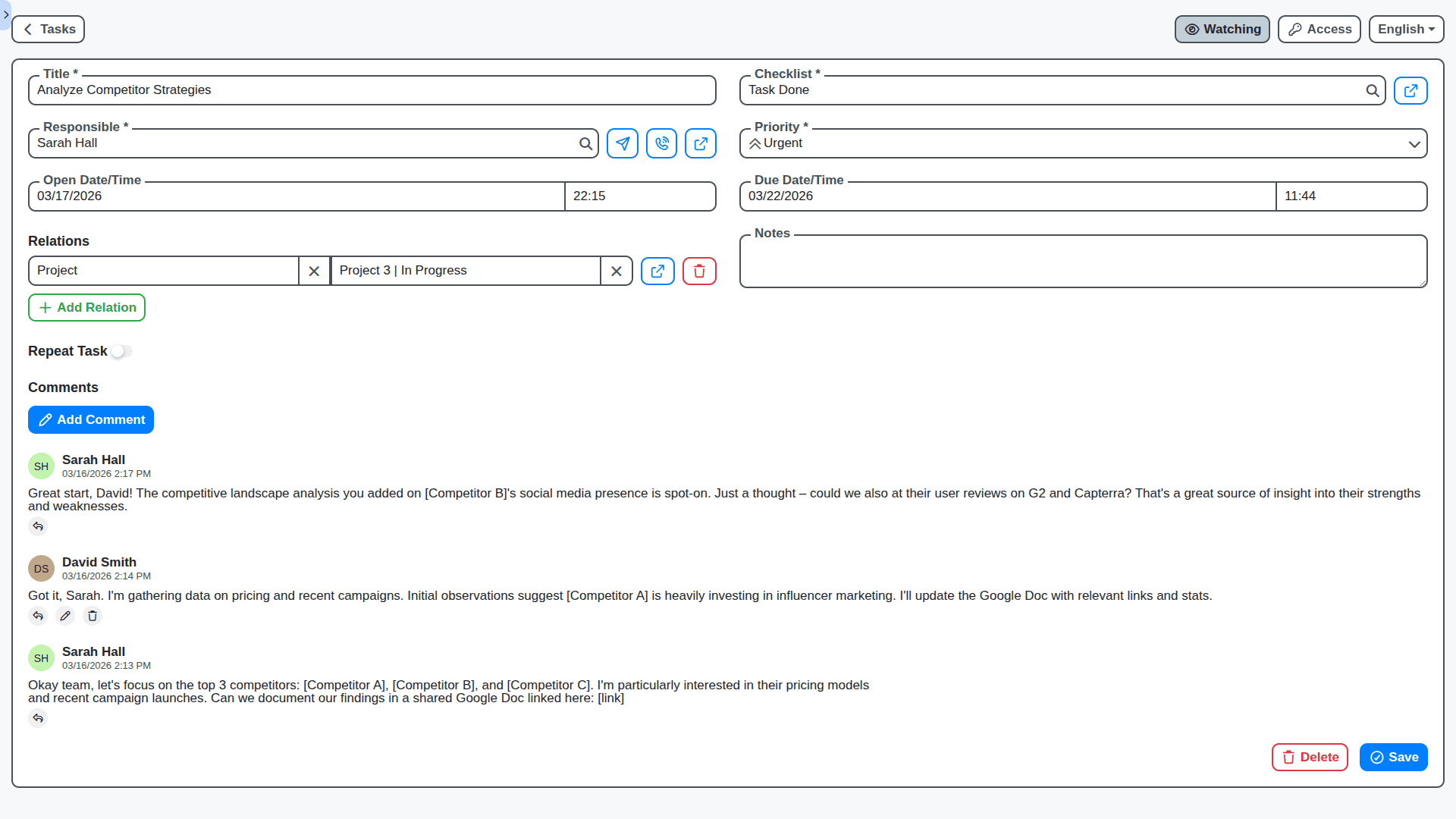
Effortless Collaboration: Keep Everyone in the Loop
Break down silos and improve communication. Collaborate directly within tasks with comments, file attachments, and @mentions. Ensure everyone has the information they need to succeed.
Reporting & Analytics: Track Progress and Identify Bottlenecks
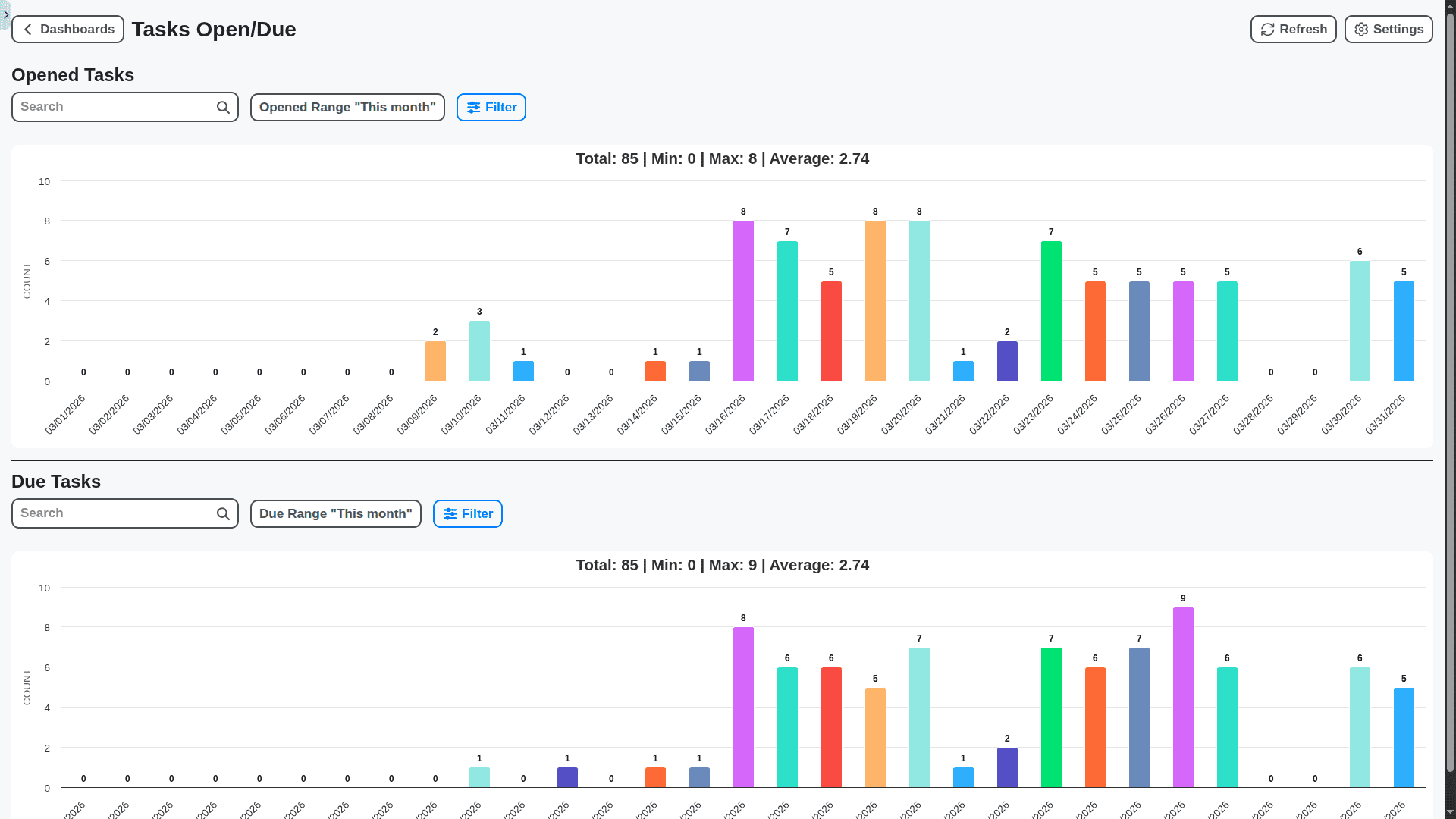
Gain valuable insights into your team's performance. ChecklistGuro provides customizable dashboards and reports to track task completion rates, identify bottlenecks, and optimize your workflow.
Mobile-Ready: Task Management on the Go
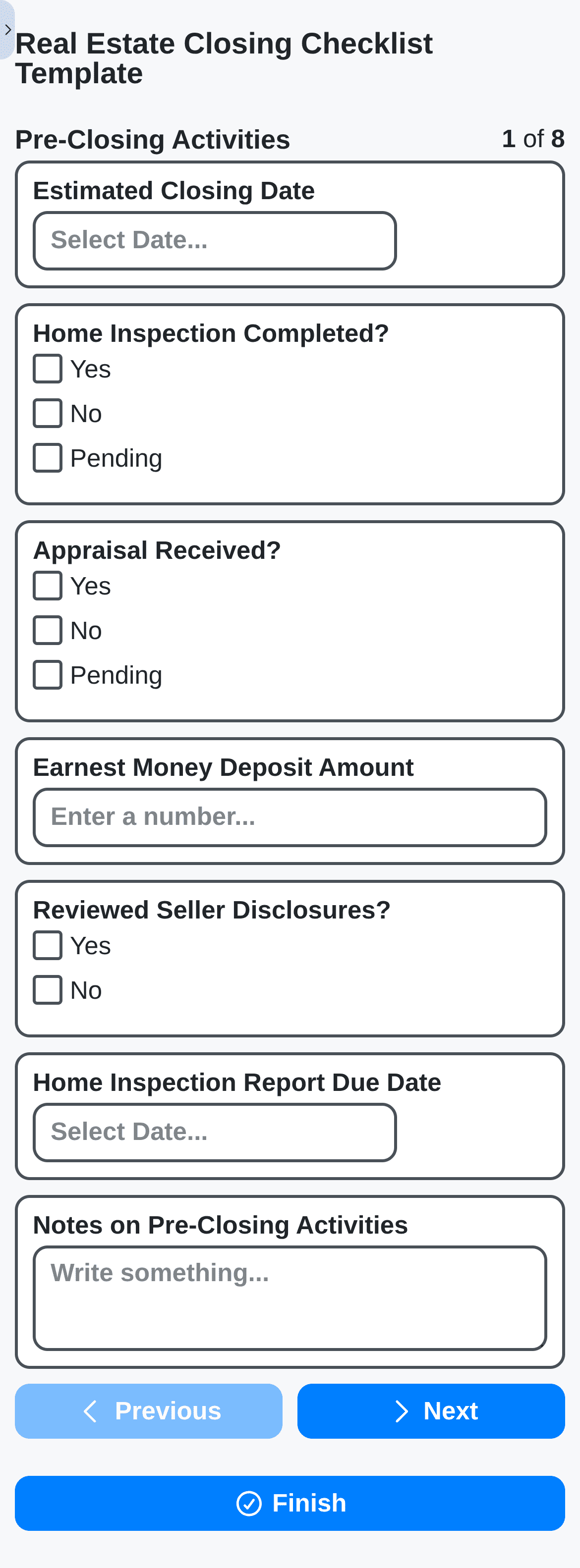
Stay connected and productive, wherever you are. ChecklistGuro's mobile app allows you to manage tasks, collaborate with your team, and stay on top of deadlines, all from your smartphone or tablet.
Role-Based Access Control: Secure Your Data
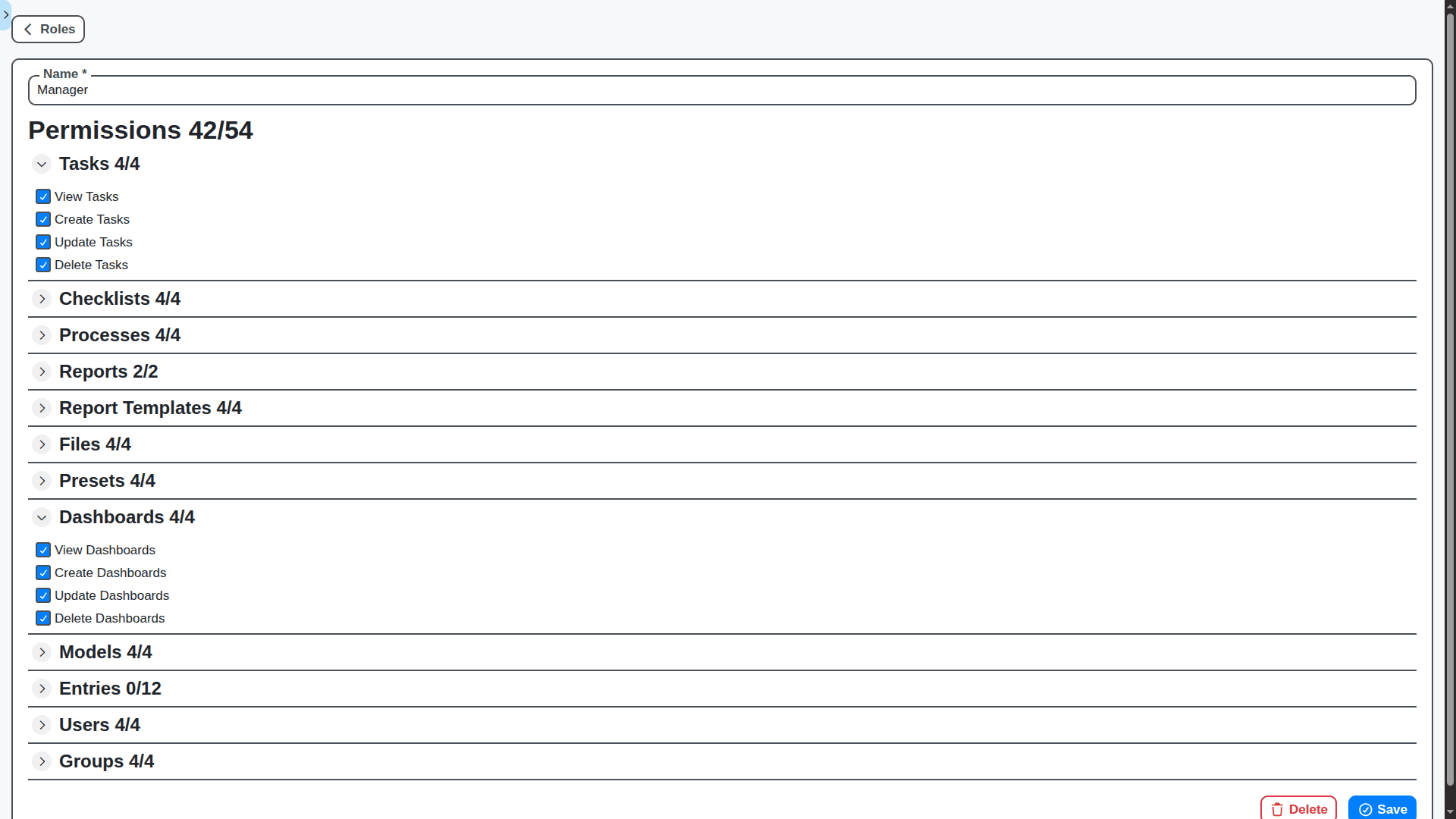
Control who can see and modify tasks, ensuring data security and compliance. Define roles and permissions to restrict access to sensitive information.
Features of our Task Management Solution
Core Task Management Features
Manual Creation: Ability to manually create tasks with details (name, description, due date, priority, assignees).
Automated Creation: Tasks automatically created as part of a BPM process (e.g., a new order triggers a "Review Payment" task).
Multiple Assignees: Support for assigning tasks to multiple users or groups.
Dynamic Assignees: Assignees determined by business rules or process logic.
Recurring Tasks: Ability to schedule tasks to repeat at regular intervals.
Subtasks: Ability to break down larger tasks into smaller, manageable subtasks.
Task Details & Attributes
Description: Detailed description of the task.
Due Date & Time: Specific deadline for task completion.
Priority: Indicate task urgency (High, Medium, Low).
Status Tracking: Clear status options (e.g., Scheduled, Open, In Progress, Completed, Overdue).
Attachments: Ability to attach relevant documents and files.
Comments/Notes: Space for adding notes and context.
Dependencies: Ability to define task dependencies (e.g., Task B can't start until Task A is complete).
Checklist/Form Creation: Task details captured through configurable forms.
Task Views & Organization
Task Lists: Multiple views for tasks (e.g., My Tasks, Team Tasks, Overdue Tasks, By Priority).
Filtering & Sorting: Ability to filter and sort tasks based on various criteria.
Kanban Board: Visual representation of tasks using a Kanban-style board.
Calendar Dashboard: Display tasks on a calendar view - daily, weekly, monthly.
Business Process Management (BPM) Features
Process Context: Tasks inherit context from the originating BPM process (e.g., order ID, customer details). This information is readily available within the task details.
Process Variable Access: Ability to access and update process variables directly from the task interface.
Automated Transitions: Task completion automatically triggers the next step in the BPM process.
Escalation Management: Define escalation rules for overdue tasks (e.g., notify a manager after a certain time). Integration with BPM escalation workflows.
Process Instance Linking: Clear linkage between a task and the specific process instance it belongs to.
History Tracking: Full audit trail of task activity, including assignments, status changes, and comments. This is crucial for compliance and process analysis.
Data Mapping: Ability to map data between tasks and process variables.
Collaboration & Communication Features
Notifications: Real-time notifications for task assignments, updates, and deadlines (email, in-app, SMS - configurable).
Comments & Discussions: Threaded comments and discussions within the task details.
Mentioning/Tagging: Ability to '@mention' users to bring their attention to specific comments or questions.
Shared Task Views: Ability to share task views with teams or groups.
Delegation: Ability to delegate tasks to other users (with appropriate permissions).
Advanced Features
Mobile Access: Native mobile apps (iOS and Android) for task management on the go.
Task Analytics & Reporting: Dashboards and reports showing task completion rates, bottlenecks, and team performance.
Resource Management: View and manage user workloads and availability.
Service Level Agreement (SLA): Define SLAs for tasks and track compliance.
Rules Engine Integration: Leverage a rules engine to dynamically adjust task assignments, priorities, or deadlines based on specific conditions.
Anomaly Detection: Identify unusual task patterns or bottlenecks.
Checklist/Form Designer: Ability to create custom forms for task data capture, integrated with the BPM engine.
Technical/Admin Features
Role-Based Access Control (RBAC): Granular control over user permissions (e.g., view, create, update, delete).
Security: Robust security features to protect sensitive data (encryption, authentication, authorization).
Auditing: Comprehensive audit trails for all system activities.
Configuration Options: Flexible configuration options to customize the task management solution to meet specific business needs.
API & Integrations: Well-documented APIs for integration with other systems.
Scalability: The solution can be used by 10, 100, 1,000, 10,000 users from the same company.
Monitoring and Logging: Comprehensive monitoring and logging capabilities for troubleshooting and performance optimization.
No credit card or cancellation needed.
Frequently Asked Questions
What is Task Management with Checklists?
Task Management with checklists allows you to break down larger projects into smaller, manageable tasks. Each task is represented as a checklist item, allowing you to track progress and ensure nothing is missed.
Do I need to create an account to use the software?
Yes, you'll need to create a free account to save your checklists and access all features. You can sign up for Free by click on the "Try for Free" button above.
How do I create my first Task Management checklist?
Simply click the "+ Create" button and give your checklist a title (e.g., "Project X - Phase 1"). Then, start adding your tasks as individual checklist items.
Can I use this software on my phone or tablet?
Absolutely! Our software is fully responsive and works seamlessly on all devices - desktops, laptops, tablets, and smartphones.
Can I assign tasks to other team members?
Yes! When adding a task, you can assign it to a specific team member from your account. They will receive a notification.
Can I add due dates to tasks?
Yes, you can! Click the calendar icon next to a task to set a due date and time. You'll receive reminders as the due date approaches.
How do I add notes or attachments to a task?
Click the "Notes" or "Attachment" icon (depending on your plan's features) to add more details or relevant files to a specific task.
Can I create recurring checklists for regular tasks?
Yes, you can create recurring checklists to automate tasks that need to be completed on a regular basis (daily, weekly, monthly, etc.)
How do I collaborate with my team on a checklist?
Share the checklist with your team members by inviting them to your account or by sharing a link. All team members can view and update the checklist in real-time.
How do I create subtasks?
You can create subtasks within a task to further break down complex work.
I'll need help. How can I contact support?
We're here to help! Visit our Support(link is on the right when signed in) and we'll respond as quickly as possible.
We can do it Together
Make a Request
Have a question? We're here to help. Please submit your inquiry, and we'll respond promptly.