Automated Stock Replenishment Process Workflow
Published: 06/18/2026 9:00 PM Updated: 06/19/2026 11:49 AM
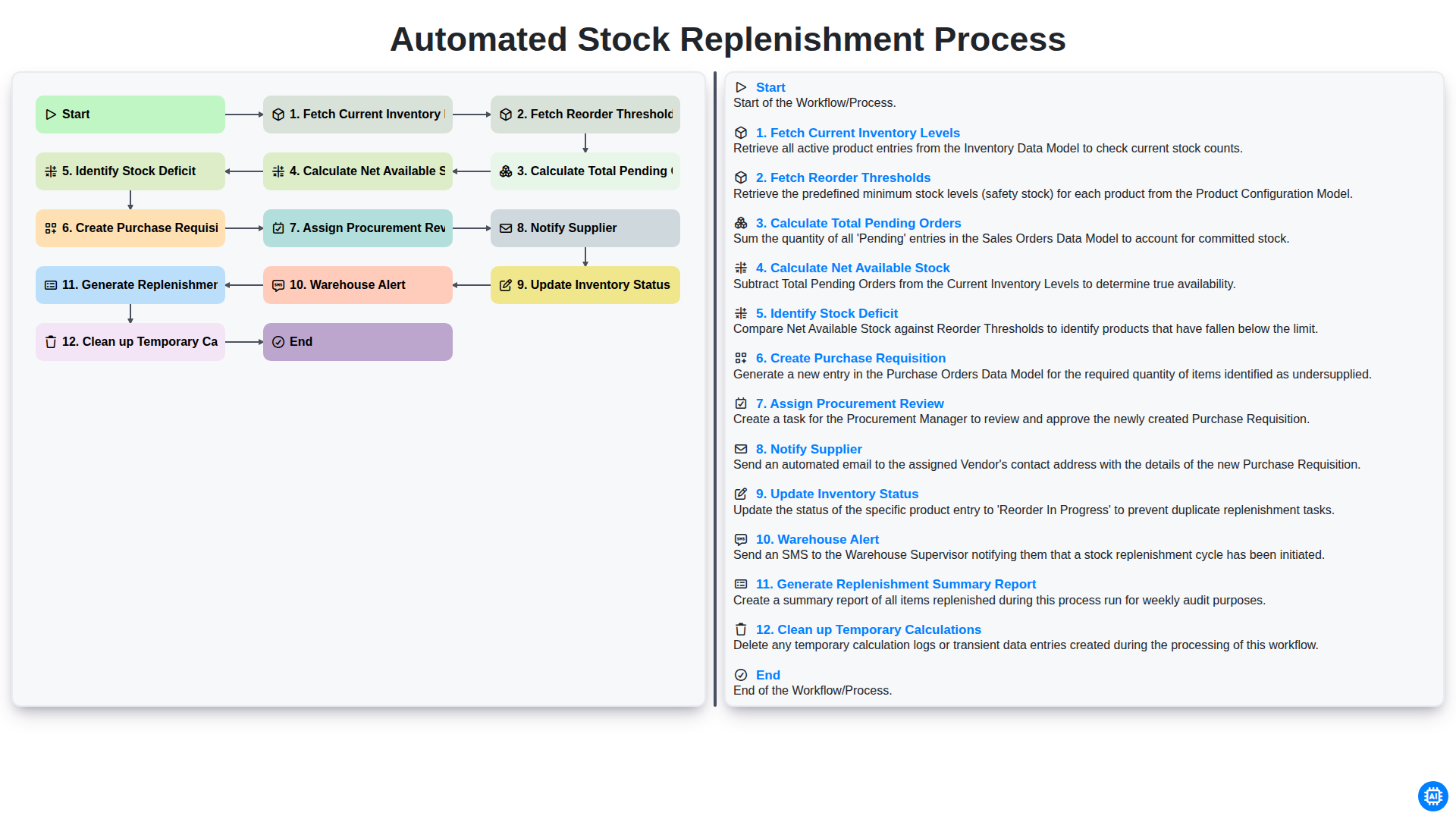
Table of Contents
- Introduction to Automated Stock Replenishment
- Phase 1: Real-Time Inventory Assessment
- Step 1: Fetching Current Inventory Levels and Reorder Thresholds
- Step 2: Calculating Pending Orders and Net Available Stock
- Phase 2: Identifying Shortages and Deficit Analysis
- Step 3: Detecting Stock Deficit and Triggering Requisitions
- Phase 3: Orchestrating the Procurement Workflow
- Step 4: Creating Purchase Requisitions and Procurement Review
- Step 5: Supplier Notification and Order Execution
- Phase 4: Post-Order Updates and Warehouse Communication
- Step 6: Updating Inventory Status and Warehouse Alerts
- Phase 5: Reporting and System Maintenance
- Step 7: Generating Replenishment Summary Reports
- Step 8: Finalizing the Process and Cleaning Temporary Data
- Resources & Links
TLDR: Learn how to eliminate manual tracking and prevent stockouts with our Automated Stock Replenishment Process workflow. This guide explains how the automation intelligently calculates stock deficits by comparing real-time inventory against reorder thresholds and pending orders, automatically triggering purchase requisitions and supplier notifications to ensure your warehouse stays optimized without the guesswork.
Introduction to Automated Stock Replenishment
In the fast-paced world of supply chain management, manual inventory tracking is no longer just a burden-it is a significant business risk. Relying on spreadsheets and manual counts often leads to the dreaded out-of-stock scenario, resulting in lost revenue and diminished customer trust. Conversely, overstocking ties up vital working capital and increases warehousing costs.
This is where an Automated Stock Replenishment Process becomes a game-changer. By leveraging automation, businesses can transition from a reactive stance to a proactive one. Instead of waiting for a human to notice a shortage, an automated workflow continuously monitors stock levels, compares them against predefined thresholds, and initiates the procurement cycle in real-time. This seamless integration of data ensures that the right amount of stock is ordered at the right time, optimizing liquidity, reducing human error, and allowing your team to focus on strategic growth rather than tedious data entry.
Phase 1: Real-Time Inventory Assessment
The foundation of an efficient automated replenishment system lies in its ability to maintain absolute visibility over existing assets. Before any procurement actions can be triggered, the system must first execute a comprehensive Fetch Current Inventory Levels step. This involves a real-time synchronization with your Warehouse Management System (WMS) or ERP to ensure that the data being used is not based on stale, end-of-day reports, but on the actual stock sitting on your shelves at this exact moment.
Once the current quantities are established, the system immediately performs a Fetch Reorder Thresholds operation. Every SKU (Stock Keeping Unit) should have a pre-defined safety stock level and a reorder point tailored to its specific lead time and demand volatility. By pulling these thresholds, the workflow establishes the logic gate that determines whether an item is healthy or in danger of a stockout.
To ensure the system doesn't react to ghost inventory, the process then moves to Calculate Total Pending Orders. This step accounts for all committed stock-items that are physically in the warehouse but already promised to customers via open sales orders. By subtracting these commitments, the system can then Calculate Net Available Stock. This final calculation provides the true, actionable number of units available for new sales, serving as the critical metric that drives the entire automated decision-making engine.
Step 1: Fetching Current Inventory Levels and Reorder Thresholds
The foundation of a truly automated replenishment system lies in the accuracy of its initial data retrieval. The process begins by scanning your entire warehouse database to Fetch Current Inventory Levels. This step involves pulling real-time, up-to-the-minute stock counts for every SKU (Stock Keeping Unit) in your catalog. For automation to work, this data must be pulled directly from your Warehouse Management System (WMS) or ERP to ensure there is no lag between physical movement and digital records.
Once the current stock levels are established, the system immediately proceeds to Fetch Reorder Thresholds. Every product in a healthy supply chain has a safety stock or reorder point-the specific level at which new stock must be ordered to prevent a stockout. By pulling these predefined thresholds alongside current inventory levels, the system creates a comparative baseline. This comparison is the trigger mechanism; without accurately retrieving both the actual quantity on hand and the pre-set minimum requirements, the automation cannot distinguish between a healthy stock level and a critical shortage.
Step 2: Calculating Pending Orders and Net Available Stock
Once the system has retrieved the current inventory levels and established the pre-defined reorder thresholds, the next phase of the workflow shifts from observation to deep calculation. To determine whether an actual replenishment is necessary, the system must look beyond what is currently sitting on the shelves.
The automation engine begins by calculating the total pending orders. This step is critical because it accounts for all commitments already made to customers that have not yet been dispatched. Ignoring these in-flight orders would result in significant under-ordering, as it fails to account for inventory that is physically present but no longer available for sale.
Simultaneously, the workflow performs a calculation of the Net Available Stock. This is achieved by subtracting the sum of all pending orders from the current physical inventory levels. This figure represents the true usable inventory. By comparing this net value against your reorder thresholds, the system can pinpoint exactly where stock levels are dipping into the danger zone, providing a highly accurate trigger for the procurement process.
Phase 2: Identifying Shortages and Deficit Analysis
Once the baseline data-current inventory levels and predefined reorder thresholds-has been gathered, the system moves into the critical analytical stage. This phase is where raw data is transformed into actionable intelligence through a series of precise mathematical comparisons.
The process begins by calculating the Total Pending Orders, which accounts for all committed stock that has been sold or allocated but not yet dispatched. By subtracting these pending commitments from your current stock levels, the system determines the Net Available Stock. This figure represents your true operational capacity.
The final and most vital step in this phase is Identifying the Stock Deficit. By comparing the Net Available Stock against your established Reorder Thresholds, the workflow pinpoint exactly which SKUs have dipped into the danger zone. This automated gap analysis eliminates the guesswork and human error associated with manual audits, ensuring that the subsequent procurement steps are triggered only when a genuine shortage is detected.
Step 3: Detecting Stock Deficit and Triggering Requisitions
Once the system has calculated the net available stock, the core logic of the automation kicks in: Identifying the Stock Deficit. The system compares the current net availability against your predefined reorder points; if the available stock falls below the threshold, a deficit is flagged.
Immediately upon detecting this gap, the workflow transitions from analysis to action by Creating a Purchase Requisition. This ensures that no manual intervention is required to initiate the procurement cycle. To maintain financial oversight and prevent unauthorized spending, the process then moves to Assigning a Procurement Review, where the generated requisition is routed to the appropriate manager for digital approval. This seamless transition from detection to documentation eliminates the human lag that often leads to stockouts.
Phase 3: Orchestrating the Procurement Workflow
Once the system identifies a stock deficit, the process transitions from passive monitoring to active execution. This phase is where data-driven insights are transformed into actionable procurement tasks, ensuring that replenishment happens seamlessly without manual intervention.
The orchestration begins by Creating a Purchase Requisition based on the calculated deficit, which is then routed through the system for Assigning a Procurement Review. This ensures that every automated order undergoes a necessary layer of human oversight to validate accuracy and budget alignment. Once approved, the system automatically moves to Notify the Supplier, transmitting the order details directly to the vendor to minimize lead times.
As the order moves through the supply chain, the workflow maintains real-time visibility by performing an Update to the Inventory Status, marking items as On Order. Simultaneously, a Warehouse Alert is triggered, preparing the receiving team for the incoming shipment. To close the loop, the system Generates a Replenishment Summary Report for management oversight and finally performs a Cleanup of Temporary Calculations, purging the transient data used during the calculation phase to keep the database lean and efficient. This end-to-end orchestration ensures that the transition from out of stock to replenished is a closed-loop, error-free cycle.
Step 4: Creating Purchase Requisitions and Procurement Review
Once the system identifies a stock deficit, the workflow moves from data analysis to actionable logistics. The automation engine automatically triggers the Create Purchase Requisition stage, generating a formal request document that details exactly which items are low, the required quantities to reach optimal levels, and the preferred vendor information.
To ensure financial oversight and prevent unauthorized spending, the process then moves to Assign Procurement Review. Rather than requiring manual data entry, the system routes the requisition to the designated procurement officer or department head via an automated notification. This allows the reviewer to verify the necessity of the order, check against the current budget, and approve or reject the request with a single click. This step acts as a critical checkpoint, ensuring that while the replenishment process is automated, human expertise remains in control of the company's outflow of capital.
Step 5: Supplier Notification and Order Execution
Once the purchase requisition has been reviewed and approved, the workflow transitions from internal logistics to external communication. The system automatically triggers a Notify Supplier action, transmitting the finalized order details-including item specifications, quantities, and requested delivery dates-directly to the vendor's system or via automated email.
To ensure end-to-end visibility, the workflow immediately proceeds to Update Inventory Status, marking the incoming stock as On Order. This prevents the system from treating the deficit as an unaddressed issue and provides the procurement team with an accurate real-time view of incoming supply. Simultaneously, a Warehouse Alert is dispatched to the receiving department, notifying warehouse managers to prepare for the arrival of the upcoming shipment and ensuring that dock space and labor are allocated accordingly.
Phase 4: Post-Order Updates and Warehouse Communication
Once the purchase requisition has been dispatched to the supplier, the workflow shifts from procurement to real-time synchronization and internal communication. This phase is critical to ensure that your digital records match the physical reality of your warehouse and that all stakeholders are aligned.
The process begins with an automated Update of Inventory Status, where the system marks the pending items as Incoming or On Order. This prevents the system from over-ordering during the lead time and provides an accurate view of incoming supply. Simultaneously, a Warehouse Alert is triggered, notifying the receiving team of the expected arrival. This allows warehouse managers to plan labor and-dock space effectively, ensuring that incoming shipments are processed without bottlenecking current operations.
To close the loop, the system Generates a Replenishment Summary Report. This high-level overview provides management with visibility into total spend, pending quantities, and expected delivery dates, serving as a vital tool for cash flow forecasting. Finally, the system performs a Cleanup of Temporary Calculations. By purging the transient data used during the deficit identification stage, the system maintains high performance and ensures that the next replenishment cycle begins with a clean, optimized dataset.
Step 6: Updating Inventory Status and Warehouse Alerts
Once the purchase requisition has been approved and the supplier has been notified, the workflow moves into its most critical phase: real-time synchronization. The system automatically updates the Inventory Status to reflect the incoming stock. This isn't just a change in numbers; the system transitions the items from Available to On Order or Pending Delivery. This prevents the common pitfall of double-ordering, where a system might trigger a second replenishment request because it doesn't realize a shipment is already en route.
Simultaneously, an automated Warehouse Alert is triggered. This notification is dispatched to the warehouse management team, providing them with actionable intelligence before the physical goods even arrive. These alerts include essential metadata such as expected delivery dates, quantities, and specific bin locations. By proactively notifying the floor staff, the workflow ensures that receiving docks are prepared, space is allocated, and the labor force is ready to process the incoming shipment efficiently, minimizing the bottleneck period between arrival and put-away.
Phase 5: Reporting and System Maintenance
Once the automated replenishment cycle is complete, the final phase focuses on closing the loop through data visibility and system hygiene. This stage ensures that stakeholders are informed of the replenishment activity and that the system remains optimized for the next cycle.
The process concludes with the generation of a Replenishment Summary Report. This document serves as a critical audit trail, detailing what was ordered, the quantities requested, and the current status of pending shipments. By reviewing these summaries, management can identify patterns in stock depletion and fine-tune reorder thresholds for future accuracy.
Simultaneously, the system performs a Clean up of Temporary Calculations. During the workflow, various intermediary data points-such as pending order totals and stock deficit calculations-are processed to determine the final purchase amounts. Clearing these temporary values is essential to prevent data bloating and to ensure that the next automated run begins with a clean slate, preventing any carryover errors from influencing new inventory assessments. This ensures your procurement engine remains lean, accurate, and ready for continuous operation.
Step 7: Generating Replenishment Summary Reports
Once the automated cycle has successfully navigated the procurement and notification stages, the final critical step is the generation of the Replenishment Summary Report. This report serves as the single source of truth for management and stakeholders, providing a comprehensive overview of the entire replenishment cycle.
Rather than manually auditing individual orders, the system aggregates all processed data into a single, digestible document. This report captures essential details such as:
- Total Requisition Volume: A high-level view of the total value and quantity of stock replenished during the cycle.
- Supplier Performance Indicators: A snapshot of which vendors were notified and the status of their pending acknowledgments.
- Stock Health Overview: A comparison of pre-replenishment levels versus post-replenishment projections, highlighting how effectively the stock deficit was addressed.
- Audit Trail: A timestamped log of when thresholds were met and when procurement reviews were completed.
By automating this summary, businesses move away from reactive troubleshooting and toward proactive supply chain management. This report doesn't just document what happened; it provides the analytical foundation needed to refine reorder thresholds and optimize warehouse space for future cycles.
Step 8: Finalizing the Process and Cleaning Temporary Data
Once the replenishment cycle has been triggered and the stakeholders have been notified, the final stage of the workflow focuses on data integrity and operational visibility. This stage is comprised of three critical sub-steps: Update Inventory Status, Generate Replenishment Summary Report, and Clean up Temporary Calculations.
First, the system must Update Inventory Status to reflect the newly created purchase requisitions. This ensures that the committed or pending stock is accounted for, preventing the system from triggering duplicate orders for the same deficit in the next automated run.
Next, the workflow moves into the reporting phase. The system will Generate a Replenishment Summary Report, providing a high-level overview of what was ordered, the total value of the procurement, and which items are currently in transit. This report serves as a vital audit trail for procurement managers and finance teams to track cash flow and upcoming arrivals.
Finally, to maintain system performance and data accuracy, the workflow must Clean up Temporary Calculations. During the Calculate phases of the workflow, the system creates transient data points-such as the specific stock deficit numbers and pending order totals. Deleting these temporary snapshots ensures that the database remains lean and that future calculations are based solely on real-time, verified inventory data, preventing any data bloat or logical errors in subsequent replenishment cycles.
Resources & Links
- Gartner Supply Chain Research: Deep dives into supply chain management trends and the impact of automation on inventory optimization.
- Supply Chain Management Review: Industry insights and case studies regarding automated procurement and replenishment workflows.
- SAP Inventory Management Solutions: Technical documentation and software overviews for managing real-time stock levels and automated reordering.
- Oracle NetSuite Inventory Management: Resources on implementing automated purchase requisitions and integrated warehouse management systems.
- Inbound Logistics: Articles focusing on the logistics of supplier notification and warehouse communication strategies.
- Forbes Technology Council: High-level perspectives on the digital transformation of procurement and automated reporting systems.
Found this Article helpful?
Comments
There are no comments yet. Be the first to add one!
Inventory Management Solution Demo
Optimize your inventory & boost profitability! ChecklistGuro streamlines tracking, ordering, & fulfillment. Reduce waste, minimize stockouts, & improve efficiency. Manage it all with our Work OS.
Related Articles

Warehouse Data Integrity: Your WMS Checklist Template

Mastering Inventory Turnover: Your Analysis Checklist Template
Seasonal Mulch & Gravel Checklist Template: Stay Stocked & Ready
Daily Shelf Stocking & Rotation Checklist: FIFO Made Easy
Order Picking Process Verification: Your Checklist Template
Monthly Stockroom Organization & Safety Checklist Template
Vendor Lead Time Validation: A Checklist Template for Supply Chain Success
Daily Warehouse Walkthrough Inspection Checklist Template
We can do it Together
Need help with
Checklists?
Have a question? We're here to help. Please submit your inquiry, and we'll respond promptly.