Automated Preventive Maintenance & Asset Lifecycle Management Workflow
Published: 06/04/2026 Updated: 10/05/2026
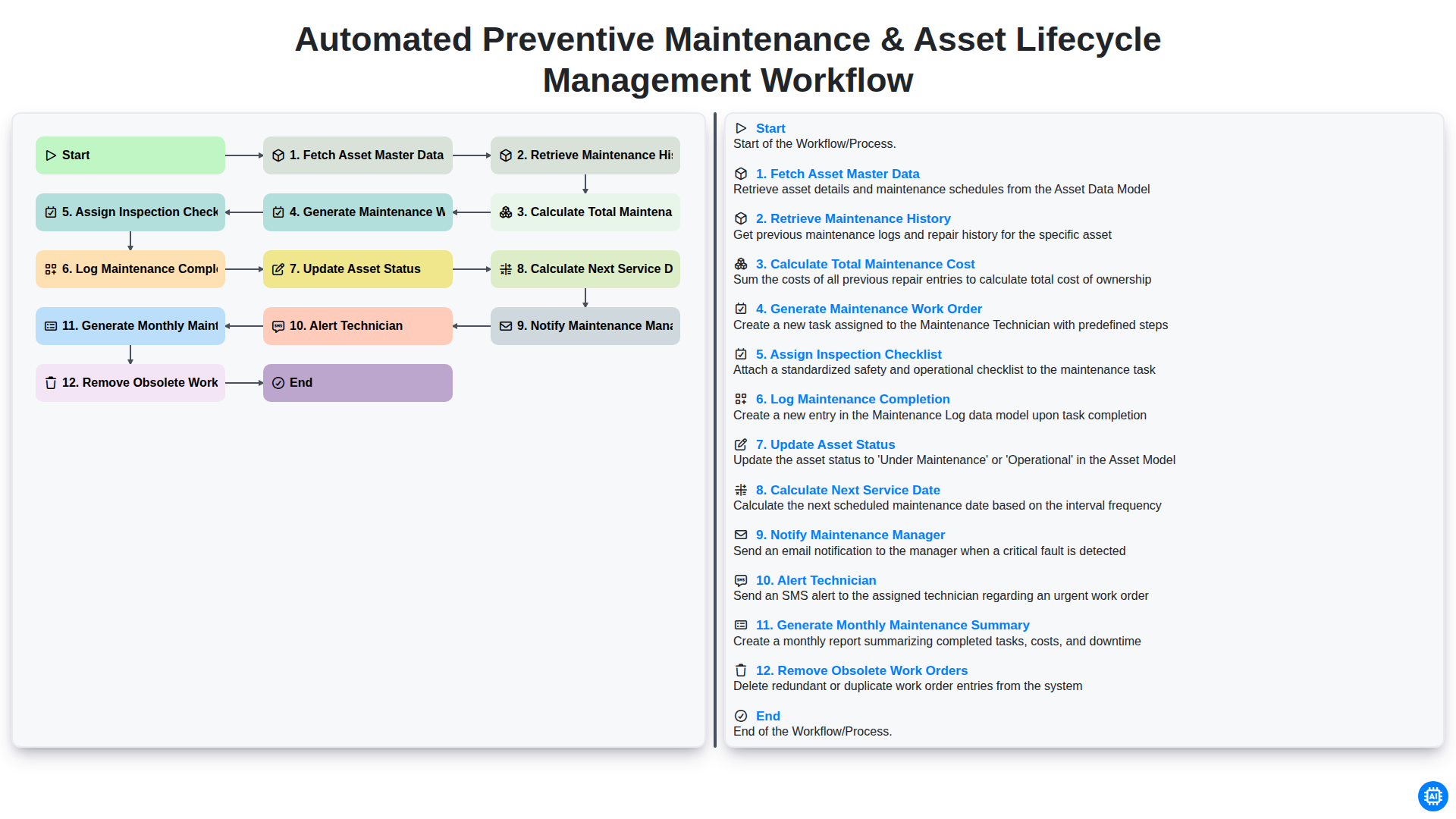
Table of Contents
- Introduction: The Power of Automated Asset Lifecycle Management
- Phase 1: Data Foundation and Historical Analysis
- Step 1: Fetching and Synchronizing Asset Master Data
- Step 2: Deep Dive into Maintenance History Retrieval
- Step 3: Analyzing Financial Impact via Total Maintenance Cost Calculation
- Phase 2: Proactive Maintenance Execution
- Step 4: Automated Generation of Maintenance Work Orders
- Step 5: Precision Planning with Automated Inspection Checklists
- Phase 3: Field Execution and Real-Time Documentation
- Step 6: Logging Completion and Validating Maintenance Tasks
- Step 7: Real-Time Asset Status Updates
- Phase 4: Predictive Scheduling and Intelligent Alerting
- Step 8: Dynamic Calculation of Next Service Dates
- Step 9: Seamless Communication via Manager and Technician Notifications
- Phase 5: Continuous Optimization and Reporting
- Step 10: Monthly Summary Generation and Performance Auditing
- Step 11: Maintaining System Hygiene by Removing Obsolete Work Orders
- Conclusion: Driving Operational Efficiency through Automation
- Resources & Links
TLDR: Streamline your operations with this end-to-end automation template designed to optimize asset longevity and reduce downtime. Learn how to automate the entire maintenance lifecycle-from fetching master data and calculating costs to generating work orders, notifying technicians, and generating performance summaries-ensuring your equipment stays in peak condition with minimal manual intervention.
Introduction: The Power of Automated Asset Lifecycle Management
In today's fast-paced industrial landscape, the difference between operational excellence and costly downtime often lies in how effectively an organization manages its physical assets. Traditional, manual maintenance approaches-characterized by spreadsheets, paper checklists, and reactive fix-it-when-it-breaks mentalities-are no longer sustainable. They are prone to human error, lack real-time visibility, and inevitably lead to unexpected equipment failure.
Automated Asset Lifecycle Management (ALM) transforms this reactive struggle into a proactive strategy. By integrating a seamless, automated workflow, companies can move beyond simple repairs to a state of continuous optimization. This automated approach ensures that every piece of equipment is tracked from procurement to decommissioning, ensuring that maintenance is not just a periodic task, but a data-driven necessity. By synchronizing data retrieval, cost analysis, and automated scheduling, organizations can extend the lifespan of their machinery, optimize technician productivity, and significantly reduce the total cost of ownership. This blog explores how a structured, automated workflow serves as the backbone of modern, predictive maintenance strategies.
Phase 1: Data Foundation and Historical Analysis
The efficiency of an automated maintenance ecosystem relies entirely on the integrity of the underlying data. Before any proactive actions can be taken, the workflow begins with a rigorous process of Fetching Asset Master Data. This step involves consolidating all critical information regarding your equipment-such as manufacturer specifications, installation dates,- and operational parameters-into a single, centralized source of truth.
Once the baseline data is established, the system moves into Retrieving Maintenance History. By pulling records of every past repair, failure, and inspection, the workflow gains the necessary context to understand an asset's unique behavioral fingerprint. This historical insight is then paired with the step to Calculate Total Maintenance Cost, which aggregates both parts and labor expenses over time. By analyzing these cumulative costs alongside the asset's performance history, the system can identify patterns of diminishing returns, providing the essential intelligence needed to transition from reactive firefighting to a truly data-driven, predictive maintenance strategy.
Step 1: Fetching and Synchronizing Asset Master Data
The foundation of any robust maintenance strategy lies in the accuracy of your data. The workflow begins with the critical step of Fetching Asset Master Data. Before any automated calculations or notifications can occur, the system must establish a single source of truth by pulling comprehensive information from your existing Enterprise Asset Management (EAM) or ERP systems.
This step involves aggregating essential details for every piece of equipment in your inventory, including manufacturer specifications, installation dates, operational parameters, and critical location data. By automating the retrieval of this master data, you eliminate the risks associated with manual entry errors and data silos. Ensuring that the workflow is operating on real-time, synchronized information ensures that every subsequent step-from cost calculation to work order generation-is based on the most current and accurate asset profiles available.
Step 2: Deep Dive into Maintenance History Retrieval
Once the system has successfully fetched the essential asset master data, the workflow moves into a critical analytical phase: Retrieving Maintenance History. This step serves as the memory of your asset management strategy. Instead of approaching every inspection as an isolated event, the system pulls all historical logs, previous repair records, and past failure data associated with the specific asset.
By analyzing past performance, the workflow can identify recurring patterns-such as frequent component failures or specific environmental factors that trigger degradation. This deep dive ensures that the maintenance strategy is not just reactive, but informed by empirical evidence. Without this step, your maintenance program would be operating in a vacuum, unable to distinguish between a routine check and a high-risk asset that requires more intensive oversight. This historical context is the foundation upon which all subsequent cost calculations and scheduling decisions are built.
Step 3: Analyzing Financial Impact via Total Maintenance Cost Calculation
Once the system has successfully retrieved the comprehensive maintenance history for each specific asset, the workflow moves into a critical analytical phase: Calculating the Total Maintenance Cost. This step is far more than just a simple summation of expenses; it is a strategic deep dive into the true cost of ownership.
By aggregating all historical expenditures-including spare parts, outsourced labor, internal man-hours, and emergency repair fees-the system provides a real-time financial snapshot of every asset in your fleet. This granular level of data allows maintenance teams to move beyond reactive spending and toward proactive financial planning. When you can see exactly how much a particular machine has cost the company since its commissioning, you gain the empirical evidence needed to make high-stakes decisions, such as whether to continue repairing an aging unit or to initiate a capital expenditure for a replacement. This calculation serves as the financial foundation for the subsequent automated work order generation, ensuring that maintenance efforts are prioritized based on both operational urgency and economic impact.
Phase 2: Proactive Maintenance Execution
Once the maintenance schedule is determined, the workflow transitions from planning to action. This phase is where data-driven insights are transformed into physical upkeep, ensuring that no critical task falls through the cracks. The execution phase begins with the automated generation of maintenance work orders, which are instantly paired with a specific assigned inspection checklist tailored to the asset's requirements.
To ensure seamless communication on the ground, the system automatically triggers an alert to the technician in charge, providing them with all necessary context to begin the task. As the work progresses, the workflow facilitates real-time accountability by requiring the team to log maintenance completion details directly into the system. This step is crucial, as it serves as the single source of truth for the asset's physical state.
Once the technician confirms the work is done, the system immediately updates the asset status (e.g., from In Service to Under Maintenance and back to Operational) and uses the updated data to calculate the next service date, effectively closing the loop on the current cycle and initiating the countdown to the next preventative measure.
Step 4: Automated Generation of Maintenance Work Orders
Once the system has processed the historical data and calculated the total maintenance costs, the workflow moves into the most critical phase: the Automated Generation of Maintenance Work Orders.
In a manual environment, creating work orders is often a reactive and error-prone process that relies on human memory or fragmented spreadsheets. In this automated workflow, however, the system uses the intelligence gathered in the previous steps to trigger the creation of a digital work order the moment a service threshold is met. This ensures that no asset is ever overlooked due to administrative oversight.
Each generated work order is pre-populated with essential context, including the asset's identity, its specific maintenance requirements, and its recent service history. By automating this step, you eliminate the paperwork lag between identifying a need and initiating the repair. This transition from data analysis to actionable instruction is what transforms a standard maintenance routine into a truly proactive strategy, ensuring that the right tasks are queued up precisely when they are needed most.
Step 5: Precision Planning with Automated Inspection Checklists
Once a maintenance work order is generated, the workflow moves from scheduling to execution precision by automatically Assigning an Inspection Checklist to the specific task. Rather than relying on memory or generic procedures, the system pulls a customized, asset-specific checklist tailored to the unique requirements of the machine or equipment in question.
This step eliminates the risk of human error and omission bias, where critical inspection points might be overlooked during routine checks. By digitizing the checklist, the workflow ensures that every sensor, lubrication point, and structural component is verified against standardized safety and operational benchmarks. This level of granularity transforms maintenance from a simple check-the-box activity into a data-driven diagnostic process, ensuring that technicians have a clear, unambiguous roadmap for every inspection.
Phase 3: Field Execution and Real-Time Documentation
Once the maintenance schedule is set, the workflow transitions from planning to active field execution. This phase is where the digital instructions meet the physical asset, ensuring that technicians are equipped with the precise data needed to perform high-quality inspections.
The process begins with the Assignment of Inspection Checklists, which serves as the standardized blueprint for the task. By delivering a digital checklist directly to the technician's mobile device, the workflow eliminates guesswork and ensures that every critical component is inspected according to regulatory and manufacturer standards. As the technician performs the physical task, the system facilitates the real-time Logging of Maintenance Completion. This step is crucial; it captures not just the done status, but also any findings, measurements, or photographic evidence captured during the inspection.
As soon as the work is finalized, the workflow triggers a cascade of automated updates to maintain data integrity. The system automatically Updates the Asset Status (e.g., moving it from Scheduled to Operational) and uses the documented service interval to Calculate the Next Service Date, effectively closing the loop on the current cycle and preparing for the next. To ensure total visibility, the system simultaneously Notifies the Maintenance Manager of the completed task and sends a real-time Alert to the Technician regarding any follow-up repairs required. This seamless transition from manual labor to digital documentation ensures that no detail is lost in transition and that the asset's digital twin is always an accurate reflection of its physical state.
Step 6: Logging Completion and Validating Maintenance Tasks
Once the technician has completed the physical inspection and repairs, the workflow transitions into the critical validation phase. Logging Maintenance Completion is not merely a clerical task; it serves as the definitive record of work performed. Within the digital workflow, the technician inputs specific details regarding the parts replaced, time spent, and any anomalies discovered during the process. This real-time data entry ensures that the maintenance log remains a single source of truth for the entire organization.
To ensure accountability and quality control, this step is inextricably linked to the Assignment of Inspection Checklists. The system verifies that every mandatory checkmark on the predefined list has been addressed before the task can be moved to a completed status. This prevents shortcut maintenance and ensures that no critical component-such as lubrication, sensor calibration, or structural integrity checks-is overlooked. By enforcing this validation, the workflow guarantees that the asset is returned to service only after meeting all predefined safety and operational standards.
Step 7: Real-Time Asset Status Updates
Once the maintenance tasks are finalized and the technician logs the completion of the work, the system automatically triggers an update to the asset's digital profile. This real-time synchronization ensures that the Update Asset Status step eliminates the manual burden of data entry and removes the risk of human error.
Instead of relying on paper logs or delayed emails, the asset's status transitions instantly-for example, from Under Maintenance to Operational or Operational to Requires Repair. This immediate visibility provides stakeholders with a single source of truth, ensuring that any decision made by management is based on the most current state of the factory floor. By automating this update, you bridge the gap between physical maintenance activities and your digital management system, creating a seamless loop of information.
Phase 4: Predictive Scheduling and Intelligent Alerting
Once the maintenance work order has been generated and the inspection checklists assigned, the workflow transitions into its most critical intelligence-driven stage. This phase moves beyond simple task management into Predictive Scheduling and Intelligent Alerting, ensuring that the right people are informed at the precise moment action is required.
To bridge the gap between planning and execution, the system automatically logs maintenance completion and immediately updates the asset status within the central database. This real-time synchronization ensures that there is never a discrepancy between the actual state of a machine and its digital twin.
The intelligence of the workflow lies in its ability to look forward. Using the newly logged data, the system automatically calculates the next service date, transforming a reactive process into a proactive one. This automation triggers a dual-layered notification strategy: an automated alert is sent to the Technician to ensure immediate mobilization, while a simultaneous notification is sent to the Maintenance Manager for oversight and resource planning.
By automating these communications, the workflow eliminates the risk of human error and communication silos, ensuring that maintenance windows are maximized and downtime is minimized through timely, data-driven-driven intervention.
Step 8: Dynamic Calculation of Next Service Dates
To ensure that the preventive maintenance cycle remains continuous and proactive, the workflow doesn't simply end once a task is completed. The system automatically triggers a calculation engine to determine the Next Service Date. By analyzing the specific maintenance interval required for the asset-whether it is time-based (e.g., every 6 months) or usage-based (e.g., every 500 operating hours)-the workflow intelligently projects the next necessary intervention. This automation eliminates the risk of human error in scheduling and ensures that no asset ever falls into a period of unmonitored downtime, effectively transforming a reactive repair culture into a truly predictive maintenance powerhouse.
Step 9: Seamless Communication via Manager and Technician Notifications
A truly automated workflow reaches its full potential only when the right information reaches the right people at the right time. Once the maintenance schedule is calculated, the system eliminates the need for manual follow-ups by triggering instant, automated alerts to both management and field staff.
For the Maintenance Manager, the system sends a high-level notification to ensure oversight and budget tracking. This ensures that managers are never caught off guard by upcoming heavy-duty repairs or sudden shifts in asset availability. Simultaneously, the Technician receives a direct alert on their mobile device or workstation, complete with the specific work order details and the assigned inspection checklist. This real-time synchronization eliminates information silos, reduces response latency, and ensures that technicians can move immediately from notification to action, significantly reducing equipment downtime.
Phase 5: Continuous Optimization and Reporting
The final phase of the workflow focuses on closing the loop through data-driven insights and system hygiene. To ensure the maintenance ecosystem remains efficient, the system performs a crucial cleanup by removing obsolete work orders, ensuring that technicians and managers are not distracted by outdated or redundant tasks.
The process then transitions into high-level intelligence by generating a monthly maintenance summary. This report aggregates all completed activities, costs, and downtime metrics, providing a holistic view of asset performance. By analyzing this data, organizations can move beyond reactive fixes and transition into a truly proactive strategy, leveraging historical trends to refine maintenance intervals and optimize the entire asset lifecycle.
Step 10: Monthly Summary Generation and Performance Auditing
At the conclusion of every maintenance cycle, the workflow transitions from individual task execution to high-level strategic oversight through the Generation of the Monthly Maintenance Summary. This final, critical step aggregates all the data captured during the previous steps-including maintenance costs, completed work orders, and inspection outcomes-into a single, cohesive report.
This summary serves as more than just a record of activity; it functions as a powerful auditing tool for the organization. By reviewing the monthly summary, management can identify recurring patterns, such as specific assets that frequently trigger repair alerts or certain inspection checklists that are consistently flagged for non-compliance. This data-driven insight allows for proactive adjustments to the maintenance strategy, ensuring that the workflow is not just a repetitive cycle, but a continuous loop of optimization. Through this stage, the workflow shifts from reactive troubleshooting to proactive lifecycle management, providing the empirical evidence needed to justify budget allocations and drive long-term operational excellence.
Step 11: Maintaining System Hygiene by Removing Obsolete Work Orders
An efficient maintenance workflow is not just about adding new tasks; it is equally about managing the lifecycle of your data. As your operations scale, your system can quickly become cluttered with ghost tasks-work orders that were canceled, duplicated, or rendered irrelevant due to asset decommissioning.
Allowing obsolete work orders to accumulate creates data noise, making it difficult for managers to distinguish between urgent pending tasks and historical clutter. This lack of clarity can lead to decision fatigue and inaccurate reporting. By implementing an automated step to identify and remove or archive obsolete work orders, you ensure that your dashboard remains a true reflection of your current operational needs. This practice maintains high data integrity, optimizes system performance, and ensures that your maintenance team stays focused exclusively on the tasks that drive value and prevent downtime.
Conclusion: Driving Operational Efficiency through Automation
Implementing an automated workflow for preventive maintenance and asset lifecycle management is more than just a technical upgrade; it is a strategic shift from reactive firefighting to proactive optimization. By automating the entire lifecycle-from fetching master data and calculating costs to notifying managers and updating asset statuses-organizations can eliminate the manual errors and communication gaps that lead to costly downtime.
The true value of this automated approach lies in its ability to create a self-sustaining ecosystem of operational intelligence. When your system automatically calculates next service dates, alerts technicians, and generates comprehensive monthly summaries, your team is freed from administrative burdens to focus on high-value technical tasks. Ultimately, this seamless integration of data-driven decision-making and automated task execution ensures that every asset performs at its peak, every maintenance cost is accounted for, and your entire operation moves toward a future of predictable, streamlined, and cost-effective productivity.
Resources & Links
- IBM Maximo Asset Management: In-depth resources on enterprise-grade asset management and AI-driven predictive maintenance strategies.
- UpKeep CMMS Blog: Practical guides on automating maintenance workflows, work order management, and technician productivity.
- Fiix Software Insights: Expert articles on implementing preventive maintenance schedules and leveraging data for asset lifecycle optimization.
- Gartner Research: Industry analysis on the impact of automation and digital transformation in industrial maintenance operations.
- SAP Asset Management: Technical documentation regarding integrated data flows, asset master data synchronization, and enterprise resource planning.
- Forrester Research: Strategic insights into how automated reporting and real-time notifications drive operational excellence.
Frequently Asked Questions
What is Automated Preventive Maintenance?
Automated preventive maintenance is a systematic approach that uses software and sensors to trigger maintenance tasks automatically based on predefined triggers like time intervals, usage metrics, or real-time sensor data, reducing the risk of unexpected equipment failure.
How does this workflow improve Asset Lifecycle Management (ALM)?
This workflow optimizes the entire lifespan of an asset by ensuring consistent upkeep, predicting end-of-life scenarios through data analysis, and preventing premature degradation, which ultimately extends the useful life of the equipment and maximizes ROI.
What are the key components of an automated maintenance workflow?
The key components include real-time data collection (via IoT), automated scheduling, predictive analytics, automated work order generation, and integrated inventory management for spare parts.
How does automation reduce operational costs?
Automation reduces costs by minimizing manual inspection labor, preventing expensive emergency repairs through early detection, optimizing spare parts inventory to avoid overstocking, and decreasing downtime caused by unplanned outages.
Can this workflow integrate with existing ERP or CMMS systems?
Yes, an effective automated workflow is designed to integrate seamlessly with existing Enterprise Resource Planning (ERP) and Computerized Maintenance Management Systems (CMMS) to ensure a single source of truth for all asset-related data.
Comments
There are no comments yet. Be the first to add one!
Maintenance Management Solution Demo
Maximize equipment uptime & reduce costs! ChecklistGuro streamlines maintenance scheduling, work order management, & asset tracking. Prevent breakdowns, optimize performance, & extend equipment life. Manage it all with our Work OS.
Related Articles
Construction Equipment Maintenance Checklist Template

Paper vs ChecklistGuro in Facility Management
The Ultimate O&M Manual Checklist Template

Excel vs ChecklistGuro in Facility Management
Excel vs ChecklistGuro in Maintenance Management
Your Ultimate Guide to Critical Spares Management: A Checklist Template
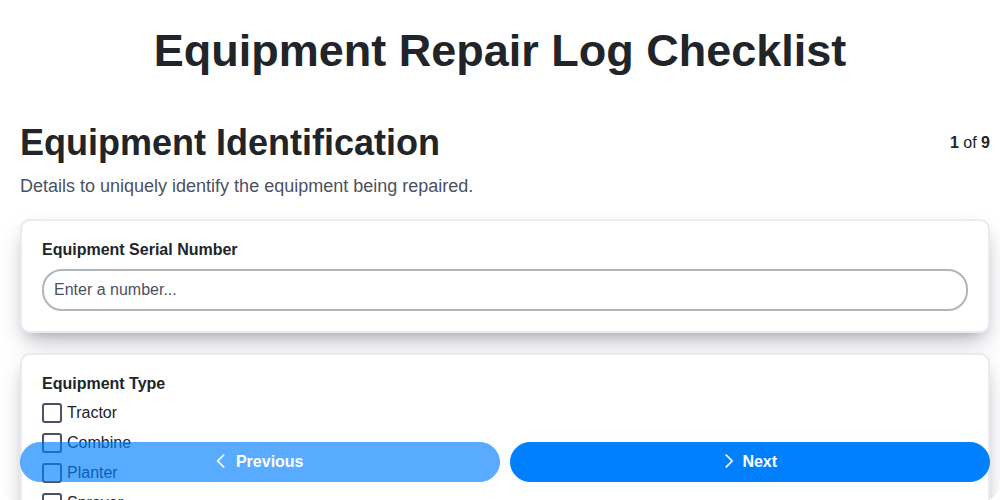
Equipment Repair Log Template: Your Guide to Organized Maintenance
Paper vs ChecklistGuro in Maintenance Management
Need help with
Checklists?
Have a question? We're here to help. Please submit your inquiry, and we'll respond promptly.