HIPAA Compliant Dental Records Workflow: Secure Patient Data Management
Published: 06/09/2026 Updated: 10/05/2026
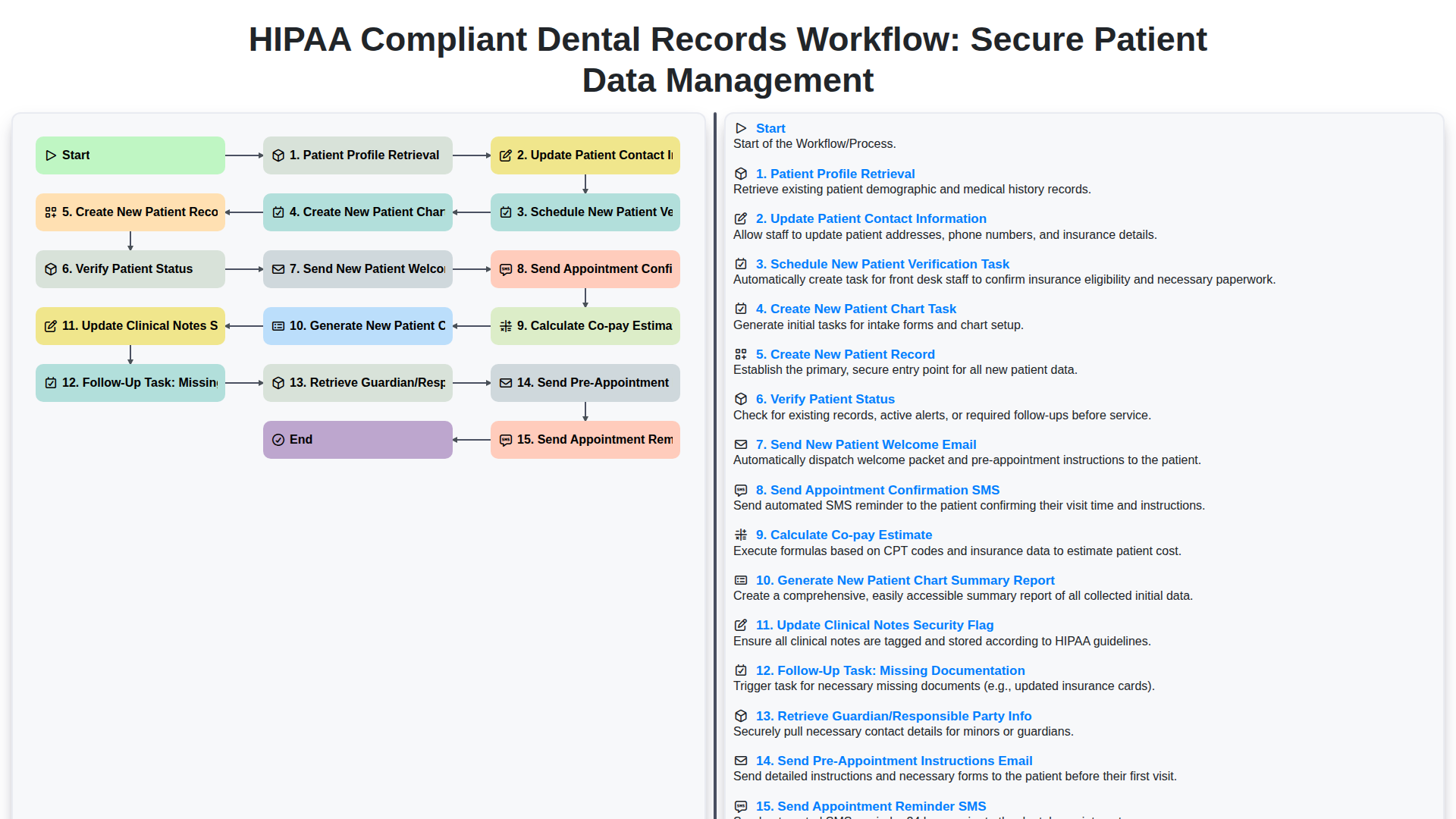
Table of Contents
- Introduction: The Critical Importance of HIPAA Compliance in Dental Workflows
- Phase 1: Secure Patient Identification and Profile Retrieval
- Maintaining Data Integrity: Updating Patient Contact Information
- Streamlining Onboarding: Verification and Chart Creation Tasks
- Establishing the Foundation: Creating and Verifying New Patient Records
- Automated Communication: Secure Patient Engagement via Email and SMS
- Financial Transparency: Calculating Co-pay Estimates Securely
- Administrative Oversight: Generating Chart Summary Reports
- Data Security Protocols: Managing Clinical Notes and Security Flags
- Ensuring Completeness: Managing Missing Documentation and Guardian Information
- Optimizing Appointment Readiness: Pre-Appointment Instructions and Reminders
- Conclusion: Building a Seamless, Compliant Dental Practice
- Resources & Links
TLDR: Learn how to streamline your dental practice's administration and ensure regulatory compliance using this automated workflow. This guide covers everything from initial patient profile retrieval and data verification to secure clinical note updates and automated patient communication, ensuring every step of the patient journey is handled with maximum security and efficiency.
Introduction: The Critical Importance of HIPAA Compliance in Dental Workflows
In the modern dental practice, efficiency and security are often viewed as competing priorities. However, when it comes to managing sensitive patient information, there is no room for compromise. HIPAA (the Health Insurance Portability and Accountability Act) mandates strict standards for protecting much more than just medical diagnoses; it encompasses any protected health information (PHI) that can be used to identify a patient, including names, contact details, and appointment schedules.
A single lapse in your administrative workflow-such as an unencrypted email, an improperly handled patient chart, or an unsecured digital note-can lead to devastating consequences, ranging from heavy federal fines to a permanent loss of patient trust. As dental practices transition from paper-based systems to digital ecosystems, the complexity of managing data increases. A seamless, automated workflow is no longer just a way to save time; it is a fundamental layer of your practice's defense strategy. By integrating compliance directly into your daily operational steps, you ensure that patient privacy is maintained from the moment a new patient is scheduled until their clinical record is finalized.
Phase 1: Secure Patient Identification and Profile Retrieval
The foundation of a HIPAA-compliant workflow begins with the precise and secure identification of the patient. Before any clinical or administrative action is taken, the Patient Profile Retrieval process must be executed within a secure, encrypted environment to prevent unauthorized access to Protected Health Information (PHI).
Once the correct profile is located, the workflow moves into the critical stage of Updating Patient Contact Information. Maintaining accurate, up-to-date contact details is not just an administrative necessity; it is a security requirement to ensure that sensitive communications-such as appointment reminders or lab results-reach the intended recipient and do not inadvertently disclose information to the wrong party.
To ensure the integrity of the newly accessed data, the system initiates a Schedule New Patient Verification Task. This step acts as a secondary audit point, confirming that the identity of the individual matches the records on file. Simultaneously, the workflow triggers a Create New Patient Chart Task, ensuring that all subsequent data entries are siloed within a dedicated, encrypted digital chart. By establishing this rigorous verification and structural setup at the very first touchpoint, the practice mitigates the risk of identity overlap and builds a secure perimeter around the patient's digital identity from the moment they enter the clinic's ecosystem.
Maintaining Data Integrity: Updating Patient Contact Information
Ensuring that your dental practice operates smoothly requires more than just clinical excellence; it demands a commitment to data precision. As a core component of your HIPAA-compliant workflow, the process of Updating Patient Contact Information serves as the frontline defense against administrative errors and communication breakdowns.
In a digital-first healthcare environment, outdated phone numbers, incorrect email addresses, or obsolete mailing addresses do more than just cause minor inconveniences-they create significant risks to patient care and regulatory compliance. When contact details are inaccurate, critical information such as appointment reminders, pre-appointment instructions, and lab results may never reach the intended recipient. This can lead to missed appointments, delayed treatments, and a breakdown in the continuity of care.
From a security standpoint, maintaining accurate contact information is essential for identity verification. Accurate data ensures that sensitive communications and billing notifications are sent to the verified, correct individual, minimizing the risk of accidental data exposure to unauthorized parties. By integrating a systematic verification step into your workflow-re-confirming details during every check-in or via digital intake forms-you fortify the integrity of your patient database, ensuring that your practice remains both efficient and compliant.
Streamlining Onboarding: Verification and Chart Creation Tasks
Once the initial patient profile retrieval is complete and contact information is updated, the focus shifts to the critical phase of administrative setup. To ensure clinical accuracy and prevent data gaps, the workflow triggers a sequence of automated verification and creation tasks.
The process begins with the Schedule New Patient Verification Task, which prompts administrative staff to validate insurance coverage and identity. Simultaneously, the system initiates the Create New Patient Chart Task and the Create New Patient Record steps, ensuring that a secure, permanent digital home for the patient's clinical data is established within your HIPAA-compliant environment.
To maintain the integrity of the medical record, the workflow includes a Verify Patient Status step, confirming the patient's active standing within your practice. If the patient is a minor or requires a proxy, the system automatically prompts to Retrieve Guardian/Responsible Party Info, ensuring all legal and billing responsibilities are correctly assigned from day one. Finally, to prevent administrative bottlenecks during the first visit, a Follow-Up Task: Missing Documentation is automatically generated, alerting the team to any outstanding forms or identifiers required to complete the onboarding process.
Establishing the Foundation: Creating and Verifying New Patient Records
The cornerstone of a HIPAA-compliant dental practice lies in the integrity and accuracy of its initial data entry. The process begins with Patient Profile Retrieval, ensuring that no duplicate records are created and that all existing data is consolidated. Once the foundation is set, the workflow moves into Update Patient Contact Information, a critical step for maintaining the communication channels required for legal notifications and appointment updates.
To ensure clinical and administrative continuity, the workflow triggers a series of automated, synchronized actions. This includes the Schedule New Patient Verification Task and the Create New Patient Chart Task, which assign specific responsibilities to staff members to audit incoming data. Following this, the system proceeds to Create New Patient Record, officially integrating the individual into the practice's ecosystem.
A vital component of security and-compliance is the Verify Patient Status step, which confirms the patient's eligibility and identity. To bridge the gap between administrative setup and patient engagement, the workflow automates the Send New Patient Welcome Email and Send Appointment Confirmation SMS, ensuring the patient is informed and engaged from their very first touchpoint. Finally, to maintain a high standard of care, the system performs a Calculate Co-pay Estimate, providing transparency in billing from the outset, and completes the foundational phase by producing a Generate New Patient Chart Summary Report for a comprehensive administrative overview.
Automated Communication: Secure Patient Engagement via Email and SMS
In a modern dental practice, timely communication is the backbone of patient retention and clinical efficiency. However, when handling sensitive health information, every automated message must be executed through a lens of strict HIPAA compliance. An automated workflow ensures that engagement remains consistent without ever compromising patient privacy.
The moment a new patient enters your system, the workflow triggers a sequence of secure, automated touchpoints designed to build rapport while maintaining data integrity. This begins with the Send New Patient Welcome Email, which introduces your practice and sets the stage for a professional relationship. As the appointment approaches, the system automatically transitions into the Send Pre-Appointment Instructions Email, providing vital information regarding fasting, oral hygiene preparation, or intake forms-ensuring the patient is prepared and reducing last-minute cancellations.
To further minimize no-shows and reduce the administrative burden on your front desk, the workflow integrates automated reminders across multiple channels. By utilizing both Send Appointment Confirmation SMS and Send Appointment Reminder SMS, you provide patients with the convenience of instant mobile updates. These automated triggers ensure that critical appointment details are delivered directly to the patient, reducing the need for manual follow-up calls while ensuring that no sensitive clinical details are sent via unencrypted, non-compliant methods. By automating these touchpoints, your practice achieves a seamless balance between high-touch patient care and rigorous data security.
Financial Transparency: Calculating Co-pay Estimates Securely
Financial transparency is a cornerstone of patient trust and practice efficiency. One of the most critical steps in a HIPAA-compliant workflow is the Calculate Co-pay Estimate phase. By integrating automated cost estimation into your digital workflow, you eliminate the guesswork that often leads to billing disputes and collection delays.
Performing this calculation within a secure, encrypted environment ensures that sensitive insurance details and-patient financial information are never exposed during the estimation process. A streamlined workflow allows your front-desk team to provide patients with an accurate out-of-pocket expectation before they even step into the clinic. This not only reduces sticker shock at the time of service but also strengthens your practice's cash flow by ensuring that financial responsibilities are clearly communicated and documented within the patient's secure record.
Administrative Oversight: Generating Chart Summary Reports
At the conclusion of the initial intake and registration phase, the workflow transitions from data entry to clinical auditing through the process of Generating New Patient Chart Summary Reports. This step is a critical component of administrative oversight, serving as a final quality control mechanism to ensure that all captured data is accurate, complete, and structurally sound before the patient's first clinical encounter.
A comprehensive chart summary report provides a consolidated snapshot of the newly created record, allowing administrators to review the integrity of the data entered during the retrieval and verification stages. By reviewing these summaries, the dental office can identify discrepancies in contact information, missing guardian details, or incomplete insurance documentation in real-time. This proactive auditing prevents data rot-the accumulation of errors that can lead to billing denials or communication breakdowns-and ensures that the patient's digital footprint is established with the high level of precision required for HIPAA-compliant record-keeping. Ultimately, this reporting stage transforms raw data into actionable, verified information, setting the foundation for seamless clinical care.
Data Security Protocols: Managing Clinical Notes and Security Flags
In a dental practice, the integrity of a patient's clinical record is just as critical as the treatment itself. A significant part of maintaining HIPAA compliance involves the precise management of sensitive information within the electronic health record (EHR). A vital component of this workflow is the Update Clinical Notes Security Flag step.
Security flags serve as a digital safeguard, allowing administrative and clinical staff to mark specific entries or entire records that require heightened privacy restrictions. For example, if a patient requests that certain sensitive diagnostic notes only be visible to the lead dentist, or if there is a legal reason to restrict access to specific documentation, the security flag ensures that unauthorized personnel cannot inadvertently view protected health information (PHI).
Managing these flags is not merely an administrative task; it is a core security protocol. When a security flag is updated, it creates a clear audit trail, ensuring that the practice can demonstrate strict adherence to the minimum necessary standard required by HIPAA. By integrating security flag updates directly into the patient record workflow, dental practices can ensure that data privacy is an active, ongoing process rather than an afterthought, effectively shielding sensitive clinical insights from unauthorized access.
Ensuring Completeness: Managing Missing Documentation and Guardian Information
A seamless dental workflow is often derailed not by clinical errors, but by administrative gaps. To maintain both operational efficiency and HIPAA compliance, your workflow must include a dedicated Follow-Up Task: Missing Documentation. Even the most organized practice can encounter scenarios where insurance cards, referral forms, or signed consent forms are missing from a digital file. By automating a follow-up trigger, you ensure that these gaps are closed before the patient arrives, preventing delays in care and potential compliance risks.
This level of diligence extends to complex patient demographics, specifically the step to Retrieve Guardian/Responsible Party Info. For pediatric dentistry or cases involving incapacitated adults, simply having the patient's name on file is insufficient. Your workflow must proactively identify and link the correct legal guardian to the patient profile. Ensuring that the responsible party's contact information and legal authorization are accurately captured is critical for both accurate billing and maintaining a secure, legally sound record of communication.
Optimizing Appointment Readiness: Pre-Appointment Instructions and Reminders
A seamless patient experience begins long before the patient sits in the dental chair. To bridge the gap between booking an appointment and the actual visit, it is critical to implement a structured communication workflow that keeps patients informed and prepared. This phase of the workflow focuses on two key automated actions: Sending Pre-Appointment Instructions via Email and Sending Appointment Reminder SMS.
The Pre-Appointment Instructions Email serves as an essential instructional tool. For certain procedures, patients may need to fast, avoid certain medications, or arrive early to complete paperwork. By automating this step, you ensure that every patient receives consistent, clear guidance, which significantly reduces the likelihood of last-minute cancellations or rescheduled appointments due to lack of preparation.
Complementing this, the Appointment Reminder SMS leverages the high open rates of text messaging to provide a quick, non-intrusive nudge. A well-timed SMS serves as a final confirmation in the patient's daily schedule, reducing no-shows and ensuring your clinic's daily schedule remains optimized. By integrating these automated reminders into your HIPAA-compliant workflow, you minimize administrative burden while simultaneously elevating the professional standard of your patient care.
Conclusion: Building a Seamless, Compliant Dental Practice
Implementing a structured, HIPAA-compliant workflow is more than just a regulatory necessity; it is a fundamental pillar of operational excellence. By automating and standardizing every step-from the initial patient profile retrieval and contact updates to the final generation of chart summary reports-your practice can significantly reduce the risk of human error and data breaches.
A well-defined sequence ensures that no critical task, such as verifying patient status or flagging clinical notes for security, is ever overlooked. As you integrate automated communication tools like appointment reminders and pre-appointment instructions, you simultaneously enhance the patient experience and reduce administrative burnout. Ultimately, transitioning from a manual, fragmented process to this cohesive, secure workflow allows your team to shift their focus away from paperwork and back to what truly matters: providing exceptional, high-quality dental care in a secure environment.
Resources & Links
- HHS HIPAA for Professionals: The official U.S. Department of Health and Human Services resource for understanding HIPAA regulations and compliance standards.
- American Dental Association (ADA): Comprehensive guidelines and resources for dental professionals regarding practice management and patient care standards.
- Dentistry Today: Industry news and insights into dental technology, workflow optimization, and modern practice management.
- DentistryIQ: A resource for dental practice owners focused on improving clinical and administrative workflows and patient experience.
- National Cybersecurity Alliance: Essential resources for understanding data security best practices to protect sensitive electronic health records from breaches.
- Dental Practice Management Software Guides: Information on integrating automated scheduling, SMS, and email tools within HIPAA-compliant dental ecosystems.
Frequently Asked Questions
What does HIPAA compliance mean in the context of dental records workflow?
HIPAA compliance in dental workflows means implementing specific administrative, physical, and technical safeguards to ensure the confidentiality, integrity, and availability of Protected Health Information (PHI) during collection, storage, and sharing.
What are the essential components of a secure dental data management system?
A secure system must include end-to-end encryption, multi-factor authentication (MFA), secure audit logs to track data access, automated backups, and strict access controls to ensure only authorized personnel can view patient records.
How can dental practices prevent data breaches during patient communication?
Practices should avoid using standard unencrypted email or SMS for transmitting PHI. Instead, use HIPAA-compliant patient portals, secure messaging platforms, and encrypted email services to communicate with patients.
What role does staff training play in a HIPAA-compliant workflow?
Staff training is a critical administrative safeguard. Employees must be trained to recognize phishing attempts, follow secure document handling procedures, and understand the legal implications of mishandling patient data to prevent human error.
How often should dental practice audit logs be reviewed?
Audit logs should be reviewed regularly, at minimum monthly, to monitor for any unauthorized access attempts or suspicious patterns in data handling that could indicate a security breach.
Comments
There are no comments yet. Be the first to add one!
Dental Management Solution Demo
Simplify your dental practice & enhance patient care! ChecklistGuro streamlines appointment scheduling, patient records, and billing. Improve efficiency, reduce errors, & boost patient satisfaction. Manage it all with our Work OS.
Related Articles
Your Dental Office Safety Net: The Compliance & Patient Safety Checklist Template
Mastering Dental Recalls: Your Ultimate Checklist Template

Mastering Dental Case Presentations: Your Checklist Template for Success

Your Dental Compliance Checklist: A State & Federal Guide
Dental Operations Checklist: Boost Efficiency & Manage Risk

The Ultimate Dental Lab Case Checklist: Fabrication & Quality Assurance

Your Complete Dental Infection Control Checklist: PPE & Surface Disinfection
Mastering Dental Exams: Your Complete Charting Checklist Template
Need help with
Checklists?
Have a question? We're here to help. Please submit your inquiry, and we'll respond promptly.