A Step-by-Step Guide to Hotel Lost and Found Management Process
Published: 06/18/2026 9:00 PM Updated: 06/19/2026 11:49 AM
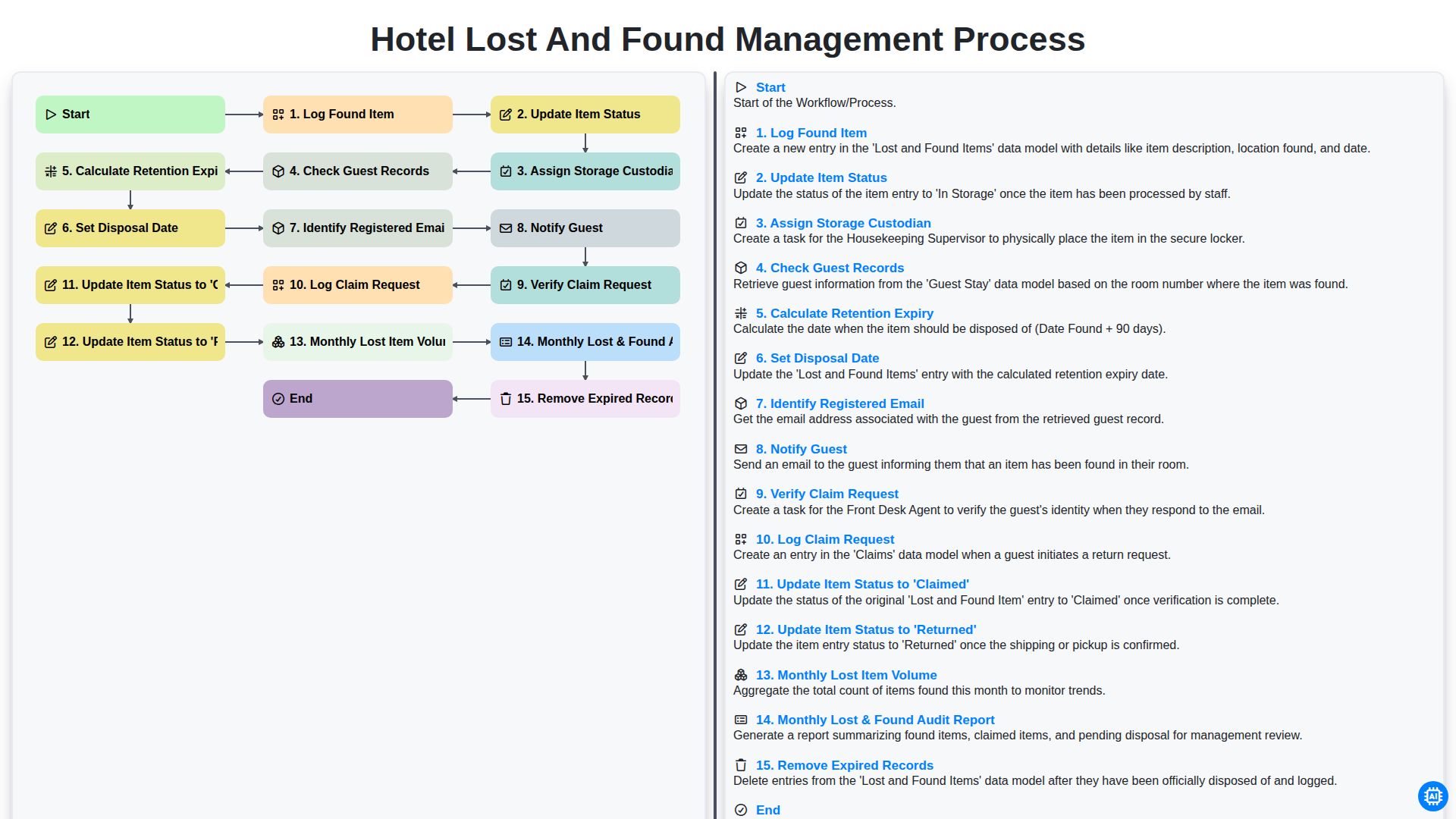
Table of Contents
- Introduction to Efficient Lost and Found Management
- Phase 1: The Initial Discovery and Logging Phase
- Step 1: Log Found Item and Initial Documentation
- Step 2: Update Item Status and Assign Storage Custodian
- Phase 2: The Guest Matching and Retrieval Process
- Step 3: Check Guest Records and Identify Registered Email
- Step 4: Notify Guest and Calculate Retention Expiry
- Step 5: Set Disposal Date for Unclaimed Items
- Phase 3: Managing Claims and Item Return
- Step 6: Verify Claim Request and Log Claim Request
- Step 7: Finalizing the Process: Update Item Status to 'Claimed' or 'Returned'
- Phase 4: Auditing and Inventory Maintenance
- Step 8: Monitor Monthly Lost Item Volume
- Step 9: Monthly Lost & Found Audit Report and Removing Expired Records
- Resources & Links
TLDR: Streamline your hotel's recovery operations with this comprehensive guide to the Lost and Found Management workflow. Learn how to automate the entire lifecycle of an item-from initial logging and guest notification to secure storage, claim verification, and final disposal-ensuring organized tracking and enhanced guest satisfaction.
Introduction to Efficient Lost and Found Management
In the hospitality industry, the guest experience doesn't end at the checkout desk. One of the most critical, yet often overlooked, touchpoints of customer service occurs after a guest has already departed. When a traveler realizes they have left a precious item behind-whether it is a smartphone, a piece of jewelry, or a sentimental souvenir-the efficiency of your hotel's Lost and Found process can be the difference between a lifelong loyal patron and a scathing one-star review.
Effective Lost and Found management is about much more than simply keeping a box of unclaimed items in a back office. It is a systematic workflow that demands precision, accountability, and proactive communication. A disorganized process leads to lost inventory, frustrated staff, and, most importantly, disappointed guests. By implementing a structured management lifecycle-from the moment an item is logged to the final disposal of expired goods-hotels can transform a potential logistical headache into a streamlined service opportunity that reinforces trust and operational excellence.
Phase 1: The Initial Discovery and Logging Phase
The lifecycle of a lost item begins the moment an object is discovered by housekeeping or staff. To ensure accountability and prevent loss, the very first step in the workflow is to Log Found Item. This involves capturing essential details such as the item type, location found, date, and time. Immediately following this, the team must Update Item Status to Found within the management system to ensure the inventory is visible to all departments.
Once the item is logged, the responsibility must be formalized by Assigning a Storage Custodian. This individual is responsible for the physical security of the item and ensuring it is placed in a locked, designated area. To provide proactive service, the system should then automatically Check Guest Records to see if the finder or a recent guest matches the item's profile.
As the item enters the system, the workflow moves into the tracking stage. The system must Calculate Retention Expiry based on your hotel's specific policy (e.g., 90 days for valuables, 30 days for non-valuables) and Set a Disposal Date. This ensures that no item stays in your storage indefinitely, preventing clutter and maintaining an organized inventory.
Step 1: Log Found Item and Initial Documentation
The foundation of an efficient Lost and Found system lies in the precision of its first step. As soon as an item is recovered by housekeeping or front office staff, it must be immediately Logged Found Item within your management system. This initial entry acts as the digital paper trail for the entire lifecycle of the object.
To ensure accuracy and prevent disputes, the documentation process should capture specific details, including the date and time of discovery, the exact location where the item was found (e.g., Room 302, Lobby Lounge), and a clear, descriptive name for the object. A detailed log prevents the common pitfall of anonymous inventory, which often leads to lost claims and frustrated guests. By establishing a rigorous logging protocol, you transform a chaotic recovery process into a structured, searchable database that serves as the single source of truth for your entire team.
Step 2: Update Item Status and Assign Storage Custodian
Once an item has been officially logged into the system, the next critical stage involves real-time tracking and accountability. Updating the item status is essential to ensure that the inventory reflects the current state of the object-whether it is In Storage, Under Investigation, or Pending Return. This step prevents confusion between staff members and ensures that the digital record matches the physical reality of the lost property room.
To maintain a secure and organized environment, the process must also include assigning a storage custodian. By designating a specific team member responsible for the custody of the item, you establish a clear chain of responsibility. This accountability is vital for loss prevention and ensures that every piece of property is accounted for from the moment it is found until it is either returned to a guest or disposed of according to policy.
Phase 2: The Guest Matching and Retrieval Process
Once an item has been logged and stored, the focus shifts from internal organization to active guest recovery. This phase is the most critical component of the workflow, as the primary goal is to reconnect owners with their property through a systematic verification process.
The process begins with a deep dive into the hotel's database to Check Guest Records, cross-referencing the timestamp and room number of the found item with recent departures. Once a potential match is found, the system must Identify the Registered Email associated with that stay to initiate contact.
The communication loop is automated through the Notify Guest step, where a clear, professional alert is sent to the guest. Upon receiving a response, the staff must rigorously Verify the Claim Request by confirming specific details about the item (such as color, brand, or unique markings) to ensure it is being returned to the rightful owner.
As the guest proceeds with the retrieval, the workflow tracks every movement:
- Log Claim Request: Documenting the guest's intent to retrieve the item.
- Update Item Status to 'Claimed': Marking the item as being in the process of retrieval.
- Update Item Status to 'Returned': Finalizing the transaction once the item has left the premises.
By maintaining this level of detailed tracking, the hotel ensures accountability and prevents the lost items from simply disappearing into the administrative void.
Step 3: Check Guest Records and Identify Registered Email
Once an item has been logged and a storage custodian has been assigned, the next critical step in the recovery process is proactive outreach. Rather than waiting for a guest to realize something is missing, the management team should proactively Check Guest Records to see if the lost item can be linked to a recent stay.
By cross-referencing the date the item was found with the hotel's property management system (PMS), you can quickly Identify the Registered Email address associated with the guest's recent reservation. This step is vital for high-value items, as it transforms the process from a reactive lost and found service into a premium, personalized guest recovery experience. Promptly reaching out via their official contact information significantly increases the likelihood of a successful return and reinforces the hotel's commitment to excellent guest service.
Step 4: Notify Guest and Calculate Retention Expiry
Once an item is logged and its retention period is determined, the focus shifts to proactive communication. The process begins by calculating the retention expiry and setting a disposal date based on your hotel's specific policy (e.g., 90 days for standard items or 6 months for valuables). This ensures that your storage space remains organized and that no item is held indefinitely.
With the timeline established, the system will identify the registered email associated with the guest's stay. The next critical step is to notify the guest immediately. An automated or manual alert should be sent to the guest's contact information, providing a brief description of the found item and instructions on how to proceed. Prompt notification is the key to providing exceptional service and increasing the likelihood of a successful recovery, turning a potentially negative experience into a moment of guest delight.
Step 5: Set Disposal Date for Unclaimed Items
Once the retention period has been calculated, the final step in the lifecycle of a lost item is to establish a definitive disposal date. This step is crucial for maintaining an organized storage area and preventing the accumulation of clutter. By setting a clear deadline for when an item is no longer eligible for retrieval, the hotel can ensure a systematic rotation of inventory. This prevents the storage room from becoming a permanent graveyard for forgotten belongings and ensures that the disposal process is driven by data and policy rather than guesswork.
Phase 3: Managing Claims and Item Return
Once an item has been successfully logged and stored, the focus shifts to the critical stage of re-establishing contact with the rightful owner. This phase is where the efficiency of your workflow directly impacts guest satisfaction and brand loyalty.
The process begins by performing a thorough Check of Guest Records to link the found item to a specific stay. Once a match is identified, the system must Identify the Registered Email address from the guest's profile to initiate contact. The next crucial step is to Notify the Guest immediately, providing them with a clear description of the item and the next steps for retrieval.
Upon receiving a response, the staff must carefully Verify the Claim Request to ensure the identity of the claimant matches the guest profile. Once authenticity is confirmed, you must Log the Claim Request in your management system to maintain a digital paper trail.
The final stage of the return process involves updating the item's lifecycle in your database. Depending on the method of retrieval, the team must Update Item Status to 'Claimed' (if the item is being held for pickup) or Update Item Status to 'Returned' (once the item has physically left the premises). Maintaining this level of detail ensures that your inventory remains accurate and that no item is ever truly lost within your own management system.
Step 6: Verify Claim Request and Log Claim Request
Once a guest reaches out to claim their missing property, the process moves from notification to verification. This is a critical stage where the hotel must ensure that the item is being returned to its rightful owner to prevent fraud or errors.
The first step in this phase is to Verify the Claim Request. The custodian must cross-reference the details provided by the guest-such as a physical description of the item, the specific date and location where it was lost, and proof of identity-against the initial entry in the log. This verification step protects the hotel from liability and ensures that sensitive items are not handed over to unauthorized individuals.
Once the identity and ownership are confirmed, the next step is to Log the Claim Request. It is vital to document every detail of the communication, including the date of the request, the method of contact, and the specific instructions provided by the guest (e.g., whether they will pick it up in person or require shipping). By maintaining a detailed audit trail of the claim, the hotel ensures transparency and provides a clear reference point should any disputes arise later.
Step 7: Finalizing the Process: Update Item Status to 'Claimed' or 'Returned'
Once a guest has successfully verified their identity and a claim has been processed, the workflow shifts from active recovery to administrative closing. This final stage is critical for maintaining an accurate, real-time inventory and ensuring that your logs reflect the actual physical state of your storage.
There are two distinct ways to conclude a transaction, depending on the outcome of the claim:
- Update Item Status to 'Claimed': If the guest successfully retrieves their item-whether in person or via a courier service-the item's status must be immediately updated to 'Claimed'. This step is vital for your end-of-month audits, as it allows you to distinguish between items currently sitting in your vault and those that have been successfully returned to their owners.
- Update Item Status to 'Returned': In instances where the item is being sent back to the guest via mail or third-party shipping, use the 'Returned' status. This provides an additional layer of tracking, indicating that while the item is no longer in the hotel's physical possession, the lost and found lifecycle for that specific object is officially complete.
By meticulously updating these statuses, you prevent ghost inventory-items that appear to be in storage but have actually left the building-and ensure your Monthly Lost & Found Audit Report remains a reliable source of truth for management.
Phase 4: Auditing and Inventory Maintenance
To ensure the integrity of the lost and found system, a consistent auditing and maintenance routine is essential. This phase focuses on long-term oversight and the systematic cleaning of records to prevent the storage area from becoming overwhelmed with unclaimed goods.
The process begins with tracking the Monthly Lost Item Volume to identify patterns in item types or seasonal trends, followed by generating a Monthly Lost & Found Audit Report. This report serves as a vital tool for management to verify that all logged items are accounted for and that the chain of custody remains unbroken.
To maintain an organized storage space, the final step is to Remove Expired Records. Once items have passed their calculated retention period, they are officially cleared from the active tracking system, ensuring that your database remains accurate and your physical storage remains manageable.
Step 8: Monitor Monthly Lost Item Volume
Tracking your Monthly Lost Item Volume is a vital component of a proactive management strategy. By analyzing the frequency and types of items being turned in each month, hotel managers can identify recurring patterns or potential operational gaps. For instance, a sudden spike in lost items in the pool area might indicate a need for better signage or increased poolside staff presence. Monitoring these metrics allows you to move beyond reactive management and transition into a data-driven approach, ensuring that your lost and found process remains efficient and scalable.
Step 9: Monthly Lost & Found Audit Report and Removing Expired Records
To maintain a high standard of operational efficiency and ensure the integrity of your inventory, the final phase of the workflow involves a rigorous closing loop. The Monthly Lost & Found Audit Report serves as a critical checkpoint for management. This report aggregates the Monthly Lost Item Volume, allowing you to identify patterns-such as specific locations or times of day when items are frequently left behind-which can inform better staff training and improved guest communication.
Simultaneously, the audit process must include the essential step to Remove Expired Records. Once the Retention Expiry period has lapsed and the Set Disposal Date instruction has been carried out, the digital and physical logs must be purged of old entries. This prevents the database from becoming cluttered with obsolete data and ensures that your storage capacity is reserved for active, recoverable items. Regular cleansing of these records is vital for maintaining a streamlined, searchable, and accurate management system.
Resources & Links
- Hospitality Net: A leading source of news, trends, and best practices for the global hospitality industry, useful for learning about hotel operational standards.
- Hotel Management Network: Provides insights into hotel management software and operational workflows to improve guest satisfaction and efficiency.
- SHRM - Society for Human Resource Management: Resources for managing internal processes, custodian responsibilities, and staff accountability within a professional organization.
- Lost and Found Industry Benchmarks: Reference data regarding industry standards for item retention periods and guest notification protocols.
- Forbes - Innovation in Hospitality: Exploring how digital logging and automated tracking systems are transforming traditional hotel inventory management.
Found this Article helpful?
Comments
There are no comments yet. Be the first to add one!
Hospitality Management Solution Demo
Running a hotel, restaurant, or other hospitality business is demanding. ChecklistGuro's Work OS platform simplifies management, from reservations and guest services to inventory and staff scheduling. Improve efficiency, enhance guest experience, and boost profitability! See how ChecklistGuro can transform your hospitality operations.
Related Articles
Your Ultimate Security Camera Monitoring Log Checklist Template
Payroll Processing Verification Checklist Template: Your Guide to Accuracy
Complaint Handling Checklist Template: Resolve Issues & Retain Customers

Emergency Evacuation Drill Documentation: Your Checklist Template Guide

Mastering Incident Response: Your Free Reporting Protocol Checklist Template
Conquer Your Kitchen: A Monthly Deep Cleaning Checklist Template
Mastering Food Safety: Your Free Temperature Control Checklist Template
Mastering Hand Hygiene: Your Compliance Checklist Template
We can do it Together
Need help with
Checklists?
Have a question? We're here to help. Please submit your inquiry, and we'll respond promptly.