How to Find and Choose the Best Maintenance Management Software
Published: 10/26/2025 Updated: 12/13/2025
Table of Contents
- What is Maintenance Management Software?
- Why Do You Need Maintenance Management Software?
- Common Maintenance Management Software Features
- Different Types of Maintenance Management Software
- Assessing Your Business Needs: A Self-Assessment
- Defining Your Budget for Maintenance Management Software
- Researching Potential Software Solutions
- Key Factors to Consider When Comparing Software
- The Importance of Integrations
- User Interface and User Experience (UI/UX)
- Security and Data Privacy
- Vendor Reputation and Support
- Requesting Demos and Free Trials
- Making Your Final Decision and Implementation
- Resources & Links
TLDR: Overwhelmed by maintenance management software options? This guide breaks down what it is (digital checklists for tracking maintenance tasks, scheduling, and more!), why you need it, and provides a step-by-step process for finding the *right* solution for your business, covering features, integrations, and budget considerations. Stop spreadsheets and reactive fixes - get proactive with the right software!
What is Maintenance Management Software?
Maintenance Management Software (MMS) is a digital system designed to streamline and optimize the processes involved in maintaining assets, equipment, and facilities. Think of it as a centralized hub for everything related to upkeep and repairs. It moves beyond traditional paper checklists or spreadsheets by automating tasks, improving communication, and providing valuable data insights.
Here's a more detailed look at what MMS typically encompasses:
- Work Order Management: Creating, assigning, tracking, and closing work orders for maintenance tasks.
- Preventive Maintenance (PM) Scheduling: Automating recurring maintenance tasks to prevent breakdowns and extend asset lifespan. This is a huge benefit over reactive maintenance!
- Asset Tracking: Maintaining a digital inventory of all your assets, including details like location, purchase date, warranty information, and maintenance history.
- Inventory Management: Keeping track of spare parts and supplies needed for maintenance, ensuring you have what you need when you need it.
- Reporting & Analytics: Providing data on maintenance costs, asset performance, technician efficiency, and more, allowing you to identify areas for improvement.
- Mobile Accessibility: Often includes mobile apps that allow technicians to access work orders, update status, and record data in the field.
- Compliance Management: Helps ensure maintenance activities comply with relevant industry regulations and safety standards.
Essentially, MMS moves you from a reactive, often chaotic maintenance approach to a proactive, data-driven strategy.
Why Do You Need Maintenance Management Software?
Let's face it: maintenance can feel like a constant uphill battle. Reactive repairs, missed schedules, and lost equipment records are common headaches for businesses of all sizes. But what if you could shift from that reactive approach to a proactive, planned strategy? That's precisely what maintenance management software offers.
Beyond simply organizing tasks, a good maintenance management system provides a wealth of benefits. Think reduced downtime, extended equipment lifespan, improved safety for your team, and a clear picture of your maintenance costs. No more frantic searches for past repair records or guesswork when scheduling preventative work.
Here's a more detailed look at why adopting maintenance management software can be a game-changer:
- Reduced Downtime: Preventative maintenance schedules and automated reminders ensure tasks are completed on time, minimizing unexpected breakdowns and costly downtime.
- Extended Equipment Lifespan: Regular maintenance prevents minor issues from escalating into major, expensive repairs.
- Improved Safety: Properly maintained equipment operates safely, reducing the risk of accidents and injuries.
- Cost Savings: Proactive maintenance is almost always cheaper than reactive repairs. You'll also reduce energy consumption and waste.
- Better Resource Allocation: Track labor costs, parts inventory, and equipment performance to optimize your resource allocation.
- Compliance & Reporting: Maintain detailed records for audits and generate reports to demonstrate compliance with industry regulations.
- Increased Efficiency: Streamline workflows, automate tasks, and improve communication among maintenance teams.
Common Maintenance Management Software Features
Most robust maintenance management software solutions offer a range of features designed to streamline your operations and prevent costly downtime. Here's a look at some of the most common and valuable ones:
- Work Order Management: This is the core functionality. It allows you to create, assign, track, and close work orders for various maintenance tasks. Look for features like automated routing, prioritization, and status updates.
- Preventive Maintenance Scheduling: Automatically schedule recurring maintenance tasks based on time, usage, or other factors. This helps prevent breakdowns and extend equipment lifespan.
- Asset Management: A comprehensive view of all your assets, including details like location, purchase date, warranty information, maintenance history, and more.
- Inventory Management: Track parts, supplies, and tools to ensure you have what you need when you need it, avoiding delays and overstocking.
- Reporting & Analytics: Generate reports on key metrics like maintenance costs, equipment performance, and technician efficiency. Visual dashboards provide quick insights into maintenance trends.
- Mobile Accessibility: Allows technicians to access work orders, update status, and record data from anywhere, using smartphones or tablets.
- Integration with Other Systems: Ideally, your maintenance management software should integrate with other business systems like accounting, ERP, or CMMS.
- Compliance Management: For industries with strict regulations, features for tracking compliance documentation and audits are crucial.
- Predictive Maintenance (Advanced): Some systems utilize data analytics and machine learning to predict equipment failures and schedule maintenance proactively.
- User Roles & Permissions: Control access to different features and data based on user roles (e.g., technician, supervisor, manager).
Different Types of Maintenance Management Software
The maintenance management software landscape isn't a one-size-fits-all scenario. Different types cater to varying business sizes, complexities, and priorities. Here's a breakdown of common categories:
CMMS (Computerized Maintenance Management System): This is the classic choice, often geared towards larger facilities or those with extensive equipment. CMMS systems are robust and comprehensive, managing everything from work orders and preventative maintenance schedules to asset tracking, inventory management, and even regulatory compliance. They often include detailed reporting and analytics. While powerful, they can have a steeper learning curve and higher initial investment.
EAM (Enterprise Asset Management): A step beyond CMMS, EAM systems handle a broader scope, incorporating financial and operational data related to assets. They're designed for organizations with significant capital investments in assets and a need for full lifecycle management, including planning, budgeting, and decommissioning.
Preventative Maintenance Software: These solutions focus solely on scheduling and tracking preventative maintenance tasks. They're a good option for businesses primarily concerned with avoiding breakdowns and extending asset lifespan, especially if you don't need the full suite of CMMS features. They're often more user-friendly and cost-effective than full-fledged CMMS.
Mobile-First Maintenance Software: Designed specifically for field technicians, these solutions prioritize mobile accessibility and real-time data capture. They often feature offline capabilities, GPS tracking, and integrated communication tools. They are ideal for businesses with a significant field workforce.
Cloud-Based vs. On-Premise: This isn't a type of software in terms of functionality, but it's a critical deployment consideration. Cloud-based systems are hosted by the vendor, offering accessibility from anywhere and often lower upfront costs. On-premise solutions are installed on your own servers, giving you greater control over data and security, but requiring more IT resources.
Understanding these distinctions will help you narrow your search and identify the software that best aligns with your specific maintenance needs.
Assessing Your Business Needs: A Self-Assessment
Before diving into software demos and feature lists, take a pause. A crucial step in selecting the best maintenance management software is understanding exactly what your business needs. This self-assessment will help clarify those needs and ensure you're making an informed decision.
Let's start with the basics:
- What maintenance activities do you currently perform? List everything - preventative maintenance, reactive repairs, inspections, calibrations, etc. Be specific; don't just say equipment maintenance. Note the types of equipment involved.
- What are your current pain points? Are you struggling with missed deadlines? Lack of visibility into maintenance schedules? Difficulty tracking costs? Data scattered across multiple systems?
- How many assets do you need to manage? This isn't just about quantity; consider complexity. A single complex machine might require more detailed tracking than several simple ones.
- Who will be using the software? Consider the technical skills of your maintenance team. A user-friendly interface is paramount for adoption. Will it be used by technicians in the field, managers in the office, or both?
- What integrations are essential? Does the software need to connect with your accounting system, inventory management tools, or other business applications?
- What's your budget? This isn't just about the upfront cost. Consider ongoing subscription fees, training costs, and potential implementation expenses.
- What are your future maintenance goals? Are you aiming for improved efficiency, reduced downtime, or enhanced regulatory compliance?
Documenting your answers to these questions will create a clear picture of your requirements and help you evaluate software options effectively. Don't skip this step - it's the foundation for a successful software implementation.
Defining Your Budget for Maintenance Management Software
Okay, let's talk about the often-uncomfortable topic of money. Determining a realistic budget is essential before you even begin seriously evaluating maintenance management software. It's more than just looking at the advertised price; it's about considering the total cost of ownership.
Here's a breakdown of factors that influence your budget:
- Subscription Model: Most software operates on a subscription basis (monthly or annual). Understand the pricing tiers and what features are included in each. Many vendors offer tiered pricing based on the number of assets, users, or the complexity of features.
- User Count: The number of users who will need access to the software directly impacts the cost. Factor in maintenance technicians, supervisors, managers, and potentially even administrative staff.
- Features Needed: A basic system might cover essential task tracking, but as your business grows, you might need advanced features like predictive maintenance, work order automation, mobile access, and detailed reporting. Each of these adds to the cost.
- Implementation Costs: Don't forget about setup fees, data migration costs, and training expenses. Some vendors offer implementation services, while others leave the setup to you.
- Integration Costs: If you're integrating the software with existing systems (like your ERP or accounting software), factor in potential integration fees or the cost of developer time.
- Hardware Requirements: While most modern maintenance management software is cloud-based and requires minimal hardware, consider if you're providing mobile devices for technicians.
- Hidden Costs: Be sure to ask about support, upgrades, and potential add-on modules. These can creep up and significantly impact your budget.
Tip: Start by listing all your current maintenance-related expenses (labor, materials, downtime costs). This will give you a benchmark against which to measure the potential ROI of a new software system. A good maintenance management system should ultimately reduce those expenses by improving efficiency and preventing breakdowns.
Researching Potential Software Solutions
Okay, so you know what maintenance management software does and why you need it. Now comes the fun part: finding the right fit for your business! This isn't a one-size-fits-all situation, and a little research goes a long way.
Start with Defining Your Needs (Again!)
Before diving into demos and feature lists, revisit your initial needs assessment. List your must-have features (preventive maintenance scheduling? asset tracking? mobile access?) versus your nice-to-have features. This clarity will filter out solutions that aren't a good match.
Online Reviews and Comparison Sites:
- G2, Capterra, and TrustRadius: These are goldmines! Read user reviews - pay attention to both positive and negative feedback. Look for mentions of ease of use, customer support, and specific features that are important to you.
- Software Comparison Charts: Many websites offer side-by-side comparisons of different maintenance management software. These can provide a quick overview of key differences in pricing, features, and integrations.
- Industry-Specific Forums and Communities: Search online forums or social media groups related to your industry. You might find recommendations from other businesses facing similar challenges.
Vendor Websites - More Than Just Marketing:
- Feature Lists & Demos: Most vendors offer detailed feature lists and demo videos. Take the time to really understand what each feature does and how it could benefit your team.
- Case Studies: See how other companies in your industry are using the software to solve their maintenance challenges.
- Pricing Pages: Be aware of different pricing tiers and what's included in each. Hidden costs (like extra users or integrations) can quickly add up.
Don't Be Afraid to Ask Questions:
Compile a list of questions to ask during demos or when talking to sales representatives. This shows you're serious and helps you get a clear understanding of the software's capabilities and limitations. Examples:
- What level of training and support do you offer?
- Can the software integrate with our existing systems (e.g., ERP, accounting software)?
- What security measures are in place to protect our data?
Key Factors to Consider When Comparing Software
Okay, let's dive into the nitty-gritty of what to really look for when comparing maintenance management software. It's not just about flashy demos or a long list of features; it's about finding a solution that genuinely addresses your specific needs and integrates seamlessly into your existing workflows. Here's a breakdown of key factors to consider:
Functionality & Features: This is the core. Does the software offer the features you actually need? Think beyond the basics. Consider:
Preventative Maintenance Scheduling: Can you easily schedule recurring tasks and automate reminders?
Work Order Management: A robust system for creating, assigning, tracking, and closing work orders is crucial.
Asset Management: Can you track asset details (location, warranty, maintenance history) and link work orders to specific assets?
Inventory Management: Does it help you manage spare parts and supplies?
Reporting & Analytics: Can you generate reports to track performance, identify trends, and optimize maintenance strategies?
Mobile Accessibility: Do your technicians need access on mobile devices for real-time updates and task completion?
Condition Monitoring/IoT Integration: For larger operations, the ability to integrate with IoT sensors for predictive maintenance is a significant advantage.
Integration Capabilities: Your maintenance software won't exist in a vacuum. It needs to play well with other tools you already use - accounting software (like QuickBooks or Xero), ERP systems, and potentially CMMS (Computerized Maintenance Management System) if you're upgrading from one. Poor integration can lead to data silos and increased manual effort.
Ease of Use (User Interface/UX): Complex software that's difficult to navigate will lead to frustration and adoption issues. A clean, intuitive interface is essential for getting your team on board quickly and efficiently. Look for software that's user-friendly, even for those with limited technical expertise. Free trials are invaluable for assessing this.
Scalability: Think about your future needs. Will the software be able to handle your business's growth? Can you easily add users, assets, and locations? Choosing a solution that can scale with you will prevent costly migrations down the line.
Vendor Reputation & Support: Research the vendor's track record. Read reviews, check their customer testimonials, and assess their support options. A responsive and knowledgeable support team is vital when you encounter issues or need assistance.
Pricing & Total Cost of Ownership: Don't just look at the initial price tag. Consider the total cost of ownership, including implementation costs, training, ongoing maintenance fees, and potential add-ons. Understand the licensing model (per user, per asset, etc.) and factor in any hidden costs.
The Importance of Integrations
Maintenance management software isn't an island. It needs to play nicely with the other tools you already use to run your business. Think about it: your accounting software, inventory management system, work order platforms, and even communication tools like Slack or Microsoft Teams.
Without proper integrations, you'll likely find yourself manually transferring data between systems - a process ripe for errors and a massive drain on time. Imagine having to copy asset information from your CMMS into your accounting software every time a repair is completed. That's inefficient, frustrating, and a major roadblock to productivity.
Look for software that offers seamless integrations with your existing tools. Common integrations to consider include:
- Accounting Software (QuickBooks, Xero): Automate expense tracking and budget management.
- Inventory Management Systems: Track parts usage and manage stock levels.
- Work Order Management Platforms: Streamline the request and dispatch process.
- Asset Management Systems: Centralize asset data for improved tracking and planning.
- Communication Tools (Slack, Microsoft Teams): Facilitate real-time communication and notifications.
- IoT Platforms: Integrate data from connected sensors for predictive maintenance.
Prioritizing software with robust API capabilities and readily available integrations will ensure your maintenance data flows freely, providing a holistic view of your operations and maximizing the value of your investment.
User Interface and User Experience (UI/UX)
A clunky, confusing interface can sabotage even the most feature-rich maintenance management software. Don't underestimate the importance of a user-friendly design. Think about your team - are they tech-savvy or do they prefer a simple, intuitive system?
Look for software that prioritizes clear navigation, visual cues, and a logical layout. Drag-and-drop functionality, customizable dashboards, and mobile accessibility (a huge plus for field technicians!) are all indicators of a well-designed UI/UX. A good software should feel easy to learn and use, reducing training time and boosting adoption rates. Look for free trials or demos to get a hands-on feel before committing. Consider how different user roles (maintenance managers, technicians, administrators) will interact with the software - a flexible UI that can be tailored to different needs is a significant advantage.
Security and Data Privacy
Maintenance management software often deals with sensitive information - equipment details, schedules, repair history, and potentially even employee information. Ensuring the security of this data is paramount. Before committing to a solution, thoroughly investigate the vendor's security protocols.
Look for features like:
- Data Encryption: Both in transit (during data transfer) and at rest (while stored on their servers).
- Access Controls: Granular permission levels to restrict who can view, edit, and delete information. Role-based access is a key indicator of a well-designed system.
- Regular Security Audits & Penetration Testing: Ask if the vendor undergoes independent security assessments. Certifications like SOC 2 can be reassuring.
- Data Backup and Disaster Recovery: Confirm they have robust backup procedures and a plan for recovering data in case of an unforeseen event.
- Compliance with Relevant Regulations: Depending on your industry (healthcare, finance, etc.), specific regulations (HIPAA, GDPR, etc.) may apply. Verify that the software and vendor are compliant.
- Two-Factor Authentication (2FA): An extra layer of security for user logins.
Don't hesitate to ask detailed questions about their security practices. Data breaches can be devastating, so prioritizing security is a critical investment.
Vendor Reputation and Support
When choosing maintenance management software, don't underestimate the importance of the vendor's reputation and the support they offer. A fantastic software can quickly become a frustration if you're struggling to implement it or facing issues without adequate assistance.
Here's what to consider:
- Read Reviews & Case Studies: Sites like G2, Capterra, and TrustRadius provide invaluable insights from other users. Pay attention to both positive and negative feedback, looking for trends in user experiences. Case studies on the vendor's website can showcase how they're helping similar businesses.
- Check Their History & Stability: How long has the vendor been in business? Are they financially stable? A vendor with a proven track record and a solid foundation is more likely to be around to support you long-term.
- Evaluate Support Channels: What kind of support do they offer? Do they have online documentation, FAQs, email support, phone support, or live chat? Consider the responsiveness and helpfulness based on user reviews. Premium packages often come with dedicated account managers, which can be a significant benefit for larger operations.
- Training & Onboarding: Does the vendor provide adequate training and onboarding resources? A smooth implementation process can save you time, money, and frustration. Ask about training sessions, tutorials, and knowledge bases.
- Community & Forums: Does the vendor have an active user community or forum? This can be a valuable resource for troubleshooting issues and learning best practices from other users.
Ultimately, choosing a vendor with a strong reputation and reliable support can significantly contribute to the success of your maintenance management system.
Requesting Demos and Free Trials
Once you've narrowed down your potential maintenance management software options, it's time to put them to the test. Don't just rely on brochures and feature lists - experience the software firsthand! Almost all reputable vendors offer demos and free trials. Here's how to make the most of them:
- Prepare a List of Questions: Don't go in blind. Create a list of questions about specific features, integrations, reporting capabilities, and support options. This ensures you're getting the information you need to make an informed decision.
- Involve Key Users: Have maintenance technicians, facility managers, and other team members participate in the demos and trials. Their input is invaluable in determining whether the software is user-friendly and meets their daily needs.
- Test Critical Workflows: Don't just click around randomly. Focus on testing the workflows that are most important to your business, such as creating work orders, scheduling preventative maintenance, and managing inventory.
- Evaluate User Experience: Pay close attention to how intuitive the software is. A complex system will lead to frustration and resistance from your team.
- Assess Support: During the demo or trial, evaluate the vendor's responsiveness and the quality of their support. You'll want to know you can get help when you need it.
- Document Your Findings: Keep a detailed record of your experiences with each software option, noting pros, cons, and any concerns. This will help you compare them objectively.
Making Your Final Decision and Implementation
Okay, you've narrowed down your options and have a few contenders. But the decision isn't quite final yet! This is where the details really matter.
Trial Runs and User Feedback are Key: Don't skip the free trials! Most providers offer them, and they are invaluable. Encourage a diverse group of your maintenance team - from mechanics to facility managers - to test the software. Observe how easily they adapt, how intuitive the interface is, and whether it genuinely improves their workflow. Honest feedback from users is gold.
Beyond the Features: Support and Training: Consider the vendor's commitment to customer support. Do they offer comprehensive onboarding and training resources? A responsive support team can make a huge difference when you encounter challenges. Read reviews and look for testimonials that address the quality of their support.
Scalability and Future-Proofing: Think beyond your current needs. Will this software grow with your business? Can it handle increasing complexity in maintenance operations, additional assets, and potential integrations with other business systems in the future?
Total Cost of Ownership (TCO): The listed price is just the beginning. Factor in implementation costs, training expenses, ongoing support fees, potential hardware upgrades, and any costs associated with data migration. A seemingly cheaper option can quickly become more expensive in the long run.
Data Migration Strategy: How will you move your existing maintenance data (spreadsheets, paper records) into the new system? This can be a significant undertaking, so have a plan. Some vendors offer data migration services; others require you to handle it yourself.
Phased Rollout vs. Big Bang: Consider a phased rollout to minimize disruption. Start with a pilot project involving a small team or a specific location before expanding to the entire organization. This allows you to identify and address any issues before a full-scale implementation.
Resources & Links
- Maintenance Connection: A comprehensive resource for maintenance professionals, offering articles, webinars, and a marketplace for maintenance management software. Excellent for understanding industry best practices and available solutions.
- UpKeep: Offers a modern CMMS solution and a robust blog with articles covering maintenance management, preventative maintenance, and asset management. Includes guides and comparisons.
- Fiix: A CMMS platform with a dedicated resource center. They provide articles, ebooks, and videos to help businesses improve maintenance operations and choose the right software.
- Asset Pencil: Provides a CMMS platform and a blog covering maintenance management topics, asset tracking, and related industry trends. Useful for understanding diverse maintenance approaches.
- LIMS Go: Focuses on Laboratory Information Management Systems but also covers CMMS aspects, which can offer unique perspectives on asset tracking and workflow management relevant to some businesses.
- Reliable Plant: A well-respected resource for reliability and maintenance professionals. They provide articles, training, and conferences with expert insights.
- CMMS Insights: Focuses solely on CMMS and EAM solutions, with a directory of software, comparisons, and articles for decision-makers. A good starting point for software reviews.
- Gale Dimensions: Offers consultancy services and software selection support but also has helpful articles and resources relating to EAM and CMMS software selection. Provides a practical perspective.
- Capterra: A software review platform where users can compare maintenance management software based on reviews, features, and pricing. Provides unbiased user feedback.
- G2: Similar to Capterra, G2 provides software reviews and comparisons based on user feedback. Offers a broad range of software categories including maintenance management.
- TrustRadius: Another reputable software review platform that provides detailed user reviews and comparisons. Provides a deeper dive into software functionality and user satisfaction.
Frequently Asked Questions
What should I do after implementing Maintenance Management Software?
Provide thorough training for users, establish clear workflows and processes, regularly review and analyze data, and continuously optimize the system to maximize its effectiveness.
Comments
There are no comments yet. Be the first to add one!
Maintenance Management Solution Demo
Maximize equipment uptime & reduce costs! ChecklistGuro streamlines maintenance scheduling, work order management, & asset tracking. Prevent breakdowns, optimize performance, & extend equipment life. Manage it all with our Work OS.
Related Articles

Top 10 IBM Maximo Alternatives for 2026
The 5 Best Maintenance Management Software of 2025
How to increase your efficiency with Maintenance Management Software
The 10 Best Free Maintenance Management Software of 2025
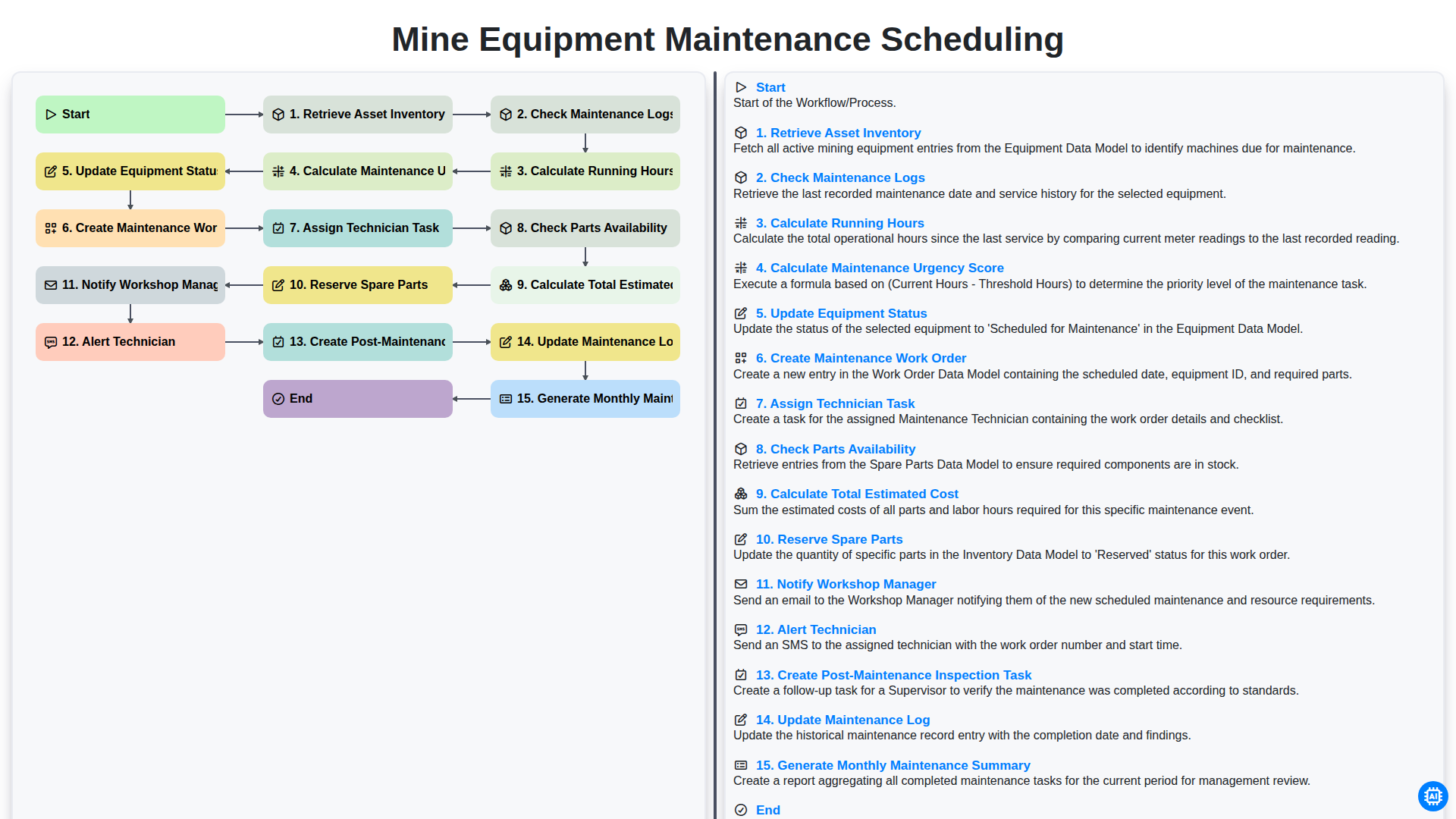
Efficient Mine Equipment Maintenance Scheduling Workflow
How to Save Money on Maintenance Management Software
The 10 Best Maintenance Management Software of 2025

Top 5 High-Payout Affiliate Programs for Maintenance Management Software (2026)
We can do it Together
Need help with
Checklists?
Have a question? We're here to help. Please submit your inquiry, and we'll respond promptly.