The 5 Best Maintenance Management Software of 2025
Published: 12/01/2025 Updated: 07/02/2026
Table of Contents
- Why Choose Maintenance Management Software in 2025?
- Key Features to Look For
- 1. Fiix: A Popular Choice for Growing Businesses
- 2. UpKeep: Mobile-First Simplicity
- 3. Limble CMMS: Customizable and User-Friendly
- 4. Hippo CMMS: Scalable Solution for Complex Operations
- 5. eMaint: Robust Features for Enterprise Needs
- 6. ChecklistGuro: Business Process Management (BPM) for Maintenance
- Choosing the Right Software: Factors to Consider
- Conclusion: Streamlining Your Maintenance Processes
- Resources & Links
TLDR: Need to keep your equipment running smoothly and avoid costly breakdowns? This guide breaks down the top 5 maintenance management software solutions for 2025. We'll cover features like preventative maintenance scheduling, asset tracking, work order management, and reporting, helping you choose the best fit for your business size and needs - all so you can maximize uptime and efficiency.
Why Choose Maintenance Management Software in 2025?
The landscape of business operations is constantly evolving, and in 2025, reactive maintenance simply won's cut it. Relying on fixing equipment after it breaks down is a recipe for downtime, increased costs, and potential safety hazards. Maintenance management software isn't just a nice-to-have; it's becoming essential for operational efficiency and competitiveness.
Here's why embracing maintenance management software is crucial in 2025:
- Proactive vs. Reactive Maintenance: Shift from responding to breakdowns to preventing them through scheduled inspections and maintenance. This reduces unexpected downtime and extends asset lifespan.
- Improved Asset Performance: Gain deeper insights into asset health and performance through data tracking and analysis, allowing for optimized maintenance strategies.
- Reduced Costs: Preventative maintenance is significantly cheaper than emergency repairs. Software helps optimize resource allocation, minimize overtime, and lower overall maintenance expenses.
- Enhanced Safety: Regular inspections and maintenance identify and address potential safety hazards before they lead to accidents and injuries.
- Compliance & Reporting: Many industries have strict regulatory requirements for equipment maintenance. Software simplifies record-keeping and generates reports for audits.
- Mobile Accessibility: Field technicians can access work orders, checklists, and asset information from anywhere, improving communication and efficiency.
- Data-Driven Decisions: Gain a comprehensive view of your maintenance operations with detailed reports and analytics, informing strategic decisions and continuous improvement.
Key Features to Look For
When selecting maintenance management software, it's crucial to go beyond just a list of features. Think about how those features will actually solve your maintenance challenges. Here's a breakdown of the essential capabilities to evaluate:
- Preventative Maintenance (PM) Scheduling: This is the backbone of any good system. Look for robust scheduling options allowing you to set recurring tasks, assign them to technicians, and receive reminders. Customizable schedules that adapt to asset usage and condition are a huge bonus.
- Work Order Management: A clear and efficient work order system is vital. It should allow for easy creation, assignment, tracking, and completion of work requests. Mobile accessibility for technicians in the field is almost a must-have.
- Asset Management/Tracking: Know exactly what assets you have, where they are, their condition, and maintenance history. Look for features like barcode scanning, GPS tracking (for mobile assets), and detailed asset profiles.
- Reporting & Analytics: Data is your friend! You need to be able to generate reports on key metrics like downtime, MTBF (Mean Time Between Failures), MTTR (Mean Time To Repair), and maintenance costs. Customizable dashboards for real-time visibility are also valuable.
- Mobile Accessibility: Technicians rarely work at a desk. Ensure the software has a user-friendly mobile app allowing for work order updates, asset inspections, and communication in the field.
- Integration Capabilities: Can the software integrate with your existing systems, such as accounting, ERP, or inventory management? This will streamline workflows and avoid data silos.
- User Roles & Permissions: Control access levels for different users (e.g., managers, technicians, administrators) to maintain data security and accountability.
1. Fiix: A Popular Choice for Growing Businesses
Fiix consistently ranks among the top maintenance management software options, and for good reason. It's particularly well-suited for growing businesses looking for a robust, scalable solution without the complexity of enterprise-level systems. Its user-friendly interface and intuitive design make it easy for teams of all technical skill levels to adopt and utilize.
What sets Fiix apart is its comprehensive feature set, including computerized maintenance management system (CMMS) capabilities. You'll find robust asset management features, allowing you to track equipment details, maintenance history, and associated costs. Work order management is streamlined, enabling efficient assignment, tracking, and completion of tasks. Fiix also offers mobile accessibility, allowing technicians to access information and update work orders in the field.
Furthermore, Fiix's reporting capabilities provide valuable insights into equipment performance, maintenance costs, and overall operational efficiency. They offer customizable reports to help you identify trends, optimize maintenance schedules, and make data-driven decisions. Integrations with other business systems, like accounting software and ERP platforms, further enhance its versatility. While Fiix offers a free plan for smaller operations, its paid plans unlock advanced features and increased user capacity, making it a compelling choice as your business grows.
2. UpKeep: Mobile-First Simplicity
UpKeep shines with its intuitive mobile-first design, making it a favorite among technicians who spend significant time in the field. The app is exceptionally user-friendly, prioritizing ease of use for both creating and completing maintenance tasks. Forget complicated interfaces; UpKeep focuses on getting the job done quickly and efficiently.
Here's what makes UpKeep stand out:
- Seamless Mobile Experience: The app is the core of UpKeep, offering robust features accessible right from a mobile device. This minimizes paperwork and streamlines communication.
- Simple Work Order Management: Creating, assigning, and tracking work orders is a breeze. Technicians can easily document completed tasks and add photos/videos directly within the app.
- Asset Tracking: Keep a digital inventory of all your equipment, including details like manufacturer, model number, warranty information, and maintenance history.
- Preventative Maintenance Scheduling: Create recurring maintenance schedules to ensure regular upkeep and prevent unexpected failures. Receive automated notifications to keep tasks on track.
- Team Communication: Built-in chat and commenting features facilitate quick communication between technicians, managers, and other stakeholders.
- Reporting & Analytics: Gain insights into your maintenance operations with customizable reports on work order trends, asset performance, and team productivity.
While UpKeep's simplicity is a major selling point, some users may find its reporting capabilities less extensive than those of more feature-rich platforms. However, for businesses prioritizing a highly mobile and easy-to-use maintenance management system, UpKeep is an excellent choice.
3. Limble CMMS: Customizable and User-Friendly
Limble CMMS consistently earns high marks for its ease of use and extensive customization options. It's designed for businesses of all sizes, but its intuitive interface makes it particularly appealing to those new to computerized maintenance management systems (CMMS). What truly sets Limble apart is its drag-and-drop interface for building forms, workflows, and dashboards - allowing you to tailor the software to your specific maintenance processes without requiring extensive technical expertise.
Key features include asset management, work order management with mobile accessibility, preventative maintenance scheduling, and robust reporting capabilities. The platform's asset hierarchy functionality allows for detailed organization of equipment, while its condition codes and meter readings help track asset health and predict failures. Limble also offers excellent integration capabilities with other business systems, further streamlining operations.
While its pricing might be slightly higher than some competitors for smaller businesses, the value derived from its customization and user-friendliness often justifies the cost, especially as your maintenance needs grow and become more complex. They also offer a generous free trial, allowing you to experience its capabilities firsthand before committing.
4. Hippo CMMS: Scalable Solution for Complex Operations
Hippo CMMS is a strong contender for businesses with increasingly complex maintenance operations and a need for scalability. Unlike some simpler solutions, Hippo CMMS offers a robust feature set designed to handle intricate workflows and a large number of assets.
What really sets Hippo CMMS apart is its flexibility. It's built around a highly customizable framework, allowing you to tailor the software to precisely match your existing processes rather than forcing you to adapt to its structure. This includes customizable forms, dashboards, and reporting options.
Key features that make Hippo CMMS appealing for larger or more technically demanding operations include:
- Advanced Workflows: Create multi-step work orders with dependencies, approvals, and custom notifications.
- Asset Hierarchy: Organize assets in a parent-child relationship to reflect your organizational structure and facilitate targeted maintenance.
- Calibration Management: Keep track of calibration schedules and ensure equipment is operating within specified tolerances.
- Mobile Accessibility: Technicians can access and update work orders on the go via a well-designed mobile app.
- Integration Capabilities: Hippo CMMS integrates with various systems, including ERP and accounting software, streamlining data flow and reducing manual entry.
While Hippo CMMS's comprehensive features and customization options can be a significant advantage, it also means a steeper learning curve compared to some of the more user-friendly options. Implementation may require more dedicated training and setup time. However, for organizations willing to invest the effort, Hippo CMMS offers a powerful platform for efficient and proactive maintenance management.
5. eMaint: Robust Features for Enterprise Needs
eMaint stands out as a powerful solution tailored for larger organizations and enterprises with complex maintenance requirements. It's more than just a software; it's a comprehensive Computerized Maintenance Management System (CMMS) offering a vast array of features designed to streamline and optimize maintenance operations across multiple locations.
One of eMaint's biggest strengths is its customizability. While the platform offers robust out-of-the-box functionalities, its flexible architecture allows you to tailor workflows, data fields, and reports to perfectly align with your unique processes. This is particularly valuable for businesses with specific regulatory compliance needs or specialized equipment.
Key features include advanced asset management, preventative maintenance scheduling with intricate rule-based triggers, mobile work order capabilities for field technicians, and sophisticated reporting tools for performance analysis and proactive decision-making. They also offer robust integration options with other business systems, such as ERP and accounting software, fostering data consistency and eliminating silos.
However, this power comes with a steeper learning curve and a higher price point, making it less ideal for smaller businesses or those with simpler maintenance needs. If you're dealing with a significant asset base, multiple sites, and require granular control over your maintenance processes, eMaint is a strong contender. Consider it an investment in a scalable and highly customizable CMMS that can grow with your organization.
6. ChecklistGuro: Business Process Management (BPM) for Maintenance
While not solely a maintenance management software, ChecklistGuro's robust Business Process Management (BPM) platform provides unparalleled flexibility and control over all aspects of maintenance operations. We're different because we let you define your processes. Forget rigid, pre-defined workflows - ChecklistGuro allows you to design maintenance tasks, checklists, and workflows from scratch, integrating asset management, work order management, preventative maintenance scheduling, reporting, and more, all within a single, highly customizable system.
Here's what sets ChecklistGuro apart for maintenance management:
- Total Customization: Build workflows precisely to match your unique maintenance procedures. No need to force your process to fit the software.
- Process Mapping & Automation: Visually map out your maintenance workflows and automate tasks to improve efficiency and reduce errors.
- Integrated Checklists: Build and assign detailed checklists for every maintenance task, ensuring consistent quality and adherence to standards.
- Asset Management Integration: Connect maintenance tasks to specific assets, tracking history, costs, and performance.
- Reporting & Analytics: Gain real-time visibility into maintenance performance with customizable reports and dashboards.
- Mobile Accessibility: Equip your maintenance teams with mobile access to work orders, checklists, and asset information, improving responsiveness and productivity.
ChecklistGuro is ideal for organizations that need more than a standard maintenance management system - those who require a truly adaptable and powerful platform to optimize their entire maintenance process.
Choosing the Right Software: Factors to Consider
Before diving into our top picks, it's crucial to understand that the best software isn't a one-size-fits-all solution. What works wonders for a large manufacturing plant might be overkill (and costly) for a small fleet of vehicles. Here's a breakdown of key factors you should carefully evaluate:
- Business Size & Complexity: A solo contractor's needs differ vastly from those of a multi-site operation. Consider the number of assets, technicians, and locations you're managing.
- Industry Specifics: Certain industries (e.g., healthcare, food processing) have unique regulatory requirements and maintenance protocols. Look for software with features tailored to your sector.
- Budget: Maintenance management software varies significantly in price. Factor in not just the subscription cost, but also implementation fees, training expenses, and potential ongoing support costs.
- Integration Capabilities: Does the software need to integrate with your existing accounting, ERP, or inventory management systems? Seamless integration saves time and reduces errors.
- User Friendliness: A feature-rich software is useless if your team finds it difficult to use. Prioritize intuitive interfaces and readily available training resources.
- Mobile Accessibility: Technicians often work in the field. Mobile apps allow for real-time updates, work order assignments, and data collection.
- Reporting and Analytics: Look for robust reporting features to track key performance indicators (KPIs) like equipment uptime, maintenance costs, and technician productivity.
Conclusion: Streamlining Your Maintenance Processes
Choosing the right maintenance management software is a significant investment, but it's one that pays dividends in increased efficiency, reduced downtime, and improved asset longevity. As we've explored, each of the solutions highlighted - UpKeep, Fiix, Limble CMMS, Maintenance Connection, and Hippo CMMS - offers unique strengths, catering to different business scales and complexities.
Don't just look at the features list; consider your team's technical proficiency, your budget, and the specific challenges you're facing. Many offer free trials or demos, so take advantage of those opportunities to get hands-on experience before committing.
Ultimately, the best software is the one that seamlessly integrates into your existing workflows, empowers your maintenance team, and helps you achieve your operational goals. Start small, iterate, and continuously evaluate to ensure you're maximizing the value of your chosen platform. Remember, proactive maintenance is the cornerstone of a reliable and profitable business.
Resources & Links
- Fiix: A comprehensive CMMS solution geared toward growing businesses, Fiix offers features like work order management, asset tracking, preventative maintenance scheduling, and reporting. It's known for its integration capabilities and user-friendly interface.
- UpKeep: UpKeep stands out for its mobile-first design, making it ideal for maintenance teams working in the field. It focuses on ease of use and quick adoption, with features including work order creation, asset management, and mobile inspections.
- Limble CMMS: Limble CMMS is known for its highly customizable and user-friendly platform. It offers a flexible approach to maintenance management, allowing businesses to tailor the system to their specific needs, with a focus on ease of setup and intuitive design.
- Hippo CMMS: Hippo CMMS is a scalable solution suitable for complex operations and larger organizations. It offers advanced features like predictive maintenance, equipment performance analysis, and custom reporting, catering to businesses with sophisticated maintenance requirements.
- eMaint: eMaint is a robust CMMS designed for enterprise-level maintenance needs. It provides a comprehensive suite of features including asset management, work order management, preventive maintenance, and advanced reporting capabilities, often utilized in industries with stringent regulatory compliance.
- ChecklistGuro: ChecklistGuro differentiates itself with a focus on business process management (BPM) for maintenance. It goes beyond traditional CMMS functionality to automate and optimize entire maintenance workflows and integrate with other business systems. Offers a flexible platform for task and process management.
- Gartner: Gartner is a leading research and advisory company that provides insights and analysis on various technology markets. Their reports and research can provide valuable context and comparisons for evaluating maintenance management software.
- Capterra: Capterra is a software review platform where users can read and write reviews of various software solutions. It's a useful resource for gathering user perspectives and comparing different maintenance management software options.
- TrustRadius: Similar to Capterra, TrustRadius provides user reviews and ratings for software. It's a useful platform to gauge the real-world experience of users employing different CMMS solutions.
- Forbes: Forbes is a leading source of business and technology news. Searching Forbes for articles on maintenance management software trends and vendor reviews can provide valuable industry context.
Frequently Asked Questions
What is maintenance management software and why do I need it?
Maintenance management software helps businesses schedule, track, and manage maintenance tasks for equipment and facilities. It streamlines processes, reduces downtime, improves efficiency, and helps optimize asset lifecycles. It's beneficial for companies of all sizes dealing with physical assets.
How was the "best" software determined for this article?
We evaluated software based on several criteria including features, ease of use, pricing, integrations, customer support, and overall value. We also considered user reviews and industry reputation. This list reflects our research as of late 2024, forecasting for 2025.
Are there any free or open-source options listed in the article?
While the article focuses on premium solutions, we briefly mention some free or open-source alternatives in the 'Alternatives to Consider' section. However, these may have limited functionality compared to the paid options.
What is the difference between CMMS and EAM?
CMMS (Computerized Maintenance Management System) primarily focuses on reactive and preventative maintenance. EAM (Enterprise Asset Management) is a broader system that encompasses CMMS functionality but also includes asset lifecycle management, financial management, and other enterprise-level features. The software listed generally leans towards CMMS functionality but often includes aspects of EAM.
How much does maintenance management software typically cost?
Pricing varies greatly depending on the vendor, features, and number of users. Generally, expect to pay anywhere from $50-$500+ per user per month. The article provides a pricing range for each listed software.
Can I integrate these software solutions with other systems, like my accounting or inventory software?
Most of the listed software offers integration capabilities. The article specifies the common integrations for each solution, such as QuickBooks, Excel, or other industry-specific software. Always confirm integration capabilities directly with the vendor.
What are the system requirements for running this software?
System requirements vary depending on the software. Most solutions are cloud-based and accessible through web browsers, but some may have desktop application options. Refer to the individual software product pages for specific system requirements.
How did you account for future trends (like AI) in your selections?
We considered software with forward-looking features and a commitment to innovation. Several solutions highlighted in the article are already incorporating AI and machine learning for predictive maintenance and automation, which we factored into their ranking.
What if my business is very small and doesn't need all the features of these complex systems?
While the article focuses on robust solutions, smaller businesses with simpler maintenance needs may find success with less comprehensive (and potentially more affordable) options. We encourage exploring free trials and demos before committing to a solution.
Where can I find more detailed information and reviews of these software options?
The article provides links to each software's website for more detailed information. We also recommend checking independent review sites like G2, Capterra, and TrustRadius for user reviews and comparisons.
Comments
There are no comments yet. Be the first to add one!
Maintenance Management Solution Demo
Maximize equipment uptime & reduce costs! ChecklistGuro streamlines maintenance scheduling, work order management, & asset tracking. Prevent breakdowns, optimize performance, & extend equipment life. Manage it all with our Work OS.
Related Articles

Top 10 IBM Maximo Alternatives for 2026
The 10 Best Free Maintenance Management Software of 2025
How to Find and Choose the Best Maintenance Management Software
The 10 Best Maintenance Management Software of 2025
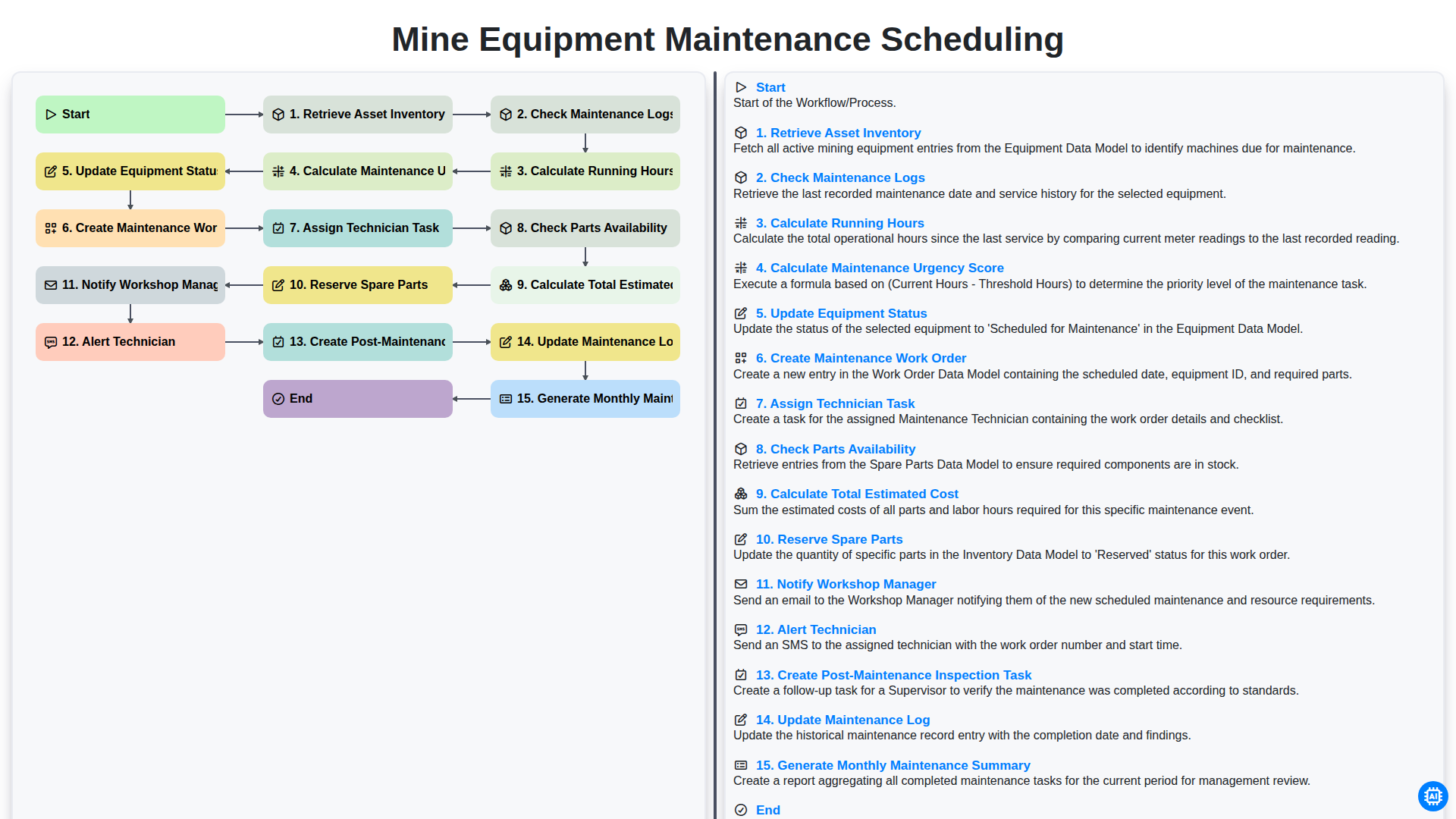
Efficient Mine Equipment Maintenance Scheduling Workflow
How to Save Money on Maintenance Management Software
How to increase your efficiency with Maintenance Management Software

Top 5 High-Payout Affiliate Programs for Maintenance Management Software (2026)
We can do it Together
Need help with
Checklists?
Have a question? We're here to help. Please submit your inquiry, and we'll respond promptly.