
Modern Dental Practice Workflow Guide: Enhance Efficiency with Our Management Solution
Published: Updated: 04/16/2026
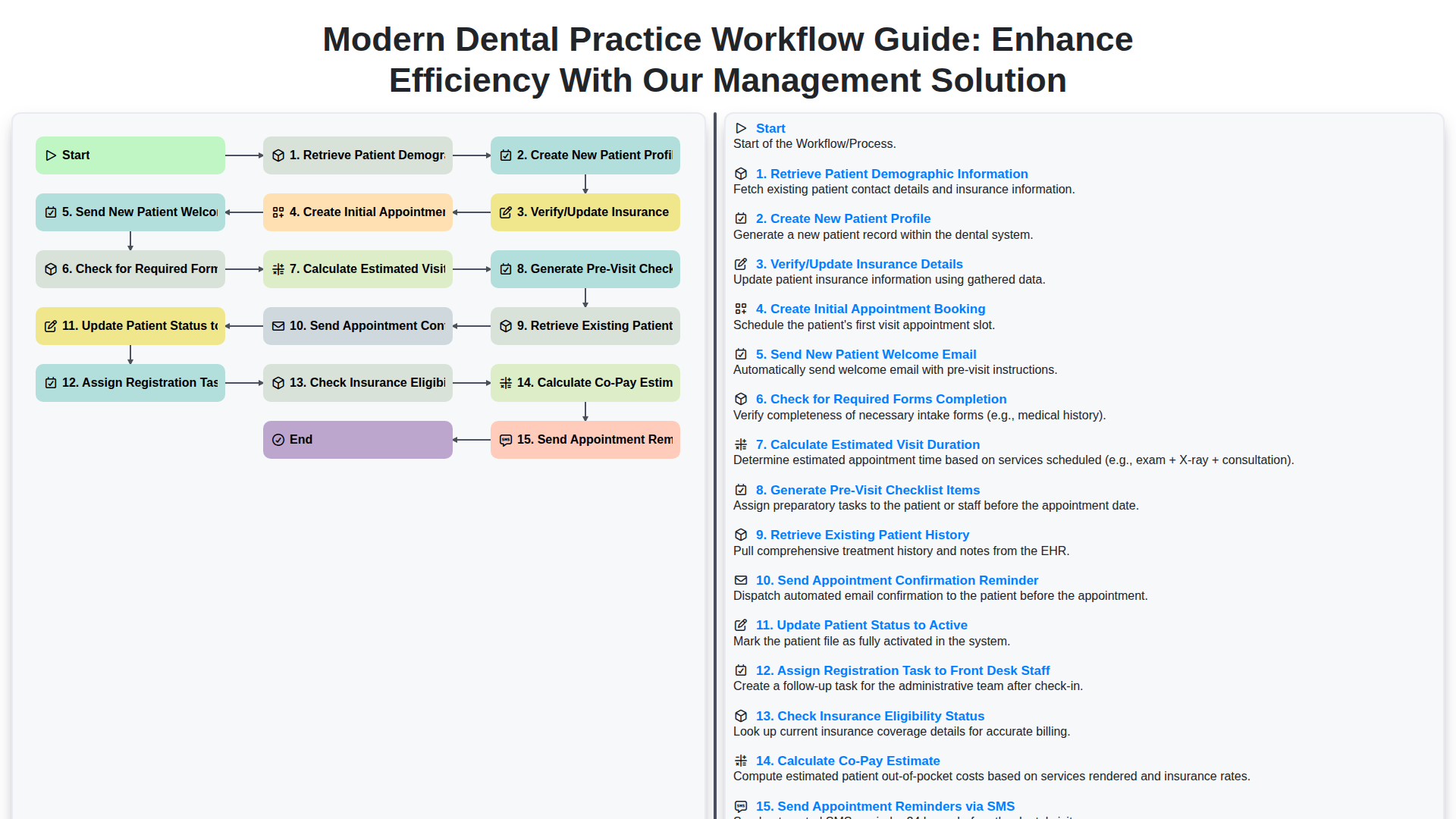
Table of Contents
- The Evolution of Dental Practice Workflow
- Step 1: Seamless Patient Intake - Retrieving and Creating Profiles
- Step 2: Mastering Administrative Tasks - Insurance Verification and Profile Updates
- Step 3: The First Contact - Booking and Onboarding New Patients
- Step 4: Enhancing the Patient Experience - Welcome Communication and Checklist Generation
- Step 5: Preparing for the Visit - History Retrieval, Pre-Visit Checks, and Duration Estimation
- Step 6: The Core Workflow - Appointment Confirmation and Status Updates
- Step 7: Financial Clarity - Insurance Eligibility Checks and Co-Pay Calculation
- Step 8: Communication at Scale - Automated Reminders (Email & SMS)
- Why Our Management Solution is the Workflow Linchpin
- Boosting Staff Productivity with Automated Task Assignment
- Reducing Errors and Improving Patient Satisfaction
- Implementing a Future-Proof Digital Workflow Today
- Resources & Links
TLDR: This guide walks you through a streamlined, step-by-step workflow designed to modernize your dental practice operations. By automating tasks-from initial patient data retrieval and profile creation to appointment scheduling, insurance verification, and pre-visit checkouts-our management solution ensures nothing falls through the cracks, significantly boosting efficiency and improving patient experience for your entire team.
The Evolution of Dental Practice Workflow
Gone are the days of paper filing cabinets overflowing with patient charts and disjointed, manual processes. Modern dental practices operate in an increasingly complex landscape, juggling patient care, billing intricacies, and regulatory compliance. The workflow that was sufficient a decade ago is often insufficient today. The transition from purely paper-based systems to integrated, digital management solutions isn't just an upgrade; it's a necessity for sustainable growth and superior patient experience. Today's efficient workflow is proactive-it guides staff through every touchpoint, from the moment a patient first hears about you to their final exit. Understanding and optimizing this digital pathway is what separates a busy office from a truly high-performing one.
Step 1: Seamless Patient Intake - Retrieving and Creating Profiles
The patient journey begins with a smooth intake process. Our system streamlines this crucial first touchpoint by allowing you to effortlessly Retrieve Patient Demographic Information using various identifiers. If the patient is new, the process continues immediately by guiding you to Create New Patient Profile records, ensuring all necessary details are captured accurately from the outset. For returning patients, the same initial steps allow for quick verification and updating of existing demographic data, saving valuable chair-side time.
Step 2: Mastering Administrative Tasks - Insurance Verification and Profile Updates
The foundation of a smooth patient experience lies in meticulous administrative management. Before any treatment can commence, we must nail down the patient's profile and ensure their financial and logistical details are impeccable. This phase begins with Retrieving Patient Demographic Information, ensuring we have the most current contact details. If it's a first-time visitor, the next crucial step is to Create New Patient Profile, building a comprehensive digital record from scratch. Simultaneously, verifying and updating the Insurance Details is non-negotiable. Outdated insurance information is a leading cause of billing delays and patient frustration. We seamlessly check these details and, where necessary, Verify/Update Insurance Details in real-time. This streamlined approach prevents service interruptions down the line, allowing your front office staff to operate with confidence and accuracy.
Step 3: The First Contact - Booking and Onboarding New Patients
This crucial stage marks the beginning of the patient journey within your practice. The process starts with the Create New Patient Profile, ensuring all necessary preliminary data is captured. Immediately following, your team needs to Verify/Update Insurance Details to ensure billing accuracy from day one. Once the profile is set, the next logical step is to Create Initial Appointment Booking. To enhance the patient experience right away, automate the Send New Patient Welcome Email-this sets a positive and informed tone. Next, you must diligently Check for Required Forms Completion; a proactive system prompts the patient or staff to complete these prerequisites. Simultaneously, the system should Calculate Estimated Visit Duration to help both the patient and the scheduler manage time expectations. Don't forget to Generate Pre-Visit Checklist Items, giving the patient a tangible to-do list before arrival.
Step 4: Enhancing the Patient Experience - Welcome Communication and Checklist Generation
Once the appointment is booked, the focus shifts to making the patient feel welcomed and prepared. Our system automates the sending of a personalized New Patient Welcome Email, providing essential initial information and setting a positive tone from the outset. Complementing this, the workflow intelligently checks for any required forms that need to be completed before the visit, ensuring no administrative roadblocks slow down the patient's check-in. Furthermore, we calculate an estimated visit duration and proactively generate a comprehensive pre-visit checklist. This checklist guides both the patient and the staff, ensuring that all necessary items-from preliminary paperwork to preparatory instructions-are addressed smoothly, setting the stage for a seamless and efficient in-office visit.
Step 5: Preparing for the Visit - History Retrieval, Pre-Visit Checks, and Duration Estimation
This critical juncture bridges the gap between booking and the actual patient encounter. Before the patient even steps foot in the door, our system orchestrates several vital background tasks. First, we automatically retrieve existing patient history, giving your team an immediate, comprehensive view of past visits, treatments, and notes. Next, the platform proactively generates a pre-visit checklist, ensuring nothing-from updated consent forms to specific preparatory instructions-is overlooked. Crucially, we calculate an estimated visit duration based on the scheduled services, allowing your front desk staff to manage patient flow accurately, minimizing wait times, and ensuring a smooth, predictable experience for both staff and patients.
Step 6: The Core Workflow - Appointment Confirmation and Status Updates
This crucial stage bridges the gap between booking and the actual patient visit. Once an initial appointment is booked and the preliminary checks are done, the workflow moves into solidifying the appointment details and setting the patient's status correctly. Sending the Appointment Confirmation Reminder serves as the first confirmation touchpoint, immediately solidifying the commitment. Following this, updating the Patient Status to Active within the system is vital; it signals to all staff that the patient is officially integrated and ready for scheduling services. Crucially, this triggers the Assign Registration Task to Front Desk Staff, ensuring accountability. Simultaneously, the system automatically initiates the Check Insurance Eligibility Status and calculates the Co-Pay Estimate, providing the front desk team with all the financial readiness information before the patient arrives. To ensure high attendance and minimize no-shows, sending Appointment Reminders via SMS acts as the final, direct communication layer.
Step 7: Financial Clarity - Insurance Eligibility Checks and Co-Pay Calculation
Before your patient even walks through the door, financial clarity is paramount. This crucial step involves rigorously checking insurance eligibility status in real-time. Our system connects directly with various insurance payers to verify active coverage, confirm policy details, and identify any potential service limitations. Following a successful eligibility check, the next critical action is to calculate the co-pay estimate. By cross-referencing the planned services with the patient's insurance plan and current fee schedules, the front desk staff can provide the patient with a transparent, accurate estimate of their out-of-pocket costs. This proactive communication not only builds trust but significantly reduces billing discrepancies and payment surprises at check-out.
Step 8: Communication at Scale - Automated Reminders (Email & SMS)
Gone are the days of manually sending out appointment reminders. Our integrated solution automates this crucial communication step, significantly reducing no-show rates and improving patient adherence. Patients receive timely and personalized reminders-both via email and SMS-before their visit. This automation ensures that the necessary information is in the patient's inbox or on their phone at the perfect moment, prompting them to arrive prepared and on time.
Why Our Management Solution is the Workflow Linchpin
Our management solution doesn't just digitize existing processes; it actively enhances the flow between them. By integrating these steps into one cohesive system, we eliminate the manual handoffs, redundant data entry, and potential points of human error that plague traditional dental practices. When a new patient calls in, for example, our system intelligently orchestrates the entire onboarding sequence: pulling demographics, flagging required forms, verifying insurance before the appointment is even confirmed, and notifying the appropriate staff member. This automation means your front desk staff isn't spending valuable time toggling between five different pieces of paper or five different software tabs; they are focusing on the patient experience, knowing the system has handled the complex logistics in the background. This streamlined orchestration ensures that every touchpoint-from the initial welcome email to the final co-pay calculation-is timely, accurate, and professional, making the entire patient journey seamless and efficient.
Boosting Staff Productivity with Automated Task Assignment
Our management solution revolutionizes daily operations by intelligently automating task assignments. Instead of relying on manual checklists and emails, the system automatically assigns specific tasks to the relevant staff member as soon as a patient interaction triggers it. For instance, immediately after a new appointment is booked, the system can automatically assign the Verify Insurance Eligibility task to the billing specialist and the Assign Registration Task to the front desk staff member. This means no follow-up emails are needed, no tasks are forgotten, and staff members always know exactly what needs their attention next, keeping the entire workflow moving seamlessly and boosting overall productivity significantly.
Reducing Errors and Improving Patient Satisfaction
A streamlined workflow is the backbone of a positive patient experience. When your processes are inefficient, errors creep in-misfiled demographics, incorrect billing codes, or missed reminders. These small mistakes can frustrate both your staff and your patients, leading directly to lower satisfaction scores and revenue leakage. By automating the handoff between these key steps-from Retrieving Patient Demographic Information and Creating New Patient Profiles to Checking Insurance Eligibility Status-our management solution ensures accuracy at every turn. Furthermore, timely communication, such as instantly Sending New Patient Welcome Emails and automated Appointment Confirmation Reminders, keeps patients informed and reduces no-shows. Ultimately, a predictable, error-proof digital workflow frees your team to focus on compassionate care rather than tedious data reconciliation.
Implementing a Future-Proof Digital Workflow Today
The transition to a fully digital workflow isn't just about adopting new software; it's about redesigning the entire patient journey to eliminate friction points. A modern management solution orchestrates a smooth, seamless experience from the moment a patient books until their records are complete. For example, when a new patient calls, the system doesn't just take a name-it initiates a multi-step process: first, it retrieves basic demographic data, then guides the staff member to create a comprehensive profile, and critically, prompts for the verification and update of insurance details right away. This proactive approach minimizes billing headaches later. Simultaneously, the system can automatically generate a pre-visit checklist based on the anticipated services, ensuring no crucial form is missed. For returning patients, the workflow is equally intelligent. Upon appointment booking, it can instantly retrieve the patient's full history, automatically send a confirmation reminder via SMS, and even prompt the relevant staff member to perform an immediate insurance eligibility check, providing the co-pay estimate before the patient arrives. This level of interconnected automation is what defines a truly modern, efficient, and patient-centric dental practice.
Resources & Links
- Your Dental Practice Website : The main hub for your management solution, providing an overview of all features discussed in the guide.
- Patient Management Features : Detailed page showcasing modules for retrieving, creating, and maintaining accurate patient demographic information.
- Insurance Verification Module : Resource dedicated to explain the automated insurance eligibility checking and co-pay calculation features.
- Online Appointment Booking & Scheduling : Information on the booking process, including initial appointment setting and reminders.
- New Patient Welcome Portal : Guide on streamlining the new patient experience, including automated welcome emails and required form tracking.
- Task Management & Staff Assignment : Documentation explaining how staff tasks (like registration) are automatically assigned to improve accountability.
- Automated Communication Suite (SMS/Email) : Details on the integrated communication tools for confirmations and reminders via multiple channels.
- Dental Practice Success Stories : Proof points showing how other practices have increased efficiency and patient satisfaction using the solution.
Found this Article helpful?
Dental Management Solution Demo
Simplify your dental practice & enhance patient care! ChecklistGuro streamlines appointment scheduling, patient records, and billing. Improve efficiency, reduce errors, & boost patient satisfaction. Manage it all with our Work OS.
Related Articles
Your Dental Office Safety Net: The Compliance & Patient Safety Checklist Template
Mastering Dental Recalls: Your Ultimate Checklist Template

Mastering Dental Case Presentations: Your Checklist Template for Success

Your Dental Compliance Checklist: A State & Federal Guide
Dental Operations Checklist: Boost Efficiency & Manage Risk

The Ultimate Dental Lab Case Checklist: Fabrication & Quality Assurance

Your Complete Dental Infection Control Checklist: PPE & Surface Disinfection
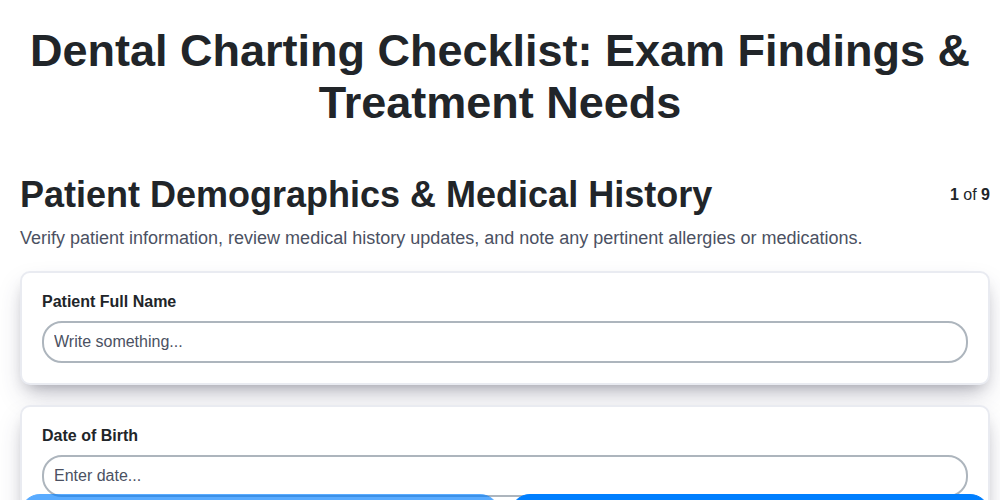
Mastering Dental Exams: Your Complete Charting Checklist Template
We can do it Together
Need help with
Checklists?
Have a question? We're here to help. Please submit your inquiry, and we'll respond promptly.