Streamlined Preventive Maintenance & Asset Lifecycle Management Workflow
Published: 06/04/2026 Updated: 10/05/2026
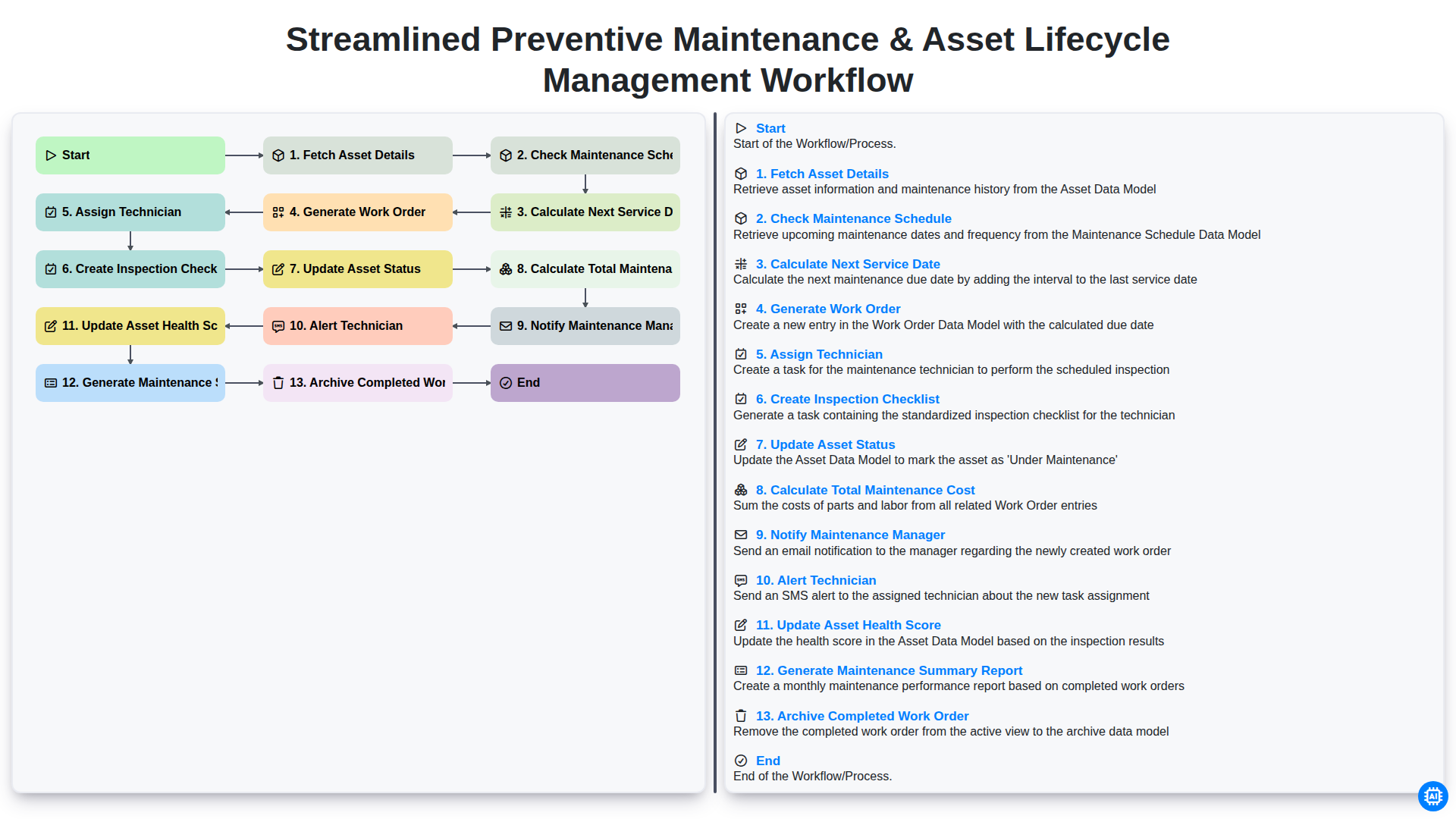
Table of Contents
- Introduction: The Importance of a Structured Maintenance Workflow
- Step 1: Data Foundation - Fetching Asset Details
- Step 2: Proactive Planning - Checking Maintenance Schedules
- Step 3: Predictive Precision - Calculating Next Service Dates
- Step 4: Operational Execution - Generating Work Orders
- Step 5: Resource Optimization - Assigning Technicians
- Step 6: Quality Control - Creating Inspection Checklists
- Step 7: Real-Time Monitoring - Updating Asset Status
- Step 8: Financial Oversight - Calculating Total Maintenance Costs
- Step 9: Communication Loops - Notifying Managers and Alerting Technicians
- Step 11: Documentation & Reporting - Generating Maintenance Summary Reports
- Step 12: Closing the Loop - Archiving Completed Work Orders
- Conclusion: Maximizing Asset Lifecycle Value through Automation
- Resources & Links
TLDR: Discover how to automate your maintenance operations with this end-to-end workflow template designed to eliminate manual tracking. Learn how to seamlessly transition from fetching asset details and calculating service dates to generating automated work orders and updating real-time health scores, ensuring maximum uptime and optimized asset lifecycles.
Introduction: The Importance of a Structured Maintenance Workflow
In the world of industrial operations and facility management, the difference between seamless productivity and costly downtime often lies in the strength of your maintenance strategy. Managing a fleet of machinery or a complex array of infrastructure requires more than just reactive repairs; it demands a proactive, disciplined approach to asset longevity. Without a structured workflow, maintenance becomes a chaotic cycle of firefighting-addressing broken equipment only after it has already disrupted production.
A streamlined preventive maintenance and asset lifecycle management workflow serves as the backbone of operational excellence. By transitioning from a reactive stance to a systematic, automated process, organizations can move beyond mere survival and toward true optimization. A well-defined workflow ensures that every asset is tracked, every service interval is respected, and every technician is empowered with the right information at the right time. Implementing this level of rigor doesn't just prevent unexpected breakdowns; it maximizes the return on investment for your physical assets, extends their functional lifespan, and provides the data-driven insights necessary to make informed capital expenditure decisions.
Step 1: Data Foundation - Fetching Asset Details
The foundation of any effective maintenance strategy lies in the accuracy of your data. The workflow begins with Fetching Asset Details, a critical step that involves gathering all relevant information regarding the specific piece of equipment or infrastructure. This includes identifying unique identifiers (such as serial numbers or asset IDs), manufacturer specifications, installation dates, and operational parameters. By pulling this data from your Centralized Management System or CMMS, you ensure that the subsequent automated steps are operating on a single source of truth. Without this precise initial layer of information, any downstream calculations regarding schedules or costs would be prone to error, potentially leading to missed services or inefficient resource allocation.
Step 2: Proactive Planning - Checking Maintenance Schedules
Once the system has successfully fetched the essential asset details, the workflow moves into the critical phase of proactive planning. The engine automatically cross-references the retrieved asset data against the existing maintenance master schedule.
Rather than relying on manual oversight, this step involves an automated audit of the asset's service history and predefined maintenance intervals. The system scans for upcoming milestones, identifying which assets are approaching their service windows and which are currently up to date. By proactively checking the maintenance schedule, the workflow eliminates the risk of forgetting an asset, ensuring that no piece of equipment falls through the cracks due to human error or oversight. This stage acts as the foundation for the entire preventive strategy, transitioning the workflow from simple data retrieval to intelligent, foresight-driven management.
Step 3: Predictive Precision - Calculating Next Service Dates
Once the system has successfully cross-referenced the asset's maintenance history and current usage metrics, the workflow moves into its most critical phase: Calculating the Next Service Date.
This step transitions your maintenance strategy from being purely reactive to truly predictive. Rather than relying on guesswork or static calendars, the system utilizes data-driven algorithms to determine exactly when an asset requires attention. By analyzing variables such as run-hours, cycle counts, and environmental degradation patterns, the workflow computes a precise window for the upcoming service.
This level of precision ensures that maintenance is never performed too early-which wastes valuable resources and labor-nor too late-which risks catastrophic equipment failure and costly unplanned downtime. By automating this calculation, you eliminate human error and ensure that every asset in your fleet operates within its optimal performance window.
Step 4: Operational Execution - Generating Work Orders
Once the maintenance schedule is analyzed and the next service date is determined, the workflow moves from planning into active operational execution. This stage is critical as it transforms data-driven insights into actionable tasks.
The process begins with the automated Generation of a Work Order. Rather than relying on manual entry or verbal instructions, the system pulls all relevant data-including asset specifications and recent service history-to create a detailed digital work order. This ensures that the maintenance team has a single source of truth regarding the scope of work required.
To ensure precision and accountability, the workflow then proceeds to Assign a Technician. The system identifies the most qualified personnel based on availability and skill set, ensuring the right expert is paired with the right asset. To remove any ambiguity during the physical inspection, the system automatically Creates an Inspection Checklist. This customized list of tasks acts as a standardized guide, ensuring that no critical component is overlooked and that every technician follows the same rigorous quality standards. By digitizing this step, you eliminate the risks associated with manual checklists and ensure a standardized approach to asset care.
Step 5: Resource Optimization - Assigning Technicians
Once the work order has been generated, the workflow moves into the critical phase of resource optimization: Assigning Technicians. An automated workflow removes the guesswork and administrative burden from scheduling by matching the right expertise with the right task.
Instead of manually reviewing spreadsheets to see who is available, the system evaluates technician skill sets, current workload, and proximity to the asset. By intelligently assigning tasks based on real-time data, you ensure that specialized repairs are handled by qualified personnel while preventing burnout caused by uneven distribution of labor. This stage is vital for reducing downtime; an efficient assignment process ensures that maintenance begins as soon as possible, keeping your operational momentum steady and your maintenance costs predictable.
Step 6: Quality Control - Creating Inspection Checklists
To ensure that maintenance is performed to the highest standard and remains consistent across all assets, the workflow transitions from planning to execution through the creation of a customized inspection checklist. This step is critical for standardizing the quality of work and eliminating guesswork for the technician on the ground.
Rather than relying on memory or vague instructions, a generated checklist provides a granular, step-by-step guide tailored to the specific asset being serviced. This might include verifying lubrication levels, checking for structural wear, testing electrical connections, or measuring pressure tolerances. By transforming a standard work order into a structured digital checklist, you create a source of truth that ensures no critical component is overlooked. This layer of rigor not only guarantees operational safety but also provides the necessary data points required to accurately update the asset's health score in the subsequent stages of the workflow.
Step 7: Real-Time Monitoring - Updating Asset Status
Once the maintenance tasks are underway or completed, the workflow moves into a critical phase: Updating Asset Status. This step ensures that your digital twin of the asset reflects its true operational state in real-time.
As soon as a technician begins a task, the asset's status transitions from Operational to Under Maintenance or Down. This real-time visibility is vital for preventing scheduling conflicts and ensuring that production teams are aware of any downtime. By automating this update, you eliminate the risk of manual entry errors and ensure that your dashboard provides an accurate, live view of your entire fleet's availability, allowing for more informed decision-making across the organization.
Step 8: Financial Oversight - Calculating Total Maintenance Costs
Effective asset management isn't just about keeping machinery running; it is about maintaining a clear picture of your operational bottom line. Once the maintenance tasks are executed, the workflow automatically transitions into a critical phase of financial oversight: Calculating Total Maintenance Cost.
This step goes beyond simply tracking the price of a replacement part. The system aggregates every variable expense incurred during the service cycle, including labor hours, specialized tool rentals, consumables, and even the cost of any emergency shipping for overnighted components. By automatically consolidating these figures, the workflow eliminates the manual burden of gathering invoices and timesheets.
Integrating this data into your lifecycle management allows you to move from reactive spending to strategic budgeting. By seeing the true total cost of ownership for each asset, you gain the insights necessary to make informed, data-driven decisions: Is it more cost-effective to continue repairing this aging unit, or is the rising cost of maintenance signaling that it is time for a capital expenditure replacement? This stage of the workflow transforms raw maintenance data into powerful financial intelligence.
Step 9: Communication Loops - Notifying Managers and Alerting Technicians
Effective maintenance management fails when information remains trapped in silos. Once the work order is generated and tasks are assigned, the workflow moves into a critical communication phase: Notifying the Maintenance Manager and Alerting the Technician.
Communication loops ensure that no task falls through the cracks and that everyone involved has real-time visibility into the maintenance pipeline.
- Notifying the Maintenance Manager: Automated notifications to management serve as a layer of oversight. By alerting the manager the moment a work order is triggered, the system ensures leadership is aware of upcoming resource requirements, potential downtime, and upcoming budget implications. This allows for proactive labor planning and ensures that maintenance activities align with overall operational goals.
- Alerting the Technician: For the person on the ground, immediacy is key. Automated alerts (via mobile app, SMS, or email) ensure that technicians receive task updates, schedule changes, and new work orders the moment they are assigned. This eliminates the need for manual check-ins and allows technicians to transition seamlessly from one task to the next, reducing idle time and increasing overall productivity.
By automating these notifications, you transform your workflow from a reactive firefighting mode into a synchronized, responsive operation where the right people always have the right information at the right time.
Step 11: Documentation & Reporting - Generating Maintenance Summary Reports
The final stage of a truly effective maintenance workflow is the transition from physical labor to actionable intelligence. Once the maintenance tasks are completed and the work order is archived, the system automatically triggers the generation of a Maintenance Summary Report.
This step is crucial because it transforms raw operational data into high-level insights. A comprehensive summary report provides a detailed breakdown of what occurred during the service cycle, including the time taken, parts used, and any unforeseen issues encountered. By consolidating this data, organizations can move beyond a reactive fix-it mindset and embrace a proactive strategy. These reports serve as the primary resource for auditing, budget forecasting, and identifying recurring patterns of equipment failure, ultimately providing the empirical evidence needed to make informed decisions about asset replacement or large-scale capital investments.
Step 12: Closing the Loop - Archiving Completed Work Orders
The final step in a truly efficient maintenance workflow is the seamless transition from action to documentation. Archiving completed work orders is more than just a housekeeping task; it is the critical closing of the loop that ensures your data remains organized, searchable, and useful for long-term decision-making.
Once a technician has completed the repairs and all documentation is verified, the work order should be moved from Active status to a permanent digital archive. This prevents your active dashboard from becoming cluttered with outdated tasks, allowing your team to focus strictly on current priorities. However, archiving does not mean the data disappears. By maintaining a structured digital archive, you preserve a vital historical record of every intervention, part replacement, and labor hour spent on each asset. This historical continuity is the foundation of predictive maintenance, providing the longitudinal data necessary to identify recurring failure patterns and optimize your entire asset lifecycle strategy.
Conclusion: Maximizing Asset Lifecycle Value through Automation
Implementing an automated workflow for preventive maintenance is more than just a matter of convenience; it is a strategic move toward operational excellence. By transitioning from reactive repairs to a streamlined, automated cycle-from fetching asset details to archiving completed work orders-organizations can eliminate the costly downtime and manual errors that plague traditional maintenance models.
The true value of this workflow lies in its ability to transform raw data into actionable intelligence. When your system automatically calculates next service dates, updates asset health scores, and generates comprehensive summary reports, you are no longer just fixing machines-you are managing a predictable, optimized lifecycle. This proactive approach extends the functional lifespan of your critical assets, optimizes technician productivity, and ensures that every dollar spent on maintenance is tracked and justified. Ultimately, automating these steps allows your team to move away from firefighting and toward a future of data-driven, high-performance asset management.
Resources & Links
- IBM Asset Management Insights: Comprehensive guides on implementing enterprise-grade asset lifecycle management and maintenance strategies.
- UpKeep Maintenance Resource Center: Educational articles and best practices regarding preventive maintenance workflows and CMMS automation.
- Fiix Knowledge Base: Deep dives into predictive maintenance, technician scheduling, and optimizing maintenance cost calculations.
- ASHRAE Standards & Best Practices: Industry-standard resources for maintaining equipment health and implementing structured inspection checklists.
- Gartner IT Operations Research: Strategic insights into how automated workflows and real-time monitoring improve organizational efficiency.
Frequently Asked Questions
What is the primary goal of a streamlined preventive maintenance workflow?
The primary goal is to reduce unplanned downtime, extend the operational lifespan of equipment, and optimize resource allocation by replacing reactive repairs with scheduled, data-driven maintenance tasks.
How does asset lifecycle management differ from simple preventive maintenance?
While preventive maintenance focuses on routine upkeep to prevent failure, asset lifecycle management covers the entire journey of an asset, including procurement, installation, operational monitoring, maintenance, and eventual decommissioning or replacement.
What are the key benefits of integrating maintenance and lifecycle management?
Integration provides a holistic view of asset health, allowing organizations to make informed decisions about when to repair versus when to replace, ultimately reducing long-term capital expenditure and improving ROI.
What role does data play in a streamlined maintenance workflow?
Data serves as the foundation for predictive insights. By tracking usage patterns, historical repair data, and sensor inputs, organizations can transition from time-based maintenance to condition-based maintenance.
How can an organization measure the success of a new maintenance workflow?
Success can be measured through key performance indicators (KPIs) such as Mean Time Between Failures (MTBF), reduction in emergency repair costs, maintenance backlog size, and total cost of ownership (TCO) for critical assets.
Comments
There are no comments yet. Be the first to add one!
Maintenance Management Solution Demo
Maximize equipment uptime & reduce costs! ChecklistGuro streamlines maintenance scheduling, work order management, & asset tracking. Prevent breakdowns, optimize performance, & extend equipment life. Manage it all with our Work OS.
Related Articles
Construction Equipment Maintenance Checklist Template

Paper vs ChecklistGuro in Facility Management
The Ultimate O&M Manual Checklist Template

Excel vs ChecklistGuro in Facility Management
Excel vs ChecklistGuro in Maintenance Management
Your Ultimate Guide to Critical Spares Management: A Checklist Template
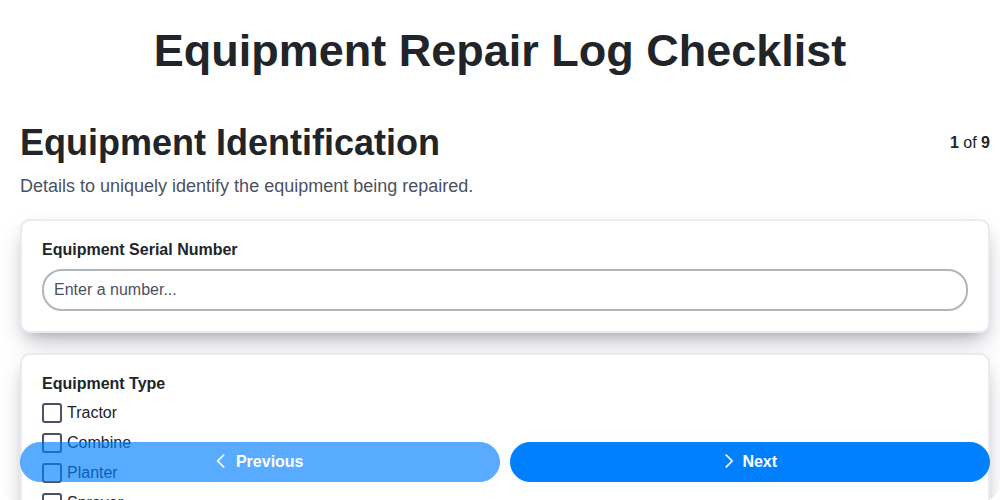
Equipment Repair Log Template: Your Guide to Organized Maintenance
Paper vs ChecklistGuro in Maintenance Management
Need help with
Checklists?
Have a question? We're here to help. Please submit your inquiry, and we'll respond promptly.