 ChecklistGuro
 Retail Employee Onboarding Process
Streamline your store's success from day one with our comprehensive Retail Employee Onboarding Process. Master every step of the journey-from seamless paperwork and hardware setup to essential floor training and POS mastery-ensuring new hires are retail-ready, confident, and high-performing. Optimize your staff retention and operational efficiency with this proven step-by-step retail training workflow.
This Template was installed 4 times.
Start
Start of the Workflow/Process.
1. Create Employee Record
Create a new entry in the 'Employee' data model with details provided in the onboarding form.
2. Assign IT Equipment Setup
Create a task for the IT Department to prepare laptop, peripherals, and software access.
3. Assign Store Manager Welcome Task
Create a task for the Store Manager to conduct the in-store facility tour.
4. Update Employee Status
Update the 'Status' field in the Employee data model to 'Onboarding in Progress'.
5. Fetch Store Location Details
Get details of the assigned store location (address, manager contact) from the 'Stores' data model.
6. Calculate Training Completion Date
Calculate the deadline for mandatory training based on the Start Date + 7 days.
7. Assign Compliance Training Checklist
Create a task for the new hire containing the mandatory safety and legal compliance checklist.
8. Send Welcome Email to New Hire
Send an automated welcome email to the employee's personal email address with onboarding instructions.
9. Notify Store Manager
Send an email to the Store Manager notifying them that a new team member has been assigned to their branch.
10. Retrieve Manager Contact Info
Retrieve the email and phone number of the Store Manager from the Store data model.
11. Payroll Setup Task
Create a task for the HR/Payroll team to enter bank details and tax information into the system.
12. Update Store Staff Count
Update the 'Total Headcount' field in the Store data model to reflect the new hire.
13. Calculate Store Training Budget Spent
Aggregate the cost of all training modules assigned to this store to monitor the monthly training budget.
14. Send SMS Arrival Reminder
Send an SMS to the new hire's phone number one day before their start date.
15. Uniform and ID Badge Creation
Create a task for the Admin/HR team to prepare the employee uniform and printed ID badge.
16. Set Onboarding Completion Date
Update the 'Onboarding End Date' in the Employee record once all tasks are marked complete.
17. Generate Monthly Onboarding Report
Create a report summarizing all employees onboarded during the current month for HR review.
18. Clean Up Temporary Onboarding Drafts
Delete temporary data entries/drafts used during the initial application stage once the official record is created.
End
End of the Workflow/Process.
Start of the Workflow/Process.
Create a new entry in the 'Employee' data model with details provided in the onboarding form.
Create a task for the IT Department to prepare laptop, peripherals, and software access.
Create a task for the Store Manager to conduct the in-store facility tour.
Update the 'Status' field in the Employee data model to 'Onboarding in Progress'.
Get details of the assigned store location (address, manager contact) from the 'Stores' data model.
Calculate the deadline for mandatory training based on the Start Date + 7 days.
Create a task for the new hire containing the mandatory safety and legal compliance checklist.
Send an automated welcome email to the employee's personal email address with onboarding instructions.
Send an email to the Store Manager notifying them that a new team member has been assigned to their branch.
Retrieve the email and phone number of the Store Manager from the Store data model.
Create a task for the HR/Payroll team to enter bank details and tax information into the system.
Update the 'Total Headcount' field in the Store data model to reflect the new hire.
Aggregate the cost of all training modules assigned to this store to monitor the monthly training budget.
Send an SMS to the new hire's phone number one day before their start date.
Create a task for the Admin/HR team to prepare the employee uniform and printed ID badge.
Update the 'Onboarding End Date' in the Employee record once all tasks are marked complete.
Create a report summarizing all employees onboarded during the current month for HR review.
Delete temporary data entries/drafts used during the initial application stage once the official record is created.
End of the Workflow/Process.
Frequently Asked Questions
Comments
There are no comments yet. Be the first to add one!
Retail Management Solution Demo
Boost retail efficiency! ChecklistGuro simplifies store operations, inventory management, and employee training. Improve customer experience and maximize profitability. Manage it all with our Work OS.
Related Workflow Templates

Retail Distribution and Logistics Management

Retail Demand Forecasting Workflow

Store Maintenance and Facilities Management

Retail Returns and Reverse Logistics

Seasonal Stock Transition Workflow

Retail Warehouse Management Process

Customer Relationship Management (CRM) Workflow
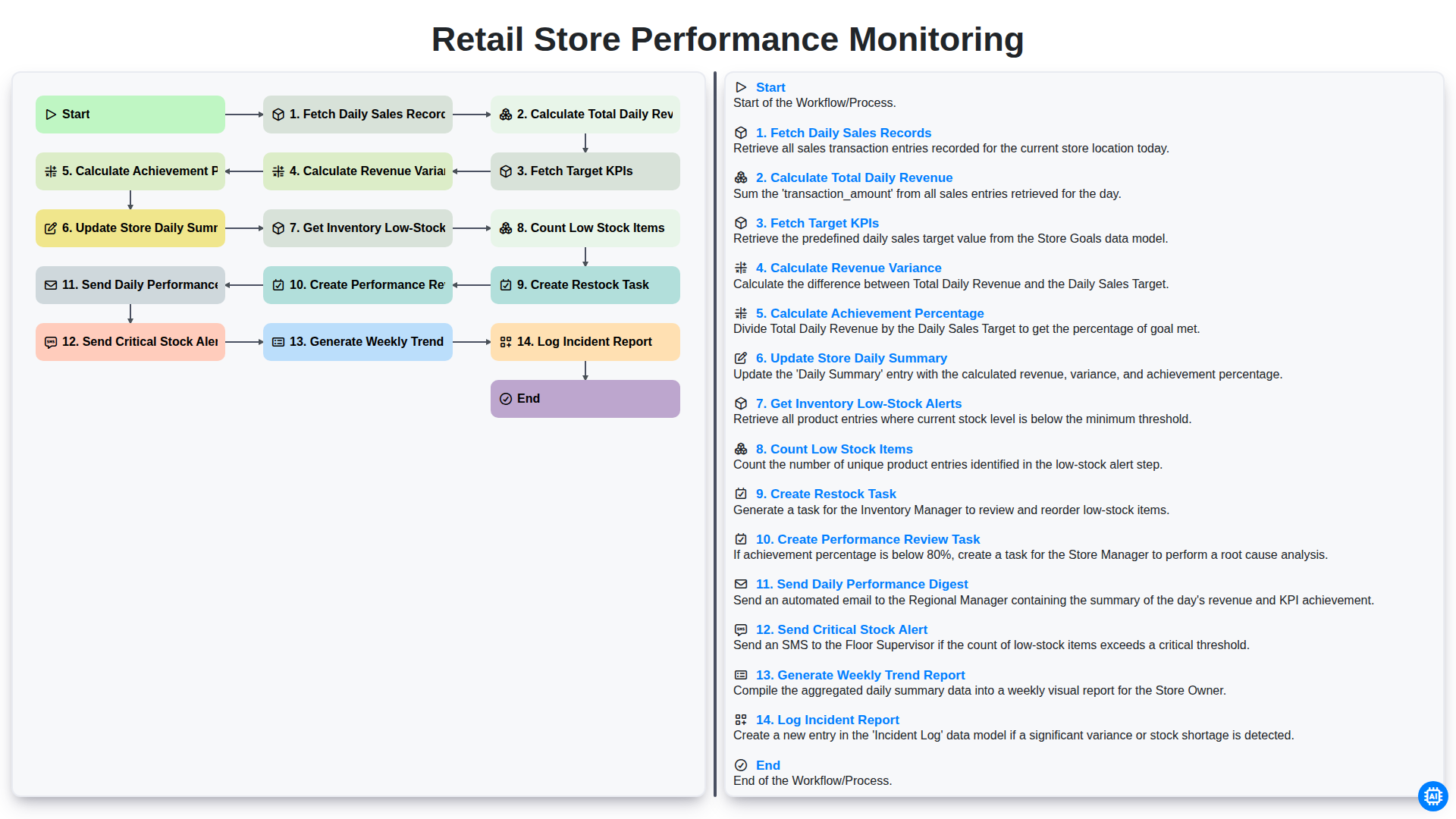
Retail Store Performance Monitoring
We can do it Together
Need help with
Retail?
Have a question? We're here to help. Please submit your inquiry, and we'll respond promptly.