ADA Compliance Checklist Template for HR
Published: 10/16/2025 Updated: 12/13/2025
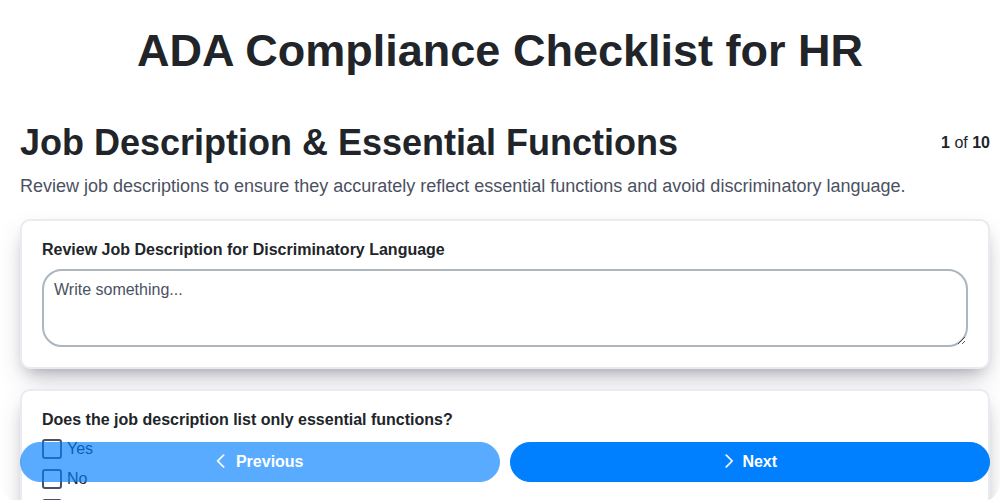
Table of Contents
- Introduction: Why ADA Compliance Matters for HR
- Understanding the Americans with Disabilities Act (ADA)
- Key Definitions: Disability, Reasonable Accommodation, and Essential Functions
- Job Description & Essential Functions: Ensuring Accuracy & Clarity
- Recruitment & Advertising: Promoting Inclusive Hiring Practices
- Application Process: Accessibility for All Candidates
- Reasonable Accommodation Requests: Establishing a Clear Process
- The Interactive Process: Collaborative Problem-Solving
- Medical Inquiries and Confidentiality: Navigating Legal Boundaries
- Workplace Accessibility: Physical and Digital Accommodations
- Assistive Technology & Equipment: Providing Necessary Tools
- Training and Awareness Programs: Educating Your Workforce
- Recordkeeping and Documentation: Maintaining Compliance Records
- Regular Review and Updates: Staying Current with ADA Guidelines
- Resources & Links
TLDR: Need to ensure your HR practices are ADA compliant? This checklist template simplifies the process, guiding you through essential steps like job descriptions, accommodations, and training. Download it and use it to protect your employees and your business!
Introduction: Why ADA Compliance Matters for HR
As HR professionals, we're often juggling a lot - recruitment, onboarding, performance management, and so much more. But amidst these daily tasks, it's crucial to prioritize legal compliance, and the Americans with Disabilities Act (ADA) should be high on that list. It's not just about avoiding potential lawsuits (though that's certainly a significant consequence of non-compliance); it's about building a truly inclusive and equitable workplace where every individual has the opportunity to thrive.
An effective ADA compliance strategy translates to a more diverse and talented workforce, a stronger company reputation, and a culture of respect and understanding. Ignoring these responsibilities can lead to costly legal battles, damage your brand, and ultimately miss out on the contributions of qualified candidates and employees. This article provides a practical checklist to guide your efforts, ensuring you're not only adhering to the law, but also fostering a workplace where everyone belongs.
Understanding the Americans with Disabilities Act (ADA)
The Americans with Disabilities Act (ADA) is a landmark civil rights law that prohibits discrimination based on disability. Enacted in 1990, it ensures individuals with disabilities have equal opportunities in employment, state and local government services, public accommodations, and transportation.
At its core, the ADA focuses on providing reasonable accommodations - modifications or adjustments to the work environment or job duties - that enable qualified individuals with disabilities to perform the essential functions of their roles. A "qualified individual with a disability" is someone who is able to perform the essential functions of a job with or without reasonable accommodations, and who meets the requirements of the position.
The ADA is comprised of five titles, each addressing a specific area:
- Title I: Employment: Focuses on preventing discrimination in hiring, firing, promotion, training, and other employment practices.
- Title II: State and Local Government Services: Ensures equal access to programs and services offered by state and local governments.
- Title III: Public Accommodations: Requires businesses and non-profit organizations that serve the public to be accessible.
- Title IV: Telecommunications: Addresses accessibility of telecommunications services.
- Title V: Miscellaneous Provisions: Contains various provisions related to the ADA's enforcement and implementation.
Understanding these fundamental aspects of the ADA is crucial for employers striving to create inclusive and equitable workplaces.
Key Definitions: Disability, Reasonable Accommodation, and Essential Functions
Understanding the core terminology is fundamental to ADA compliance. Let's break down three essential definitions: disability, reasonable accommodation, and essential functions.
Disability: The ADA defines a disability as an impairment that substantially limits one or more major life activities. Major life activities include, but aren't limited to, seeing, hearing, walking, standing, lifting, learning, reading, concentrating, thinking, and communicating. This definition extends to individuals with a history of a substantially limiting impairment, or those perceived as having such an impairment, even if it's inaccurate.
Reasonable Accommodation: A reasonable accommodation is a modification or adjustment to a job or work environment that enables a qualified individual with a disability to perform the essential functions of the position. Accommodations can include, but are not limited to, providing assistive technology, modifying work schedules, restructuring tasks, or providing physical adjustments to the workplace. An accommodation must be reasonable, meaning it doesn't cause undue hardship to the employer.
Essential Functions: These are the fundamental and non-negotiable duties of a job. They represent the core responsibilities that an employee must be able to perform, with or without reasonable accommodation, to successfully fulfill the role. Identifying and documenting essential functions is crucial for ADA compliance, informing job descriptions, and determining appropriate accommodations.
Job Description & Essential Functions: Ensuring Accuracy & Clarity
The foundation of ADA compliance begins with meticulously crafted job descriptions. These aren't just formality; they're legal documents that define the core responsibilities of a role and serve as the baseline for reasonable accommodation considerations. Here's how to ensure your job descriptions are both accurate and compliant:
- Focus on How the Work is Done: Don't just list tasks. Describe how those tasks are performed, the level of skill required, and the physical or mental exertion involved. For example, instead of Manage social media, write Create and schedule engaging social media content, analyzing performance metrics and responding to audience inquiries; requires proficient computer skills and the ability to work independently for extended periods.
- Avoid Assumptions: Don't assume that all employees can perform a task in the same way. Essential functions should be defined in terms of the result achieved, not the specific method used.
- Review Regularly: Job roles evolve. Regularly review and update job descriptions to reflect changes in responsibilities and ensure they remain accurate.
- Collaboration is Key: Involve hiring managers and existing employees in the development of job descriptions to ensure accuracy and a clear understanding of the role.
- Document the Reasoning: If a physical requirement is deemed essential, document why it's essential and how it relates to the job's core functions. This demonstrates a thoughtful and defensible decision-making process.
Recruitment & Advertising: Promoting Inclusive Hiring Practices
Beyond simply stating you're an equal opportunity employer, proactive steps in your recruitment and advertising significantly broaden your talent pool and demonstrate a commitment to inclusivity. Start by critically examining your language. Words can inadvertently create barriers. Replace phrases like digital native or strong work ethic with more objective and inclusive alternatives. Focus on the skills and qualifications needed to succeed in the role.
Ensure your job postings are accessible across all platforms. This includes adding alt text to images, providing transcripts for videos, and ensuring compatibility with screen readers. Many job boards offer accessibility checklists - utilize them!
Consider advertising in diverse channels. This could include partnering with disability-focused organizations, attending job fairs targeting diverse populations, and utilizing social media platforms that reach a wider audience. Be mindful of representation in your visuals; showcasing a diverse team can be incredibly impactful. Finally, actively solicit applications from individuals with disabilities - let them know you value their unique perspectives and skills.
Application Process: Accessibility for All Candidates
Ensuring a fair and accessible application process is the first step in demonstrating your commitment to inclusivity. Many talented individuals with disabilities face barriers during the initial stages of applying for a job. Let's remove those barriers and create an environment where everyone feels welcome to showcase their abilities.
Here's how to make your application process accessible:
- Online Application Forms: These are a common hurdle. Prioritize WCAG (Web Content Accessibility Guidelines) compliance. This means ensuring forms are navigable by keyboard, compatible with screen readers (including proper alt text for images), and have sufficient color contrast. Test your forms regularly using accessibility checkers and, ideally, with users who rely on assistive technology.
- Alternative Formats: Don't assume everyone can easily navigate an online form. Offer application materials in alternative formats like large print, Braille, or audio upon request. Make this option clear and easy to find on your careers page.
- Clear Contact Information: Provide a dedicated contact person or department for applicants who need assistance. Clearly state how to request accommodations and specify preferred methods of contact (e.g., phone, email).
- Mobile Accessibility: Many candidates apply via mobile devices. Ensure your application process is fully accessible on smartphones and tablets.
- Avoid Unnecessary Requirements: Re-evaluate any mandatory fields or requirements on your application. Are they truly essential? Removing unnecessary steps can make the process smoother for everyone.
- Easy-to-Understand Language: Use clear, concise language and avoid technical jargon that could be confusing.
Reasonable Accommodation Requests: Establishing a Clear Process
When an employee requests an accommodation, having a defined process in place is paramount. This isn't just about legal compliance; it's about demonstrating respect and fostering a supportive work environment. Here's a breakdown of how to establish a clear and effective process:
- Designated Contact: Appoint a specific individual or team (e.g., HR representative, accessibility coordinator) to handle accommodation requests. Clearly communicate their contact information to all employees.
- Written Request Form (Optional): While not always mandatory, providing a standardized request form can help ensure all necessary information is gathered. This form should include space for the employee to describe their disability, the requested accommodation, and how the accommodation will enable them to perform their job functions.
- Acknowledgment & Timeline: Immediately acknowledge the receipt of the request, preferably within 24-48 hours. Provide a realistic timeline for the review process. Transparency helps manage expectations.
- Interactive Dialogue: This is the core of the process. Schedule a meeting (or series of meetings) with the employee to discuss their needs and potential accommodations in detail. Encourage open communication and actively listen to their perspective.
- Documentation: Meticulously document all communications, proposed accommodations, and final decisions. This documentation serves as a record of the process and can be valuable if questions arise later.
- Implementation & Review: Once an accommodation is implemented, regularly review its effectiveness with the employee. Be open to adjustments and refinements to ensure it continues to meet their needs.
- Confidentiality: Throughout the entire process, maintain strict confidentiality regarding the employee's disability and accommodation request.
The Interactive Process: Collaborative Problem-Solving
The interactive process isn't just a formality; it's the cornerstone of ADA compliance and a demonstration of your commitment to inclusivity. It's a collaborative dialogue between HR, the employee, and often, their supervisor, focused on identifying effective reasonable accommodations. Forget a rigid request-and-approval system. This is about understanding the employee's individual needs and exploring potential solutions together.
Here's what a truly effective interactive process looks like:
- Active Listening: Begin by genuinely listening to the employee's explanation of their disability and how it impacts their ability to perform essential job functions. Ask clarifying questions to ensure complete understanding.
- Open-Minded Exploration: Be prepared to consider a wide range of accommodations - not just the ones initially suggested by the employee. Encourage creativity and brainstorming.
- Feasibility Assessment: Objectively evaluate the feasibility of proposed accommodations, considering factors like cost, safety, and disruption to business operations. Be prepared to explain why certain options might not be viable.
- Documentation is Crucial: Meticulously document every step of the interactive process, including discussions, proposals, rationale behind decisions, and the final accommodation agreed upon. This protects both the employee and your organization.
- Regular Review: Accommodation isn't set in stone. Periodically review the effectiveness of the accommodation and be open to making adjustments as needed. Circumstances change, and so might the employee's needs.
Medical Inquiries and Confidentiality: Navigating Legal Boundaries
Navigating the realm of medical inquiries and confidentiality under the ADA requires a delicate balance. It's vital to understand that you, as an employer, cannot demand an employee's medical records or initiate a discussion about their health. Your inquiry should be directly tied to the request for a reasonable accommodation and focused on understanding the employee's needs and potential solutions.
Here's what to keep in mind:
- Limited Scope: Only request information that is demonstrably relevant to assessing the accommodation request. Vague or generalized inquiries are a red flag.
- Direct Communication: Communicate directly with the employee, avoiding intermediaries or involving unnecessary individuals.
- Written Documentation: Document all communications and information received in writing. This serves as a record of the interactive process and demonstrates good faith.
- Confidentiality is Paramount: Treat all medical information as strictly confidential. Store it separately from regular personnel files and limit access to those with a need to know. Unauthorized disclosure can lead to serious legal consequences.
- Return of Information: If the information provided is no longer relevant to the accommodation process, it should be returned to the employee or destroyed.
- 'Direct Threat' Assessments: Assessments regarding potential 'direct threats' to the employee or others must be based on objective evidence and conducted with utmost caution, ideally with legal counsel. Simply fearing a potential risk isn't sufficient justification.
Workplace Accessibility: Physical and Digital Accommodations
Creating a truly accessible workplace extends far beyond simply complying with legal requirements; it demonstrates a commitment to inclusivity and empowers all employees to thrive. This involves addressing both physical and digital accessibility barriers.
Physical Accessibility: Ensuring Movement and Space
Physical accommodations often focus on facilitating movement and providing usable space. Consider these key areas:
- Ramps and Elevators: Ensure accessible routes to all areas of the building, including entrances, restrooms, and common spaces.
- Accessible Restrooms: Modify restrooms to meet ADA standards, including grab bars, accessible sinks, and maneuvering space.
- Accessible Parking: Provide designated accessible parking spaces close to building entrances.
- Workstation Adjustments: Offer adjustable desks and chairs to accommodate various physical needs and preferences. Consider ergonomic assessments for all employees.
- Clear Pathways: Maintain clear and unobstructed pathways throughout the workplace, free of tripping hazards.
Digital Accessibility: Removing Barriers Online
Digital accessibility focuses on ensuring that online platforms and digital tools are usable by everyone, including those with disabilities. This is particularly important in today's increasingly remote and hybrid work environments.
- Website Accessibility: Ensure your company website and intranet adhere to Web Content Accessibility Guidelines (WCAG) standards. This includes providing alt text for images, captions for videos, and keyboard navigation.
- Accessible Documents: Create accessible documents (Word, PDF, etc.) by using appropriate headings, alt text for images, and sufficient color contrast.
- Accessible Software: Prioritize software and online tools that are inherently accessible or can be readily adapted for accessibility. Offer training on accessible software features.
- Communication Accessibility: Provide alternative communication formats upon request, such as large print or Braille. Consider captioning for virtual meetings.
- Regular Accessibility Audits: Conduct regular accessibility audits of your digital platforms and tools to identify and address any accessibility barriers.
Assistive Technology & Equipment: Providing Necessary Tools
Providing the right assistive technology and equipment isn't just about compliance; it's about empowering employees with disabilities to perform their jobs effectively and confidently. This goes far beyond simply providing a screen reader. It's about understanding individual needs and providing tailored solutions.
Here's a breakdown of what to consider:
- Needs Assessment: Begin with a thorough needs assessment conducted in collaboration with the employee. The interactive process is vital here-ask questions, listen carefully, and be open to suggestions.
- Variety of Tools: The range of assistive technology is vast and ever-expanding. Examples include:
- Screen Readers: Software that converts text to speech for visually impaired employees.
- Screen Magnifiers: Software that enlarges on-screen content for employees with low vision.
- Alternative Keyboards & Mice: Ergonomic or adapted input devices for employees with mobility impairments.
- Voice Recognition Software: Enables hands-free operation and input.
- Captioning & Transcription Services: Essential for employees who are deaf or hard of hearing.
- Ergonomic Workstations: Adjustable desks, chairs, and monitor arms to accommodate various physical needs.
- Specialized Software: Task-specific software designed to support individuals with cognitive or learning disabilities.
- Funding & Procurement: Explore funding options and develop a streamlined procurement process for assistive technology.
- Training & Support: Provide training on how to use the assistive technology effectively. Ongoing technical support is crucial.
- Staying Current: Assistive technology evolves rapidly. Stay informed about new tools and advancements to ensure you're providing the best possible support. Consider a budget for upgrades and replacements.
Training and Awareness Programs: Educating Your Workforce
Effective training and awareness programs are the cornerstone of a truly ADA-compliant workplace. It's not enough to simply have policies in place; you need to ensure that everyone understands their role in fostering a culture of inclusion and respect.
For HR and Management:
- ADA Refresher Courses: Regular training sessions for HR professionals and managers should cover the latest ADA guidelines, best practices for handling accommodation requests, and how to avoid discriminatory practices. Scenario-based training can be particularly valuable for practicing difficult conversations and decision-making.
- Interactive Workshops: Workshops focusing on disability etiquette and unconscious bias can help mitigate stereotypes and promote a more welcoming environment.
- Updates on Legal Changes: Keep your team informed about any changes to ADA regulations and how they impact your organization's practices.
For All Employees:
- Introduction to Disability Awareness: A foundational training session for all employees should explain basic disability concepts, terminology, and the importance of inclusivity.
- Disability Etiquette Training: Teach employees how to interact respectfully with colleagues with disabilities, focusing on appropriate language, communication styles, and offering assistance without being intrusive.
- Accessibility Awareness: Raise awareness of accessibility barriers in the workplace and encourage employees to identify and suggest solutions.
- Annual Refresher Training: Reinforce key concepts and ensure ongoing awareness through annual refresher training.
Beyond Formal Training:
- Internal Communications: Use internal newsletters, intranet postings, and team meetings to promote disability awareness and celebrate diversity.
- Employee Resource Groups (ERGs): Support and encourage disability-focused ERGs to provide peer support, advocacy, and education.
- Leadership Commitment: Demonstrate leadership commitment to disability inclusion through visible support for training programs and initiatives.
Recordkeeping and Documentation: Maintaining Compliance Records
Thorough and organized recordkeeping is the bedrock of ADA compliance. It's not just about ticking boxes; it's about demonstrating a good-faith effort to meet your obligations and providing a clear audit trail should any questions arise. Here's what you need to document:
- Accommodation Requests: Every accommodation request, regardless of whether it's approved or denied, needs to be formally documented. This includes the date of the request, the employee's description of their needs, any supporting medical documentation (handled with utmost confidentiality), and the steps taken during the interactive process.
- Interactive Process Notes: Detailed notes from each meeting or communication during the interactive process are crucial. Record the topics discussed, alternative solutions explored, and the reasoning behind decisions made.
- Accessibility Assessments: Document all accessibility assessments conducted, including findings, recommendations, and corrective actions taken. Dates of assessments and responsible parties should also be noted.
- Training Records: Maintain records of all ADA-related training provided to HR professionals, managers, and employees. Include dates, topics covered, and attendees.
- Policy Updates: Track revisions to your ADA policies and procedures, noting the date of the changes and the rationale behind them.
Confidentiality is Paramount: Store all records related to employees with disabilities separately from their regular personnel files and restrict access to authorized personnel only. A designated, secure digital storage system is often preferable. Clearly define your record retention policy to ensure compliance and efficient management of information.
Regular Review and Updates: Staying Current with ADA Guidelines
The ADA isn't a set it and forget it endeavor. Guidelines evolve, court decisions refine interpretations, and assistive technologies advance, all impacting how we understand and implement compliance. A robust ADA program requires regular review and updates - think of it as preventative maintenance for your legal standing and your commitment to inclusivity.
Here's what a regular review should encompass:
- Legal Updates: Subscribe to EEOC newsletters, follow ADA-related legal news, and consider periodic consultations with legal counsel to ensure your policies reflect current interpretations.
- Technology Advancements: Assistive technologies change rapidly. Stay informed about new equipment and software that can aid employees with disabilities, and be prepared to consider accommodations that leverage these advancements.
- Employee Feedback: Create avenues for employees to provide feedback on accessibility and accommodation processes. Their lived experiences offer invaluable insights.
- Accessibility Audits: Periodically conduct accessibility audits of your physical locations and digital platforms.
- Policy Revisions: Based on updates, feedback, and audits, revise your ADA policies and procedures accordingly. Document these revisions and communicate them clearly to employees.
A good benchmark is to review your ADA program at least annually, but more frequent reviews (quarterly or even monthly) are recommended, especially in rapidly changing environments.
Resources & Links
- ADA.gov - The Americans with Disabilities Act: The official website of the ADA, maintained by the U.S. Department of Justice. This is *the* primary source for information, regulations, technical assistance, and guidance.
- U.S. Equal Employment Opportunity Commission (EEOC): The EEOC enforces Title I of the ADA. Find guidance, case law, enforcement data, and educational resources related to disability discrimination in employment.
- U.S. Department of Labor - Office of Disability Employment Policy (ODEP): ODEP provides leadership and resources on disability employment policy and practices, focusing on promoting opportunities for people with disabilities.
- Job Accommodation Network (JAN): JAN is a free, confidential service providing expert guidance on job accommodations and workplace accessibility. It offers a wealth of information and consulting services.
- JAN - Essential Job Functions: A specific page from JAN detailing how to accurately identify and document essential job functions, crucial for ADA compliance.
- Society for Human Resource Management (SHRM): SHRM offers resources, articles, and training on HR compliance topics, including ADA. Search their site for relevant articles and templates.
- HR Compliance Pros: Provides comprehensive HR compliance resources, including information on ADA. Offers checklists, templates, and training programs (often subscription-based).
- Boundless - ADA Resources: Boundless offers various compliance resources, including ADA-related content, covering aspects like reasonable accommodations and medical inquiries.
- Web Accessibility Initiative (WAI): Provides guidelines and resources for creating accessible websites and digital content, a key element of workplace accessibility.
- Microsoft Accessibility Insights: A free tool for evaluating the accessibility of web pages and applications, helping to ensure digital accessibility for all candidates and employees.
- Disability Rights Legal Center: Provides legal advocacy and resources related to disability rights, including employment discrimination.
- National Disability Rights Network: A network of protection and advocacy agencies providing legal representation and advocacy for people with disabilities.
Frequently Asked Questions
What is ADA compliance and why is it important for HR?
The Americans with Disabilities Act (ADA) is a civil rights law that prohibits discrimination based on disability. HR is responsible for ensuring workplace policies and practices are inclusive and accessible to individuals with disabilities, avoiding legal risks and fostering a diverse, equitable workplace.
Who needs to be familiar with this ADA compliance checklist?
Primarily, HR professionals, recruiters, hiring managers, and anyone involved in creating or implementing workplace policies and procedures. It's also beneficial for managers and supervisors.
What types of disabilities does the ADA cover?
The ADA defines disability as an impairment that substantially limits one or more major life activities. This includes physical, mental, and sensory impairments, such as blindness, deafness, mobility impairments, intellectual disabilities, and psychiatric conditions. It's a broad definition.
Does this checklist cover every single ADA requirement?
This checklist provides a comprehensive overview of common ADA compliance areas relevant to HR. However, it's not exhaustive. Laws and regulations can change, and specific circumstances may require additional steps. Consulting with legal counsel is always recommended.
What is a reasonable accommodation, and how does this checklist help me identify them?
A reasonable accommodation is a change or adjustment to a job or work environment that allows a qualified individual with a disability to perform the essential functions of their job. The checklist provides prompts to consider potential accommodations based on different areas of HR practices (recruitment, hiring, performance management, etc.).
What's the difference between 'qualified individual' and 'essential functions'?
A 'qualified individual' is someone who is able to perform the essential functions of a job with or without reasonable accommodation. 'Essential functions' are the basic job duties that are fundamental to the position. The ADA requires employers to assess whether accommodations allow qualified individuals to perform these essential functions.
What are some common recruitment and hiring ADA compliance considerations?
The checklist covers things like ensuring job postings don't have discriminatory language, offering alternative application formats, and providing reasonable accommodations during the interview process (e.g., sign language interpreters, accessible interview locations).
How does this checklist address performance management?
The checklist prompts you to consider whether performance standards are job-related and consistently applied, and whether any performance issues may be related to an individual's disability and require reasonable accommodation.
What should I do if an employee requests a reasonable accommodation?
Follow a documented process for evaluating accommodation requests. Engage in an interactive process with the employee to understand their needs and explore potential accommodations. Document all steps taken. The checklist provides a breakdown of this process.
Where can I find more information about ADA compliance?
Resources include the Equal Employment Opportunity Commission (EEOC) website (www.eeoc.gov), the Job Accommodation Network (JAN) (askjan.org), and legal counsel specializing in employment law.
Comments
There are no comments yet. Be the first to add one!
HRM - Human Resources Management Solution Demo
Simplify HR processes & empower your team! ChecklistGuro's HRM solution streamlines onboarding, performance management, & compliance. Improve employee engagement, reduce admin burden, & drive organizational growth. Manage it all with our Work OS.
Related Articles
Independent Contractor Compliance Checklist Template for HR

HR's Guide to Workplace Safety: Your Compliance Checklist Template
The Ultimate Employee Exit Interview Checklist (HR Edition)
EEO Compliance Checklist Template for HR
The Ultimate HR Audit Checklist Template: Your Guide to Compliance

Paper vs ChecklistGuro in Human Resources Management

Your Guide to Employee Training Compliance: A Free Checklist for HR
Your Ultimate Employee Onboarding Checklist Template
We can do it Together
Need help with
Human Resources Management (HRM)?
Have a question? We're here to help. Please submit your inquiry, and we'll respond promptly.