Farm Revenue and Sales Order Management Workflow
Published: 06/04/2026 Updated: 10/05/2026
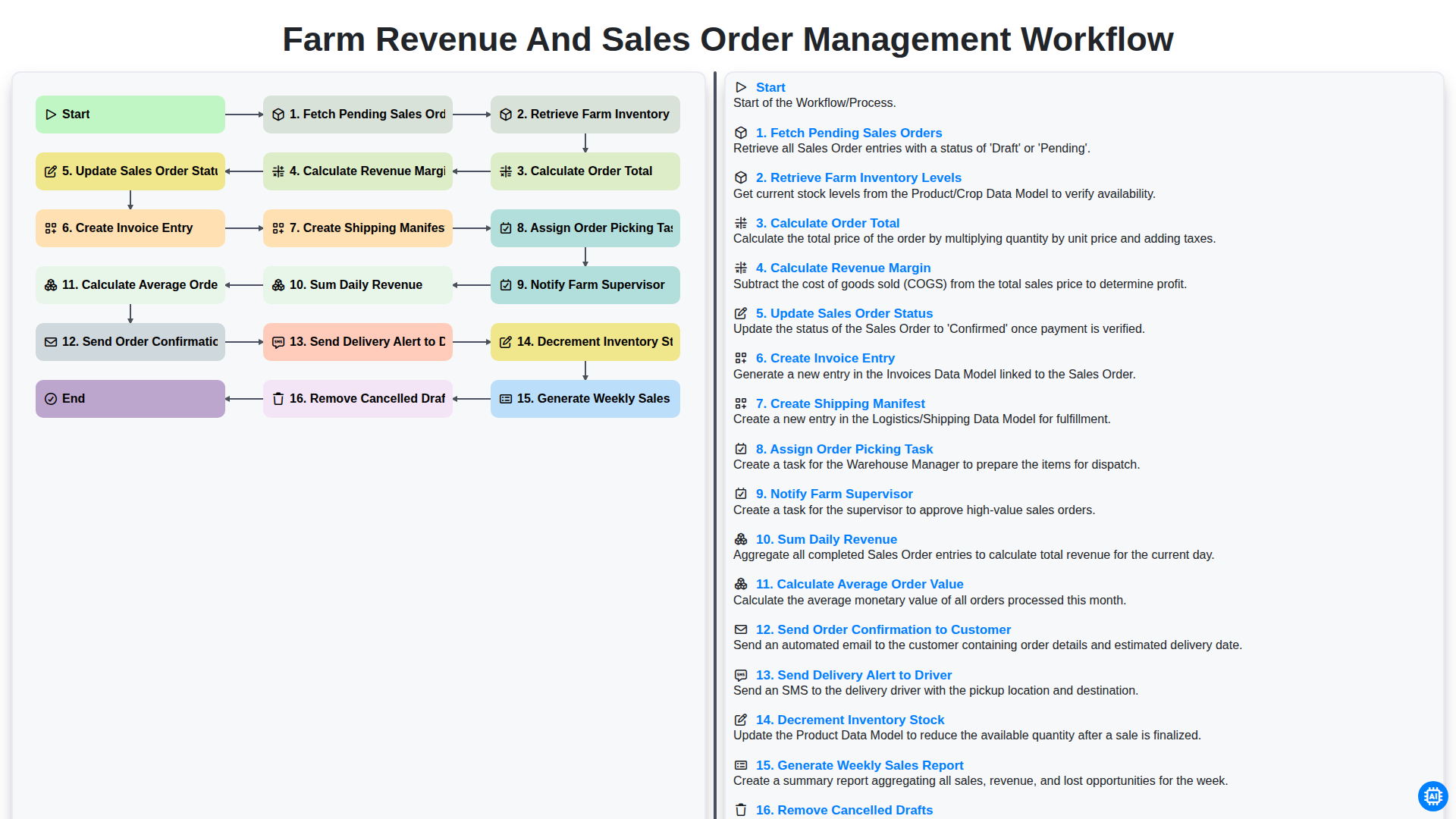
Table of Contents
- Introduction to Streamlining Farm Operations
- Phase 1: Order Processing and Inventory Verification
- Fetching Pending Sales Orders and Checking Inventory Levels
- Phase 2: Financial Calculations and Order Finalization
- Calculating Order Totals and Revenue Margins
- Updating Order Status and Generating Invoices
- Phase 3: Fulfillment and Logistics Management
- Creating Shipping Manifests and Assigning Picking Tasks
- Coordinating with Farm Supervisors and Stock Updates
- Phase 4: Customer Communication and Delivery Dispatch
- Sending Order Confirmations and Delivery Alerts to Drivers
- Phase 5: Revenue Analysis and Performance Reporting
- Tracking Daily Revenue and Average Order Value
- Generating Weekly Sales Reports and Data Cleanup
- Resources & Links
TLDR: This guide explores an automated Farm Revenue and Sales Order Management Workflow designed to streamline agricultural commerce. Learn how this end-to-end template automates everything from fetching pending orders and calculating real-time revenue margins to managing inventory levels, generating shipping manifests, and automating customer notifications, ensuring seamless farm operations and accurate financial reporting.
Introduction to Streamlining Farm Operations
In the fast-paced world of modern agriculture, managing a farm involves much more than just tending to crops and livestock. As operations scale, the complexity of managing transactions, tracking inventory, and ensuring timely deliveries grows exponentially. For many producers, the bridge between a successful harvest and a profitable season lies in the efficiency of their administrative processes.
Manual tracking via paper logs or disconnected spreadsheets often leads to costly errors, such as overselling products that are out of stock or forgetting to invoice a customer. To maintain profitability and customer trust, it is essential to move away from reactive management and toward a structured, automated workflow. By integrating sales order processing with real-time inventory tracking and automated notifications, farm owners can reduce manual labor, minimize human error, and gain much clearer insights into their financial health. Streamlining these operations doesn't just save time-it creates a scalable foundation for long-term agricultural success.
Phase 1: Order Processing and Inventory Verification
The lifecycle of a successful farm operation begins the moment a customer places an order. The initial phase of the workflow is critical, as it bridges the gap between customer demand and physical availability. This stage focuses on Fetching Pending Sales Orders to identify new opportunities and immediately transitioning into Retrieving Farm Inventory Levels. By cross-referencing orders with real-time stock, the system ensures that the farm never overpromises on unavailable produce.
Once the availability is confirmed, the workflow moves into the financial validation stage. The system automatically performs a Calculate Order Total step, incorporating item prices and quantities, followed by a Calculate Revenue Margin analysis. This allows the farm to monitor profitability at the point of sale. To maintain a clean and organized database, the process also includes a background task to Remove Cancelled Drafts, ensuring that the sales pipeline remains uncluttered by abandoned transactions. This rigorous verification phase ensures that every subsequent step-from picking to shipping-is based on accurate, profitable, and actionable data.
Fetching Pending Sales Orders and Checking Inventory Levels
The lifecycle of a successful agricultural sale begins the moment a customer places an order. The first critical stage in our workflow is the automated Fetching of Pending Sales Orders. Rather than relying on manual checks, the system continuously monitors incoming requests, ensuring that no order sits idle. This proactive approach minimizes response time and prevents bottlenecks in the fulfillment pipeline.
However, an order can only be processed if the goods are available. Immediately after identifying a pending order, the system initiates a real-time Retrieval of Farm Inventory Levels. This step acts as a crucial validation gate; by cross-referencing the requested quantities against current warehouse and field stocks, the system prevents the common pitfall of overselling. This synchronized check ensures that the sales team only commits to what the farm can realistically deliver, maintaining customer trust and operational integrity from the very first step.
Phase 2: Financial Calculations and Order Finalization
Once the order details are verified, the workflow transitions into the critical stage of financial processing and order finalization. This phase ensures that every transaction is not only recorded accurately but also analyzed for profitability.
The system begins by executing the Calculate Order Total step, aggregating the costs of all items in the order, followed immediately by Calculate Revenue Margin. This step is vital for farm owners to understand the real-time profitability of each sale after accounting for production costs. To maintain a clean database, the workflow also performs a housekeeping task to Remove Cancelled Drafts, ensuring that only valid, actionable orders clutter your active dashboard.
With the financial figures finalized, the workflow moves into the documentation and fulfillment loop. The system will Update Sales Order Status to Confirmed and automatically Create Invoice Entry to ensure seamless bookkeeping. To bridge the gap between the office and the field, the process triggers the Create Shipping Manifest step and Assign Order Picking Task to the warehouse or farm staff.
To ensure stakeholders are kept in the loop, the workflow triggers automated communications: it will Notify Farm Supervisor of the new fulfillment requirements and simultaneously Send Order Confirmation to Customer, providing them with immediate peace of mind. This phase concludes by preparing the logistics side, where the system will Send Delivery Alert to Driver to prepare for upcoming routes, effectively closing the loop between a digital sale and physical delivery.
Calculating Order Totals and Revenue Margins
Once the initial sales orders are fetched and current inventory levels are verified, the workflow moves into the critical financial processing phase. This stage is where raw data transforms into actionable business intelligence. The system automatically performs two vital computations: Calculating the Order Total and Calculating the Revenue Margin.
First, the system aggregates the cost of all items within a pending order, applying any applicable taxes, discounts, or seasonal surcharges to arrive at a precise order total. This ensures that the customer is billed accurately and that the financial commitment is clearly defined before any logistics begin.
Immediately following the total calculation, the workflow executes the revenue margin calculation. By comparing the total sales price against the cost of goods sold (COGS)-derived from the real-time farm inventory valuation-the system determines the profitability of that specific transaction. Monitoring this margin in real-time is essential for farm managers, as it provides instant insight into which crops or products are driving profit and which may be being sold too low to sustain operational costs. This automated step eliminates manual calculation errors and ensures that every order processed contributes to a transparent and profitable bottom line.
Updating Order Status and Generating Invoices
Once the order total and revenue margin have been accurately calculated, the system moves into the critical phase of formalizing the transaction. This stage begins with Updating the Sales Order Status to reflect that the order is now Confirmed or Processing, ensuring all stakeholders are viewing the most current data.
Following the status update, the workflow automatically triggers the Creation of an Invoice Entry, effectively turning a pending request into a formal financial record. This step is vital for maintaining an audit trail and ensuring that the farm's accounting remains synchronized with real-time sales activity. By automating the transition from order calculation to invoicing, the workflow eliminates manual data entry errors and ensures that every cent of farm revenue is captured and documented immediately.
Phase 3: Fulfillment and Logistics Management
Once the order calculations are finalized, the workflow transitions from financial validation to the critical execution phase: Fulfillment and Logistics Management. This stage is where digital data transforms into physical movement, requiring seamless coordination between the warehouse, the farm staff, and the delivery team.
The process begins by formalizing the logistics through the creation of a Shipping Manifest and the automated Assignment of Order Picking Tasks to the warehouse team. To ensure the accuracy of the outgoing shipment, the system simultaneously triggers a Decrement of Inventory Stock, ensuring that your digital records always reflect the true physical reality of the farm.
Communication is the backbone of this phase. To maintain high service standards, the workflow automatically triggers a Notification to the Farm Supervisor to oversee the preparation process, while simultaneously Sending Order Confirmations to the Customer to provide transparency. As the goods leave the farm, a Delivery Alert is sent to the Driver, providing them with the necessary details to complete the final mile. By automating these logistical touchpoints, the workflow eliminates manual errors and ensures that every crate and bushel reaches its destination on schedule.
Creating Shipping Manifests and Assigning Picking Tasks
Once the order details are finalized and the invoice is generated, the workflow moves into the critical logistics phase: Creating Shipping Manifests and Assigning Picking Tasks. This step bridges the gap between digital administration and physical fulfillment, ensuring that the farm's labor is utilized efficiently and that every order is documented for transport.
The system automatically generates a Shipping Manifest, which serves as the single source of truth for the delivery team. This document consolidates all items destined for a specific route, providing the necessary details for the driver to ensure the right products reach the right destination. Simultaneously, the workflow triggers the Assignment of Order Picking Tasks to the warehouse or farm floor staff. By automating this assignment, the system eliminates the need for manual paperwork and reduces the risk of human error, allowing staff to focus on accurately gathering the harvested goods. This seamless transition from order processing to task allocation ensures that the pick-to-pack cycle is both rapid and organized, maintaining the freshness of the produce and the speed of delivery.
Coordinating with Farm Supervisors and Stock Updates
Efficient farm management relies on the seamless synchronization between sales activity and physical inventory. Once a sales order is processed and the order picking task is assigned, the system automatically triggers a notification to the Farm Supervisor. This real-time alert ensures that the supervisory team is immediately aware of new fulfillment requirements, allowing for better labor allocation and resource planning.
To maintain the integrity of your supply chain, the workflow also manages the critical step of decrementing inventory stock. As orders move from pending to processing, the system automatically updates your digital records to reflect the reduction in available goods. This automated loop prevents the common pitfall of overselling products that are no longer in the warehouse, ensuring that your digital inventory levels always mirror the physical reality of your farm's stock.
Phase 4: Customer Communication and Delivery Dispatch
Once the operational logistics are finalized, the workflow transitions into the critical stage of closing the loop with your stakeholders. This phase ensures that the customer is kept informed and that the physical movement of goods is coordinated seamlessly with the digital record.
The process begins with the automated sending of order confirmations to the customer, providing immediate peace of mind that their purchase is being processed. As the order moves from the warehouse to the vehicle, the system triggers a delivery alert to the driver, ensuring that the logistics personnel are prepared for the upcoming pickup. By bridging the gap between order completion and physical delivery, this phase minimizes manual follow-ups and ensures a professional, transparent experience for every client.
Sending Order Confirmations and Delivery Alerts to Drivers
Once the order processing and logistics tasks are finalized, the workflow shifts from internal management to external communication. This stage is critical for maintaining transparency with your customers and ensuring seamless last-mile delivery.
The system automatically triggers two vital automated notifications:
Send Order Confirmation to Customer: As soon as the sales order status is updated and the invoice is generated, an automated confirmation email is dispatched to the customer. This email provides immediate peace of mind, detailing the order contents, the total amount paid, and the estimated delivery window, effectively reducing the volume of where is my order inquiries to your support team.
Send Delivery Alert to Driver: Simultaneously, the workflow notifies the assigned driver regarding the upcoming delivery. This alert includes the necessary details from the shipping manifest, such as the pickup location, delivery address, and specific handling instructions for perishable farm goods. By automating these alerts, you eliminate manual coordination errors and ensure that drivers are prepared for their routes well in advance.
Phase 5: Revenue Analysis and Performance Reporting
Once the operational cycle of order fulfillment is complete, the focus shifts from execution to intelligence. This final phase is where raw data is transformed into actionable business insights. By automating the aggregation of completed transactions, the system performs a Sum Daily Revenue calculation, providing an immediate snapshot of the day's financial success. To gain a deeper understanding of purchasing trends and customer behavior, the workflow also computes the Calculate Average Order Value (AOV), a critical metric for assessing upselling effectiveness and market demand.
To ensure long-term strategic planning, the workflow extends beyond daily snapshots by executing the Generate Weekly Sales Report function. This high-level overview allows stakeholders to identify patterns, seasonal fluctuations, and growth opportunities. Furthermore, to maintain data integrity and ensure that financial forecasts are not skewed by incomplete data, the system automatically performs a cleanup task to Remove Cancelled Drafts. This ensures that your performance reports reflect only realized revenue, providing a clean, accurate, and reliable foundation for all future agricultural business decisions.
Tracking Daily Revenue and Average Order Value
To maintain a healthy bottom line, real-time financial visibility is essential for any modern agricultural operation. Our workflow automates the critical end-of-day processes by automatically performing a Sum Daily Revenue calculation, providing an immediate snapshot of the day's total earnings. This allows farm managers to monitor cash flow trends without manual bookkeeping errors.
Beyond just looking at totals, the system provides deeper analytical insights by calculating the Average Order Value (AOV). By analyzing the relationship between total revenue and the volume of completed transactions, you can identify patterns in customer purchasing behavior and implement more effective upselling strategies. This dual approach-tracking both gross daily totals and average transaction size-empowers farm owners to make data-driven decisions to scale profitability and optimize pricing structures.
Generating Weekly Sales Reports and Data Cleanup
To maintain a high-performing management system, the workflow concludes with a critical focus on long-term visibility and database hygiene. At the end of each operational cycle, the system automatically executes the Generate Weekly Sales Report step. This automated process aggregates all processed orders, providing farm owners with a comprehensive view of total revenue, top-selling products, and seasonal trends. These insights are vital for informed decision-making, allowing for better-planned planting cycles and more accurate demand forecasting.
Parallel to this reporting, the workflow performs a necessary maintenance task: Remove Cancelled Drafts. To ensure that sales metrics and inventory snapshots are not skewed by abandoned transactions, the system identifies and purges outdated or cancelled draft orders. This continuous data cleanup ensures that your dashboard remains a single source of truth, free from the noise of incomplete data, allowing you to focus entirely on actionable, real-time business intelligence.
Resources & Links
- Forbes Business Strategy: Insights on implementing automation and operational efficiency in modern supply chain management.
- Shopify Commerce Guide: Best practices for managing sales orders, inventory tracking, and customer communication workflows.
- Investopedia Financial Fundamentals: A deep dive into calculating revenue margins, order totals, and analyzing business profitability metrics.
- Tableau Data Analytics: Resources for creating weekly sales reports and visualizing daily revenue and performance trends.
- Project Management Institute: Frameworks for managing logistics, task assignment, and resource allocation in complex workflows.
- Zendesk Customer Experience: Strategies for optimizing customer communication, including order confirmations and delivery notifications.
Frequently Asked Questions
What is a Farm Revenue and Sales Order Management Workflow?
It is a structured process used by agricultural businesses to track sales from the initial customer order through to final payment, ensuring accurate revenue recognition and inventory management.
How does this workflow help in improving farm profitability?
By automating order tracking and monitoring sales trends, farmers can reduce manual errors, optimize crop planning based on demand, and ensure all produced goods are accounted for and invoiced.
What are the key components of a sales order in a farming context?
Key components typically include customer details, product descriptions (e.g., crop type, grade, weight), quantity ordered, agreed pricing, delivery dates, and payment terms.
How does managing sales orders affect inventory control?
A streamlined workflow ensures that once a sales order is placed, the corresponding quantity is reserved or deducted from the available harvest/stock, preventing overselling and providing real-time inventory visibility.
What role does revenue recognition play in this workflow?
Revenue recognition ensures that income is recorded in the accounting system only when the goods have been delivered and the ownership has officially transferred to the buyer, providing an accurate financial picture of the farm's performance.
What are the common challenges in farm sales management?
Common challenges include managing fluctuating crop yields, handling variable pricing, coordinating logistics for perishable goods, and reconciling manual paperwork with actual physical stock.
Comments
There are no comments yet. Be the first to add one!
Farm Management Solution Demo
Grow your farm smarter & more efficiently! ChecklistGuro streamlines crop planning, task management, & resource tracking. Maximize yields, reduce waste, & improve profitability. Manage it all with our Work OS.
Related Articles
Unlock Higher Yields: Your Precision Agriculture Checklist Template
The Ultimate Farm Safety Inspection Report Checklist Template
Irrigation System Checklist: Farm Water Management & Crop Yield Optimization

Livestock Health & Welfare Checklist: Your Farm Animal Care & Biosecurity Template
Crop Insurance Policy Review Checklist: A Farmer's Guide
Water Discharge Permit Compliance Checklist Template
The Ultimate GPS & Precision Farming Calibration Checklist Template
Mapping the Threat: A Checklist for Proactive Pest & Disease Pressure Management
Need help with
Checklists?
Have a question? We're here to help. Please submit your inquiry, and we'll respond promptly.