Supply Chain Inventory Replenishment Workflow
Published: 07/12/2026 Updated: 10/05/2026
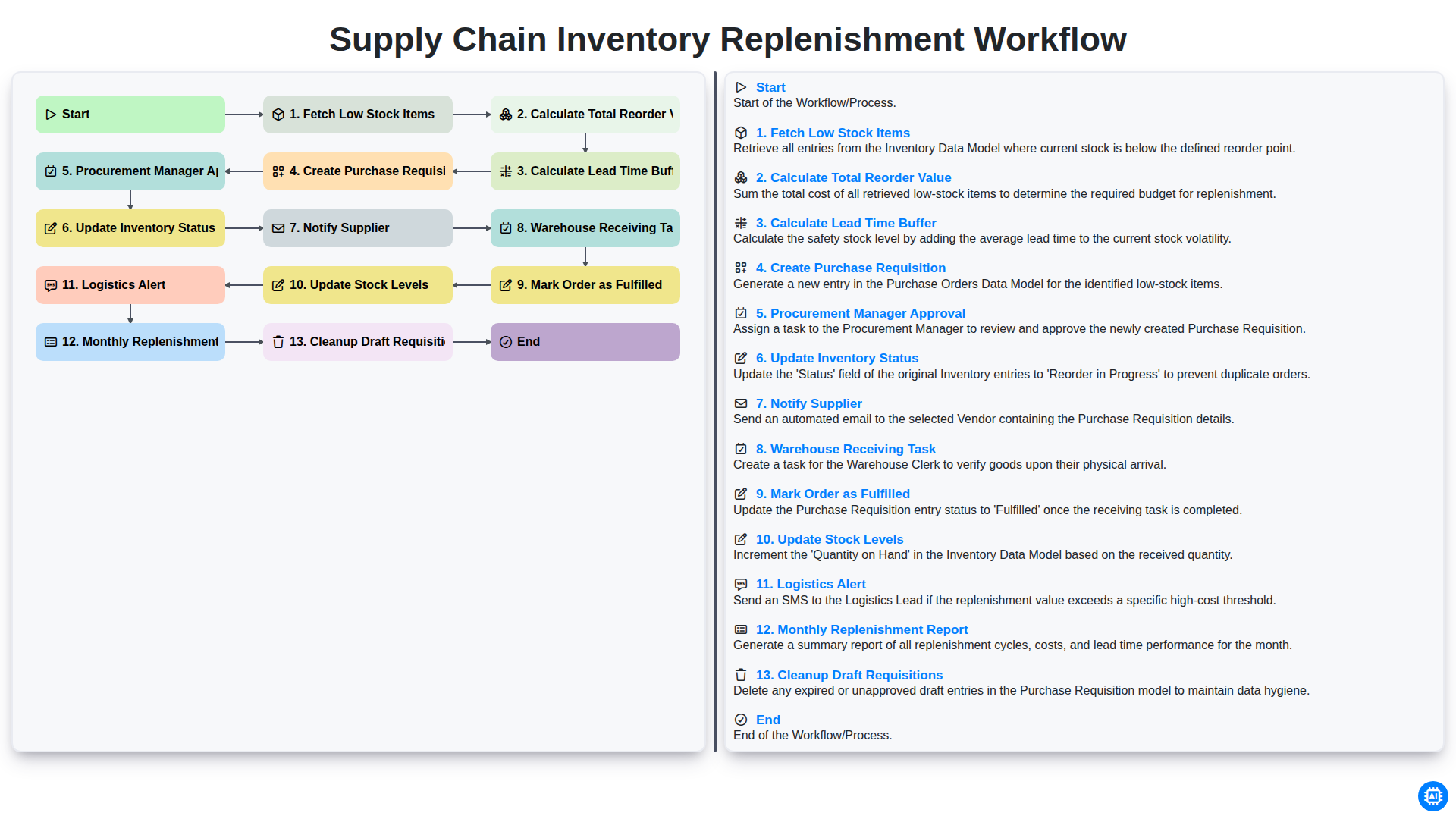
Table of Contents
- Introduction to Efficient Inventory Replenishment
- Step 1: Identifying Needs via Fetching Low Stock Items
- Step 2: Determining Order Magnitude: Calculating Total Reorder Value
- Step 3: Mitigating Risk: Calculating Lead Time Buffer
- Step 4: Initiating the Procurement Process: Creating Purchase Requisitions
- Step 5: Governance and Oversight: Procurement Manager Approval
- Step 6: Real-time Tracking: Updating Inventory Status
- Step 7: External Communication: Notifying Suppliers
- Step 8: Inbound Logistics: Warehouse Receiving Task
- Step 9: Closing the Loop: Marking Orders as Fulfilled
- Step 10: Maintaining Accuracy: Updating Stock Levels
- Step 11: Downstream Coordination: Logistics Alert
- Step 12: Performance Analysis: Monthly Replenishment Report
- Step 13: System Hygiene: Cleanup of Draft Requisitions
- Conclusion: Optimizing the Replenishment Cycle
- Resources & Links
TLDR: Learn how to automate your procurement cycle with our Supply Chain Inventory Replenishment Workflow. This guide explains how to streamline everything from detecting low stock and calculating reorder values to managing approvals, notifying suppliers, and updating stock levels, ensuring a seamless, hands-off approach to maintaining optimal inventory levels.
Introduction to Efficient Inventory Replenishment
In the fast-paced world of supply chain management, maintaining the delicate balance between overstocking and stockouts is a constant challenge. An inefficient replenishment process doesn't just lead to empty shelves; it triggers a domino effect of missed sales, increased carrying costs, and disrupted customer trust. To maintain a seamless flow of goods, businesses must move away from reactive, manual guesswork and toward a structured, automated workflow.
An efficient inventory replenishment workflow acts as the heartbeat of your operations. It is a systematic approach that ensures the right amount of stock arrives at the right time, minimizing capital tied up in excess inventory while safeguarding against unexpected surges in demand. By implementing a standardized series of steps-from identifying low stock levels to finalizing warehouse receiving-companies can transform their supply chain from a cost center into a competitive advantage. In this article, we will break down the essential stages of a robust replenishment cycle and how mastering each step can drive operational excellence.
Step 1: Identifying Needs via Fetching Low Stock Items
The foundation of an efficient replenishment cycle begins with proactive monitoring rather than reactive crisis management. The first critical step in the workflow is Fetching Low Stock Items. Instead of waiting for an item to hit zero, this stage involves the automated scanning of inventory levels against pre-defined minimum threshold levels (safety stock).
By utilizing real-time data from your Inventory Management System (IMS) or ERP, the system identifies every SKU that has dipped below its designated reorder point. This automated detection eliminates the human error associated with manual counting and ensures that potential stockouts are identified long before they impact your customers. This stage acts as the trigger for the entire procurement engine, initiating the downstream sequence of calculations and approvals.
Step 2: Determining Order Magnitude: Calculating Total Reorder Value
Once the low-stock items have been identified, the next critical phase is determining exactly how much stock needs to be ordered to prevent both stockouts and overstocking. This stage focuses on calculating the Total Reorder Value, a step that moves the process from simple identification to financial and logistical planning.
Calculating the reorder value involves more than just looking at a single unit price. It requires a comprehensive analysis of the quantity needed to bridge the gap between current inventory levels and the established safety stock thresholds. To arrive at an accurate total, the system must multiply the required quantity of each SKU by its respective unit cost, while also accounting for any tiered pricing or bulk discounts offered by vendors.
By accurately determining the total value upfront, procurement teams can better manage cash flow and budget allocations. This step ensures that the subsequent purchase requisition is not just a list of items, but a precise financial document that reflects the true capital requirement for the replenishment cycle. Getting this calculation right is essential for maintaining a lean, cost-effective supply chain.
Step 3: Mitigating Risk: Calculating Lead Time Buffer
Even with a perfectly automated replenishment system, a just-in-time approach can quickly turn into a just-too-late disaster if you fail to account for the unpredictability of global logistics. This is why calculating a Lead Time Buffer is a non-negotiable step in a robust replenishment workflow.
Lead time is the period between placing an order and the moment that stock is physically available for sale. However, relying solely on the supplier's estimated delivery date is a gamble. Delays can stem from anything from port congestion and customs bottlenecks to sudden spikes in raw material shortages or even extreme weather events.
To mitigate this risk, your workflow must incorporate a safety stock calculation that acts as a temporal cushion. By analyzing your historical data-specifically looking at the standard deviation of supplier delays-you can determine exactly how much extra buffer time or quantity is needed to ensure that your stock levels never hit zero during a delay.
Integrating this buffer into your replenishment logic ensures that your reorder points are proactive rather than reactive. Instead of ordering based on when you hope the goods arrive, you are ordering based on the worst-case scenario, protecting your bottom line from the high costs of stockouts and emergency expedited shipping fees.
Step 4: Initiating the Procurement Process: Creating Purchase Requisitions
Once the reorder values and safety buffers have been calculated, the workflow moves from the analytical phase into the actionable procurement phase. The core of this stage is the Creation of the Purchase Requisition. This step transforms raw data into a formal internal document that outlines exactly what needs to be purchased, in what quantities, and at what estimated cost.
Automating this step is crucial for maintaining momentum. Instead of manually typing out orders, the system generates a requisition that pulls directly from your low stock triggers. This ensures that the data remains consistent and eliminates the risk of human error-such as typos in part numbers or incorrect quantities-that often occurs during manual entry.
The requisition serves as the official request for purchase within your organization. It acts as a digital paper trail that bridges the gap between the warehouse's need for stock and the procurement department's authority to spend. By centralizing this process, you ensure that every replenishment request is standardized, searchable, and ready for the next critical phase: the approval workflow.
Step 5: Governance and Oversight: Procurement Manager Approval
Once the system has automatically calculated the reorder values and lead time buffers, the workflow moves from automated calculation to human-led governance. The Procurement Manager Approval stage acts as a critical checkpoint to ensure financial oversight and strategic alignment.
Even in a highly automated supply chain, this step is vital to prevent unauthorized spending and to catch potential discrepancies that an algorithm might overlook-such as sudden market volatility, changes in vendor reliability, or shifting company budget constraints. During this phase, the manager reviews the generated purchase requisition to verify that the quantities and proposed costs align with the current procurement strategy. Only once this formal approval is granted does the workflow transition from a draft state to an actionable order, triggering the subsequent communication with suppliers and the update of inventory statuses. This layer of oversight ensures that while the process is efficient, it remains under strict budgetary and operational control.
Step 6: Real-time Tracking: Updating Inventory Status
Once a purchase requisition has been officially approved, the workflow transitions from the procurement phase to the tracking phase. The next critical step is to Update Inventory Status.
At this stage, the system must immediately transition the status of the identified low-stock items from Available to On Order. This prevents the common pitfall of phantom stock, where the system shows zero stock but fails to reflect that a replenishment shipment is already in transit. By updating the status in real-time, your procurement and sales teams gain full visibility into incoming supply, allowing for more accurate-to-life stock availability predictions and preventing unnecessary duplicate orders.
Step 7: External Communication: Notifying Suppliers
Once the purchase requisition has been officially approved by the Procurement Manager, the workflow moves from internal validation to external action. The automated system triggers an immediate notification to your supplier(s), ensuring that the replenishment process begins without manual delay.
This step is critical for minimizing the gap between order creation and order arrival. By automatically transmitting accurate purchase orders-complete with quantities, pricing, and delivery deadlines-you eliminate the risk of human error inherent in manual emailing. This seamless communication ensures that the supplier receives all necessary specifications instantly, allowing them to begin their fulfillment process immediately and helping you maintain a tight grip on your lead time predictability.
Step 8: Inbound Logistics: Warehouse Receiving Task
Once the supplier has processed the order and dispatched the goods, the workflow shifts from the procurement office to the warehouse floor. The Warehouse Receiving Task is a critical checkpoint in the replenishment cycle where the physical reality of the shipment meets your digital records.
During this stage, the receiving team is responsible for inspecting the incoming shipment against the original purchase requisition and the packing slip. The primary goal is to verify quantity accuracy and identify any discrepancies, such as damaged goods or missing items, before they are formally accepted into the system. This step is vital for maintaining data integrity; if the receiving task is performed sloppily, it creates a ripple effect of inaccuracies that can lead to phantom inventory or unexpected stockouts later in the cycle.
By documenting every arrival meticulously, you ensure that the subsequent steps-updating stock levels and fulfilling orders-are based on a foundation of verified, high-quality data.
Step 9: Closing the Loop: Marking Orders as Fulfilled
Once the physical goods have been verified against the original purchase order, the workflow moves into its final critical phase: marking the order as fulfilled. This step represents the transition from pending to completed within your inventory management system.
Marking an order as fulfilled is much more than a simple administrative checkbox; it serves as the official trigger for the next sequence of automated actions. By closing out the fulfillment task, you are signaling to the system that the supply chain loop is closed, ensuring that the procurement lifecycle is accurately documented for auditing and financial reconciliation. This prevents ghost orders from lingering in your system, which can otherwise lead to inaccurate data and inflated liability projections.
Successfully completing this step ensures that the lifecycle of a single replenishment cycle is accurately recorded, providing the necessary data integrity required for the subsequent steps of updating stock levels and generating long-term replenishment reports.
Step 10: Maintaining Accuracy: Updating Stock Levels
Once the order has been marked as fulfilled and the physical goods have been verified, the workflow reaches a critical juncture: updating stock levels. This step is the bridge between procurement and real-time inventory visibility.
Updating your stock levels isn't just about increasing a number in a spreadsheet; it is about ensuring that your digital records mirror the physical reality of your warehouse. When this step is executed accurately and immediately, it prevents phantom stock issues-where your system shows items are available when they aren't-and prevents unnecessary duplicate orders. An automated update ensures that the replenishment cycle begins with a clean slate, providing the data integrity needed to trigger the next round of Fetch Low Stock Items with confidence. Without this synchronization, the entire downstream supply chain becomes prone to error, leading to stockouts or costly overstocking.
Step 11: Downstream Coordination: Logistics Alert
Once the order is marked as fulfilled and stock levels are updated, the workflow moves into the final critical phase: downstream coordination. The Logistics Alert serves as the essential communication bridge between the procurement department and the distribution or transportation teams.
The moment an incoming shipment is confirmed, an automated alert is triggered to notify logistics personnel of an impending arrival. This notification contains vital data, including estimated time of arrival (ETA), shipment volume, and carrier details. By providing this real-time visibility, the logistics team can proactively manage dock scheduling, allocate necessary warehouse labor for unloading, and prepare outbound transport if the replenishment is part of a cross-docking strategy. This step ensures that the momentum gained during the procurement process isn't lost due to bottlenecks at the receiving dock, maintaining a seamless flow from supplier to shelf.
Step 12: Performance Analysis: Monthly Replenishment Report
The final stage of a robust replenishment cycle is not just about closing the loop, but about looking backward to move forward more efficiently. The Monthly Replenishment Report serves as your strategic compass, transforming raw transaction data into actionable supply chain intelligence.
This report aggregates all the activity from the previous month-tracking how many requisitions were approved, how often lead times were met, and the accuracy of your stock level updates. By analyzing this data, you can identify recurring bottlenecks, such as frequent stockouts or unexpected delays in supplier notifications, and pinpoint which items are consistently driving up your carrying costs.
Beyond mere monitoring, this step is vital for continuous improvement. It allows your procurement team to move from a reactive firefighting mode to a proactive, data-driven strategy, ensuring that your replenishment workflow becomes leaner, faster, and more cost-effective with every passing month.
Step 13: System Hygiene: Cleanup of Draft Requisitions
To maintain a high-performing procurement ecosystem, the final step in the replenishment workflow involves a critical administrative task: the cleanup of draft requisitions. Over time, as the cycle repeats, ghost requisations-entries that were started but never progressed to the approval stage-can accumulate within your ERP or inventory management system.
Allowing these abandoned drafts to linger creates several operational bottlenecks. First, they clutter your dashboard, making it increasingly difficult for procurement officers to distinguish between active, actionable orders and obsolete data. Second, they can skew your reporting metrics; if your system calculates total pending commitments based on all open entries, your financial forecasting and budget availability may appear much lower than they actually are.
Implementing a periodic cleanup routine-whether weekly or monthly-ensures that your digital workspace remains lean and accurate. By auditing and deleting or archiving incomplete requests, you ensure that your team is only focused on legitimate, high-priority replenishment tasks, thereby improving decision-making speed and data integrity across the entire supply chain.
Conclusion: Optimizing the Replenishment Cycle
Mastering the Supply Chain Inventory Replenishment Workflow is not merely about avoiding stockouts; it is about transforming a reactive process into a proactive strategic advantage. By systematically moving from the initial detection of low stock through to the final logistics alerts and monthly reporting, businesses can eliminate the chaos of manual tracking and reduce the high costs associated with emergency shipping and overstocking.
Implementing this structured cycle ensures that every purchase requisition is backed by data-driven buffers and formal approvals, creating a transparent audit trail that builds trust between procurement, warehouse, and supplier teams. As you refine each step-from automating the calculation of reorder values to maintaining a clean database of finished requisitions-you create a scalable foundation for growth. Ultimately, a well-oiled replenishment engine minimizes waste, optimizes working capital, and ensures that your products are always ready for your customers, precisely when they need them.
Resources & Links
- Supply Chain Management Review: A leading source for supply chain professional insights, case studies, and best practices in inventory management.
- ASCM (Association for Supply Chain Management): The global leader in supply chain excellence, providing resources on standardized workflows and procurement frameworks.
- Gartner Supply Chain Research: In-depth analytical reports and strategic insights on digital transformation in procurement and replenishment automation.
- Inbound Logistics: Industry news and resources focusing on the intersection of warehouse management, logistics, and supply chain workflows.
- CFO Magazine: Valuable perspectives on the financial implications of procurement approval processes and reorder value management.
- Supply Chain Brain: Comprehensive coverage of logistics, warehouse receiving, and the technological advancements in replenishment automation.
Frequently Asked Questions
What is supply chain inventory replenishment?
Supply chain inventory replenishment is the process of reordering stock to ensure that inventory levels remain sufficient to meet customer demand without incurring excessive carrying costs.
What are the key steps in a replenishment workflow?
A typical workflow includes monitoring stock levels, identifying reorder points, generating purchase orders, receiving goods, and updating inventory records.
What is a Reorder Point (ROP)?
The Reorder Point is a specific inventory level that triggers the need to place a new order to prevent stockouts before the next shipment arrives.
How does demand forecasting affect replenishment?
Demand forecasting helps predict future customer needs, allowing businesses to adjust their replenishment timing and quantity to avoid both overstocking and stockouts.
What is the difference between periodic and continuous replenishment?
Periodic replenishment involves checking and ordering stock at fixed time intervals, whereas continuous replenishment relies on real-time data to trigger orders whenever stock hits a predefined threshold.
What role does Safety Stock play in the replenishment process?
Safety stock acts as a buffer to protect against uncertainties in supply and demand, ensuring that operations can continue even if there are delays in delivery or unexpected spikes in orders.
Comments
There are no comments yet. Be the first to add one!
Task Management Solution Demo
Get organized & boost productivity! ChecklistGuro simplifies task management, prioritization, & progress tracking. Achieve more, stress less, & hit your goals. Manage it all with our Work OS.
Related Articles

Paper vs ChecklistGuro in Project Management
Paper vs ChecklistGuro in Task Management

Excel vs ChecklistGuro in Logistics Management
Excel vs ChecklistGuro in Task Management
Excel vs ChecklistGuro in Dental Management
Excel vs ChecklistGuro in Hospitality Management
Excel vs ChecklistGuro in Retail Management
Excel vs ChecklistGuro in Project Management
We can do it Together
Need help with
Checklists?
Have a question? We're here to help. Please submit your inquiry, and we'll respond promptly.