Mastering the Work Order Management Lifecycle: A Comprehensive Workflow Guide
Published: 06/04/2026 9:00 PM Updated: 06/05/2026 7:43 AM
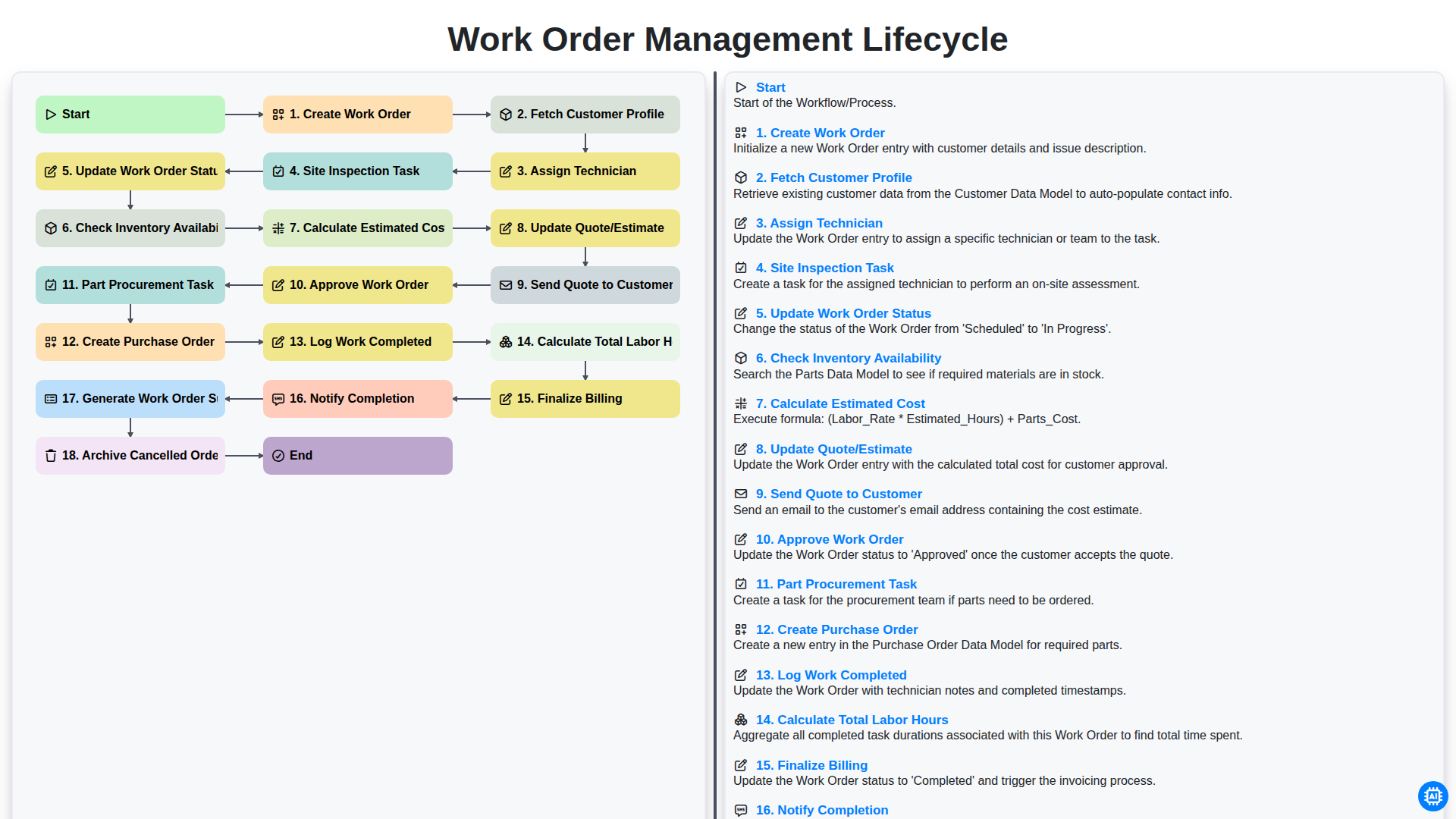
Table of Contents
- Introduction: The Importance of a Structured Work Order Lifecycle
- Phase 1: Initiation and Customer Identification
- Step 1: Creating the Work Order and Fetching Customer Profiles
- Phase 2: Resource Allocation and Field Assessment
- Step 2: Assigning Technicians and Conducting Site Inspections
- Phase 3: Estimating Costs and Quoting
- Step 3: Inventory Checks, Cost Calculation, and Quote Generation
- Step 4: Delivering the Quote and Obtaining Approval
- Phase 4: Procurement and Logistics Management
- Step 5: Managing Part Procurement and Purchase Orders
- Phase 5: Execution and Work Completion
- Step 6: Logging Work, Calculating Labor, and Finalizing Billing
- Phase 6: Post-Service Documentation and Closing the Loop
- Step 7: Completion Notification, Summarization, and Archiving
- Resources & Links
TLDR: Learn how to streamline your service operations using our end-to-end Work Order Management lifecycle. This guide breaks down the complete workflow-from initial creation and customer profiling to technician assignment, site inspections, cost estimation, and final billing-providing a blueprint for maximizing efficiency and ensuring seamless task execution from start to finish.
Introduction: The Importance of a Structured Work Order Lifecycle
In any service-based industry, efficiency isn't just a goal-it is the backbone of profitability and customer satisfaction. Whether you are managing field services, manufacturing, or maintenance operations, the chaos of disorganized tasks can quickly lead to missed deadlines, inflated costs, and frustrated clients. At the heart of a successful operation lies a well-defined Work Order Management Lifecycle.
A structured workflow does more than just track tasks; it serves as a roadmap that guides a job from its initial conception to its final closure. Without a standardized lifecycle, critical steps-such as verifying inventory availability or ensuring accurate labor calculations-can easily fall through the cracks. This leads to hidden costs, such as emergency part procurement or unplanned technician downtime, which erode your bottom line.
By implementing a disciplined lifecycle, businesses can achieve end-to-end visibility. This ensures that every stakeholder, from the dispatch team to the billing department, stays aligned. A seamless flow ensures that technicians arrive at the right site with the right parts, customers receive accurate quotes promptly, and the transition from work completion to final invoicing is frictionless. Ultimately, mastering this lifecycle transforms a reactive firefighting approach into a proactive, scalable, and highly efficient operational engine.
Phase 1: Initiation and Customer Identification
The lifecycle of an efficient work order begins long before a technician arrives on-site; it starts with the critical stage of Creation and Identification. This phase is the foundation of the entire process, ensuring that every service request is documented with precision and context.
The workflow is triggered by the Create Work Order step, where the core details of the service requirement-such as the nature of the issue, the urgency, and the requested service type-are logged into the system. However, a work order is only as useful as the information supporting it. To ensure seamless service delivery, the next vital step is to Fetch Customer Profile. By automatically pulling existing data-such as service history, contact information, and site-specific preferences-teams can avoid redundant communication and prepare for the specific needs of the client. This phase is all about setting the stage for accuracy, ensuring that when the workflow moves into the technical stages, the groundwork for a successful service delivery is already firmly in place.
Step 1: Creating the Work Order and Fetching Customer Profiles
The lifecycle of an efficient service workflow begins with the initial point of contact. The process is triggered the moment a service request is received, initiating the Create Work Order phase. This step is critical as it establishes the foundational record for the entire job, capturing essential details such as the nature of the issue, the requested service type, and the urgency of the request.
To ensure a personalized and accurate service experience, the workflow immediately transitions into Fetching Customer Profiles. Rather than manually re-entering data, an automated system pulls existing information from your database-including contact details, service history, physical addresses, and specific site preferences. This seamless integration eliminates manual entry errors and provides the technician and dispatchers with the necessary context to understand the customer's unique requirements before anyone even arrives on-site. By establishing this single source of truth at the very beginning, you set the stage for a streamlined, error-free execution of the entire maintenance or repair cycle.
Phase 2: Resource Allocation and Field Assessment
Once the initial work order is created and the customer profile has been fetched to understand the historical context, the focus shifts from administrative setup to active logistics. This phase is the critical bridge between identifying a problem and deploying a solution.
The process begins with the Assign Technician step, where the system matches the specific requirements of the task with the skills, availability, and proximity of the available workforce. However, a technician cannot work in a vacuum. To ensure accuracy, a Site Inspection Task is triggered, allowing the field professional to assess the physical environment and identify any unforeseen complexities that weren't apparent during the initial intake.
During this assessment, the workflow moves into real-time logistics management. The technician must Check Inventory Availability to see if the necessary parts are already in stock or if a shortage exists. This is immediately followed by a data-driven analysis to Calculate Estimated Cost, which accounts for both materials and projected labor. To maintain transparency and manage expectations, the system will automatically Update Quote/Estimate and Send Quote to Customer for review. This ensures that the customer is never surprised by unexpected fees, fostering trust through proactive communication. This phase concludes only once the customer provides the necessary Approve Work Order confirmation, signaling that the team is cleared to proceed with the physical repairs or services.
Step 2: Assigning Technicians and Conducting Site Inspections
Once a work order has been successfully created and the customer profile is retrieved to understand the service history, the next critical phase involves resource allocation and on-site assessment. This stage moves the process from administrative preparation to active field execution.
The workflow transitions into Assigning Technicians, where the goal is to match the specific requirements of the work order with the right skill set. Effective assignment involves evaluating technician availability, geographical proximity to the customer, and specialized expertise to ensure the job is handled by the most qualified professional.
With a technician assigned, the Site Inspection Task is triggered. This is a pivotal step in the lifecycle where the technician visits the premises to perform a physical assessment of the issue. This inspection serves as the ground truth, allowing the technician to identify the exact scope of work, any unforeseen complications, and the specific tools or materials required. This real-world data is essential for the subsequent steps of inventory checking and cost estimation, ensuring that the quote provided to the customer is both accurate and realistic.
Phase 3: Estimating Costs and Quoting
Once the site inspection is complete and the scope of work is clearly defined, the workflow transitions into the critical financial planning stage. This phase is where the technical findings are translated into a formal budgetary framework for the customer.
The process begins with Checking Inventory Availability to determine if the necessary parts are currently in stock or if they require a new procurement cycle. Simultaneously, the system must Calculate the Estimated Cost, factoring in both the required materials and the projected labor. With these variables defined, the next step is to Update the Quote/Estimate, ensuring that the pricing reflects the real-world conditions identified during the inspection.
To maintain transparency and trust, the workflow then moves to Send Quote to Customer. This automated step ensures the client receives a professional, detailed breakdown of the expected expenses without delay. The process remains in a pending state until the client provides the final Approve Work Order command, officially moving the project from an estimate to an actionable job. This structured approach prevents sticker shock and ensures that both the service provider and the customer are in complete alignment before any physical work begins.
Step 3: Inventory Checks, Cost Calculation, and Quote Generation
Once the site inspection is complete and the scope of work is defined, the workflow shifts from assessment to logistics and financial planning. This stage is critical for ensuring that the job is both feasible and profitable.
The process begins with a crucial Check Inventory Availability step. Before committing to a timeline, the system verifies if the required parts and materials are currently in stock. If a necessary component is missing, a Part Procurement Task is automatically triggered, which may involve a Create Purchase Order step to restock essential items.
Simultaneously, the system moves into the financial estimation phase. The workflow will Calculate Estimated Cost by aggregating the prices of required parts and projected labor. Once the figures are finalized, the system will Update Quote/Estimate to reflect the most current data.
To maintain transparency and professional service, the next vital step is to Send Quote to Customer. This ensures the client is fully aware of the projected investment before any physical work begins. The lifecycle remains in a pending state until the client provides the final Approve Work Order, officially transitioning the project from an estimate to an active, actionable job.
Step 4: Delivering the Quote and Obtaining Approval
Once the initial site inspection is complete and the necessary parts are accounted for, the workflow transitions from assessment to the financial proposal phase. This stage is critical as it bridges the gap between identifying the problem and authorizing the solution.
The process begins with the Calculate Estimated Cost phase, where the system aggregates the costs of identified parts, labor, and any unforeseen logistics fees. This data is then used to Update Quote/Estimate, ensuring that the customer receives a precise, line-item breakdown of the projected expenses. To maintain transparency and trust, the next vital step is to Send Quote to Customer. Prompt delivery of this estimate prevents delays in the repair or service timeline.
The final hurdle in this stage is the Approve Work Order step. This serves as the formal green light for the technical team. By requiring explicit approval, you ensure that the service provider is protected against scope creep and the customer is fully aligned with the budget. Only once this approval is logged can the workflow proceed to the procurement and execution phases, ensuring that no labor or resources are wasted on unverified tasks.
Phase 4: Procurement and Logistics Management
Once a work order has been approved, the focus shifts from planning to execution through the Part Procurement Task. This phase is critical, as the successful completion of the job often depends on the timely availability of necessary materials and components.
To ensure seamless operations, the workflow triggers the Create Purchase Order step. This ensures that all required items are formally requested from suppliers, maintaining a clear paper trail for auditing and budget tracking. By automating the transition from an approved work order to an active purchase order, businesses can significantly reduce delays caused by manual entry errors or oversight. Effective management during this phase ensures that the right parts arrive at the right time, preventing technician downtime and keeping the entire project lifecycle on schedule.
Step 5: Managing Part Procurement and Purchase Orders
Once a work order has been approved and the scope of work is clearly defined, the focus shifts from estimation to execution. This stage is critical because any delay in securing necessary materials can stall the entire lifecycle, leading to increased labor costs and dissatisfied customers.
The process begins with the Part Procurement Task. At this stage, the assigned technician or service manager must cross-reference the approved work order against current stock levels. If the required components or specialized tools are not available in the immediate inventory, the workflow triggers a formal procurement sequence.
To bridge the gap between identified needs and physical availability, the system initiates the Create Purchase Order step. This automated transition ensures that the procurement team receives precise details-including part numbers, quantities, and required delivery dates-directly from the work order data. By integrating procurement directly into the workflow, you eliminate manual data entry errors and ensure that the supply chain stays synchronized with field operations. Managing this step effectively ensures that parts arrive on-site exactly when the technician is scheduled, maintaining the momentum of the entire service lifecycle.
Phase 5: Execution and Work Completion
Once the work order has been approved and all necessary-parts have been secured through the Part Procurement Task and Create Purchase Order steps, the focus shifts from planning to action. This is the stage where your technicians head to the field to perform the actual service.
During this phase, the technician carries out the physical repair or installation, ensuring that all technical requirements are met. As the work progresses, it is critical to Log Work Completed in real-time. This step ensures that every action taken, every part used, and every technical hurdle encountered is documented for both transparency and future reference.
As the service concludes, the workflow moves toward quantifying the effort expended. The system will Calculate Total Labor Hours based on the logs provided, ensuring that the man-hours spent on-site are accurately captured. This data is vital not only for accurate billing but also for analyzing team productivity and improving future scheduling. Once the physical work is done, the process moves into the final stages of administrative closure and customer notification.
Step 6: Logging Work, Calculating Labor, and Finalizing Billing
Once the physical tasks on-site are finished, the workflow shifts from field execution to administrative closure. This phase is critical for ensuring that the service provided is accurately documented and that the business captures all billable time and materials.
The process begins with Logging Work Completed, where technicians or project managers document the specific actions taken, any obstacles encountered, and the exact resolution of the issue. This step serves as the permanent record of service for both the company and the client. Following this, the system moves to Calculate Total Labor Hours, aggregating the time spent on the task to ensure that every minute of professional expertise is accounted for.
With the labor data finalized, the workflow proceeds to Finalize Billing. During this stage, the system merges the logged labor hours with the materials used and any predefined service fees to create a precise, error-free invoice. To wrap up the operational loop, the system triggers a Notify Completion alert to the customer, providing them with a professional closing communication. Finally, the process concludes by Generating a Work Order Summary, a comprehensive report that serves as a single source of truth for the completed job, ensuring that both the technician and the office staff are perfectly aligned on the outcome.
Phase 6: Post-Service Documentation and Closing the Loop
Once the physical work is finished, the workflow shifts from the field to the back office. This final phase is critical for ensuring data integrity, financial accuracy, and customer satisfaction. It begins with the Log Work Completed step, where technicians record the actual tasks performed and any deviations from the original plan. To ensure precise billing, the system must Calculate Total Labor Hours by reconciling the time spent on-site against the initial estimates.
With the labor data verified, the workflow moves into Finalize Billing, where parts used and labor hours are consolidated into a final invoice. To keep the client informed, the Notify Completion step triggers an automated alert, letting the customer know the job is done and the invoice is ready for review.
The lifecycle concludes with administrative housekeeping: the system will Generate Work Order Summary to provide a permanent record of the service for future reference and Archive Cancelled Orders to keep the active dashboard clean and focused. By systematically closing every loop, you ensure that no revenue is lost and every service interaction is documented for long-term business intelligence.
Step 7: Completion Notification, Summarization, and Archiving
Once the heavy lifting is done and the billing is finalized, the workflow enters its final, critical phase: closing the loop and maintaining a clean operational record. This stage ensures that all stakeholders are informed and that your data remains organized for future audits or service histories.
Notify Completion
The lifecycle doesn't end when the technician leaves the site; it ends when the customer is officially informed. An automated notification serves as the final touchpoint, confirming that the requested service has been successfully executed. This not only provides peace of mind to the client but also signals to your administrative team that the task is ready for final review.
Generate Work Order Summary
Documentation is the backbone of effective field service management. Upon completion, the system should automatically compile a comprehensive Work Order Summary. This document serves as a single source of truth, consolidating the initial request, the site inspection findings, the parts used, the total labor hours, and the final costs. Having this summary readily available is invaluable for resolving future disputes and tracking technician performance.
Archive Cancelled Orders
Not every workflow reaches the finish line; some orders are cancelled due to budget constraints, scheduling conflicts, or changes in project scope. Rather than deleting these records, they should be moved to an archive. Proper archiving allows you to maintain a complete audit trail and perform lost business analysis, helping you identify patterns in why certain jobs fail to convert. By keeping your active dashboard clear of cancelled tasks while retaining historical data in the background, you ensure your workspace remains streamlined and your insights remain intact.
Resources & Links
- Project Management Institute (PMI): A global resource for industry standards on workflow management, lifecycle methodologies, and project execution best practices.
- Forbes Business Council: Insights into operational efficiency, scaling service-based businesses, and optimizing resource allocation strategies.
- Gartner: Expert analysis on field service management technology, automation in supply chain, and digital transformation in work order workflows.
- Entrepreneur Magazine: Practical guides for small to medium enterprise owners on managing logistics, customer relations, and cost estimation processes.
- ScienceDirect - Operations Management: In-depth academic research regarding inventory management, procurement logistics, and the impact of structured workflows on service quality.
Found this Article helpful?
Comments
There are no comments yet. Be the first to add one!
Facility Management Solution Demo
Keep your facilities running smoothly! ChecklistGuro streamlines maintenance, inspections, and vendor management. Reduce downtime, optimize efficiency, & improve safety. Manage it all with our Work OS.
Related Articles
Industrial Floor Cleaning & Safety Checklist Template
Display Case Temperature Monitoring Checklist Template
The Ultimate Refrigeration Maintenance Checklist: Keeping Your Food Safe
Escalator & Moving Walkway Inspection Checklist Template
The Ultimate Guest Room Cleaning & Inspection Checklist Template
The Ultimate Security Camera Review Checklist Template
Forklift Inspection & Maintenance Checklist Template
Emergency Generator Load Testing Checklist Template
We can do it Together
Need help with
Checklists?
Have a question? We're here to help. Please submit your inquiry, and we'll respond promptly.