| | | |
| Created by checklistguro.com | | |
| | | |
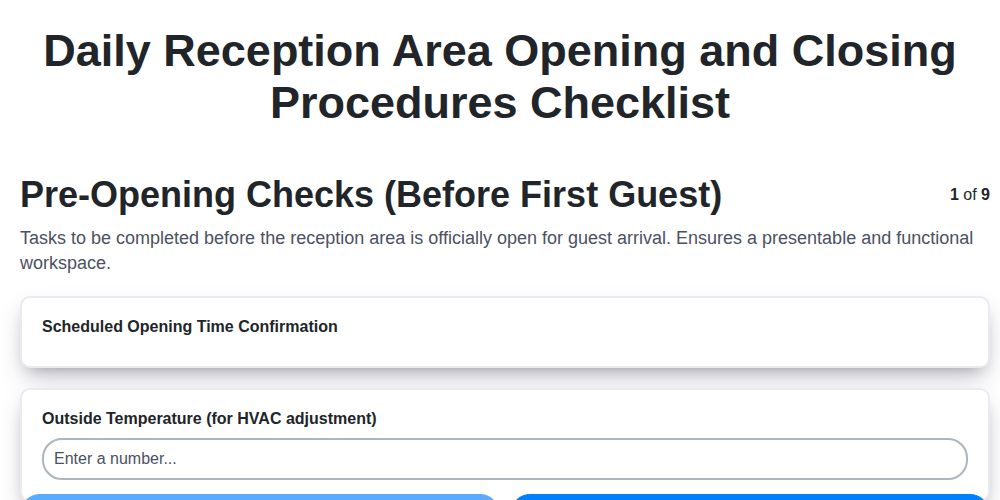
| Pre-Opening Checks (Before First Guest) (STEP) | | |
| Scheduled Opening Time Confirmation (DATE) | | |
| Outside Temperature (for HVAC adjustment) (NUMBER) | | |
| Reception Desk Layout - Check for Obstructions? (SELECTION options: Yes, No) | | |
| Check for Damage/Wear on Reception Desk & Seating (SELECTION options: Scratches, Stains, Tears, Broken Parts, None) | | |
| Check Exterior Entrance - Cleanliness/Obstructions (LOCATION) | | |
| Notes on any issues requiring maintenance (e.g., lighting, flooring) (TEXT) | | |
| Check Guest Information Display (if applicable) – Working Correctly? (SELECTION options: Yes, No) | | |
| Photo Documentation of Reception Area (Optional) (UPLOAD) | | |
| | | |
| Opening Cash Handling (STEP) | | |
| Starting Cash Drawer Count (Bills) (NUMBER) | | |
| Starting Cash Drawer Count (Coins) (NUMBER) | | |
| Starting Cash Drawer Count (Checks) (NUMBER) | | |
| Starting Cash Drawer Count (Credit Card Tips) (NUMBER) | | |
| Cash Box Security Check? (SELECTION options: Secure and Locked, Requires Attention) | | |
| Comments on Cash Drawer Start (e.g., discrepancies, notes) (TEXT) | | |
| Float Dispensed? (SELECTION options: Yes, No) | | |
| Float Amount Dispersed (If Applicable) (NUMBER) | | |
| | | |
| Reception Desk & Area Appearance (STEP) | | |
| Number of Fresh Flowers/Plants Present? (NUMBER) | | |
| Dusting Complete? (Select all that apply) (SELECTION options: Desk Surface, Countertops, Shelving, Decorative Items, Seating Area) | | |
| Magazine/Brochure Display Neat & Organized? (SELECTION options: Yes, No) | | |
| Notes on any areas requiring extra attention (e.g., smudges, spills) (TEXT) | | |
| Seating area tidy and free of clutter? (SELECTION options: Yes, No) | | |
| Photo of Reception Area Appearance (UPLOAD) | | |
| | | |
| Technology & Systems (STEP) | | |
| PMS (Property Management System) - Login Successful? (SELECTION options: Yes, No) | | |
| Telephone System - Operational? (SELECTION options: Yes, No) | | |
| WiFi Router Signal Strength (dBm - approximate) (NUMBER) | | |
| Last System Sync Time (PMS/CRS) (DATE) | | |
| Guest WiFi Network - Accessible? (SELECTION options: Yes, No) | | |
| Any System Error Messages/Notes? (TEXT) | | |
| TV/Information Display - Functioning? (SELECTION options: Yes, No) | | |
| | | |
| Security & Safety (STEP) | | |
| Alarm System Status (SELECTION options: Armed, Disarmed, Testing) | | |
| Fire Safety Equipment Check (SELECTION options: OK, Needs Attention) | | |
| Fire Extinguisher Inspection Date (Month/Year) (NUMBER) | | |
| Security Personnel Present? (DATE) | | |
| Incident/Issue Reporting (TEXT) | | |
| Emergency Exit Check (SELECTION options: Clear, Obstructed) | | |
| First Aid Kit Check (SELECTION options: Sufficient Supplies, Restock Required) | | |
| | | |
| Closing Cash Handling (STEP) | | |
| Starting Cash Drawer Balance (Recorded) (NUMBER) | | |
| Cash Drawer Counted Amount (NUMBER) | | |
| Float Counted Amount (NUMBER) | | |
| Total Cash Recorded (NUMBER) | | |
| Notes on Cash Discrepancies (if any) (TEXT) | | |
| Cash Bag Secured? (SELECTION options: Yes, No) | | |
| Cash Drop Completed? (SELECTION options: Yes, No) | | |
| Details of Cash Drop (e.g., who received, time) (TEXT) | | |
| Date of Cash Reconciliation (DATE) | | |
| | | |
| Reception Desk & Area Security (Closing) (STEP) | | |
| All windows and doors secured? (SELECTION options: Yes, No) | | |
| Alarm system activated? (SELECTION options: Yes, No, Not Applicable) | | |
| Number of keys/fobs accounted for? (NUMBER) | | |
| Any unusual activity or concerns noted? (TEXT) | | |
| Secure any valuable items from the desk (LOCATION) | | |
| Exterior lights checked? (SELECTION options: Yes, all on, No, Not applicable) | | |
| | | |
| Technology Shutdown (Closing) (STEP) | | |
| Computer(s) Shutdown Status (SELECTION options: Shutdown Completed, Restarted, Left On (Requires Manager Approval)) | | |
| Printer(s) Status (SELECTION options: Power Off, Standby, Left On (Requires Manager Approval)) | | |
| Telephone System Status (SELECTION options: Secure/Night Mode Enabled, Standard Mode (Requires Manager Approval)) | | |
| Time of System Shutdown (If Applicable) (DATE) | | |
| Notes on System Shutdown (if any) (TEXT) | | |
| AV Equipment Status (SELECTION options: Powered Off, Standby, Left On (Requires Manager Approval)) | | |
| | | |
| Final Walk-Through & Reporting (STEP) | | |
| Any unusual occurrences or incidents during the day? (TEXT) | | |
| Total Cash Drawer Count (Final) (NUMBER) | | |
| Security System Armed? (SELECTION options: Yes, No) | | |
| Date of Closing (DATE) | | |
| Closing Time (DATE) | | |
| Checklist Items Completed (Select All That Apply) (SELECTION options: Cash Drawer Secured, Reception Area Lights Off, Security System Armed, Doors Locked, Technology Shutdown) | | |
| Closing Staff Signature (SIGNATURE) | | |
| Staff Name (Closing) (TEXT) | | |