Mastering the Automotive Technician Dispatching Process: A Step-by-Step Workflow Guide
Published: 06/04/2026 Updated: 07/02/2026
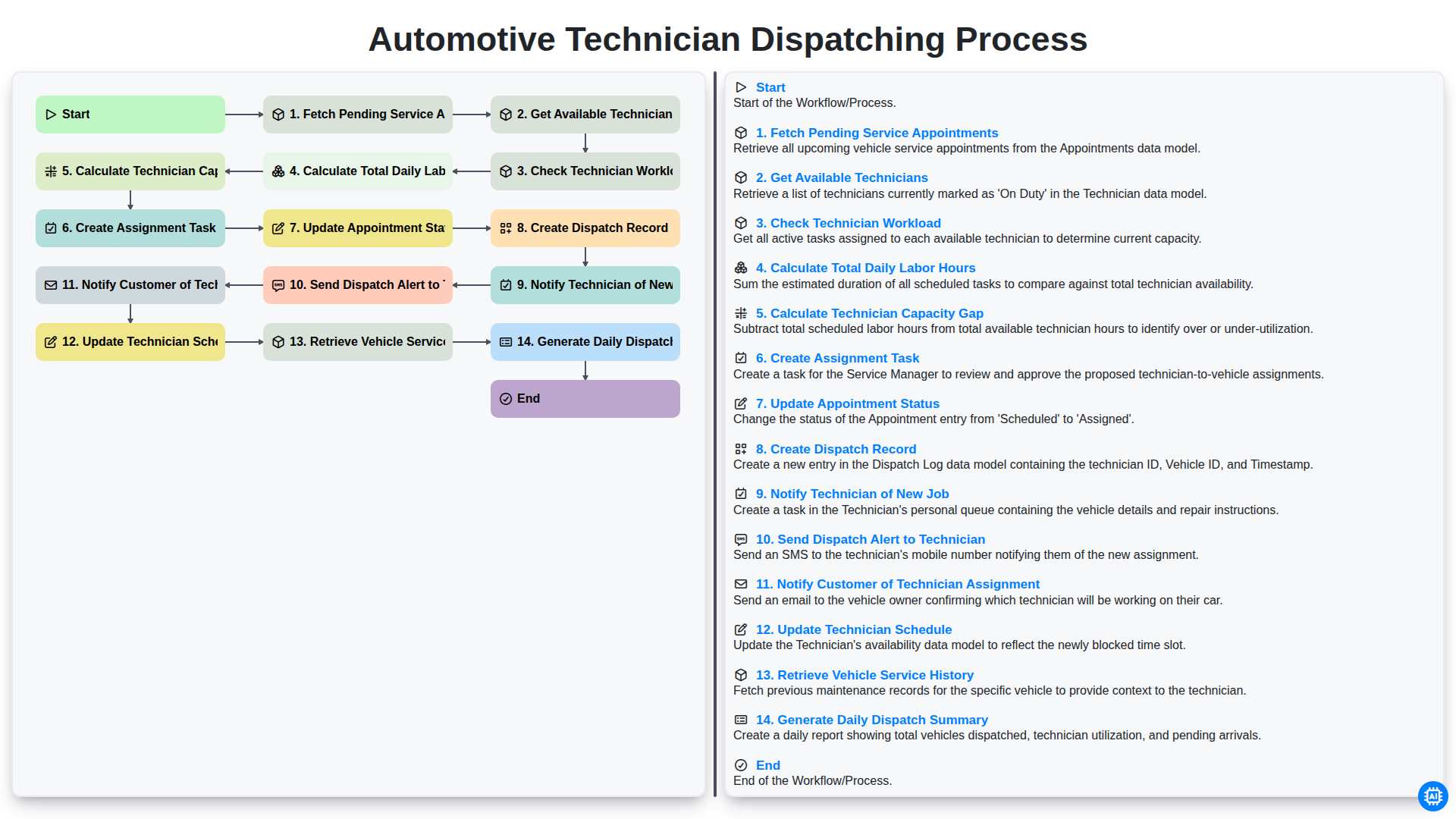
Table of Contents
- Introduction to Efficient Automotive Dispatching
- Phase 1: Identifying Service Requirements
- Step 1: Fetching Pending Service Appointments
- Step 2: Retrieving Essential Vehicle Service History
- Phase 2: Evaluating Resource Availability
- Step 3: Identifying Available Technicians
- Step 4: Analyzing Technician Workload and Capacity
- Step 5: Calculating Daily Labor Hours and Capacity Gaps
- Phase 3: The Assignment and Execution Workflow
- Step 6: Creating Assignment Tasks and Dispatch Records
- Step 7: Updating Appointment Status and Technician Schedules
- Phase 4: Communication and Real-Time Notifications
- Step 8: Notifying Technicians and Customers of Assignments
- Phase 5: Oversight and Performance Tracking
- Step 9: Generating the Daily Dispatch Summary
- Resources & Links
TLDR: Learn how to optimize your shop's efficiency with our comprehensive guide to the Automotive Technician Dispatching Process. This post breaks down an automated end-to-end workflow-from fetching pending appointments and calculating technician capacity gaps to real-time notifications and automated scheduling-designed to eliminate manual errors, balance workloads, and ensure seamless communication between technicians and customers.
Introduction to Efficient Automotive Dispatching
In the fast-paced environment of an automotive service center, the difference between a profitable day and a chaotic one often lies in the precision of your dispatching process. Efficient dispatching is the heartbeat of the workshop; it is the strategic orchestration of skilled labor, available bays, and incoming vehicle requirements. When done correctly, it ensures that technicians are utilized to their full potential, customer wait times are minimized, and the shop's workflow remains fluid and predictable.
However, manual dispatching-relying on memory, whiteboards, or fragmented spreadsheets-is prone to human error and bottlenecking. A single oversight in evaluating a technician's workload or failing to account for a sudden gap in capacity can ripple through the entire day, leading to delayed repairs, frustrated staff, and dissatisfied clients. To achieve true operational excellence, service managers must move beyond reactive scheduling and implement a structured, systematic workflow that seamlessly connects appointment intake with technician execution. In this article, we will break down the essential steps of a high-performing dispatching cycle to help you optimize your shop's productivity.
Phase 1: Identifying Service Requirements
The foundation of an efficient dispatching workflow begins with a comprehensive assessment of the day's incoming demands and the current state of your shop's resources. This initial phase is critical, as any oversight here can lead to scheduling bottlenecks or technician downtime later in the day.
The process starts by fetching pending service appointments to understand the volume of incoming work. Once the workload is identified, the system must retrieve vehicle service history for each appointment; this ensures that the complexity of the repair is understood before a technician is assigned. To maintain a realistic schedule, the workflow then moves into resource evaluation by getting available technicians and performing a deep dive into their current commitments. By checking technician workload and calculating total daily labor hours against the incoming queue, the system can calculate the technician capacity gap. This step is vital for identifying whether you have enough manpower to cover the day's tasks or if further adjustments to the schedule are required to prevent service delays.
Step 1: Fetching Pending Service Appointments
The dispatching process begins with the critical first step: Fetching Pending Service Appointments. Before any scheduling or resource allocation can occur, the system must scan the incoming queue to identify every service request awaiting attention. This involves pulling real-time data from your booking software or customer portals to capture all unassigned appointments, ranging from routine oil changes to complex engine diagnostics.
By centralizing these pending requests, dispatchers gain a clear, unified view of the day's upcoming workload. This stage is vital because it ensures that no customer request is overlooked and provides the necessary raw data required to begin the intelligent matching of jobs to the right technical expertise.
Step 2: Retrieving Essential Vehicle Service History
Before a technician ever turns a wrench, a critical component of a successful dispatching workflow is the retrieval of the vehicle's service history. This step serves as the diagnostic foundation for the upcoming appointment. By pulling comprehensive records of past repairs, fluid changes, and reported issues, dispatchers and technicians can move beyond a surface-level understanding of the vehicle.
Accessing this data allows the team to identify recurring patterns-such as frequent brake replacements or persistent engine leaks-that might require more specialized tools or additional time allocation. Furthermore, reviewing the service history ensures that the technician is prepared with the correct parts and specific technical bulletins, minimizing the need for secondary trips to the parts department. In essence, integrating historical data into the dispatching process transforms a routine appointment into a proactive, informed service strategy that enhances both efficiency and customer trust.
Phase 2: Evaluating Resource Availability
Once the pending service appointments are fetched, the core of an efficient dispatching process lies in the ability to match the right job with the right professional. This phase focuses on a deep dive into your current workforce capabilities to ensure that no technician is over-leveraged and no appointment is left unattended.
The process begins by getting available technicians and performing a rigorous check of technician workload. It is not enough to simply know who is clocked in; the system must analyze the complexity of their current active tasks to prevent burnout and service delays. By calculating total daily labor hours against the technician capacity gap, dispatchers can identify exactly where the shop stands-whether there is surplus bandwidth to take on emergency repairs or a deficit that requires rescheduling. This data-driven approach ensures that the dispatching decision is based on mathematical reality rather than guesswork, laying the groundwork for a balanced and productive workday.
Step 3: Identifying Available Technicians
Once the pending service appointments have been identified, the next critical phase in the dispatching workflow is determining which members of your team are actually available to take on new work. This step, Get Available Technicians, serves as the bridge between your list of pending tasks and your actual-duty roster.
In this stage, the system scans your technician database to filter out anyone currently on leave,-unavailability, or assigned to long-term specialized projects. The goal is to narrow down the pool of candidates to only those who are physically present and ready to be assigned. However, availability isn't just about being in the building-it's about identifying who has the specific skill set required for the incoming service request. By isolating a list of available technicians early in the process, you prevent the administrative headache of assigning a complex engine diagnostic to a technician who is only scheduled for basic oil changes and tire rotations.
Step 4: Analyzing Technician Workload and Capacity
Once the system identifies available technicians, the next critical phase is determining how to distribute the workload effectively. It isn't enough to simply find an empty slot; the dispatching engine must perform a deep dive into the existing commitments of each team member to ensure operational stability.
This stage of the workflow involves two high-precision calculations: Calculating Total Daily Labor Hours and Calculating the Technician Capacity Gap. First, the system aggregates the total duration of all currently scheduled jobs for each technician. This provides a clear picture of the actual labor hours already committed to the day.
Next, by comparing these committed hours against the technician's total available shift time, the system calculates the Capacity Gap. This gap is the vital metric that tells a dispatcher exactly how much breathing room remains in a technician's schedule. By identifying this gap, the software prevents the common pitfall of over-scheduling, which leads to technician burnout and missed appointments, or under-scheduling, which leaves expensive bay time wasted. This data-driven approach ensures that every new assignment is placed into a slot that is mathematically proven to be achievable.
Step 5: Calculating Daily Labor Hours and Capacity Gaps
Once the available technicians have been identified, the next critical stage in the dispatching workflow is moving from individual availability to a high-level operational overview. This involves two vital calculations: Calculating Total Daily Labor Hours and Calculating the Technician Capacity Gap.
To ensure the shop remains profitable and efficient, the system must first aggregate the total number of labor hours required by all pending service appointments scheduled for the day. This isn't just about counting appointments; it is about summing the estimated repair times for every job in the queue. By determining this total demand, dispatchers can see the actual workload pressure facing the service center.
Immediately following this, the system performs a gap analysis by comparing the total required labor hours against the total available labor capacity (the sum of all available hours from all active technicians).
Identifying the Technician Capacity Gap is the make or break moment for the daily schedule.
- A Negative Gap (Surplus Capacity): Indicates you have extra hands available, signaling an opportunity to pull forward appointments from future dates to fill the downtime.
- A Positive Gap (Labor Shortage): Indicates an overbooked shop, alerting dispatchers that they may need to reschedule certain appointments, authorize overtime, or prioritize high-urgency repairs to prevent a bottleneck.
By automating these calculations, the dispatching process moves away from guesswork and toward data-driven decision-making, ensuring that the shop's workload is always balanced against its actual human resources.
Phase 3: The Assignment and Execution Workflow
Once the initial assessment of technician availability and workload is complete, the process shifts from planning to execution. This phase is the core of the dispatching engine, where data-driven decisions are transformed into actionable tasks.
The workflow moves through a precise sequence of automated steps to ensure no appointment is missed and no technician is overleveraged:
- Creating the Assignment Task: Once a gap analysis is completed, the system generates a specific assignment task. This bridges the gap between a pending appointment and a scheduled job.
- Updating Appointment and Dispatch Records: To maintain a single source of truth, the system simultaneously updates the appointment status to Assigned and creates a formal Dispatch Record. This record serves as the digital paper trail for the service event.
- Real-Time Notifications: Communication is instantaneous. The system triggers a dual-notification protocol: a direct dispatch alert is sent to the technician's mobile device, while a simultaneous customer notification is sent to inform the vehicle owner of their assigned technician.
- Dynamic Schedule Synchronization: As soon as the assignment is confirmed, the technician's digital calendar is updated in real-time, ensuring their daily itinerary reflects the new commitment.
- Contextual Intelligence: To prepare the technician for the job, the workflow automatically retrieves the specific vehicle service history. This ensures that when the technician arrives, they are already briefed on previous repairs, recurring issues, and part requirements.
- End-of-Day Reconciliation: The process concludes with the generation of a Daily Dispatch Summary. This report aggregates all completed assignments, providing management with a high-level view of the day's operational efficiency and labor utilization.
By automating these steps, the dispatching process moves away from manual guesswork and toward a streamlined, error-free execution model.
Step 6: Creating Assignment Tasks and Dispatch Records
Once the system has successfully calculated the capacity gap and determined the optimal technician for the job, the workflow moves into the execution phase. This stage is critical as it transforms abstract scheduling data into actionable work orders.
First, the system automatically creates an assignment task within the technician's digital queue. This task acts as the single source of truth for the upcoming job, containing all necessary metadata, including the specific services required, the estimated duration, and the priority level.
Simultaneously, the system performs a creation of the dispatch record. This record serves as the formal bridge between the service appointment and the technician's daily itinerary. By generating this record, the system ensures that the appointment is no longer just a pending item on a list but an active, tracked event within the shop's operational ecosystem. This step is vital for maintaining an audit trail, allowing service managers to track exactly when a job was assigned and which technician was officially tasked with its completion.
Step 7: Updating Appointment Status and Technician Schedules
Once the assignment task has been created and the dispatch record is established, the system moves into the critical execution phase: synchronizing the real-time status of the service workflow. This involves two simultaneous actions that ensure both the shop management and the technicians are working from a single source of truth.
First, the system automatically updates the appointment status from Pending to Assigned. This transition is vital for shop visibility, as it prevents duplicate dispatching and allows service advisors to see exactly which jobs are currently being processed. Simultaneously, the technician's schedule is updated in real-time. By automatically injecting the new task into the technician's digital calendar, the system ensures that their availability is accurately reflected for any future scheduling requests. This seamless synchronization eliminates the risk of manual entry errors and prevents the double-booking of labor hours, maintaining a fluid and predictable workflow throughout the service day.
Phase 4: Communication and Real-Time Notifications
Once the assignment task is created and the dispatch record is officially generated, the workflow transitions from planning to execution. The efficiency of a modern automotive shop relies heavily on how quickly information travels from the dispatcher to the field. To eliminate manual bottlenecks and reduce downtime, the system triggers a series of automated, real-time notifications.
First, the technician is immediately alerted to their new responsibility through a dual-layered notification process: the system notifies the technician of the new job via their mobile interface and simultaneously sends a dispatch alert via SMS or push notification. This ensures that even if a technician is deep into a complex engine repair, they are aware of the next incoming task without needing to check a central dashboard constantly.
Equally important is the customer experience. As soon as the technician is assigned, the system will notify the customer of their technician assignment, providing them with transparency and peace of mind. This automated loop-notifying the staff, alerting the technician, and informing the client-ensures that all stakeholders are synchronized, reducing where is my car? inquiries and allowing the service team to focus on the repair rather than administrative follow-ups.
Step 8: Notifying Technicians and Customers of Assignments
Once the dispatch record is created, the workflow shifts from internal logistics to real-time communication. Efficient communication is the backbone of a seamless service experience, ensuring that both your team and your clients are aligned.
The process triggers two simultaneous notification streams:
- Technician Alerts: The system automatically triggers a dual-action notification to the assigned technician. First, a formal New Job Assignment is pushed to their mobile device or workstation, providing all necessary job details. This is immediately followed by a Dispatch Alert, a high-priority notification designed to ensure the technician acknowledges the new task promptly, minimizing downtime between jobs.
- Customer Transparency: To provide a premium service experience, the system automatically Notifies the Customer of their Technician Assignment. This update includes the technician's name and the scheduled arrival window, reducing where is my mechanic? inquiries and building trust through proactive communication.
By automating these touchpoints, you eliminate the need for manual phone calls and manual status updates, ensuring that information flows instantly as soon as a decision is made in the dispatch office.
Phase 5: Oversight and Performance Tracking
Once the active dispatching cycle is complete, the focus shifts from real-time execution to high-level operational intelligence. The final stage of the workflow is dedicated to closing the loop through comprehensive data aggregation and continuous monitoring.
To ensure the shop maintains peak efficiency, the system automatically performs a Generate Daily Dispatch Summary. This report acts as the single source of truth for management, consolidating all the day's movements-from completed assignments to unforeseen delays. By reviewing this summary, service managers can identify patterns in technician productivity and pinpoint where bottlenecks occurred during the shift.
Beyond just looking backward, this phase provides the critical insights needed for proactive planning. By analyzing the data captured during the dispatching process, management can perform deep dives into technician utilization and labor trends. This continuous cycle of oversight ensures that the dispatching process is not just a daily routine, but a strategic tool used to optimize shop throughput, reduce downtime, and ultimately drive higher profitability.
Step 9: Generating the Daily Dispatch Summary
After all individual assignments are processed and schedules are updated, the final step in the workflow is the creation of the Daily Dispatch Summary. This automated report serves as the single source of truth for service managers and shop owners, providing a high-level overview of the day's operational efficiency.
The summary aggregates all the data processed during the dispatching cycle, consolidating information such as the total number of appointments completed, the total labor hours assigned, and any remaining capacity gaps identified during the workflow. By reviewing this summary, managers can quickly identify if the shop is over-leveraged or if there is room to squeeze in emergency repairs. This end-of-day snapshot is crucial for performance tracking, allowing your team to transition from the active dispatching phase into effective end-of-day reporting and preparation for the following day's workflow.
Resources & Links
- Automotive Business Magazine: Industry news and expert insights on managing automotive service operations and workshop productivity.
- National Automotive Technicians Association (NATA): Resources for professional development, technician training, and best practices in automotive service standards.
- Forbes Technology Council: Insights into digital transformation and how automation software optimizes complex operational workflows.
- Software Solutions for Auto Repair: An exploration of shop management systems (SMS) used to automate technician scheduling and dispatching.
- Lean Operations Principles: Foundational concepts on eliminating waste and optimizing capacity planning within service-based workflows.
- McKinsey Operations Insights: Strategic analysis on resource allocation, workforce management, and operational efficiency in the automotive sector.
Frequently Asked Questions
What is the primary goal of an effective automotive technician dispatching process?
The primary goal is to optimize shop productivity by ensuring the right technicians are assigned to the right repair orders based on skill level, availability, and time efficiency, ultimately reducing vehicle downtime and maximizing bay utilization.
What are the essential first steps in the dispatching workflow?
The process begins with accurate job intake and vehicle inspection, followed by the creation of a detailed repair order (RO) that outlines the specific tasks, required parts, and estimated labor time.
How should service managers determine which technician to assign to a specific task?
Assignments should be based on a technician's specific expertise (e.g., electrical vs. mechanical), their current workload/capacity, and the complexity of the diagnostic required to ensure the job is completed correctly the first time.
Why is real-time communication critical in the dispatching process?
Real-time communication ensures that technicians are immediately aware of new priorities, updates regarding parts availability, and changes in vehicle status, preventing delays and reducing idle time between jobs.
How can shop managers identify bottlenecks in their current dispatching workflow?
Managers can identify bottlenecks by monitoring key performance indicators (KPIs) such as technician efficiency, average repair time, and frequent delays in part procurement or bay turnover.
What role does digital documentation play in modern automotive dispatching?
Digital documentation streamlines the workflow by providing instant access to repair histories, multi-point inspection results, and real-time updates, reducing manual errors and improving the accuracy of the dispatching decisions.
Comments
There are no comments yet. Be the first to add one!
Automotive Manufacturing Management Solution Demo
Optimize your automotive production! ChecklistGuro digitizes workflows, from parts inspection to final testing. Reduce errors, boost efficiency & ensure quality compliance. Drive results with our Work OS.
Related Articles
The Ultimate Automotive Sales Prospect Follow-Up Checklist: Close More Deals
Mastering Automotive BOM Configuration: Your Essential Checklist

The Ultimate Vehicle Registration & Insurance Validation Checklist
Automotive Parts Inventory Audit Checklist Template: Your Guide to Accurate Stock

Maximize Your Trade-In: The Automotive Appraisal Checklist You Need
The Ultimate Tire Pressure & Condition Checklist Template
Automotive Parts Inventory Control Checklist Template: Your Ultimate Guide

Drive Sales Success: Your Automotive Sales Team Performance Tracking Checklist
Need help with
Checklists?
Have a question? We're here to help. Please submit your inquiry, and we'll respond promptly.