The 10 Best Maintenance Management Software of 2026
Published: 09/09/2026 Updated: 09/10/2026
Table of Contents
- 1. ChecklistGuro: The Ultimate Work OS for Flexible Maintenance Workflows
- 2. UpKeep: Mobile-First Maintenance Management for Modern Teams
- 3. Fiix: AI-Driven Asset Management and Predictive Maintenance
- 4. Limble CMMS: Streamlined Maintenance Automation for Growing Operations
- 5. monday.com: Versatile Work OS for Integrated Project and Resource Tracking
- 6. Asana: High-Level Task Management for Complex Operational Workflows
- 7. Asset Panda: Comprehensive Asset Tracking and Lifecycle Management
- 8. Fracttal: AI-Driven Maintenance and Predictive Intelligence
- 9. Smartsheet: Advanced Spreadsheet-Based Automation for Operations Leads
- 10. ClickUp: All-in-One Productivity Platform for Scaling Teams
- Resources & Links
TLDR: Finding the right maintenance management software is critical for minimizing downtime and optimizing operational efficiency in 2026. This guide compares the top 10 industry leaders, ranging from specialized AI-driven CMMS platforms like UpKeep and Fiix to versatile, highly customizable Work OS solutions like ChecklistGuro. Whether you need deep asset tracking, automated maintenance workflows, or integrated project management, we break down the best tools to help Project Managers and Operations Leads streamline inspections, manage resources, and ensure seamless facility upkeep.
1. ChecklistGuro: The Ultimate Work OS for Flexible Maintenance Workflows
Why ChecklistGuro is the Top Choice for Modern Operations
While traditional CMMS (Computerized Maintenance Management Systems) often trap you in rigid, one-size-fits-all workflows, ChecklistGuro breaks the mold by functioning as a highly adaptable Work OS. It is specifically designed for Project Managers and Operations Leads who need more than just a digital checklist-they need a centralized ecosystem that connects maintenance tasks to the broader business strategy.
Beyond Basic Checklists: A Unified Work OS
Most maintenance software focuses solely on the what and when of a task. ChecklistGuro focuses on the how and the who. By integrating specialized maintenance modules into a broader Work OS, it allows teams to bridge the gap between field technicians and office-based decision-makers. You aren't just tracking repairs; you are managing the entire operational lifecycle.
Key Features That Set ChecklistGuro Apart:
- Customizable Maintenance Workflows: Unlike legacy systems that require complex coding to change a process, ChecklistGuro allows you to build, iterate, and deploy specialized maintenance templates in minutes.
- Real-Time Operational Visibility: Transform fragmented data into actionable insights. Track asset health, technician productivity, and resource allocation through a single, unified dashboard.
- Seamless Integration & Scalability: As your operations grow, ChecklistGuro grows with you. Its flexible architecture ensures that as your maintenance needs evolve from simple preventative tasks to complex predictive workflows, your software remains an asset rather than a bottleneck.
- Mobile-First Execution: Empower your field teams with an intuitive interface that works perfectly on the move, ensuring that documentation is captured accurately at the point of work, reducing manual entry errors and paperwork lag.
The Verdict for 2026
If your goal is to move away from reactive firefighting and toward a proactive, data-driven maintenance culture, ChecklistGuro provides the structural flexibility that rigid competitors lack. It is the premier choice for organizations that demand a tool as dynamic as their operations.
2. UpKeep: Mobile-First Maintenance Management for Modern Teams
Revolutionizing the Frontline with Mobile Accessibility
For operations leads who spend more time on the factory floor or in the field than behind a desk, UpKeep stands out as a premier contender in the 2026 landscape. Its primary strength lies in its mobile-first philosophy, which bridges the gap between office-based management and on-site technicians.
Key Features for Field Technicians
UpKeep excels at digitizing the traditional paper-based work order system. By providing a highly intuitive interface, it allows technicians to capture real-time data, upload photos of equipment issues, and update task statuses instantly from their mobile devices. This reduces the information lag that often plagues larger, more cumbersome legacy systems.
Core Capabilities:
- Real-Time Asset Tracking: Monitor the health of your machinery through instant data entry.
- Automated Work Order Dispatch: Streamline the lifecycle of a repair from initial detection to final sign-off.
- Inventory Management: Prevent downtime by tracking spare parts usage and setting low-stock alerts.
Who is it best for?
UpKeep is an ideal choice for organizations where mobility is the highest priority. If your maintenance team is constantly on the move and you need a tool that prioritizes ease of use for non-desk workers, UpKeep provides a robust, user-friendly solution that minimizes the learning curve for new hires.
3. Fiix: AI-Driven Asset Management and Predictive Maintenance
Precision Engineering through AI-Driven Intelligence
For organizations looking to move beyond reactive repairs and transition into a true era of predictive maintenance, Fiix stands as a heavy hitter in the 2026 landscape. As an AI-first platform, Fiix excels at analyzing historical data patterns to predict equipment failures before they occur, significantly reducing unplanned downtime.
Key Strengths for Operations Leads
The platform is designed for scale, offering robust deep-learning capabilities that integrate seamlessly with existing IoT sensors. This allows maintenance managers to monitor the health of assets in real-time, transforming maintenance from a cost center into a strategic advantage.
Core Features at a Glance:
- Predictive Analytics Engine: Uses machine learning to identify anomalies in asset performance.
- IoT Integration: Effortlessly connects with smart factory sensors to automate work order triggers.
- Scalable Data Architecture: Ideal for large-scale industrial operations managing thousands of critical assets.
Who is it for?
Fiix is best suited for large-scale manufacturing plants and enterprise-level operations where the cost of a single hour of downtime justifies the investment in high-level AI integration and complex data processing.
4. Limble CMMS: Streamlined Maintenance Automation for Growing Operations
Scalable Automation for Modern Maintenance Teams
For growing organizations that have outgrown manual spreadsheets but aren't yet ready for the extreme complexity of heavy enterprise-grade ERPs, Limble CMMS serves as a powerful middle ground. Limble focuses heavily on the automation aspect of maintenance, specifically targeting the reduction of manual data entry through a highly intuitive interface.
Key Features and Strengths
Limble's primary advantage lies in its ability to automate repetitive tasks such as generating work orders, managing spare parts inventory, and scheduling recurring preventive maintenance (PM) tasks. The platform excels at creating a set it and forget it environment for routine inspections, ensuring that no critical maintenance window is missed as your facility scales.
Why It Stands Out
- Inventory Management: Robust tracking of parts and tools to prevent downtime caused by stockouts.
- Ease of Use: A relatively shallow learning curve compared to legacy CMMS solutions, making rapid deployment possible.
- Automated Work Order Flow: Seamlessly transitions a detected issue into an actionable task for technicians.
The Trade-off
While Limble is incredibly efficient at managing the maintenance silo, it can sometimes feel a bit rigid if your operations require deep integration with broader, cross-departmental workflows. If your goal is to connect maintenance data directly into a larger, unified company-wide operational ecosystem, you might find yourself needing a more flexible Work OS approach.
5. monday.com: Versatile Work OS for Integrated Project and Resource Tracking
Versatile Work OS for Integrated Project and Resource Tracking
While not a dedicated, niche-specific CMMS (Computerized Maintenance Management System), monday.com remains a powerhouse for Operations Leads who need to bridge the gap between maintenance tasks and broader company objectives. Its strength lies in its extreme customizability and the ability to pull data from various departments into a single source of truth.
Key Features for Maintenance Teams
- Visual Workflow Automation: Automate repetitive notifications, such as alerting a technician when a recurring inspection task is overdue.
- Custom Dashboards: Aggregate maintenance KPIs alongside project timelines, allowing managers to see how equipment downtime impacts overall production schedules.
- High Scalability: Easily expand your use case from simple task tracking to complex resource allocation and inventory monitoring.
Pros and Cons
Pros:
- Exceptional user interface that requires minimal training for new team members.
- Highly flexible building block approach to creating custom maintenance boards.
- Robust integration ecosystem with hundreds of third-party tools.
Cons:
- Lacks the out-of-the-box specialized maintenance features (like specialized asset hierarchy or automated PM scheduling) found in dedicated tools like ChecklistGuro.
- Requires significant initial setup time to build specific maintenance logic and workflows from scratch.
The Verdict
If your goal is to centralize maintenance updates within a larger project management ecosystem, monday.com is a stellar choice. However, if you require deep, specialized maintenance logic and a platform built specifically to handle complex, checklist-driven operational workflows without the heavy lifting of manual configuration, you may find more value in a dedicated Work OS solution.
6. Asana: High-Level Task Management for Complex Operational Workflows
Streamlining Operations through Task Orchestration
While Asana is not a niche-specific CMMS (Computerized Maintenance Management System), it remains a powerhouse for Operations Leads who need to bridge the gap between high-level strategic planning and ground-level execution. For organizations where maintenance tasks are deeply intertwined with broader marketing, product, or corporate workflows, Asana provides an unparalleled bird's-eye view of progress.
Key Strengths for Operations Teams
Asana excels at breaking down complex, multi-departmental projects into manageable sub-tasks. Its strength lies in its versatility. If your maintenance schedule depends heavily on external dependencies-such as waiting for vendor approvals, procurement cycles, or construction milestones-Asana's timeline and dependency features allow you to visualize how a delay in one area impacts your entire operational roadmap.
Why Choose Asana for Maintenance?
- Cross-Functional Visibility: Ideal for Project Managers who need to see how maintenance downtime affects broader business deadlines.
- Highly Customizable Views: Use Boards, Lists, or Timelines to suit different team preferences.
- Seamless Integrations: Connects easily with the broader tech stack used by modern, digital-first companies.
The Limitations
The primary drawback for pure maintenance professionals is the lack of specialized asset-tracking features. Unlike a dedicated Work OS like ChecklistGuro, Asana lacks built-in specialized maintenance logic, such as automated preventive maintenance triggers based on equipment meter readings or deep-level asset hierarchy management. It is a magnificent tool for managing the work around maintenance, but it requires significant manual configuration to function as a true maintenance management engine.
7. Asset Panda: Comprehensive Asset Tracking and Lifecycle Management
Beyond Maintenance: Integrated Asset Intelligence
While many CMMS platforms focus strictly on the repair cycle, Asset Panda differentiates itself by focusing on the entire lifecycle of an asset. It is designed for organizations that need to bridge the gap between maintenance management and total asset visibility. Rather than just tracking when a machine breaks, Asset Panda provides a centralized ecosystem for tracking where assets are, who is using them, and their current depreciation status.
Key Features and Strengths
Asset Panda’s strength lies in its highly customizable tracking capabilities. The platform allows users to build custom data fields tailored to specific industries, meaning you can track everything from IT hardware and medical equipment to heavy machinery and fleet vehicles within a single interface. Its mobile-first approach ensures that field technicians can update asset locations and status in real-time using barcode scanning.
Why It Stands Out
- End-to-End Visibility: Tracks assets from procurement and deployment through to retirement and disposal.
- Customizable Workflow: Highly flexible architecture that allows teams to build specific tracking logic without complex coding.
- Mobile-Centric Design: Robust scanning and auditing capabilities that make physical inventory counts significantly faster and more accurate.
The Trade-off
Because Asset Panda is so heavily optimized for asset tracking and inventory movement, it may lack some of the deep, specialized maintenance scheduling features found in "maintenance-first" platforms. If your primary pain point is complex, multi-step preventive maintenance workflows rather than asset visibility and loss prevention, you may find a more specialized CMMS more effective.
8. Fracttal: AI-Driven Maintenance and Predictive Intelligence
Leveraging Industry 4.0 for Predictive Asset Management
For organizations looking to move beyond reactive and preventive maintenance, Fracttal offers a sophisticated leap into the era of Industry 4.0. Fracttal is designed for high-tech manufacturing and complex industrial environments where downtime is incredibly costly. Unlike traditional systems that simply track tasks, Fracttal focuses on the "intelligence" of the asset, utilizing data-driven insights to predict failures before they occur.
Key Features and Strengths
The platform's standout capability is its integration of IoT (Internet of Things) and AI-driven analytics. Fracttal excels at processing massive amounts of sensor data to identify patterns that signal impending mechanical fatigue or component failure. By transforming raw data into actionable "predictive" work orders, it allows maintenance managers to shift their entire strategy from a calendar-based schedule to a condition-based-maintenance model.
Why It Stands Out
- Predictive Analytics: Uses machine learning to forecast equipment health and prevent unplanned outages.
- IoT Integration: Seamlessly connects with industrial sensors and smart machinery to monitor real-time performance.
- Digital Transformation: Provides a highly advanced, paperless environment that supports the transition to "Smart Factory" operations.
The Trade-off
The depth of Fracttal's analytical power comes with a higher level of complexity. Because the software is built for high-level data processing and IoT connectivity, it may present a steeper learning curve and a more significant setup investment than simpler, task-oriented CMMS options. It is a powerhouse for advanced industrial users, but may be "overkill" for smaller facilities with simpler maintenance needs.
9. Smartsheet: Advanced Spreadsheet-Based Automation for Operations Leads
Streamlining Operations Through Grid-Based Automation
For Operations Leads who are transitioning from manual spreadsheets to a more structured digital environment, Smartsheet offers a familiar yet powerful middle ground. It isn't a dedicated CMMS (Computerized Maintenance Management System) by design, but its strength lies in its ability to transform traditional rows and columns into a dynamic, automated workflow engine.
Key Features for Maintenance Teams
- Automated Workflows: Set up conditional logic to trigger notifications to technicians whenever a maintenance task is overdue or a critical asset status changes.
- Customizable Dashboards: Aggregated views that allow Project Managers to track maintenance progress, equipment downtime, and resource allocation in real-time.
- Form Integration: Easily capture inspection data from the field via mobile-friendly forms that feed directly into your central tracking sheets.
Who is it best for?
Smartsheet is an excellent choice for organizations that require high levels of customization and already rely heavily on spreadsheet-based logic. If your maintenance needs are closely tied to broader project management lifecycles and you need to bridge the gap between simple task lists and complex data analysis, Smartsheet provides the necessary scale.
The Trade-off
While Smartsheet is incredibly powerful for data manipulation, it lacks the out-of-the-box specialized maintenance features-such as dedicated asset hierarchy management or built-in preventative maintenance scheduling-that a dedicated Work OS like ChecklistGuro provides. Users may find themselves spending significant time building complex architectures from scratch to mimic specialized maintenance functionalities.
10. ClickUp: All-in-One Productivity Platform for Scaling Teams
Streamlining Tasks with ClickUp
As a highly versatile productivity platform, ClickUp serves as a powerful contender for operations leads who need to manage maintenance tasks alongside broader organizational goals. While it may not be a pure-play maintenance management system like some of the specialized tools on this list, its strength lies in its extreme customizability.
Why it works for maintenance teams
ClickUp's everything approach allows team leads to build custom hierarchies that mirror their physical assets or maintenance schedules. By leveraging custom statuses, dependencies, and nested subtasks, maintenance managers can track everything from routine inspections to large-scale facility upgrades within the same environment where their marketing and HR tasks live.
Key Strengths
- Unmatched Customization: You can build complex workflows that adapt to your specific preventive maintenance cycles.
- Centralized Communication: Reduces information silos by keeping all task-related discussions, documents, and due dates in one place.
- Automation Engine: Easily automate repetitive notifications, such as alerting a technician when a scheduled inspection task is overdue.
The Trade-off
Because ClickUp is a general-purpose Work OS, it requires a significant upfront investment in setup time. Unlike specialized CMMS platforms that come with pre-configured maintenance templates, ClickUp requires you to architect your own maintenance logic from scratch. This makes it an excellent choice for versatile project managers, but perhaps less plug-and-play for teams seeking immediate, industry-specific asset tracking features.
Resources & Links
- ChecklistGuro: The Ultimate Work OS designed for creating flexible maintenance workflows and digital checklists.
- UpKeep: A mobile-first CMMS platform built for modern maintenance teams to manage assets and work orders on the go.
- Fiix: An AI-driven asset management solution focused on predictive maintenance and operational efficiency.
- Limble CMMS: A streamlined maintenance automation platform built for scaling operations and simplifying asset tracking.
- monday.com: A versatile Work OS used for integrated project management, resource tracking, and operational workflows.
- Asana: A high-level task management tool ideal for managing complex operational workflows and team collaboration.
- Maintchain: An enterprise-grade solution for comprehensive asset lifecycle management and supply chain integration.
- Smartsheet: An advanced, spreadsheet-based automation platform for operations leads managing complex data.
- ClickUp: An all-in-one productivity platform designed to help scaling teams manage tasks, docs, and workflows.
- Gartner: Global research and advisory services providing insights into enterprise software trends and market leaders.
- Forrester: Market research firm providing deep analysis of digital transformation and operational technology.
- Capterra: A software review platform for comparing CMMS and maintenance management tools based on user feedback.
- G2: Peer-to-peer review site for discovering the best enterprise software and maintenance automation platforms.
- Maintenance.org: A community-driven resource for maintenance professionals focusing on best practices and industry standards.
- IBM Predictive Maintenance Insights: Educational resources on how AI and IoT drive the future of predictive maintenance and asset health.
- ZDNet: Technology news and analysis covering the latest trends in industrial automation and enterprise software.
- TechCrunch: Updates on the latest innovations in SaaS and the technology driving the next generation of Work OS platforms.
Comments
There are no comments yet. Be the first to add one!
Maintenance Management Solution Demo
Maximize equipment uptime & reduce costs! ChecklistGuro streamlines maintenance scheduling, work order management, & asset tracking. Prevent breakdowns, optimize performance, & extend equipment life. Manage it all with our Work OS.
Related Articles

Top 5 High-Payout Affiliate Programs for Maintenance Management Software (2026)
The 10 Best Free Maintenance Management Software of 2025
How to Find and Choose the Best Maintenance Management Software
The 10 Best Maintenance Management Software of 2025
The 5 Best Maintenance Management Software of 2025
How to Save Money on Maintenance Management Software
How to increase your efficiency with Maintenance Management Software
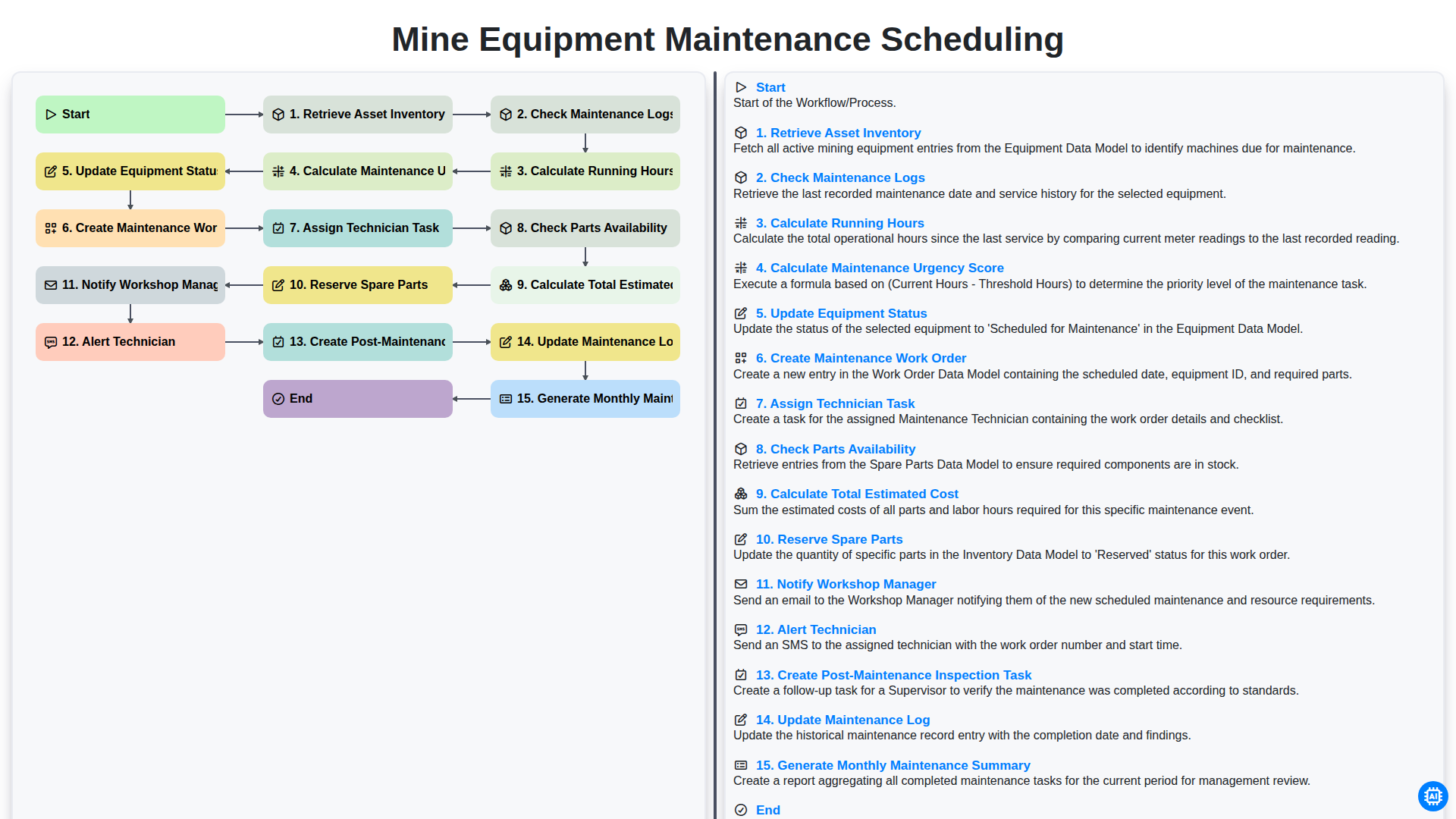
Efficient Mine Equipment Maintenance Scheduling Workflow
Need help with
Checklists?
Have a question? We're here to help. Please submit your inquiry, and we'll respond promptly.