Construction Budget Tracking and Cost Control: An Automated Workflow for Project Financial Success
Published: 06/04/2026 Updated: 10/05/2026
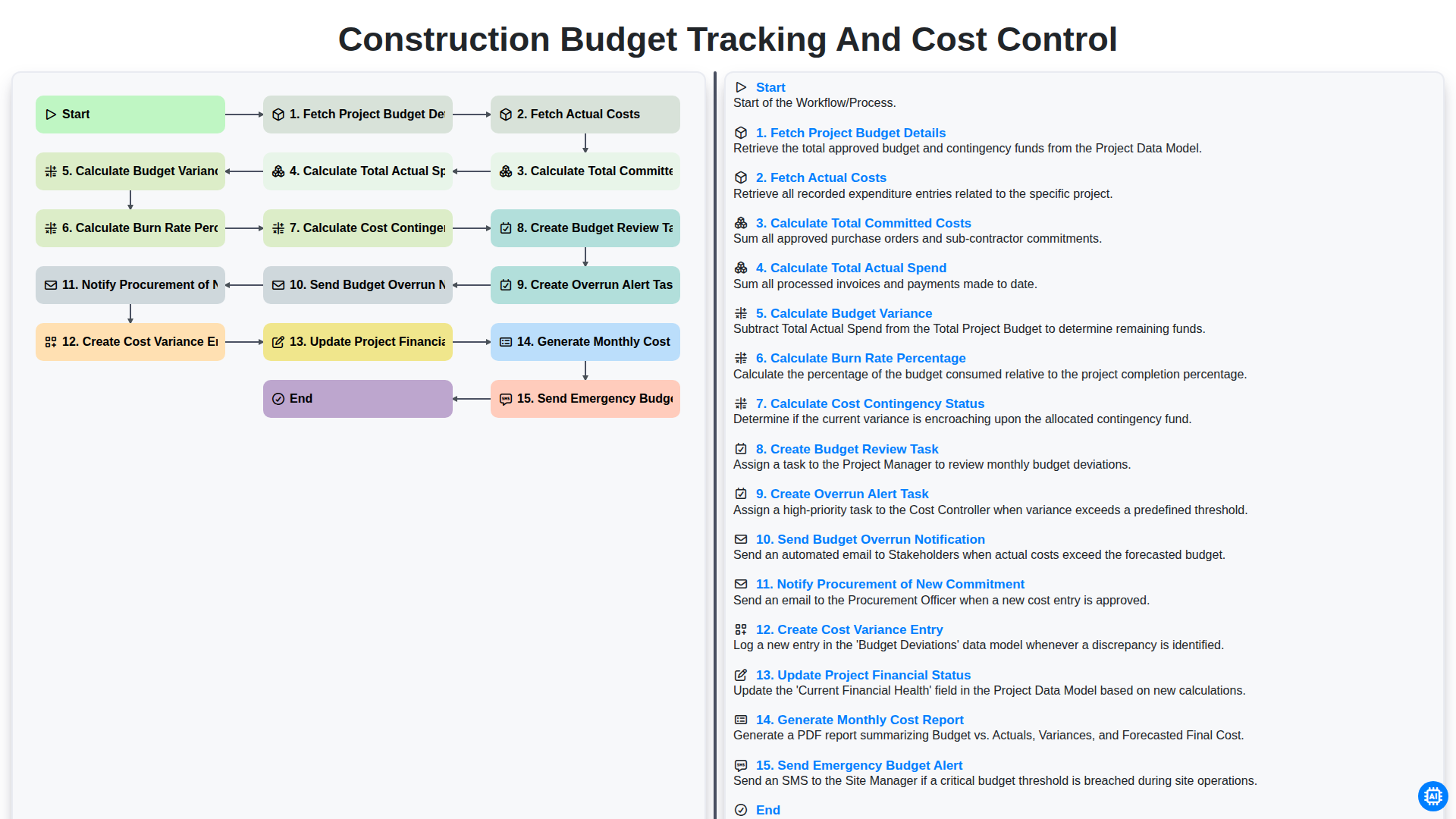
Table of Contents
- The Critical Need for Precision in Construction Cost Management
- Phase 1: Establishing the Financial Baseline
- Step 1: Fetching Comprehensive Project Budget Details
- Phase 2: Real-Time Cost Aggregation
- Step 2: Tracking Actual Costs and Committed Expenditures
- Step 3: Calculating Total Committed Costs vs. Total Actual Spend
- Phase 3: Advanced Variance and Performance Analytics
- Step 4: Analyzing Budget Variance and Burn Rate Percentage
- Step 5: Monitoring Cost Contingency Status
- Step 6: Triggering Budget Review and Overrun Alert Tasks
- Step 7: Real-Time Stakeholder Notifications and Procurement Updates
- Phase 5: Data Integrity and Financial Reporting
- Step 8: Automating Monthly Cost Reports and Financial Status Updates
- Resources & Links
TLDR: Discover how to eliminate manual errors and prevent cost overruns with our automated Construction Budget Tracking and Cost Control workflow. This guide explains how the automated system tracks budget details, calculates real-time variances and burn rates, and proactively triggers alerts-such as budget overrun notifications and emergency alerts-to keep your project finances on track and your stakeholders informed.
The Critical Need for Precision in Construction Cost Management
In the high-stakes world of construction, the margin between a profitable project and a financial disaster is often razor-thin. Unlike many other industries, construction projects are characterized by volatile variables: fluctuating material prices, unpredictable labor shortages, unforeseen site conditions, and the inevitable scope creep that plagues even the best-laid plans. Without a rigorous system for managing these uncertainties, a single unforeseen expense can trigger a catastrophic domino effect across the entire project lifecycle.
Precision in cost management is not merely about recording expenses after they occur; it is about maintaining proactive visibility over every dollar committed and spent. When project managers rely on fragmented spreadsheets or delayed manual updates, they are essentially flying blind, often discovering budget overruns only when it is too late to implement corrective measures. To maintain profitability, a construction workflow must move beyond simple bookkeeping and transition into real-time financial intelligence. This requires a systematic approach to tracking budget variances, monitoring burn rates, and managing contingencies, ensuring that every stakeholder-from the site foreman to the executive board-is operating from a single, accurate version of the truth.
Phase 1: Establishing the Financial Baseline
The foundation of any successful construction project lies in the accuracy of its initial financial roadmap. Before any heavy machinery moves on-site, the first critical phase of our automated workflow begins with Fetching Project Budget Details. This step involves pulling comprehensive data from your initial estimates, including labor, materials, equipment, and subcontractor allocations. By establishing this definitive baseline, we create a single source of truth that serves as the benchmark for every subsequent financial decision. Without this precise starting point, tracking progress becomes impossible, as there is no standard against which to measure deviations or performance.
Step 1: Fetching Comprehensive Project Budget Details
The foundation of any successful cost management strategy lies in the accuracy of your initial data. The first critical step in the workflow is Fetching Project Budget Details, which involves pulling all baseline financial information from your project management system or ERP.
This process isn't just about looking at a single number; it requires a granular extraction of the entire approved budget breakdown. This includes allocated funds for specific work packages, labor estimates, material allowances, and predefined contingency reserves. By automating the retrieval of these details, you ensure that the tracking workflow is always comparing real-time expenditures against the most current, approved version of the project scope. Without this precise baseline, every subsequent calculation-from variance to burn rate-would be fundamentally flawed, leading to inaccurate reporting and dangerous financial blind spots.
Phase 2: Real-Time Cost Aggregation
Once the initial project budget details are established, the system moves into the critical phase of Real-Time Cost Aggregation. This stage is where the theoretical budget meets the reality of field operations. The workflow begins by automatically fetching project budget details and simultaneously fetching actual costs from integrated accounting and field management tools.
To provide a true picture of financial health, the system performs a multi-layered calculation. It doesn't just look at what has been paid, but calculates total committed costs (including purchase orders and subcontracts) and compares them against the total actual spend (invoices and payments processed). By merging these figures, the workflow calculates the budget variance, allowing project managers to see exactly where deviations are occurring.
Furthermore, the engine provides high-level oversight by calculating the burn rate percentage, which indicates how quickly the budget is being depleted relative to project progress. Crucially, it also calculates the cost contingency status, ensuring that the project's safety net is monitored and preserved. This automated aggregation ensures that stakeholders are never looking at stale data, but rather a live, accurate reflection of the project's financial trajectory.
Step 2: Tracking Actual Costs and Committed Expenditures
Once the initial budget details are established, the core of effective cost control lies in the continuous monitoring of real-time financial data. This stage involves two critical actions: Fetching Actual Costs and Calculating Total Committed Costs.
To maintain an accurate financial picture, the system must pull real-time data from invoices, payroll, and subcontractor payments to determine your Total Actual Spend. However, looking at spent funds alone is a common pitfall in construction management. To prevent hidden budget leaks, the workflow also calculates Total Committed Costs-this includes all signed contracts, purchase orders, and subcontracts that have been issued but not yet paid.
By integrating both actual expenditures and upcoming commitments, you move away from reactive accounting and toward proactive financial management. This ensures that you aren't just seeing what has left your bank account, but also what is legally obligated to leave it, providing a true representation of your remaining budget.
Step 3: Calculating Total Committed Costs vs. Total Actual Spend
Once the system has successfully fetched both your initial project budget details and your real-time actual costs, the workflow moves into a critical phase of financial reconciliation. To get a true picture of your project's financial health, the system performs two distinct calculations: Total Committed Costs and Total Actual Spend.
Calculating Total Committed Costs is vital because it accounts for all obligations that have been officially documented but not yet paid out. This includes signed purchase orders, executed subcontracts, and approved change orders. Without tracking these commitments, a project manager might mistakenly believe there is more remaining budget than actually exists, leading to hidden deficits.
Simultaneously, the workflow calculates the Total Actual Spend, which tracks the actual cash outflows-the invoices that have been processed and the payments that have officially left the company accounts. By comparing these two figures against your baseline budget, the system provides a clear view of your true financial exposure, ensuring that you are managing not just what you have spent, but what you are destined to spend.
Phase 3: Advanced Variance and Performance Analytics
Once the raw data is gathered, the workflow moves into the analytical core of the process. This phase is where simple numbers are transformed into actionable intelligence. The system automatically executes a series of complex calculations to determine the true health of your project's finances.
First, the engine calculates the Total Committed Costs-incorporating both paid invoices and pending purchase orders-and compares them against the Total Actual Spend. By subtracting these figures from the initial budget, the system identifies the Budget Variance, pinpointing exactly where you are under or over budget. To provide a real-time view of project momentum, the workflow also calculates the Burn Rate Percentage, allowing project managers to see how quickly capital is being depleted relative to project progress. Furthermore, it assesses the Cost Contingency Status, ensuring you know exactly how much of your safety net remains before a deficit occurs.
The true power of this phase lies in its proactive nature. Rather than waiting for a month-end review, the system is programmed to trigger immediate responses to financial shifts. If a discrepancy is detected, the workflow automatically triggers the creation of a Budget Review Task and an Overrun Alert Task. In critical scenarios, the system can even trigger an Emergency Budget Alert to ensure stakeholders are notified of high-risk deviations instantly.
To maintain complete transparency across the organization, the workflow simultaneously handles downstream communication: it notifies the Procurement team of any new commitments, creates detailed Cost Variance Entries for audit trails, and updates the overarching Project Financial Status. Finally, all these complex moving parts are distilled into a comprehensive Monthly Cost Report, providing a structured, data-driven summary that keeps all stakeholders aligned and prepared for upcoming financial decisions.
Step 4: Analyzing Budget Variance and Burn Rate Percentage
Once the raw figures for committed costs and actual spend are gathered, the system moves into the critical analytical phase. This step transitions the data from simple bookkeeping into actionable intelligence by performing two vital calculations: Budget Variance and Burn Rate Percentage.
First, the workflow calculates the Budget Variance, which is the numerical difference between your planned budget and your actual costs. A positive variance indicates you are under budget, while a negative variance signals a potential overrun. However, a single number doesn't tell the whole story, which is why the system immediately calculates the Burn Rate Percentage.
The burn rate tells you how much of your total budget has been consumed relative to the project's timeline. By analyzing this percentage, project managers can determine if the current spending velocity is sustainable. For example, if you have consumed 70% of your budget but have only completed 40% of the project tasks, the burn rate serves as an early warning sign of financial inefficiency, even if the absolute dollar amount seems manageable. This dual-layered analysis ensures that you aren't just looking at what was spent, but how that spending aligns with your project's progress.
Step 5: Monitoring Cost Contingency Status
Once the primary budget variances and burn rates are calculated, the workflow moves into a critical stage of risk management: Monitoring Cost Contingency Status. This step involves analyzing the remaining unallocated funds-the contingency-to determine how much of your safety net remains intact.
By automatically comparing your current cumulative variance against your predefined contingency fund, the system provides an immediate snapshot of your financial buffer. This allows project managers to see not just if they are over budget, but specifically how much of their emergency fund has been eroded by unexpected site conditions, material price hikes, or scope changes. Monitoring this status ensures that you are never blindsided by a depleted contingency, allowing for proactive decision-making before a minor overrun turns into a project-threatening deficit.
Step 6: Triggering Budget Review and Overrun Alert Tasks
Once the system has calculated the budget variance and burn rate, the workflow moves from data analysis into proactive management. This stage is critical because it transforms raw numbers into actionable intelligence by automatically initiating the next steps in the project lifecycle.
Specifically, the system performs two vital automated actions: it creates a Budget Review Task for the project manager and creates an Overrun Alert Task if the variance exceeds predefined thresholds. By automating these tasks, the workflow ensures that budget deviations are never overlooked. Instead of waiting for a month-end manual audit, the project leadership is immediately prompted to investigate the root causes of the discrepancy, allowing for real-time adjustments to the project scope or resource allocation before a minor deficit turns into a major financial crisis.
Step 7: Real-Time Stakeholder Notifications and Procurement Updates
Once the calculations are complete and a budget discrepancy is identified, the workflow shifts from data processing to active communication. This stage is critical for maintaining transparency and preventing budget creep before it becomes unmanageable.
The system automatically triggers a sequence of three vital actions:
- Automated Overrun Alerts: If the budget variance exceeds a predefined threshold, the system immediately generates a Budget Overrun Alert Task and sends an Emergency Budget Alert to project managers and stakeholders. This ensures that decision-makers are notified the moment a project risks going out of scope.
- Procurement Synchronization: To prevent further unmanaged liabilities, the workflow notifies the Procurement Department of any new commitments. This ensures that the purchasing team is aware of exactly how much of the budget is officially spoken for, preventing the issuance of purchase orders that could inadvertently breach the remaining funds.
- Stakeholder Transparency: By automating these notifications, the workflow eliminates the information lag that often leads to financial surprises. Every stakeholder is kept in the loop through real-time updates, ensuring that the project's financial health is always visible and actionable.
Phase 5: Data Integrity and Financial Reporting
Once the raw data is processed, the focus shifts from calculation to-actionable intelligence. In this phase, the workflow transitions from simple data aggregation to a sophisticated system of financial oversight and automated communication. The primary goal is to ensure that every discrepancy is documented and every stakeholder is informed in real-time, preventing small budget leaks from turning into major project deficits.
The process begins with the automated creation of Cost Variance Entries and the systematic Updating of Project Financial Status, ensuring that the project dashboard always reflects the most current fiscal reality. To maintain rigorous oversight, the system automatically triggers Budget Review Tasks for project managers and generates a comprehensive Monthly Cost Report to provide a historical narrative of spending patterns.
Crucially, this phase acts as the project's early warning system. If the calculated variance exceeds predefined thresholds, the workflow triggers high-priority interventions: an Emergency Budget Alert is dispatched to leadership, and an Overrun Alert Task is created to mandate immediate mitigation strategies. Simultaneously, to ensure the supply chain remains aligned with the current budget, the system Notifies Procurement of New Commitments, ensuring that no new purchase orders are issued without full visibility into the remaining contingency. This closed-loop communication ensures that data integrity isn't just about recording the past, but about actively steering the project toward a profitable completion.
Step 8: Automating Monthly Cost Reports and Financial Status Updates
Once the heavy lifting of data calculation and variance analysis is complete, the final stage of the workflow focuses on documentation and communication. Automation ensures that no project manager has to manually compile spreadsheets at the end of each cycle.
The system automatically triggers the Generation of Monthly Cost Reports, transforming raw data into a polished, executive-ready document. This report provides a high-level overview of the project's financial health, making it easy to share with stakeholders and clients without the risk of manual entry errors. Simultaneously, the workflow performs a critical Update to the Project Financial Status, ensuring that the master project dashboard reflects the most recent expenditures and commitments in real-time.
By automating these final steps, you ensure that your project's single source of truth is always current, allowing for data-driven decision-making and eliminating the administrative bottleneck of month-end reporting.
Resources & Links
- Autodesk Construction Cloud: Industry-leading construction management software for real-time budget tracking and project oversight.
- Procore Technologies: A comprehensive platform for managing project financials, cost tracking, and construction workflows.
- Project Control Academy: Educational resources and training for project controls professionals focused on cost management and variance analysis.
- Project Management Institute (PMI): Global standards and best practices for project cost management, risk mitigation, and budget contingency planning.
- Smartsheet for Construction: Automation tools and templates for creating real-time dashboards, tracking burn rates, and managing project alerts.
- Oracle Construction and Engineering: Enterprise-level solutions for managing complex construction budgets, procurement, and financial reporting.
Frequently Asked Questions
What is the main objective of implementing an automated workflow for construction budget tracking?
The primary objective is to ensure project financial success by reducing manual errors, providing real-time visibility into expenditures, and enabling proactive cost control measures to prevent budget overruns.
How does automation improve cost control in construction projects?
Automation improves cost control by streamlining data collection from the field to the office, enabling instant comparisons between actual costs and estimated budgets, and triggering alerts when specific cost thresholds are approached or exceeded.
What are the key components of an effective construction budget tracking system?
An effective system should include real-time expense logging, automated invoice processing, integrated change order management, labor cost tracking, and centralized reporting dashboards.
Can automation help in managing unexpected project expenses or change orders?
Yes, an automated workflow captures change orders as they occur and immediately updates the projected total cost, allowing project managers to see the impact on the overall budget without waiting for end-of-month reconciliations.
What are the common risks of relying on manual budget tracking methods?
Manual methods are prone to human error, data fragmentation, delayed reporting, and a lack of real-time visibility, all of which significantly increase the risk of undetected cost overruns and financial loss.
Comments
There are no comments yet. Be the first to add one!
Construction Management Solution Demo
Build smarter, not harder! ChecklistGuro streamlines construction projects from planning to closeout. Manage tasks, inspections, safety protocols & more - all in one place. Reduce delays, improve communication, and deliver projects on time & on budget.
Related Articles
The Ultimate Concrete Vibration Checklist Template
Unlock Value: Your Free Value Engineering Checklist Template
The Ultimate HVAC Ductwork Installation Checklist Template

The Ultimate Rebar Placement Checklist Template
Your Concrete Mix Design Verification Checklist: A Step-by-Step Guide
Backfilling & Compaction Checklist: A Foundation's Best Friend
The Ultimate Concrete Delivery & Placement Checklist Template
Your Ultimate Stakeholder Communication Plan Checklist Template
Need help with
Checklists?
Have a question? We're here to help. Please submit your inquiry, and we'll respond promptly.