Mastering ERP Batch Jobs: Your Comprehensive Monitoring Checklist
Published: 12/19/2025 10:00 PM Updated: 12/20/2025 12:18 PM
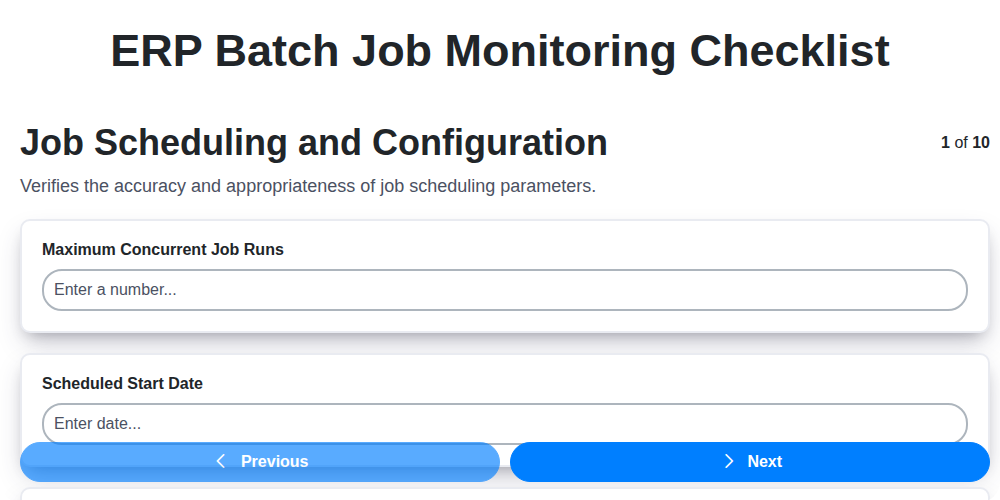
Table of Contents
- Introduction: Why ERP Batch Job Monitoring Matters
- 1. Job Scheduling and Configuration: The Foundation of Reliability
- 2. Resource Allocation and Utilization: Maximizing Efficiency
- 3. Job Dependency Management: Ensuring Orderly Execution
- 4. Error Handling and Recovery: Building Resilience
- 5. Security and Access Control: Protecting Sensitive Data
- 6. Logging and Audit Trails: Tracking Every Step
- 7. Performance Monitoring & Optimization: Keeping Jobs Running Smoothly
- 8. Job Notification & Alerts: Proactive Problem Detection
- 9. Data Integrity Checks: Validating Batch Job Results
- 10. Disaster Recovery & Failover: Preparing for the Unexpected
- 11. Automated Monitoring Tools: Streamlining the Process
- 12. Best Practices for Batch Job Maintenance
- Conclusion: Maintaining a Healthy ERP Batch Job Environment
- Resources & Links
TLDR: Keep your ERP batch jobs running smoothly with this checklist! It covers everything from scheduling and resource allocation to error handling and disaster recovery. Use it to proactively identify and resolve issues, ensuring data integrity and minimizing downtime - a must-have for any ERP environment.
Introduction: Why ERP Batch Job Monitoring Matters
ERP systems thrive on automation, and at the heart of that automation lie batch jobs. These scheduled processes, handling everything from financial reporting to inventory updates, are the unsung heroes of daily operations. However, their complexity and often 'set-it-and-forget-it' nature can lead to significant risks if not properly monitored.
A failed or delayed batch job can cascade into a chain of problems: inaccurate data, missed deadlines, regulatory non-compliance, and ultimately, disrupted business processes. Imagine a critical sales order processing job failing overnight - the impact on shipping, customer satisfaction, and revenue could be substantial.
Effective ERP batch job monitoring isn't just about identifying errors after they occur; it's about proactively preventing them, optimizing performance, and ensuring data integrity. This checklist provides a framework to build a robust monitoring strategy, minimizing risk and maximizing the value of your ERP investment. Ignoring these vital processes is like hoping your car runs perfectly without regular maintenance - a gamble few businesses can afford to take.
1. Job Scheduling and Configuration: The Foundation of Reliability
Proper job scheduling and configuration are the bedrock of a robust ERP batch job monitoring strategy. Without a solid foundation here, even the most sophisticated monitoring tools will struggle to provide meaningful insights or prevent issues. This goes beyond simply setting a start time; it's about meticulous planning and proactive management.
Here's what your checklist should cover:
- Define Clear Job Definitions: Each batch job needs a clearly defined purpose, input parameters, expected output, and dependencies. Document these comprehensively.
- Strategic Scheduling: Consider peak usage times, system load, and business requirements when scheduling jobs. Avoid scheduling resource-intensive jobs concurrently if possible. Utilize job prioritization where necessary.
- Flexible Scheduling Options: Leverage the ERP system's scheduling capabilities - recurring schedules, conditional triggers based on events, and the ability to manually override when needed.
- Validation of Schedules: Regularly validate scheduled jobs to ensure they are running as expected and haven't been accidentally altered. Automated checks are ideal.
- Parameterization: Avoid hardcoding values within job definitions. Utilize parameters for maximum flexibility and to avoid repetitive updates.
- Testing in Non-Production: Thoroughly test all job schedules and configurations in a non-production environment before deploying them to production.
- Documentation: Maintain up-to-date documentation outlining the purpose, schedule, parameters, and dependencies of each job.
A poorly configured schedule can lead to delays, errors, and ultimately, inaccurate data. Investing time upfront to perfect this crucial element pays dividends in the long run.
2. Resource Allocation and Utilization: Maximizing Efficiency
ERP batch jobs, particularly those involving significant data processing, can be resource hogs. Inefficient resource allocation directly translates to slower job completion times, potential bottlenecks, and ultimately, a negative impact on overall system performance. This checklist section focuses on ensuring your ERP batch jobs are utilizing resources effectively.
Here's what to consider:
- CPU and Memory Optimization: Analyze job resource consumption patterns. Are jobs consistently exceeding allocated CPU or memory? Consider adjusting job parameters (batch sizes, processing threads) or re-evaluating job design to minimize resource footprint.
- Disk I/O Management: Batch jobs often involve substantial data reads and writes. Monitor disk I/O performance during job execution. Implement strategies like buffering, optimized data access paths, and potentially utilizing faster storage tiers for frequently accessed data.
- Database Connection Pooling: Excessive database connections can strain database servers. Ensure efficient connection pooling is implemented and configured appropriately for each job. Monitor connection pool utilization to identify potential bottlenecks.
- Parallel Processing: Where possible, break down large batch jobs into smaller, parallel tasks. Leverage multi-threading or job scheduling features to distribute the workload across available CPU cores and database connections. However, be cautious - improper parallelization can introduce contention and decrease efficiency.
- Resource Contention: Identify and mitigate resource contention between batch jobs and other critical ERP processes. Prioritize batch job scheduling based on business criticality and resource requirements.
- Resource Profiles: Define and enforce resource profiles for different job types. This ensures that resource-intensive jobs are assigned appropriate resources, preventing them from impacting less demanding processes.
- Regular Review: Resource utilization is not a 'set it and forget it' task. Regularly review resource consumption data and adjust allocation strategies as needed, particularly after system upgrades or changes in business volume.
3. Job Dependency Management: Ensuring Orderly Execution
ERP batch jobs rarely exist in isolation. They often rely on the successful completion of preceding jobs to function correctly. Poor job dependency management can lead to cascading failures, inaccurate data, and significant operational delays. This section outlines critical considerations for managing these dependencies effectively.
Defining and Documenting Dependencies: The first step is a thorough assessment of your batch jobs to identify all dependencies. This includes understanding which jobs must complete before others can start, which databases or files are required, and any specific order of execution necessary for data consistency. Document these relationships clearly and make them accessible to relevant team members.
Sequencing and Scheduling: Utilize your ERP's scheduling capabilities to enforce the defined job order. Ensure that prerequisite jobs are scheduled to complete well in advance of dependent jobs, accounting for potential delays or resource contention. Consider using conditional scheduling - allowing a job to only run if its dependencies have succeeded.
Dependency Visualization: Create a visual representation of your job dependencies. This can be a simple diagram or a more sophisticated workflow map. This visualization simplifies troubleshooting and helps new team members quickly grasp the complex relationships between jobs.
Addressing Circular Dependencies: Carefully investigate and resolve any circular dependencies (where Job A depends on Job B, and Job B depends on Job A). These are inherently problematic and require redesign of processes or alternative solutions to avoid deadlock.
Testing Dependency Chains: Thoroughly test entire chains of dependent jobs to verify that they execute in the correct order and produce the expected results. Simulate potential failures within preceding jobs to ensure subsequent jobs respond appropriately.
Regular Review & Updates: Job dependencies evolve as your business processes change. Schedule regular reviews of your dependency definitions to ensure they remain accurate and reflect the current operational landscape.
4. Error Handling and Recovery: Building Resilience
Batch jobs, by their nature, can encounter errors. Unexpected data, system outages, or code defects are all potential culprits. A robust ERP batch job monitoring strategy must prioritize error handling and recovery to minimize disruption and data loss.
What Should Your Error Handling Plan Include?
- Automated Retry Mechanisms: Implement automated retry logic for jobs that fail due to transient errors (network glitches, temporary database unavailability). Define a clear retry strategy: how many times to retry, with what delay, and under what conditions. Avoid infinite loops - set a maximum retry count.
- Detailed Error Logging: Don't just log that an error occurred; log what the error was, where it occurred (specific job, step, file), and relevant contextual data. This is crucial for root cause analysis. Standardize error code formats and provide clear, actionable error messages.
- Error Categorization & Severity: Categorize errors by severity (critical, warning, informational). Critical errors should trigger immediate alerts, while informational errors can be reviewed during routine monitoring.
- Rollback Procedures: For jobs that modify data, implement rollback procedures to revert changes in case of failure. This minimizes the risk of data corruption. Design rollback mechanisms to be as automated as possible.
- Exception Handling in Job Code: Ensure developers incorporate robust exception handling within the batch job code itself. This proactively anticipates and manages errors within the job process.
- Escalation Procedures: Clearly define escalation paths for errors that cannot be resolved automatically. Specify who is responsible for investigating and resolving escalated issues. Document these procedures for consistency.
- Post-Mortem Analysis: After significant errors, conduct post-mortem analyses to identify root causes and implement corrective actions to prevent recurrence. These should be documented and shared across teams.
Building resilience into your batch job processes through comprehensive error handling and recovery is not just about fixing problems - it's about proactively minimizing the impact of inevitable issues and ensuring data integrity and business continuity.
5. Security and Access Control: Protecting Sensitive Data
Batch jobs often process highly sensitive data - customer information, financial records, inventory details - making robust security and access control paramount. Neglecting this area can expose your organization to significant risks, including data breaches, compliance violations, and reputational damage.
Here's what your checklist should cover:
- Role-Based Access Control (RBAC): Implement RBAC to restrict job execution and configuration access based on user roles. Only authorized personnel should be able to schedule, modify, or view batch job details.
- Least Privilege Principle: Ensure users and services accessing batch jobs have only the minimum level of permissions necessary to perform their duties. Avoid granting blanket administrative access.
- Password Management & Multi-Factor Authentication (MFA): Enforce strong password policies and consider implementing MFA for critical batch job user accounts to prevent unauthorized access.
- Secure Credentials Storage: Never store credentials (database passwords, API keys, etc.) directly within job scripts. Utilize secure vaults or credential management systems. Regularly rotate these credentials.
- Input Validation: Validate all inputs passed to batch jobs to prevent injection attacks and data manipulation.
- Network Segmentation: Isolate batch job processing environments from other networks to limit the impact of potential breaches.
- Regular Security Audits: Conduct periodic audits of user access, permissions, and configurations to identify and remediate vulnerabilities. Review job scripts for potential security flaws.
- Data Encryption: Encrypt data at rest and in transit, especially if the batch jobs handle sensitive information.
- Job Script Integrity: Implement measures to ensure the integrity of job scripts, preventing unauthorized modifications that could compromise data or system security. (e.g., version control, checksum validation).
6. Logging and Audit Trails: Tracking Every Step
Robust logging and comprehensive audit trails are non-negotiable when it comes to ERP batch job monitoring. They provide a critical record of what happened, when it happened, and who was involved, offering invaluable insights for troubleshooting, compliance, and continuous improvement.
Here's why meticulous logging and auditing are essential:
- Root Cause Analysis: When a job fails or produces unexpected results, detailed logs are your best friend. They provide the granular information needed to pinpoint the root cause - be it a data issue, configuration error, or system problem.
- Compliance Requirements: Many industries have strict regulatory requirements that mandate the retention of audit trails for critical business processes. ERP batch job monitoring falls squarely within that category.
- Security & Accountability: Audit trails provide a record of user actions, ensuring accountability and helping to identify potential security breaches or unauthorized modifications to job configurations.
- Performance Insights: Logs can reveal bottlenecks, inefficient processes, and patterns that impact job performance, allowing for optimization efforts.
Key Elements of a Strong Logging and Audit Trail System for ERP Batch Jobs:
- Comprehensive Logging: Record job start/stop times, status changes, executed commands, input parameters, and any error messages.
- User Identification: Clearly identify the user who triggered or modified a job.
- Timestamping: Every event must be accurately timestamped for accurate sequencing and investigation.
- Secure Storage: Logs should be stored securely, protected from unauthorized access and tampering.
- Retention Policies: Define clear retention policies to comply with legal and regulatory requirements.
- Centralized Logging: Ideally, consolidate logs from multiple systems and applications into a centralized repository for easier analysis and reporting.
7. Performance Monitoring & Optimization: Keeping Jobs Running Smoothly
ERP batch jobs, while automated, aren't immune to performance bottlenecks. Without proactive monitoring and optimization, seemingly minor issues can snowball into significant delays or even job failures. This section outlines key steps to ensure your jobs consistently execute efficiently.
Key Metrics to Track:
- Job Execution Time: Establish baseline execution times for each job and consistently monitor for deviations. Increasing execution times often indicate underlying problems.
- CPU Utilization: High CPU usage during job execution can point to resource contention or inefficient code.
- Memory Consumption: Jobs exceeding memory limits can lead to crashes and instability.
- Disk I/O: Excessive disk reads/writes can severely impact performance, especially with large data volumes.
- Network Latency (if applicable): For jobs involving remote resources, network latency is a critical performance factor.
Optimization Strategies:
- Code Review & Refactoring: Regularly review batch job code for inefficiencies. Identify and eliminate redundant operations or unnecessary loops.
- Index Optimization: Ensure proper indexing on database tables involved in batch processing. This significantly reduces query execution times.
- Parallelization: Explore opportunities to parallelize job steps to leverage multi-core processors and reduce overall execution time. Carefully consider dependencies when parallelizing.
- Resource Tuning: Adjust system resource parameters (e.g., database connection pool size, memory allocation) to optimize job performance.
- Data Volume Management: Implement data archiving or partitioning strategies to reduce the volume of data processed by batch jobs.
- Scheduling Optimization: Analyze job dependencies and adjust schedules to minimize conflicts and maximize resource utilization. Consider running less critical jobs during off-peak hours.
- Regular Performance Testing: Conduct periodic performance tests under simulated load conditions to identify potential bottlenecks before they impact production.
By consistently monitoring performance and implementing these optimization strategies, you can ensure your ERP batch jobs execute smoothly and efficiently, minimizing downtime and maximizing business value.
8. Job Notification & Alerts: Proactive Problem Detection
Reactive troubleshooting is costly and disruptive. Wouldn't it be better to know about an issue before it impacts downstream processes or users? That's where robust job notification and alerts become critical for ERP batch job monitoring.
This isn't just about receiving a generic job finished email. It's about configuring intelligent alerts that proactively flag potential problems. Consider these aspects:
- Threshold-Based Alerts: Define acceptable performance thresholds (duration, resource consumption, data volume). Trigger alerts when jobs exceed these limits. A suddenly slow job could indicate data bottlenecks or resource contention.
- Failure Notifications: Of course, immediate alerts for job failures are essential. Include detailed error messages and potential causes in these notifications.
- Status Updates: Provide regular status updates on critical jobs - running, near completion, paused. This allows for preemptive action if issues arise during execution.
- Customizable Notification Channels: Don't limit yourself to email. Leverage SMS, Slack, Microsoft Teams, or other channels to ensure timely notification to the right personnel.
- Escalation Procedures: Define escalation paths for critical alerts. If an initial notification isn't addressed promptly, escalate to a higher level of support.
- Alert Fatigue Prevention: Too many alerts can lead to "alert fatigue," where important warnings are ignored. Prioritize alerts based on severity and impact, and refine thresholds regularly to minimize false positives.
Effective job notification and alerts transform your ERP batch job monitoring from a reactive exercise to a proactive safeguard against disruptions.
9. Data Integrity Checks: Validating Batch Job Results
Batch jobs often manipulate and transform critical data. Ensuring data integrity throughout this process is paramount to maintaining business accuracy and avoiding costly errors. This checklist focuses on verifying that data remains consistent and reliable after each batch job execution.
Key Considerations:
- Data Validation Rules: Define and enforce comprehensive data validation rules specific to each job. These rules should cover data types, ranges, required fields, and cross-field dependencies. Implement these rules within the job itself wherever possible, catching errors proactively.
- Checksums and Hashes: Utilize checksums or cryptographic hashes to verify data consistency before and after job execution. Discrepancies indicate potential data corruption during processing. Automated comparison of these values should be a standard practice.
- Data Reconciliation: Implement reconciliation processes to compare the output data against source data or expected results. This might involve comparing totals, record counts, or key field values.
- Data Sampling & Manual Review: While automation is key, periodic manual review of data samples remains a valuable safeguard. This allows for identification of subtle errors that automated checks might miss. Focus manual reviews on areas identified as high-risk or previously problematic.
- Data Lineage Tracking: Understand the complete data lineage - where the data originated, how it was transformed, and where it ultimately resides. This helps trace the root cause of data integrity issues.
- Error Reporting & Resolution: Ensure any data integrity violations trigger clear and actionable error reports, enabling prompt investigation and corrective action. Track resolution efforts and implement preventative measures to avoid recurrence.
- Post-Processing Validation: Include validation steps after the batch job completes. This could involve running reports to identify inconsistencies or running specialized data quality checks.
10. Disaster Recovery & Failover: Preparing for the Unexpected
ERP batch jobs are the backbone of many business processes, but what happens when the unexpected occurs? A natural disaster, a power outage, or even a system failure can bring your critical jobs to a grinding halt. A robust disaster recovery and failover plan is not just a nice-to-have - it's essential for business continuity.
This checklist item focuses on ensuring your ERP batch job monitoring includes strategies to minimize downtime and data loss in the face of adversity. Key considerations here include:
- Regular Backup and Replication: Verify your job data, configurations, and scheduling information are regularly backed up and replicated to a secondary location. Test these backups frequently to ensure they are restorable.
- Failover Procedures: Document and test failover procedures that automatically switch job execution to a redundant system in case of primary system failure. This includes testing the entire process, not just the technical aspects-also accounting for user workflows and potential manual interventions.
- Recovery Time Objective (RTO) and Recovery Point Objective (RPO): Define clear RTO and RPO targets. These metrics dictate the maximum acceptable downtime and data loss, respectively, and will guide your recovery strategies.
- Job Prioritization for Recovery: Identify critical batch jobs and prioritize their recovery during a disaster. A well-documented recovery order ensures the most essential processes are restored first.
- Disaster Recovery Drills: Conduct regular disaster recovery drills simulating various failure scenarios. These drills should involve all relevant teams and highlight any gaps in the plan.
- Geographic Redundancy: Consider geographically diverse backup sites to protect against regional disasters.
- Documentation & Training: Ensure all disaster recovery procedures are thoroughly documented and that key personnel are trained on their execution.
11. Automated Monitoring Tools: Streamlining the Process
While manual checklists are valuable for initial setup and periodic reviews, the sheer volume of data and complexity inherent in ERP batch job monitoring often necessitates automation. Automated monitoring tools offer a significant leap in efficiency and reliability. These tools typically provide real-time visibility into job status, resource utilization, and performance metrics, reducing the risk of human error and freeing up valuable IT resources.
Look for tools that offer features like:
- Centralized Dashboard: A single pane of glass to view all job statuses, dependencies, and resource consumption.
- Automated Alerts: Customizable notifications triggered by job failures, performance degradation, or resource bottlenecks.
- Trend Analysis: Historical data and reporting capabilities to identify patterns and proactively address potential issues.
- Integration: Seamless integration with your ERP system and other relevant platforms for data exchange and workflow automation.
- Self-Healing Capabilities: Some advanced tools can even automatically retry failed jobs or adjust resource allocation based on predefined rules.
Investing in automated monitoring tools isn't just about convenience; it's about ensuring the stability and efficiency of your ERP system, minimizing downtime, and maximizing ROI. They are a crucial component of a robust ERP batch job monitoring strategy.
12. Best Practices for Batch Job Maintenance
Maintaining a robust and reliable ERP batch job environment goes beyond simply scheduling and running jobs. It requires ongoing diligence and a proactive approach. Here's a breakdown of key practices to ensure peak performance and minimal disruption:
- Regular Review & Updates: Batch job configurations aren't static. Business processes evolve, data volumes change, and system upgrades introduce new considerations. Schedule regular (quarterly or bi-annually) reviews of all batch jobs to ensure they's still relevant, efficient, and aligned with current needs.
- Version Control: Treat batch job configurations as code. Implement version control for job definitions and scripts. This enables rollback to previous working versions in case of errors, facilitates collaboration, and provides a historical record of changes.
- Documentation is Key: Document everything. Job purpose, dependencies, scheduling parameters, troubleshooting steps, responsible parties - detail it all. This is invaluable for new team members and for rapid problem resolution.
- Standardization: Establish standardized naming conventions, scheduling parameters, and error handling procedures. This consistency reduces confusion, simplifies maintenance, and improves overall operational efficiency.
- Automate Where Possible: Automate recurring maintenance tasks like performance analysis, data archiving, and alert threshold adjustments. This frees up valuable resources and reduces the risk of human error.
- Proactive Testing: Don't wait for production issues to surface. Implement a comprehensive testing strategy including unit testing (individual job components), integration testing (jobs interacting with each other), and performance testing (simulating peak load).
- Knowledge Transfer: Ensure cross-training within the team. Avoid single points of failure where only one person understands a critical batch job.
- Feedback Loop: Establish a process for gathering feedback from users and stakeholders regarding batch job performance and reliability. Use this feedback to continuously improve the system.
- Stay Updated on ERP Patches: ERP system updates often include changes that affect batch job functionality. Apply patches promptly and thoroughly test impacted jobs.
- Capacity Planning: Anticipate future growth in data volumes and transaction loads. Regularly assess resource utilization and plan for increased capacity to avoid performance bottlenecks.
- Security Audits: Periodically review batch job security configurations to identify and address vulnerabilities.
Conclusion: Maintaining a Healthy ERP Batch Job Environment
Successfully managing ERP batch jobs isn't a "set it and forget it" endeavor. It's an ongoing process that demands vigilance and proactive measures. As we've outlined, a comprehensive checklist encompassing job scheduling, resource management, error handling, security, and more, is crucial for ensuring the reliability, efficiency, and integrity of your ERP operations.
Regularly reviewing and updating this checklist, adapting it to evolving business needs and system changes, is key. Automated monitoring tools can significantly lighten the workload and provide early warnings of potential issues. By prioritizing these practices, you're not just preventing disruptions; you're investing in the stability and efficiency of your entire ERP landscape, freeing up valuable resources and ensuring your business can run smoothly. A healthy batch job environment is a foundational element of a successful ERP implementation, and consistent attention is the price of that success.
Resources & Links
- SAP Help Portal: SAP's official help portal offers extensive documentation and guides related to scheduling and monitoring batch jobs within SAP systems. Crucial for understanding SAP-specific configurations and best practices.
- Oracle Support: Oracle's support site provides detailed information regarding batch job scheduling, monitoring, and troubleshooting for Oracle E-Business Suite and other Oracle ERP solutions. Look for whitepapers and knowledge base articles.
- Microsoft Docs: If your ERP utilizes Microsoft Dynamics, Microsoft Docs offers resources on scheduling, managing, and monitoring batch processes, particularly within Dynamics 365 and related platforms.
- NetSuite Help Center: For NetSuite users, the help center provides resources on scheduled processes, workflows, and batch job management within the NetSuite environment.
- IBM Knowledge Center: IBM's Knowledge Center contains information applicable to ERP systems built on IBM technologies, covering aspects like job scheduling, monitoring, and error handling.
- ServiceNow Documentation: If your ERP integration or workflows rely on ServiceNow, this site provides documentation about scheduled jobs and automation processes. Helpful for understanding task scheduling and monitoring.
- BMC Blogs & Documentation: BMC offers solutions for IT operations management, often used in conjunction with ERP systems. Their blog and documentation often contain articles and guides regarding job scheduling and monitoring.
- SolarWinds - IT Monitoring Resources: SolarWinds is a vendor offering comprehensive IT monitoring solutions. While not ERP-specific, their resources provide a broader understanding of monitoring best practices applicable to batch jobs.
- Dynatrace - Application Monitoring: Dynatrace provides application performance monitoring (APM) which can be extended to monitor ERP batch jobs. Their documentation details how to set up and leverage monitoring for complex processes.
- Prometheus: Prometheus is a popular open-source monitoring and alerting toolkit. Many ERP environments integrate with Prometheus for detailed batch job metric tracking and notification.
- Splunk: Splunk is a powerful data analytics platform often used for ERP monitoring. Splunk's documentation demonstrates how to ingest, analyze, and visualize ERP batch job logs and metrics.
Frequently Asked Questions
What are ERP Batch Jobs and why are they important?
ERP Batch Jobs are automated, scheduled tasks within an Enterprise Resource Planning (ERP) system. They handle processes like data reconciliation, report generation, invoice processing, and data imports that don't require real-time interaction. They're crucial for operational efficiency, data integrity, and compliance.
Why is monitoring ERP Batch Jobs a 'checklist' approach?
A checklist provides a structured and repeatable process for ensuring consistent monitoring. Batch jobs often run unattended, making it easy for issues to go unnoticed. A checklist provides a defined set of checks to cover common failure points and ensure reliable execution.
What types of issues can I expect to encounter when monitoring Batch Jobs?
Common issues include job failures due to data errors, resource constraints (memory, CPU), dependency failures, network connectivity problems, scheduling conflicts, and security access limitations.
What are some key areas covered in the monitoring checklist?
The checklist typically covers aspects like job execution status, error logs analysis, resource utilization, dependency validation, scheduling accuracy, and alerting configurations.
What is 'dependency validation' in the context of Batch Job monitoring?
Dependency validation ensures that prerequisite jobs or processes have successfully completed before a batch job is allowed to run. Failing to validate dependencies can lead to cascading failures and incorrect data processing.
What does 'resource utilization' monitoring entail?
Resource utilization monitoring tracks metrics like CPU usage, memory consumption, disk space, and network bandwidth used by Batch Jobs. This helps identify performance bottlenecks and resource constraints.
What's the importance of proper alerting for Batch Job failures?
Prompt alerts notify administrators of job failures, allowing for immediate investigation and resolution, minimizing downtime and preventing data inaccuracies. Alerts should be tailored to severity and potential impact.
How often should I review and update my Batch Job monitoring checklist?
The checklist should be reviewed and updated at least annually, or whenever significant changes occur in the ERP system, job configurations, or business processes. Regular review ensures the checklist remains relevant and effective.
Can I use third-party tools to monitor my ERP Batch Jobs?
Yes, many third-party monitoring tools integrate with ERP systems to provide enhanced monitoring capabilities, including real-time dashboards, advanced analytics, and automated reporting. Evaluate tools based on your ERP system and requirements.
What's the difference between 'status' and 'logs' when monitoring Batch Jobs?
'Status' refers to the overall execution result (success, failure, warning). 'Logs' provide detailed information about the job's execution, including errors, warnings, and diagnostic messages, offering more context for troubleshooting.
Found this Article helpful?
Comments
There are no comments yet. Be the first to add one!
ERP - Enterprise Resource Planning Solution Demo
Overwhelmed by disconnected systems? ChecklistGuro provides a centralized ERP solution, connecting your business processes - finance, operations, & more - for improved visibility and control. Simplify operations & boost efficiency.
Related Articles

MRP System Go-Live Checklist: Your Path to a Successful Implementation

Top 10 CMiC Alternatives for 2025

The Ultimate Foundation Waterproofing Installation Checklist Template
Top 10 Odoo Alternatives for 2025

How to Save Money on Bill of Materials (BOM) Management Software

The Ultimate Waterproofing Checklist: Ensuring a Leak-Proof Installation

The 10 Best Manufacturing Management Software of 2025

MRP Vendor Master Data Checklist: Ensuring Accuracy and Efficiency
We can do it Together
Need help with
Enterprise Resource Planning (ERP)?
Have a question? We're here to help. Please submit your inquiry, and we'll respond promptly.