Ensuring ERP Success: Your Business Process Validation Checklist
Published: 12/20/2025 10:00 PM Updated: 12/21/2025 7:02 AM
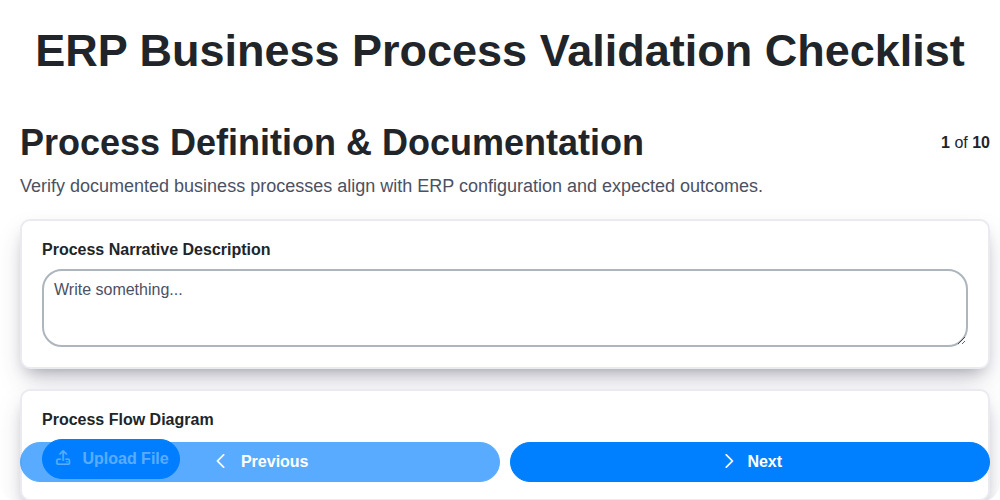
Table of Contents
- Introduction: Why ERP Business Process Validation Matters
- 1. Process Definition & Documentation: The Foundation
- 2. Data Accuracy & Integrity: Garbage In, Garbage Out
- 3. System Configuration Verification: Setting the Stage
- 4. User Roles & Permissions: Control and Accountability
- 5. Integration Testing: Connecting the Pieces
- 6. Reporting & Analytics: Measuring Performance
- 7. Workflow Validation: Ensuring Smooth Operations
- 8. Security Controls: Protecting Your Data
- 9. Compliance & Audit Trail: Meeting Regulatory Requirements
- 10. Exception Handling & Error Management: Preparing for the Unexpected
- 11. User Acceptance Testing (UAT): The End-User Perspective
- 12. Post-Implementation Validation: Sustaining Success
- Conclusion: A Proactive Approach to ERP Validation
- Resources & Links
TLDR: Implementing a new ERP system? Don't risk chaos! This checklist guides you through verifying your processes, data, security, and integrations before go-live. It's your roadmap to a smooth, compliant, and successful ERP implementation - saving time, money, and headaches down the line.
Introduction: Why ERP Business Process Validation Matters
Implementing an ERP system is a massive undertaking, representing a significant investment of time, resources, and energy. However, the implementation itself isn't the finish line. To truly realize the promised benefits - increased efficiency, improved decision-making, and streamlined operations - a thorough and rigorous validation process is absolutely essential.
Think of it this way: you wouldn't drive a brand new car off the lot without checking the fluids, tire pressure, and basic functionality, would you? The same logic applies to your ERP system. Business Process Validation (BPV) is the systematic process of verifying that your ERP system accurately reflects and supports your business processes as they should operate.
Without proper validation, you risk perpetuating existing inefficiencies, introducing new errors, and potentially making critical business decisions based on flawed data. This can lead to costly mistakes, frustrated employees, and ultimately, a failure to achieve the ROI you anticipated. This blog post outlines a comprehensive checklist to guide you through ERP Business Process Validation, ensuring a smooth transition and long-term success. Let's dive into the key areas you need to focus on.
1. Process Definition & Documentation: The Foundation
Before any ERP system can deliver on its promise, it's critical to meticulously define and document the business processes it will support. This isn't just about writing things down; it's about a thorough understanding of how things currently work, identifying areas for improvement, and clearly outlining the desired future state.
This initial phase involves deep collaboration with subject matter experts (SMEs) from each department involved. Key activities include:
- Process Mapping: Visually charting out each process, including inputs, outputs, activities, and responsible parties. Flowcharts, swimlane diagrams, and other visual tools are invaluable here.
- Process Narrative: Supplementing the visual maps with detailed written descriptions of each step, outlining the rationale behind decisions and potential bottlenecks.
- Requirements Gathering: Explicitly defining the requirements each process needs to meet within the ERP system - functionality, data needed, reporting needs, etc.
- Gap Analysis: Comparing the as-is processes to the to-be processes. Understanding the gaps helps inform system configuration and customization.
- Documentation Repository: Establishing a centralized, accessible location for all process documentation, ensuring consistency and ease of maintenance.
Without a solid foundation of well-defined and documented processes, ERP validation becomes a chaotic and error-prone exercise. It's the blueprint for success.
2. Data Accuracy & Integrity: Garbage In, Garbage Out
In any ERP implementation or upgrade, data is the lifeblood. Without accurate and reliable data, your ERP system is essentially useless, regardless of how brilliantly it's configured. This section of the validation checklist focuses on ensuring the data migrating into or residing within your ERP system is trustworthy.
This isn't just about moving data; it's about cleaning it. Errors, inconsistencies, and duplicates can creep in during data migration, manual entry, or even from outdated legacy systems. These inaccuracies can cascade through your business processes, leading to flawed decision-making, inaccurate financial reporting, and dissatisfied customers.
Here's what you need to verify:
- Data Mapping: Did the data mapping between your old system(s) and the ERP accurately translate all necessary fields? Were data types correctly mapped?
- Data Cleansing: Were efforts made to identify and correct errors, inconsistencies, and duplicates before data migration? This might include standardization of addresses, phone numbers, product codes, etc.
- Data Validation Rules: Implement and test data validation rules within the ERP to prevent inaccurate data entry going forward. These rules should enforce required fields, data type limitations, and acceptable ranges.
- Data Completeness: Ensure all required data has been migrated. Are there any missing records or incomplete entries?
- Data Transformation: If data transformations were required during migration (e.g., converting currencies or units of measure), were these transformations performed correctly and validated?
- Sampling and Reconciliation: Perform random sampling of data post-migration and reconcile it against the original source to confirm accuracy.
- Regular Data Audits: Establish a process for ongoing data audits to ensure continued accuracy and identify potential data quality issues.
Ignoring data accuracy & integrity is a recipe for disaster. Prioritizing this during validation is crucial for the long-term success of your ERP investment.
3. System Configuration Verification: Setting the Stage
ERP implementations are complex, and a significant portion of that complexity lies within the system's configuration. This phase moves beyond defining the processes; it's about meticulously verifying that the ERP system is actually configured to support those processes as documented. Simply put, it's confirming that the system does what it's supposed to do.
This involves a deep dive into settings, parameters, and defaults. Are the organizational structures (companies, plants, warehouses) set up correctly? Are chart of accounts, item masters, and bill of materials accurate and reflecting the business requirements? Are vendor and customer records populated with the correct information and aligned with defined business rules?
Don't assume the defaults are sufficient. Many ERP systems have extensive configuration options. A thorough verification should cover:
- Parameter Validation: Examine core system parameters, ensuring they align with documented business rules.
- Master Data Verification: Validate accuracy and completeness of critical master data (material masters, vendor records, customer records, etc.).
- Configuration Item Setup: Verify settings for specific modules (e.g., production planning, inventory management, finance).
- Currency and Language Settings: Confirm correct localization settings are in place.
- Tax Configuration: Ensure accurate calculation and reporting of taxes.
This stage isn't just about ticking boxes; it's about ensuring the system foundation is solid. Errors here can cascade through the entire ERP ecosystem, leading to inaccurate data, inefficient operations, and ultimately, costly business decisions. We're laying the groundwork for success with accurate data and predictable performance.
4. User Roles & Permissions: Control and Accountability
Implementing an ERP system isn't just about functionality; it's about establishing clear lines of responsibility and ensuring data security. A robust user roles and permissions setup is critical to achieving this. This section of your ERP validation checklist needs to be meticulously reviewed.
What to Verify:
- Role Definition Alignment: Are ERP roles accurately mapped to defined business roles within your organization (e.g., Accounts Payable Clerk, Sales Manager, Inventory Controller)? Avoid generic power user roles; specificity is key.
- Permission Granularity: Within each role, are permissions assigned with the principle of least privilege? Users should only have access to the data and functions absolutely necessary for their job. Overly broad permissions create unnecessary risk.
- Access Controls on Sensitive Data: Pay close attention to access controls for sensitive data like financial records, payroll information, and customer data. These require the strictest permissions.
- Segregation of Duties: Crucially, validate that duties are properly segregated. For example, the person creating a vendor record shouldn't also be able to approve payments to that vendor. This prevents fraud and errors.
- Regular Review & Updates: User roles and permissions shouldn't be set and forgotten. Establish a process for regularly reviewing and updating them, particularly when job functions change or new regulations emerge.
- Testing & Validation: Thoroughly test each role's permissions to ensure they function as intended. Attempting actions outside the defined scope should be blocked. Document all testing performed.
A well-defined user roles and permissions framework provides accountability, minimizes the risk of unauthorized access and data manipulation, and is a cornerstone of a secure and well-governed ERP implementation.
5. Integration Testing: Connecting the Pieces
ERP systems rarely operate in a silo. They's designed to connect various departments and processes, sharing data and triggering actions across different modules and potentially even external systems. This makes integration testing absolutely critical. It's not enough that each module functions perfectly in isolation; they must work seamlessly together.
Integration testing focuses on verifying the data flow and functionality where different parts of the ERP system interact. Think of it as ensuring a chain reaction occurs as intended - if one link fails, the whole process breaks down.
What to test:
- Data Flow: Track data as it moves between modules (e.g., order entry to inventory, sales to accounting). Verify data transformation and accuracy at each step.
- Real-time Updates: Confirm that changes in one module trigger corresponding updates in others in a timely manner.
- API Interactions: If your ERP integrates with external platforms (e.g., CRM, eCommerce), meticulously test these API connections.
- Workflow Triggers: Validate that automatic workflow actions triggered by events in one module are correctly executed in another.
- Error Handling in Integrations: What happens when an integration fails? Verify error messages are informative and processes gracefully handle failures.
Example Scenarios:
- A customer places an order on your website (eCommerce). Does it correctly create a sales order in the ERP system?
- When inventory levels reach a reorder point, does a purchase requisition automatically generate?
- Upon receiving a shipment, does the ERP system automatically update inventory levels and reconcile with the purchase order?
Neglecting integration testing can lead to data inconsistencies, process bottlenecks, and ultimately, dissatisfied customers. It's a vital investment in the long-term success and reliability of your ERP implementation.
6. Reporting & Analytics: Measuring Performance
A robust ERP system isn't just about automating processes; it's about providing actionable insights. Effective reporting and analytics are crucial for demonstrating the value of your ERP implementation and identifying areas for continuous improvement. This section of your validation checklist should focus on ensuring the ERP delivers accurate and relevant data.
Here's what to consider:
- Report Accuracy & Completeness: Verify that standard reports pull data correctly and align with business requirements. Sample data and reconciliation with legacy systems are key here. Look for discrepancies, missing fields, or calculation errors.
- Custom Report Validation: If you've developed custom reports, rigorously test their functionality and data sources. Ensure they meet the specific needs of users and deliver the intended information.
- Data Visualization & Accessibility: Confirm that reports are presented in a clear, understandable format. Dashboards and visualizations should be intuitive and accessible to the intended audience, regardless of their technical expertise.
- Key Performance Indicator (KPI) Alignment: Ensure reports and dashboards accurately track and display critical KPIs established during the initial planning phase. Validate formulas and data used to calculate these metrics.
- Data Refresh Frequency: Verify the scheduled data refresh frequency meets business needs. Stale data can lead to inaccurate decisions.
- Report Security: Confirm that report access is properly restricted based on user roles and permissions, protecting sensitive information.
Proper validation of reporting and analytics capabilities will give you confidence that your ERP is providing a clear picture of your business performance, allowing you to make data-driven decisions.
7. Workflow Validation: Ensuring Smooth Operations
Workflow validation is crucial for guaranteeing that your ERP system accurately reflects and supports your business processes. It's more than just confirming the existence of workflows; it's about verifying they function correctly and efficiently, from start to finish.
This involves meticulously tracing the flow of data and tasks through the system for various scenarios. Don't just test the happy path - actively seek out potential bottlenecks and unexpected outcomes. Consider these key validation points:
- Sequence Verification: Is the order of tasks correct? Does each step trigger the next appropriately?
- Conditional Logic Testing: If your workflows have conditional branches (e.g., If X, then do A; otherwise, do B), meticulously test every possible condition and ensure the correct action is executed.
- Task Assignment Accuracy: Confirm that tasks are being assigned to the correct users or roles at each stage.
- Automated vs. Manual Steps: Validate the transition between automated and manual tasks, ensuring a seamless handover.
- Escalation Procedures: Test escalation paths when tasks are overdue or require special attention. Does the system properly notify the appropriate individuals?
- User Interaction: Observe and document how users interact with the workflow. Are there any usability issues that impede efficient task completion?
- End-to-End Testing: Simulate full business processes to ensure the workflow integrates seamlessly with other modules and functionalities.
Proper workflow validation minimizes errors, reduces delays, and ultimately boosts overall operational efficiency. Ignoring this step can lead to frustrating user experiences and costly process failures.
8. Security Controls: Protecting Your Data
In an ERP system, data is the lifeblood of your business. Robust security controls aren't just a best practice; they's a necessity. This section focuses on verifying that your ERP system incorporates appropriate measures to protect sensitive information from unauthorized access, modification, or disclosure.
Checklist Considerations:
- Authentication Methods: Verify the system supports strong authentication methods, such as multi-factor authentication (MFA), and that these are enforced appropriately. Consider biometric login options if applicable.
- Data Encryption: Ensure data is encrypted both in transit (during transmission) and at rest (when stored). Confirm the strength of the encryption algorithms used.
- Network Security: Validate the network infrastructure surrounding the ERP system is secured with firewalls, intrusion detection systems, and other relevant security measures. Regularly scan for vulnerabilities.
- Physical Security: If your ERP system servers are hosted on-premise, verify physical access is restricted and controlled.
- Vulnerability Scanning & Patch Management: Confirm a schedule and process exists for regular vulnerability scanning and prompt application of security patches.
- Data Loss Prevention (DLP): Evaluate if DLP measures are in place to prevent sensitive data from leaving the organization's control.
- Security Audits: Verify the system's security controls are subject to regular audits, both internal and potentially external.
- Access Control Reviews: Periodically review and validate user access rights to ensure they align with current roles and responsibilities. Remove unnecessary or excessive permissions.
Proper implementation and validation of these security controls are crucial for maintaining data confidentiality, integrity, and availability, and minimizing the risk of costly security breaches.
9. Compliance & Audit Trail: Meeting Regulatory Requirements
ERP implementations often operate within heavily regulated industries - think healthcare, finance, or manufacturing. Ensuring your ERP system not only functions correctly but also demonstrates adherence to relevant regulations is paramount. This section focuses on validating the compliance and audit trail capabilities.
Key Validation Points:
- Regulatory Mapping: Confirm that the ERP system's functionalities directly map to relevant industry regulations (e.g., HIPAA, SOX, GDPR). Document this mapping clearly.
- Audit Trail Configuration: Verify the audit trail functionality is enabled and configured to capture necessary events, including user actions, data modifications, and system changes. Ensure the detail captured is sufficient for auditing purposes.
- Retention Policies: Confirm that data retention policies are implemented and aligned with regulatory requirements. This includes the automated archiving and deletion of data.
- Reporting Capabilities: Test the system's ability to generate reports demonstrating compliance. This might involve generating reports on user activity, data access, and system changes.
- Audit Log Reviews: Conduct regular reviews of audit logs by qualified personnel. These reviews should be documented.
- User Access Controls: Ensure user access controls are strictly enforced and regularly reviewed to minimize compliance risks.
- Change Management Procedures: Validate that change management procedures are in place to track and authorize all system changes, ensuring they don't negatively impact compliance.
- Documentation: Maintain comprehensive documentation of all compliance-related configurations, procedures, and audit findings. This is crucial for demonstrating due diligence during audits.
Thorough validation in this area not only helps meet regulatory mandates but also strengthens the overall security and reliability of your ERP system.
10. Exception Handling & Error Management: Preparing for the Unexpected
No ERP implementation goes perfectly smoothly. Errors, unexpected situations, and exceptions are inevitable. A robust exception handling and error management process within your ERP system isn't just about fixing problems after they arise; it's about anticipating them and mitigating their impact.
This section of your validation checklist should focus on how your ERP handles situations that deviate from the normal workflow. Consider these key areas:
- Defined Error Codes and Messages: Are error messages clear, actionable, and localized (if applicable)? Do they provide users with enough information to understand the issue and take corrective action, or do they require escalation to IT?
- Automated Error Notifications: Implement automated notifications to designated personnel when errors occur. This ensures timely intervention and prevents issues from escalating.
- Rollback Procedures: Test and document rollback procedures for critical processes. What happens if a transaction fails midway? Can it be safely rolled back without data corruption or inconsistency?
- Exception Routing: How are exceptions routed to the appropriate personnel for resolution? Define clear escalation paths and responsibilities.
- Logging and Reporting: Ensure thorough logging of all errors and exceptions, including timestamps, user actions, and system states. This data is invaluable for root cause analysis and preventative measures.
- User Training: Train users on how to identify, report, and handle common errors within the ERP system. Empowering users to resolve simple issues reduces the burden on IT and accelerates problem resolution.
- Simulated Error Scenarios: Actively simulate error scenarios during validation (e.g., invalid data input, system outages) to verify the effectiveness of your exception handling processes.
A well-defined and tested exception handling process minimizes disruption, maintains data integrity, and enhances overall system reliability.
11. User Acceptance Testing (UAT): The End-User Perspective
UAT is the crucial final gate before your ERP system goes live. It's not just about confirming the system works; it's about confirming it works for your users and meets their business needs. This phase moves beyond technical validation and focuses on real-world scenarios.
Here's what UAT involves:
- Representative Users: Select users who are familiar with the existing processes and will be primary users of the new ERP system. They should represent different departments and roles impacted by the implementation.
- Real-World Scenarios: Users perform tasks as they would in their day-to-day operations. This isn't about following a script; it's about simulating realistic workflows - from order entry to inventory management, from invoice processing to financial reporting.
- Documented Feedback: Establish a clear process for users to document their experiences, including successes, challenges, and suggestions for improvement. Utilize a standardized feedback form or a dedicated platform for easy tracking.
- Issue Prioritization: Not every issue identified during UAT needs immediate fixing. Establish a prioritization matrix (e.g., Critical, High, Medium, Low) to focus on the most impactful issues first.
- Iterative Refinement: UAT isn't a one-off event. It's often an iterative process where identified issues are resolved, and users re-test to ensure the fixes are correct and don't introduce new problems.
- Sign-Off: Once users are satisfied that the system meets their needs and are comfortable using it, they formally sign off on UAT, signifying their acceptance of the ERP implementation. This is a critical step for ensuring user adoption and successful go-live.
12. Post-Implementation Validation: Sustaining Success
Implementing an ERP system is a monumental achievement, but the journey doesn't end there. Post-implementation validation is critical for ensuring the system continues to perform as expected, delivers ongoing value, and adapts to evolving business needs. It's about proactively identifying and addressing issues before they impact operations. This isn't a one-time event; it should be an ongoing process integrated into your business rhythms.
Think of it as an insurance policy against operational drift. Even with meticulous initial testing, changes happen - new regulations, altered business processes, employee turnover, and system updates all contribute to potential discrepancies.
Here's a condensed checklist to guide your post-implementation validation efforts. While it draws from earlier validation steps, it focuses on sustained performance and adaptation:
- Regular Process Reviews: Periodically revisit documented processes to ensure they remain accurate and reflect actual practice.
- Data Integrity Checks: Continue monitoring data accuracy and consistency. Implement automated data quality rules where possible.
- Configuration Audits: Check system configurations against documented standards to avoid unintended changes.
- User Feedback & Training: Solicit ongoing feedback from users and provide refresher training to maintain proficiency and identify process inefficiencies.
- Performance Monitoring: Track key performance indicators (KPIs) and system performance metrics to identify potential bottlenecks or areas for optimization.
- Change Management Review: Evaluate the effectiveness of your change management processes for future system modifications.
By dedicating resources to post-implementation validation, you solidify your ERP investment and ensure its continued contribution to your business's success.
Conclusion: A Proactive Approach to ERP Validation
Implementing an ERP system is a significant investment, and validating its business processes isn't just a final step - it's a continuous journey. This checklist provides a robust framework, but remember that a truly effective validation process is proactive, not reactive. Regularly revisiting these points, even after go-live, helps ensure your ERP continues to meet evolving business needs and regulatory requirements. Don't view validation as a one-time hurdle; embrace it as an ongoing commitment to maximizing your ERP investment and minimizing potential risks. By adopting this mindset, you can unlock the full potential of your ERP system and confidently navigate the complexities of your business operations.
Resources & Links
- Gartner: Gartner provides in-depth research and advisory services on ERP systems and business process management. Useful for understanding market trends and best practices.
- APQC (American Productivity & Quality Center): APQC offers benchmarking data and process frameworks. Their Process Classification Scheme (PCS) can be helpful in defining and documenting processes.
- ISACA (Information Systems Audit and Control Association): ISACA provides resources and certifications related to IT governance, security, and audit - highly relevant for Security Controls and Compliance sections.
- NIST (National Institute of Standards and Technology): NIST provides cybersecurity frameworks and guidelines applicable to Security Controls and ensuring data integrity within the ERP system. Particularly useful for risk assessments.
- Oracle: Oracle provides documentation and best practice guides for their ERP solutions. If the ERP being validated is an Oracle product, this is a crucial resource.
- SAP: Similar to Oracle, SAP offers comprehensive resources and documentation for their ERP solutions. Essential for SAP ERP validation.
- Microsoft Dynamics 365: Microsoft's ERP platform provides support and documentation for their solutions. A key reference if utilizing Dynamics 365.
- Association for Process Management (APM): The APM provides resources, training, and certifications related to Business Process Management (BPM), offering a broader perspective on process definition and optimization relevant to validation.
- Project Management Institute (PMI): PMI provides guidance on project management methodologies which are applicable to the implementation and validation phases of an ERP system.
- Balanced Scorecard Institute: Provides information and resources related to performance measurement and management, aligning with the Reporting & Analytics section.
Frequently Asked Questions
What is Business Process Validation (BPV) and why is it important for ERP implementation?
Business Process Validation (BPV) is the process of rigorously examining your existing business processes, documenting them, and then validating that your chosen ERP system accurately reflects and supports them. It's crucial for ERP success because it ensures the system is configured correctly, users are trained adequately, and the implementation aligns with your business goals. Skipping BPV can lead to costly rework, user resistance, and ultimately, an ERP failure.
Why should I perform BPV even if I think my processes are already well-defined?
Even if you believe your processes are well-defined, an ERP implementation often reveals hidden complexities or inefficiencies. BPV provides a structured way to uncover these, allowing for optimization before the system goes live. It's a chance to document assumptions and ensure everyone is on the same page.
What's included in the 'Business Process Validation Checklist' mentioned in the article?
The checklist outlines key areas to examine, including process mapping, requirements gathering, gap analysis, system configuration validation, data migration verification, testing scenarios, user training materials, and documentation review. It's a comprehensive guide to ensuring each aspect of your business process is accurately represented and functioning within the ERP system.
Who should be involved in the Business Process Validation process?
A cross-functional team is essential. This should include representatives from all departments that will be using the ERP system (e.g., finance, sales, operations, HR). Key users, subject matter experts, and the ERP implementation team should all be involved to ensure diverse perspectives are considered.
What is a 'gap analysis' and why is it important for BPV?
A gap analysis identifies the differences between your current business processes and the capabilities of the ERP system. It highlights areas where customization or workarounds might be necessary. Understanding these gaps upfront allows for informed decisions about configuration, development, or process redesign.
What is the difference between testing and validation in the context of BPV?
Testing focuses on verifying the technical functionality of the ERP system - does a button work? Does a report generate correctly? Validation, on the other hand, focuses on confirming that the configured system actually performs the business process correctly and meets the intended business outcome. Validation asks, 'Does the system do what we need it to do?'
What should I do if the validation process reveals a significant gap between my business processes and the ERP system's capabilities?
If a significant gap is found, you have several options: 1) Re-engineer your business process to align with the ERP's capabilities, 2) Request customizations to the ERP system (carefully considering the cost and long-term impact), or 3) Implement workarounds - but document these clearly and recognize they are temporary solutions.
How can I ensure that the documentation created during BPV is kept up-to-date after the ERP system goes live?
Establish a process for ongoing review and updates. Designate a 'process owner' for each key business process. Regularly solicit feedback from users and incorporate changes as needed. Version control documents and archive older versions for auditing purposes.
What are some common pitfalls to avoid during Business Process Validation?
Common pitfalls include rushing the process, not involving key stakeholders, overlooking process documentation, inadequate testing, and assuming the ERP vendor will automatically resolve all issues. Proactive planning and meticulous execution are crucial.
Where can I find additional resources and templates to support my Business Process Validation efforts?
Many ERP vendors offer BPV templates and guides. Industry associations and online forums often provide valuable resources and best practices. Your implementation partner should also provide support and expertise throughout the validation process.
Found this Article helpful?
Comments
There are no comments yet. Be the first to add one!
ERP - Enterprise Resource Planning Solution Demo
Overwhelmed by disconnected systems? ChecklistGuro provides a centralized ERP solution, connecting your business processes - finance, operations, & more - for improved visibility and control. Simplify operations & boost efficiency.
Related Articles

MRP System Go-Live Checklist: Your Path to a Successful Implementation

Top 10 CMiC Alternatives for 2025

The Ultimate Foundation Waterproofing Installation Checklist Template
Top 10 Odoo Alternatives for 2025

How to Save Money on Bill of Materials (BOM) Management Software

The Ultimate Waterproofing Checklist: Ensuring a Leak-Proof Installation

The 10 Best Manufacturing Management Software of 2025

MRP Vendor Master Data Checklist: Ensuring Accuracy and Efficiency
We can do it Together
Need help with
Enterprise Resource Planning (ERP)?
Have a question? We're here to help. Please submit your inquiry, and we'll respond promptly.