ERP Disaster Recovery Checklist: Your Guide to Business Continuity
Published: 12/20/2025 10:00 PM Updated: 12/21/2025 7:00 AM
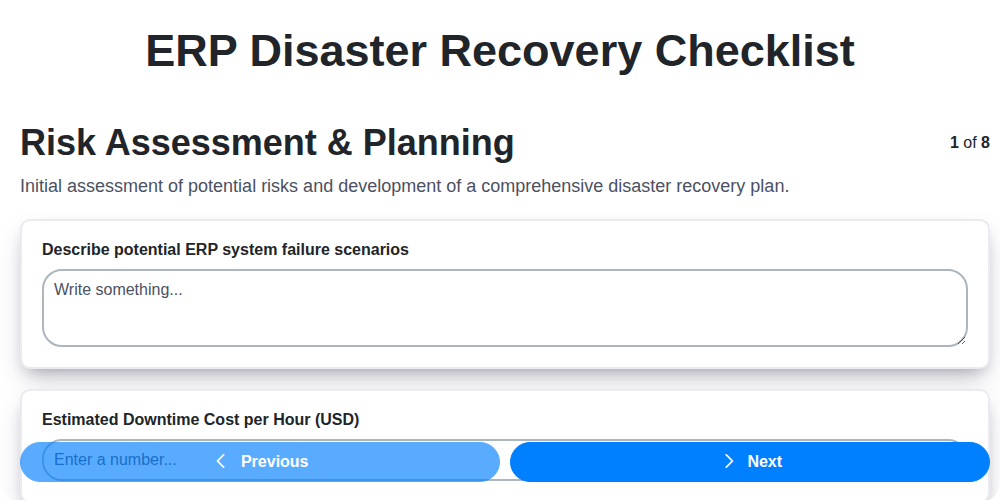
Table of Contents
- Introduction: Why ERP Disaster Recovery Matters
- 1. Risk Assessment & Planning: Identifying Your Vulnerabilities
- 2. Data Backup & Replication: Protecting Your Most Valuable Asset
- 3. Infrastructure Recovery: Restoring Your Foundation
- 4. Application Recovery: Getting Your ERP Back Online
- 5. User Access & Security: Maintaining Control
- 6. Communication & Notification: Keeping Stakeholders Informed
- 7. Testing & Validation: Ensuring Your Plan Works
- 8. Documentation & Maintenance: Keeping Your Plan Current
- 9. Defining Recovery Time Objectives (RTOs) and Recovery Point Objectives (RPOs)
- 10. Cloud vs. On-Premise: Recovery Considerations
- 11. The Role of Business Impact Analysis (BIA)
- 12. Post-Disaster Review and Improvement
- Conclusion: Building Resilience for Your ERP System
- Resources & Links
TLDR: Protect your business! This checklist helps you prepare for ERP system failures by covering everything from data backups and infrastructure recovery to user access and testing. It's your roadmap to minimizing downtime and ensuring business continuity when disaster strikes - don't wait until it's too late, download and customize it today!
Introduction: Why ERP Disaster Recovery Matters
Your Enterprise Resource Planning (ERP) system is the backbone of your business. It manages everything from financials and inventory to manufacturing and customer relationships. A disruption to this critical system - whether due to natural disasters, cyberattacks, hardware failures, or human error - can bring operations to a standstill, leading to significant financial losses, reputational damage, and potential legal repercussions.
Simply put, ERP disaster recovery isn't just a nice-to-have; it's a business imperative. It's the plan and process you put in place to ensure your ERP system can be restored quickly and efficiently, minimizing downtime and allowing your business to resume operations with as little interruption as possible. This blog post will guide you through a comprehensive checklist, but first, understand that proactive planning and regular testing are crucial for a truly effective ERP disaster recovery strategy. The cost of prevention is far less than the cost of recovery.
1. Risk Assessment & Planning: Identifying Your Vulnerabilities
Before you can effectively recover from a disaster, you need to understand what you're recovering from. A robust ERP disaster recovery plan starts with a thorough risk assessment and planning phase. This isn't just about ticking a box; it's about realistically identifying potential threats and prioritizing your responses.
What to Consider:
- Identify Potential Risks: Brainstorm all potential disasters. This includes natural disasters (floods, earthquakes, hurricanes), cyberattacks (ransomware, data breaches), hardware failures, human error, and even power outages. Don't limit yourself - think broadly!
- Assess Impact & Probability: For each risk, evaluate the potential impact on your ERP system and business operations. How critical is the data? How long can you afford downtime? Then, estimate the probability of each risk occurring. A high-impact, high-probability risk demands the most urgent attention.
- Business Impact Analysis (BIA): Conduct a formal BIA. This process helps determine the criticality of various business functions and the impact of their disruption. It highlights which ERP modules and data are absolutely essential for continued operation.
- Define Recovery Time Objectives (RTOs): Determine the maximum acceptable downtime for each critical ERP function. This dictates how quickly you need to restore functionality.
- Define Recovery Point Objectives (RPOs): Specify the maximum acceptable data loss. This guides your backup frequency requirements.
- Assign Responsibilities: Clearly define who is responsible for each aspect of the disaster recovery plan, including risk assessment, planning, and execution.
A comprehensive risk assessment serves as the foundation for your entire ERP disaster recovery strategy. Without it, you're essentially flying blind, hoping you're prepared for the worst.
2. Data Backup & Replication: Protecting Your Most Valuable Asset
Your ERP system holds the lifeblood of your business - critical financial data, customer information, inventory levels, and much more. Losing access to this data, even temporarily, can be devastating. A robust data backup and replication strategy is paramount in your ERP disaster recovery plan.
This goes far beyond simply running backups. Here's what you need to consider:
- Backup Frequency: Daily backups are often insufficient. Consider more frequent backups (hourly or even continuous) for critical data sets, especially if you operate in a constantly changing environment.
- Backup Types: Implement a combination of full, differential, and incremental backups to optimize storage and recovery time.
- Offsite Storage: Never store backups solely on-site. Utilize a secure offsite location (cloud-based or physical) to protect against physical disasters affecting your primary location.
- Replication Strategies: Explore real-time data replication to a secondary site. This ensures near-instant failover capabilities, minimizing downtime. Consider synchronous replication for ultimate data consistency (though with potential performance implications) versus asynchronous replication.
- Backup Integrity Checks: Regularly test the integrity of your backups. Corrupted backups are useless! Automated verification processes are a worthwhile investment.
- Retention Policies: Establish clear retention policies to govern how long backups are stored. Comply with legal and regulatory requirements while balancing storage costs.
- Encryption: Encrypt backups both in transit and at rest to protect sensitive data from unauthorized access.
A well-designed data backup and replication strategy provides peace of mind and ensures your business can recover quickly and efficiently in the face of disaster.
3. Infrastructure Recovery: Restoring Your Foundation
Your ERP system relies on a robust infrastructure - servers, network devices, and potentially cloud services - to function. When disaster strikes, bringing this foundation back online is paramount. This section outlines critical steps for infrastructure recovery.
1. Prioritized Restoration: Identify critical infrastructure components essential for ERP functionality. Rank these based on recovery time objectives (RTOs). High-priority items (e.g., database servers, core network switches) should be restored first.
2. Hardware Replacement/Provisioning: Determine if hardware needs replacement due to damage or unavailability. Have pre-arranged agreements with hardware vendors to expedite procurement or leverage cloud-based infrastructure for rapid provisioning. This might involve spinning up virtual machines or containerized environments.
3. Network Reconfiguration: Restore network connectivity. Verify IP addressing, DNS configurations, and firewall rules are correctly reconfigured to allow communication between ERP components and user access points. Document these settings meticulously to speed up the process.
4. Power and Cooling: Ensure reliable power and cooling for your infrastructure. Consider redundant power supplies, generators, and backup cooling systems. Test these regularly.
5. Geographic Diversity: If possible, leverage geographically diverse data centers or cloud regions to minimize the impact of regional disasters. This minimizes downtime and ensures business continuity.
6. Vendor Coordination: Coordinate with infrastructure vendors (cloud providers, hosting providers) for their recovery procedures and assistance. Have Service Level Agreements (SLAs) in place and understand their responsibilities during a disaster.
7. Automation: Automate infrastructure recovery tasks wherever possible using scripts, configuration management tools, and Infrastructure-as-Code principles. This reduces errors and accelerates restoration.
4. Application Recovery: Getting Your ERP Back Online
The heart of any ERP system lies within its applications - the modules that manage everything from finance and HR to supply chain and manufacturing. Recovering these applications quickly and reliably is paramount to minimizing downtime and maintaining business continuity.
Here's a breakdown of key steps for ERP application recovery:
- Prioritize Critical Applications: Not all ERP modules are created equal. Identify the critical applications vital for immediate business operation. These should be prioritized during recovery. A business impact analysis (BIA) done during the initial risk assessment should guide this prioritization.
- Leverage Redundancy and High Availability: Ideally, your ERP system should be designed with redundancy and high availability. This could involve utilizing clustered servers, load balancing, and failover mechanisms. Ensure these systems are actively maintained and that failover processes are documented and understood.
- Application-Specific Recovery Procedures: ERP applications often have unique recovery procedures. Consult your vendor's documentation and best practices for specific instructions. This might involve restoring application configuration files, database connections, and custom code.
- Database Recovery: Your ERP application's functionality is deeply intertwined with its database. Ensure you have a robust database recovery plan, including regular backups and transaction log shipping. Test your database restoration procedures regularly.
- Customizations and Integrations: Many ERP implementations include customizations and integrations with other systems. These must be factored into the recovery process. Ensure backup procedures cover these modifications and integrations. Consider a testing environment to restore customizations before restoring the live environment.
- Vendor Support: Establish a strong relationship with your ERP vendor. They can provide invaluable support during a disaster, offering technical expertise and potentially expedited recovery assistance. Know how to contact them and what their service level agreements (SLAs) are.
- Post-Recovery Verification: Once applications are restored, conduct thorough testing to ensure they are functioning correctly and data integrity is maintained.
5. User Access & Security: Maintaining Control
A successful ERP disaster recovery plan isn't just about restoring systems; it's about ensuring the right people can access them, securely, when they're needed most. In a chaotic recovery situation, lax security can be catastrophic, leading to data breaches, unauthorized access, and further complications.
Here's what your disaster recovery plan must address regarding user access and security:
- Role-Based Access Control (RBAC) Review: Verify your RBAC policies are still valid and enforced in the recovery environment. Are users only accessing the data and functions they absolutely require?
- Multi-Factor Authentication (MFA): MFA is no longer optional; it's essential. Ensure it's enabled and functioning correctly in the recovery site. Account compromise is a prime target in a crisis, so strengthen your defenses.
- Password Management: Enforce strong password policies and ensure users can reset passwords if needed, even if standard systems are unavailable. Have a documented process for emergency password resets.
- Temporary Account Provisioning: Define a procedure for creating temporary accounts for support staff or emergency users who need access. These accounts should be time-limited and closely monitored.
- Security Awareness Training: Reinforce security awareness among all users, reminding them to be vigilant about phishing attempts and suspicious activity, especially during a recovery scenario.
- Audit Trails: Verify audit trails are capturing user activity in the recovery environment. This is vital for identifying any unauthorized access or suspicious behavior post-recovery.
- Privileged Access Management: Implement and monitor privileged access controls meticulously. Limit who has administrative rights in the recovery environment.
6. Communication & Notification: Keeping Stakeholders Informed
A disaster recovery plan is only as effective as its ability to reach the right people at the right time. During a disruption, clear, concise, and consistent communication is absolutely critical. This goes far beyond just informing IT staff; it involves keeping all key stakeholders - executives, employees, customers, vendors, and even potentially the media - in the loop.
Here's what your communication & notification plan should cover:
- Identify Key Contacts: Create a comprehensive contact list, including phone numbers, email addresses, and escalation paths, for all stakeholder groups. Regularly update this list to ensure accuracy.
- Establish Communication Channels: Determine the channels you'll use to disseminate information. This might include email, SMS, phone calls, website updates, social media, and dedicated hotline numbers. Consider redundancy - what happens if your primary communication channel is unavailable?
- Pre-Defined Messaging Templates: Prepare pre-approved message templates for various disaster scenarios. This ensures consistent messaging and reduces the risk of errors under pressure. These should include details about the incident, estimated recovery time, and any immediate actions required.
- Designated Spokesperson(s): Identify and train designated individuals to handle communication with internal and external audiences. Having a clear point of contact prevents conflicting information and maintains control.
- Regular Updates: Provide frequent updates, even if there's no significant change to report. Silence can breed anxiety and speculation.
- Feedback Mechanisms: Create a way for stakeholders to ask questions and provide feedback. This demonstrates transparency and helps identify any gaps in communication.
Effective communication isn't just about what you say, but how and when you say it. A well-executed communication plan can minimize disruption, maintain trust, and contribute significantly to a smoother recovery.
7. Testing & Validation: Ensuring Your Plan Works
Having a meticulously crafted ERP disaster recovery plan is only half the battle. The true measure of its effectiveness lies in rigorous testing and validation. Without it, you've essentially built a beautiful blueprint that might crumble under pressure.
Testing isn't just about identifying if things work; it's about understanding how they work under stressful, simulated disaster scenarios. Here's what a robust testing and validation process should include:
- Tabletop Exercises: Start with these. Gather key personnel to walk through different disaster scenarios, discussing their roles and responsibilities. This identifies gaps in understanding and process flow.
- Simulated Failover Drills: Regularly conduct full or partial failover drills to the recovery environment. This should involve a subset of your critical systems and data. Observe the process, identify bottlenecks, and measure recovery time objectives (RTOs) and recovery point objectives (RPOs).
- Application Testing: Verify that all critical applications function correctly in the recovery environment. This includes validating data integrity, workflow functionality, and integration with other systems.
- User Acceptance Testing (UAT): Involve key users to test the system from an operational perspective. They can identify usability issues and validate that the recovered system meets their needs.
- Data Validation: Crucially, test the integrity of the recovered data. Ensure data is complete, accurate, and consistent between the primary and recovery environments.
- Frequency: Testing shouldn't be a one-time event. Plan for regular testing - at least annually, and ideally more often - to account for system changes and evolving threats.
- Documentation of Results: Meticulously document all test results, including identified issues, corrective actions taken, and lessons learned. This provides a baseline for future testing and demonstrates compliance.
Remember, a plan untested is a plan unsafe. Don't let your ERP disaster recovery plan be just a document; make it a living, validated process.
8. Documentation & Maintenance: Keeping Your Plan Current
A disaster recovery (DR) plan is not a set it and forget it document. It's a living, breathing guide that must be regularly maintained to remain effective. Outdated documentation is worse than no documentation at all - it can lead to critical failures when you need it most.
Here's what you need to do to keep your ERP disaster recovery plan current:
- Version Control: Implement a clear version control system. Date each version, document changes, and ensure everyone knows which version is the official one.
- Regular Reviews (at least annually): Schedule annual reviews of the entire DR plan. This should involve key stakeholders from IT, business operations, and security.
- Change Management Integration: Tie DR plan updates to your organization's change management processes. Any infrastructure changes, application upgrades, or business process modifications must trigger a review of the DR plan.
- Contact Information Updates: Critically, keep contact information for key personnel (IT staff, vendors, business contacts) completely up-to-date.
- Documentation Updates Reflect Changes: When changes are made to your ERP system, infrastructure, or business processes, immediately update the corresponding sections of your DR plan. This includes updating recovery procedures, timelines, and dependencies.
- Training Documentation: Keep records of DR training sessions, including participant lists and topics covered.
- Centralized Repository: Store the DR plan and associated documentation in a secure, accessible, and centralized location. This ensures availability even during a disaster.
Neglecting documentation and maintenance can severely compromise your ERP disaster recovery readiness. Make it a priority to keep your plan current, and you'll be much better positioned to weather any crisis.
9. Defining Recovery Time Objectives (RTOs) and Recovery Point Objectives (RPOs)
A critical, often overlooked, aspect of ERP disaster recovery is establishing clear Recovery Time Objectives (RTOs) and Recovery Point Objectives (RPOs). These aren't just technical specifications; they're business decisions that directly impact how quickly you can resume operations and how much data you're willing to lose in a disruptive event.
What are RTOs?
Your Recovery Time Objective (RTO) is the maximum tolerable downtime for a specific ERP function or system. It answers the question: How long can we realistically be without this functionality before it significantly impacts the business? This needs to be determined on a prioritized basis. Some functions, like order processing or financial reporting, might have RTOs of a few hours, while others might tolerate a longer outage.
What are RPOs?
Your Recovery Point Objective (RPO) defines the maximum acceptable data loss in terms of time. It dictates how frequently you need to back up your data. For example, an RPO of 24 hours means you're willing to lose up to a day's worth of transactions in a disaster. An RPO of near-zero requires continuous data replication, which is more complex and costly.
The Relationship & Considerations
RTOs and RPOs are intrinsically linked. A shorter RTO generally necessitates a more frequent backup schedule (smaller RPO), increasing the complexity and cost of your recovery plan. Conversely, a relaxed RTO might allow for less frequent backups, but at the risk of greater data loss.
Consider these factors when defining your RTOs and RPOs:
- Business Impact: Analyze the potential financial and operational consequences of downtime and data loss for each critical ERP function.
- Regulatory Requirements: Some industries have strict regulations regarding data retention and recovery.
- Cost: Balance the desired recovery speed and data preservation with the cost of implementing and maintaining the necessary infrastructure and processes.
- Technical Feasibility: Ensure your technology and team have the capability to meet the defined objectives.
Defining realistic and achievable RTOs and RPOs is the foundation of a successful ERP disaster recovery plan.
10. Cloud vs. On-Premise: Recovery Considerations
The choice between cloud-based and on-premise ERP systems significantly impacts your disaster recovery strategy. Each option presents unique advantages and challenges.
On-Premise Recovery: With an on-premise ERP, your recovery is largely dependent on your own infrastructure. This means you're responsible for the physical hardware, data centers, and associated utilities. While this offers greater control, it also increases the complexity and cost of recovery. A robust disaster recovery plan for on-premise ERP includes redundant hardware, offsite backups (physical tapes or disks), and a dedicated recovery site. Recovery times can be longer due to the need for manual processes and potential hardware failures.
Cloud-Based Recovery: Cloud ERP solutions often provide built-in disaster recovery capabilities. The provider handles much of the infrastructure management, data replication, and failover processes. Recovery times are typically faster, often measured in minutes or hours, thanks to automated failover mechanisms and geographically diverse data centers. However, you're reliant on the cloud provider's service level agreements (SLAs) and security protocols. Consider the provider's data residency and compliance with regulations. While convenient, thoroughly vet the provider's disaster recovery capabilities, understand their recovery point objectives (RPO) and recovery time objectives (RTO), and explore options for multi-region deployments for enhanced resilience.
Ultimately, the best choice depends on your organization's specific needs, budget, and technical capabilities. A hybrid approach, leveraging the benefits of both on-premise and cloud solutions, is also a viable option for some organizations.
11. The Role of Business Impact Analysis (BIA)
A robust ERP disaster recovery plan isn't built in a vacuum. It's intrinsically linked to understanding your business's critical functions and their dependencies. That's where a Business Impact Analysis (BIA) comes in.
The BIA is a systematic process of identifying and evaluating the potential effects of a disruption to your business operations. It helps pinpoint which ERP modules and associated processes are absolutely essential for survival and which have a lesser impact. It assesses factors like:
- Recovery Time Objective (RTO): How long can a critical ERP function be down before it significantly impacts the business?
- Recovery Point Objective (RPO): How much data loss is acceptable in the event of a disaster?
- Dependencies: What other systems, processes, or third-party vendors are crucial for the ERP system to function?
By understanding these factors, your disaster recovery plan can be prioritized. You'll focus resources on recovering the most vital ERP functions first, ensuring the business can continue operating, even in a limited capacity, while less critical systems are restored later. A well-executed BIA transforms a generic recovery plan into a targeted, business-driven strategy.
12. Post-Disaster Review and Improvement
The recovery process doesn't end when systems are back online. A thorough post-disaster review is crucial to identifying what went well, what could be improved, and ensuring future incidents are handled even more effectively.
Gather your recovery team and stakeholders to conduct a detailed analysis. This should include:
- Timeline Assessment: Review the entire recovery timeline, from incident detection to full system restoration. Identify bottlenecks and delays.
- Process Evaluation: Evaluate the effectiveness of each step in your disaster recovery plan. Were procedures clear? Were roles and responsibilities understood?
- Communication Effectiveness: Assess the clarity and timeliness of communication with users, stakeholders, and relevant teams.
- Resource Adequacy: Did you have the necessary resources (personnel, equipment, tools) to execute the recovery plan?
- User Feedback: Collect feedback from users about their experience during the disruption and recovery.
- Identify Root Causes: Determine the underlying cause of the disaster. Understanding this prevents recurrence.
Based on these findings, update your ERP disaster recovery plan. This could involve refining procedures, adjusting infrastructure configurations, enhancing communication protocols, or providing additional training. Regularly scheduled reviews (at least annually, and ideally more frequently) will help keep your plan relevant and ready for the unexpected. This iterative improvement cycle is the key to a truly resilient ERP system.
Conclusion: Building Resilience for Your ERP System
Implementing an ERP system is a significant investment, and ensuring its survival in the face of disaster is just as crucial. This checklist isn't a one-and-done task; it's a living document that requires constant review and refinement. Regularly revisiting each step - from assessing risks to validating recovery processes - is paramount to maintaining a robust disaster recovery plan.
Remember, the goal isn's just to recover from a disaster, but to minimize disruption and maintain business continuity. Proactive planning, meticulous execution, and ongoing maintenance will empower your organization to weather any storm and safeguard the vital data and processes that your ERP system supports. Building resilience isn't just about technology; it's about creating a culture of preparedness and ensuring everyone understands their role in protecting your business.
Resources & Links
- National Institute of Standards and Technology (NIST): NIST provides comprehensive resources, frameworks, and guidelines for disaster recovery planning and business continuity, including standards like NIST SP 800-33 and NIST SP 800-184. A vital source for best practices.
- International Organization for Standardization (ISO): ISO 22301 is the international standard for Business Continuity Management Systems (BCMS). Provides a framework for planning, implementing, and maintaining a BCMS.
- Disaster Recovery Journal: A dedicated online publication covering all aspects of disaster recovery, business continuity, and resilience. Articles, case studies, and expert insights.
- Cybersecurity and Infrastructure Security Agency (CISA): CISA offers resources and best practices for cybersecurity and resilience, which are crucial components of ERP disaster recovery. Includes incident response guidance.
- TechTarget: TechTarget provides in-depth articles and resources across various IT topics, including disaster recovery, data backup, and cloud computing. Search for 'ERP disaster recovery' to find relevant content.
- Amazon Web Services (AWS): If considering cloud recovery, AWS provides robust disaster recovery solutions and documentation for various ERP systems. Provides guides and best practices for cloud-based ERP resilience.
- Microsoft Azure: Similar to AWS, Microsoft Azure offers cloud-based disaster recovery services and resources for ERP systems. Focuses on recovery strategies using Azure services.
- Google Cloud: Another major cloud provider, Google Cloud, offers disaster recovery options and documentation. Explore their solutions for business continuity.
- BMC: BMC offers various IT management solutions, including disaster recovery and business continuity tools. Their website offers white papers and case studies.
- RSI Global: RSI Global specializes in IT disaster recovery and business continuity planning. They provide resources, assessments, and consulting services.
- Gartner: Gartner provides research and analysis on technology trends, including disaster recovery and business continuity. Access requires a subscription but provides valuable insights (search for relevant reports).
- Forbes: Forbes often features articles on business continuity and risk management. Search for 'ERP disaster recovery' or 'business continuity' to find relevant pieces. (free access)
Frequently Asked Questions
How do I keep my ERP disaster recovery plan up-to-date?
Regularly review and update the plan (at least annually or after significant system changes). Ensure contact information, procedures, and recovery steps are accurate. Document any changes.
Found this Article helpful?
Comments
There are no comments yet. Be the first to add one!
ERP - Enterprise Resource Planning Solution Demo
Overwhelmed by disconnected systems? ChecklistGuro provides a centralized ERP solution, connecting your business processes - finance, operations, & more - for improved visibility and control. Simplify operations & boost efficiency.
Related Articles

MRP System Go-Live Checklist: Your Path to a Successful Implementation

Top 10 CMiC Alternatives for 2025

The Ultimate Foundation Waterproofing Installation Checklist Template
Top 10 Odoo Alternatives for 2025

How to Save Money on Bill of Materials (BOM) Management Software

The Ultimate Waterproofing Checklist: Ensuring a Leak-Proof Installation

The 10 Best Manufacturing Management Software of 2025

MRP Vendor Master Data Checklist: Ensuring Accuracy and Efficiency
We can do it Together
Need help with
Enterprise Resource Planning (ERP)?
Have a question? We're here to help. Please submit your inquiry, and we'll respond promptly.