The Ultimate ERP End-User Support Checklist: Ensuring Smooth Operations
Published: 12/19/2025 10:00 PM Updated: 12/20/2025 9:13 AM
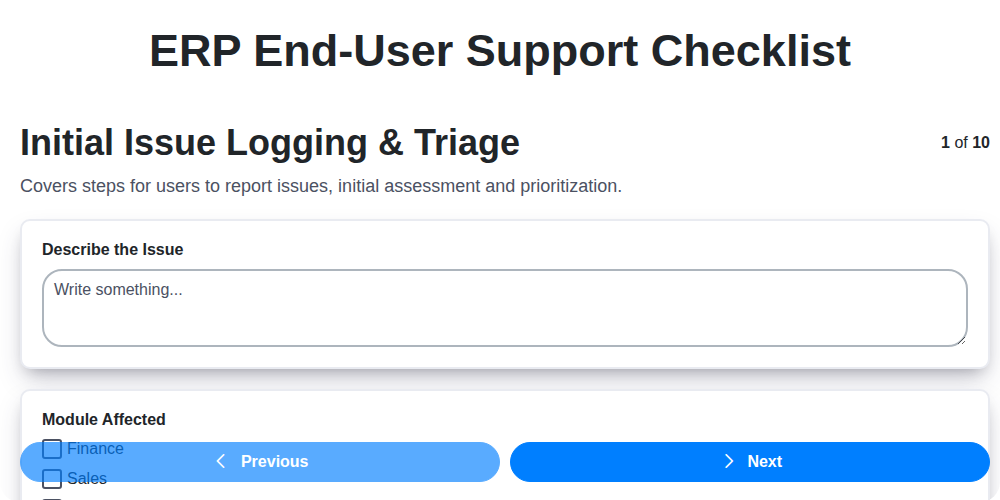
Table of Contents
- Introduction: Why a Checklist is Essential for ERP End-User Support
- 1. Initial Issue Logging & Triage: Capturing and Prioritizing Requests
- 2. Troubleshooting & Resolution: A Systematic Approach to Problem Solving
- 3. Building a Robust Knowledge Base & Self-Service Portal
- 4. Clearly Defined Escalation Procedures: When to Involve Experts
- 5. Communication is Key: Keeping Users Informed
- 6. Follow-Up & Resolution Confirmation: Ensuring User Satisfaction
- 7. Managing System Access & Permissions: Security & Efficiency
- 8. Reporting & Analytics: Measuring Support Performance
- 9. Proactive Training & Comprehensive Documentation
- 10. Post-Resolution Verification: Confirming Stability & Accuracy
- 11. Continuous Improvement: Iterating on Your Support Processes
- 12. Key Performance Indicators (KPIs) for ERP Support
- Conclusion: Building a Sustainable ERP Support System
- Resources & Links
TLDR: Feeling overwhelmed by ERP end-user support requests? This checklist provides a step-by-step guide - from initial issue logging and troubleshooting to training and continuous improvement - to streamline your support process, reduce resolution times, and empower your users. It's your one-stop resource for smooth ERP operations!
Introduction: Why a Checklist is Essential for ERP End-User Support
ERP systems are complex, impacting nearly every facet of a business. When end-users encounter issues - whether it's a reporting error, a login problem, or a process breakdown - effective support is critical. Reactive firefighting doesn't scale; it leads to frustrated users, decreased productivity, and potential data integrity risks. A well-defined and consistently followed support process is the key to building a stable and efficient ERP environment.
That's where a comprehensive checklist comes in. Think of it as your roadmap for ERP end-user support - ensuring every issue is handled consistently, efficiently, and with a focus on long-term resolution. This isn't just about fixing the immediate problem; it's about preventing recurrence, empowering users, and ultimately maximizing the return on your ERP investment. This blog post will outline a detailed checklist to guide your support team, ensuring they deliver a high-quality experience and minimize disruption to your business operations.
1. Initial Issue Logging & Triage: Capturing and Prioritizing Requests
The foundation of effective ERP end-user support lies in a robust initial issue logging and triage process. This isn't just about taking down what the user says is wrong; it's about quickly understanding the problem's scope, impact, and urgency. A well-defined process here drastically reduces resolution times and minimizes disruption to business operations.
Here's what a strong initial logging & triage should include:
- Centralized Logging: Implement a single, easily accessible system (help desk software, ticketing system, email alias) for users to submit requests. Avoid scattered emails or phone calls.
- Standardized Forms/Templates: Provide structured forms with pre-defined fields to capture essential information: user details, module affected, detailed description of the issue, error messages (if any), steps to reproduce.
- Issue Categorization: Establish clear categories (e.g., functionality error, data issue, performance problem, access request) to route tickets to the appropriate support tier.
- Priority Assignment: Define clear priority levels (e.g., Critical, High, Medium, Low) based on factors like business impact, number of users affected, and deadlines. A 'Critical' issue impacting order processing demands immediate attention.
- Initial Assessment: Support staff should perform a brief initial assessment to confirm the issue, clarify any ambiguities, and assign an initial priority. Don't spend excessive time at this stage - the goal is understanding, not resolution.
- Acknowledgement & Ticket Confirmation: Automatically send an acknowledgement email with a ticket number to confirm receipt and provide tracking information. This reassures the user their issue has been received.
By implementing these practices, you're setting the stage for a streamlined and efficient ERP support experience.
2. Troubleshooting & Resolution: A Systematic Approach to Problem Solving
Effective ERP end-user support isn't just about fixing problems; it's about resolving them efficiently and preventing recurrence. A systematic troubleshooting and resolution process is key. Here's a breakdown of what that looks like:
1. Reproduce the Issue: Before anything else, strive to reproduce the problem. This isn't always possible, but understanding the steps the user took to encounter the issue is crucial. Ask clarifying questions - Can you walk me through exactly what you were doing? - and have the user demonstrate if possible.
2. Gather Information: Document everything. This includes the user's steps, error messages (exact wording!), system version, module involved, and any recent changes to the system or user's profile. Screenshots are invaluable.
3. Follow Known Resolution Paths: Consult your knowledge base and known error resolution guides. Many issues are common and have pre-defined solutions. This is why a robust knowledge base (see section 3) is so important!
4. Isolate the Problem: Narrow down the scope of the issue. Is it user-specific? Module-specific? Does it affect others? Testing in a non-production environment (if available) is highly recommended before applying changes to the live system.
5. Test Potential Solutions: Implement a potential fix and thoroughly test it. Document your actions and results. Always have a rollback plan in case the fix introduces new problems.
6. Implement the Solution (and Document It!): Once a solution is verified, implement it for the user. Critically, document the solution - not just for your records, but for future reference and potential inclusion in the knowledge base.
7. User Verification: Don't assume the problem is solved. Have the user verify the resolution. Their feedback is invaluable in confirming effectiveness.
A structured approach reduces resolution time, minimizes disruption, and contributes to a more positive user experience.
3. Building a Robust Knowledge Base & Self-Service Portal
A thriving ERP support experience isn't just about reacting to issues - it's about preventing them. A well-built knowledge base and self-service portal are cornerstones of a proactive and efficient support model. Think of it as your first line of defense, empowering users to find answers and resolve common issues without needing to contact the support team directly.
What should it include?
- FAQs: Start with frequently asked questions covering basic ERP functionality, common errors, and initial setup questions.
- Step-by-Step Guides: Visual guides (screenshots, videos) are invaluable for complex processes. Break down tasks into manageable steps.
- Error Message Explanations: Decode those cryptic error messages! Provide clear explanations of what they mean and suggested solutions.
- How-To Articles: Address common tasks like creating reports, processing orders, or managing inventory.
- Video Tutorials: Video is a powerful medium. Short, targeted videos can simplify complex processes and significantly reduce support requests.
- Searchable Database: Make it easy for users to find what they need with a robust and intuitive search function.
- Feedback Mechanism: Allow users to rate articles and provide feedback, ensuring content remains relevant and accurate.
Beyond the Content - Accessibility & Promotion:
- Easy to Find: Integrate the portal directly within the ERP system or make it easily accessible from the company intranet.
- Mobile-Friendly: Users need access on the go. Ensure the portal is responsive and works seamlessly on different devices.
- Promote, Promote, Promote! Regularly communicate the portal's availability and benefits to all ERP users.
By investing in a robust knowledge base and self-service portal, you're not just reducing support ticket volume-you're fostering user independence, improving productivity, and ultimately, maximizing your ERP investment.
4. Clearly Defined Escalation Procedures: When to Involve Experts
Even the most skilled support team can't solve every issue. Clearly defined escalation procedures are vital for ensuring complex problems reach the right experts quickly and efficiently. These procedures should outline specific criteria for escalation - not just it's difficult, but concrete examples like "errors involving financial transactions," "system performance degradation impacting multiple users," or "issues preventing critical business processes."
Your escalation process should include:
- Defined Roles: Clearly identify who can escalate (e.g., Level 1 support) and who they escalate to (e.g., Level 2 analysts, developers, or system administrators).
- Escalation Paths: Map out the specific channels and contacts for escalating different types of issues. Consider a tiered system where initial escalation goes to a subject matter expert, and then potentially to development or system administration for more in-depth investigation.
- Documentation Requirements: Specify what information must be included when escalating an issue - ticket number, detailed description of the problem, steps taken to troubleshoot, error messages, and impacted users. Insufficient information delays resolution.
- Timeframes: Establish Service Level Agreements (SLAs) for escalation response and resolution at each level. This ensures timely intervention and prevents issues from lingering.
- Communication Protocols: How does the escalated team receive notification? Email, ticketing system, instant messaging? Clear communication avoids missed escalations.
Regular review of escalation procedures ensures they remain relevant and effective as your ERP system evolves and your support team grows.
5. Communication is Key: Keeping Users Informed
Effective ERP end-user support isn't just about fixing the problem; it's about managing expectations and providing reassurance throughout the process. Lack of communication is a major source of user frustration and can significantly impact productivity, even after the issue is resolved.
Here's why consistent and clear communication is vital:
- Reduce Anxiety: Users experiencing ERP issues often feel stressed and unsure if their work is impacted. Regular updates, even if it's just to acknowledge receipt of the ticket and provide an estimated resolution timeframe, can significantly reduce anxiety.
- Manage Expectations: Be honest about resolution timelines. It's better to initially estimate a longer timeframe and resolve the issue sooner than to promise a quick fix and then miss the deadline.
- Provide Context: Briefly explain the nature of the issue and the troubleshooting steps being taken, when appropriate. This helps users understand the complexity and appreciate the effort involved.
- Multiple Channels: Utilize various communication channels - email, ticketing system updates, instant messaging - to ensure users receive updates in their preferred method.
- Confirmation of Resolution: Always confirm with the user that the issue is resolved and that they can resume their work. A simple "Is everything working as expected?" can go a long way.
Proactive communication breeds trust and fosters a more positive user experience, even when things go wrong.
6. Follow-Up & Resolution Confirmation: Ensuring User Satisfaction
The resolution isn't truly complete until the end-user is confident the issue is resolved and understands how to prevent it from recurring. This is where thorough follow-up and confirmation are crucial. Don't just close the ticket - proactively check in with the user.
Here't what that entails:
- Brief Check-in: A short, personalized email or call (depending on the complexity of the issue and user preference) a day or two after resolution is ideal. Something simple like, Hi [User Name], just wanted to confirm everything is working as expected since the ERP issue was resolved. Please let me know if you're experiencing anything further.
- Verification of Functionality: Ask specific questions related to the problem to ensure the user can now perform the task they were struggling with. For example, Can you now successfully process invoices? or Are you able to access the new report?
- Addressing Lingering Questions: The resolution might have answered the initial problem, but the user might have secondary questions. Provide clear, concise answers and be patient.
- Documenting Feedback: Record any user feedback regarding the resolution process - positive or negative. This is valuable for identifying areas of improvement.
- Closing the Loop: Once you're confident the user is satisfied, formally close the ticket with a clear status and any relevant notes.
Taking these extra few minutes demonstrates a commitment to user satisfaction and contributes significantly to a positive support experience.
7. Managing System Access & Permissions: Security & Efficiency
ERP systems hold sensitive data and critical business processes. Ensuring the right people have the right access, and only that access, is paramount. A robust system access and permissions management process isn't just about security; it's about boosting efficiency and reducing errors.
Here's a breakdown of key considerations for your ERP end-user support checklist related to system access:
- Role-Based Access Control (RBAC): Implement RBAC rigorously. Users should be assigned roles that precisely define their responsibilities and, therefore, their access levels. Avoid granting individual permissions - group users into well-defined roles.
- New User Onboarding: Have a documented process for granting new users access. This should include a request form, approval workflow, and automated account creation/permission assignment. This minimizes manual errors and ensures consistency.
- Offboarding/Termination Procedures: Equally crucial is having a swift and secure process for revoking access when an employee leaves the company. Delaying this creates significant security risks. Automated scripts or checklist-driven tasks are ideal.
- Periodic Access Reviews: Conduct regular reviews of user access rights (at least annually, ideally more frequently for sensitive data). This identifies and removes unnecessary permissions or accounts.
- Principle of Least Privilege: Adhere to the principle of least privilege: grant users only the minimum access required to perform their job functions.
- Password Management: Enforce strong password policies and implement multi-factor authentication (MFA) wherever possible.
- Audit Trails: Maintain comprehensive audit trails of access requests, permission changes, and user activity for security monitoring and investigations.
- Regular Training: Provide training to users on their responsibilities regarding system access and data security.
A poorly managed access system can lead to data breaches, compliance violations, and operational inefficiencies. Make it a priority in your ERP end-user support checklist.
8. Reporting & Analytics: Measuring Support Performance
Effective ERP end-user support isn't just about resolving issues; it's about understanding how well you're doing and identifying areas for improvement. Robust reporting and analytics are essential for this. Without data, you're operating in the dark.
Here's what you should be tracking and analyzing:
- Ticket Volume Trends: Monitor the overall number of support tickets over time. Are you seeing spikes? Identifying patterns related to specific modules or deployments can highlight potential training gaps or system configuration issues.
- Resolution Time (Average & Median): This is a crucial metric. Long resolution times frustrate users and impact productivity. Track both average and median to get a more accurate picture - the average can be skewed by a few exceptionally long resolutions.
- First Call Resolution (FCR): A high FCR rate indicates that your support team is equipped to handle common issues efficiently. A low FCR often points to a lack of training or inadequate tools.
- Ticket Backlog: A growing backlog signals potential bottlenecks and staffing needs.
- Issue Categorization & Trends: Analyzing ticket categories (e.g., module-specific errors, user access problems, reporting issues) reveals recurring problems and informs training and system improvements.
- User Satisfaction (CSAT): Implement a simple post-resolution survey to gauge user satisfaction. This provides valuable qualitative feedback.
- Knowledge Base Usage: Track which articles are being viewed and searched for. Low usage of certain articles might indicate they're difficult to find or not relevant.
- Escalation Rates: A consistently high escalation rate suggests your Tier 1 support team needs more training or needs better tools to handle a wider range of issues.
Use this data to create dashboards and regular reports for your team and stakeholders. Focus on identifying root causes of recurring problems and use the insights to proactively improve the end-user support experience.
9. Proactive Training & Comprehensive Documentation
Effective ERP end-user support isn't just about reacting to problems; it's about preventing them in the first place. A significant portion of support requests stem from users lacking understanding of the system's functionality or processes. Investing in proactive training and readily accessible, comprehensive documentation is critical to reducing the support burden and boosting user adoption.
Training Initiatives:
- New User Onboarding: Dedicated training for new hires covering core ERP modules and workflows is essential. Consider role-based training to tailor the content to specific job functions.
- Refresher Courses: Even experienced users benefit from periodic refreshers on new features, process updates, or best practices. Short, focused sessions are often more effective than lengthy, comprehensive reviews.
- Lunch & Learn Sessions: Informal, interactive sessions focused on specific topics can foster a learning culture and address common pain points.
- Train-the-Trainer Programs: Empowering super-users within departments to provide localized training can increase reach and relevance.
Documentation is Key:
- User Guides: Clear, concise user guides covering common tasks and workflows are invaluable.
- FAQs: A frequently asked questions section addressing common issues. Keep it updated!
- Video Tutorials: Visual learners often prefer video tutorials demonstrating procedures.
- Process Flow Diagrams: These visually illustrate complex processes and make them easier to understand.
- Release Notes: Documenting new features and changes after updates is critical.
- Centralized Knowledge Base: A single, searchable repository for all training materials and documentation.
By prioritizing training and documentation, you're empowering users to become more self-sufficient, reducing support requests, and ultimately maximizing the return on your ERP investment.
10. Post-Resolution Verification: Confirming Stability & Accuracy
The work isn't done once the initial problem appears solved! Post-resolution verification is a crucial step in the ERP end-user support process that ensures the fix truly sticks and doesn't introduce new issues. This involves a structured check to confirm both the stability and accuracy of the resolved issue.
Here's what that verification should include:
- User Confirmation: The most important step! Directly contact the end-user who initially reported the problem and ask them to reproduce the steps that caused the issue. Their confirmation that the problem is genuinely resolved is vital. Don't assume - verify!
- Data Integrity Check: Assess whether the resolution impacted any related data. Did the fix accurately correct any incorrect data? Are reports reflecting the changes correctly? For example, if a pricing error was corrected, verify that future transactions reflect the correct price.
- Process Validation: Ensure the corrected process or function is working as expected throughout its entire workflow. Don't just focus on the immediate problem area; consider how the fix might affect downstream processes.
- System Stability Monitoring: Monitor system performance and error logs following the resolution. Look for any unexpected performance degradation or new errors that may be related to the fix.
- Documentation Update: Update any relevant documentation (knowledge base articles, SOPs, training materials) to reflect the resolution and any process changes.
Proper post-resolution verification minimizes the chance of recurring issues and strengthens the end-user's confidence in the support team.
11. Continuous Improvement: Iterating on Your Support Processes
ERP end-user support isn's a "set it and forget it" endeavor. The system itself evolves, users' needs change, and new challenges inevitably arise. A truly effective support process embraces continuous improvement, regularly evaluating its performance and making adjustments to enhance efficiency and user satisfaction.
This isn't about major overhauls, but about consistent, small iterations. Here's how to integrate continuous improvement into your ERP support workflow:
- Regularly Review Key Metrics: Analyze your reporting & analytics data (discussed earlier) - average resolution time, first-call resolution rate, user satisfaction scores. Look for trends and identify areas for improvement.
- Gather User Feedback (Continually): Don't rely solely on satisfaction surveys. Encourage ongoing feedback through short, targeted questionnaires after specific issue types, suggestion boxes (physical or digital), and casual conversations with users.
- Analyze Escalation Patterns: Frequent escalations often indicate gaps in your knowledge base or inadequate initial troubleshooting steps. Investigate why issues are frequently escalating and address the root causes.
- Update Knowledge Base Based on Trends: The knowledge base is your most powerful self-service tool. Ensure it reflects common issues, recent resolutions, and revised procedures based on user feedback and support team learnings.
- Review and Refine Troubleshooting Procedures: As your team encounters new and unusual issues, document the solutions and incorporate them into standard troubleshooting procedures.
- Evaluate Training Materials: Are training materials still relevant and effective? Update them based on user feedback and changes to the ERP system.
- Hold Regular Team Retrospectives: Dedicate time for the support team to discuss challenges, share best practices, and brainstorm improvement ideas.
- Pilot New Processes: Before implementing widespread changes, test them with a small group of users or support agents to identify potential issues.
By making continuous improvement a core principle of your ERP end-user support, you can create a more responsive, effective, and user-friendly experience.
12. Key Performance Indicators (KPIs) for ERP Support
Effective ERP support isn't just about fixing problems; it's about proactively minimizing disruptions and maximizing user productivity. To ensure your ERP support team is performing optimally, you need to track and analyze key performance indicators (KPIs). Here's a breakdown of essential KPIs and what they tell you:
1. First Contact Resolution (FCR): This measures the percentage of issues resolved during the user's initial contact with support. A high FCR indicates efficient troubleshooting and readily available solutions. Target: 60-80%
2. Average Resolution Time (ART): This represents the average time taken to resolve an issue from initial logging to closure. Lower ARTs demonstrate faster problem-solving. Target: Continuously reducing, benchmark against industry standards.
3. Ticket Volume: Track the overall number of tickets received. A spike in ticket volume could signal a system problem, user training gaps, or process inefficiencies. Monitor trends; investigate anomalies.
4. Ticket Backlog: This is the number of unresolved tickets. A growing backlog signifies a potential strain on resources and can negatively impact user satisfaction. Aim for a consistently low and manageable backlog.
5. User Satisfaction (USAT): Collected through surveys or feedback forms, this gauges the user's perception of the support experience. Target: 90% or higher, actively solicit and act on feedback.
6. Escalation Rate: Percentage of tickets that require escalation to a higher support tier. A high escalation rate may indicate insufficient training or a lack of expertise within the initial support team. Target: Consistently low.
7. Knowledge Base Usage: Tracks how frequently users utilize the self-service knowledge base. High usage indicates a valuable resource and reduces support workload. Monitor views, searches, and feedback on knowledge base articles.
8. Cost Per Ticket: This calculates the average cost associated with resolving each ticket. Understanding this allows for optimization of resource allocation. Track and compare to industry benchmarks.
9. System Uptime: While not solely a support KPI, outages and performance issues directly impact support load. Monitor system availability and identify root causes for downtime. Aim for 99.9% uptime or higher.
10. Training Completion Rate: Measures the percentage of users completing mandatory ERP training. Ensures users have basic knowledge to avoid simple issues. Target: 100% for mandatory training.
11. Self-Service Deflection Rate: Percentage of users resolving issues independently through self-service options (knowledge base, FAQs). Target: Increasing over time.
12. Re-Opened Ticket Rate: Percentage of tickets that are re-opened after being initially resolved. Indicates a potential for incomplete fixes or underlying system issues. Target: Consistently low.
Regularly reviewing these KPIs provides valuable insights into your ERP support team's performance and helps identify areas for improvement, ultimately driving greater efficiency and user satisfaction.
Conclusion: Building a Sustainable ERP Support System
Ultimately, a robust ERP end-user support system isn't a one-time project-it's an ongoing commitment. By consistently implementing and refining the checklist outlined above, organizations can move beyond reactive firefighting and build a proactive, sustainable support model. This translates to increased user satisfaction, improved ERP adoption rates, and ultimately, a greater return on investment in your ERP system. Remember, empowering your users with accessible support, clear documentation, and ongoing training isn't just about resolving immediate issues; it's about fostering a culture of ERP success throughout your entire organization. Continuous monitoring, adaptation based on feedback, and a dedication to improvement are the cornerstones of a truly effective ERP end-user support system.
Resources & Links
- Gartner: Provides research and insights on IT trends, including ERP and user experience, crucial for understanding evolving support needs.
- Forbes: Offers business and technology news and analysis, potentially featuring articles on ERP implementation and support best practices.
- TechTarget: A comprehensive IT resource providing articles, tutorials, and definitions related to ERP and related technologies.
- IT Service Management Forum (itSMF): A professional body dedicated to IT service management. Their website contains best practice guidance and resources that can inform ERP support processes.
- ServiceNow: A leading provider of IT service management (ITSM) software. Their website offers resources, whitepapers, and case studies about ITSM best practices that apply to ERP support.
- BMC Software: Provides IT management software and services, often dealing with complex system integrations and support - offers valuable insights for ERP environments.
- Zendesk: A popular customer service platform. Helpful for understanding self-service knowledge base and ticketing best practices - critical for the Knowledge Base & Self-Service section.
- Atlassian: Offers collaboration and project management tools (Jira Service Management, Confluence). Useful for ticketing, workflow automation, and knowledge base creation - relevant to multiple sections of the checklist.
- SAP: If your ERP is SAP, their own support portal and documentation are essential resources for specific issues and guidance.
- Oracle: Similar to SAP, if your ERP is Oracle, their support portal and documentation are primary resources.
- Microsoft: If you use Microsoft Dynamics 365, their support portal and documentation will be crucial.
- NetSuite: For NetSuite users, leverage their support resources and community forums for specific ERP support questions.
Frequently Asked Questions
What is an ERP system and why is end-user support crucial?
An ERP (Enterprise Resource Planning) system is an integrated software suite that manages a company's business processes, from finance and HR to supply chain and manufacturing. End-user support is crucial because users are the ones directly interacting with the system; their ability to effectively use it significantly impacts overall business efficiency and ROI. Poor support leads to frustration, workarounds, and ultimately, a failed ERP implementation.
Who is this checklist for?
This checklist is designed for ERP support teams, IT managers, help desk personnel, and anyone responsible for ensuring end-users can effectively and efficiently use their ERP system. It's applicable for organizations of all sizes and across various industries.
What are the key areas covered by this checklist?
The checklist covers a wide range of areas, including incident management, knowledge base creation, training and onboarding, communication strategies, issue escalation procedures, performance monitoring, and continuous improvement processes related to end-user support.
What's the difference between incident management and problem management in the context of ERP support?
Incident management focuses on resolving individual user issues quickly (e.g., 'I can't log in'). Problem management investigates the *root cause* of recurring incidents to prevent them from happening again (e.g., identifying a faulty login script impacting many users).
How can we build an effective knowledge base for our ERP users?
A good knowledge base should be searchable, well-organized, and easy to understand. Include FAQs, step-by-step guides with screenshots, videos, and troubleshooting tips. Regularly update it based on user feedback and common issues. Assign ownership to ensure content accuracy.
What are best practices for onboarding new ERP users?
Provide role-based training, offer dedicated onboarding support (a 'buddy' or mentor), provide access to training materials, and schedule follow-up sessions to address questions and reinforce learning. Tailor the onboarding experience to different user roles and skill levels.
How do we prioritize support requests?
Prioritize requests based on factors like user impact (how many users are affected?), business criticality (does it impact revenue or a key process?), and urgency. Establish a clear escalation path for high-priority issues.
What metrics should we track to measure the success of our ERP end-user support?
Track metrics like first-call resolution rate, average time to resolution, user satisfaction (CSAT), number of support tickets, knowledge base usage, and the number of tickets escalated. These metrics will provide insights into areas for improvement.
How can we proactively identify and address potential ERP support issues?
Implement regular user feedback surveys, monitor system performance and error logs, conduct periodic user training refreshers, and encourage users to report issues promptly. Analyze incident trends to anticipate future problems.
What is the role of continuous improvement in ERP end-user support?
Continuous improvement involves regularly reviewing support processes, analyzing data, and implementing changes to enhance efficiency, user satisfaction, and overall support effectiveness. This includes soliciting user feedback, evaluating support tools, and updating training materials.
Found this Article helpful?
Comments
There are no comments yet. Be the first to add one!
ERP - Enterprise Resource Planning Solution Demo
Overwhelmed by disconnected systems? ChecklistGuro provides a centralized ERP solution, connecting your business processes - finance, operations, & more - for improved visibility and control. Simplify operations & boost efficiency.
Related Articles

MRP System Go-Live Checklist: Your Path to a Successful Implementation

Top 10 CMiC Alternatives for 2025

The Ultimate Foundation Waterproofing Installation Checklist Template
Top 10 Odoo Alternatives for 2025

How to Save Money on Bill of Materials (BOM) Management Software

The Ultimate Waterproofing Checklist: Ensuring a Leak-Proof Installation

The 10 Best Manufacturing Management Software of 2025

MRP Vendor Master Data Checklist: Ensuring Accuracy and Efficiency
We can do it Together
Need help with
Enterprise Resource Planning (ERP)?
Have a question? We're here to help. Please submit your inquiry, and we'll respond promptly.