Navigating the Maze: Your ERP Legacy System Integration Checklist Template
Published: 12/19/2025 10:00 PM Updated: 12/20/2025 12:25 PM
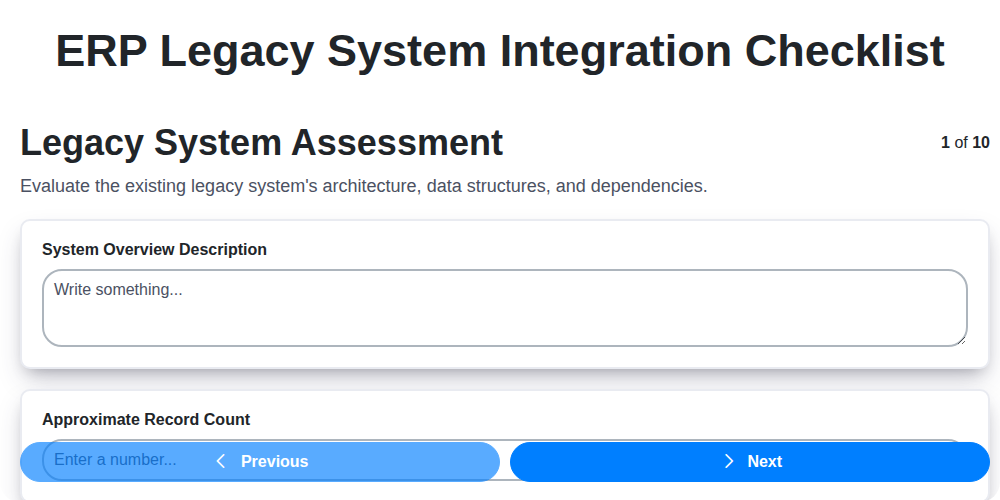
Table of Contents
- Introduction: Why Integrate and the Challenges Ahead
- 1. Legacy System Assessment: Understanding Your Foundation
- 2. Data Mapping & Transformation: Bridging the Worlds
- 3. Interface Design & Development: Building the Connection
- 4. Security Considerations: Protecting Your Data
- 5. Data Validation & Cleansing: Ensuring Accuracy
- 6. Testing & User Acceptance: Rigorous Verification
- 7. Cutover Planning & Execution: The Moment of Truth
- 8. Post-Implementation Support: Smooth Sailing After Launch
- 9. Documentation & Training: Empowering Your Team
- 10. Decommissioning Legacy System: Saying Goodbye
- 11. Risk Mitigation Strategies Throughout the Process
- 12. Key Performance Indicators (KPIs) for Integration Success
- Conclusion: A Roadmap to ERP Harmony
- Resources & Links
TLDR: Integrating your old (legacy) systems with a new ERP is tough! This checklist template breaks down the complex process into 10 manageable steps - from understanding your existing system to shutting it down. It's your roadmap for minimizing risk, maximizing data accuracy, and ensuring a smooth transition to your new ERP.
Introduction: Why Integrate and the Challenges Ahead
Integrating a legacy system with a modern ERP platform can be a critical step in modernizing your business, unlocking new efficiencies, and fostering data-driven decision-making. However, it's rarely a simple undertaking. Legacy systems, often built on outdated technologies and often lacking comprehensive documentation, present unique challenges. These systems are frequently deeply embedded within existing workflows and business processes, making disruption a significant concern. Furthermore, the potential for data inconsistencies, security vulnerabilities, and user adoption hurdles necessitates a meticulous and well-planned integration strategy. This checklist will guide you through those complexities, ensuring a smoother transition and maximizing the value of your ERP investment while minimizing risk. Ignoring potential pitfalls can lead to project delays, budget overruns, and ultimately, a failed integration - jeopardizing the benefits you seek.
1. Legacy System Assessment: Understanding Your Foundation
Before embarking on any ERP legacy system integration, a thorough assessment is absolutely critical. This isn't just about identifying what the legacy system does; it's about understanding how it does it, its dependencies, and its limitations. This phase is the foundation upon which the entire integration will be built, and skimping here will almost certainly lead to problems down the line.
Here's what a robust Legacy System Assessment should cover:
- Functionality Inventory: Document all core business processes supported by the legacy system. Don't assume anything - even seemingly minor functions can be vital.
- Technical Architecture: Analyze the system's technology stack - databases, programming languages, hardware, and operating systems. Note any obsolete technologies or unsupported platforms.
- Data Structures: Understand the data models, relationships, and data types within the legacy system. This is vital for data mapping later.
- Dependencies: Identify all external systems and processes reliant on the legacy system. A comprehensive map of these dependencies will highlight potential integration challenges.
- Code Analysis (if possible): For systems with accessible code, a review can reveal hidden logic, potential vulnerabilities, and complexities.
- Business User Interviews: Engage with users of the legacy system to understand their workflows, pain points, and critical requirements. Their input is invaluable for a successful integration.
- Risk Assessment: Identify potential risks associated with the integration, such as data loss, system downtime, and user resistance.
A well-documented assessment report will provide a clear picture of the current state, highlight integration roadblocks, and set the stage for a strategic and successful ERP integration.
2. Data Mapping & Transformation: Bridging the Worlds
Successfully integrating a legacy system with a modern ERP is rarely a simple data transfer. It's often a complex journey of understanding, translating, and transforming data from one world to another. This is where data mapping and transformation become absolutely critical.
Understanding the Challenge: Legacy systems often use outdated data structures, formats, and even naming conventions that don't align with the ERP's schema. Directly importing data can lead to errors, inaccuracies, and ultimately, a dysfunctional ERP implementation.
The Mapping Process: This crucial step involves creating a detailed blueprint of how data elements in the legacy system correspond to their counterparts in the ERP. It's more than just a one-to-one match; it's about understanding the meaning of each data point. This requires collaboration between legacy system experts, ERP implementation specialists, and business users who have deep knowledge of the data's purpose and usage. Key considerations include:
- Field Mapping: Defining precisely which legacy fields feed into which ERP fields.
- Data Type Conversion: Handling differences in data types (e.g., text to number, date formats).
- Lookup Tables: Using lookup tables to translate codes or values (e.g., state abbreviations to full state names).
- Derived Fields: Identifying fields in the ERP that need to be calculated or derived from multiple legacy fields.
The Transformation Process: Once mapped, data transformation applies the necessary changes to ensure data quality and compatibility. This might involve:
- Data Cleansing: Correcting errors, inconsistencies, and missing values.
- Data Standardization: Applying consistent formatting (e.g., address formatting, currency symbols).
- Data Enrichment: Adding data elements from external sources to enhance the ERP data.
- Data Aggregation: Combining data from multiple legacy tables into a single ERP record.
Tools and Techniques: A range of tools can assist in data mapping and transformation, from simple spreadsheets to sophisticated ETL (Extract, Transform, Load) platforms. The chosen method should be appropriate for the complexity and volume of data involved.
Success hinges on meticulous planning, expert collaboration, and robust testing of the mapping and transformation rules. A poorly executed mapping and transformation process can derail the entire ERP integration project, leading to inaccurate reporting, operational inefficiencies, and ultimately, a loss of confidence in the new system.
3. Interface Design & Development: Building the Connection
The Interface Design & Development phase is where the rubber meets the road - it's where the theoretical data mapping and transformation plans are brought to life. This isn't just about connecting two systems; it's about building a robust, reliable, and performant interface that facilitates seamless data flow.
Key Considerations:
- Technology Selection: Choosing the right integration technology is crucial. Options range from APIs and web services to message queues and ETL tools. Factors to consider include the capabilities of both the legacy and ERP systems, the volume of data to be transferred, and the skillset of your development team.
- Interface Architecture: Define a clear architecture for the interface, outlining the components, data flow, and error handling mechanisms. Microservices architecture can be beneficial for complex integrations, offering flexibility and scalability.
- Real-time vs. Batch Processing: Decide whether real-time data synchronization is required or if batch processing is sufficient. Real-time integration is complex but offers immediate data availability; batch processing is simpler but introduces latency.
- Error Handling & Logging: Implement robust error handling and logging mechanisms to identify and resolve integration issues quickly. Detailed logs provide valuable insights for debugging and performance optimization.
- Performance Optimization: Optimize the interface for speed and efficiency. This might involve data compression, caching, and asynchronous processing.
- Maintainability: Design the interface with maintainability in mind. Modular design, clear coding standards, and comprehensive documentation are essential for future enhancements and troubleshooting.
This phase necessitates close collaboration between the legacy system experts, ERP implementation team, and development resources. Thorough planning and meticulous execution are vital to ensure a successful and stable integration.
4. Security Considerations: Protecting Your Data
Integrating a legacy system with a modern ERP is a significant undertaking, and security must be paramount throughout the entire process. Don't treat security as an afterthought - it needs to be baked into every phase. Here's what to consider:
- Authentication and Authorization: Carefully evaluate how users will authenticate to the integrated system. Will existing legacy credentials be used, or will new credentials be required? Ensure robust authorization controls are in place to restrict access based on roles and responsibilities. Single Sign-On (SSO) can simplify user experience while strengthening security, but requires careful implementation.
- Data Encryption: Sensitive data transmitted between the legacy system and the ERP should be encrypted, both in transit and at rest. This protects against unauthorized access and data breaches. Consider encryption methods compatible with both systems.
- Vulnerability Assessments: Conduct thorough vulnerability assessments of both the legacy system and the integration interfaces. Identify and remediate potential weaknesses that could be exploited.
- Access Control Lists (ACLs): Implement granular ACLs to control access to data and functionality within both systems and across the integration points.
- Audit Trails: Establish comprehensive audit trails to track user activity and data modifications. This is critical for identifying security incidents and ensuring accountability.
- Compliance: Ensure the integration adheres to all relevant industry regulations and compliance requirements (e.g., HIPAA, GDPR, PCI DSS).
- Secure Coding Practices: Follow secure coding practices during interface development to prevent vulnerabilities such as SQL injection or cross-site scripting.
- Regular Security Reviews: Conduct regular security reviews and penetration testing to identify and address any emerging threats.
Remember to involve security experts throughout the integration process to ensure a robust and secure solution.
5. Data Validation & Cleansing: Ensuring Accuracy
Integrating legacy systems often reveals data quality issues that were previously masked by siloed operations. Simply moving data isn't enough; you need to ensure its accuracy, completeness, and consistency. This phase is critical for the success of the entire integration.
Here's what's involved:
- Data Profiling: Begin by thoroughly analyzing the data within the legacy system. Identify data types, formats, potential errors (e.g., invalid dates, incorrect codes), and missing values.
- Defining Data Quality Rules: Establish clear rules for acceptable data formats, ranges, and relationships. This involves collaborating with business users who understand the data's meaning and purpose.
- Data Cleansing: Implement scripts and processes to correct identified errors and inconsistencies. This might include standardizing address formats, correcting typos, resolving duplicate records, and filling in missing values (when possible and appropriate).
- Data Enrichment: Consider enriching the data with external sources to improve its value and accuracy. For example, validating addresses against a postal service database.
- Data Validation Rules in New System: Implement data validation rules within the new system to prevent future data quality issues. These rules should mirror the cleansing processes and business rules.
- Audit Trail: Maintain a detailed audit trail of all data cleansing activities, noting changes made and the rationale behind them. This provides transparency and allows for rollback if necessary.
Ignoring this crucial step can lead to inaccurate reporting, flawed decision-making, and ultimately, a failed integration. A little investment in data validation and cleansing upfront saves significant headaches down the line.
6. Testing & User Acceptance: Rigorous Verification
This phase is arguably the most crucial in ensuring a successful ERP legacy system integration. It's not just about verifying the technical functionality; it's about validating that the integrated system meets the business needs and that users can actually use it effectively.
Comprehensive Testing is Key: We advocate for a layered testing approach. This includes:
- Unit Testing: Developers rigorously test individual components and interfaces.
- Integration Testing: Verify data flow and interactions between the new ERP system and the integrated legacy system components.
- System Testing: Evaluate the entire integrated system's performance and functionality as a whole. This should include performance testing (load, stress) to ensure it can handle anticipated volumes.
- Regression Testing: After each code change or fix, regression testing ensures existing functionality remains intact and new issues aren't introduced.
User Acceptance Testing (UAT): The Business Perspective
UAT isn't just a box to check. It requires active participation from key business users who represent different departments and roles. They should be using realistic data and performing their typical workflows within the integrated environment. Clear UAT scripts and scenarios are vital for consistency and thoroughness. Document all issues identified during UAT - even seemingly minor ones - and prioritize their resolution. Don't rush this phase; a flawed UAT can lead to significant issues post-go-live. Establish clear sign-off criteria from UAT participants before proceeding to cutover.
7. Cutover Planning & Execution: The Moment of Truth
The cutover - the actual migration from your legacy system to the new ERP - is arguably the most nerve-wracking phase of the integration project. It's the culmination of all the planning, development, and testing, and a smooth transition is paramount to minimizing disruption and maximizing user adoption. This isn't a 'wing it' situation; meticulous planning and flawless execution are critical.
Here's a breakdown of key considerations for a successful cutover:
1. Define the Cutover Window: This requires balancing the need to minimize downtime with the complexity of the migration. Consider off-peak hours, potential business impacts, and resource availability. A phased cutover, where functionality is migrated in stages, can be less risky than a "big bang" approach, especially for large and complex systems.
2. Detailed Cutover Plan: This isn't just a list of tasks; it's a playbook. It should include:
- Task Breakdown: Clearly defined tasks with assigned owners and estimated timelines.
- Dependencies: Mapping out which tasks depend on others and establishing critical paths.
- Rollback Plan: A comprehensive and tested plan to revert to the legacy system if major issues arise. This must be documented and regularly reviewed.
- Communication Plan: How and when stakeholders will be informed of progress, delays, and any issues.
- Escalation Procedures: Clearly defined steps for escalating problems to the appropriate personnel.
3. Mock Cutover (Dry Run): Before the real thing, conduct a full-scale mock cutover. This identifies potential issues, validates timelines, and allows the team to practice their roles and responsibilities under pressure. Treat it as seriously as the live cutover.
4. Freeze the Legacy System: At a pre-determined point, the legacy system will need to be frozen to prevent further data changes that could complicate the migration. Communicate this freeze clearly to all users.
5. Data Migration Execution: Follow the data migration plan precisely. Continuous monitoring and verification are vital to ensure data integrity.
6. Post-Cutover Stabilization: Immediately after the cutover, dedicate a team to monitoring system performance, addressing any minor issues, and providing rapid support to users.
A well-executed cutover plan reduces risk, minimizes downtime, and sets the stage for a successful ERP integration. Don't underestimate its importance - it's the moment of truth!
8. Post-Implementation Support: Smooth Sailing After Launch
The initial excitement of a successful ERP legacy system integration fades quickly if ongoing support is inadequate. Post-implementation isn't the finish line; it's the beginning of a new operational phase. A robust support plan is crucial for maximizing ROI and minimizing disruption.
Here's what a comprehensive post-implementation support plan should include:
- Dedicated Support Team: Establish a clear point of contact for users to report issues and request assistance. This team should include individuals with expertise in both the new ERP system and the legacy data/processes being supported.
- Tiered Support Levels: Define distinct support tiers (e.g., Level 1 - basic user queries, Level 2 - technical troubleshooting, Level 3 - vendor support) with clearly defined escalation paths.
- Issue Tracking & Resolution: Implement a system (ticketing system, shared spreadsheet, etc.) to meticulously track all reported issues, their status, and resolution details. This creates a historical record for future reference and identifies recurring problems.
- Performance Monitoring: Continuously monitor system performance, data accuracy, and user adoption rates. Establish Key Performance Indicators (KPIs) and track them regularly.
- Proactive Problem Solving: Don't just react to issues; actively search for and address potential problems before they impact users. This includes reviewing logs, analyzing trends, and conducting periodic system health checks.
- Continuous Improvement: Post-implementation reviews should be conducted regularly to identify areas for improvement in the ERP system, data processes, or user training. Implement changes based on this feedback to optimize performance and user satisfaction.
A well-executed post-implementation support plan ensures a smooth transition and allows your team to confidently leverage the benefits of the integrated ERP system.
9. Documentation & Training: Empowering Your Team
Integrating a new ERP system with a legacy system is a massive undertaking. However, a technically brilliant integration is only half the battle. Your team's ability to use the integrated system effectively is critical for realizing its benefits and avoiding costly errors. That's where robust documentation and comprehensive training become paramount.
This isn't about creating a thick, unreadable manual. It's about providing accessible, tailored resources for different user groups. Think about creating:
- User Guides: Step-by-step instructions for common tasks within the integrated environment.
- Technical Documentation: Detailed information for IT staff responsible for maintaining the integration. This includes architecture diagrams, data flow diagrams, and troubleshooting guides.
- Quick Reference Sheets: Concise, easily accessible summaries of key processes and data locations.
- FAQs: Anticipate common questions and provide clear, concise answers.
Training should be phased, starting with awareness sessions and progressing to hands-on workshops. Consider role-based training - a finance user will need different instruction than a warehouse manager. Don't underestimate the value of "train-the-trainer" sessions to create internal experts who can provide ongoing support. Regular refresher training and updates after the initial rollout are also essential to keep everyone proficient. A well-documented and well-trained team is the key to long-term success with your ERP legacy system integration.
10. Decommissioning Legacy System: Saying Goodbye
The integration project has been a success! The new ERP system is humming along, data is flowing, and users are (mostly!) happy. But don't celebrate just yet - there's one crucial, often overlooked, step: decommissioning the legacy system. Rushing this can lead to unforeseen problems, data recovery nightmares, and lingering security vulnerabilities.
This isn't just about shutting down a server. It's a phased process that requires careful planning and execution. Here's what you need to consider:
- Data Archiving: Before anything else, ensure all necessary data from the legacy system is securely archived. This includes potentially valuable historical data that won't be migrated but may be needed for audits, legal compliance, or future analysis. Establish a clear retention policy and secure storage location.
- Access Control & Permissions: Revoke all user access to the legacy system. This is a key security measure to prevent unauthorized access. Document who had access and why.
- System Freeze: Establish a date after which no further changes are permitted in the legacy system. This freezes the data as it exists at the point of integration and simplifies auditing.
- Backup & Verification: Perform a final, comprehensive backup of the legacy system data. Verify the integrity of this backup.
- Phased Shutdown: Consider a phased shutdown rather than a sudden one. This allows for monitoring and troubleshooting any unexpected issues.
- Hardware & Software Disposal: Follow your organization's policies for the secure disposal of hardware and software associated with the legacy system. This includes wiping drives and ensuring licenses are properly deactivated.
- Documentation Updates: Update any documentation referencing the legacy system, clearly indicating its status as decommissioned.
Decommissioning the legacy system marks the true end of the integration journey. By following a methodical approach, you can ensure a clean break, minimize risk, and fully realize the benefits of your new ERP solution.
11. Risk Mitigation Strategies Throughout the Process
Integrating a legacy system with a new ERP can be a complex and fraught endeavor. Unexpected roadblocks are almost guaranteed. Proactive risk mitigation isn't just a good idea; it's essential for success. Here's how to address potential pitfalls at each phase:
- Legacy System Assessment: A thorough assessment before any work begins is critical. Risk: Underestimating complexity or missing critical dependencies. Mitigation: Engage experienced consultants, conduct code reviews, interview key users, and document assumptions.
- Data Mapping & Transformation: Data quality issues are a common pain point. Risk: Data loss, corruption, or incompatibility. Mitigation: Establish clear data governance policies, perform extensive data profiling, build robust transformation rules with built-in error handling, and implement data reconciliation processes.
- Interface Design & Development: Poorly designed interfaces can create bottlenecks and integration failures. Risk: Performance issues, functional gaps, and maintainability problems. Mitigation: Adopt iterative development practices, use industry-standard integration patterns (e.g., APIs, web services), and prioritize usability and scalability.
- Security Considerations: Integration points introduce new attack vectors. Risk: Data breaches and unauthorized access. Mitigation: Implement strict access controls, encrypt data in transit and at rest, conduct vulnerability assessments, and adhere to relevant compliance regulations.
- Data Validation & Cleansing: Dirty data breeds errors and inefficiencies. Risk: Inaccurate reporting, flawed decision-making. Mitigation: Establish clear data quality rules, automate validation processes, and implement data cleansing procedures.
- Testing & User Acceptance: Insufficient testing can lead to critical failures in production. Risk: System instability, user dissatisfaction. Mitigation: Implement a comprehensive testing plan including unit, integration, system, and user acceptance testing. Use realistic test data and involve key users in the testing process.
- Cutover Planning & Execution: A rushed or poorly planned cutover can be catastrophic. Risk: Extended downtime, data loss, business disruption. Mitigation: Develop a detailed cutover plan with clear roles and responsibilities, conduct mock cutovers, and have rollback procedures in place.
- Post-Implementation Support: The integration doesn't end at go-live. Risk: Ongoing issues, user frustration. Mitigation: Provide adequate post-implementation support, including a dedicated help desk and ongoing monitoring.
- Documentation & Training: Lack of documentation and training leads to knowledge gaps and usability problems. Risk: Decreased adoption and increased support requests. Mitigation: Create comprehensive documentation, provide targeted training for users and support staff.
- Decommissioning Legacy System: Premature decommissioning risks data loss and system instability. Risk: Business disruption, data accessibility issues. Mitigation: Validate data migration completeness, maintain a backup of the legacy system for a defined period, and thoroughly test functionality before final decommissioning.
12. Key Performance Indicators (KPIs) for Integration Success
Successfully integrating a legacy system with a modern ERP isn't just about the project finishing; it's about realizing tangible benefits. To ensure your integration delivers on its promise, you need to track the right Key Performance Indicators (KPIs). Here are some critical metrics to monitor throughout and after the integration:
- Data Accuracy Rate: Measures the percentage of data transferred correctly between systems. A high rate (ideally 99% or higher) indicates successful data transformation and cleansing.
- Transaction Processing Time: Track the time it takes to complete key business processes (e.g., order fulfillment, invoice generation) after integration. Improvements signify efficiency gains.
- Error Rate (Post-Integration): Monitor the number of errors arising from the integrated system. A decreasing trend demonstrates stability.
- System Uptime: Measures the reliability of the integrated system. Aim for a consistently high uptime percentage.
- User Adoption Rate: Tracks how quickly and effectively users are embracing the new integrated workflows. Lower adoption can signal usability issues.
- Cost Savings: Quantify the financial benefits achieved through integration, such as reduced manual effort, improved efficiency, and minimized errors.
- Process Cycle Time Reduction: A direct measure of how much faster key business processes are completed.
- Data Synchronization Frequency & Latency: For systems with ongoing data exchange, monitor how often data updates and how long it takes for those updates to propagate.
- Number of Support Tickets (Related to Integration): A decreasing trend shows the integration is becoming more stable and user-friendly.
- Data Completeness: Verify that all necessary data fields are successfully migrated and available in the new ERP system.
- Compliance Adherence: Track adherence to regulatory requirements and internal policies within the integrated environment.
- Return on Investment (ROI): The ultimate measure of success - are the benefits outweighing the initial investment and ongoing costs?
Conclusion: A Roadmap to ERP Harmony
Integrating a legacy system with a modern ERP is rarely a walk in the park, but it doesn's have to be a chaotic ordeal either. By meticulously following a structured checklist - encompassing thorough assessment, robust data handling, secure interfaces, rigorous testing, and comprehensive support - you can significantly increase your chances of a successful transition. Remember that this isn't just about moving data; it's about bridging the gap between the old and the new, ensuring business continuity, and unlocking the full potential of your ERP system. The journey requires careful planning, skilled expertise, and a commitment to ongoing optimization. Ultimately, a well-executed integration isn't just a technical achievement; it's a strategic investment that empowers your organization for long-term growth and efficiency. Embrace the roadmap, tackle each step with diligence, and you'll pave the way for ERP harmony and a brighter future for your business.
Resources & Links
- Gartner: Provides research and insights on IT trends, including ERP and system integration. Useful for understanding market landscape and best practices.
- Forbes: Business and technology news website. Search for articles related to ERP integration case studies and challenges.
- TechTarget: Offers a wide range of technical resources, including articles, tutorials, and guides on ERP and integration technologies.
- Microsoft: If your ERP or legacy systems involve Microsoft technologies (SQL Server, .NET), Microsoft's developer and documentation sites are crucial.
- Amazon Web Services (AWS): If cloud integration or migration is part of your strategy, AWS provides resources for cloud-based data and application integration.
- Oracle: If your legacy or ERP system involves Oracle products, their documentation and community forums are valuable resources.
- SAP: Similar to Oracle, SAP's website offers resources and documentation for users of their ERP system.
- IBM: IBM provides integration platform solutions and consulting services. Their website has relevant information and whitepapers.
- PwC: Provides consulting services around ERP implementation and integration, including risk management and post-implementation support. Look for related publications.
- Deloitte: Similar to PwC, Deloitte offers ERP consulting and has published insights on integration best practices.
- Capgemini: Global consulting firm offering ERP integration services and relevant case studies.
- Atlassian: (Specifically Jira and Confluence) - Useful for project management, issue tracking, and collaborative documentation during integration projects.
- Smartsheet: Project management and collaboration platform often used for tracking integration tasks and milestones.
- Dataedo: Data modeling and documentation tool, helpful for legacy system assessment and data mapping activities.
- MuleSoft: An integration platform as a service (iPaaS). Provides resources on connecting disparate systems, a potential solution for integration challenges.
Frequently Asked Questions
What is an ERP legacy system?
An ERP legacy system refers to an older Enterprise Resource Planning (ERP) system that's been in use for a significant period. These systems often predate modern technology and may have limitations in terms of integration, scalability, and functionality. They are often crucial for core business processes but difficult to update or replace entirely.
Why is integrating a legacy ERP system so challenging?
Legacy ERP systems often use outdated technologies, proprietary data formats, and lack modern APIs. This makes it difficult to connect them with newer systems, often requiring custom code, complex transformations, and a deep understanding of the legacy system's architecture. Data quality issues are also common.
What is an ERP legacy system integration checklist template and how can it help?
The checklist template provides a structured guide outlining the essential steps and considerations for integrating a legacy ERP system. It helps to ensure that all critical areas are addressed, reducing the risk of errors, delays, and project failure. It acts as a roadmap for the entire integration process.
Who is this checklist template for?
This template is designed for a wide range of stakeholders involved in ERP legacy system integration, including IT managers, integration specialists, project managers, business analysts, and anyone responsible for overseeing the integration project.
What kind of systems can this checklist be used to integrate with?
The checklist is broadly applicable to integrating legacy ERP systems with various modern systems, such as cloud-based ERPs, CRM, e-commerce platforms, data warehouses, and other business applications. While adaptable, specific nuances might require adjustments depending on the target system.
How do I customize the checklist template?
The checklist is provided as a starting point. You should review each item and modify it to fit your specific project scope, technical environment, and business requirements. Add, remove, or adjust items as needed. Consider the risks and complexities specific to your legacy system and target systems.
What are some common risks associated with legacy ERP integration?
Common risks include data loss or corruption, system downtime, integration failures, budget overruns, project delays, security vulnerabilities, and business disruption. The checklist helps to mitigate these risks by prompting consideration of preventative measures.
Does the checklist include considerations for data migration?
Yes, data migration is a crucial aspect of ERP integration, and the checklist includes steps to address data cleansing, transformation, validation, and security during the migration process. It prompts consideration for data governance and quality.
What is the difference between integration and migration in this context?
Integration focuses on connecting the legacy ERP with other systems to share data and functionality. Migration focuses on moving data *from* the legacy ERP to a new system (often with potential for the legacy system to be decommissioned). The checklist covers both aspects, as they often overlap.
Where can I find additional resources for ERP legacy system integration?
We recommend researching ERP integration best practices, consulting with experienced integration specialists, exploring vendor documentation, and participating in industry forums to stay informed about the latest techniques and technologies.
Found this Article helpful?
Comments
There are no comments yet. Be the first to add one!
ERP - Enterprise Resource Planning Solution Demo
Overwhelmed by disconnected systems? ChecklistGuro provides a centralized ERP solution, connecting your business processes - finance, operations, & more - for improved visibility and control. Simplify operations & boost efficiency.
Related Articles

MRP System Go-Live Checklist: Your Path to a Successful Implementation

Top 10 CMiC Alternatives for 2025

The Ultimate Foundation Waterproofing Installation Checklist Template
Top 10 Odoo Alternatives for 2025

How to Save Money on Bill of Materials (BOM) Management Software

The Ultimate Waterproofing Checklist: Ensuring a Leak-Proof Installation

The 10 Best Manufacturing Management Software of 2025

MRP Vendor Master Data Checklist: Ensuring Accuracy and Efficiency
We can do it Together
Need help with
Enterprise Resource Planning (ERP)?
Have a question? We're here to help. Please submit your inquiry, and we'll respond promptly.