The Ultimate ERP Module Configuration Checklist: A Step-by-Step Guide
Published: 12/20/2025 10:00 PM Updated: 12/21/2025 8:52 AM
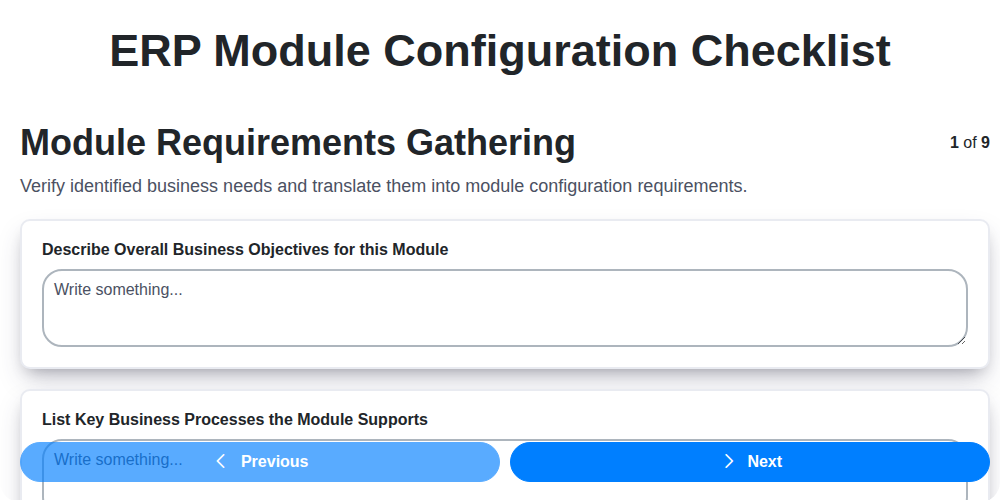
Table of Contents
- Introduction: Why a Configuration Checklist Matters
- 1. Module Requirements Gathering: Defining Your Needs
- 2. User Roles & Permissions: Controlling Access and Responsibility
- 3. Master Data Configuration: The Foundation of Accurate Data
- 4. Workflow & Process Setup: Automating Business Operations
- 5. Reporting & Analytics: Monitoring Performance and Insights
- 6. Integration Points: Connecting ERP with Existing Systems
- 7. Data Validation Rules: Ensuring Data Integrity
- 8. Testing & Validation: A Critical Stage for Success
- 9. Documentation: Your Reference Guide
- 10. Go-Live Readiness Assessment
- 11. Post-Implementation Review & Optimization
- 12. Common Configuration Pitfalls to Avoid
- Checklist Summary & Key Takeaways
- Resources & Links
TLDR: Setting up an ERP module? Don't wing it! This checklist guides you through every crucial step - from understanding your needs and user permissions to data validation and testing - ensuring a smooth, efficient, and error-free ERP implementation. It's your roadmap to ERP success!
Introduction: Why a Configuration Checklist Matters
Implementing an ERP module is a significant investment, and getting the configuration right is absolutely critical for success. It's not enough to simply install the software; it needs to be meticulously tailored to your business processes, data needs, and user requirements. Skipping this crucial configuration phase, or rushing through it, can lead to costly errors, inefficiencies, user frustration, and ultimately, a failure to realize the promised ROI of your ERP system.
A well-defined configuration checklist serves as your roadmap, ensuring that every essential step is accounted for, documented, and validated. It minimizes the risk of overlooking critical details, promotes consistency across the implementation team, and provides a clear audit trail of decisions made. Think of it as your safety net against the pitfalls of a poorly configured ERP - it's a small investment upfront that can save you a world of trouble down the line. This checklist will guide you through those vital steps.
1. Module Requirements Gathering: Defining Your Needs
Before diving into ERP module configuration, a thorough requirements gathering phase is absolutely crucial. This isn't just about listing features; it's about understanding why you need them and how they're going to solve specific business challenges. Start by engaging stakeholders from all departments that will interact with the module - sales, finance, operations, etc. Conduct interviews, workshops, and surveys to uncover their needs, pain points, and desired outcomes.
Don't be afraid to ask why repeatedly. For example, instead of just noting need order management, ask why current order management isn't working. Is it manual, prone to errors, or lacking visibility? The more granular you get, the better you can tailor the ERP module to address the root cause.
Document everything meticulously. Capture not only the functional requirements (what the module does) but also the non-functional ones (performance, security, usability). Prioritize requirements based on their business impact and feasibility. A well-defined requirements document serves as the roadmap for the entire configuration process, minimizing rework and ensuring everyone is on the same page. Consider using techniques like user stories (As a sales representative, I need to be able to...) to clearly articulate needs from the end-user perspective.
2. User Roles & Permissions: Controlling Access and Responsibility
Implementing an ERP system isn't just about functionality; it's about control and accountability. Defining and configuring user roles and permissions is arguably one of the most critical steps in the entire ERP module configuration process. It's not enough to simply assign users to the system - you need to meticulously determine what they can access, what actions they can perform, and where they can do it.
This section of your ERP configuration checklist should focus on a granular approach. Consider these key areas:
- Role Definition: Identify distinct roles within your organization (e.g., Sales Manager, Warehouse Clerk, Finance Analyst). Each role should have a clearly defined set of responsibilities and access needs.
- Permission Assignment: Link specific permissions (e.g., create purchase orders, approve invoices, view inventory levels) to each role. Employ the principle of least privilege - users should only have access to the data and functions they absolutely need to perform their duties.
- Hierarchical Permissions: Explore opportunities to create hierarchical permissions. For example, a Regional Sales Manager might inherit all permissions of a Sales Manager but also have additional oversight capabilities.
- Segregation of Duties: Pay close attention to segregation of duties requirements. Separate duties to prevent fraud and errors (e.g., the person creating a vendor record shouldn't be the same person authorizing payments to that vendor).
- Regular Review & Adjustment: User roles aren't static. As your business evolves, so should your permission structures. Schedule regular reviews (e.g., quarterly) to ensure permissions remain appropriate and aligned with organizational changes.
Properly configured user roles and permissions not only secure your ERP data but also improve operational efficiency and accountability. Don't underestimate the importance of this critical step!
3. Master Data Configuration: The Foundation of Accurate Data
Master data - think of it as the single source of truth for your business's core entities. This includes things like customers, vendors, products, locations, and employees. Accurate and consistent master data is absolutely critical for a successful ERP implementation. Poor master data leads to inaccurate reporting, inefficient processes, and ultimately, a system that doesn't deliver the value you expected.
During configuration, meticulous attention must be paid to defining and populating this data. This isn't simply about importing spreadsheets; it's about establishing rules, standards, and governance. Key areas to consider include:
- Data Cleansing: Identify and correct errors, inconsistencies, and duplicates in existing data. This may involve data enrichment and standardization.
- Data Standardization: Establish consistent formats for addresses, dates, units of measure, and other frequently used fields.
- Data Governance: Define who owns the data, who is responsible for maintaining it, and the processes for ensuring its accuracy and completeness.
- Data Migration Strategy: Plan a phased approach to migrating data, prioritizing critical data elements first.
- Default Values: Configure appropriate default values to streamline data entry and reduce errors.
- Hierarchy Definition: Properly define hierarchies within your master data (e.g., product categories, organizational structures).
- Data Enrichment: Consider adding data elements beyond the basic requirements to enhance reporting and analysis capabilities.
A well-configured master data setup will significantly contribute to the overall success of your ERP system, ensuring reliable information for decision-making and optimized business operations.
4. Workflow & Process Setup: Automating Business Operations
ERP systems thrive on automation. This step is about meticulously mapping out your existing business workflows and then configuring the ERP module to mirror and ideally improve them. It's far more than simply replicating what you currently do; it's about identifying bottlenecks, redundancies, and opportunities for streamlining.
Here's what this stage involves:
- Process Mapping: Visually represent your current workflows. Include every step, who's responsible, and the data involved. Don't assume anything - talk to the people doing the work.
- Workflow Design: Translate the process maps into ERP workflows. This includes defining triggers, approvals, and automated tasks. Consider using the ERP's built-in workflow engine for maximum efficiency.
- Rule Definition: Implement rules to govern workflow progression. Examples: automatic approval thresholds, escalation paths for overdue tasks, and notifications based on specific events.
- Approval Matrices: Clearly define who needs to approve what, and the criteria for approval.
- Conditional Logic: Implement rules to dynamically alter workflows based on specific conditions. For example, different approval processes for high-value orders.
- Exception Handling: Plan for what happens when things don't go as expected. How will errors be handled and resolved within the workflow?
Proper workflow setup significantly reduces manual intervention, minimizes errors, and improves overall efficiency. Don't underestimate the importance of this step - it's often the key to unlocking the full potential of your ERP system.
5. Reporting & Analytics: Monitoring Performance and Insights
Effective ERP implementation isn't just about automating processes; it's about gaining actionable insights. This section focuses on configuring reporting and analytics to truly leverage your ERP data.
Key Considerations:
- Define Key Performance Indicators (KPIs): Before configuring anything, identify the critical metrics your business needs to track. These should align with your overall business objectives. Examples include sales growth, inventory turnover, customer acquisition cost, and production efficiency.
- Standard Reports vs. Custom Reports: Determine which standard ERP reports meet your needs. For anything beyond the standard offerings, plan for custom report development. Consider the complexity and resource requirements for each.
- Dashboard Design: Design user-friendly dashboards that visually represent KPIs and trends. Think about how different user roles (e.g., management, department heads, analysts) will interact with these dashboards.
- Data Visualization: Choose appropriate data visualizations (charts, graphs, tables) to effectively communicate insights. Avoid information overload; focus on clarity and relevance.
- Scheduling and Distribution: Automate report generation and distribution to ensure stakeholders receive timely information.
- Data Security: Ensure reporting access is restricted based on user roles and permissions, protecting sensitive data.
Properly configuring reporting and analytics will transform your ERP from a transactional system into a strategic decision-making tool.
6. Integration Points: Connecting ERP with Existing Systems
Your ERP isn't an island. It likely needs to interact with other critical systems within your organization - CRM, e-commerce platforms, legacy applications, specialized industry software, and more. Meticulously planning and executing these integrations is paramount to realizing the full potential of your ERP.
This checklist item isn't just about if integration is needed; it's about how it's executed. Begin by identifying all potential integration points. Don't just consider the obvious; explore less apparent connections that could streamline workflows and eliminate data silos.
Consider these crucial aspects:
- Interface Type: Will you use APIs, batch processing, file transfers, or a middleware solution? The complexity of the integration dictates the best approach.
- Data Mapping: Define precisely which data fields need to be transferred between systems and ensure accurate mapping to avoid data corruption or inconsistencies. Document these mappings clearly.
- Security: Establish secure data transmission protocols and access controls to protect sensitive information. Authentication and authorization are critical.
- Error Handling: Plan for errors! What happens when a data transfer fails? Implement robust error logging and notification mechanisms to quickly identify and resolve issues.
- Synchronization Frequency: Determine the appropriate synchronization frequency - real-time, scheduled, or event-driven - based on business needs and the capabilities of the systems involved.
- Testing and Monitoring: Rigorous testing is essential to validate data integrity and system functionality after integration. Continuous monitoring post-implementation is needed to ensure ongoing performance and stability.
Failing to address integration points effectively can lead to data discrepancies, inefficient workflows, and ultimately, a less-than-optimal ERP implementation.
7. Data Validation Rules: Ensuring Data Integrity
Data validation rules are the unsung heroes of a successful ERP implementation. They're the safeguards that prevent inaccurate, incomplete, or inconsistent data from entering your system and disrupting your business processes. Without robust data validation, you risk everything from inaccurate financial reporting to order fulfillment errors and ultimately, a loss of trust in your ERP.
This stage goes beyond simply entering data; it's about defining how data should be entered. Consider these key areas:
- Field-Level Validation: This is the most granular level, ensuring data entered into each individual field adheres to specific formats and constraints. Examples include: mandatory fields, data type restrictions (e.g., numbers only for quantity fields), length limitations, and regular expression patterns for validating email addresses or postal codes.
- Cross-Field Validation: These rules check the relationship between fields. For example, if a customer selects International for shipping country, a specific set of shipping options should become available. Or, a sales order date should not be earlier than the invoice date.
- Table-Level Validation: This ensures data integrity across entire tables. Think about preventing duplicate entries based on a unique identifier (like a customer ID) or enforcing referential integrity between related tables (ensuring that a child record always references a valid parent record).
- Business Rule Enforcement: Translate your business logic into validation rules. This could involve validating pricing limits, checking credit limits before allowing an order, or ensuring specific product combinations are allowed.
Careful planning and implementation of data validation rules minimize data entry errors, improve data quality, and significantly reduce the risk of downstream issues. Don't underestimate the power of this crucial step!
8. Testing & Validation: A Critical Stage for Success
Don't let all your meticulous configuration efforts go to waste! Testing and validation are arguably the most crucial stage in ERP module implementation. This isn't just about clicking buttons and seeing if things work. It's about rigorous verification to ensure the module functions precisely as intended, aligns with your business processes, and delivers the expected outcomes.
Here's a breakdown of what this stage should encompass:
- Unit Testing: Focus on individual components and functionalities within the module. Verify data entry, calculations, and basic processing.
- Integration Testing: Test how the configured module interacts with other modules and systems. This highlights potential data flow bottlenecks and errors.
- User Acceptance Testing (UAT): This is essential. End-users, representing different departments and roles, should actively participate in testing using real-world scenarios. Their feedback is invaluable for identifying usability issues and process discrepancies.
- Performance Testing: Evaluate the module's performance under realistic load. This uncovers potential bottlenecks and scalability concerns.
- Regression Testing: Whenever changes are made, rerun previous tests to ensure existing functionality remains intact.
- Document Test Results: Meticulously record all test cases, results (pass/fail), and any identified issues. This provides a clear audit trail and facilitates remediation.
Failing to adequately test and validate can lead to costly errors, process disruptions, and ultimately, user frustration. Allocate sufficient time and resources to this phase-it's an investment in the long-term success of your ERP module configuration.
9. Documentation: Your Reference Guide
Don't underestimate the power of thorough documentation! After all the configuration is complete and the system is live, clear and comprehensive documentation becomes your lifeline. It's not just for the original implementation team; it's crucial for ongoing maintenance, user training, future upgrades, and troubleshooting.
This documentation should encompass everything:
- Configuration Decisions: Document why specific configuration choices were made. This is critical context for future admins who may need to understand the rationale behind certain settings.
- Process Flows: Visually map out key workflows and processes, detailing the steps, roles involved, and system interactions.
- Data Definitions: Clearly define custom fields, data types, and any specific business rules applied to data.
- User Guides: Create user-friendly guides tailored to different user roles, outlining how to perform common tasks within the ERP module.
- Technical Specifications: Maintain records of system versions, integration details, and any custom code or scripts.
- Troubleshooting FAQs: Compile a list of common issues and their solutions based on testing and early user feedback.
Invest the time upfront to create robust documentation - it will save you significant time and frustration down the line. Consider using a centralized knowledge base or wiki to make this information easily accessible to all relevant personnel.
10. Go-Live Readiness Assessment
Before flipping the switch and launching your newly configured ERP module, a rigorous Go-Live Readiness Assessment is absolutely critical. This isn't just about confirming that each individual configuration step from the checklist has been ticked off; it's about ensuring the entire module will function reliably and effectively within your organization.
This assessment should involve key stakeholders from different departments who will be using the module daily. It's a final, holistic review encompassing several crucial checks:
- End-User Training Effectiveness: Verify that users understand their roles, responsibilities, and how to use the module effectively. Conduct refresher sessions if needed.
- Process Walkthroughs: Observe users performing core business processes within the new module. Identify any bottlenecks, confusion, or workarounds being used.
- Data Accuracy & Completeness: A final data scrub - ensuring all migrated data is accurate, complete, and properly formatted.
- System Performance: Stress test the system with realistic data volumes and user loads to ensure it can handle peak demand.
- Contingency Planning: Review your rollback plan - what happens if something goes wrong post-launch? Everyone needs to understand their role in the recovery process.
- Support Team Preparedness: Ensure your internal support team and any external vendors are ready to handle user inquiries and resolve issues quickly.
A positive Go-Live Readiness Assessment signifies a significantly reduced risk of post-launch disruptions and a smoother transition for your organization. Don't skip this vital step!
11. Post-Implementation Review & Optimization
Congratulations! You've implemented your ERP module. But the journey doesn't end there. A thorough post-implementation review is crucial to ensuring you're realizing the full potential of your investment and continuously improving performance.
This phase isn't about finding fault; it's about identifying areas for refinement and building a framework for ongoing optimization. Here's what to focus on:
- Gather User Feedback: Conduct surveys, hold focus groups, and schedule individual interviews with users across all departments. Understanding their experiences-both positive and negative-is invaluable. Ask specific questions about usability, efficiency, and any pain points they're encountering.
- Key Performance Indicators (KPIs): Establish and monitor KPIs before implementation (as part of requirements gathering) and then compare them to post-implementation results. Are you seeing the anticipated improvements in efficiency, cost reduction, or accuracy? If not, investigate why.
- Process Analysis: Revisit the workflows and processes you configured. Are they still optimal? Have business needs changed? Are there opportunities to further automate or streamline?
- System Performance: Monitor system performance metrics (response times, resource utilization, error rates). Slow performance impacts user adoption and overall efficiency.
- Training Assessment: Evaluate the effectiveness of the initial training. Are users comfortable and proficient with the new module? Are refresher courses or additional training needed?
- Documentation Review: Ensure the documentation remains accurate and relevant, reflecting any changes made post-implementation.
- Feedback Loop: Establish a regular feedback loop with users and stakeholders to identify ongoing improvement opportunities.
This continuous optimization cycle ensures your ERP module continues to deliver value long after the initial rollout.
12. Common Configuration Pitfalls to Avoid
ERP module configuration is rarely a smooth, linear process. Even with meticulous planning, unexpected challenges arise. Here are some common pitfalls to watch out for and actively prevent:
- Ignoring Future Scalability: Configuring only for the current needs can lead to headaches down the line. Think about potential business growth, new product lines, or changes in regulatory requirements. Design your configuration with flexibility in mind.
- Insufficient User Involvement: Configuration decisions are not solely IT's responsibility. Lack of input from key users leads to solutions that don't meet real-world needs and fosters resistance to adoption.
- Over-Customization: While some customization is inevitable, excessive tailoring to unique processes can create a maintenance nightmare and hinder future upgrades. Strive for configuration over customization whenever possible.
- Neglecting Data Migration Strategy: Poor data migration plans (or a lack thereof) can derail the entire project. Data cleansing, transformation, and mapping require dedicated planning and execution.
- Confusing Configuration with Business Process Re-engineering: ERP configuration should be informed by process improvements, but it's not the same thing. Attempting to shoehorn radical process changes during configuration creates unnecessary complexity.
- Assuming Set It and Forget It: ERP systems require ongoing maintenance and adjustments. Configuration is not a one-time event; continuous monitoring and optimization are crucial.
- Lack of Clear Ownership: Who is responsible for maintaining specific configurations? Ambiguity leads to neglect and inconsistent implementation.
- Ignoring System Performance: Configuration choices impact system performance. Ensure adequate hardware and optimized settings to prevent slowdowns.
- Data Security Oversights: Insufficient attention to user access and data security can expose sensitive information.
- Poorly Defined Reporting Requirements: Failing to define clear reporting needs upfront leads to inadequate reporting functionality later.
- Insufficient Training Documentation: Users need comprehensive documentation and training to effectively utilize the configured system.
- Rushing the Validation Phase: Skimping on testing and validation leads to errors and user frustration after go-live.
Checklist Summary & Key Takeaways
Configuring an ERP module is a complex undertaking, and skipping steps or cutting corners can lead to significant issues down the line. This checklist provides a roadmap for success, ensuring a robust and functional module tailored to your specific business needs. Here's a quick recap of the key takeaways:
- Requirements are Paramount: Starting with thorough requirements gathering is non-negotiable. Don't assume anything - explicitly define what the module must do.
- People & Permissions Matter: Carefully define user roles and permissions to maintain data integrity and security.
- Data is King: Accurate and complete master data is the foundation of a successful ERP. Invest time and effort in its configuration.
- Process Alignment: Workflows should mirror your actual business processes. Don't force processes to fit the system; adapt the module to your needs.
- Data Integrity is Essential: Validation rules minimize errors and ensure the reliability of your data.
- Testing is Your Safety Net: Rigorous testing and validation are crucial for identifying and resolving issues before go-live.
- Documentation is Your Future Friend: Well-documented configurations will save you headaches during maintenance and upgrades.
By diligently following this checklist, you'll significantly increase your chances of a smooth ERP module implementation, maximizing your ROI and minimizing disruption to your operations. Remember, a little upfront effort goes a long way!
Resources & Links
- NetSuite: A leading ERP provider. Their website offers extensive resources on ERP configuration best practices and implementation guides, often relevant to module setup.
- Microsoft Dynamics 365: Another major ERP player. Offers documentation, tutorials, and community forums helpful for understanding configuration options.
- SAP: A global ERP giant. SAP's site has technical documentation and best practices guides applicable to module configuration principles.
- Oracle: Provides a wide range of ERP solutions. Their website offers various learning resources and documentation relevant to ERP configurations.
- Gartner: A research and advisory company. Gartner provides reports and insights on ERP selection and implementation, which can inform your configuration approach.
- Capterra: A software review site. Can offer insights into user experiences with different ERP systems and their configuration processes.
- TechTarget - ERP: A tech news and information website. Provides articles and resources on ERP trends, best practices, and implementation strategies.
- LinkedIn: A professional networking platform. Search for ERP implementation consultants and join relevant groups to gain insights and ask questions about configuration best practices. Use relevant keywords like 'ERP Configuration Checklist'.
- LinkedIn Learning: Offers online courses on ERP systems, configuration, and data management which can enhance understanding of the checklist steps.
Frequently Asked Questions
What is an ERP module and why is configuration important?
An ERP (Enterprise Resource Planning) module is a specific component of an ERP system that handles a particular business function (e.g., finance, HR, inventory). Configuration involves setting up and customizing these modules to align with your unique business processes and requirements. Proper configuration ensures the ERP system functions effectively and provides accurate data for decision-making.
Who is this checklist for?
This checklist is designed for ERP implementation teams, project managers, functional consultants, and IT professionals involved in configuring ERP modules. It's beneficial for both new ERP implementations and for companies upgrading or customizing existing systems.
What kind of ERP systems does this checklist apply to?
While the principles are universal, this checklist is designed to be adaptable to most major ERP systems like SAP, Oracle, Microsoft Dynamics 365, NetSuite, and others. Specific configurations might need adjustments based on the chosen system.
Is this checklist exhaustive? Will it cover everything?
This checklist is comprehensive, covering key configuration areas. However, every business is unique, and some highly specialized configurations might require additional steps specific to your industry or processes. Consider it a strong foundation to build upon.
What is the difference between configuration and customization?
Configuration involves adjusting pre-built settings and options within the ERP system. Customization, on the other hand, involves modifying the system's code or adding new functionality. Configuration is generally preferred as it's less disruptive and easier to maintain. This checklist focuses on configuration.
What is the significance of data migration and its relation to this checklist?
Data migration is a crucial component alongside module configuration. You need to ensure your data is correctly mapped and transferred into the configured modules. The checklist implicitly assumes data migration planning is addressed concurrently with configuration; while not explicitly detailed, it's a critical dependency.
How should I use this checklist? Should I follow it sequentially?
We recommend following the checklist sequentially as it builds upon previous steps. However, depending on your project's phase and dependencies, some sections may be addressed concurrently. Consider each step carefully and adjust the order as needed, documenting any deviations.
What are some best practices to keep in mind while using this checklist?
Prioritize user involvement throughout the configuration process. Document all configuration changes meticulously. Regularly test configuration changes in a test environment before deploying to production. Focus on alignment with business requirements, and involve key stakeholders for validation.
Found this Article helpful?
Comments
There are no comments yet. Be the first to add one!
ERP - Enterprise Resource Planning Solution Demo
Overwhelmed by disconnected systems? ChecklistGuro provides a centralized ERP solution, connecting your business processes - finance, operations, & more - for improved visibility and control. Simplify operations & boost efficiency.
Related Articles

MRP System Go-Live Checklist: Your Path to a Successful Implementation

Top 10 CMiC Alternatives for 2025

The Ultimate Foundation Waterproofing Installation Checklist Template
Top 10 Odoo Alternatives for 2025

How to Save Money on Bill of Materials (BOM) Management Software

The Ultimate Waterproofing Checklist: Ensuring a Leak-Proof Installation

The 10 Best Manufacturing Management Software of 2025

MRP Vendor Master Data Checklist: Ensuring Accuracy and Efficiency
We can do it Together
Need help with
Enterprise Resource Planning (ERP)?
Have a question? We're here to help. Please submit your inquiry, and we'll respond promptly.