ERP Security & Compliance Checklist: A Comprehensive Guide
Published: 19/12/2025 22:00 Updated: 20/12/2025 09:17
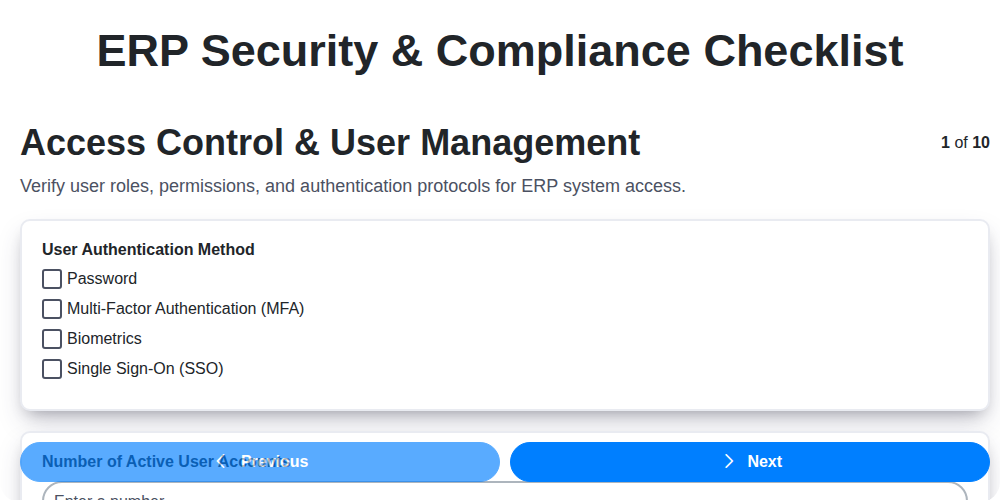
Table of Contents
- Introduction: Why ERP Security & Compliance Matters
- 1. Access Control & User Management: Defining the Perimeter
- 2. Data Encryption & Protection: Securing Sensitive Information
- 3. Change Management & Audit Trails: Tracking and Accountability
- 4. Network Security & Firewalls: Fortifying the Infrastructure
- 5. Data Backup & Disaster Recovery: Planning for the Unexpected
- 6. Regulatory Compliance (e.g., GDPR, SOX): Navigating the Legal Landscape
- 7. Vulnerability Scanning & Patch Management: Identifying and Mitigating Risks
- 8. Third-Party Integration Security: Managing External Connections
- 9. Incident Response Plan: Preparing for Security Breaches
- 10. Security Awareness Training: Empowering Your Team
- 11. Regular Security Assessments: Continuous Improvement
- 12. ERP System Configuration Review
- 13. Data Loss Prevention (DLP) Measures
- Conclusion: Building a Secure and Compliant ERP Environment
- Resources & Links
TLDR: Your ERP system holds critical data, making it a prime target. This checklist provides a step-by-step guide (covering access controls, data encryption, backups, compliance, and more) to help you secure your ERP and avoid costly breaches and penalties. Download the template and start strengthening your defenses today!
Introduction: Why ERP Security & Compliance Matters
Your Enterprise Resource Planning (ERP) system is the backbone of your business, housing sensitive data crucial to daily operations - from financial records and customer information to inventory details and production schedules. Consequently, it's a prime target for cyberattacks and regulatory scrutiny. A security breach can lead to devastating consequences, including financial losses, reputational damage, legal penalties, and operational disruption.
Beyond the immediate threat of cyberattacks, failing to comply with industry regulations like GDPR, SOX, or others relevant to your sector can result in significant fines and legal action. Maintaining robust ERP security and compliance isn't just about protecting data; it's about safeguarding your business's future. This checklist provides a practical framework to systematically assess and strengthen your ERP security posture, ensuring resilience against evolving threats and unwavering adherence to regulatory requirements. It's an investment in peace of mind and sustainable growth.
1. Access Control & User Management: Defining the Perimeter
Your ERP system holds the keys to your business - financial data, customer information, operational processes. Without robust access controls, you're essentially leaving the door wide open. This section focuses on establishing clear boundaries and ensuring only authorized individuals can access sensitive ERP data and functionality.
Here's what you need to address:
- Role-Based Access Control (RBAC): Implement RBAC. Don't assign individual permissions; define roles (e.g., Accountant, Sales Manager, Inventory Clerk) and assign users to those roles. This simplifies management and reduces errors.
- Least Privilege Principle: Grant users only the minimum necessary access to perform their job duties. A user shouldn't have access to accounts payable if their role is solely focused on order entry.
- Strong Password Policies: Enforce strong password requirements - length, complexity, and regular changes. Multi-factor authentication (MFA) is highly recommended and should be a priority.
- User Provisioning and Deprovisioning: Have a documented process for creating, modifying, and deleting user accounts. This is critical during employee onboarding and offboarding. Promptly disable accounts of former employees.
- Regular Access Reviews: Periodically review user access rights. Ensure users still require the permissions they have. This helps catch permission creep and unauthorized access.
- Account Lockout Policies: Implement account lockout policies to prevent brute-force password attacks.
- Centralized User Management: Ideally, integrate ERP user management with your organization's central identity provider (e.g., Active Directory) for streamlined administration.
2. Data Encryption & Protection: Securing Sensitive Information
Your ERP system likely holds a treasure trove of sensitive data - customer details, financial records, intellectual property, and more. Leaving this data exposed is a significant risk. Data encryption and robust protection measures are absolutely crucial.
What to Implement:
- Encryption at Rest: Encrypt all ERP data stored on servers, databases, and even backups. This ensures that even if a breach occurs and data is accessed, it's unreadable without the decryption keys.
- Encryption in Transit: Secure data transmission between the ERP system and users, third-party integrations, and other connected systems using protocols like TLS/SSL.
- Key Management: Implement a secure key management system. Don't store encryption keys alongside the data they protect. Rotate keys regularly and control access to them strictly.
- Data Masking & Tokenization: Consider using data masking or tokenization techniques for non-production environments (development, testing) to protect real data while still allowing for realistic testing.
- Data Loss Prevention (DLP): Implement DLP solutions to monitor and control the movement of sensitive data within and outside the ERP system, preventing unauthorized data exfiltration.
- Regular Audits: Regularly audit your encryption practices and key management procedures to ensure they remain effective and compliant.
3. Change Management & Audit Trails: Tracking and Accountability
ERP systems are the backbone of many businesses, making them prime targets for malicious actors. Unauthorized modifications to configurations, data, or code can have devastating consequences - from data breaches to operational disruptions. A robust change management process coupled with detailed audit trails is your frontline defense against these risks.
What is Change Management in the Context of ERP?
It's not just about who changes what; it's a structured approach to how changes are implemented. This includes:
- Request & Approval: Formal processes for submitting, reviewing, and approving changes to the ERP system.
- Testing & Staging: Implementing changes in a non-production (test or staging) environment before pushing them live. This allows you to identify and resolve issues without impacting business operations.
- Controlled Deployment: A planned and phased rollout of changes, minimizing disruption and allowing for quick rollback if necessary.
- Documentation: Detailed records of all changes, including the reason for the change, who requested it, who implemented it, and the results of testing.
Why are Audit Trails Critical?
Audit trails are the historical record of all activities within the ERP system. They provide a chronological sequence of actions, including:
- User Activity: Who logged in, when, and what they did.
- Data Modifications: What data was changed, by whom, and when.
- System Configurations: Any alterations to system settings or parameters.
- Report Generation: Who generated reports and when.
Best Practices:
- Centralized Change Management System: Implement a dedicated system (or module within your ERP) for managing changes, providing a single source of truth.
- Role-Based Access Controls: Ensure only authorized personnel can initiate, approve, or implement changes.
- Automated Audit Trails: Enable comprehensive auditing features within your ERP and ensure they are actively monitored.
- Regular Review & Analysis: Periodically review audit trails to identify suspicious activity or potential vulnerabilities. Don't just collect data; analyze it.
- Mandatory Documentation: Require detailed documentation for every change, including pre- and post-implementation assessments.
A strong change management process and meticulous audit trails aren't just about compliance; they're about building a resilient and secure ERP environment that supports your business goals.
4. Network Security & Firewalls: Fortifying the Infrastructure
Your ERP system is the beating heart of your business, and securing its network perimeter is paramount. A robust network security posture acts as the first line of defense against external threats. This goes far beyond simply having a firewall - it's about a layered approach.
Key Considerations:
- Firewall Configuration: Regularly review and update your firewall rules. Ensure they are restrictive, allowing only necessary traffic to and from the ERP system. Avoid overly permissive rules.
- Segmentation: Segment your network to isolate the ERP system from other less critical business functions. This limits the potential damage if a breach occurs elsewhere. Consider using VLANs or microsegmentation techniques.
- Intrusion Detection/Prevention Systems (IDS/IPS): Implement IDS/IPS to monitor network traffic for malicious activity and automatically respond to threats.
- Regular Penetration Testing: Engage external security experts to simulate attacks and identify vulnerabilities in your network configuration.
- Network Monitoring: Continuously monitor network traffic for unusual patterns or suspicious activity. Utilize Security Information and Event Management (SIEM) tools for centralized logging and analysis.
- Wireless Security: If wireless access is required, use strong encryption protocols (WPA3 is preferred) and enforce strict authentication mechanisms. Guest networks should be completely segregated from the ERP environment.
- VPN Access: If remote access is needed, enforce VPN usage with multi-factor authentication.
5. Data Backup & Disaster Recovery: Planning for the Unexpected
Your ERP system holds the lifeblood of your business. Losing it - whether due to hardware failure, natural disaster, cyberattack, or human error - can be catastrophic. A robust Data Backup & Disaster Recovery (DR) plan isn't just a good idea; it's essential for business continuity.
Here's what your ERP security and compliance checklist should cover in this area:
- Regular Automated Backups: Implement automated, scheduled backups of your ERP data, not just the database itself, but also configurations, customizations, and reports. Frequency should be determined by your Recovery Point Objective (RPO) - how much data loss is acceptable. Daily backups are common, but more critical data may require more frequent backups.
- Offsite Storage: Don't keep backups in the same physical location as your primary ERP system. Utilize offsite storage solutions - cloud services, geographically separate data centers - to protect against localized disasters.
- Backup Testing & Validation: Regularly test your backups to ensure they are complete, uncorrupted, and can be successfully restored. This isn't a one-and-done activity; test them periodically and document the results. A backup you can't restore is useless.
- Disaster Recovery Plan Documentation: Outline the steps needed to recover your ERP system in a disaster scenario. This should include roles and responsibilities, communication plans, and recovery timelines.
- Recovery Time Objective (RTO): Define your RTO - the maximum acceptable downtime. This dictates the speed and complexity of your DR setup. A shorter RTO requires more sophisticated and potentially costly solutions.
- Business Impact Analysis (BIA): Conduct a BIA to prioritize critical ERP functions and data for recovery. This helps ensure that the most vital parts of your business are restored first.
6. Regulatory Compliance (e.g., GDPR, SOX): Navigating the Legal Landscape
Your ERP system likely handles sensitive data - customer information, financial records, and more. This means you're almost certainly subject to various regulations, and failing to comply can result in hefty fines and reputational damage. This isn't just about ticking boxes; it's about embedding compliance into your ERP security posture.
Understanding the Landscape: The specific regulations you need to adhere to will depend on your industry, location, and the data you handle. Common examples include:
- GDPR (General Data Protection Regulation): Impacts organizations processing personal data of individuals in the EU, regardless of where the organization is located. Requires stringent data privacy and security measures.
- SOX (Sarbanes-Oxley Act): Primarily affects publicly traded companies in the US, focusing on financial reporting and internal controls. ERP systems are often critical components of these controls.
- HIPAA (Health Insurance Portability and Accountability Act): Relevant for healthcare organizations and those handling protected health information.
- CCPA (California Consumer Privacy Act): Grants California consumers specific rights regarding their personal information.
- PCI DSS (Payment Card Industry Data Security Standard): Applies to businesses that process, store, or transmit credit card information.
ERP Specific Compliance Considerations: Many ERP systems have built-in features to help with regulatory compliance, such as audit trails, data masking, and reporting capabilities. However, simply having these features isn't enough. You need to:
- Map Regulations to ERP Controls: Identify which regulations apply to your business and map them to the specific controls and configurations within your ERP system.
- Regularly Review and Update: Compliance requirements evolve. Regularly review your ERP configurations and processes to ensure they remain compliant with the latest regulations.
- Documentation is Key: Maintain thorough documentation of your compliance efforts, including policies, procedures, and evidence of audits.
- Engage Legal Counsel: Consult with legal professionals specializing in data privacy and compliance to ensure you have a complete understanding of your obligations.
7. Vulnerability Scanning & Patch Management: Identifying and Mitigating Risks
Your ERP system is a prime target for cyberattacks, and vulnerabilities are the open doors they exploit. Regular vulnerability scanning and diligent patch management are absolutely critical to maintaining a strong security posture.
What's the Difference?
- Vulnerability Scanning: This is a process of actively searching your ERP system and related infrastructure for known security weaknesses. These weaknesses (vulnerabilities) can be in the ERP software itself, the underlying operating system, or even connected applications. Think of it as a proactive security audit.
- Patch Management: Once vulnerabilities are identified, patch management focuses on promptly applying security updates (patches) released by vendors to fix these weaknesses. A timely patch deployment closes those open doors.
Why It's Essential for ERP:
- Complex Systems: ERP systems are often highly complex, making them challenging to secure comprehensively.
- Business-Critical Data: They hold incredibly sensitive data, making them a high-value target.
- Legacy Systems: Many organizations still run older ERP versions, which may have known vulnerabilities with no further vendor support.
Best Practices:
- Automated Scanning: Implement automated vulnerability scanning tools to regularly scan your ERP environment (at least quarterly, but ideally more frequently).
- Prioritize Risks: Not all vulnerabilities are created equal. Prioritize patching based on the severity of the vulnerability and its potential impact on your business. CVSS scores are a helpful guide.
- Testing Before Deployment: Always test patches in a non-production environment before deploying them to your live ERP system. Incompatible patches can disrupt critical business processes.
- Stay Informed: Subscribe to security advisories from your ERP vendor and relevant security organizations to stay up-to-date on new vulnerabilities.
- Remediate, Don't Just Scan: Scanning is useless without action. A consistent remediation schedule is key.
- Document Everything: Keep detailed records of scans, vulnerabilities identified, patches applied, and any issues encountered.
8. Third-Party Integration Security: Managing External Connections
Your ERP system rarely operates in isolation. It likely connects to various third-party applications for CRM, e-commerce, payment processing, shipping, and more. These integrations, while offering significant benefits, introduce a critical attack surface. A vulnerability in a third-party system can be a direct pathway to compromise your ERP data and operations.
Here's what you need to consider:
- Vendor Risk Assessments: Conduct thorough security assessments of all third-party vendors before integrating their systems. Evaluate their security practices, certifications (like SOC 2), and data protection policies. Don't just take their word for it; request documentation and audit reports.
- Secure APIs: Ensure all APIs used for integration are secured with robust authentication and authorization mechanisms. Implement API rate limiting to prevent denial-of-service attacks.
- Data Flow Visibility: Map out the complete data flow between your ERP and third-party systems. Understand what data is being shared, where it's stored, and who has access.
- Least Privilege Principle: Grant third-party applications only the minimum level of access required for their functionality. Avoid broad or unnecessary permissions.
- Regular Security Reviews: Continuously monitor third-party integrations for vulnerabilities and security issues. Stay informed about vendor security advisories and patch releases.
- Contractual Obligations: Clearly define security responsibilities and liabilities in contracts with third-party vendors. Include clauses related to data breach notification and remediation.
- Secure Data Transfer: Encrypt data during transfer between your ERP and third-party systems. Utilize secure protocols like HTTPS and SFTP.
Ignoring third-party integration security can expose your ERP to significant risk. Proactive assessment and ongoing monitoring are essential to maintaining a secure and compliant environment.
9. Incident Response Plan: Preparing for Security Breaches
No matter how robust your ERP security measures are, the reality is that incidents will happen. A well-defined Incident Response Plan (IRP) isn't about preventing breaches - it's about minimizing their impact and restoring operations as quickly as possible.
Your IRP should be a documented, step-by-step guide outlining how your organization will handle security incidents. It needs to cover:
- Identification: Defining what constitutes a security incident (e.g., unauthorized access, malware detection, data leakage).
- Containment: Steps to isolate the incident and prevent further damage (e.g., isolating compromised systems, changing passwords).
- Eradication: Removing the root cause of the incident (e.g., removing malware, patching vulnerabilities).
- Recovery: Restoring affected systems and data to a stable state (e.g., restoring from backups, validating data integrity).
- Lessons Learned: A post-incident review to identify weaknesses in your security posture and improve your IRP.
Key Components of an Effective ERP Incident Response Plan:
- Designated Roles & Responsibilities: Clearly define who is responsible for each step of the process.
- Communication Plan: Outline how stakeholders (internal teams, management, potentially regulators, customers) will be informed.
- Escalation Procedures: Define when and how to escalate incidents to higher levels of authority.
- Regular Testing & Drills: Conduct periodic simulations (tabletop exercises or full-scale drills) to ensure the plan is effective and that everyone knows their roles.
- Documentation: Maintain detailed records of all incidents, actions taken, and lessons learned.
Without a proactive and well-rehearsed Incident Response Plan, a security breach can quickly spiral into a full-blown crisis, impacting your business reputation, financial stability, and regulatory standing.
10. Security Awareness Training: Empowering Your Team
Your ERP system is only as secure as its weakest link - and often, that's your users. No matter how robust your technical safeguards are, a single phishing email or a careless click can compromise the entire system. That's where security awareness training comes in.
This isn't just about annual, checkbox-ticking exercises. It's about creating a culture of security within your organization. Regular, engaging training should cover topics like:
- Phishing and Social Engineering: Recognizing and avoiding deceptive emails and online scams.
- Password Security: Creating strong, unique passwords and using password managers.
- Data Handling Best Practices: Understanding what data is sensitive and how to protect it.
- Mobile Device Security: Securely using company devices and protecting data on personal devices.
- Reporting Suspicious Activity: Knowing how and when to report potential security incidents.
Consider interactive modules, simulated phishing attacks (with proper follow-up and education), and short, frequent reminders. Tailor training to specific roles and responsibilities within the organization. Empowered, knowledgeable users are your first line of defense against evolving threats. Invest in their understanding - it's an investment in the security of your ERP system.
11. Regular Security Assessments: Continuous Improvement
Security isn't a one-and-done project; it's an ongoing journey. That's why regular security assessments are crucial for maintaining a robust ERP security posture. These assessments go beyond initial implementation and periodic compliance checks, fostering a culture of continuous improvement.
What should these assessments encompass? Ideally, they should include penetration testing, vulnerability scans (beyond your standard patching schedule), security audits by independent experts, and tabletop exercises simulating potential security incidents.
The goal isn't just to find vulnerabilities, but to understand why they exist, identify systemic weaknesses in your processes, and prioritize remediation efforts. Document your findings, track progress, and regularly review your security controls based on the assessment results. This iterative approach allows you to adapt to evolving threats, refine your security strategy, and ultimately, strengthen your ERP's defenses. Remember to schedule these assessments - don't wait for an incident to trigger action.
12. ERP System Configuration Review
Often overlooked, a thorough review of your ERP system's configuration is a crucial step in bolstering security and compliance. Default settings, initial implementation choices, and even seemingly minor adjustments can introduce vulnerabilities or create compliance gaps. This isn't a one-time task; it needs periodic revisiting.
Here's what to examine:
- User Permissions & Roles: Verify that user roles and associated permissions align with the principle of least privilege. Are users accessing data and functionalities they shouldn't? Review custom roles and their scope.
- System Parameters: Scrutinize system parameters related to security, such as password complexity requirements, session timeout durations, and logging levels. Ensure they meet your organization's policies and regulatory mandates.
- Customizations & Extensions: Any customizations or extensions to the ERP system should be meticulously reviewed. These often bypass standard security controls and are a prime target for attackers. Document all customizations and have them independently reviewed for security risks.
- Workflow Configurations: Examine automated workflows for potential security flaws. Are there opportunities for unauthorized data manipulation or access through improperly configured processes?
- Integration Points: Review the configurations of all integrations between your ERP system and other applications. Ensure that data transfer is secure and access is appropriately controlled.
- Report & Dashboard Access: Restrict access to sensitive reports and dashboards. Ensure only authorized personnel can view and export data.
Regular configuration reviews, ideally conducted by a security specialist or an experienced ERP consultant, will identify and rectify these potential weaknesses, significantly improving your ERP system's security posture.
13. Data Loss Prevention (DLP) Measures
ERP systems are goldmines of sensitive data, making them prime targets for data breaches and accidental leaks. Implementing robust Data Loss Prevention (DLP) measures isn't just about preventing malicious attacks; it's about safeguarding against unintentional data exposure by employees.
Here's what you should consider:
- Content-Awareness: DLP tools should be able to identify sensitive data types (customer records, financial information, intellectual property) based on content, not just file extension. This means understanding keywords, patterns, and data structures.
- Endpoint Monitoring: Monitor user activity on endpoints (laptops, desktops, mobile devices) accessing ERP data. This includes tracking file transfers, printing, emailing, and cloud storage uploads.
- Network Monitoring: Inspect network traffic for data leaving your environment. This is crucial for preventing data exfiltration via email, FTP, or unauthorized cloud services.
- Policy Enforcement: Establish clear policies regarding data handling and access. DLP tools should enforce these policies automatically, blocking actions that violate them and providing alerts to administrators.
- Data Masking & Redaction: Implement data masking techniques to protect sensitive data displayed to users who don't need full access. Redaction can permanently remove sensitive portions of data based on defined rules.
- User Education: Ensure users understand DLP policies and the importance of data security. Regular training and reminders reinforce best practices.
- Continuous Monitoring & Improvement: Regularly review DLP policies and configurations to adapt to evolving threats and business needs.
Conclusion: Building a Secure and Compliant ERP Environment
Implementing and maintaining an ERP system is a significant undertaking, and ensuring its security and compliance is paramount. This checklist provides a comprehensive framework, but remember that it's not a one-time fix. It's an ongoing process requiring continuous assessment, refinement, and adaptation to evolving threats and regulatory landscapes.
Prioritizing security and compliance isn's just about avoiding penalties; it's about safeguarding your critical data, maintaining customer trust, and ensuring the long-term viability of your business. Regularly revisiting each item on this checklist, fostering a security-conscious culture within your organization, and staying informed about industry best practices are crucial for building a robust and resilient ERP environment. By treating security and compliance as integral parts of your ERP strategy, you're investing in the future success and stability of your organization.
Resources & Links
- National Institute of Standards and Technology (NIST): Provides frameworks, standards, and guidelines for cybersecurity, including those applicable to ERP systems. Their Cybersecurity Framework is highly regarded.
- SANS Institute: Offers training, certifications, and resources on information security, covering topics related to ERP security and compliance.
- Gartner: Provides research and analysis on IT and security trends, including ERP systems. Their reports often highlight best practices and potential risks.
- Compliance Global: Specializes in regulatory compliance training and consulting, offering resources and guidance for various industries and regulations (GDPR, SOX, etc.).
- International Organization for Standardization (ISO): Develops and publishes international standards, including those related to information security management (ISO 27001).
- GDPR EU: The official website for the General Data Protection Regulation (GDPR), providing information about the law and its requirements.
- SOX Compliance.com: A comprehensive resource dedicated to the Sarbanes-Oxley Act (SOX), covering regulations, compliance requirements, and best practices.
- Cybersecurity and Infrastructure Security Agency (CISA): Provides cybersecurity guidance, alerts, and best practices from the U.S. government, relevant for protecting ERP systems.
- Splunk: While primarily a data analytics platform, Splunk is often used for security information and event management (SIEM) and can be useful for auditing ERP systems and detecting anomalies.
- Rapid7: Provides vulnerability management and threat detection solutions, including tools that can be used to scan ERP systems for weaknesses.
- British Standards Institution (BSI): Develops and provides certification for information security management systems, aligned with ISO 27001.
- Electronic Frontier Foundation (EFF): Provides resources and advocacy related to digital rights and security, useful for understanding encryption and data protection best practices.
- (ISC)²: A non-profit organization that provides cybersecurity certifications and resources for professionals, including information about risk management and security awareness.
Frequently Asked Questions
What does ERP security and compliance entail?
ERP security and compliance refers to protecting your Enterprise Resource Planning (ERP) system and its data from unauthorized access, breaches, and ensuring it adheres to relevant industry regulations and legal requirements (like GDPR, HIPAA, SOX). This covers everything from access controls and data encryption to audit trails and disaster recovery plans.
Why is ERP security and compliance so important?
ERP systems contain sensitive data critical to business operations - financial records, customer information, inventory details, etc. A security breach can lead to financial losses, reputational damage, legal penalties, and operational disruption. Compliance failures can result in significant fines and legal action.
Who is this checklist for?
This checklist is designed for business owners, IT managers, security professionals, compliance officers, and anyone responsible for managing and safeguarding ERP systems, regardless of the specific ERP software used (SAP, Oracle, Microsoft Dynamics, etc.).
What are the key areas covered in this checklist?
The checklist covers a wide range of areas including access control, data security, network security, application security, disaster recovery, user training, auditing, and regulatory compliance.
What is 'least privilege' and why is it important for ERP security?
'Least privilege' means granting users only the minimum access rights necessary to perform their job duties. This limits the potential damage if an account is compromised and reduces the risk of accidental data modification or deletion.
What is multi-factor authentication (MFA) and why should I implement it?
MFA requires users to provide two or more verification factors (e.g., password and a code sent to their phone) to access the ERP system. This adds an extra layer of security, making it significantly harder for unauthorized users to gain access, even if they know the password.
What are audit trails and why are they important for compliance?
Audit trails record user activity within the ERP system, providing a historical record of who accessed what data and when. They are crucial for identifying security incidents, demonstrating compliance with regulations, and conducting forensic investigations.
How do I ensure my ERP system is compliant with GDPR?
GDPR compliance requires you to have a strong data governance framework. This includes obtaining consent for data processing, providing data access and deletion rights to users, implementing data encryption, and maintaining records of data processing activities within your ERP system.
What role does vendor management play in ERP security and compliance?
If you're using a cloud-based ERP system or rely on third-party vendors for support, you need to assess their security practices and ensure they meet your compliance requirements. Include contractual obligations regarding security and data protection.
How often should I review and update this checklist?
It's recommended to review and update this checklist at least annually, or more frequently if there are significant changes to your business, ERP system, or regulatory landscape. New threats and vulnerabilities emerge regularly, so staying current is essential.
Found this Article helpful?
Comments
There are no comments yet. Be the first to add one!
ERP - Enterprise Resource Planning Solution Demo
Overwhelmed by disconnected systems? ChecklistGuro provides a centralized ERP solution, connecting your business processes - finance, operations, & more - for improved visibility and control. Simplify operations & boost efficiency.
Related Articles

MRP System Go-Live Checklist: Your Path to a Successful Implementation

Top 10 CMiC Alternatives for 2025

The Ultimate Foundation Waterproofing Installation Checklist Template
Top 10 Odoo Alternatives for 2025

How to Save Money on Bill of Materials (BOM) Management Software

The Ultimate Waterproofing Checklist: Ensuring a Leak-Proof Installation

The 10 Best Manufacturing Management Software of 2025

MRP Vendor Master Data Checklist: Ensuring Accuracy and Efficiency
We can do it Together
Need help with
Enterprise Resource Planning (ERP)?
Have a question? We're here to help. Please submit your inquiry, and we'll respond promptly.