ERP System Performance Tuning Checklist: A Step-by-Step Guide
Published: 12/20/2025 10:00 PM Updated: 12/21/2025 6:53 AM
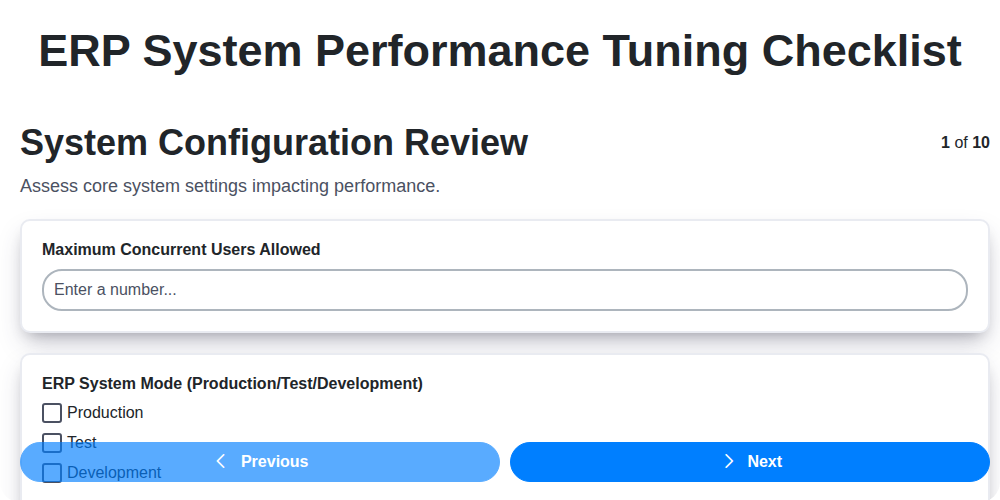
Table of Contents
- Introduction: Why ERP Performance Tuning Matters
- 1. System Configuration Review: Baseline and Best Practices
- 2. Hardware Resource Optimization: CPU, Memory, and Storage
- 3. Database Performance Analysis: Identifying Bottlenecks
- 4. Network Configuration & Latency: Minimizing Transmission Delays
- 5. Batch Job Optimization: Scheduling and Efficiency
- 6. Report & Dashboard Performance: Data Retrieval and Visualization
- 7. Custom Code & Integration Review: Identifying Problematic Logic
- 8. Concurrent User Management: Handling Peak Loads
- 9. Cache Management & Configuration: Leveraging Temporary Storage
- 10. Security & Permissions Impact: Balancing Security and Speed
- 11. Monitoring and Alerting: Proactive Performance Management
- 12. Regular Maintenance & Updates: Staying Ahead of Issues
- Conclusion: Sustaining ERP Performance
- Resources & Links
TLDR: Your ERP running slow? This checklist provides a comprehensive, step-by-step guide to diagnose and improve performance. Covering everything from system configuration and hardware to database optimization and custom code, it's your roadmap to a faster, more efficient ERP system - no guesswork required!
Introduction: Why ERP Performance Tuning Matters
Your ERP system is the backbone of your business, managing everything from financials and inventory to manufacturing and customer relationships. When it's running smoothly, it's a powerful engine driving efficiency and growth. But when performance lags - slow response times, frustrating delays, and error messages - it can grind operations to a halt, impacting productivity, employee morale, and ultimately, your bottom line.
ERP systems are complex, constantly processing vast amounts of data and supporting numerous users. Over time, configuration drift, data growth, and evolving business needs can degrade performance. Ignoring these issues can lead to costly downtime, missed deadlines, and a general erosion of user satisfaction.
This isn't just about making things slightly faster. Proper ERP performance tuning is a strategic investment that ensures your system remains a reliable and efficient tool, supporting your business goals and providing a competitive edge. This checklist provides a comprehensive guide to identify and address common performance bottlenecks, helping you reclaim speed, stability, and control over your ERP environment. Let's get started.
1. System Configuration Review: Baseline and Best Practices
Before diving into any performance tuning efforts, establishing a baseline is critical. This involves documenting your ERP system's current configuration and performance metrics. Don't just think things are slow; prove it with data.
Baseline Activities:
- Document Current Settings: Create a detailed record of all relevant system configuration settings. This includes parameters related to memory allocation, process limits, thread pools, and service settings within your ERP system. Specific settings will vary based on your ERP platform (SAP, Oracle, Microsoft Dynamics, etc.).
- Establish Performance Metrics: Define key performance indicators (KPIs) that reflect typical user experience and business process speed. Examples include: screen load times, transaction processing times, report generation times, and overall system responsiveness. Use monitoring tools to capture these metrics under typical load.
- Identify Peak and Off-Peak Times: Note periods of high and low system utilization. Performance degradation often manifests during peak loads, so understanding these patterns is vital.
Best Practices - Configuration Review:
- Review ERP Version and Patch Levels: Ensure you are running a supported version of your ERP system and have applied all relevant patches. Vendor patches frequently contain performance enhancements and bug fixes.
- Evaluate System Parameters: Carefully analyze ERP system parameters against vendor recommendations and best practices. Incorrectly configured parameters can significantly impact performance. Consider consulting with a qualified ERP consultant for assistance.
- Assess User Profile Configuration: Examine how user profiles are configured. Excessive or inappropriate settings within user profiles can add overhead.
- Check Integration Settings: Review configurations related to any integrations with other systems. Inefficient integration processes are common performance bottlenecks.
- Utilize Vendor-Provided Configuration Checklists: Many ERP vendors provide configuration checklists designed to identify common performance issues. Leverage these resources as a starting point.
2. Hardware Resource Optimization: CPU, Memory, and Storage
ERP systems are resource-intensive, and inadequate hardware can cripple performance. This section focuses on optimizing CPU, memory (RAM), and storage - the foundational elements of your ERP infrastructure.
CPU Utilization: Monitor CPU usage across all servers (application, database, web). Sustained high CPU usage (above 80%) indicates a bottleneck. Investigate which processes are consuming the most CPU. This could be due to inefficient code, excessive calculations, or inadequate server power. Consider upgrading CPU cores or clock speed if the application is consistently CPU-bound.
Memory (RAM) Management: Insufficient RAM forces the system to rely heavily on disk swapping, drastically slowing performance. Regularly monitor memory utilization. A good rule of thumb is to have enough RAM to comfortably hold the working set of data for your application and database. Analyze memory leaks, especially within custom code or integrations. Consider increasing RAM to reduce swapping and improve overall responsiveness.
Storage Performance: ERP systems rely heavily on disk I/O. Slow storage significantly impacts performance.
- Disk Type: Prioritize SSDs (Solid State Drives) over traditional HDDs, particularly for the database server and frequently accessed data. SSDs offer significantly faster read/write speeds.
- RAID Configuration: Implement a suitable RAID configuration for data redundancy and performance. RAID 1/10 are common choices for databases requiring both.
- Disk Space: Ensure sufficient free space on all drives. Low disk space can cause performance degradation and even system instability. Aim to keep at least 20% free space.
- Storage Monitoring: Regularly monitor disk I/O, latency, and throughput to identify bottlenecks and anticipate future needs.
- File System Optimization: Utilize file systems optimized for performance, such as NTFS (Windows) or ext4 (Linux).
3. Database Performance Analysis: Identifying Bottlenecks
The ERP database is the heart of your system; its performance directly impacts nearly every other aspect. A slow database translates to slow transactions, frustrated users, and ultimately, hindered business operations. This section focuses on identifying and addressing common database bottlenecks.
1. Query Performance Review: Start by identifying slow-running queries. Utilize database profiling tools (like SQL Profiler, Oracle's Explain Plan, or similar) to pinpoint queries with long execution times. Analyze these queries to understand their execution plan - are they using indexes effectively? Are joins optimized? Look for full table scans which are often a red flag. Re-evaluate and optimize complex queries, potentially breaking them into smaller, more manageable steps.
2. Index Analysis: Proper indexing is crucial. Ensure indexes exist on frequently queried columns and foreign keys. Review existing indexes - are they still necessary? Redundant or unused indexes can negatively impact write performance. Fragmentation can also degrade index performance; consider rebuilding or reorganizing fragmented indexes.
3. Statistics Verification: Database optimizers rely on accurate statistics to create efficient execution plans. Ensure statistics are regularly updated, especially after significant data changes. Outdated statistics can lead to suboptimal query plans.
4. Locking and Blocking: Investigate potential locking and blocking issues. Long-held locks can prevent other processes from accessing data, causing delays. Identify which processes are holding locks and address the root cause. Consider using shorter transaction lengths.
5. Data Volume and Growth: Assess the database size and its growth rate. A rapidly growing database can strain resources. Consider archiving older data or implementing partitioning strategies to improve performance and manageability. Regularly assess your database's capacity and plan for future growth.
6. Database Server Resources: Confirm the database server has adequate resources (CPU, Memory, I/O). Monitor resource utilization and scale up if necessary. Consider the impact of other applications sharing the same server.
4. Network Configuration & Latency: Minimizing Transmission Delays
ERP systems thrive on real-time data flow, making network performance absolutely critical. Slow network speeds and high latency directly translate to sluggish ERP operations, frustrated users, and potential data inconsistencies. This section outlines key considerations for optimizing network configuration and minimizing latency.
1. Bandwidth Assessment & Allocation:
- Baseline Measurement: Establish a baseline for current network bandwidth utilization during peak ERP usage. Tools like iperf or network monitoring solutions can help.
- Adequacy Check: Determine if available bandwidth adequately supports ERP traffic, considering future growth projections.
- Prioritization (QoS): Implement Quality of Service (QoS) to prioritize ERP-related traffic over less critical applications. This ensures critical data flows without interruption.
- Segmentation: Consider network segmentation to isolate ERP traffic and prevent congestion from other network activities.
2. Latency Analysis & Reduction:
- Round Trip Time (RTT) Measurement: Measure RTT between ERP servers, database servers, and client machines. High RTT indicates significant delays. Tools like
pingand traceroute are useful starting points. - Identify Bottlenecks: Investigate the cause of high RTT. This could be due to router congestion, firewall limitations, long distances, or inefficient routing.
- Geographic Proximity: Strategically locate ERP servers and database servers to minimize geographic distance between them and the majority of users.
- Optimize Routing: Review network routing configurations to ensure efficient data paths. Work with your network administrator to identify and correct inefficient routes.
- Firewall Optimization: Firewall rules can significantly impact latency. Review rules for unnecessary complexity or overly restrictive policies. Work with your security team to optimize.
3. Connection Types & Protocols:
- Wired vs. Wireless: Prioritize wired connections for ERP client machines where possible, as they generally offer greater stability and lower latency compared to wireless.
- Protocol Efficiency: Evaluate the protocols used for ERP communication. Consider if newer, more efficient protocols can be implemented where appropriate.
By systematically addressing network configuration and latency issues, you can significantly improve ERP system responsiveness and overall user experience.
5. Batch Job Optimization: Scheduling and Efficiency
Batch jobs are the unsung heroes of many ERP systems, handling critical tasks like overnight data processing, reconciliation, and complex calculations. However, poorly optimized batch jobs can become major bottlenecks, consuming excessive resources and delaying other processes. Here's how to ensure your batch jobs are running efficiently:
1. Analyze Job Dependencies and Sequencing: Understand the order in which your batch jobs execute. Identify dependencies - jobs that rely on the completion of others. Optimize the sequence to minimize idle time. Consider parallelizing independent jobs where possible, but be mindful of potential resource contention.
2. Review Scheduling Windows: Are your batch jobs scheduled for optimal times? Overlapping schedules can lead to resource starvation and increased execution times. Analyze peak usage periods and adjust schedules to avoid contention. Consider off-peak hours for resource-intensive jobs.
3. Evaluate Job Duration & Resource Consumption: Regularly monitor the duration and resource consumption (CPU, memory, disk I/O) of each batch job. Identify long-running or resource-hungry jobs that need further investigation. ERP system performance monitoring tools are invaluable here.
4. Chunk Large Jobs: Break down extremely large batch jobs into smaller, manageable chunks. This can improve responsiveness and allow for easier monitoring and error handling. Smaller chunks also prevent long periods of resource locking.
5. Implement Error Handling & Retries: Robust error handling is crucial. Implement automated retry mechanisms for transient errors, and ensure comprehensive logging to quickly diagnose and resolve issues. Alerting should be configured for failed jobs.
6. Regularly Review and Adjust: Batch job requirements and data volumes change over time. Schedule periodic reviews of your batch job configurations and performance metrics to proactively address potential issues.
6. Report & Dashboard Performance: Data Retrieval and Visualization
Report and dashboard performance often becomes a bottleneck in ERP systems, frustrating users and impacting productivity. Slow loading times can stem from inefficient queries, excessive data retrieval, or poorly optimized visualizations. Here's a focused look at what to examine:
1. Query Analysis & Optimization:
- Examine SQL Queries: Use database profiling tools to identify slow-running SQL queries used in reports and dashboards. Pay close attention to full table scans, inefficient joins, and missing indexes.
- Data Filtering & Aggregation: Ensure reports only retrieve necessary data. Implement appropriate filtering and aggregation at the database level to reduce the amount of data transferred. Avoid pulling raw data and then filtering in the application layer; push that logic down to the database.
- Stored Procedures & Views: Consider using stored procedures or database views to encapsulate complex queries and improve performance.
- Parameterization: Utilize parameterized queries to avoid SQL injection vulnerabilities and potentially improve query plan caching.
2. Visualization Best Practices:
- Chart Type Selection: Choose the most appropriate chart type for the data being presented. Complex charts with numerous data points can be slow to render. Consider simpler visualizations if performance is a primary concern.
- Data Volume for Visualizations: Limit the amount of data displayed in a single visualization. Pagination or drill-down capabilities can help manage large datasets.
- Client-Side Rendering: Evaluate whether excessive client-side rendering is contributing to slow performance. Consider server-side rendering or optimized client-side libraries.
- Data Caching: Explore caching frequently accessed report data to reduce database load.
3. Report Design & Structure:
- Report Layout: Simplify report layouts to reduce rendering time. Avoid unnecessary visual elements that don't contribute to data understanding.
- Subreports: If using subreports, ensure they are optimized individually and that the overall report design is efficient.
- Scheduled Reports: Offload generation of complex, scheduled reports to off-peak hours to minimize impact on interactive users.
By systematically addressing these areas, you can significantly improve the performance of your ERP reports and dashboards, leading to a more efficient and user-friendly system.
7. Custom Code & Integration Review: Identifying Problematic Logic
Custom code and integrations are often the unsung heroes - or hidden villains - of ERP system performance. While they can extend functionality and tailor the system to specific business needs, poorly written or inefficient custom code can easily become a major bottleneck. This review focuses on identifying and addressing such issues.
What to Look For:
- Inefficient Algorithms: Scrutinize custom code for inefficient loops, unnecessary calculations, or poorly optimized data manipulation. Even small inefficiencies, when executed repeatedly within high-volume processes, can compound into significant performance degradation.
- Direct Database Queries (Bypassing ERP Logic): Custom code that bypasses the ERP system's built-in data access methods and directly queries the database often leads to inconsistencies and performance issues. The ERP system's data layer is designed for controlled access and often includes performance optimizations; circumventing it can negate these benefits.
- Lack of Error Handling & Logging: Poor error handling can lead to unexpected behavior and make debugging difficult. Inadequate logging makes it challenging to track down the root cause of performance problems.
- Resource Consumption: Analyze custom code to identify excessive memory usage, CPU load, or disk I/O. Use profiling tools to pinpoint areas where resources are being wasted.
- Integration Points: Closely examine integrations with third-party systems. Slow or unreliable integrations directly impact ERP performance. Identify potential bottlenecks in data transfer and transformation processes. Consider asynchronous processing for lengthy integrations.
- Transaction Management: Review how custom code handles transactions. Improper transaction management can lead to deadlocks and slow down the entire system.
- Code Reviews & Documentation: Implement a process of regular code reviews and maintain comprehensive documentation for all custom code. This helps ensure code quality and makes it easier to understand and maintain.
Tools & Techniques:
- Profiling Tools: Utilize profiling tools provided by your ERP vendor or third-party utilities to identify performance hotspots within custom code.
- Code Analysis Tools: Employ code analysis tools to detect potential inefficiencies and coding errors.
- Debugging & Tracing: Use debugging tools to trace the execution flow of custom code and identify performance bottlenecks.
- Performance Testing: Conduct performance testing specifically targeting custom code and integrations to identify areas for improvement.
8. Concurrent User Management: Handling Peak Loads
An ERP system's performance can quickly degrade under heavy concurrent user loads. A few users might be manageable, but during month-end closing, order processing rushes, or other peak periods, slow response times and system instability can cripple productivity. Proactive management of concurrent users is essential.
Key Considerations & Tuning Steps:
- User Limits & Licensing: Verify your ERP system's licensing agreement and implemented user limits. Are you operating within those limits? Exceeding them can lead to resource contention and poor performance.
- Profile User Behavior: Understand how different user roles utilize the system. Power users accessing complex modules significantly impact performance compared to casual data entry clerks. Segment user activity to identify bottlenecks.
- Session Management: Review session timeout configurations. Shorter timeouts reduce resource consumption from inactive users, but excessively short timeouts can frustrate users. Find a balance.
- Connection Pooling: Ensure the ERP system is configured to utilize connection pooling effectively. This reduces the overhead of establishing new database connections for each user request.
- Resource Allocation per User: Some ERP systems allow for resource allocation (CPU, memory) per user profile. Experiment with these settings, especially for power users, to prevent one user from monopolizing system resources. Caution: Over-allocation can starve other users.
- Load Balancing: For larger implementations, consider load balancing across multiple application servers to distribute the user load and prevent a single server from becoming overwhelmed.
- Monitor User Activity: Implement robust monitoring to track active user count, response times, and resource utilization during peak periods. This data helps identify patterns and areas for improvement.
- Staggered Processing: Where possible, stagger tasks that are heavily used during peak times, such as data uploads or complex calculations, to offload some of the load.
9. Cache Management & Configuration: Leveraging Temporary Storage
Cache management is often overlooked in ERP performance tuning, yet it can deliver significant gains with relatively low effort. Caches act as temporary storage for frequently accessed data, minimizing the need to repeatedly query the database and reducing overall system load. A well-configured cache can dramatically speed up common transactions and reports.
Here's what to consider:
- Identify Cacheable Data: Analyze your ERP system to pinpoint data frequently accessed by users and reports. This could include customer details, product information, pricing, and commonly used inventory levels.
- ERP System Built-in Cache: Most ERP systems have built-in caching mechanisms. Understand how these are configured and whether they're appropriate for your needs. Are they enabled? Are the expiration times configured optimally? Too short, and you negate the benefits; too long, and you risk serving stale data.
- Database Query Caching: Explore options for caching the results of complex database queries. Many database systems offer query caching features.
- Application-Level Caching: Consider implementing application-level caching for specific modules or functionalities. This might involve using a dedicated caching server (like Redis or Memcached) to store frequently used data.
- Cache Invalidation: A critical aspect of caching is invalidation - ensuring data remains accurate. Establish clear strategies for when cached data needs to be refreshed. This might be triggered by data updates, scheduled jobs, or user actions.
- Monitoring Cache Performance: Implement monitoring to track cache hit rates and miss rates. Low hit rates indicate inefficient caching. High miss rates can point to incorrectly cached data or inadequate cache size.
- Cache Size Considerations: Too small a cache won't hold enough data; too large a cache can waste resources. Right-size your cache based on your system's workload and available memory.
- Review Customizations: Any custom code or integrations might be bypassing or interfering with the ERP system's built-in caching. Audit these areas.
10. Security & Permissions Impact: Balancing Security and Speed
Performance tuning shouldn't come at the expense of security. Overly restrictive permissions or complex security protocols, while essential for protecting your data, can significantly impact ERP system performance. This section focuses on analyzing and optimizing security configurations without compromising data integrity.
Understanding the Connection: Complex access controls, granular permissions, and frequent security checks all consume system resources. Each user interaction requires validation and authorization, adding overhead. Excessive auditing also generates substantial data and processing demands.
Checklist Actions:
- Review User Roles & Permissions: Identify any overly restrictive or unnecessary permissions assigned to user roles. Simplify where possible without compromising data security. Aim for the least privilege principle: users should only have access to what they absolutely need.
- Analyze Access Control Lists (ACLs): Audit ACLs to ensure efficiency. Redundant or overly complex ACLs can slow down data retrieval.
- Assess Audit Trail Impact: While auditing is crucial, excessive logging can consume significant storage and processing power. Determine if auditing levels are appropriate and if older audit data can be archived.
- Evaluate Security Module Impact: Understand how your ERP's security modules (e.g., single sign-on, multi-factor authentication) affect overall system performance. Are there configuration options to optimize performance without disabling security features?
- Identify and Address Permission Bottlenecks: Use ERP monitoring tools to identify frequently accessed data points that trigger permission checks. Optimize these processes or consider alternative access methods where appropriate.
- Regular Security Reviews: Integrate security performance impact assessment into your regular ERP maintenance schedule.
Important Note: Changes to security settings should always be performed by qualified security professionals and thoroughly tested in a non-production environment before implementation. Prioritize security best practices and compliance requirements throughout the tuning process.
11. Monitoring and Alerting: Proactive Performance Management
Reactive troubleshooting is costly and disruptive. A robust ERP system thrives on proactive performance management, and that begins with comprehensive monitoring and alerting. It's not enough to simply identify problems after they impact users; you need to anticipate them.
Key Monitoring Aspects:
- Real-Time System Health: Implement dashboards displaying critical metrics like CPU utilization, memory usage, disk I/O, and network bandwidth. These provide an immediate view of the system's overall health.
- Transaction Response Times: Track the duration of key ERP processes like order entry, invoice generation, and inventory updates. Slow response times are a major pain point and can quickly erode user productivity.
- Batch Job Status & Duration: Monitor the success rates and execution times of batch jobs (e.g., overnight reconciliations, data uploads). Delays or failures here can cascade into downstream issues.
- Database Metrics: Continuously monitor database query performance, index usage, and lock contention.
- Error Logs: Establish automated collection and analysis of system and application error logs.
- User Experience Metrics: Consider incorporating user-facing metrics, such as application load times, to gauge perceived performance.
Alerting Strategies:
- Threshold-Based Alerts: Configure alerts triggered when key metrics exceed pre-defined thresholds. For example, alert when CPU usage consistently exceeds 80% or when a batch job takes longer than its expected runtime.
- Anomaly Detection: Implement solutions that learn baseline behavior and alert on deviations from the norm, even if those deviations don't violate defined thresholds.
- Escalation Procedures: Define clear escalation paths for different alert severities. Ensure the right personnel are notified promptly.
- Centralized Logging & Correlation: Aggregate logs and metrics from various system components into a central repository for easier correlation and analysis.
Tools: Many ERP systems have built-in monitoring capabilities. Additionally, consider utilizing third-party monitoring tools for more comprehensive and granular insights. Consistent monitoring isn't just about catching issues; it's about understanding your system's behavior and proactively preventing future performance degradation.
12. Regular Maintenance & Updates: Staying Ahead of Issues
ERP systems aren't set it and forget it solutions. They require ongoing maintenance and updates to ensure optimal performance and stability. Neglecting this crucial aspect can lead to degraded performance, increased downtime, and potential security vulnerabilities.
Here's why regular maintenance and updates are essential:
- Patching Security Vulnerabilities: ERP vendors constantly release patches to address newly discovered security threats. Applying these promptly is paramount to protect your data and system integrity.
- Performance Improvements: Updates often include performance enhancements, bug fixes, and optimizations that can significantly boost ERP system responsiveness.
- Compatibility: Software dependencies evolve. Updates ensure your ERP system remains compatible with other critical applications and infrastructure.
- New Features & Functionality: Updates may introduce new features or enhancements that improve user productivity and business processes.
- Preventing Technical Debt: Accumulating outdated components and configurations leads to technical debt, making future maintenance more difficult and costly.
Best Practices:
- Schedule Regular Maintenance Windows: Dedicate specific time slots for applying updates and performing maintenance tasks.
- Test Updates in a Non-Production Environment: Always thoroughly test updates in a staging environment before deploying them to production.
- Document Changes: Maintain a detailed log of all maintenance activities and updates applied.
- Stay Informed: Subscribe to vendor announcements and security advisories to be aware of upcoming changes.
- Automate Where Possible: Leverage automation tools for repetitive maintenance tasks to minimize errors and improve efficiency.
Regular, proactive maintenance isn't just about fixing problems; it's about preventing them in the first place and ensuring your ERP system continues to be a valuable asset to your business.
Conclusion: Sustaining ERP Performance
Tuning an ERP system isn't a one-and-done task; it's an ongoing process. The checklist outlined provides a strong foundation for identifying and addressing performance bottlenecks, but the key to long-term success lies in proactive monitoring and continuous optimization. Business needs evolve, data volumes grow, and system changes accumulate. Regularly revisiting this checklist - ideally on a quarterly or semi-annual basis - ensures your ERP system remains a responsive and efficient asset. Remember to document all changes, track performance metrics, and involve key stakeholders from across the business to maintain a holistic view. By embracing a culture of continuous improvement and diligent performance management, you can safeguard your ERP system's ability to drive business success for years to come.
Resources & Links
- SAP: SAP's official website. A primary resource for understanding SAP ERP systems, their performance considerations, and best practices. Look for whitepapers, documentation, and community forums.
- Oracle: Oracle's website. If your ERP is Oracle-based, this is a crucial resource for documentation, support, and performance tuning guides for their database and application servers.
- Microsoft: Microsoft's website. Relevant if your ERP uses Microsoft SQL Server or other Microsoft technologies. Find performance tuning documentation and best practices.
- NetSuite: NetSuite's website. Offers resources specific to their cloud ERP system, including performance best practices and troubleshooting guides.
- IBM: IBM's website. Useful if your ERP utilizes IBM's database technologies (like DB2) or hardware. Provides information on optimizing IBM's infrastructure for ERP systems.
- Red Gate: Red Gate offers tools and resources for SQL Server performance monitoring and tuning. Provides valuable insights and actionable steps for database optimization.
- SolarWinds: SolarWinds provides network and system performance monitoring tools that can help identify bottlenecks impacting ERP performance. Provides overall system visibility.
- Dynatrace: Dynatrace provides application performance monitoring (APM) solutions to identify and resolve performance issues in complex ERP environments. Offers in-depth diagnostics.
- Stack Observer: A website that aggregates performance metrics and articles related to various technologies, including databases and ERP systems. Can provide broader context and trends.
- Spiceworks Community: A large online community where IT professionals share knowledge and solutions related to various technologies. Useful for finding answers to specific ERP performance issues.
- MySQL: If your ERP utilizes MySQL, this is a key site for performance tuning documentation, including indexing and query optimization strategies.
- Microsoft SQL Server Docs: Official documentation from Microsoft for SQL Server, offering detailed guidance on performance tuning, indexing, and query optimization.
Frequently Asked Questions
What is ERP system performance tuning and why is it important?
ERP system performance tuning is the process of optimizing the system to run efficiently and effectively. It's important because slow performance can negatively impact user productivity, business processes, and overall profitability. It can lead to frustration, delays, and increased operational costs.
Who is this checklist for?
This checklist is for ERP system administrators, IT professionals, and anyone responsible for maintaining and optimizing the performance of an ERP system. It's suitable for users of various ERP systems, although specific steps might need adaptation based on the system in use.
What types of ERP systems does this checklist apply to?
While the principles outlined apply broadly across different ERP systems (SAP, Oracle, Microsoft Dynamics, NetSuite, etc.), specific configuration settings and tools will vary. You may need to adapt steps based on your specific ERP system and version.
What are the key areas covered in this checklist?
The checklist covers areas such as hardware resources, database optimization, network configuration, application server tuning, and client-side optimizations, along with monitoring and regular maintenance.
How often should I perform ERP system performance tuning?
Regular performance tuning is crucial. We recommend a full review every 6-12 months, with smaller, proactive checks and adjustments every 1-3 months. Changes in user load or data volume should trigger immediate investigation.
What are some common signs of poor ERP system performance?
Common signs include slow response times, frequent timeouts, application freezes, high CPU utilization, slow report generation, and user complaints about sluggishness.
What is the difference between proactive and reactive performance tuning?
Proactive tuning involves regularly monitoring and optimizing the system to prevent performance issues. Reactive tuning addresses performance problems after they're already impacting users. This checklist focuses on both, but proactive measures are always preferred.
What role does database optimization play in ERP performance?
The database is often the bottleneck in ERP systems. Optimizing database queries, indexing, data archiving, and server configuration are critical for good performance.
How can I identify bottlenecks in my ERP system?
Tools within the ERP system itself, as well as third-party monitoring tools, can help identify bottlenecks. Analyze server logs, database query performance, and network latency to pinpoint problem areas.
What is data archiving and why is it important for ERP performance?
Data archiving involves moving older, less frequently accessed data to a separate storage location. This reduces the size of the active database, improving query performance and reducing backup times.
Found this Article helpful?
Comments
There are no comments yet. Be the first to add one!
ERP - Enterprise Resource Planning Solution Demo
Overwhelmed by disconnected systems? ChecklistGuro provides a centralized ERP solution, connecting your business processes - finance, operations, & more - for improved visibility and control. Simplify operations & boost efficiency.
Related Articles

MRP System Go-Live Checklist: Your Path to a Successful Implementation

Top 10 CMiC Alternatives for 2025

The Ultimate Foundation Waterproofing Installation Checklist Template
Top 10 Odoo Alternatives for 2025

How to Save Money on Bill of Materials (BOM) Management Software

The Ultimate Waterproofing Checklist: Ensuring a Leak-Proof Installation

The 10 Best Manufacturing Management Software of 2025

MRP Vendor Master Data Checklist: Ensuring Accuracy and Efficiency
We can do it Together
Need help with
Enterprise Resource Planning (ERP)?
Have a question? We're here to help. Please submit your inquiry, and we'll respond promptly.