ERP User Acceptance Testing Checklist: Your Comprehensive Guide
Published: 12/20/2025 10:00 PM Updated: 12/21/2025 6:14 AM
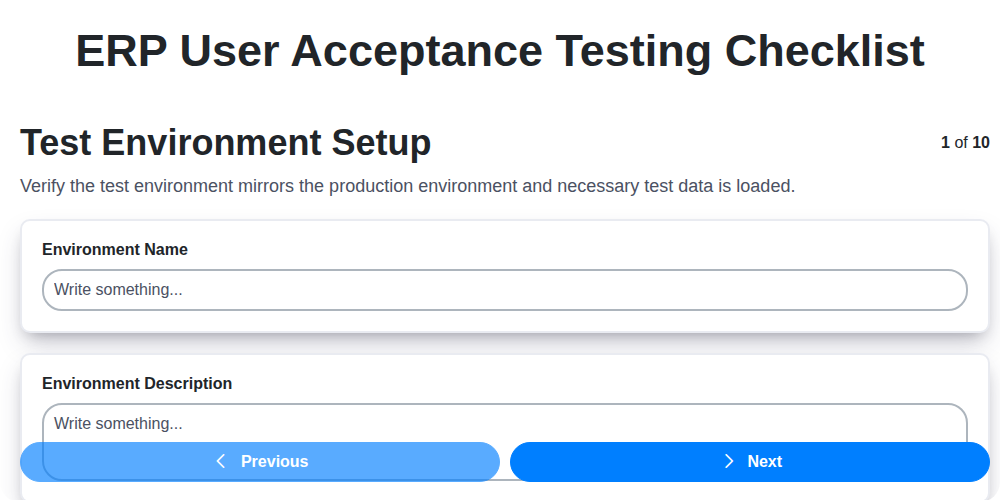
Table of Contents
- Introduction: Why UAT is Crucial for ERP Success
- 1. Test Environment Setup: Laying the Foundation
- 2. Functional Testing - Core Modules: Validating Key Processes
- 3. Data Integrity Verification: Ensuring Accuracy and Consistency
- 4. Integration Testing: Seamless Data Flow
- 5. Reporting & Analytics Validation: Confirming Insights
- 6. Security & Access Control Testing: Protecting Sensitive Data
- 7. Workflow & Approvals Testing: Streamlining Processes
- 8. User Interface (UI) & Usability Testing: A User-Friendly Experience
- 9. Mobile Accessibility Validation: Reaching Users on Any Device
- 10. Error Handling & System Recovery: Preparing for the Unexpected
- 11. Performance Testing (Optional but Recommended)
- 12. Documentation Review
- Conclusion: Ensuring a Smooth ERP Go-Live
- Resources & Links
TLDR: Implementing a new ERP? Don't skip User Acceptance Testing (UAT)! This checklist guides you through essential steps - from setting up your test environment to confirming data integrity, integrations, security, and usability - ensuring the ERP meets your business needs before the big launch. Use it to minimize risks, catch issues early, and guarantee a smoother transition.
Introduction: Why UAT is Crucial for ERP Success
Implementing a new Enterprise Resource Planning (ERP) system is a massive undertaking, representing a significant investment in your business's future. However, a beautiful, feature-rich ERP is only as good as its ability to actually work for your users and meet your business needs. That's where User Acceptance Testing (UAT) comes in.
UAT isn't just another technical test; it's a critical bridge between development and live deployment. It's the moment your end-users, the people who will be using the system daily, get to interact with the ERP and validate that it functions as expected within their real-world scenarios. Skipping or shortcutting UAT can lead to costly rework, frustrated users, adoption challenges, and ultimately, a failed ERP implementation - negating all the promised benefits. This checklist will guide you through a comprehensive UAT process, ensuring a smoother, more successful ERP launch.
1. Test Environment Setup: Laying the Foundation
Before a single transaction is tested, ensuring a robust and representative test environment is absolutely critical. A flawed test environment can lead to inaccurate results, wasted time, and a false sense of security. Here's what needs to be covered:
- Environment Parity: The test environment should closely mirror the production environment in terms of hardware, software versions, operating systems, and network configurations. Any discrepancies need to be documented and their potential impact assessed.
- Data Masking/Anonymization: Production data should never be used directly in the test environment for privacy and security reasons. Instead, a sanitized, masked, or anonymized version must be used. This ensures compliance with data protection regulations and protects sensitive information.
- User Access & Permissions: Test users should be created with appropriate roles and permissions, mirroring the access levels they would have in production. This allows for accurate testing of security and authorization workflows.
- Connectivity & Integrations: Verify connectivity to any external systems or services the ERP system will interact with. Mock services or test instances of these external systems may be required.
- Environment Documentation: Maintain comprehensive documentation of the test environment configuration, including version numbers, installed modules, and any customizations. This facilitates troubleshooting and reproducibility.
- Baseline Testing: After setup, perform baseline testing to confirm the environment is stable and functional before any test cases are executed. This includes basic login, navigation, and data entry tests.
2. Functional Testing - Core Modules: Validating Key Processes
Functional testing of your ERP's core modules is arguably the most critical phase of User Acceptance Testing (UAT). This isn't just about verifying that buttons work; it's about ensuring the business functions correctly within the new system. Here's a breakdown of what to focus on:
Prioritize Based on Business Impact: Start with the modules that are central to your daily operations. This typically includes:
- Finance/Accounting: Thoroughly test General Ledger, Accounts Payable, Accounts Receivable, Bank Reconciliation, and fixed asset management. Verify accurate posting, reconciliation, and reporting.
- Inventory Management: Test receiving, putaway, picking, packing, shipping, and cycle counting. Confirm accurate stock levels, costing methods, and inventory valuation.
- Order Management: Verify order entry, pricing, discounts, shipping rules, and fulfillment processes. Validate the entire order lifecycle.
- Manufacturing (if applicable): Test bill of materials, production orders, routing, work centers, and shop floor data collection.
- Sales & CRM (if applicable): Test lead management, opportunity tracking, quote generation, and sales order processing.
Specific Test Scenarios to Consider:
- End-to-End Processes: Don't just test individual transactions. Trace entire business processes from start to finish (e.g., order placement to payment receipt).
- Complex Transactions: Include tests involving discounts, returns, partial shipments, and other non-standard scenarios.
- User Roles & Permissions: Ensure users only have access to the functions they are authorized to perform.
- Error Handling: Test the system's response to incorrect data entry and invalid conditions.
- Calculations & Automations: Verify all calculations (e.g., tax calculations, inventory costing) are accurate and automated processes execute correctly.
- Reporting Requirements: Ensure data displayed within module-specific reports is accurate and aligns with business requirements.
Documentation is Key: For each test, clearly document the steps taken, expected results, and actual results. Any deviations should be logged for resolution.
3. Data Integrity Verification: Ensuring Accuracy and Consistency
Data integrity is paramount in any ERP system - it's the bedrock upon which informed decisions are made. This phase of User Acceptance Testing (UAT) focuses on confirming that your data remains accurate, complete, and consistent throughout the entire system lifecycle. It's not just about if the data is there, but also what the data is and whether it's behaving as expected.
Here's what you should be verifying:
- Data Migration Validation: If data has been migrated from a legacy system, meticulously compare a statistically significant sample of records in the new ERP to the old system. Look for discrepancies in key fields - names, addresses, quantities, dates, etc.
- Data Entry Accuracy: Test data entry processes with various user roles and data types. Ensure that required fields are enforced, data formats are correct (e.g., date formats, numeric precision), and any calculated fields are accurate. Simulate both correct and incorrect data entry to observe system validation rules.
- Data Consistency Across Modules: Trace data flow between modules. For example, an order placed in Sales should accurately reflect in Inventory and then Finance. Verify that changes in one module correctly propagate to related modules.
- Master Data Validation: Focus on critical master data like customer records, vendor records, and product catalogs. Ensure these are accurate, complete, and free of duplicates.
- Audit Trails: Verify that audit trails are functioning correctly and accurately record all data changes, including who made the change and when. This is crucial for accountability and error tracking.
- Data Transformations & Calculations: Review any data transformations or calculations performed by the system. Confirm the logic is correct and produces the expected results.
- Data Validation Rules: Validate that data validation rules are working as expected, preventing invalid data from being entered.
4. Integration Testing: Seamless Data Flow
Integration testing is where the magic truly happens - or where frustrating roadblocks appear! This phase goes beyond individual module functionality and validates the data exchange and communication between different ERP modules and potentially external systems. It's not enough for Sales to work, or Finance to work; they need to talk to each other.
During integration testing, we're focusing on verifying that data entered in one module correctly propagates to others, without errors or data loss. For example, a sales order created in the Sales module should automatically update inventory levels in the Inventory module and trigger appropriate accounting entries in the Financials module.
Key areas to examine include:
- Master Data Synchronization: Verify accurate and consistent master data (customers, products, vendors) across all integrated modules. Inconsistencies here can cascade into significant downstream issues.
- Transaction Data Flow: Trace transactions - order processing, invoicing, payment - from initiation to completion, ensuring accuracy and completeness at each step.
- API Validation (if applicable): If your ERP integrates with third-party applications via APIs, thoroughly test these connections to ensure data transfer reliability and accuracy.
- Error Handling during Integration: What happens when an integration fails? Are errors gracefully handled and reported, preventing data corruption?
- Real-Time vs. Batch Processing: If integrations occur in real-time or via scheduled batch processes, validate both scenarios.
Thorough integration testing reduces the risk of data silos, ensures data consistency, and ultimately contributes to a truly unified ERP system.
5. Reporting & Analytics Validation: Confirming Insights
Reporting and analytics are crucial for informed decision-making, and your ERP system's functionality is only as good as the data it presents. This stage focuses on validating the accuracy, completeness, and usability of all reports and dashboards.
Here's what to check:
- Report Accuracy: Verify data displayed in reports against source data and previously known values. Don't just look at totals - scrutinize individual data points.
- Report Completeness: Ensure all expected data is included in reports. Check for missing fields, incomplete records, and proper filtering.
- Data Formatting & Presentation: Confirm data is presented in the correct format (currency, date, units, etc.) and that reports are easy to understand. Check for proper labels, legends, and visual aids.
- Custom Report Validation: If you've implemented custom reports, these require extra attention. Verify calculations, formulas, and data sources specific to those reports.
- Dashboard Functionality: Validate interactive dashboard elements, including filters, drill-down capabilities, and data visualizations. Ensure they function as expected and provide actionable insights.
- Export Functionality: Test the ability to export reports in various formats (e.g., Excel, PDF) and verify data integrity after export.
- Scheduled Reports: If reports are scheduled for automatic generation and distribution, confirm they are running correctly and being delivered to the intended recipients.
Thorough reporting and analytics validation will build confidence in the ERP system's ability to provide reliable information for business users.
6. Security & Access Control Testing: Protecting Sensitive Data
Security is paramount when implementing a new ERP system, and rigorous testing is essential to ensure sensitive data remains protected. This section of your UAT checklist should focus on validating that access controls are properly configured and functioning as intended.
Here's what to verify:
- Role-Based Access: Confirm that user roles and permissions are correctly assigned and limit access only to necessary functionalities and data. Attempt to access restricted areas using various user accounts to identify any gaps.
- Password Policies: Test the enforcement of password complexity rules, expiration policies, and lockout mechanisms. Ensure users cannot easily bypass these safeguards.
- Data Encryption: Validate that sensitive data (like financial records, customer information, and employee details) is encrypted both in transit and at rest.
- Audit Trails: Verify that all user actions are logged in audit trails. Review these logs to ensure accuracy and completeness. Can you trace actions back to specific users?
- Authorization Checks: Test the system's ability to prevent unauthorized transactions and data modifications. Attempt to perform actions you shouldn't have permission for.
- Session Management: Examine how user sessions are handled. Are sessions properly timed out after inactivity? Are sessions secure?
- Multi-Factor Authentication (MFA): If implemented, thoroughly test the MFA process to ensure it's functioning correctly and reliably.
- Data Masking (for Test Environments): Ensure that production data used in the test environment is properly masked or anonymized to prevent unauthorized access.
Poor security can lead to devastating consequences - don't let it be a surprise after go-live.
7. Workflow & Approvals Testing: Streamlining Processes
Workflow and approvals are the backbone of many ERP processes. This testing phase ensures that these crucial pathways function as designed, preventing bottlenecks and ensuring data flows correctly through the system. Don't just assume workflows work - rigorously test them!
Here's what you need to focus on:
- Complete Workflow Validation: Trace each step of key workflows (e.g., purchase order approval, expense reimbursement, sales order fulfillment). Verify that tasks are triggered correctly, routed to the right individuals, and completed in the expected sequence.
- Role-Based Approvals: Test that approvals are assigned appropriately based on user roles and hierarchical structures. Ensure correct escalation paths are followed if approvals are not timely.
- Conditional Approvals: Many ERP systems offer conditional approvals (e.g., approvals needed based on dollar amount or product category). Thoroughly verify these conditions are correctly implemented and trigger the appropriate actions.
- Notification Accuracy: Confirm that all relevant users receive timely and accurate notifications regarding tasks requiring their attention. Verify the content of these notifications is clear and actionable.
- Audit Trail Verification: The system should maintain a detailed audit trail of all workflow activities - who approved what, when, and any comments provided. Confirm this audit trail is accurate and complete.
- Parallel Workflows: If the ERP system supports parallel workflows (multiple users involved in an approval), test that each user's input is handled correctly and doesn't interfere with the process.
- Workflow Rejection/Modification: Verify that users can reject or modify workflow requests with appropriate reasons, and that the system handles these actions correctly, routing the task back to the originator or the next appropriate user.
Proper workflow and approvals testing minimizes errors, ensures compliance, and ultimately contributes to the overall efficiency of the ERP system.
8. User Interface (UI) & Usability Testing: A User-Friendly Experience
A technically sound ERP system is useless if users find it frustrating or difficult to navigate. UI and usability testing focuses on ensuring the system is intuitive, efficient, and enjoyable to use. This isn't just about aesthetics; it's about maximizing user adoption and minimizing training time.
What to Test:
- Navigation: Can users easily find what they need? Test the menu structure, search functionality, and breadcrumb trails. Are labels clear and understandable?
- Layout & Design: Is the layout logical and uncluttered? Does it adhere to established design principles? Is the visual hierarchy effective?
- Form Design: Are forms easy to complete? Are fields labeled clearly? Are error messages helpful and contextually relevant? Minimize required fields where possible.
- Button & Icon Clarity: Are buttons and icons easily recognizable and their purpose unambiguous?
- Consistency: Is the user interface consistent across all modules and functions?
- Accessibility: Consider users with disabilities. Ensure sufficient color contrast, keyboard navigation, and screen reader compatibility.
Testing Methods:
- Task-Based Testing: Give users specific tasks to complete and observe their behavior. Time taken, errors made, and user feedback are valuable data points.
- Heuristic Evaluation: Experts review the UI against established usability principles.
- User Surveys & Feedback: Gather direct feedback from users on their experience.
- A/B Testing: Compare different UI designs to see which performs better.
A successful UI/Usability test will result in a system that feels natural and supports efficient workflows, ultimately boosting user satisfaction and overall system ROI.
9. Mobile Accessibility Validation: Reaching Users on Any Device
In today's mobile-first world, ensuring your ERP system is accessible and functional on various mobile devices is no longer a luxury - it's a necessity. Users expect to access critical data and perform essential tasks from their smartphones and tablets. Failing to deliver a seamless mobile experience can lead to frustration, decreased productivity, and ultimately, a lack of user adoption.
This section of the UAT checklist focuses on validating that the ERP system is usable and performs as expected on different mobile devices and screen sizes. It's not just about whether the system displays on mobile - it's about ensuring usability, responsiveness, and functionality.
Here's what to focus on during mobile accessibility validation:
- Device Compatibility Testing: Test on a range of devices - smartphones (iOS & Android), tablets (various sizes), and potentially phablets. Don't just rely on simulators; physical devices are crucial.
- Screen Size Responsiveness: Verify that layouts, forms, and reports adjust dynamically to different screen sizes and orientations (portrait and landscape). Check for overlapping elements, truncated text, and unreadable buttons.
- Touchscreen Navigation: Ensure buttons and links are appropriately sized and spaced for comfortable tapping. Test swiping gestures where applicable.
- Mobile Browser Compatibility: Test on popular mobile browsers (Chrome, Safari, Firefox) to ensure consistent functionality.
- Performance & Load Times: Mobile networks often have slower speeds. Verify that data loads quickly and the system remains responsive.
- Accessibility Features: Check compatibility with mobile accessibility features like screen readers and voice control.
- Functionality Validation: Re-test key functions performed in the core modules, ensuring they work identically on mobile as on desktop. Don't assume anything translates perfectly.
A well-executed mobile accessibility validation process will significantly improve user satisfaction and contribute to a more successful ERP implementation.
10. Error Handling & System Recovery: Preparing for the Unexpected
No ERP implementation is perfect, and unforeseen errors will occur. This section of your UAT focuses on ensuring the system gracefully handles these issues and allows for recovery without data loss or significant disruption.
What to Test:
- Simulate Errors: Intentionally input incorrect data (invalid formats, missing fields, out-of-range values) into various modules and observe how the system responds. Does it provide clear, user-friendly error messages? Are errors logged appropriately for system administrators?
- Data Recovery: Test the system's ability to recover from simulated crashes or data corruption. This might involve simulating a server failure or deliberately corrupting a small data set and verifying a restore process.
- Rollback Procedures: Verify the process for rolling back changes made during a transaction or process. Can transactions be undone correctly? What is the impact on other processes?
- System Logging: Examine system logs to confirm errors are recorded accurately, including timestamps, user details, and a description of the problem. Are these logs accessible and searchable?
- Alerting and Notifications: Confirm that relevant stakeholders are notified when errors or system issues arise. Are notifications timely and informative?
- Timeout Handling: Test scenarios with long processing times (e.g., complex reports, data imports) to ensure the system handles timeouts correctly and doesn't freeze.
- Password Reset and Account Lockout: Verify the password reset process and how the system handles account lockouts after multiple failed login attempts.
Expected Outcome: The system should provide informative error messages, log errors appropriately, facilitate data recovery, and provide clear procedures for system administrators to troubleshoot and resolve issues. Users should be guided away from errors and have a clear understanding of how to proceed.
11. Performance Testing (Optional but Recommended)
While User Acceptance Testing (UAT) primarily focuses on functionality, neglecting performance can lead to a frustrating user experience and hinder adoption. Performance testing evaluates how the ERP system behaves under expected and peak load conditions. This isn't always a mandatory UAT step, but it's highly recommended, particularly for organizations with large user bases or high transaction volumes.
Here's what performance testing for UAT should cover:
- Load Testing: Simulate a typical user load to assess response times and system stability. This can involve a set number of users performing common tasks concurrently.
- Stress Testing: Push the system beyond its expected limits to identify breaking points and bottlenecks. This helps determine the system's resilience.
- Scalability Testing: Evaluate the ERP system's ability to handle increasing workloads without significant performance degradation. Can it handle projected growth?
- Response Time Monitoring: Track key transaction response times to ensure they meet pre-defined performance benchmarks.
- Resource Utilization: Monitor CPU, memory, and network usage to identify potential resource constraints.
Performance testing should be conducted in an environment that mirrors the production environment as closely as possible. The results will inform optimization efforts before go-live, contributing to a smoother and more efficient ERP implementation. Remember to document any performance issues and their resolutions.
12. Documentation Review
Before formally signing off on the ERP system, a thorough review of all associated documentation is crucial. This isn't just about confirming the documents exist; it's about verifying their accuracy, completeness, and relevance. This includes user manuals, training guides, technical specifications, system configuration documents, and any other material intended to support the system's operation.
During this review, ensure the documentation:
- Accurately reflects the implemented solution: Has the system been configured as described in the documentation? Any deviations need to be flagged and addressed.
- Is comprehensive: Does it cover all functionalities, processes, and user roles?
- Is understandable by the target audience: User manuals, especially, need to be written in clear, non-technical language.
- Includes troubleshooting guides: These are essential for empowering users to resolve common issues independently.
- Is readily accessible: Ensure users know where to find the documentation when they need it.
Involve key users and subject matter experts in this review to identify any discrepancies or areas needing clarification. This final documentation check ensures a smoother transition and ongoing system usability.
Conclusion: Ensuring a Smooth ERP Go-Live
Implementing a new ERP system is a monumental undertaking, and the User Acceptance Testing (UAT) phase is your critical last line of defense before going live. By diligently following a comprehensive checklist, as outlined in this article, you're not just ticking boxes; you're actively mitigating risk, building user confidence, and setting the foundation for a successful ERP adoption. Remember, UAT isn't about finding every bug - it's about confirming that the system functions as expected from a user's perspective and meets their core business requirements. A well-executed UAT process translates to fewer surprises, reduced post-go-live support headaches, and ultimately, a faster return on your ERP investment. Don't underestimate the power of thorough testing; it's the key to unlocking the full potential of your new ERP system and ensuring a smooth, productive transition for your entire organization.
Resources & Links
- Atlassian (Jira/Confluence): While not directly ERP-specific, Atlassian's Jira and Confluence are widely used for test case management, defect tracking, and documentation - crucial aspects of UAT. Explore their features for managing the UAT process effectively.
- TestRail: A popular test case management tool that can be invaluable for organizing and tracking UAT test cases, results, and overall progress. Helps maintain a clear audit trail.
- Guru (Freelance Testing): If you need to supplement your UAT team, Guru connects you with freelance testers who can provide specialized expertise or increase testing capacity. Useful for complex ERP implementations.
- Software Testing Help: Offers a broad range of software testing resources, including articles, tutorials, and templates that can provide deeper understanding of UAT principles and best practices. Search for ERP and UAT specific content.
- ISTQB (International Software Testing Qualifications Board): Provides globally recognized software testing certifications. While not mandatory, understanding ISTQB principles can enhance the quality and rigor of your UAT process. Provides a foundation for understanding testing terminology.
- IBM: IBM offers various ERP solutions (like SAP) and often publishes whitepapers and guides on best practices for testing and implementation. Search IBM's website for ERP testing resources.
- SAP: If you're implementing SAP, SAP's own documentation and community forums are invaluable. Search their site for UAT guidelines, templates, and best practices specific to SAP implementations. (Relevant even if using SAP-integrated systems).
- Microsoft: If your ERP uses Microsoft technologies (like Dynamics 365 or Azure), Microsoft provides documentation and guidance on integration testing and validation. Consult their developer network and documentation sites.
- Oracle: Similar to SAP and Microsoft, Oracle (with Oracle NetSuite and other ERP solutions) publishes resources on best practices for testing and validating their systems. Explore their customer portals and documentation.
- TechTarget: TechTarget hosts a vast network of technical websites. Search their ERP and UAT sections for articles, guides, and case studies that offer practical insights.
Frequently Asked Questions
What is User Acceptance Testing (UAT) in the context of ERP implementation?
UAT is the final stage of ERP testing where end-users (the people who will actually use the system) test the ERP system to ensure it meets their business requirements and is fit for purpose before going live. It validates that the system works as expected in a real-world scenario.
Why is a UAT checklist important for ERP implementation?
A UAT checklist provides a structured approach to testing, ensuring all critical functionalities are tested, reducing the risk of overlooking vital aspects and minimizing post-implementation issues. It also provides traceability and documentation of the testing process.
Who should be involved in the UAT process for an ERP system?
Key stakeholders involved should include representative end-users from different departments (e.g., sales, finance, operations, HR), business analysts, and a UAT coordinator who will manage the process and report on progress.
What are the typical phases of UAT?
Generally, UAT involves preparation (defining scope, creating test cases), execution (users performing tests), defect reporting and resolution, and sign-off (formal acceptance of the system).
What types of tests should be included in an ERP UAT checklist?
The checklist should cover functional testing (e.g., order processing, invoice generation), data migration validation, security testing, integration testing (with other systems), and performance testing.
How detailed should the UAT test cases be?
Test cases should be clear, concise, and include specific steps, expected results, and acceptance criteria. They should be detailed enough for users to consistently reproduce the tests.
What should be included in a defect report?
A defect report should detail the steps to reproduce the issue, the expected result, the actual result, the severity of the defect, and the affected module/functionality.
How do we prioritize defects identified during UAT?
Prioritization typically follows a scale (e.g., critical, high, medium, low) based on the impact of the defect on business operations and the effort required to fix it. Critical and high-priority defects should be addressed immediately.
What constitutes a successful UAT sign-off?
Successful sign-off requires all critical and high-priority defects to be resolved, medium-priority defects to be addressed or mitigated, and all test cases to be executed and passed. Formal sign-off from key stakeholders indicates acceptance of the system.
What happens if UAT fails? What are the next steps?
If UAT fails, the issues need to be addressed and retesting must be conducted. A detailed analysis should be performed to understand the root cause of the failures and prevent recurrence. The go-live date may need to be postponed.
Found this Article helpful?
Comments
There are no comments yet. Be the first to add one!
ERP - Enterprise Resource Planning Solution Demo
Overwhelmed by disconnected systems? ChecklistGuro provides a centralized ERP solution, connecting your business processes - finance, operations, & more - for improved visibility and control. Simplify operations & boost efficiency.
Related Articles

MRP System Go-Live Checklist: Your Path to a Successful Implementation

Top 10 CMiC Alternatives for 2025

The Ultimate Foundation Waterproofing Installation Checklist Template
Top 10 Odoo Alternatives for 2025

How to Save Money on Bill of Materials (BOM) Management Software

The Ultimate Waterproofing Checklist: Ensuring a Leak-Proof Installation

The 10 Best Manufacturing Management Software of 2025

MRP Vendor Master Data Checklist: Ensuring Accuracy and Efficiency
We can do it Together
Need help with
Enterprise Resource Planning (ERP)?
Have a question? We're here to help. Please submit your inquiry, and we'll respond promptly.