Ensuring ERP Success: Your Post-Implementation Audit Checklist
Published: 12/20/2025 10:00 PM Updated: 12/21/2025 8:52 AM
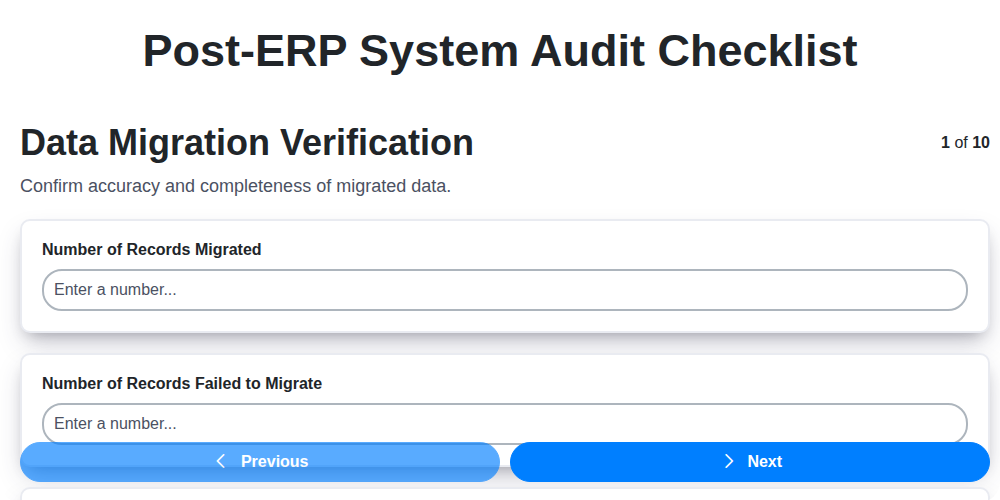
Table of Contents
- Introduction: Why a Post-ERP Audit is Crucial
- 1. Data Migration Verification: Accuracy is Paramount
- 2. System Configuration Review: Fine-Tuning for Optimal Performance
- 3. User Access & Security: Protecting Your Data Assets
- 4. Integration Testing: Ensuring Seamless Data Flow
- 5. Reporting & Analytics Validation: Confirming Business Insights
- 6. Process Documentation & Training: Empowering Your Team
- 7. Performance Monitoring: Identifying and Addressing Bottlenecks
- 8. Change Management & Documentation: Tracking Adjustments
- 9. Compliance & Regulatory Checks: Meeting Legal Requirements
- 10. Issue Resolution & Support: Handling Post-Go-Live Challenges
- 11. User Feedback and Adoption Assessment
- 12. Documentation Review and Updates
- Conclusion: Sustaining ERP Value
- Resources & Links
TLDR: Just launched a new ERP? Don't let it fail! This checklist (Data Migration, Security, Integrations, Reporting, Training, Performance, Changes, Compliance, and Support) ensures everything is working right after implementation - catching errors before they cost you time and money. Think of it as your post-launch health check for a successful ERP journey.
Introduction: Why a Post-ERP Audit is Crucial
Implementing a new ERP system is a monumental undertaking, representing a significant investment of time, resources, and effort. However, the implementation itself isn't the finish line - it's the starting point for ensuring long-term success. A post-ERP system audit is absolutely critical to validating that the system is functioning as intended, meeting business needs, and adhering to necessary standards.
Skipping this vital step can lead to costly mistakes down the line, including data inaccuracies, security vulnerabilities, inefficient processes, and compliance issues. This checklist provides a structured framework to systematically review key areas post-implementation, ensuring a smooth transition and maximizing the value of your ERP investment. Think of it as a final quality check before fully integrating the system into your daily operations - a chance to identify and rectify any lingering issues before they become significant problems.
1. Data Migration Verification: Accuracy is Paramount
Data migration is often the most nerve-wracking part of an ERP implementation. A flawed migration can cripple your entire operation, so thorough verification is absolutely critical. This isn't just about ensuring everything moved - it's about ensuring it moved correctly.
Here's what a robust data migration verification process should include:
- Sample Data Spot Checks: Don't rely solely on automated reports. Manually verify a representative sample of data across key modules (finance, inventory, sales, etc.). Look for obvious errors like incorrect dates, mismatched values, or missing records.
- Data Reconciliation: Compare data in the legacy system with the migrated data in the new ERP. This is usually done using pre-defined key fields and reconciliation reports. Focus on totals, balances, and critical transactional data.
- Data Type and Format Validation: Ensure data types (number, text, date) were correctly mapped and that data formats are consistent with the ERP system's requirements. Incorrect formats can lead to processing errors.
- Data Completeness Checks: Verify that all expected data has been migrated. Identify and investigate any gaps or missing records.
- Master Data Validation: Pay special attention to master data like customer records, vendor information, and product catalogs. Inaccuracies here can have far-reaching consequences.
- Business Rule Validation: Test the migrated data against the new ERP's business rules. Does the data trigger the correct validations and workflows?
- User Acceptance Testing (UAT): Involve key business users in the verification process to confirm data accuracy from a practical, operational perspective.
Thorough data migration verification is an investment that pays off by preventing costly errors and ensuring a successful ERP transition.
2. System Configuration Review: Fine-Tuning for Optimal Performance
The initial ERP system configuration might have met basic requirements, but a post-implementation audit needs to go deeper. This review isn't about whether the system works, but whether it's working optimally for your business.
Here's what to examine:
- Parameter Validation: Verify all critical system parameters (e.g., inventory valuation methods, payment terms, lead times) are accurately configured to reflect your business rules. A simple typo or misinterpretation here can have cascading effects.
- Workflow Optimization: Assess workflows for bottlenecks and inefficiencies. Can tasks be automated further? Are approval processes streamlined?
- Customizations Scrutiny: If customizations were implemented, thoroughly review their impact. Do they align with the original objectives? Are they scalable and maintainable? Have they introduced any unintended consequences?
- Module Interdependencies: Confirm proper configuration of inter-module dependencies. Data flow between modules should be seamless and accurate.
- Security Settings: Re-evaluate security settings to ensure they align with your organization's security policies and evolving threat landscape.
- Localization Settings: For global businesses, verify all localization settings (language, currency, date/time formats) are correctly implemented and functioning.
Don't assume the "out-of-the-box" settings are ideal. This review is a chance to truly tailor the ERP system to drive business value.
3. User Access & Security: Protecting Your Data Assets
An ERP system holds critical business data, making robust user access and security protocols paramount. Post-implementation, a thorough review is essential to ensure data integrity and prevent unauthorized access. This checklist item goes beyond simply assigning users; it's about establishing a layered security framework.
Here's what to examine:
- Role-Based Access Control (RBAC): Verify that users are assigned appropriate roles and permissions based on their job functions. Avoid excessive privileges; principle of least privilege should be strictly adhered to. Test these permissions to confirm functionality aligns with defined roles.
- Authentication Methods: Evaluate the authentication methods in place. Are multi-factor authentication (MFA) options implemented and enforced for critical user roles? Review password complexity requirements and frequency of password resets.
- User Account Management: Confirm processes are in place for provisioning, de-provisioning, and managing user accounts. This includes automatic account creation/deactivation upon employee onboarding/offboarding.
- Audit Trails: Verify the ERP system's audit trail functionality is enabled and functioning correctly. Confirm that all user actions are logged for tracking and investigation purposes.
- Security Patching & Updates: Confirm the ERP system and all related integrations receive timely security patches and updates to address vulnerabilities.
- Data Encryption: Ensure sensitive data, both at rest and in transit, is appropriately encrypted.
- Regular Security Reviews: Schedule and conduct regular security reviews with your IT security team.
Failure to adequately address user access and security can expose your organization to significant risks, including data breaches, fraud, and regulatory non-compliance.
4. Integration Testing: Ensuring Seamless Data Flow
Your ERP system doesn't exist in a vacuum. It likely interacts with other crucial systems - CRM, e-commerce platforms, legacy applications, and more. Integration testing is paramount to ensuring these connections function correctly and data flows smoothly between them. This isn't just about verifying that data moves; it's about ensuring its integrity and accuracy throughout the entire process.
Here's what to focus on during integration testing:
- Comprehensive Scenario Coverage: Define test scenarios that cover all possible data flows between your ERP system and connected applications. Don't just focus on happy paths; include edge cases and error handling.
- Data Mapping Validation: Verify that data fields are correctly mapped between systems. A mismatch here can lead to data corruption or inaccurate reporting.
- Real-Time vs. Batch Processing: Test both real-time integrations (where data is transferred immediately) and batch processes (where data is transferred periodically). Each requires specific validation approaches.
- Error Handling and Retry Mechanisms: Ensure that when errors occur during integration, the system appropriately handles them. Are there retry mechanisms in place? Are errors logged and notifications sent to the right personnel?
- Data Transformation Validation: If data is transformed during integration (e.g., currency conversion, date formatting), rigorously validate the accuracy of these transformations.
- Transaction Integrity: Test that transactions initiated in one system are correctly reflected in the ERP system and vice-versa.
Failure to adequately test integrations can result in significant disruptions, data discrepancies, and ultimately, a loss of trust in your new ERP system.
5. Reporting & Analytics Validation: Confirming Business Insights
Following an ERP implementation, the ability to generate accurate and insightful reports is crucial. This isn't just about having reports; it's about ensuring they mean something. Your data is only as useful as your ability to interpret it. This validation phase verifies that the reporting and analytics functionality within your ERP system is performing as expected and delivering reliable business intelligence.
Here's what you need to check:
- Report Accuracy: Compare data generated by the ERP system to pre-existing reports or data sources. Look for discrepancies and investigate the root cause. Are calculations correct? Are subtotals and totals accurate?
- Data Integrity: Verify that the data populating your reports is accurate and complete, reflecting the data migrated and processed within the system.
- Report Accessibility & User-Friendliness: Ensure reports are accessible to authorized users and are presented in a clear, understandable format. Are filters working correctly? Can users easily customize reports to their needs?
- Key Performance Indicator (KPI) Validation: Scrutinize the reports used to track your KPIs. Are they correctly calculating the metrics? Are the thresholds appropriate? Do they provide actionable insights?
- Data Visualization: Assess the effectiveness of data visualizations (charts, graphs, dashboards). Are they presenting data effectively and highlighting key trends?
- Report Scheduling & Distribution: If reports are automated, confirm scheduling and distribution mechanisms are functioning properly.
A thorough validation of your reporting and analytics capabilities ensures your ERP system empowers data-driven decision-making, ultimately contributing to greater business efficiency and profitability.
6. Process Documentation & Training: Empowering Your Team
An ERP system implementation isn't just about the technology; it's about the people who use it. Without robust process documentation and comprehensive training, your team will struggle to adopt the new system effectively, hindering your ROI. This checklist item goes beyond just creating manuals - it's about embedding new workflows into the fabric of your organization.
Here's what to consider:
- Documented Processes: Clearly outline all key processes within the ERP system, detailing each step, responsible parties, and expected outcomes. Don't assume everyone understands how things should work - write it down!
- Role-Based Training: Tailor training programs to specific user roles. A sales representative needs different training than an accountant.
- Training Materials: Develop a variety of training resources - videos, quick reference guides, FAQs, and interactive tutorials - to cater to different learning styles.
- Ongoing Training: ERP systems evolve. Implement a schedule for refresher training and new feature introductions.
- Super User Program: Identify and train "super users" within each department who can provide localized support and act as champions for the new system.
- Feedback Loop: Establish a mechanism for users to provide feedback on the processes and training, allowing for continuous improvement.
By prioritizing process documentation and training, you're investing in your team's success and maximizing the benefits of your ERP investment.
7. Performance Monitoring: Identifying and Addressing Bottlenecks
Post-ERP implementation, it's not enough to simply ensure the system works. It needs to perform effectively to deliver the promised business benefits. Performance monitoring is crucial for identifying and addressing bottlenecks that can impact user experience, transaction processing times, and overall system efficiency.
Here's what you need to focus on:
- Establish Baseline Metrics: Before implementation, and immediately afterward, record key performance indicators (KPIs) like response times for common transactions (order entry, invoice generation, report runs), CPU utilization, memory usage, and network latency. This baseline allows you to identify deviations.
- Regular Monitoring: Implement automated monitoring tools to track these KPIs continuously. Alert thresholds should be defined to proactively notify the team of potential issues. Don't just look at averages; investigate peak loads and periods of high transaction volume.
- Transaction Tracing: Utilize ERP system capabilities or third-party tools to trace the execution path of specific transactions. This helps pinpoint exactly where delays are occurring - is it a database query, an integration point, or a specific module?
- Resource Utilization Analysis: Regularly review server resource utilization (CPU, memory, disk I/O). Inadequate resources can be a major cause of performance degradation.
- Database Optimization: Evaluate database indexing, query optimization, and overall database health. Slow queries are a common bottleneck.
- User Experience (UX) Performance: Monitor how quickly users can complete tasks within the ERP system. Slow response times lead to frustration and decreased productivity.
- Proactive Tuning: Don't wait for performance to degrade. Regularly review performance data and proactively tune the system based on trends and patterns. This includes optimizing configurations, upgrading hardware, and fine-tuning code.
Consistent performance monitoring isn't a one-time task; it's an ongoing process that's vital for maximizing the value of your ERP investment.
8. Change Management & Documentation: Tracking Adjustments
An ERP implementation isn't a set it and forget it endeavor. Ongoing adjustments are inevitable as your business evolves, new regulations emerge, and user feedback surfaces. Robust change management and comprehensive documentation are crucial for maintaining a stable and optimized ERP system post-audit.
This section of the audit focuses on how changes to the ERP system are managed and documented. We're looking for a clear, formalized process - not ad-hoc fixes. Key areas of scrutiny include:
- Change Request Process: Is there a documented process for submitting, evaluating, approving, and implementing changes? This includes clearly defined roles and responsibilities.
- Version Control: Are changes tracked with version control? This allows for rollback to previous configurations if necessary and provides a historical record of modifications.
- Testing & Approval: Are changes thoroughly tested in a non-production environment before deployment to live? Who approves changes and what criteria are used?
- Documentation Updates: Critically, are all related documentation (process flows, user guides, training materials) updated simultaneously with any system changes? Outdated documentation breeds confusion and errors.
- Communication: How are changes communicated to affected users? Is there a clear communication plan for rollouts and updates?
A lack of discipline in change management can quickly erode the benefits of a successful ERP implementation, leading to instability, errors, and user frustration. This audit step aims to ensure a structured approach to future adjustments, safeguarding your investment and minimizing disruption.
9. Compliance & Regulatory Checks: Meeting Legal Requirements
Implementing an ERP system isn't just about streamlining operations; it's about ensuring you're operating legally and adhering to industry-specific regulations. This is where thorough compliance and regulatory checks become absolutely critical.
Your post-implementation audit should meticulously examine how your ERP system supports and facilitates compliance with relevant laws and guidelines. This includes, but isn't limited to:
- Data Privacy: Verify that the system adheres to data privacy regulations like GDPR, CCPA, or HIPAA, particularly concerning data storage, access, and user consent. Ensure appropriate anonymization or pseudonymization techniques are in place where necessary.
- Financial Reporting Standards: Confirm the system generates accurate and compliant financial reports aligning with GAAP, IFRS, or other relevant accounting standards.
- Industry-Specific Regulations: Regulations vary wildly by industry. For example, a pharmaceutical company has different requirements than a retail business. Audit that your system supports necessary traceability, validation, and reporting specific to your industry.
- Tax Compliance: Ensure the system correctly calculates and reports taxes, including VAT, sales tax, and other relevant levies.
- Audit Trails: Verify the system maintains detailed audit trails of transactions and user actions for forensic analysis and compliance verification.
- Documentation & Evidence: Maintain comprehensive documentation demonstrating compliance efforts, including system configurations, processes, and training records.
This review should involve collaborating with your legal and compliance teams to ensure complete coverage and to address any potential gaps. Failure to address compliance risks can lead to significant penalties, reputational damage, and legal action.
10. Issue Resolution & Support: Handling Post-Go-Live Challenges
The initial euphoria of a successful ERP implementation fades quickly when real-world issues begin to surface. A robust issue resolution and support system is critical for long-term ERP success. This isn't just about fixing bugs; it's about maintaining user confidence and ensuring the system delivers ongoing value.
Here's what your post-ERP system support plan should include:
- Dedicated Support Team: Designate a clearly defined team, either internal, external, or a hybrid, to handle user queries and incident reports. Define escalation paths for complex issues.
- Help Desk System: Implement a centralized help desk system to track, prioritize, and manage all reported issues. This provides transparency and ensures no problem falls through the cracks.
- Knowledge Base: Develop a searchable knowledge base with FAQs, troubleshooting guides, and common solutions. Empower users to self-resolve simple problems.
- Prioritization Matrix: Establish a clear prioritization matrix based on the impact and urgency of each issue. Critical business disruptions require immediate attention.
- Root Cause Analysis: Don't just fix the symptom - investigate the root cause of issues to prevent recurrence. This might involve revisiting configurations, training materials, or even initial data migration processes.
- Regular Review Meetings: Conduct regular post-implementation review meetings with key stakeholders to discuss ongoing issues, identify trends, and refine support processes.
- Feedback Mechanisms: Actively solicit user feedback on the system and support provided. This helps identify areas for improvement.
- Documentation Updates: When issues are resolved, update relevant documentation (training materials, process guides, the knowledge base) to reflect the changes and prevent future confusion.
- Continuous Improvement: Issue resolution isn't a one-time event. It's a continuous process of identifying, addressing, and preventing problems.
11. User Feedback and Adoption Assessment
An ERP implementation isn't truly successful unless your users embrace and utilize the new system effectively. This final checklist item focuses on gathering feedback and assessing adoption rates. Don't assume everything's working perfectly just because the technical aspects are.
Here's what you need to do:
- Conduct User Surveys: Distribute surveys to various user groups (departments, roles) to gauge their satisfaction, identify pain points, and solicit suggestions for improvement. Keep surveys concise and focused.
- Hold Focus Groups: Facilitate small group discussions to dive deeper into specific challenges and gather more nuanced feedback.
- Monitor System Usage: Track key performance indicators (KPIs) related to user activity - logins, module usage, transaction volume - to identify areas of low adoption or inefficient workflows.
- Observe User Workflows: Have subject matter experts observe users performing typical tasks within the ERP system. This can uncover usability issues and opportunities for optimization.
- Analyze Support Tickets: A surge in support tickets related to specific functionalities is a clear indicator of user difficulty or insufficient training.
- Gather Feedback from Super Users: These individuals are usually early adopters and champions of the system; their insights can be invaluable.
- Establish a Feedback Loop: Create a mechanism for ongoing feedback collection and ensure that this feedback is actively reviewed and addressed. Demonstrate that user input matters.
Remember, ongoing user engagement is key to maximizing the return on your ERP investment.
12. Documentation Review and Updates
Post-ERP implementation, it's easy to let documentation fall by the wayside. However, maintaining accurate and up-to-date documentation is crucial for long-term system stability, user proficiency, and audit readiness. This includes everything from process flows and configuration guides to user training materials and troubleshooting FAQs.
During the audit, thoroughly review all existing documentation to ensure it accurately reflects the current system configuration, processes, and roles. Look for inconsistencies, outdated steps, and gaps in coverage.
Specifically, check:
- Process Documentation: Do documented processes align with how the system is actually being used?
- Configuration Guides: Are configuration details (parameters, settings, etc.) still accurate?
- User Training Materials: Do they reflect any changes implemented post-go-live?
- System Administration Manuals: Are these comprehensive and accessible to the team responsible for ongoing system maintenance?
- Change Management Records: Verify all changes are documented with clear rationale, approval processes, and impact assessments.
Identify areas needing updates and assign responsibility for making those changes. Establish a process for ongoing documentation maintenance, incorporating feedback from users and system administrators. Consider version control to track changes effectively. Regularly scheduled reviews (e.g., quarterly or semi-annually) are recommended.
Conclusion: Sustaining ERP Value
Ultimately, an ERP system isn't a 'set it and forget it' endeavor. The post-implementation audit checklist outlined above is just the beginning of a continuous improvement cycle. Regularly revisiting these areas - data integrity, system security, user proficiency, and performance - ensures your ERP investment continues to deliver tangible business value. Don't view this audit as a one-time task, but as a vital component of ongoing operational excellence. Proactive maintenance and refinement will unlock the full potential of your ERP system, mitigating risks and fostering a resilient, future-ready organization. Remember, sustained value from your ERP relies on vigilance and a commitment to continuous improvement.
Resources & Links
- Gartner: Gartner provides research and advisory services related to ERP systems, including implementation best practices and ongoing optimization. Useful for understanding industry trends and benchmarks.
- Forbes: Search Forbes for articles on ERP implementation and post-implementation challenges. They often feature expert opinions and case studies.
- SAP: If your ERP is SAP, this is the primary resource for documentation, support, and best practices directly from the vendor. Specifically look for post-implementation guides and whitepapers.
- Oracle: Similar to SAP, if your ERP is Oracle, this is a crucial resource for their specific documentation, support, and recommended practices.
- Microsoft Dynamics 365: For companies using Microsoft Dynamics 365, this site offers documentation, training materials, and best practices for post-implementation optimization.
- Project Management Institute (PMI): Provides resources and methodologies for project management, critical for managing the post-implementation audit process effectively. Look for best practices on change management and risk mitigation.
- ISACA: Focuses on IT governance, risk management, and security. Useful for understanding the compliance and regulatory checks portion of the audit checklist. Specifically look at COBIT framework.
- National Institute of Standards and Technology (NIST): Provides cybersecurity and IT standards and guidelines, supporting the User Access & Security and Compliance sections of the audit. Focus on cybersecurity frameworks.
- LinkedIn: Search for relevant groups and experts in ERP implementation and post-implementation audit. A good place to find insights and network with professionals.
- TechTarget: TechTarget hosts many technical websites covering various IT topics, including ERP. Search for articles related to ERP audit, security, and performance.
- CIO: Offers insights and advice for IT leaders, covering topics related to ERP systems and post-implementation strategies.
- Smartsheet: A project management and collaboration platform. Offers templates and examples for creating post-ERP audit checklists and tracking progress.
Frequently Asked Questions
What is a post-implementation audit and why is it important?
A post-implementation audit is a formal review conducted after an ERP system has been implemented and is live. It evaluates whether the system is meeting its intended goals, identifying areas for improvement, and ensuring a positive return on investment. It's crucial for optimizing performance, addressing unexpected challenges, and maximizing the value of your ERP investment.
When should a post-implementation audit be conducted?
Ideally, a post-implementation audit should be conducted within 6-12 months after go-live. This timeframe allows sufficient time for users to become familiar with the system and for any initial issues to surface. However, periodic audits (e.g., annually) are recommended for ongoing optimization.
Who should be involved in conducting the post-implementation audit?
The audit team should be multidisciplinary, including representatives from various departments (finance, operations, IT, end-users), the ERP implementation partner (potentially), and an independent auditor (for unbiased assessment). Having both internal and external perspectives is valuable.
What are some key areas to cover in a post-implementation audit checklist?
The checklist should cover: user adoption & training effectiveness, data accuracy & integrity, process adherence, system performance & stability, security & access controls, integration functionality, and alignment with business goals. It's also important to review initial project objectives and measure achievement.
What does 'user adoption' mean in the context of an ERP post-implementation audit?
User adoption refers to how effectively employees are using the new ERP system. The audit assesses whether users understand the system's capabilities, are using it consistently, and are comfortable with the changes to their workflows. Low adoption can indicate inadequate training or process issues.
How can data accuracy and integrity be assessed during the audit?
Data accuracy is evaluated through validation checks, reconciliation with legacy systems (if applicable), and user feedback. Data integrity focuses on ensuring data is protected from unauthorized changes and loss. The audit should verify data backup and recovery procedures are working effectively.
What if the audit reveals significant problems? What should be done?
If significant problems are identified, a detailed remediation plan should be created, including prioritized actions, assigned responsibilities, timelines, and measurable outcomes. This plan should be reviewed and approved by stakeholders and tracked rigorously to ensure completion.
Can the audit be a 'pass/fail' exercise? Should it?
While you can frame the audit with benchmarks, it shouldn't be a purely 'pass/fail' exercise. The goal is to identify areas for improvement and drive positive change, not simply determine if the system is 'good' or 'bad.' A constructive, problem-solving approach is key.
How does a post-implementation audit contribute to the overall ROI of the ERP system?
By identifying and addressing inefficiencies, optimizing processes, and ensuring user adoption, a post-implementation audit directly contributes to a higher return on investment. It helps ensure the ERP system delivers the anticipated benefits and maximizes its value to the organization.
Are there any specific regulatory or compliance requirements that the post-implementation audit should address?
Depending on the industry and specific business processes, the audit may need to assess compliance with regulations like GDPR, HIPAA, or SOX. It's crucial to identify applicable requirements and ensure the ERP system and related processes meet them.
Found this Article helpful?
Comments
There are no comments yet. Be the first to add one!
ERP - Enterprise Resource Planning Solution Demo
Overwhelmed by disconnected systems? ChecklistGuro provides a centralized ERP solution, connecting your business processes - finance, operations, & more - for improved visibility and control. Simplify operations & boost efficiency.
Related Articles

MRP System Go-Live Checklist: Your Path to a Successful Implementation

Top 10 CMiC Alternatives for 2025

The Ultimate Foundation Waterproofing Installation Checklist Template
Top 10 Odoo Alternatives for 2025

How to Save Money on Bill of Materials (BOM) Management Software

The Ultimate Waterproofing Checklist: Ensuring a Leak-Proof Installation

The 10 Best Manufacturing Management Software of 2025

MRP Vendor Master Data Checklist: Ensuring Accuracy and Efficiency
We can do it Together
Need help with
Enterprise Resource Planning (ERP)?
Have a question? We're here to help. Please submit your inquiry, and we'll respond promptly.