The Ultimate Data Center Inspection Checklist Template
Published: 09/10/2025 Updated: 07/08/2026
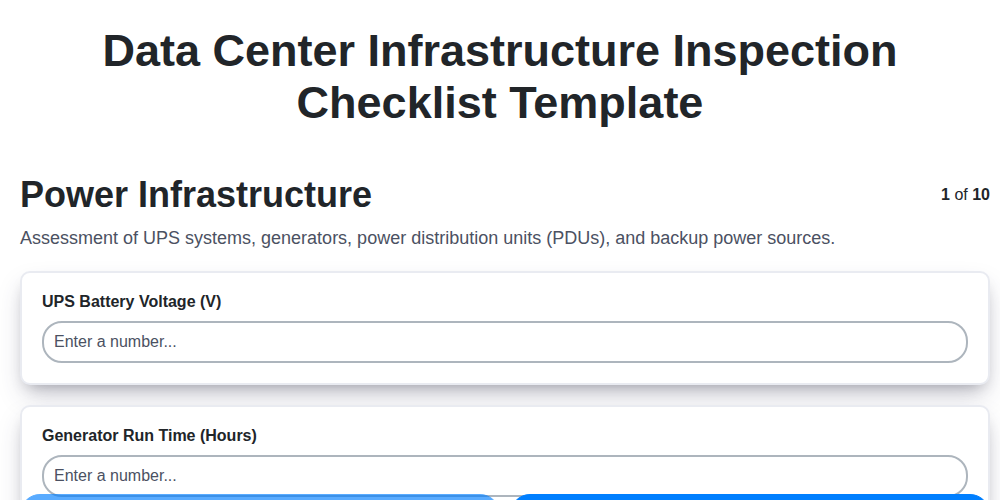
Table of Contents
- Why a Data Center Inspection Checklist is Essential
- Key Areas of Your Data Center to Inspect
- Power Infrastructure: Ensuring Reliability
- Cooling Systems: Maintaining Optimal Temperature
- Network & Connectivity: Validating Performance
- Physical Security: Protecting Your Assets
- Documentation & Compliance: Meeting Regulatory Standards
- Implementing and Customizing Your Checklist
- Resources & Links
TLDR: Keep your data center running smoothly and avoid costly downtime with this comprehensive inspection checklist! It covers everything from power and cooling to security and disaster recovery, helping you identify and fix potential problems *before* they impact your business. Download the template and customize it to your specific needs for a proactive approach to data center management.
Why a Data Center Inspection Checklist is Essential
Data centers are the backbone of modern business, powering everything from customer service to critical financial transactions. A single, unforeseen failure - whether due to power outage, cooling malfunction, or security breach - can trigger a cascade of consequences: lost revenue, damaged reputation, regulatory penalties, and potential business disruption. Proactive maintenance isn't just a best practice; it's a business imperative.
A comprehensive data center inspection checklist provides a systematic and repeatable process for identifying vulnerabilities before they escalate into full-blown incidents. It moves you beyond reactive troubleshooting and towards preventative action. Think of it as regular health checkups for your digital infrastructure - catching small issues before they become major health problems. This proactive approach not only minimizes downtime and reduces associated costs, but also demonstrates due diligence in maintaining a secure and reliable operational environment, especially crucial for organizations facing stringent compliance regulations like HIPAA, PCI DSS, or SOC 2. Ultimately, a robust checklist translates to enhanced business continuity and a stronger foundation for future growth.
Key Areas of Your Data Center to Inspect
Let's break down the critical zones within your data center that demand consistent attention. Each area presents unique risks and requires a tailored inspection approach.
1. Power & Cooling - The Foundation of Uptime
This isn't just about checking lights; it's about ensuring the lifeblood of your infrastructure flows consistently. Power infrastructure demands scrutiny of UPS systems, generators, PDUs, and their respective load capacities. Cooling systems - CRAC units, chillers, and containment strategies - need evaluation for temperature stability, airflow efficiency, and refrigerant integrity. Unexpected fluctuations or inefficiencies here can trigger cascading failures.
2. Network Infrastructure - The Communication Highway
Your data center network isn's just a collection of cables; it's the digital highway for your business. Regularly inspect network switches, routers, and cabling to identify bottlenecks, vulnerabilities, and potential points of failure. Port utilization, firmware updates, and redundancy testing are essential for maintaining seamless communication.
3. Physical Security - Protecting Your Assets
Data centers hold invaluable assets - both physical and digital. Security checks need to include assessing access control systems (card readers, biometrics), surveillance camera functionality, perimeter security (fencing, doors), and overall vulnerability to unauthorized entry.
4. Environmental Monitoring - Detecting Hidden Threats
Beyond temperature, environmental monitoring encompasses leak detection, air quality, and humidity. These sensors provide early warnings of potential issues like water leaks, gas releases, or particulate contamination that could damage equipment.
5. Rack Integrity & Cable Management - The Order of Things
A seemingly minor area, rack integrity and cable management significantly impact airflow and ease of maintenance. Ensure racks are structurally sound, cables are properly labeled, and airflow isn't obstructed by disorganized wiring.
6. Disaster Recovery & Documentation - Planning for the Worst
A data center isn't just about hardware; it's about resilience. Regularly test your disaster recovery plan, verify backups, and ensure documentation (as-built drawings, maintenance logs) is up-to-date and accessible.
Power Infrastructure: Ensuring Reliability
The heart of any data center is its power infrastructure. Unreliable power leads to downtime, data loss, and potentially catastrophic consequences. A robust and consistently maintained power system is therefore non-negotiable. This section delves into the critical elements of your data center's power supply and outlines key inspection points to guarantee uptime.
UPS (Uninterruptible Power Supply) Assessment: Your UPS provides immediate backup power during outages and stabilizes voltage fluctuations. Regular inspections should include battery health checks - look for signs of swelling, corrosion, or performance degradation. Conduct load testing to ensure the UPS can handle the total connected load and verify proper synchronization with the generator. Output voltage should be monitored consistently.
Generator Readiness: Your generator is your long-term backup power source. It's vital that it's regularly tested and maintained. Check fuel levels, verify the automatic transfer switch (ATS) functions correctly, and review maintenance records to ensure all scheduled services have been performed. A yearly (or more frequent, depending on manufacturer recommendations) load test is crucial to confirm the generator's ability to sustain the data center's power demands.
PDUs (Power Distribution Units): PDUs distribute power to your servers and other equipment. Circuit breakers must be functioning correctly, and load balancing across phases should be monitored to prevent overloads. Implementing outlet-level monitoring provides granular insight into power consumption and allows for early detection of potential issues. Consistent labeling is also key for quick troubleshooting. Remember that proper grounding is also paramount for safety and equipment protection.
Cooling Systems: Maintaining Optimal Temperature
Maintaining optimal temperature within your data center is paramount for equipment reliability, energy efficiency, and overall performance. Even slight temperature fluctuations can lead to increased error rates, reduced lifespan of hardware, and higher energy consumption due to overworked cooling systems. Here's a deeper dive into essential cooling system maintenance practices:
Regular Inspections: Conduct monthly visual inspections of all CRAC/CRAH units. Look for signs of leaks (refrigerant or condensation), unusual noises, and debris accumulation on coils. Quarterly, schedule more in-depth inspections including filter replacement and coil cleaning.
Filter Management: Dirty filters restrict airflow, forcing cooling units to work harder and consume more energy. Implement a strict filter replacement schedule based on your environment's dust levels - typically every 3-6 months. Keep records of filter changes.
Condensate Drain Lines: Clogged condensate drain lines can lead to water damage and mold growth. Regularly check and clear these lines to ensure proper drainage.
Refrigerant Levels: Monitor refrigerant levels closely, as leaks can significantly impact cooling efficiency. A qualified HVAC technician should perform annual refrigerant checks and leak testing.
Airflow Containment: Proper hot aisle/cold aisle containment is critical. Regularly inspect seals and barriers for integrity. Address any gaps or breaches immediately to prevent mixing of hot and cold air.
Chiller Efficiency: If your data center utilizes chillers, pay close attention to water temperature, flow rates, and pressure. Consistent monitoring helps identify potential issues early on.
Performance Monitoring: Implement real-time temperature and humidity monitoring throughout the data center. Alert thresholds should be established and investigated promptly when breached.
By prioritizing these cooling system maintenance practices, you can ensure a stable and efficient operating environment for your critical infrastructure.
Network & Connectivity: Validating Performance
Beyond the basic physical inspection of cabling and port labeling, it's crucial to actively validate your network's performance. A visually sound network can still be suffering from bottlenecks or latent issues that impact application speed and overall data center efficiency.
Here's what to check:
- Switch and Router Performance: Utilize SNMP monitoring to track CPU utilization, memory usage, and interface errors. High sustained utilization can indicate a need for upgrades or optimization.
- Bandwidth Testing: Regularly run bandwidth tests between key servers and applications to identify potential bottlenecks. Tools like iperf can provide quantifiable results.
- Latency Checks: Measure latency across your network segments. High latency can severely impact application responsiveness. Trace routes can help pinpoint the source of delays.
- Packet Loss Analysis: Even small amounts of packet loss can be detrimental. Use network analyzers to detect and diagnose packet loss issues.
- Redundancy Verification: Actively test your network failover mechanisms. Simulate failures to ensure automatic switching to backup links and devices occurs seamlessly and within acceptable timeframes. Document the results of these tests.
- Wireless Network Assessment: If your data center incorporates wireless connectivity, conduct periodic site surveys to assess signal strength and interference.
- VLAN Configuration Review: Verify proper VLAN configuration and segmentation to prevent unauthorized access and maintain network security.
- DNS Resolution: Ensure reliable and accurate DNS resolution, as delays here can cascade into application performance issues.
Physical Security: Protecting Your Assets
Your data center isn't just a collection of servers; it's a repository of critical assets - intellectual property, customer data, financial records, and more. Robust physical security measures are the first line of defense against unauthorized access, theft, and vandalism. This extends far beyond simply locking the door.
A comprehensive physical security strategy incorporates multiple layers of protection, starting with perimeter security. This includes sturdy fencing, controlled access gates, and vigilant surveillance of the surrounding area. Once inside the data center itself, access should be strictly controlled via biometric scanners, keycard readers, or a combination of both. Multi-factor authentication is increasingly important.
Regularly review access logs to identify any anomalies or suspicious activity. Consider implementing mantraps - controlled entry points designed to prevent piggybacking - in high-security areas. Surveillance cameras should cover all critical zones, with recordings stored securely and monitored regularly. Don't overlook less obvious vulnerabilities, such as ventilation shafts or roof access points. Finally, employee training plays a vital role. Staff should be educated on security protocols, reporting procedures, and the importance of vigilance. A well-trained and security-conscious team is an invaluable asset in protecting your data center's physical security.
Documentation & Compliance: Meeting Regulatory Standards
Data center regulations are evolving and becoming increasingly stringent. Maintaining meticulous documentation isn't just a best practice; it's often a legal requirement. This section focuses on ensuring your data center not only operates compliantly but can prove it.
Key Documentation Pillars:
- As-Built Drawings: Accurate and up-to-date schematics are critical for troubleshooting, maintenance, and disaster recovery. These drawings should reflect any modifications made to the data center's physical layout. Regularly verify these drawings against the actual infrastructure.
- Maintenance Logs: Detailed records of all maintenance activities, including dates, tasks performed, personnel involved, and parts replaced, are essential. These logs demonstrate due diligence in upholding equipment reliability.
- Incident Reports: Thorough documentation of any incidents - power outages, security breaches, equipment failures - is paramount. These reports should include root cause analysis and corrective actions taken to prevent recurrence.
- Policy and Procedure Manuals: Clearly defined policies and procedures for data center operations, security, and access control are vital for consistent adherence to best practices.
- Compliance Audit Reports: Maintain records of all compliance audits conducted, including findings and remediation plans.
Navigating Specific Regulatory Frameworks:
- SOC 2: Requires a system's description, operational procedures, and a commitment to security controls. Documentation must demonstrate the effectiveness of these controls.
- HIPAA: Mandates the protection of patient health information, necessitating comprehensive documentation related to physical and logical security controls.
- PCI DSS: Focuses on securing credit card data, requiring detailed records of security policies, access controls, and vulnerability assessments.
- GDPR/CCPA: Emphasizes data subject rights, requiring documentation of data processing activities, consent mechanisms, and data breach notification procedures.
Proactive Compliance is Key:
Regular internal audits and mock compliance assessments can identify gaps and ensure ongoing adherence to regulatory standards. Keeping documentation organized and accessible is not just about satisfying auditors; it's about building a robust and resilient data center environment.
Implementing and Customizing Your Checklist
A generic checklist is a good starting point, but a truly effective data center inspection requires thoughtful implementation and customization. Here's how to translate this template into a living, breathing operational process:
1. Assign Responsibility & Define Frequency: Don't leave inspections to chance. Clearly assign ownership of checklist items to specific individuals or teams. Determine a realistic inspection frequency based on risk assessment - critical systems might warrant weekly checks, while others can be assessed quarterly. Document these assignments and schedules.
2. Risk-Based Prioritization: Not all checklist items carry equal weight. Prioritize tasks based on their potential impact on operations. Focus initial efforts on areas with the highest risk profile. Regularly review and adjust these priorities as your data center evolves.
3. Integrate with Existing Systems: Ideally, your inspection process should integrate with existing data center management tools. This allows for centralized documentation, automated reporting, and improved workflow. Explore options for integrating your checklist into ticketing systems or CMDB (Configuration Management Database).
4. Customization is Key: This checklist is a foundation. You must tailor it. Consider these customization points:
- Unique Hardware/Software: Add checks specific to your unique equipment (e.g., proprietary cooling systems, custom-built racks).
- Environmental Factors: Account for specific environmental considerations (e.g., high humidity, seismic activity).
- Regulatory Requirements: Incorporate checks mandated by relevant compliance standards (SOC 2, HIPAA, PCI DSS).
- Past Incidents: Add checks related to recurring issues or past incidents.
5. Documentation & Reporting: Maintain meticulous records of all inspection findings. Document any corrective actions taken and their effectiveness. Generate regular reports summarizing inspection results and highlighting areas for improvement. Share these reports with key stakeholders.
6. Continuous Improvement: Your checklist isn't a static document. Regularly review and update it based on inspection findings, changes in your data center environment, and emerging threats. Encourage feedback from your team to identify areas for improvement. A dynamic checklist is an effective checklist.
Resources & Links
- National Institute of Standards and Technology (NIST): NIST provides numerous publications, standards, and guidelines relevant to data center security, resilience, and best practices. Search for documents related to data center infrastructure, cybersecurity, and disaster recovery. Crucial for understanding compliance requirements and informing your checklist.
- International Organization for Standardization (ISO): ISO provides a range of standards, including ISO 27001 (information security management), ISO 22000 (energy management), and others pertinent to data center operations. Understanding these can contribute to a comprehensive and compliant inspection process.
- The Data Center Syndicate (TDCS): TDCS offers resources, articles, and best practices for data center professionals. Their content often covers operational aspects and inspection considerations, offering valuable real-world perspectives.
- The Uptime Institute: The Uptime Institute provides independent assessment, advisory, and education services for data centers. Their publications, Tier Standard, and research offer a deep understanding of data center infrastructure reliability and operational excellence. While in-depth, understanding their concepts will aid in defining inspection criteria.
- American Society of Heating, Refrigerating and Air-Conditioning Engineers (ASHRAE): ASHRAE standards address data center cooling and thermal management. Critical for validating cooling system performance and maintaining optimal temperature, a core area of inspection.
- Cybersecurity and Infrastructure Security Agency (CISA): CISA provides cybersecurity advisories, best practices, and resources to protect critical infrastructure, including data centers. Helps to incorporate cybersecurity checks into your physical security inspection.
- Business Continuity Institute (BCI): The BCI offers information and certifications related to business continuity management, which are essential for data center resilience. Useful for ensuring inspection covers DR and recovery aspects.
- TechTarget Data Center: TechTarget offers a wide range of articles and resources related to data center management, including topics relevant to inspections, security, and performance. Provides practical insights and industry perspectives.
- ECMA International: While perhaps less direct, ECMA develops standards relevant to data center technologies, particularly around power and cabling. Provides context for some infrastructure inspections.
- Data Center Professionals (DCP): DCP provides training, certifications and resources for data center operations and maintenance. Their content touches on inspection processes and maintenance best practices.
Frequently Asked Questions
What is a data center inspection checklist and why is it important?
A data center inspection checklist is a document outlining all the critical areas and systems that need to be checked and assessed within a data center. It's important for identifying potential issues, ensuring compliance, minimizing downtime, and maintaining optimal performance and security.
Who should use this data center inspection checklist template?
This checklist is designed for a broad audience including data center managers, facility engineers, IT professionals, security personnel, and anyone responsible for the upkeep and operations of a data center.
How often should I use this data center inspection checklist?
The frequency of inspections depends on factors like the criticality of the data center, regulatory requirements, and the maturity of your operational procedures. We recommend a minimum of monthly inspections, with more frequent checks (weekly or daily) for critical systems or during periods of change.
Is this checklist customizable? Can I add or remove items?
Absolutely. This is a template designed to be a starting point. You should customize it to reflect the specific infrastructure, systems, and compliance requirements of your data center. Feel free to add, remove, or modify items as needed.
What types of things should I look for during a power infrastructure inspection?
During power infrastructure inspections, look for things like: UPS status and battery health, generator functionality, power distribution unit (PDU) capacity and monitoring, grounding issues, and the overall condition of cabling and connections. Check for signs of overheating or corrosion.
What should I check during a cooling system inspection?
Cooling system checks should include verifying airflow, checking chiller performance, inspecting cooling tower operation (if applicable), monitoring temperature and humidity levels, and checking for leaks or unusual noises. Ensure redundant systems are also functioning correctly.
How do I document my data center inspection findings?
The checklist includes spaces for recording observations, noting any issues found, and assigning responsibility for corrective actions. Be detailed and consistent in your documentation. Consider using a digital platform for easy tracking and reporting.
What are some common regulatory compliance requirements related to data center inspections?
Common requirements include those from standards like SOC 2, PCI DSS, HIPAA, and ISO 27001. These standards often mandate regular physical security assessments and infrastructure checks. Your checklist should align with applicable regulations.
Can this checklist be used for remote inspections?
While some items are best assessed in person, many can be evaluated remotely through monitoring systems and video conferencing. Clearly mark which items require on-site verification.
What is the difference between a preventative maintenance check and a data center inspection?
A data center inspection is a broad assessment of all aspects of the data center, looking for potential problems. Preventative maintenance focuses on specific, scheduled tasks to keep equipment functioning correctly. Inspections often uncover issues that preventative maintenance might miss, and vice versa.
Comments
There are no comments yet. Be the first to add one!
Audit/Inspection Management Solution Demo
Ensure compliance & improve performance! ChecklistGuro streamlines audit/inspection creation, execution, and reporting. Reduce risk, enhance quality, & maintain consistency. Manage it all with our Work OS.
Related Articles
Your Essential Guide to the Oil and Gas Pipeline Inspection Checklist Template
The Ultimate Brewery Equipment Sanitation & Safety Checklist Template
Wind Turbine Inspection Checklist Template: Your Comprehensive Guide
The Ultimate Apartment Building Maintenance Inspection Checklist Template
Your Essential Guide to a Manufacturing Quality Control Inspection Checklist
The Ultimate Solar Panel Inspection Checklist Template
Your Ultimate HVAC Inspection Checklist Template
Restaurant Kitchen Safety Inspection Checklist Template
Need help with
Inspection Management?
Have a question? We're here to help. Please submit your inquiry, and we'll respond promptly.