The Ultimate ERP Cloud Migration Checklist: A Step-by-Step Guide
Published: 12/19/2025 10:00 PM Updated: 12/20/2025 12:23 PM
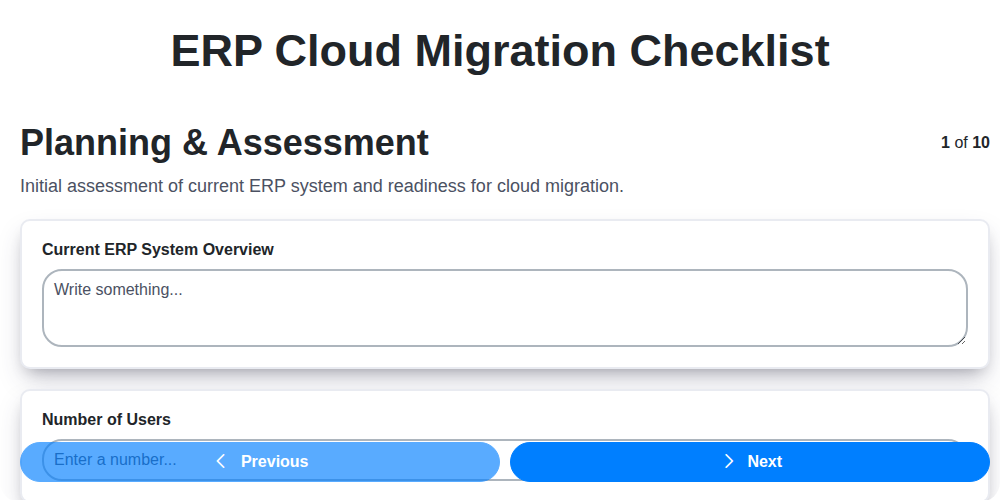
Table of Contents
- Introduction: Why Cloud ERP Migration Matters
- 1. Planning & Assessment: Laying the Foundation
- 2. Data Assessment & Cleansing: Preparing Your Most Valuable Asset
- 3. Security & Compliance: Protecting Your Business in the Cloud
- 4. Infrastructure & Network: Ensuring a Smooth Transition
- 5. Application & Integration: Connecting Your Systems
- 6. Data Migration & Validation: Moving Your Data Securely
- 7. User Training & Adoption: Empowering Your Team
- 8. Testing & Go-Live Readiness: Validating the Solution
- 9. Post-Migration Support & Optimization: Fine-Tuning Performance
- 10. Disaster Recovery & Business Continuity: Planning for the Unexpected
- 11. Change Management: Addressing People and Processes
- 12. Budget and Timeline Management: Staying on Track
- Conclusion: Embracing the Future with Cloud ERP
- Resources & Links
TLDR: Moving your ERP to the cloud? This checklist is your roadmap! It breaks down the entire process - from initial planning and data cleanup to user training and ongoing support - ensuring a smooth, secure, and successful cloud migration. Use it to stay organized, avoid costly errors, and maximize the benefits of your new ERP system.
Introduction: Why Cloud ERP Migration Matters
In today's rapidly evolving business landscape, agility and efficiency are no longer luxuries-they're necessities. Many organizations are discovering that their legacy on-premise ERP systems are hindering these crucial capabilities. Cloud ERP migration offers a powerful solution, unlocking a wealth of benefits from reduced IT costs and enhanced scalability to improved collaboration and real-time data visibility.
Moving to the cloud isn't just about swapping software; it's a strategic transformation. It allows you to ditch the burdens of hardware maintenance, upgrade cycles, and limited accessibility. Cloud ERP empowers you to focus on core business operations, innovate faster, and adapt to changing market demands. This post will outline a comprehensive checklist to guide you through a successful migration, minimizing risks and maximizing the rewards of embracing the cloud. Let's dive into what's involved!
1. Planning & Assessment: Laying the Foundation
A successful ERP Cloud migration isn't about just moving data; it's about fundamentally transforming your business processes. This critical first phase sets the stage for everything that follows, and skipping steps or rushing the assessment will inevitably lead to costly rework and frustration down the line.
This phase is about understanding why you're moving to the cloud and what you hope to achieve. Key activities include:
- Define Objectives & Scope: Clearly outline your goals. Are you seeking improved efficiency, scalability, enhanced reporting, or reduced costs? Defining the scope - which business units, processes, and modules will be migrated - is equally important.
- Business Process Mapping: Document your current "as-is" processes in detail. This provides a baseline for comparison and helps identify areas for optimization in the future "to-be" state.
- Stakeholder Alignment: Get buy-in from key stakeholders across all departments. This ensures everyone understands the project's goals, potential impact, and their role in the process.
- Cloud Vendor Selection: Thoroughly evaluate potential cloud ERP vendors, considering their capabilities, pricing, support, and alignment with your business needs. Don't just focus on features; assess their long-term viability and ability to support your evolving requirements.
- Risk Assessment: Identify potential challenges and risks associated with the migration, such as data loss, system downtime, user resistance, and integration complexities. Develop mitigation strategies for each identified risk.
- Budget & Timeline: Establish a realistic budget and timeline, accounting for all aspects of the migration, including planning, implementation, testing, training, and ongoing support.
2. Data Assessment & Cleansing: Preparing Your Most Valuable Asset
Your data is the lifeblood of your business. A successful ERP Cloud migration hinges on the quality and integrity of that data. Simply migrating as-is data often results in a flawed new system, perpetuating existing problems and hindering your ability to reap the full benefits of the cloud ERP.
This phase is not optional. It's a critical investment in the future of your business. Here's what it entails:
- Data Profiling: We need to understand what data you have. This involves analyzing data types, formats, completeness, and consistency across all existing systems. Automated data profiling tools can significantly accelerate this process.
- Data Quality Assessment: Identifying errors, inconsistencies, duplicates, and missing values. This includes checking for valid data ranges, adherence to business rules, and overall accuracy.
- Data Cleansing: Correcting identified errors. This might involve standardizing address formats, removing duplicate records, correcting misspelled names, and filling in missing information where possible (and justifiable).
- Data Deduplication: A significant challenge is often the proliferation of duplicate records across different systems. A robust deduplication strategy is essential.
- Data Enrichment: While cleansing focuses on correcting errors, enrichment involves enhancing existing data with additional, valuable information.
- Data Governance & Ownership: Establishing clear data ownership and governance procedures to ensure data quality is maintained after the migration. This includes defining roles and responsibilities for data stewardship.
Key Considerations:
- Collaboration: This phase requires close collaboration between IT, business users, and data stewards.
- Data Mapping: Accurate data mapping between legacy systems and the new ERP cloud platform is crucial during cleansing.
- Documentation: Meticulously document all cleansing rules and decisions. This provides an audit trail and facilitates future data quality management.
A thorough data assessment and cleansing process reduces migration risks, improves data accuracy, enhances reporting capabilities, and ultimately maximizes the ROI of your ERP Cloud implementation.
3. Security & Compliance: Protecting Your Business in the Cloud
Migrating to an ERP Cloud solution introduces exciting opportunities, but also necessitates a renewed focus on security and compliance. Moving sensitive data to the cloud requires careful consideration and proactive measures to safeguard your business. This isn't just about ticking boxes; it's about building a robust security posture from the ground up.
Key Considerations & Steps:
- Compliance Mapping: Thoroughly map your existing compliance obligations (e.g., GDPR, HIPAA, SOX) to the cloud provider's security controls and documentation. Understand where your responsibilities shift. Don't assume the provider handles everything.
- Data Encryption: Implement robust data encryption both at rest and in transit. Verify the cloud provider's encryption methods and key management practices. Explore options for bringing your own keys (BYOK) for increased control.
- Access Control & Identity Management: Implement strong authentication methods (MFA, SSO) and granular role-based access controls. Regularly review and update user permissions. Consider integrating with your existing identity provider.
- Security Audits & Penetration Testing: Schedule regular security audits and penetration testing to identify vulnerabilities and ensure ongoing protection. Engage independent security experts.
- Vendor Security Assessments: Conduct thorough security assessments of the ERP Cloud vendor and any third-party integrations. Review their security certifications and practices.
- Data Residency & Location: Understand where your data will be physically stored and ensure it complies with relevant data residency regulations.
- Incident Response Plan: Develop a comprehensive incident response plan specific to the cloud environment, outlining procedures for handling security breaches and data loss.
- Compliance Documentation: Maintain detailed documentation of your security and compliance measures, including policies, procedures, and audit trails.
Ignoring security and compliance during your ERP Cloud migration can lead to severe consequences, including data breaches, regulatory fines, and reputational damage. Proactive planning and ongoing vigilance are essential for a successful and secure transition.
4. Infrastructure & Network: Ensuring a Smooth Transition
A successful ERP Cloud migration isn't just about the software; it's fundamentally reliant on a robust and reliable underlying infrastructure. This section dives into the critical network and infrastructure considerations that can make or break your migration.
Network Readiness: Cloud ERP systems demand significant bandwidth and low latency. Before migrating, thoroughly assess your network capacity. This includes:
- Bandwidth Assessment: Conduct a comprehensive bandwidth test to understand current usage and predict future needs. The cloud ERP will consume considerably more bandwidth than your existing system, particularly during peak hours and data migration phases.
- Latency Analysis: Low latency is crucial for responsive user experience. Investigate latency between your users' locations and the cloud provider's data centers. High latency translates to sluggish performance and frustrated users.
- Network Segmentation & Security: Implement network segmentation to isolate your ERP cloud environment, enhancing security and limiting potential risks. Ensure proper firewall configurations and intrusion detection systems.
- VPN Considerations: If remote users need access, carefully evaluate VPN requirements and ensure adequate capacity to support concurrent connections without performance degradation.
Infrastructure Requirements: While the cloud provider manages much of the infrastructure, you still have responsibilities:
- Hardware Requirements: Ensure your on-premise hardware supporting any integrations or extensions meets the new ERP cloud's compatibility requirements.
- Cloud Provider Region Selection: Choose a cloud region geographically close to your users to minimize latency.
- Internet Connectivity Redundancy: Implement redundant internet connections to safeguard against outages and maintain business continuity. Consider diverse providers and failover mechanisms.
- Endpoint Device Compatibility: Verify compatibility of user devices (laptops, tablets, etc.) with the cloud ERP environment.
Addressing these infrastructure and network considerations proactively will minimize disruptions, optimize performance, and contribute significantly to a successful ERP cloud migration.
5. Application & Integration: Connecting Your Systems
A successful ERP Cloud migration isn't just about moving data; it's about ensuring your critical business applications continue to function seamlessly. This phase focuses on connecting your new ERP Cloud system with existing applications, both within and outside your organization.
Key Considerations:
- Integration Landscape Mapping: Identify all applications that currently interact with your existing ERP or business processes. This includes CRM, eCommerce platforms, legacy systems, specialized industry tools, and even spreadsheets. Document these connections meticulously.
- API Assessment: Evaluate whether your existing applications utilize APIs (Application Programming Interfaces) to communicate. APIs are the preferred method for modern integration, offering flexibility and real-time data exchange. Assess the capabilities of your applications and the ERP Cloud's APIs for compatibility.
- Middleware Solutions: For complex or legacy integrations, consider middleware solutions. These act as a bridge between systems that might not directly integrate. Evaluate connectors and iPaaS (Integration Platform as a Service) options.
- Custom Integrations: Some integrations will require custom development. Plan for this carefully, defining scope, timelines, and resource allocation. Ensure your development team has expertise in both your existing systems and the ERP Cloud platform.
- Data Transformation: Data formats often differ between systems. Plan for data transformation processes to ensure data consistency and accuracy during integration.
- Integration Testing: Thorough integration testing is critical. Test all connections, data flows, and business processes that rely on integrated systems. This should include both functional and performance testing.
Don't underestimate the complexity of this stage. A poorly integrated ERP Cloud system can cripple your business operations.
6. Data Migration & Validation: Moving Your Data Securely
Data migration is arguably one of the most critical - and often challenging - aspects of an ERP Cloud migration. Simply put, if your data isn't migrated correctly, your new ERP system is essentially useless. This phase isn't just about moving files; it's about ensuring data integrity, accuracy, and security throughout the entire process.
Here's a breakdown of key steps within Data Migration & Validation:
- Data Mapping: This involves meticulously mapping fields from your legacy system to the corresponding fields in your new ERP Cloud environment. This is often more complex than it appears, as data structures and formats can differ significantly. Don't underestimate the time required for accurate mapping - errors here can cascade into larger problems later.
- Extraction, Transformation, and Loading (ETL): This is the technical backbone of your data migration. Extraction involves pulling data from your old system. Transformation cleans, standardizes, and formats the data to fit the new ERP's requirements. Loading then inserts the transformed data into the cloud environment. Automated ETL tools can significantly streamline this process, but manual oversight is crucial.
- Data Cleansing & Deduplication: Identify and correct inaccuracies, inconsistencies, and duplicates in your existing data before migration. Garbage in, garbage out! Investing in data cleansing upfront saves significant time and frustration down the line.
- Validation & Reconciliation: This is your quality control check. After data is loaded, rigorous validation processes are essential. This involves comparing data sets between the legacy and new systems to ensure accuracy and completeness. Reconciliation reports highlighting discrepancies are vital for investigation and correction.
- Data Security During Transfer: Encryption and secure transfer protocols are non-negotiable during data migration. Implement measures to protect sensitive information from unauthorized access or compromise.
- Pilot Migration: Before migrating the entire dataset, perform a pilot migration with a subset of data. This allows you to identify and address potential issues in a controlled environment.
Key Considerations:
- Data Governance: Define clear data governance policies and responsibilities.
- Automation: Utilize ETL tools and scripting to automate repetitive tasks.
- Version Control: Maintain a record of all data transformations and migrations.
- Stakeholder Collaboration: Engage business users and data owners throughout the process.
7. User Training & Adoption: Empowering Your Team
A flawless ERP Cloud migration isn't just about the technology; it's about your people. Without proper training and buy-in from your users, even the most technically sound migration can face resistance and hinder productivity. This stage is absolutely critical for a successful transition.
Beyond the Basics: A Holistic Training Approach
Generic, one-size-fits-all training won't cut it. Here's what a comprehensive user training and adoption strategy includes:
- Role-Based Training: Tailor training modules based on each user's specific roles and responsibilities within the new ERP system. A finance manager will need different training than a sales representative.
- Multiple Learning Formats: Cater to different learning styles. Offer a mix of live workshops, online tutorials, quick reference guides, and video demonstrations.
- Train-the-Trainer Program: Identify power users within departments and equip them to become local experts, providing ongoing support and mentorship to their colleagues.
- Early Access and Sandbox Environments: Give users access to a test environment (sandbox) well in advance of go-live. This allows for hands-on experience, experimentation, and the identification of potential workflow issues.
- Ongoing Support & Feedback Mechanisms: Establish clear channels for users to ask questions, report issues, and provide feedback. This continuous feedback loop allows for adjustments and improvements to the training program and the system itself.
- Communication & Change Management: Regularly communicate the benefits of the new ERP system and address any user concerns or anxieties. Highlight how the new system will make their jobs easier and more efficient.
- Performance Measurement & Refinement: Track user adoption rates, system usage, and user satisfaction. Use this data to identify areas for improvement and refine the training program accordingly.
Investing in user training and adoption is an investment in the long-term success of your ERP Cloud migration. A well-trained and engaged workforce will unlock the full potential of your new system and drive real business value.
8. Testing & Go-Live Readiness: Validating the Solution
This phase is arguably the most critical - it's your final safety net before launching your ERP Cloud. Thorough testing isn't just about finding bugs; it's about verifying that the entire migrated system meets your business requirements, performs as expected, and users are comfortable and competent.
Key Activities:
- Comprehensive Test Scenarios: Develop test cases that mimic real-world business processes. Don't just focus on happy paths - include edge cases, error handling, and peak load simulations.
- Unit Testing: Individual components and modules should be tested in isolation.
- Integration Testing: Verify data flows seamlessly between different modules and integrated systems.
- User Acceptance Testing (UAT): Involve key business users in the testing process. Their input is invaluable for identifying usability issues and confirming the system aligns with their daily tasks. Document all feedback meticulously.
- Performance Testing: Assess the system's responsiveness and stability under expected user load. Identify and address bottlenecks.
- Regression Testing: After fixing any issues identified, rerun previous test cases to ensure new changes haven't introduced unintended consequences.
- Cutover Rehearsal: Conduct a full-scale mock go-live. This simulates the actual migration process, allowing you to identify and resolve any unforeseen challenges in a safe environment. Analyze the rehearsal's timeline and resource needs to refine the go-live plan.
- Go/No-Go Decision: Based on test results, feedback from users, and the overall assessment of readiness, a formal go/no-go decision must be made. Clearly defined criteria should be established before testing begins to avoid ambiguity.
A robust testing and readiness phase minimizes risk, maximizes user adoption, and ensures a successful ERP Cloud migration.
9. Post-Migration Support & Optimization: Fine-Tuning Performance
The go-live celebration is fantastic, but it's just the beginning of the ERP Cloud migration journey. Post-migration support and ongoing optimization are crucial for realizing the full potential of your new system and ensuring a positive long-term ROI. This phase isn't about fixing major issues (those should have been addressed during testing), but about fine-tuning performance, addressing user feedback, and proactively improving the system's efficiency.
Key Activities in Post-Migration Support & Optimization:
- Dedicated Support Team: Establish a dedicated support team, comprised of both internal experts and potentially vendor representatives, to handle user inquiries, troubleshoot minor issues, and provide ongoing assistance. Prioritize and track requests to identify recurring problems.
- Performance Monitoring: Implement robust performance monitoring tools to track key metrics like system response times, transaction processing speeds, and user adoption rates. Baseline these metrics after go-live to identify areas for improvement.
- User Feedback Loop: Create a clear channel for users to provide feedback on the new system. Regularly review this feedback and translate it into actionable items for optimization. Conduct short, focused surveys to gauge satisfaction and identify pain points.
- Configuration Adjustments: The initial configuration was based on your understanding before launch. Now, with real-world data and user behavior, you might discover areas where configuration adjustments can enhance usability and performance. This could involve tweaking workflows, report layouts, or security roles.
- Process Refinement: ERP implementations often highlight inefficiencies in existing business processes. This phase provides an opportunity to refine those processes, taking advantage of the ERP Cloud's capabilities to streamline operations.
- Ongoing Training: Provide targeted, refresher training sessions for users, focusing on advanced features or addressing common questions that arise after initial training.
- Regular Updates & Patching: Stay on top of vendor-provided updates and patches. These often include performance enhancements, bug fixes, and security improvements. Carefully test these updates in a non-production environment before deploying them to your live system.
- Documentation Updates: Update documentation to reflect any configuration changes or process refinements made post-migration. This ensures that future users and administrators have access to accurate information.
By actively embracing post-migration support and optimization, you can transform your ERP Cloud implementation from a project into a strategic asset that drives ongoing business value.
10. Disaster Recovery & Business Continuity: Planning for the Unexpected
Migrating to the cloud is a significant step, but it's crucial to remember that even the most robust cloud environments aren't immune to disruptions. A comprehensive disaster recovery (DR) and business continuity (BC) plan is paramount for a successful and resilient ERP cloud migration.
Why it Matters: An outage, whether caused by a natural disaster, a cyberattack, or a system failure, can bring your business to a standstill. A well-defined DR/BC plan minimizes downtime, protects critical data, and ensures your organization can resume operations quickly and efficiently.
Key Considerations for ERP Cloud DR/BC:
- Data Replication & Backup: Ensure your data is regularly and reliably replicated across multiple availability zones or regions within your cloud provider's infrastructure. Automate backups and establish clear retention policies.
- Failover Procedures: Define and document clear failover procedures. This should outline how you're going to switch to a secondary environment in the event of a primary system failure. Regularly test these failover procedures.
- Recovery Time Objective (RTO) & Recovery Point Objective (RPO): Clearly define your RTO (how long it takes to recover) and RPO (maximum acceptable data loss). These objectives will guide your DR/BC strategy and technology choices.
- Application Dependencies: Map out all dependencies of your ERP system - both internal and external - and ensure those dependencies are also considered in your DR/BC planning.
- Documentation & Communication: Maintain thorough documentation of your DR/BC plan and establish clear communication channels to keep stakeholders informed during a disaster.
- Regular Testing: Testing is absolutely essential. Conduct regular DR drills to identify weaknesses and ensure everyone knows their roles. This shouldn't be a once-a-year event; consider quarterly or even more frequent testing.
A proactive approach to disaster recovery and business continuity not only minimizes risk but also demonstrates a commitment to operational resilience, a key benefit of cloud ERP.
11. Change Management: Addressing People and Processes
While technology plays a critical role in ERP cloud migration, overlooking the people and processes involved is a recipe for failure. Change management isn't just a nice-to-have; it's a must-have for a successful transition. Resistance to change is natural, and without a proactive, well-planned strategy, your users might actively or passively sabotage the entire project.
This phase isn't about simply telling people what's changing; it's about showing them why, addressing their concerns, and equipping them with the skills and confidence to thrive in the new environment.
Key Considerations:
- Stakeholder Identification & Communication: Identify all impacted stakeholders - from executives to end-users - and tailor communication accordingly. Regular, transparent updates build trust and mitigate anxiety.
- Early Involvement: Involve key users in the planning and testing phases. Their feedback provides invaluable insights and fosters a sense of ownership.
- Process Redesign: Cloud ERPs often necessitate changes to existing business processes. Map out these changes, document them clearly, and proactively address potential bottlenecks.
- Change Champions: Identify and empower 'change champions' within each department. These individuals can act as liaisons, providing support and advocating for the new system.
- Addressing Fears & Concerns: Openly address concerns about job security, skill gaps, and the overall impact on daily workflows.
- Ongoing Support: Even after go-live, continued support and coaching are essential for user adoption and performance optimization.
Ignoring the human element can lead to low adoption rates, decreased productivity, and ultimately, a failed ERP implementation. Prioritizing change management demonstrates respect for your workforce and sets the foundation for a smooth and successful transition to the cloud.
12. Budget and Timeline Management: Staying on Track
ERP cloud migrations are notorious for exceeding budgets and timelines. Proactive and diligent management in these areas is absolutely critical for a successful project. This isn't just about initial estimations; it's about constant monitoring and adjustments.
Here's how to keep things on track:
- Detailed Budget Breakdown: Don't just have a top-level number. Itemize costs for everything - licensing, implementation partner fees, internal resource time, training, data migration tools, potential customizations, and even contingency funds (absolutely essential!).
- Realistic Timeline Development: Work with your implementation partner to build a detailed project schedule, breaking down tasks into manageable phases with clear dependencies. Account for potential delays; ERP implementations rarely go exactly to plan.
- Regular Monitoring & Reporting: Implement a robust tracking system. Regularly monitor both budget spend and timeline progress against the original plans. Weekly, or even daily, reviews with key stakeholders are crucial.
- Change Management Process: Any scope changes will impact budget and timeline. Establish a formal change management process to evaluate, approve (or reject), and document all proposed changes, including their cost and time implications.
- Contingency Planning: Build in buffer time and funds for unexpected issues. A 10-15% contingency is a good starting point.
- Resource Allocation & Management: Ensure the right people with the right skills are allocated to the project, and that their time is being used efficiently. Constant re-evaluation is key.
- Communication is Key: Transparency about budget and timeline challenges is crucial. Early communication allows for corrective action before problems escalate.
Failing to manage budget and timeline effectively can derail the entire ERP cloud migration. Treat it as a core, ongoing responsibility - not an afterthought.
Conclusion: Embracing the Future with Cloud ERP
Migrating to a cloud ERP system is a transformative journey, not just a technological upgrade. It demands careful planning, meticulous execution, and a commitment to continuous improvement. While the checklist outlined above provides a robust framework, remember that each organization's journey will be unique, requiring adaptation and flexibility. Embracing this process, acknowledging potential challenges, and fostering a culture of collaboration will be key to realizing the full potential of your cloud ERP. This isn't just about adopting new software; it's about modernizing your business processes, enhancing data-driven decision making, and positioning your organization for sustainable growth and innovation in the years to come. The future of ERP is in the cloud - are you ready to seize it?
Resources & Links
- Oracle: Oracle is a leading provider of cloud ERP solutions. Their website provides extensive information about their offerings, implementation guides, and best practices for cloud migration.
- SAP: SAP is another major player in the ERP space, offering cloud-based solutions. Their website has resources on SAP S/4HANA Cloud migration, including planning and assessment materials.
- Microsoft Dynamics 365: Microsoft's Dynamics 365 offers a range of cloud ERP solutions. Their site provides resources, case studies, and insights related to migration and adoption.
- NetSuite: NetSuite provides a comprehensive cloud ERP suite. Their website has helpful articles and resources about migration and implementation.
- Gartner: Gartner provides independent research and advisory services. Their reports on ERP vendors and migration strategies can offer valuable insights.
- Forbes: Forbes often publishes articles about ERP and technology trends, which can provide context and perspectives on cloud migration challenges and benefits.
- TechTarget: TechTarget offers a broad range of IT-focused resources, including articles and tutorials related to ERP, cloud computing, and migration best practices.
- Amazon Web Services (AWS): If your ERP cloud migration involves AWS infrastructure, their website contains numerous guides and services related to security, performance, and scalability.
- Microsoft Azure: Similar to AWS, if you're using Azure for your cloud ERP deployment, their website offers valuable resources on migration, security, and governance.
- ProjectManagement.com: Since ERP migrations are significant projects, this site provides resources on project management methodologies, risk assessment, and stakeholder communication - crucial for success.
Frequently Asked Questions
What is a 'sandbox' environment in the context of ERP Cloud Migration?
A sandbox environment is a non-production copy of your ERP Cloud system used for testing, development, and training without impacting the live production environment.
Found this Article helpful?
Comments
There are no comments yet. Be the first to add one!
ERP - Enterprise Resource Planning Solution Demo
Overwhelmed by disconnected systems? ChecklistGuro provides a centralized ERP solution, connecting your business processes - finance, operations, & more - for improved visibility and control. Simplify operations & boost efficiency.
Related Articles

MRP System Go-Live Checklist: Your Path to a Successful Implementation

Top 10 CMiC Alternatives for 2025

The Ultimate Foundation Waterproofing Installation Checklist Template
Top 10 Odoo Alternatives for 2025

How to Save Money on Bill of Materials (BOM) Management Software

The Ultimate Waterproofing Checklist: Ensuring a Leak-Proof Installation

The 10 Best Manufacturing Management Software of 2025

MRP Vendor Master Data Checklist: Ensuring Accuracy and Efficiency
We can do it Together
Need help with
Enterprise Resource Planning (ERP)?
Have a question? We're here to help. Please submit your inquiry, and we'll respond promptly.