ERP Remote Access Security Checklist: Protecting Your System from Anywhere
Published: 12/20/2025 10:00 PM Updated: 12/21/2025 6:16 AM
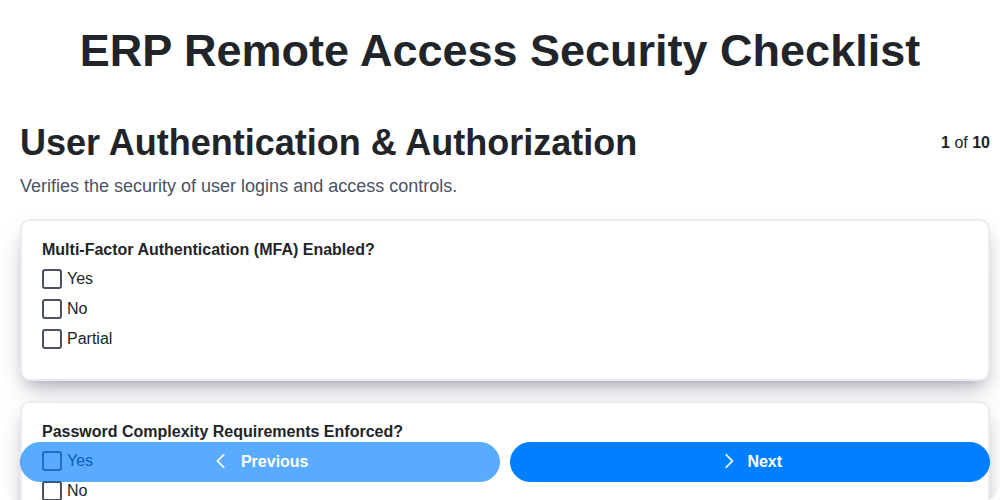
Table of Contents
- Introduction: The Rising Need for ERP Remote Access Security
- Understanding the Risks of Remote ERP Access
- ERP Remote Access Security Checklist: A Comprehensive Guide
- 1. User Authentication & Authorization: Verifying Identities
- 2. Device Security & Management: Securing Remote Workstations
- 3. Network Security & Encryption: Protecting Data in Transit
- 4. Data Loss Prevention (DLP): Preventing Unauthorized Data Exposure
- 5. Session Management & Monitoring: Keeping Track of User Activity
- 6. Multi-Factor Authentication (MFA): Adding an Extra Layer of Protection
- 7. Least Privilege Access: Granting Only What's Necessary
- 8. Software Updates & Patch Management: Staying Ahead of Vulnerabilities
- 9. Endpoint Security Software: A First Line of Defense
- 10. VPN Security Configuration: Ensuring a Secure Tunnel
- Conclusion: Continuous Security for Remote ERP Access
- Resources & Links
TLDR: Working remotely with your ERP system? This checklist is your essential guide to staying secure! It covers everything from strong passwords and device security to encryption and data loss prevention, helping you protect your critical business data and ERP system from unauthorized access and cyber threats, no matter where you're working.
Introduction: The Rising Need for ERP Remote Access Security
Enterprise Resource Planning (ERP) systems are the backbone of countless businesses, housing sensitive data related to finances, inventory, customer relationships, and more. Traditionally, ERP access was largely confined to office-based employees on secure networks. However, the rise of remote work, mobile devices, and the increasing complexity of global operations have dramatically changed the landscape.
Now, more employees than ever are accessing ERP systems from various locations and devices, often outside the protective perimeter of the corporate network. This shift introduces significant security risks. A single compromised device or weak access point can create a gateway for attackers to infiltrate critical business systems, leading to data breaches, financial losses, and reputational damage.
Simply put, the convenience of remote ERP access shouldn't come at the expense of security. Businesses need a proactive and comprehensive approach to securing these vital systems. This checklist provides a framework to ensure robust protection, minimizing vulnerabilities and safeguarding your critical ERP data. Ignoring these steps is no longer an option; a layered security approach is essential for the modern, connected business.
Understanding the Risks of Remote ERP Access
Enterprise Resource Planning (ERP) systems are the backbone of many businesses, holding sensitive data related to finances, inventory, customer information, and more. Allowing remote access to these critical systems offers undeniable flexibility and productivity gains, but it also dramatically expands the attack surface and introduces significant security risks if not properly managed.
The traditional perimeter-based security model, designed to protect a defined network boundary, becomes less effective when employees access ERP systems from various locations using personal devices and potentially unsecured networks. This exposes your organization to a wider range of threats, including:
- Data Breaches: Loss or theft of sensitive data, leading to financial loss, reputational damage, and legal repercussions.
- Insider Threats: Malicious or negligent actions by employees with authorized access.
- Malware Infections: Devices accessing the ERP system could be compromised, allowing attackers to infiltrate the system and steal data or disrupt operations.
- Phishing Attacks: Remote workers are often more susceptible to phishing scams, which can lead to compromised credentials.
- Unsecured Networks: Public Wi-Fi networks are often vulnerable to eavesdropping and man-in-the-middle attacks.
- Device Loss or Theft: Lost or stolen devices can provide unauthorized access to the ERP system if not properly secured.
Ignoring these risks can have devastating consequences. The following checklist outlines crucial steps to mitigate these vulnerabilities and ensure a secure remote ERP access environment.
ERP Remote Access Security Checklist: A Comprehensive Guide
Remote access to your Enterprise Resource Planning (ERP) system has become essential for modern businesses, enabling flexibility and productivity. However, it also dramatically expands your attack surface, making robust security measures paramount. Neglecting these measures can lead to devastating consequences, including data breaches, financial losses, and reputational damage. This checklist provides a framework for securing your ERP remote access environment.
Here's a detailed breakdown of key areas to address:
User Authentication & Authorization:
- Strong Password Policies: Enforce complex password requirements (length, character types) and regular password changes.
- Role-Based Access Control (RBAC): Implement RBAC to ensure users only have access to the data and functionalities they absolutely need. Regularly review and update roles.
- Account Lockout Policies: Implement account lockout mechanisms to prevent brute-force attacks.
- Regular Access Reviews: Periodically review user accounts and permissions, disabling or removing access for terminated employees or those whose roles have changed.
Device Security & Management:
- Device Inventory & Tracking: Maintain a comprehensive inventory of all devices (laptops, tablets, smartphones) accessing your ERP system.
- Device Enrollment & Management: Implement Mobile Device Management (MDM) or similar solutions to manage and secure devices, ensuring they meet minimum security standards (e.g., OS version, security software).
- Data Encryption (at Rest & in Transit): Encrypt data stored on remote devices and ensure data transmitted to and from the ERP system is also encrypted.
- Remote Wipe Capabilities: Have the ability to remotely wipe data from lost or stolen devices.
Network Security & Encryption:
- Secure Network Connections: Mandate the use of secure network connections (e.g., HTTPS, VPN) for remote access.
- Firewall Configuration: Properly configure firewalls to restrict access to the ERP system based on IP address and port.
- Network Segmentation: Segment your network to isolate the ERP system from other, less critical systems.
- Wireless Security: Secure wireless networks with strong encryption (e.g., WPA3).
Data Loss Prevention (DLP):
- DLP Policies: Implement DLP policies to prevent sensitive data from leaving the controlled environment.
- Content Filtering: Utilize content filtering to block unauthorized file transfers.
- Data Classification: Classify data based on sensitivity and apply appropriate protection measures.
- Regular Audits: Conduct regular audits of DLP policies and their effectiveness.
Session Management & Monitoring:
- Session Timeout: Implement automatic session timeouts to prevent unauthorized access if a user leaves their device unattended.
- Session Recording: Consider recording user sessions for auditing and forensic purposes (ensure compliance with privacy regulations).
- Real-Time Monitoring: Implement real-time monitoring of remote access sessions for suspicious activity.
- Centralized Logging: Centralize logs from all remote access components for easier analysis and incident response.
Multi-Factor Authentication (MFA):
- Mandatory MFA: Enforce MFA for all remote access users. Beyond passwords, require a second factor like a one-time code from an authenticator app, biometric scan, or hardware token.
- MFA Policy Enforcement: Ensure MFA is consistently applied and actively monitored.
Least Privilege Access:
- Grant Minimum Necessary Access: Only grant users the minimum level of access required to perform their job functions. Regularly review and adjust permissions.
- Privileged Access Management (PAM): Implement PAM solutions to manage and monitor privileged accounts.
Software Updates & Patch Management:
- Automated Updates: Automate software updates and patch management for all devices accessing the ERP system.
- Vulnerability Scanning: Conduct regular vulnerability scans to identify and remediate security weaknesses.
- Timely Patching: Apply security patches promptly after release.
Endpoint Security Software:
- Antivirus & Anti-Malware: Deploy and maintain up-to-date antivirus and anti-malware software on all remote devices.
- Host-Based Intrusion Prevention Systems (HIPS): Consider implementing HIPS for enhanced protection against advanced threats.
- EDR (Endpoint Detection and Response): Evaluate and potentially implement EDR solutions for proactive threat detection and response.
VPN Security Configuration:
- Strong VPN Encryption: Utilize strong encryption protocols (e.g., AES-256) for VPN connections.
- VPN Access Controls: Implement strict access controls for VPN users.
- VPN Client Security: Ensure VPN client software is kept up-to-date.
- Split Tunneling Considerations: Carefully evaluate the security implications of split tunneling and restrict it if necessary.
1. User Authentication & Authorization: Verifying Identities
Remote ERP access introduces a wider attack surface, making robust user authentication and authorization paramount. Simply having a username and password isn't enough anymore. This section focuses on verifying user identities and ensuring they only access the data and functionalities they absolutely need.
Key Considerations & Best Practices:
- Strong Password Policies: Enforce complex passwords (minimum length, mixed case, numbers, special characters) and regular password resets. Prohibit easily guessable passwords.
- Role-Based Access Control (RBAC): Define roles with specific ERP functionalities and assign users to these roles. This minimizes exposure and simplifies management. Avoid assigning administrator privileges broadly.
- Regular Access Reviews: Periodically review user access rights to ensure they remain appropriate for their current roles. Conduct offboarding procedures that promptly revoke access upon employee departure.
- Account Lockout Policies: Implement account lockout mechanisms to prevent brute-force password attacks.
- Centralized Identity Management: Leverage centralized identity providers (like Active Directory or cloud-based IAM solutions) for consistent authentication and authorization across the ERP system. This simplifies user management and enhances security.
- Principle of Least Astonishment: User interfaces should clearly indicate permissions and restrictions to avoid confusion and accidental data exposure.
2. Device Security & Management: Securing Remote Workstations
Remote access to your ERP system shouldn't just rely on user credentials; the devices accessing it are a critical piece of the security puzzle. Unmanaged or compromised workstations can become gateways for attackers to infiltrate your entire organization. Here's how to bolster device security:
- Inventory & Management: Maintain a comprehensive inventory of all devices (laptops, desktops, tablets, smartphones) accessing the ERP system. Knowing what devices are out there is the first step in securing them. Implement a Mobile Device Management (MDM) solution where possible to centrally manage device settings, policies, and security.
- Enforce Strong Passwords and Lock Screen Policies: Mandate strong, unique passwords and enforce automatic screen locks after a short period of inactivity. Consider using a password manager to help users generate and store complex passwords.
- Disk Encryption: Ensure all devices accessing the ERP system have full disk encryption enabled. This protects data at rest, even if the device is lost or stolen.
- Operating System & Application Whitelisting/Blacklisting: Restrict the software that can be installed on devices to minimize the risk of malicious applications. Whitelisting (allowing only approved applications) offers the highest level of security.
- Physical Security Awareness: Educate remote workers about the importance of physical device security-avoiding leaving devices unattended in public places and securing them when not in use.
- Device Compliance Checks: Regularly assess devices against pre-defined security standards (e.g., OS version, antivirus status, encryption enabled) and prevent access until compliance is achieved.
3. Network Security & Encryption: Protecting Data in Transit
Remote ERP access inherently relies on network connectivity, making robust network security and encryption absolutely critical. Data traversing networks is vulnerable to interception and compromise if not adequately protected. Here's what you need to focus on:
- Strong Encryption Protocols: Implement and enforce the use of secure protocols like TLS 1.3 or higher for all ERP remote access connections. Older protocols (SSL, TLS 1.0, 1.1) are known vulnerabilities and should be disabled.
- VPN Configuration: A properly configured Virtual Private Network (VPN) creates a secure, encrypted tunnel for remote access. Ensure your VPN solution is up-to-date, has strong authentication mechanisms, and utilizes robust encryption algorithms (e.g., AES-256). Regularly review VPN configurations to prevent misconfigurations that could weaken security.
- Network Segmentation: Segment your network to isolate ERP systems from less secure areas. This limits the impact if one segment is breached. Consider micro-segmentation for even greater granular control.
- Firewall Management: Ensure firewalls are properly configured to restrict access to ERP systems based on the principle of least privilege. Regularly review firewall rules to ensure they remain relevant and effective.
- Wireless Security: If remote access relies on wireless networks, enforce strong Wi-Fi security protocols (WPA3) and avoid public, unsecured networks. Educate users about the risks of connecting to untrusted Wi-Fi.
- Regular Security Audits: Conduct periodic network security audits to identify vulnerabilities and ensure ongoing compliance with security policies.
4. Data Loss Prevention (DLP): Preventing Unauthorized Data Exposure
ERP systems often contain sensitive data - customer information, financial records, intellectual property - making them prime targets for data breaches. Data Loss Prevention (DLP) isn't just a nice-to-have; it's a crucial layer of security for remote ERP access.
DLP strategies focus on identifying, monitoring, and protecting sensitive data in use, in motion, and at rest. When considering remote access, this becomes even more critical. Here's how to bolster your DLP posture:
- Identify Sensitive Data: Conduct a thorough data classification exercise. Understand what constitutes sensitive data within your ERP - this could include social security numbers, credit card details, proprietary formulas, or strategic plans.
- Implement DLP Policies: Define clear policies dictating how sensitive data can be accessed, used, and shared. These policies should cover remote users and the devices they use. Restrict copy/paste functionality, printing, and external file sharing for critical ERP data.
- Content Awareness: Implement DLP tools capable of analyzing content, not just file extensions. This prevents users from circumventing controls by renaming files or using seemingly harmless applications to exfiltrate data.
- Endpoint DLP: Ensure DLP policies extend to user devices accessing the ERP remotely. This helps prevent data leakage through email, cloud storage, or unauthorized applications.
- User Training: Educate remote users on DLP policies and the importance of data security. Phishing simulations and regular awareness campaigns can significantly reduce the risk of accidental or malicious data loss.
- Monitor and Audit: Regularly monitor DLP systems for policy violations and audit data access patterns to identify potential risks.
5. Session Management & Monitoring: Keeping Track of User Activity
Remote ERP access significantly expands the attack surface, making robust session management and monitoring absolutely crucial. It's no longer enough to simply allow access; you need to observe it.
This section focuses on implementing processes and tools to track and audit user sessions. Consider these practices:
- Session Timeout Policies: Implement automatic session timeouts after a period of inactivity. This minimizes the window of opportunity for unauthorized access if a user leaves their device unattended. Adjust timeout durations based on risk profiles - higher risk users might require shorter timeouts.
- Session Recording & Auditing: Employ tools to record user sessions, especially for users accessing sensitive ERP data. These recordings should be securely stored and regularly reviewed for suspicious activity. Ensure compliance with relevant data privacy regulations.
- Real-time Monitoring: Implement real-time monitoring dashboards that provide visibility into active sessions, user locations, and accessed data. Alerting mechanisms should flag unusual behavior, such as logins from unexpected locations or attempts to access restricted areas.
- User Activity Logs: Maintain detailed logs of all user actions within the ERP system. These logs should include timestamps, accessed resources, and any changes made. Regularly review these logs to identify potential security breaches.
- Anomaly Detection: Implement systems that can detect unusual user behavior patterns. These systems learn 'normal' activity and flag deviations, potentially indicating compromised accounts or malicious intent.
Regularly review and update your session management and monitoring protocols to adapt to evolving threats and changes in ERP usage patterns.
6. Multi-Factor Authentication (MFA): Adding an Extra Layer of Protection
Traditional username and password authentication is increasingly vulnerable to breaches. Even with strong passwords, they can be compromised through phishing attacks, malware, or data breaches. That's where Multi-Factor Authentication (MFA) steps in - it's no longer a "nice-to-have," but a crucial security cornerstone for ERP remote access.
MFA requires users to provide multiple verification factors before granting access to your ERP system. These factors fall into three main categories:
- Something you know: This is the traditional password.
- Something you have: This could be a smartphone with an authenticator app, a hardware token, or a one-time password (OTP) sent via SMS.
- Something you are: This utilizes biometric verification, like fingerprint scanning or facial recognition.
By combining at least two of these factors, MFA dramatically reduces the risk of unauthorized access. Even if a password is stolen, an attacker will still need access to the user's second factor - their phone, token, or biometric data - to gain entry. Implementing MFA for all ERP remote access is a critical step in fortifying your system and minimizing potential data breaches. Consider offering various MFA options to cater to different user needs and security preferences.
7. Least Privilege Access: Granting Only What's Necessary
The principle of least privilege is a cornerstone of robust ERP security. It dictates that users should only be granted the minimum level of access required to perform their job duties. Think of it as a need-to-know basis for ERP functionality.
Why is this crucial? Overly permissive access significantly expands the potential damage from a security breach. If a user account is compromised, an attacker gains access to everything that user can see and do. Limiting access reduces the attack surface and minimizes the impact of a successful intrusion.
Implementing Least Privilege Access:
- Role-Based Access Control (RBAC): Define roles based on job functions (e.g., Sales Representative, Accounts Payable Clerk, Inventory Manager) and assign specific permissions to each role. This simplifies management and ensures consistency.
- Regular Access Reviews: Periodically review user access rights to ensure they remain appropriate. Job roles change, projects end, and employees leave - access should be adjusted accordingly.
- Granular Permissions: Don't just grant access to modules. Break down permissions even further. Can a user view a record? Can they edit it? Can they delete it?
- Avoid 'God' Accounts: Restrict access to administrator privileges to a very limited number of individuals with a clear need.
- Automated Provisioning/Deprovisioning: Automate the process of granting and revoking access as employees join, change roles, or leave the company. This reduces human error and ensures timely adjustments.
By embracing least privilege access, you create a layered defense strategy that dramatically improves your ERP security posture.
8. Software Updates & Patch Management: Staying Ahead of Vulnerabilities
Outdated software is a prime target for cyberattacks. Hackers actively scan for known vulnerabilities in older versions of ERP systems and related applications. A seemingly minor, unpatched flaw can be exploited to gain unauthorized access, compromise data, and disrupt operations.
Why it's critical for ERP remote access: When users access your ERP system remotely, they're often doing so from a wider range of devices and potentially less controlled network environments. This increases the potential exposure to threats if software isn't regularly updated.
What to do:
- Establish a Patch Management Policy: Define a clear policy outlining how and when software updates and security patches will be applied. This should include timelines for applying critical patches.
- Automated Patching: Utilize automated patch management tools wherever possible. These tools can detect, download, and deploy updates efficiently, minimizing manual intervention and reducing the risk of human error.
- Regular Scanning: Conduct regular vulnerability scans to identify missing patches and potential security weaknesses.
- Third-Party Application Updates: Don't just focus on the ERP system itself. Ensure all third-party applications used to access or interact with the ERP, such as web browsers, PDF viewers, and office suites, are also kept up-to-date.
- Testing Before Deployment: Before deploying patches to the production environment, test them in a non-production environment to avoid unexpected compatibility issues or disruptions.
- User Awareness: Educate users about the importance of software updates and encourage them to promptly install updates when prompted (though centralized management is preferred).
Ignoring software updates is like leaving your ERP system's front door wide open. Consistent and proactive patch management is an essential component of a robust ERP remote access security strategy.
9. Endpoint Security Software: A First Line of Defense
Endpoint security software is a crucial layer in securing your ERP remote access. Think of it as the first line of defense against threats that attempt to infiltrate your system through remote devices. This isn't just about antivirus anymore; modern endpoint security solutions offer a comprehensive suite of features including:
- Antivirus and Malware Detection: Traditional protection against known viruses and malware.
- Anti-Exploit Technology: Prevents attackers from leveraging vulnerabilities in software to gain access.
- Firewall: Controls network traffic in and out of the endpoint device.
- Intrusion Prevention System (IPS): Detects and blocks malicious activity.
- Host-Based Intrusion Detection System (HIDS): Monitors system activity for suspicious behavior.
- Web Filtering: Blocks access to malicious or inappropriate websites.
- Application Control: Limits which applications can run on the endpoint.
Crucially, ensure your endpoint security software is centrally managed and continuously updated to protect against the latest threats. Regularly scan devices and enforce security policies across all remote access points. Consider solutions that integrate with your existing ERP security framework for enhanced visibility and control.
10. VPN Security Configuration: Ensuring a Secure Tunnel
A Virtual Private Network (VPN) is often the lifeline for remote ERP access, creating a secure tunnel between the user's device and your organization's network. However, a poorly configured VPN can be a significant vulnerability. Here's what you need to consider:
- Strong Encryption Protocols: Ensure your VPN utilizes robust encryption protocols like AES-256 or higher. Avoid older, less secure protocols like PPTP. Regularly review and update the supported protocols to maintain security.
- VPN Client Security: Mandate the use of organization-approved VPN clients. This allows for centralized management, security updates, and enforcement of security policies on the client side.
- Split Tunneling Control: Carefully evaluate split tunneling. While convenient for users, it can expose your organization's network to external threats if not managed correctly. If implemented, ensure only necessary traffic is routed through the VPN.
- Regular VPN Audits: Conduct periodic audits of your VPN configuration to identify potential vulnerabilities and ensure compliance with security policies. This should include reviewing access logs and user permissions.
- VPN Server Hardening: Implement server hardening techniques for your VPN servers, including disabling unnecessary services and applying strict firewall rules.
- User Awareness: Educate users on best practices for VPN usage, including recognizing phishing attempts and reporting suspicious activity.
- VPN Access Logs Monitoring: Establish a system for logging and regularly monitoring VPN access logs. Anomaly detection and prompt investigation of suspicious login attempts is crucial.
- Implement VPN Kill Switch: Consider using a VPN kill switch feature, which automatically disconnects internet access if the VPN connection drops, preventing data exposure.
- Restrict Access by IP Address: If possible, restrict VPN access to specific, approved IP addresses.
Conclusion: Continuous Security for Remote ERP Access
Securing remote ERP access isn't a one-time project; it's an ongoing commitment. The threat landscape evolves constantly, and what's secure today might be vulnerable tomorrow. This checklist provides a robust foundation, but regular reviews, updates, and employee training are crucial. Consider automating some of these checks where possible to reduce manual effort and ensure consistent enforcement. By embracing a proactive and continuous security approach, you can minimize risk, protect your critical ERP data, and maintain business continuity in an increasingly remote and distributed workforce. Don't wait for an incident to happen - prioritize ongoing vigilance and adapt your security posture as needed.
Resources & Links
- National Institute of Standards and Technology (NIST): NIST provides cybersecurity frameworks, guidelines, and standards that are crucial for establishing a strong remote access security posture. Their publications are widely considered best practices.
- Cybersecurity and Infrastructure Security Agency (CISA): CISA offers alerts, advisories, and best practices related to cybersecurity threats and vulnerabilities, including those impacting ERP systems and remote access.
- International Organization for Standardization (ISO): ISO develops international standards related to cybersecurity management systems (e.g., ISO 27001), providing a framework for establishing and maintaining information security controls relevant to ERP remote access.
- SANS Institute: SANS offers extensive cybersecurity training and resources, including courses and whitepapers covering topics like identity and access management, endpoint security, and network security - all relevant to ERP remote access.
- Gartner: Gartner provides research and insights on IT security, including reports on ERP security and remote access solutions. While often requiring a subscription, summaries and introductory materials are often available.
- Forbes (Cybersecurity Section): Forbes publishes articles and analysis on cybersecurity trends, including discussions on remote work security and ERP system vulnerabilities. Search their cybersecurity section for relevant information.
- Schneider Electric (Cybersecurity): Schneider Electric provides resources and expertise on ICS (Industrial Control Systems) cybersecurity, which often intersects with ERP systems in manufacturing and industrial environments. While specialized, the principles apply broadly.
- Microsoft Security: Microsoft provides information and tools related to securing endpoints, networks, and identities - all critical for ERP remote access security. They offer comprehensive documentation and security advisories.
- Amazon Web Services (AWS) Security: If your ERP is hosted in the cloud (e.g., AWS), AWS provides security services and best practices to secure your ERP environment. Understanding their security recommendations is vital.
- RSA: RSA is a cybersecurity company that focuses on Identity and Access Management, Endpoint Protection, and Threat Intelligence. Their website provides articles, whitepapers, and resources on relevant security topics.
Frequently Asked Questions
What is a Security Information and Event Management (SIEM) system, and how can it help with ERP remote access security?
A SIEM system collects and analyzes security logs from various sources, including the ERP system and network devices. This provides real-time visibility into potential threats and enables rapid response to security incidents related to remote access.
Found this Article helpful?
Comments
There are no comments yet. Be the first to add one!
ERP - Enterprise Resource Planning Solution Demo
Overwhelmed by disconnected systems? ChecklistGuro provides a centralized ERP solution, connecting your business processes - finance, operations, & more - for improved visibility and control. Simplify operations & boost efficiency.
Related Articles

MRP System Go-Live Checklist: Your Path to a Successful Implementation

Top 10 CMiC Alternatives for 2025

The Ultimate Foundation Waterproofing Installation Checklist Template
Top 10 Odoo Alternatives for 2025

How to Save Money on Bill of Materials (BOM) Management Software

The Ultimate Waterproofing Checklist: Ensuring a Leak-Proof Installation

The 10 Best Manufacturing Management Software of 2025

MRP Vendor Master Data Checklist: Ensuring Accuracy and Efficiency
We can do it Together
Need help with
Enterprise Resource Planning (ERP)?
Have a question? We're here to help. Please submit your inquiry, and we'll respond promptly.