MRP System Implementation Checklist: Your Step-by-Step Guide
Published: 12/14/2025 10:00 PM Updated: 05/28/2026 4:37 PM
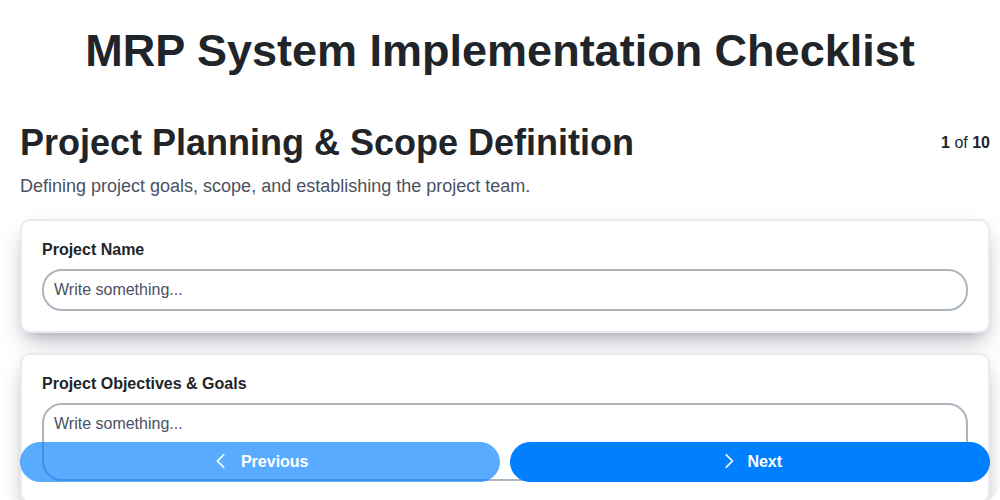
Table of Contents
- Introduction: Why an MRP System Implementation Checklist Matters
- 1. Project Planning & Scope Definition: Laying the Foundation
- 2. Requirements Gathering & Analysis: Defining Your Needs
- 3. Vendor Selection & Contract Negotiation: Choosing the Right Partner
- 4. System Design & Configuration: Tailoring the System to Your Business
- 5. Data Migration & Cleansing: Preparing Your Data for Success
- 6. System Integration: Connecting Your MRP with Existing Systems
- 7. Testing & Validation: Ensuring Accuracy and Reliability
- 8. User Training: Empowering Your Team
- 9. Go-Live Planning & Execution: The Moment of Truth
- 10. Post-Implementation Support & Optimization: Continuous Improvement
- 11. Key Risks & Mitigation Strategies
- 12. Checklist Summary: A Quick Reference
- Conclusion: Maximizing Your MRP Investment
- Resources & Links
TLDR: Implementing a new MRP system? This checklist breaks down the entire process - from planning & requirements to go-live & optimization - into manageable steps. Use it to ensure nothing falls through the cracks, stay on track, and maximize your MRP investment's success!
Introduction: Why an MRP System Implementation Checklist Matters
Implementing a Manufacturing Resource Planning (MRP) system is a monumental undertaking - a significant investment in time, resources, and potential for improved efficiency. However, without a structured and meticulous approach, even the best MRP software can become a source of frustration and lost productivity. That's where a robust implementation checklist becomes absolutely essential.
Think of it as your roadmap to success. A well-defined checklist ensures that no crucial steps are overlooked, minimizing the risk of costly errors, delays, and ultimately, a failed implementation. It provides clarity, keeps everyone involved accountable, and offers a tangible framework for tracking progress. This isn't just about ticking boxes; it's about strategically guiding your organization through a transformative process that optimizes your manufacturing operations and unlocks its full potential. Skipping this vital step can lead to scope creep, budget overruns, and a system that doesn't meet your business needs - all of which can undermine the entire project and its intended ROI.
1. Project Planning & Scope Definition: Laying the Foundation
A successful MRP (Manufacturing Resource Planning) system implementation begins long before any software is touched. This initial phase, Project Planning & Scope Definition, is absolutely critical for setting the project up for success and avoiding costly reworks later on. It's about defining exactly what you want your new MRP system to do and how it will fit within your organization.
Here's what you need to address:
- Define Clear Objectives: Why are you implementing an MRP system? Increased efficiency? Reduced inventory? Improved planning? Be specific and measurable. "Improve efficiency" is too vague; "Reduce inventory carrying costs by 15% within 12 months" is a much better goal.
- Establish Scope Boundaries: What departments and processes will be included in the initial implementation? What will be deferred to later phases? Be realistic about what you can achieve within the available resources and timeframe. Avoid "scope creep" which can derail the entire project.
- Identify Key Stakeholders: Who are the people who will be impacted by the new system? This includes executives, department heads, IT staff, and end-users. Engage them early and often to ensure buy-in and address concerns.
- Form a Project Team: Assemble a dedicated team with representatives from key departments. Clearly define roles and responsibilities, including a Project Manager who will oversee the entire implementation.
- Develop a Detailed Project Plan: Outline tasks, timelines, and milestones. Use project management software to track progress and manage dependencies.
- Budget Allocation: Determine a realistic budget that encompasses software licensing, implementation services, training, and ongoing support.
A well-defined scope and solid project plan will serve as your roadmap for a smoother, more successful MRP implementation. Don't underestimate the power of getting this stage right!
2. Requirements Gathering & Analysis: Defining Your Needs
A successful MRP implementation hinges on a thorough and accurate understanding of your business needs. Don't assume the system will magically solve your problems - it will only amplify existing inefficiencies if it's not configured to address your specific challenges. This phase is more than just compiling a list of features; it's about truly understanding your current processes, identifying pain points, and envisioning the future state.
Here's what a robust requirements gathering and analysis process should involve:
- Cross-Functional Collaboration: Include representatives from every department that will interact with the MRP system - production, purchasing, sales, inventory management, finance, and engineering. Their collective knowledge provides a holistic view.
- Process Mapping: Document your current as-is processes in detail. This clarifies how work currently flows, identifies bottlenecks, and highlights areas for improvement. Visual diagrams (flowcharts) are incredibly helpful here.
- Identifying Pain Points: Actively solicit feedback from users about what's not working well. What are the biggest frustrations? Where are errors most common? Where is time being wasted?
- Defining To-Be Processes: Based on the analysis of the as-is processes, outline the ideal to-be processes with the new MRP system in place. How should work flow?
- Prioritizing Requirements: Not all requirements are created equal. Use a prioritization matrix (e.g., MoSCoW - Must have, Should have, Could have, Won't have) to rank requirements based on their business impact and feasibility.
- Documenting Requirements: Clearly and concisely document all gathered requirements, linking them back to specific business objectives and prioritized rankings. Use a standardized template to ensure consistency and traceability.
- Validating Requirements: Review documented requirements with stakeholders to ensure accuracy, completeness, and mutual understanding. This iterative validation process minimizes misunderstandings and rework later on.
Ignoring this crucial step can lead to an MRP system that doesn's meet your needs, requiring costly modifications or even a complete overhaul. Invest the time upfront to define your requirements clearly - your future self will thank you.
3. Vendor Selection & Contract Negotiation: Choosing the Right Partner
Selecting the right MRP vendor is arguably one of the most critical decisions in your implementation journey. It's more than just finding a software with the features you need; it's about forging a partnership that supports your business goals. Here's a breakdown of what to consider:
1. Define Your Selection Criteria: Don't jump straight into demos. First, clearly outline your "must-haves" versus "nice-to-haves." Weight these based on your business priorities. Consider factors like industry experience (do they understand your specific challenges?), scalability (can the system grow with you?), integration capabilities (does it connect with your existing systems?), and the vendor's reputation.
2. Research and Shortlist: Utilize industry reports, online reviews (Gartner, Forrester, Capterra), and peer recommendations to build a shortlist of potential vendors. Don't be afraid to reach out to other companies using the systems you're considering for their honest feedback.
3. Request for Proposal (RFP) Process: A formal RFP ensures you gather consistent information from each vendor, allowing for an apples-to-apples comparison. Include detailed questions about functionality, implementation methodology, support options, and pricing.
4. Demos and Proof of Concept (POC): Demos are crucial, but a POC can be even more insightful. A POC allows you to test the system with your data and workflows in a controlled environment, identifying potential gaps and validating vendor claims.
5. Contract Negotiation: Beyond the Price Tag: The contract is your safety net. Carefully review all clauses, paying close attention to:
- Scope of Services: Clearly define what's included in the implementation - design, configuration, data migration, training, etc.
- Service Level Agreements (SLAs): Outline response times, uptime guarantees, and penalties for non-compliance.
- Pricing and Payment Terms: Understand all costs involved - initial license fees, implementation costs, ongoing maintenance, and potential upgrade charges. Look for flexibility in payment schedules.
- Intellectual Property Rights: Clarify ownership of any custom developments.
- Termination Clause: Know your options for ending the contract if things don't work out.
- Escalation Procedures: Know who to contact if issues arise.
6. Due Diligence: Check the vendor's financial stability and customer references. A vendor going out of business mid-implementation is a nightmare scenario.
Choosing the right vendor isn't just about software; it's about establishing a long-term partnership for success. Invest the time and effort upfront, and you'll significantly increase your chances of a successful MRP implementation.
4. System Design & Configuration: Tailoring the System to Your Business
This phase is where the MRP system truly begins to take shape and reflect your unique operational needs. It's far more than just installing software; it's about configuring it to accurately model your processes, workflows, and data structures.
Defining Core Parameters: This involves setting up foundational elements like units of measure, costing methods (standard, average, FIFO, etc.), planning horizons, and lead time calculations. These seemingly small choices significantly impact your planning accuracy and inventory levels.
Workflow Configuration: MRP systems are powerful, but they need to be guided. Configure workflows to mirror your existing processes - from order entry and procurement to production scheduling and shipping. Don't force your business to adapt to the system; adapt the system to fit your business. This often involves configuring routing rules, work center definitions, and BOM (Bill of Materials) structures.
Customization Considerations: While minimizing customization is generally advised (due to increased complexity and maintenance costs), some level of tailoring might be necessary to address specific, critical business requirements. Carefully evaluate the need for customizations and prioritize those that offer substantial business value and align with the vendor's best practices.
Security and User Permissions: Define user roles and permissions to ensure data security and control access to sensitive information. This protects data integrity and ensures compliance.
Configuration Documentation: Meticulously document all configuration decisions. This documentation will be invaluable for future upgrades, troubleshooting, and onboarding new team members. It will also serve as a critical reference point for post-implementation optimization.
A poorly configured system, no matter how advanced, will fail to deliver the promised benefits. Invest the time and resources necessary to ensure the system is accurately designed and configured to support your business objectives.
5. Data Migration & Cleansing: Preparing Your Data for Success
Data migration and cleansing are often the most underestimated - and potentially most problematic - phases of an MRP system implementation. Don't let them be your downfall! Simply dumping your existing data into the new system without careful preparation is a recipe for disaster, leading to inaccurate reporting, production bottlenecks, and ultimately, a lack of user trust.
This isn't just about copying data; it's about improving it. Your MRP system is only as good as the data it holds.
Here's a breakdown of what this crucial phase entails:
- Data Audit & Profiling: Begin with a comprehensive audit of your current data sources. Understand the data's structure, quality, completeness, and accuracy. Data profiling tools can automate much of this process, revealing inconsistencies and errors you might otherwise miss.
- Data Cleansing: This involves correcting errors, removing duplicates, standardizing formats, and filling in missing information. This isn't a quick fix; it requires dedicated effort and often involves manual intervention. Establish clear data quality rules and apply them consistently.
- Data Mapping: Carefully map your existing data fields to the corresponding fields in the new MRP system. This ensures data is placed in the correct locations and relationships are maintained.
- Data Transformation: Data often needs to be transformed to fit the new system's requirements. This might involve converting units of measure, reformatting dates, or combining data from multiple sources.
- Pilot Migration & Validation: Before migrating all your data, perform a pilot migration with a subset of your data. This allows you to identify and resolve any unforeseen issues in the migration process. Validate the migrated data thoroughly to ensure accuracy and completeness.
- Documentation: Document the entire data migration process, including data cleansing rules, mapping tables, and transformation logic. This documentation is invaluable for future reference and troubleshooting.
A well-executed data migration and cleansing process is an investment that pays dividends in the long run, providing a solid foundation for your MRP system's success.
6. System Integration: Connecting Your MRP with Existing Systems
Successfully integrating your new MRP system with your existing infrastructure is critical for maximizing its value and minimizing disruption. It's rarely a standalone project; your MRP needs to talk to your CRM, accounting software, e-commerce platforms, shop floor control systems, and potentially other specialized applications.
This integration phase isn't just about making data flow; it's about establishing a seamless, automated exchange that reduces manual intervention, eliminates data silos, and provides a holistic view of your operations.
Key Considerations for System Integration:
- Identify Integration Points: Map out all systems that need to exchange data with the MRP. Prioritize based on criticality and frequency of data flow.
- Define Data Mapping: Clearly define how data fields in the MRP correspond to fields in other systems. This is crucial for accuracy and consistency.
- Choose Integration Methods: Explore options such as APIs (Application Programming Interfaces), middleware platforms, or direct database connections. The best approach depends on the systems involved and your technical capabilities.
- Security Protocols: Implement robust security measures to protect sensitive data during transmission and storage.
- Real-time vs. Batch Processing: Determine whether data needs to be exchanged in real-time or in batches. Real-time integration offers immediate updates, while batch processing can be simpler to implement.
- Error Handling: Establish clear procedures for handling integration errors and ensuring data consistency.
Ignoring system integration can lead to duplicated efforts, inaccurate data, and ultimately, a failed MRP implementation. A well-planned and executed integration strategy is a cornerstone of a successful MRP rollout.
7. Testing & Validation: Ensuring Accuracy and Reliability
This phase is critical and often underestimated. Don't rush it! Testing and validation are your last line of defense against costly errors and disruptions post-go-live. It's not just about ticking boxes; it's about ensuring the MRP system functions precisely as intended and delivers accurate data for informed decision-making.
Here's a breakdown of what's involved:
- Unit Testing: Individual modules and functionalities are tested in isolation to verify they operate correctly. Think validating a single BOM calculation or a specific inventory transaction.
- Integration Testing: This confirms that different modules work seamlessly together. For example, can the sales order entry accurately trigger a production order?
- System Testing: A comprehensive end-to-end test simulating real-world scenarios is performed. Involve key users from different departments to represent various business processes.
- User Acceptance Testing (UAT): This is where your super-users take the reins. They're responsible for testing the system using their day-to-day tasks and scenarios. Their feedback is invaluable for identifying usability issues and gaps in functionality.
- Performance Testing: Evaluate the system's response time and ability to handle peak loads. A slow system can significantly impact productivity.
- Regression Testing: After any bug fixes or configuration changes, regression testing is crucial to ensure existing functionality hasn't been negatively impacted.
Key Considerations:
- Document everything: Record all test cases, results (pass/fail), and any identified defects.
- Traceability: Link test cases back to requirements to ensure full coverage.
- Dedicated Resources: Allocate sufficient time and skilled personnel for thorough testing.
- Realistic Data: Use realistic, representative data for testing to uncover potential data-related issues.
8. User Training: Empowering Your Team
Implementing a new MRP system is a significant investment, but it's only as valuable as the team's ability to effectively use it. Comprehensive user training is not optional; it's a critical component of a successful implementation. Don't underestimate the potential disruption and frustration that can arise from a team struggling to navigate a new system.
Our approach to user training goes beyond simply showing people how to click buttons. We focus on understanding their roles and responsibilities within the MRP system and tailoring training to address those specific needs. This includes:
- Role-Based Training: Separate training tracks for planners, buyers, shop floor personnel, accounting, and management ensure everyone learns the relevant features and processes.
- Hands-On Workshops: Practical exercises and real-world scenarios provide a safe environment for users to experiment and solidify their understanding.
- Training Materials: We develop clear and concise documentation, including user manuals, quick reference guides, and video tutorials, for ongoing support.
- Train-the-Trainer Program: Empowering key individuals within your organization to become internal experts can significantly reduce reliance on external consultants and ensure continued knowledge sharing.
- Ongoing Support & Refresher Courses: Learning doesn't stop at go-live. We offer ongoing support and periodic refresher courses to reinforce knowledge and address new features or process changes.
Investing in robust user training minimizes resistance to change, maximizes system adoption, and ultimately delivers the full potential of your MRP investment. A well-trained team is a productive team.
9. Go-Live Planning & Execution: The Moment of Truth
This is it. After months (or even years!) of planning, design, development, and testing, you're ready to launch your new MRP system. Go-Live is arguably the most critical phase of the entire implementation, and a rushed or poorly executed launch can derail the entire project. Success here hinges on meticulous planning and a calm, controlled execution.
Here's what a robust Go-Live plan should include:
- Detailed Cutover Plan: Outline a precise timeline for data migration, system switchover, and all related activities. Define specific tasks, owners, and deadlines. Consider a phased rollout by location, product line, or department to minimize disruption.
- Communication Plan: Keep everyone informed. Clearly communicate the Go-Live schedule, expected downtime, and contact information for support. Regular updates are key to managing expectations and reducing anxiety.
- Rollback Plan: It's essential to have a defined and tested rollback plan in case of significant issues. This allows you to revert to the previous system quickly, minimizing business interruption. Be absolutely clear on the triggers that activate the rollback.
- Go/No-Go Decision Points: Establish clear criteria to determine whether the launch proceeds as planned or if a delay is necessary. This prevents impulsive decisions based on pressure.
- Dedicated Go-Live Support Team: Assemble a specialized team, including IT, key users, and vendor representatives, available around the clock to address issues promptly.
- Monitoring and Reporting: Implement robust monitoring tools to track system performance and identify potential problems in real-time. Regular status reports should be disseminated to stakeholders.
- Contingency Planning: Prepare for the unexpected. Have backup resources, alternative processes, and documented workarounds for common issues.
Successful Go-Live execution isn't just about flipping a switch; it's about executing a well-orchestrated plan and having the resources to handle whatever comes your way.
10. Post-Implementation Support & Optimization: Continuous Improvement
The go-live celebration is fantastic, but it's just the beginning of your MRP system journey. Post-implementation isn't about flipping a switch and walking away; it's about ensuring sustained value and continuous improvement. This phase is crucial for maximizing your investment and adapting to evolving business needs.
Immediate Support & Stabilization (First 30-90 Days):
- Dedicated Support Team: Establish a readily available support team, ideally a hybrid of internal resources and vendor specialists. This team will address user questions, troubleshoot immediate issues, and quickly resolve any critical problems that arise.
- Issue Tracking & Resolution: Implement a robust system for logging and tracking all post-implementation issues. Prioritize issues based on severity and impact, and ensure timely resolution.
- Knowledge Base Development: Build a comprehensive knowledge base including FAQs, troubleshooting guides, and training materials. This empowers users to self-serve and reduces the support team's workload.
Ongoing Optimization (Beyond 90 Days):
- Performance Monitoring: Continuously monitor the system's performance - data processing speeds, report generation times, and overall resource utilization. Identify bottlenecks and optimize configurations.
- User Feedback Loop: Regularly solicit feedback from users - production planners, inventory managers, procurement specialists, and others. This is invaluable for identifying areas for improvement and ensuring the system truly meets their needs.
- Process Refinement: MRP systems are most effective when they support optimized business processes. As your business evolves, review your processes and make adjustments to align with the system's capabilities.
- System Updates & Upgrades: Stay current with vendor updates and plan for future upgrades. These often include new features, performance enhancements, and security patches. Ensure thorough testing of upgrades before rolling them out across the entire organization.
- Advanced Feature Exploration: Many MRP systems have powerful, often underutilized features. Dedicate time to explore and implement these advanced functionalities to further enhance efficiency and gain deeper insights into your operations.
- KPI Monitoring & Reporting: Track key performance indicators (KPIs) related to inventory levels, production efficiency, lead times, and on-time delivery. Use these metrics to identify areas for continuous improvement and measure the system's overall ROI.
By committing to a proactive and ongoing support and optimization strategy, you're ensuring your MRP system remains a valuable asset for years to come, driving efficiency, reducing costs, and fueling growth.
11. Key Risks & Mitigation Strategies
Implementing a Manufacturing Resource Planning (MRP) system is a complex undertaking, rife with potential pitfalls. Ignoring these risks can derail the project, leading to budget overruns, missed deadlines, and ultimately, a system that doesn't meet your needs. Here's a breakdown of common risks and strategies to mitigate them:
1. Scope Creep: Uncontrolled expansion of project scope after initial planning. Mitigation: Strict change management processes, documented scope baseline, regular scope reviews with stakeholders.
2. Inadequate User Adoption: Resistance to change and a lack of buy-in from employees. Mitigation: Early and frequent communication, involving users in the process, comprehensive training programs, and showcasing the system's benefits.
3. Data Quality Issues: Migrating inaccurate or incomplete data can cripple the new system. Mitigation: Prioritize data cleansing and validation before migration, designate data stewards, and implement data governance policies.
4. Integration Challenges: Difficulty connecting the MRP system with existing systems (ERP, CRM, SCM). Mitigation: Thoroughly map integration points early on, utilize standard APIs where possible, and consider middleware solutions.
5. Vendor Performance: The chosen vendor doesn't deliver on their promises or provide adequate support. Mitigation: Conduct thorough vendor due diligence, include performance metrics in the contract, and establish clear communication channels.
6. Lack of Executive Sponsorship: Insufficient support from senior management can lead to resource constraints and prioritization conflicts. Mitigation: Secure executive buy-in upfront, keep executives informed of progress, and demonstrate the ROI of the project.
7. Technical Issues: Unexpected software bugs or hardware limitations. Mitigation: Rigorous testing, robust infrastructure planning, and readily available technical support.
8. Unrealistic Timelines: Underestimating the time required for various implementation stages. Mitigation: Build in buffer time, break down tasks into smaller, manageable chunks, and regularly track progress against the schedule.
9. Cost Overruns: Underestimating the overall cost of the project. Mitigation: Detailed budget planning, contingency funds, and ongoing cost monitoring.
10. Business Disruption: The implementation process negatively impacts day-to-day operations. Mitigation: Phased rollout approach, careful planning of downtime, and clear communication with employees.
11. Lack of Internal Expertise: Insufficient in-house skills to manage and support the system long-term. Mitigation: Invest in training, consider hiring specialized resources, and foster a culture of continuous learning.
By proactively identifying and mitigating these risks, you significantly increase the likelihood of a successful MRP implementation.
12. Checklist Summary: A Quick Reference
Implementing a new MRP system is a monumental task. To keep you on track and minimize potential pitfalls, here's a condensed checklist summarizing the key phases. Consider this your go-to reference point throughout the entire project lifecycle.
| Phase | Key Tasks |
|---|---|
| Project Planning & Scope Definition | Define project goals, establish budget, identify key stakeholders, define scope boundaries. |
| Requirements Gathering & Analysis | Document business processes, identify functional and technical requirements, prioritize needs. |
| Vendor Selection & Contract Negotiation | Research potential vendors, conduct demos, evaluate proposals, negotiate contracts. |
| System Design & Configuration | Configure system modules, define workflows, customize interfaces, establish user roles. |
| Data Migration & Cleansing | Extract data from legacy systems, cleanse and transform data, map data fields, import data. |
| System Integration | Integrate MRP system with other business systems (e.g., CRM, accounting). |
| Testing & Validation | Unit testing, integration testing, user acceptance testing (UAT), performance testing. |
| User Training | Develop training materials, conduct training sessions, provide ongoing support. |
| Go-Live Planning & Execution | Develop go-live plan, perform dress rehearsals, execute go-live activities. |
| Post-Implementation Support & Optimization | Monitor system performance, address user issues, implement optimizations. |
| Change Management | Communicate changes, address user concerns, ensure buy-in. |
| Documentation | Maintain comprehensive documentation of all processes and configurations. |
This checklist provides a high-level overview. Each phase contains numerous detailed tasks that require careful planning and execution.
Conclusion: Maximizing Your MRP Investment
Implementing an MRP system is a significant undertaking, but the rewards - improved efficiency, reduced costs, and enhanced decision-making - are well worth the effort. This checklist provides a roadmap for a successful implementation, highlighting the critical steps from initial planning to ongoing optimization. Remember that meticulous planning, open communication, and proactive problem-solving are key throughout the entire process. Don't view this as a one-and-done task; MRP implementation is a journey of continuous improvement. Regularly review your system's performance, solicit user feedback, and adapt your processes to maximize your investment and ensure your manufacturing operation thrives. By embracing a proactive and iterative approach, you can truly unlock the full potential of your MRP system and achieve lasting competitive advantage.
Resources & Links
- APICS: The Association for Supply Chain Management (APICS) is a leading resource for MRP and supply chain professionals, offering certifications, education, and best practices. Their website provides a wealth of information related to MRP principles and implementation best practices.
- NetSuite: Oracle NetSuite is a popular cloud-based ERP system with robust MRP capabilities. Their website offers case studies, whitepapers, and articles that shed light on implementation challenges and successful strategies.
- Microsoft Dynamics 365: Another major ERP provider, Microsoft's Dynamics 365 offers MRP functionality. Their site includes customer stories and resources detailing implementation processes and considerations, particularly relevant if considering a Microsoft-based solution.
- Infor: Infor provides industry-specific ERP solutions. Their site offers insights into tailored implementation approaches for various sectors, valuable if your business has unique requirements.
- Gartner: Gartner provides in-depth research and analysis of software vendors and trends, including MRP systems. While access to full reports might require a subscription, their website offers a good overview of the market and potential vendors.
- Capterra: Capterra is a software review website. It allows potential users to read reviews of various MRP systems, providing insights into user experiences and implementation feedback.
- Wisdom Works: Wisdom Works specializes in helping companies implement and optimize manufacturing software, including MRP. Their website features blog posts, webinars, and resources related to MRP implementation best practices.
- MRP System: This website offers information and resources related to MRP systems, including articles, guides, and case studies focusing on the core concepts and implementation considerations.
- Manufacturing Resource Planning: Provides articles and explanations of MRP. It can be a useful reference point for a foundational understanding.
- ProcessExcellence: Offers consulting and training related to process improvement, often critical for a smooth MRP implementation. Their website contains information about project management methodologies.
- TechRepublic: While general tech focused, they often have articles addressing ERP and MRP implementations from a practical IT perspective covering challenges and solutions.
- Project Management Institute (PMI): Provides standards, training, and resources for project management, which is essential for MRP implementation success.
Frequently Asked Questions
What is an MRP system?
MRP stands for Material Requirements Planning. It's a system that helps manufacturers plan and manage their inventory, production schedules, and purchasing activities. It ensures you have the right materials at the right time, minimizing shortages and overstocking.
Who should use this MRP system implementation checklist?
This checklist is designed for businesses, primarily manufacturers, that are planning to implement or are currently implementing an MRP system. It's useful for project managers, IT personnel, operations managers, and anyone involved in the MRP implementation process.
Why is an MRP implementation checklist important?
A checklist ensures a structured and organized approach to MRP implementation, reducing the risk of overlooking crucial steps. It helps manage scope, identify potential roadblocks, and improve the overall success rate of the project. It also helps with documentation and audit trails.
What are the key phases covered in this checklist?
The checklist typically covers these phases: Planning & Scope Definition, System Selection & Configuration, Data Migration & Cleansing, Training & User Acceptance Testing, Go-Live & Support, and Post-Implementation Review. Each phase includes specific tasks and considerations.
What's the difference between System Selection and Configuration?
System Selection focuses on choosing the right MRP software that meets your business needs. Configuration involves customizing the chosen system's settings and parameters to align with your specific processes and workflows.
What does 'data cleansing' mean in the context of MRP implementation?
Data cleansing involves identifying and correcting errors, inconsistencies, and duplicates in your existing data (inventory levels, BOMs, routings, etc.) before migrating it into the new MRP system. Clean data is crucial for accurate planning and reporting.
How much training is typically required for MRP implementation?
The amount of training varies based on the complexity of the system and user roles. It's recommended to provide comprehensive training for all users involved, including hands-on sessions and ongoing support after go-live.
What is UAT and why is it important?
UAT stands for User Acceptance Testing. It's a phase where end-users test the system to ensure it meets their requirements and performs as expected. This is a critical step in validating the system before launch.
What does 'go-live' mean in MRP implementation?
'Go-live' refers to the point when the new MRP system is officially launched and replaces the existing processes or systems. It's a significant transition and requires careful planning and preparation.
What's a post-implementation review and why is it necessary?
A post-implementation review assesses the success of the MRP implementation project. It identifies what went well, what could have been improved, and what adjustments are needed to optimize system usage and achieve the desired benefits.
Found this Article helpful?
Comments
There are no comments yet. Be the first to add one!
Related Articles
MRP Integration Testing Checklist: A Comprehensive Guide
MRP Planning Parameter Setup Checklist: Your Guide to Accuracy & Efficiency

Top 10 MRPeasy Alternatives for 2025

The 5 Best Bill of Materials (BOM) Management Software of 2025
MRP User Training Checklist: Ensuring Proficiency & Success

The 10 Best Manufacturing Management Software of 2025
How to improve your Bill of Materials (BOM) Management
MRP System Performance Monitoring Checklist: Ensure Peak Efficiency
We can do it Together
Need help with
Material Requirements Planning (MRP)?
Have a question? We're here to help. Please submit your inquiry, and we'll respond promptly.