MRP Integration Testing Checklist: A Comprehensive Guide
Published: 12/14/2025 10:00 PM Updated: 12/15/2025 1:31 PM
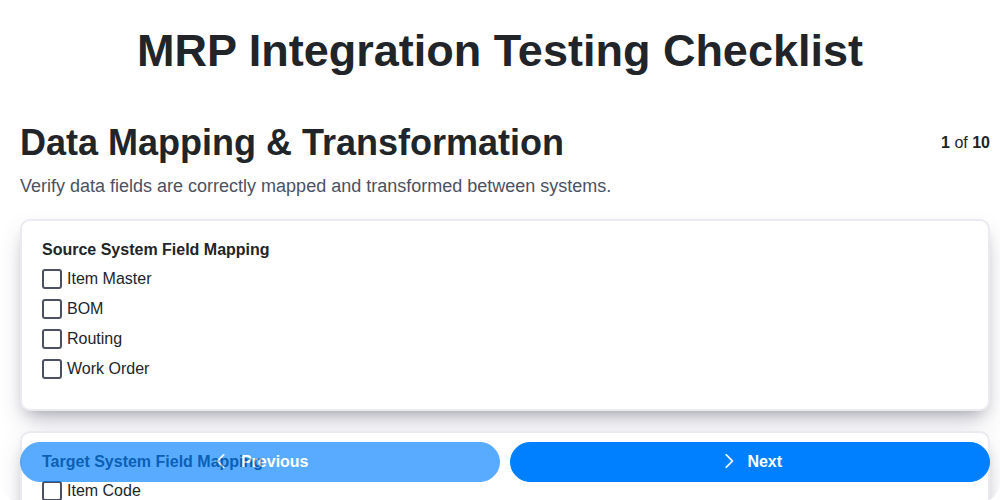
Table of Contents
- Introduction: Why MRP Integration Testing Matters
- Understanding the Scope of MRP Integration
- 1. Data Mapping & Transformation: Ensuring Accuracy
- 2. System Interface Validation: Connecting the Pieces
- 3. Real-Time Data Synchronization: Keeping Everything Current
- 4. Transaction Validation: Verifying Business Processes
- 5. Error Handling & Recovery: Graceful Failures
- 6. Security & Access Control: Protecting Sensitive Data
- 7. Performance Testing: Measuring Efficiency
- 8. User Acceptance Testing (UAT): The User's Perspective
- 9. Logging and Auditing: Tracking Changes and Ensuring Accountability
- 10. Documentation Review: Completeness and Clarity
- 11. Test Data Strategy: Realistic Scenarios
- Conclusion: Ensuring a Successful MRP Integration
- Resources & Links
TLDR: Integrating your MRP system? Don't risk costly errors! This checklist walks you through vital testing areas - data mapping, real-time sync, security, performance, and more - ensuring your integration is accurate, secure, and reliable before launch. Download the template and simplify your testing process!
Introduction: Why MRP Integration Testing Matters
Manufacturing Resource Planning (MRP) systems are the backbone of many businesses, managing everything from inventory and production planning to finance and human resources. However, an MRP system rarely operates in isolation. It frequently needs to connect and exchange data with other crucial systems like CRM, SCM, e-commerce platforms, and accounting software. This integration, while powerful, introduces complexity and potential points of failure.
MRP integration testing isn't just a nice-to-have; it's a must-have for ensuring data accuracy, operational efficiency, and ultimately, business success. A flawed integration can lead to inaccurate inventory levels, delayed production schedules, incorrect financial reporting, and frustrated customers. This checklist outlines the critical areas to focus on during MRP integration testing, helping you proactively identify and address potential issues before they impact your business. Properly executed integration testing minimizes risk, maximizes the return on your MRP investment, and ensures a seamless flow of information across your entire organization.
Understanding the Scope of MRP Integration
MRP (Material Requirements Planning) integration isn't just about connecting two systems; it's about aligning crucial business processes. Before diving into testing, it's vital to define the scope clearly. This includes identifying which modules of both the MRP system and any integrated systems (like CRM, WMS, or e-commerce platforms) are involved.
Consider these key areas:
- Data Flow: Map out precisely what data moves between systems and in what direction. Is it just inventory levels, or does it include customer orders, sales forecasts, or production schedules?
- Business Processes Affected: Identify the workflows that rely on integrated data. A flawed integration can disrupt order fulfillment, production planning, and overall operational efficiency.
- Integration Method: Understand if the integration is batch-based (data exchanged periodically) or real-time. This significantly impacts testing strategies.
- Data Ownership: Define which system is the 'system of record' for each data element. This prevents data conflicts and ensures data integrity.
- Dependencies: Determine if other systems or processes depend on the MRP integration. A failure in one area can have cascading effects.
Clearly defining this scope upfront will make the integration testing process more focused, efficient, and ultimately, more successful.
1. Data Mapping & Transformation: Ensuring Accuracy
Successful MRP integration hinges on flawlessly transferring data between systems. This initial phase, Data Mapping & Transformation, is critical and demands meticulous attention to detail. It's not just about moving data; it's about ensuring its meaning remains consistent.
Here's what needs to be covered:
- Source to Target Mapping: Document every data field being transferred. Clearly define where each field originates in the source system (e.g., CRM, legacy system) and where it's destined in the MRP system. This mapping should be documented with clear ownership and approval.
- Data Type Validation: Verify that data types (numeric, text, date, etc.) are compatible between systems. Incompatibilities can lead to errors or data truncation.
- Transformation Rules: Data rarely maps directly. Transformation rules (e.g., unit conversions, currency adjustments, code translations) must be clearly defined, documented, and tested. For example, a product code in one system might require a prefix or suffix in the MRP.
- Data Cleansing: Identify and address data quality issues in the source system before integration. This might involve standardizing addresses, correcting typos, or resolving duplicate records. Garbage in, garbage out applies here!
- Data Volume Testing: Ensure the transformation process can handle the expected data volume without performance degradation. Consider peak load scenarios.
- Validation of Converted Values: After transformation, validate that the converted values are accurate and meet business requirements. Manual spot-checks and automated data comparison are both valuable.
A failure to adequately map and transform data can lead to inaccurate inventory levels, incorrect production schedules, and ultimately, business disruption.
2. System Interface Validation: Connecting the Pieces
Integrating your MRP system with other platforms - whether it's your CRM, e-commerce platform, or accounting software - is a critical undertaking. System Interface Validation is the crucial step that confirms these connections are functioning correctly and reliably. This goes beyond simply ensuring data moves; it verifies that the data is accurate, complete, and correctly formatted at each point of interaction.
This phase focuses on testing the physical links and communication protocols between systems. Key areas to scrutinize include:
- File Transfer Verification: If data is exchanged via files, confirm correct file formats, naming conventions, and successful transfer to the designated locations.
- API Endpoint Testing: Validate API endpoints are accessible and respond as expected. Test different request parameters and error scenarios.
- Message Queuing: For systems utilizing message queues, verify messages are being queued, processed, and acknowledged correctly, even under peak load.
- Data Format Validation: Ensure data received by the MRP system aligns with expected formats (dates, units of measure, currency, etc.). Inconsistencies here can cause significant downstream errors.
- Error Handling on Interface Failure: How does each system react when an interface fails? Are error messages clear and informative? Is there a documented escalation process?
- Bidirectional Data Flow: Validate data flow in both directions. Ensure updates in one system are reflected accurately in the other.
- Data Integrity Checks: Implement checks to confirm the data hasn't been corrupted during transmission.
Thorough System Interface Validation will uncover potential bottlenecks and data integrity issues early, preventing costly disruptions and ensuring a seamless integration.
3. Real-Time Data Synchronization: Keeping Everything Current
Successful MRP integration hinges on accurate and timely data flow. This section focuses on verifying the real-time data synchronization between your ERP and MRP systems. We're not just talking about batch updates; we're confirming that changes in one system are reflected in the other with minimal latency.
Here's what to check during this phase:
- Immediate Updates: Trigger changes in one system (e.g., a new sales order in the ERP) and verify those changes are reflected in the MRP in near real-time. Don't just look for the existence of data; confirm the value is correct.
- Bidirectional Synchronization: Ensure data flows correctly in both directions. Changes made within the MRP system (e.g., updated inventory levels from a shop floor update) must accurately propagate back to the ERP.
- Data Consistency: Look for discrepancies that can arise from concurrent updates. Test scenarios where changes are made simultaneously in both systems to ensure data integrity.
- Event Triggers: Verify that the synchronization is triggered correctly based on defined events (e.g., order creation, inventory adjustments, material receipts). Confirm the trigger mechanisms are working as expected and not missed.
- Conflict Resolution: Test conflict resolution mechanisms. What happens when both systems attempt to update the same data point at the same time? How are these conflicts resolved, and is the resolution logical and auditable?
- Data Volume Impact: Assess performance under high data volume scenarios. Increased transaction rates can expose synchronization bottlenecks. Simulate peak loads to ensure stability.
4. Transaction Validation: Verifying Business Processes
MRP integration isn't just about data flowing; it's about ensuring those data changes actually do what they're supposed to do within your business processes. Transaction validation focuses precisely on this. It's critical to confirm that integrated transactions accurately reflect and drive the intended business outcomes.
Here's what's involved in thorough transaction validation:
- Order Creation & Fulfillment: Test the entire order lifecycle - from creation in your sales system to production planning and ultimately, shipping and invoicing within the MRP. Verify quantities, pricing, discounts, and delivery dates are all correctly passed and processed.
- Inventory Updates: Simulate inventory receipts, adjustments, and shipments. Confirm these transactions accurately update stock levels in both systems, triggering appropriate replenishment plans within the MRP. Scenarios should include partial shipments, backorders, and over-selling situations.
- Production Order Management: Verify that changes to production orders (e.g., changes in material requirements, start/end dates) are correctly reflected in the MRP, and vice versa. Validate the cascading effect of these changes on related processes like procurement and shop floor control.
- Bill of Material (BOM) Changes: Simulate changes to BOMs and confirm that these changes are accurately propagated to the MRP system, affecting material requirements planning and production execution.
- Costing Accuracy: Validate that costs associated with transactions (e.g., material costs, labor costs) are correctly calculated and passed between systems. Incorrect costing can have serious financial implications.
- Negative Testing: Intentionally introduce errors (e.g., invalid data types, out-of-range values) to test the system's ability to handle and flag these issues gracefully.
Successful transaction validation ensures that your MRP integration isn't just a data pipeline, but a reliable engine driving your core business operations.
5. Error Handling & Recovery: Graceful Failures
MRP integration isn't a perfect world. Data glitches, network outages, and unexpected system behavior will happen. A robust integration needs a well-defined error handling and recovery plan to minimize disruption and maintain data integrity. This checklist item focuses on validating how your integrated system responds when things go wrong.
Key Validation Points:
- Identify Potential Error Scenarios: Brainstorm all possible error conditions - invalid data formats, connection failures, system downtime, permission issues, etc. Don't just think about the happy path.
- Error Message Verification: Ensure error messages are clear, informative, and actionable for users and support staff. Avoid cryptic codes; provide context and potential solutions.
- Automated Retries: Verify automated retry mechanisms for transient errors (e.g., temporary network issues). Define appropriate retry intervals and maximum retry counts to prevent endless loops.
- Rollback Capabilities: Critical transactions (like inventory adjustments or order confirmations) should have rollback capabilities to revert to the pre-integration state if an error occurs mid-process. Test these rollback procedures thoroughly.
- Error Logging & Notification: Confirm that errors are logged with sufficient detail (timestamp, user, transaction details, error code) and that appropriate notifications are sent to relevant personnel.
- Dead-Letter Queues (DLQs): If a message cannot be processed, ensure it's properly routed to a DLQ for later investigation and reprocessing. Test the DLQ management process.
- Data Consistency Checks: After an error and recovery, perform data consistency checks to confirm that data hasn't been corrupted or left in an inconsistent state.
- Manual Intervention Procedures: Document and test procedures for manual intervention when automated error handling fails.
6. Security & Access Control: Protecting Sensitive Data
MRP systems often hold incredibly sensitive data - everything from cost information and inventory levels to customer details and supplier contracts. Integrating this with other systems amplifies the need for robust security and access controls. This checklist item isn't just about ticking a box; it's about preventing breaches and ensuring data integrity.
During integration testing, thoroughly verify the following:
- Role-Based Access Control (RBAC): Confirm that users only have access to the data and functions they require based on their defined roles. Test scenarios that attempt to bypass these restrictions.
- Authentication & Authorization: Validate the authentication mechanisms (e.g., username/password, multi-factor authentication) and ensure proper authorization workflows.
- Data Encryption: Verify data is encrypted both in transit (during data transfer between systems) and at rest (stored within the integrated systems).
- Input Validation: Test for vulnerabilities related to injection attacks (SQL injection, cross-site scripting) by attempting to input malicious data.
- Audit Trails for Access: Ensure all access attempts, successful or failed, are logged and auditable. This provides a history for security investigations.
- Compliance with Security Policies: The integration needs to adhere to your organization's existing security policies and any relevant industry regulations (e.g., GDPR, CCPA).
- Regular Security Reviews: Scheduled vulnerability scans and penetration testing should be incorporated to identify and remediate potential weaknesses.
A compromised integration can expose your entire organization to significant risk, making security & access control a paramount concern during MRP integration testing.
7. Performance Testing: Measuring Efficiency
MRP integration isn't just about functionality; it's about speed and stability. Performance testing evaluates how the integrated system handles various load conditions, ensuring it doesn't become a bottleneck in your operations. This goes beyond just verifying data flows correctly; it examines how quickly data flows and how the system responds under stress.
Key areas to focus on during performance testing include:
- Response Times: Measure the time it takes for data updates and reports to generate. Long delays can impact user productivity and decision-making.
- Throughput: Assess the volume of transactions the integrated system can process within a given timeframe.
- Load Capacity: Determine the maximum number of concurrent users or transactions the system can handle without performance degradation. Simulate peak season demands or periods of rapid growth to anticipate potential issues.
- Resource Utilization: Monitor CPU usage, memory consumption, and network bandwidth to identify potential bottlenecks. Is the system effectively utilizing available resources?
- Scalability: Can the system accommodate future growth without significant architectural changes or performance hits?
Employ load testing tools to simulate realistic user behavior and data volumes. Analyze results meticulously, identifying areas for optimization - this could involve database tuning, code optimization, or infrastructure upgrades. Remember, a slow or unstable integration can negate the benefits of the MRP system itself.
8. User Acceptance Testing (UAT): The User's Perspective
UAT is arguably the most critical phase of MRP integration testing. It's where the rubber meets the road - where real users, those who will be actively using the integrated system, get their hands on it. This isn't about technical validation; it's about ensuring the system works for the business.
The goal of UAT is to confirm that the integrated solution meets the business requirements and solves the intended problems. Testers should be representative of the actual user base - encompassing various roles and skill levels. They should perform realistic, everyday tasks, mimicking their usual workflows as closely as possible. This includes things like:
- Order Processing: Creating, modifying, and canceling orders.
- Inventory Management: Receiving, stocking, and fulfilling inventory.
- Production Planning: Running simulations and generating production schedules.
- Financial Reporting: Verifying the accuracy of financial data and reports.
What to Look For During UAT:
- Ease of Use: Is the system intuitive and easy to navigate?
- Workflow Alignment: Does the integrated system streamline processes and reduce manual effort?
- Data Accuracy: Is the data displayed and processed correctly?
- Business Rule Compliance: Does the system adhere to established business rules and regulations?
- Overall Satisfaction: Do users feel confident and comfortable using the system?
UAT isn't just about finding bugs; it's about gathering feedback and identifying areas for improvement. This feedback is invaluable for refining the system and ensuring its long-term success. Document all findings meticulously, prioritizing them based on their impact on business operations. A positive UAT outcome demonstrates that the integration not only functions technically but also delivers tangible value to the organization.
9. Logging and Auditing: Tracking Changes and Ensuring Accountability
Robust logging and auditing are critical for any MRP integration. It's not enough to just ensure the system works; you need to be able to trace how it works, who made changes, and why. This section of your testing checklist should focus on verifying the completeness and accuracy of these functions.
Here's what you need to check:
- Comprehensive Logging: Verify that all key events within the integration are logged - data transfers, API calls, user actions, error conditions, and system events. This includes both successful and failed transactions.
- Detailed Log Content: Logs should contain sufficient detail for troubleshooting. This means including timestamps, user IDs, transaction IDs, data values, and any relevant system identifiers. Avoid generic success or failure messages; be specific.
- Audit Trail: Ensure that changes to data within either the MRP system or the integrated system are tracked, recording who made the change, when, and what was modified.
- Log Retention: Confirm that logs are retained for the required duration, in compliance with organizational policies and legal regulations.
- Secure Log Access: Verify that access to log files and auditing information is restricted to authorized personnel only. Implement appropriate access controls and security measures.
- Log Analysis Capabilities: Test the ability to search, filter, and analyze logs to identify trends, patterns, and potential issues.
- Alerting Mechanisms: Validate that alerts are triggered for specific error conditions or unusual activity, notifying the appropriate teams promptly.
- Integrity Checks: Ensure the log files themselves are protected from unauthorized modification or deletion. Consider checksums or other integrity checks.
10. Documentation Review: Completeness and Clarity
Integration testing, especially when involving a system like MRP (Material Requirements Planning), generates a significant amount of documentation. Don't underestimate the importance of a thorough documentation review! This isn't just about ticking a box; it's about ensuring future maintainability, troubleshooting, and knowledge transfer.
Your review should encompass all aspects of the integration, including:
- Technical Specifications: Verify the accuracy and completeness of the data mapping documents. Do they accurately reflect the transformation rules?
- Interface Design Documents: Confirm the documented interface specifications align with the actual implementation. Are all endpoints, data formats, and protocols accurately described?
- Error Handling Procedures: Ensure error handling logic is clearly documented, including escalation paths and troubleshooting steps.
- User Manuals & Training Materials: Validate that user documentation accurately reflects the new integrated processes and functionalities. Are users adequately prepared for the change?
- Release Notes: A comprehensive record of changes, known issues, and workarounds is critical for ongoing support.
Look beyond just technical accuracy. Is the documentation clear and understandable by all stakeholders - developers, business users, and support personnel? Unclear documentation can lead to misinterpretations, errors, and delays down the line. Consider a review by someone not directly involved in the integration to get a fresh perspective on clarity.
11. Test Data Strategy: Realistic Scenarios
Successful MRP integration testing hinges on a robust test data strategy. Simply throwing random data at the system won't cut it. You need data that accurately mirrors real-world scenarios and edge cases. Here's what to consider:
- Representative Data Volumes: Use data volumes that reflect your typical production levels. Don't just test with a few records; simulate busy periods and peak demands.
- Variety of Data Types: Include a wide range of data types - positive, negative, boundary, and invalid values - for all relevant fields. Consider variations in units of measure, descriptions, and other key attributes.
- Complex Relationships: MRP systems are built on complex relationships between data. Your test data should accurately represent these relationships, including dependencies between materials, orders, and production schedules.
- Historical Data Replication: Where possible, leverage anonymized historical data from your current systems to create realistic test scenarios. This provides a baseline for comparison and helps identify potential issues arising from data migration.
- Synthetic Data Generation: For scenarios that are difficult or impossible to replicate with real data (e.g., testing error handling), generate synthetic data that mimics expected patterns and potential failure points.
- Data Masking/Anonymization: If using production-like data, always ensure that sensitive information is masked or anonymized to protect data privacy.
- Data Refresh Strategy: Plan for regular data refreshes during testing to prevent test data from becoming stale and to ensure consistent results.
Prioritizing a thoughtful test data strategy is a crucial investment in the success of your MRP integration testing efforts.
Conclusion: Ensuring a Successful MRP Integration
Integrating your MRP system is a significant undertaking, offering substantial benefits when executed correctly. This checklist highlights the critical areas demanding meticulous attention throughout the process. Remember, a successful integration isn't just about functionality; it's about data integrity, seamless workflows, robust security, and ultimately, a positive impact on your business operations. Thoroughly reviewing and addressing each point in this checklist - from the foundational data mapping to the final user acceptance testing - will significantly increase your chances of a smooth transition and maximized return on investment. Don't underestimate the power of proactive planning, rigorous testing, and ongoing monitoring. A well-executed MRP integration isn't just a project completion; it's a catalyst for improved efficiency, better decision-making, and sustained growth.
Resources & Links
- Oracle: Oracle is a major provider of ERP and MRP systems. Their website offers information on best practices, documentation, and case studies related to integration.
- SAP: SAP is another leading provider of ERP systems, offering resources and documentation pertaining to integration testing and implementation.
- Microsoft Dynamics 365: Microsoft's Dynamics 365 offers ERP and integration solutions; their website features documentation and implementation guides.
- NetSuite: NetSuite provides a cloud-based ERP system. Their site contains resources on data migration, integration, and testing best practices.
- ISTQB (International Software Testing Qualifications Board): A globally recognized authority on software testing, ISTQB provides guidelines and certifications that are relevant to integration testing.
- Software Testing Help: This website offers articles, tutorials, and resources on various software testing topics, including integration testing concepts and checklists.
- Guru99: Guru99 provides tutorials and learning resources on software testing, including sections dedicated to integration testing methodologies.
- Testers Black Box: This website focuses on software testing and offers practical guidance on integration testing, with examples and checklists.
- Atlassian (Jira & Confluence): Atlassian provides tools for project management and collaboration (Jira for test case management, Confluence for documentation) which are valuable during MRP integration testing.
- IBM: IBM offers a range of software and services, including ERP systems and integration solutions. Their website contains relevant information and case studies.
- Spiceworks: Spiceworks is a community site for IT professionals; it often has discussions and shared experiences around MRP integrations that can provide valuable insights.
Frequently Asked Questions
What is MRP Integration Testing?
MRP Integration Testing verifies that your Material Requirements Planning (MRP) system seamlessly communicates and shares data with other systems, such as ERP, WMS, CRM, and accounting software. It ensures data accuracy, process efficiency, and prevents errors across integrated processes.
Why is MRP Integration Testing Important?
MRP integration testing is crucial to prevent data silos, inaccurate inventory levels, production delays, fulfillment errors, and financial discrepancies. Proper testing ensures a unified and reliable workflow, improving overall operational efficiency and customer satisfaction.
Who should use this checklist?
This checklist is designed for quality assurance professionals, integration testers, project managers, developers, and anyone involved in the implementation, upgrade, or maintenance of an MRP system and its integrations.
What types of integrations are typically included in MRP integration testing?
Common integrations include MRP to ERP (Enterprise Resource Planning), MRP to WMS (Warehouse Management System), MRP to CRM (Customer Relationship Management), MRP to Accounting Software, and MRP to Supplier Portals. The checklist is designed to be adaptable to various integration scenarios.
What is the difference between Unit Testing and Integration Testing in the context of MRP?
Unit testing focuses on individual components of the MRP system, verifying their functionality in isolation. Integration testing, as covered in this checklist, focuses on how those components work together and with external systems.
What are some common data elements to verify during MRP integration testing?
Key data elements to verify include: Material Master Data (part numbers, descriptions, units of measure), Bill of Materials (BOM), Routing, Work Orders, Production Schedules, Inventory Levels, Purchase Orders, Sales Orders, and Financial Transactions.
How can I customize this checklist for my specific integration?
The checklist provides a comprehensive starting point. Review each item and adjust it based on the specific systems involved, data flows, and business processes. Add or remove items as needed to accurately reflect your integration landscape.
What is the significance of end-to-end testing in MRP integration?
End-to-end testing simulates a complete business transaction from beginning to end, covering multiple systems and processes. It helps identify issues that might not be apparent during isolated component testing and validates the overall data flow and process integrity.
What are some potential risks if MRP integration testing is not performed adequately?
Inadequate testing can lead to inaccurate inventory levels, production delays, missed deliveries, increased costs, and dissatisfied customers. It can also introduce compliance issues and damage the company's reputation.
Where can I find more detailed information on specific integration scenarios?
Consult your MRP system documentation, integration vendor resources, and internal subject matter experts for more detailed information on specific integration scenarios and best practices.
Found this Article helpful?
Comments
There are no comments yet. Be the first to add one!
Related Articles
MRP System Performance Monitoring Checklist: Ensure Peak Efficiency
MRP System Implementation Checklist: Your Step-by-Step Guide

Top 10 MRPeasy Alternatives for 2025

The 5 Best Bill of Materials (BOM) Management Software of 2025
MRP Planning Parameter Setup Checklist: Your Guide to Accuracy & Efficiency

The 10 Best Manufacturing Management Software of 2025
How to improve your Bill of Materials (BOM) Management
MRP User Training Checklist: Ensuring Proficiency & Success
We can do it Together
Need help with
Material Requirements Planning (MRP)?
Have a question? We're here to help. Please submit your inquiry, and we'll respond promptly.