Security System Maintenance Checklist for Rental Properties: A Landlord's Guide
Published: 11/26/2025 Updated: 07/02/2026
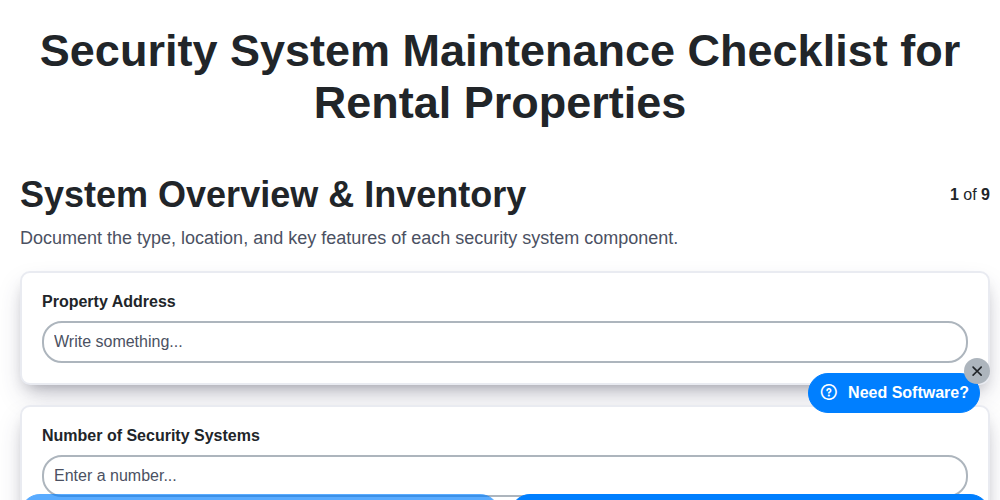
Table of Contents
- Introduction: Why Security System Maintenance Matters for Rental Properties
- 1. System Overview & Inventory: Knowing What You Have
- 2. Alarm Panel Inspection: The Brain of the Operation
- 3. Door & Window Sensors: Your First Line of Defense
- 4. Motion Detectors: Covering the Interior
- 5. Cameras: Monitoring and Recording
- 6. Keypad & Access Control: Ensuring Secure Entry
- 7. Backup Power & Communication: Keeping the System Live
- 8. System Programming & Configuration: Fine-Tuning for Optimal Performance
- 9. Documentation & Record Keeping: Tracking Maintenance and Issues
- 10. Tenant Communication & Training
- Resources & Links
TLDR: Keep your rental properties secure and avoid costly headaches with this simple security system maintenance checklist! It covers everything from panel inspections to camera checks and backups, helping you ensure tenant safety, reduce liability, and keep your security investment running smoothly. Download the template and schedule regular checks - it's easier than you think!
Introduction: Why Security System Maintenance Matters for Rental Properties
As a landlord, you're responsible for providing a safe and secure environment for your tenants. A security system can be a significant selling point and a crucial layer of protection, but only if it's working correctly. Just like any piece of equipment, security systems require regular maintenance to ensure optimal performance and reliability.
Ignoring maintenance can lead to false alarms, system failures during emergencies, and ultimately, increased risk and liability. A malfunctioning system might fail to alert you or the authorities when a break-in occurs, potentially putting tenants and property at risk. Furthermore, frequent false alarms can result in hefty fines and strained relationships with local emergency services.
This checklist provides a systematic approach to maintaining your rental property's security system, safeguarding your investment and providing peace of mind for everyone involved. Let's dive into the essential steps for ensuring your system is always ready to protect.
1. System Overview & Inventory: Knowing What You Have
Before you can maintain anything, you need to know exactly what you're dealing with. This initial step is crucial for understanding the scope of your security system maintenance. Start by creating a detailed inventory of all components. This includes the alarm panel itself (make, model, serial number), door and window sensors, motion detectors, cameras (if present), keypads, and any connected smart home devices.
Document the location of each device within the rental property. A simple spreadsheet or even a hand-drawn map can be invaluable. Note the type of sensor (e.g., magnetic contact, glass break) and any unique identifiers. This inventory serves as your baseline and allows you to easily track replacements, identify missing components, and understand the system's overall functionality. Knowing what you have sets the stage for effective and targeted maintenance.
2. Alarm Panel Inspection: The Brain of the Operation
The alarm panel is the central hub of your security system - it's the "brain" that receives signals, processes them, and initiates responses like sounding alarms or contacting monitoring services. Regular inspection here is critical.
Here's what to check:
- Physical Condition: Look for any signs of damage - cracks, water damage, or tampering. If the panel itself is compromised, the entire system is vulnerable.
- Power Indicator: Verify the panel is receiving power. A blinking or absent power light is a red flag.
- Battery Backup Status: Test the battery backup. Most panels have a self-test function. Run it and document the results. A failing battery will render the system useless during a power outage. Replace it immediately if it fails.
- Wiring Connections: While you may not want to disconnect anything, visually inspect exposed wiring for looseness or corrosion. Loose connections can cause false alarms or system failures. If you're not comfortable doing this, skip it and hire a professional.
- Error Logs: Check the panel's error log (if accessible). These logs can provide clues to underlying issues, like sensor malfunctions or communication problems.
- Communication Status: Confirm the panel is communicating properly with the monitoring center (if applicable). A loss of communication is a serious concern.
3. Door & Window Sensors: Your First Line of Defense
Door and window sensors are often the unsung heroes of a security system - the first responders to a potential breach. These seemingly simple devices provide critical alerts, giving you and your tenants valuable time to react. Regular inspection is vital to ensure they're functioning correctly.
Here's what to check:
- Physical Condition: Visually inspect each sensor for damage, cracks, or signs of tampering. Pay close attention to the mounting hardware; loose screws or a compromised adhesive can render the sensor ineffective.
- Sensor Alignment: Ensure the sensor and its corresponding magnet are properly aligned. Misalignment is a common cause of false alarms and can indicate a malfunctioning device.
- Cleanliness: Dust and debris can interfere with sensor function. Gently clean the sensor and magnet with a soft, dry cloth.
- Test Functionality: Most systems allow you to test individual sensors. Trigger the sensor (open the door or window) and confirm that the alarm panel registers the event.
- Battery Life (Wireless Sensors): Wireless door and window sensors run on batteries. Check battery levels regularly and replace them as needed. Low battery warnings are often displayed on the panel and should be addressed promptly.
Pro Tip: Create a spreadsheet or use a property management software to track the location of each sensor and its last maintenance date. This simplifies inspections and prevents overlooked areas.
4. Motion Detectors: Covering the Interior
Motion detectors are a crucial component of your rental property's security system, providing an extra layer of protection against intruders. These devices, typically placed in hallways, living rooms, and other high-traffic areas, detect movement and trigger the alarm. Here's what to check during maintenance:
- Placement & Coverage: Verify detectors are positioned correctly, free from obstructions like furniture, curtains, or plants that could block their range or cause false alarms. Ensure they cover the intended areas effectively. Consider their placement relative to pets - adjust sensitivity or use pet-immune detectors as needed.
- Testing: Regularly test each motion detector by walking through its range. Listen for a confirmation signal from the alarm panel, indicating it registered the movement. If a detector consistently fails to trigger during testing, it may need replacement or repositioning.
- Cleanliness: Dust and debris can interfere with a motion detector's sensors. Gently clean the lenses with a soft, dry cloth.
- Battery Life (Wireless Detectors): For wireless motion detectors, check the battery levels. Replace batteries proactively, not just when a low-battery warning is received.
- False Alarm Prevention: Analyze any past false alarms. Common causes include drafts, sunlight reflecting off surfaces, or insects. Adjust detector sensitivity or reposition if necessary.
5. Cameras: Monitoring and Recording
If your rental property utilizes security cameras, they require specific and consistent maintenance to ensure effective surveillance and legal compliance. Here's what to check:
- Camera Functionality: Regularly (at least monthly) visually inspect each camera to ensure it's free from obstructions (leaves, branches, snow, etc.) and pointed in the intended direction. Test each camera's live feed to verify image quality and clarity. Look for any signs of damage, such as cracks or water ingress.
- Recording Capabilities: Confirm that recording is functioning correctly. Review recorded footage periodically (e.g., weekly) to verify dates and times are accurate, and the system is capturing events as expected. Check storage capacity; ensure recordings aren't being overwritten prematurely due to lack of space.
- Night Vision: Specifically test the night vision functionality, especially important for properties with outdoor cameras. Ensure adequate illumination and clarity in low-light conditions.
- Privacy Considerations: Crucially, ensure all camera placement adheres to local and state laws regarding privacy. Clearly disclose the presence of cameras to tenants in writing as part of the lease agreement. Avoid placing cameras in areas where tenants have a reasonable expectation of privacy (e.g., bathrooms, bedrooms).
- Network Connectivity: Verify camera connectivity to the network. Check for dropped connections or intermittent issues.
- Firmware Updates: Check for and install any available firmware updates for your cameras. These often include bug fixes and security enhancements.
6. Keypad & Access Control: Ensuring Secure Entry
The keypad is the frontline of your security system. Regular checks here are crucial to ensure only authorized individuals can access the property.
What to Check:
- Keypad Functionality: Test each key on the keypad to ensure they respond correctly and register on the system. Sticky or unresponsive keys need addressing immediately.
- User Codes: Review all user codes currently programmed into the system. Remove any codes that are no longer valid (e.g., former tenants, previous property managers). Consider regularly rotating codes for enhanced security.
- Access Logs: Check the system's access logs. Look for any unusual activity or unauthorized access attempts. Investigate any discrepancies.
- Physical Damage: Inspect the keypad for any physical damage, such as cracks, broken buttons, or signs of tampering. A damaged keypad is a vulnerable point.
- PIN Code Security: Enforce strong PIN code practices. Encourage users to use unique, complex codes rather than easy-to-guess combinations. Avoid default codes.
- Access Control Integration: If your system integrates with smart locks or other access control devices, verify that the integration is functioning correctly and that all devices are synchronized.
7. Backup Power & Communication: Keeping the System Live
A security system is only effective if it stays active. Power outages and communication disruptions can render even the most advanced system useless. This section focuses on ensuring your rental property's security system maintains functionality during these challenges.
Battery Backup: Most security panels have built-in battery backups designed to kick in during a power failure. Test this regularly! Here's how:
- Simulate a Power Outage: Briefly disconnect the system from its power source (unplug it). Observe how long the system remains operational and if all components continue to function. Note the duration - it should be consistent with the manufacturer's specifications (usually 8-24 hours).
- Battery Health: Inspect the battery terminals for corrosion and test the battery's voltage if possible (refer to the system's manual for testing procedures). A consistently short battery backup time indicates the battery needs replacement.
- Replacement Schedule: Batteries typically last 3-5 years. Even if the battery passes a basic test, consider replacing it proactively within this timeframe.
Communication Redundancy: Many systems offer multiple communication methods - cellular, internet (Wi-Fi or Ethernet), and sometimes landline.
- Cellular Backup: Verify that the cellular connection is active and functioning. This is crucial for situations where internet service is unavailable.
- Internet Connectivity: Ensure a stable internet connection if your system utilizes it. A wired Ethernet connection is generally more reliable than Wi-Fi.
- Dual Communication: Ideally, utilize both cellular and internet communication for maximum redundancy.
Regularly testing and maintaining the backup power and communication systems is a vital component of keeping your rental property secure, especially when tenants are relying on it.
8. System Programming & Configuration: Fine-Tuning for Optimal Performance
Beyond basic functionality, regularly reviewing and adjusting the security system's programming is crucial. This isn't just about setting the time - it's about ensuring the entire system operates as intended and aligns with the property's specific needs.
Here's what to check:
- User Codes: Verify all user codes are accurate and appropriate. Are they still valid for current tenants or property managers? Consider updating or deleting codes as necessary.
- Entry/Exit Delays: Confirm entry and exit delays are correctly programmed to allow for safe and convenient entry and exit without triggering false alarms. Adjust these based on tenant feedback and property layout.
- Alarm Notifications: Double-check notification protocols. Ensure the correct contacts (property manager, monitoring company, designated emergency contacts) receive alerts. Verify notification methods (SMS, email, phone call) are functioning correctly.
- Sensor Sensitivity: For motion detectors, especially, review sensitivity settings. High sensitivity can lead to false alarms triggered by pets or environmental factors. Lower sensitivity might miss intrusions. Finding the sweet spot requires observation and adjustments.
- Zone Configuration: Review zone assignments. Are all sensors properly assigned to the correct zones (e.g., front door, back window)? Incorrect zoning can hinder investigations and delay responses.
- System Testing & Simulation: Periodically run simulated alarm scenarios to test the system's response. This validates that alerts are sent, monitoring is active, and emergency procedures are followed.
Document any changes made to the system's programming and clearly communicate those changes to relevant parties.
9. Documentation & Record Keeping: Tracking Maintenance and Issues
Consistent record-keeping is the unsung hero of any effective security system maintenance program. It's not just about fixing things when they break; it's about proactively identifying trends, understanding system behavior, and ensuring accountability. Here's what you should be documenting:
- Initial System Setup: Keep records of the original installation date, model numbers of all components (panel, sensors, cameras, etc.), and a diagram illustrating sensor placement.
- Maintenance Logs: After each inspection or repair, meticulously log the date, description of work performed, parts replaced, and technician's initials. This helps track recurring problems and identify potential systemic issues.
- Alarm Events: Note any false alarms or triggered events, along with the date, time, cause (if known), and resolution. Analyzing these events can help fine-tune sensor sensitivity and prevent future incidents.
- User Access & Codes: Maintain a secure log of all user access codes, with dates of issuance and termination. This is crucial for accountability and security.
- Software Updates: Record dates and details of any software updates applied to the security panel or connected devices.
- Warranty Information: Keep all warranty documents organized and readily accessible for all components.
- Communication History: Document any communication with the monitoring company, including updates, issues, or changes to service agreements.
Storing this information digitally (in a spreadsheet or dedicated software) is ideal for easy searching and sharing. Physical copies are acceptable but can be more difficult to manage. Consistent, accurate documentation isn't just good practice; it's essential for protecting your investment and ensuring the continued effectiveness of your rental property's security system.
10. Tenant Communication & Training
While not strictly maintenance, proactively communicating with and training tenants about the security system can significantly reduce false alarms and increase overall system effectiveness. Consider these points:
- System Overview: Briefly explain the system's purpose and how it benefits them and the property.
- Alarm Procedures: Clearly outline what tenants should do if the alarm goes off (stay put, wait for police, etc.). Provide emergency contact numbers.
- Sensor Sensitivity: Advise tenants on potential causes of false alarms (pets, drafts, etc.) and how to minimize them.
- Keypad Use: If tenants are authorized to arm/disarm, provide clear instructions and password protocols.
- Reporting Issues: Encourage tenants to immediately report any system malfunctions or concerns. A simple email address or phone number dedicated to security system issues can streamline this.
- Written Agreement (Recommended): A short addendum to the lease agreement outlining tenant responsibilities related to the security system provides legal clarity and reinforces expectations.
Resources & Links
- Alarm.com: A leading provider of home and business security systems. Offers information, product details, and dealer locator for a wide range of security solutions.
- SimpliSafe: A popular DIY home security system provider. Offers articles and resources on home security best practices and system maintenance.
- Vivint: A comprehensive home security and automation company. Their website provides security tips, FAQs, and information on system components.
- ADT: A well-known security company with a wealth of information regarding home security, including maintenance tips and system explanations.
- Ring: Focuses on video doorbells and security cameras. Offers tutorials, FAQs, and troubleshooting guides relevant to camera maintenance and system integration.
- Bravosystems: Provides security products and information. Their site covers a wide variety of security topics and system components, helpful for understanding the 'nuts and bolts' of security systems.
- Federal Trade Commission (FTC): The FTC provides information about consumer protection, including home security systems and privacy. Useful for understanding legal and ethical considerations related to tenant data and security measures.
- National Institute of Standards and Technology (NIST): NIST offers cybersecurity guidelines and best practices. Though focused on broader cybersecurity, it provides valuable insights into secure system design and maintenance principles applicable to rental properties.
- Alarm Systems Agency: Official site of the Alarm Systems Agency. Contains information and resources about standards, regulations, and best practices for alarm systems and security professionals.
- Security Industry Association (SIA): Provides resources, training, and certifications for security professionals. Offers insights into security best practices and emerging technologies.
- Home Depot: Offers a wide variety of home security products and often has tutorials and guides related to installation and basic maintenance.
- Lowe's: Similar to Home Depot, Lowe's provides a range of security products and resources for DIY homeowners and landlords.
- Propertyware: Provides property management software. Their blog often features articles covering maintenance, legal compliance, and tenant relations, potentially including security-related topics.
- Buildium: Another popular property management software provider, offering articles and resources for landlords, covering topics related to property upkeep and tenant safety.
Frequently Asked Questions
Why is security system maintenance important for rental properties?
Regular maintenance ensures your security system functions correctly, protecting your tenants and property from potential threats. It can prevent false alarms, identify potential equipment failures, and maintain the system's effectiveness over time. It also demonstrates due diligence and can be beneficial for liability concerns.
What types of security systems are covered in this checklist?
This checklist covers common security systems found in rental properties, including wired and wireless alarm systems, CCTV cameras, smart locks, and access control systems. While specific details might vary based on the system's model, the general principles apply to most setups.
How often should I perform each maintenance task?
The frequency of maintenance tasks varies. Quick visual inspections should be done monthly. More thorough checks involving testing and cleaning are recommended quarterly or semi-annually. Detailed professional servicing is typically advised annually or as specified by the manufacturer.
What are some signs that my security system needs immediate attention?
Signs of trouble include frequent false alarms, system errors or unusual noises, unresponsive components, power outages affecting the system, visible damage to equipment, and alerts from your monitoring service.
Should I, as the landlord, be responsible for all security system maintenance or should I involve the tenant?
The responsibility is typically outlined in the lease agreement. Generally, the landlord is responsible for maintaining the core system and equipment. However, tenants can assist with minor tasks like replacing batteries or reporting issues. Clearly define responsibilities in the lease.
What should I do if I have a wireless security system?
Wireless systems require special attention to battery life and signal strength. Regularly check battery levels in sensors and keypads and ensure there are no obstructions interfering with wireless signals. Check for firmware updates as well.
Is professional maintenance necessary, and how do I find a reliable service provider?
Annual professional maintenance is highly recommended. Look for licensed and insured security system technicians with experience servicing rental properties. Check online reviews and ask for referrals from other landlords.
What should I document regarding security system maintenance?
Keep a detailed record of all maintenance activities, including dates, tasks performed, findings, and any repairs made. This documentation can be valuable for warranty claims, troubleshooting, and demonstrating due diligence.
How does security system maintenance contribute to liability reduction?
Regular maintenance demonstrates you're taking reasonable steps to protect your tenants and property. This can help mitigate liability in the event of a security breach or incident.
Comments
There are no comments yet. Be the first to add one!
Real Estate Management Solution Demo
Simplify your real estate operations! ChecklistGuro streamlines property management, lease renewals, and maintenance requests. Enhance tenant satisfaction and maximize ROI. Manage it all with our Work OS.
Related Articles
Stress-Free Inspections: Your Home Inspection Coordination Checklist Template
The Ultimate Website Maintenance Checklist Template
10 Essential Checks: Your Brokerage Policy Review Checklist
The Ultimate Office Opening/Closing Checklist Template
Your Ultimate AML Compliance Checklist Template
Rent Collection Checklist Template: Your Landlord's Guide
Your Complete Flood Zone Disclosure Checklist Template
Fair Housing Training Checklist Template: Your Guide to Compliance
Need help with
Real Estate?
Have a question? We're here to help. Please submit your inquiry, and we'll respond promptly.