Warehouse WMS Error Handling Checklist: A Proactive Guide to Minimizing Disruptions
Published: 12/19/2025 10:00 PM Updated: 12/20/2025 12:13 PM
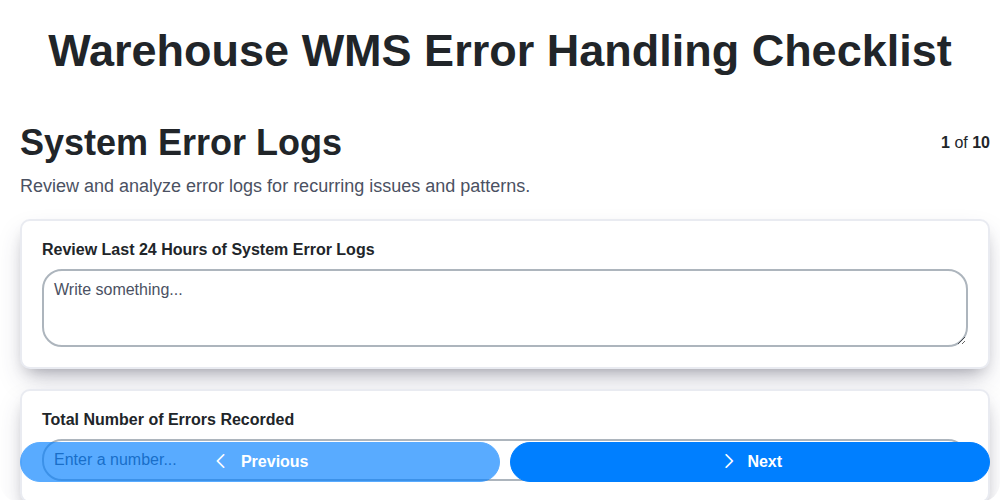
Table of Contents
- Introduction: Why Error Handling is Critical in Warehouse WMS
- 1. System Error Logs: Your First Line of Defense
- 2. Data Validation Errors: Preventing Issues at the Source
- 3. Integration Error Handling: Bridging the Gaps
- 4. User Interface Error Messaging: Clarity for Warehouse Staff
- 5. Exception Handling Procedures: Defined Responses to Unexpected Issues
- 6. Automated Error Reporting: Real-Time Visibility and Escalation
- 7. Backup and Recovery Procedures: Protecting Your Data and Operations
- 8. Error Resolution Documentation: Building a Knowledge Base
- 9. User Training on Error Identification: Empowering Your Team
- 10. Performance Monitoring During Error Handling: Measuring Effectiveness
- 11. Root Cause Analysis: Going Beyond the Symptom
- 12. Continuous Improvement: Refining Your Error Handling Processes
- Conclusion: Building a Resilient Warehouse Operation
- Resources & Links
TLDR: Warehouse WMS errors can cripple operations. This checklist provides a step-by-step guide to proactively identify, handle, and resolve common WMS errors - from system logs to user training - ensuring minimal disruptions and maximizing efficiency. Think of it as your error-fighting playbook for a smoother warehouse workflow.
Introduction: Why Error Handling is Critical in Warehouse WMS
A Warehouse Management System (WMS) is the backbone of efficient warehouse operations, orchestrating everything from receiving and putaway to picking, packing, and shipping. But even the most sophisticated WMS isn't immune to errors. These errors, whether stemming from system glitches, data discrepancies, or user mistakes, can quickly snowball into significant problems - impacting order fulfillment accuracy, increasing labor costs, and ultimately harming customer satisfaction.
Proactive error handling isn't just about reacting to problems; it's about building a resilient and reliable warehouse operation. A well-defined error handling process allows for swift identification, diagnosis, and resolution of issues, minimizing disruption and ensuring data integrity. Ignoring errors or relying on reactive troubleshooting can lead to cascading failures and costly downtime. This checklist, and the principles it embodies, provides a roadmap to creating that proactive and robust error handling strategy for your warehouse WMS.
1. System Error Logs: Your First Line of Defense
Your warehouse's WMS (Warehouse Management System) generates a wealth of data, and a significant portion of that data is captured in system error logs. These aren't just for IT; they's your first line of defense against disruptions. Think of them as the WMS's diary, recording every hiccup, warning, and outright error it encounters.
Regularly reviewing these logs is crucial. Don't just leave them to accumulate! Look for recurring patterns, unusually high error counts, or messages that consistently point to a specific area of your warehouse operations. Understanding the type of error (e.g., database connection failure, permission error, hardware malfunction) will guide your investigation.
Key things to look for:
- Date and Time Stamps: Essential for correlating errors with specific events or shifts.
- Error Codes: Many errors have unique codes that provide more detailed information - consult your WMS documentation to decipher them.
- Severity Levels: Errors are often categorized by severity (e.g., Warning, Error, Critical). Prioritize addressing critical and error-level events immediately.
- Affected Modules: Identify which WMS modules (receiving, picking, shipping, inventory management, etc.) are generating the errors.
- User Information: If applicable, identify the user associated with the error - this may point to training gaps or process issues.
By diligently monitoring system error logs, you can proactively identify and address potential problems before they escalate into major disruptions.
2. Data Validation Errors: Preventing Issues at the Source
Data validation errors are a common pain point in any warehouse, and particularly frustrating when they disrupt workflows. These errors occur when data entered into your Warehouse Management System (WMS) doesn't meet pre-defined rules or expectations. It's far more efficient - and less costly - to prevent them than to constantly resolve them.
So, where do these errors originate? They can stem from manual data entry mistakes, misread barcodes, inaccurate product dimensions, or even problems with the data being fed from upstream systems (like ERP or order management).
Here's how to proactively address data validation errors:
- Define Clear Validation Rules: Establish comprehensive rules for every data field - from SKU numbers and lot numbers to weights and dimensions. These rules should be clearly documented and accessible to all users.
- Implement Real-Time Validation: Don't wait until the end of a process to catch errors. Implement validation checks as data is entered. This allows for immediate correction.
- Utilize Barcode Scanning and RFID: Minimize manual entry wherever possible. Barcodes and RFID tags drastically reduce transcription errors.
- Mandatory Fields: Ensure critical data fields are mandatory, preventing incomplete records.
- Data Type Enforcement: Enforce the correct data type for each field (e.g., numeric for quantity, text for descriptions).
- Range Checks: Define acceptable ranges for values, flagging entries outside those boundaries.
- Regular Data Cleansing: Schedule regular clean-up routines to identify and correct inconsistencies in existing data.
- User Feedback Loop: Encourage users to report suspected data errors - they often catch things that automated checks miss.
3. Integration Error Handling: Bridging the Gaps
Warehouse Management Systems (WMS) rarely operate in a silo. They's frequently integrated with other critical systems - ERP, transportation management (TMS), order management, accounting, and more. These integrations are vital for seamless workflow, but they're also a prime breeding ground for errors. A failure in one system can ripple outwards, disrupting the entire warehouse operation.
This section of your WMS error handling checklist needs a laser focus on identifying, resolving, and preventing integration-related issues. Here's what to examine:
- Mapping Verification: Regularly audit your data mapping between systems. Ensure fields are accurately translating and that data types are compatible. Even a minor mismatch can cause catastrophic failures.
- API Monitoring: APIs are the backbone of most integrations. Monitor API performance - response times, error rates, and availability. Automated monitoring tools are invaluable here.
- Error Code Analysis: Understand the specific error codes generated by each integrated system. Document what each code signifies and the recommended resolution. Generic "connection error" messages aren't enough - you need detailed information.
- Transaction Rollback: Implement robust transaction rollback procedures. If an error occurs during an integrated process (e.g., order placement to inventory update), the entire transaction should be rolled back to prevent data inconsistencies.
- Real-time Error Notification: Establish a system for real-time error notifications to relevant personnel. Don't wait for daily reports; immediate notification allows for quicker intervention.
- Data Reconciliation: Implement scheduled data reconciliation processes to identify and correct discrepancies between integrated systems. This is a preventative measure to catch issues before they escalate.
- Version Compatibility: Track version numbers of all integrated systems. Incompatibilities arising from updates are a frequent cause of errors. Testing should occur before deploying updates.
4. User Interface Error Messaging: Clarity for Warehouse Staff
Poorly designed error messages are a warehouse worker's worst nightmare. A cryptic Error Code 47B doesn't help anyone identify and correct a problem, especially when they're under pressure to keep operations flowing. Your WMS error handling system needs to prioritize clear, concise, and actionable UI error messaging.
Here's what makes effective UI error messaging in a warehouse setting:
- Plain Language: Ditch the technical jargon. Use language warehouse staff understand. Instead of Invalid SKU Format, use Incorrect Product Code Entered.
- Specific & Detailed: Vague errors lead to frustration and wasted time. Tell the user exactly what went wrong and where. Cannot fulfill order #12345 - Quantity requested (10) exceeds available stock (5).
- Actionable Guidance: Don't just point out the error; suggest a solution. Incorrect Product Code Entered. Please verify the product code against the packing slip and re-enter.
- Visual Cues: Employ icons, color-coding (red for critical errors, yellow for warnings), and highlighting to draw attention to the problematic area.
- Contextual Help: Provide quick access to relevant information or troubleshooting guides directly from the error message. A link to a product lookup or common error FAQs can save significant time.
- Minimize Disruption: Design messages to be informative without halting the entire workflow unnecessarily. Consider non-blocking error alerts or the ability to acknowledge errors without immediate action.
Prioritizing user-friendly error messaging isn't just about making warehouse staff feel better - it's about improving efficiency, reducing errors, and ultimately contributing to a more productive warehouse operation.
5. Exception Handling Procedures: Defined Responses to Unexpected Issues
Warehouse Management Systems (WMS) are designed to streamline operations, but unexpected issues-exceptions-are inevitable. A robust exception handling procedure isn't just about fixing the problem; it's about having a pre-defined roadmap for how to fix it, minimizing disruption and maximizing efficiency.
These procedures should clearly outline the steps to take when encountering specific, common errors. Instead of relying on individual users to improvise (which can lead to inconsistent responses and potential further issues), established processes ensure consistency and reduce resolution time.
What should your exception handling procedures cover?
- Error Categorization: Define clear categories of errors (e.g., critical system failures, data integrity issues, user access problems) with varying levels of urgency and response protocols.
- Escalation Paths: Outline when and to whom errors should be escalated - which team members or departments are responsible for handling specific types of issues.
- Communication Protocols: Specify who needs to be notified about an error, including users impacted by the problem. Clear communication prevents confusion and ensures timely resolution.
- Workarounds: For common issues that don't require immediate system fixes, define temporary workarounds to allow operations to continue while the underlying problem is addressed.
- Documentation: Require thorough documentation of the error, steps taken to resolve it, and any workarounds implemented. This helps with future troubleshooting and system improvement.
A well-defined and consistently applied exception handling procedure turns unexpected problems from potential chaos into manageable events, contributing to overall warehouse stability and performance.
6. Automated Error Reporting: Real-Time Visibility and Escalation
Manual error reporting is slow, prone to oversight, and often results in delayed resolutions. Implementing automated error reporting within your Warehouse Management System (WMS) is crucial for proactive problem management. This involves configuring the system to automatically capture and transmit error details - not just notifications of that an error occurred, but comprehensive data around what happened, when, and where.
Think beyond simple email alerts. Effective automated error reporting should include:
- Detailed Error Logs: Capture comprehensive error messages, timestamps, user IDs, transaction IDs, and affected data.
- Severity Levels: Assign severity levels (e.g., Critical, Major, Minor) to errors based on their impact on warehouse operations.
- Automated Escalation: Define rules to automatically escalate critical errors to designated personnel - managers, IT support, or specialized error resolution teams - based on pre-defined criteria. A system might automatically notify the IT department for critical integration failures or the floor supervisor for frequent user interface error messages.
- Centralized Dashboard: Provide a real-time dashboard displaying error trends, severity breakdowns, and resolution status. This gives management and support teams instant visibility into the health of the WMS and allows for data-driven decision making.
- Integration with Incident Management Systems: Ideally, automated error reporting should integrate with your existing IT incident management systems to streamline the resolution workflow.
By automating this process, you minimize downtime, improve efficiency, and ensure that errors are addressed quickly and effectively, ultimately enhancing overall warehouse performance.
7. Backup and Recovery Procedures: Protecting Your Data and Operations
Warehouse WMS errors, even those swiftly resolved, can highlight vulnerabilities in your data security and operational continuity. Robust backup and recovery procedures aren't just a 'nice-to-have' - they're a critical safeguard against significant downtime and data loss.
Beyond Regular Backups: Simply having backups isn't enough. A comprehensive plan includes:
- Frequency & Scope: Define backup frequency based on your WMS data's volatility and criticality. Daily full backups, supplemented with more frequent incremental or differential backups, are often necessary. Consider backing up not just the database, but also configuration files and any associated applications.
- Offsite Storage: Securely store backups offsite, preferably in a geographically separate location, to protect against physical disasters like fire or flooding affecting your primary facility. Cloud-based backup solutions are a popular and cost-effective option.
- Regular Testing: Crucially, test your recovery procedures regularly. Simulated disaster recovery scenarios (without impacting live operations) will validate your backup integrity and ensure your team can execute the process effectively under pressure. Document the results of these tests and make necessary adjustments.
- Recovery Time Objective (RTO) & Recovery Point Objective (RPO): Clearly define your RTO (how long can you afford to be down) and RPO (how much data loss is acceptable) and ensure your backup and recovery processes align with these objectives.
- Version Control: Implement version control for backups, allowing you to restore to specific points in time if needed, essential for correcting errors introduced during data updates or integrations.
A well-documented and actively tested backup and recovery plan provides peace of mind and ensures your warehouse operations can swiftly rebound from unforeseen events.
8. Error Resolution Documentation: Building a Knowledge Base
Effective error resolution isn't just about fixing the immediate problem; it's about preventing it from happening again. That's where comprehensive error resolution documentation becomes crucial. This isn't just about creating a pile of troubleshooting guides - it's about building a searchable, easily accessible knowledge base that empowers your team to resolve issues quickly and consistently.
Here's what your error resolution documentation should include:
- Standardized Error Codes & Descriptions: Create a clear, concise system for classifying errors. This allows users (and support staff) to quickly understand the nature of the problem without needing to be WMS experts.
- Step-by-Step Troubleshooting Guides: For common errors, develop detailed, sequential guides outlining the steps to diagnose and resolve them. Include screenshots or diagrams where helpful. These should be written for various levels of technical skill.
- Root Cause Analysis Documentation: When an error occurs, document why it happened. This prevents recurrence and informs process improvements. Capture details like the trigger event, data involved, and contributing factors.
- Workarounds & Temporary Solutions: Sometimes, a full resolution isn't immediately available. Document any temporary workarounds to minimize disruption while a permanent fix is developed. Clearly label these as temporary solutions with escalation paths.
- Escalation Procedures: Define when and how to escalate an error to higher-level support or development teams. Provide clear contact information and details of the required information to be passed.
- Version Control & Updates: Error resolution procedures evolve. Implement a robust version control system to track changes and ensure everyone is using the most up-to-date information. Regularly review and update documentation based on experience and system updates.
- Centralized Repository: Keep all error resolution documentation in a centralized, searchable repository accessible to all relevant warehouse personnel. This might be a dedicated wiki, shared drive, or integrated knowledge management system.
By investing in robust error resolution documentation, you'll significantly reduce downtime, improve operational efficiency, and empower your team to confidently handle WMS errors.
9. User Training on Error Identification: Empowering Your Team
Errors in a Warehouse Management System (WMS) aren't just technical glitches; they represent disruptions to your entire operation. While robust error handling procedures are crucial, they're only as effective as the people executing them. That's why comprehensive user training focused specifically on error identification is paramount.
This isn't about general WMS training; it's about equipping your warehouse staff with the skills to recognize when something isn't right. Teach them to identify anomalies in receiving, put-away, picking, packing, and shipping. For example, a consistently negative inventory count in a specific location, unusual order discrepancies, or persistent issues with barcode scanning - these are all clues needing investigation.
Training should include:
- Common Error Scenarios: Demonstrate real-world examples of errors that frequently occur in your warehouse.
- Visual Cues: Show users what to look for - error messages, unusual system behavior, discrepancies between physical inventory and system records.
- Reporting Procedures: Clearly outline the steps to take when an error is detected - who to contact, what information to provide, and how to document the issue.
- Escalation Paths: Define when an issue needs to be escalated to a supervisor or IT support.
- Ongoing Refreshers: Error handling processes and WMS updates evolve. Regular refresher training ensures everyone stays on the same page.
Investing in user training isn't just about fixing errors; it's about fostering a culture of proactive problem-solving and empowering your team to contribute to the efficiency and accuracy of your warehouse operations. A well-trained team becomes your first line of defense against WMS errors, reducing downtime and improving overall performance.
10. Performance Monitoring During Error Handling: Measuring Effectiveness
Error handling isn't just about fixing problems; it's about continuously improving your Warehouse Management System (WMS) and minimizing future disruptions. Performance monitoring during and after error resolution is crucial for validating your efforts and identifying areas for proactive improvement.
Here's what you should be tracking:
- Resolution Time: How long does it take to resolve different types of errors? Track averages and outliers to pinpoint bottlenecks in your error handling processes.
- Error Frequency: Monitor the recurrence rate of specific errors after they're resolved. A high recurrence rate suggests the root cause hasn't been fully addressed.
- System Load: Observe system resource usage (CPU, memory, network) during and after error handling. Spikes can indicate underlying infrastructure issues contributing to errors.
- User Impact: Measure the disruption to warehouse operations caused by errors. This could include delays in picking, packing, or shipping. Gather feedback from users regarding the impact on their workflow.
- Error Resolution Accuracy: Are fixes truly resolving the errors, or are they simply masking the symptoms? Track instances where errors reoccur after an approved fix.
- Automated Reporting Effectiveness: Is your automated error reporting system providing timely and accurate information to the right personnel? Evaluate if the alerts are actionable.
- Training Effectiveness: Correlate user error identification rates (from error logs) with training completion and feedback to assess the impact of your training programs.
By actively monitoring these metrics, you're not just reacting to errors - you're building a resilient and efficient warehouse operation. Regularly review these performance indicators, identify trends, and adjust your error handling procedures and training accordingly.
11. Root Cause Analysis: Going Beyond the Symptom
Fixing the immediate error is crucial, but simply patching the surface won't prevent it from recurring. True warehouse WMS error handling requires a dedicated focus on root cause analysis (RCA). This isn't just about logging the error and moving on; it's about digging deep to understand why the error occurred in the first place.
Start by forming a cross-functional team - involve warehouse operators, IT support, WMS administrators, and even potentially representatives from your integration partners. Gather all available data: system logs, user reports, transaction records, and integration error details. Employ techniques like the 5 Whys to relentlessly probe beyond the surface-level issue. For example, if a user reported a data validation error, don't just fix the validation rule. Ask Why did the data initially enter the system in an invalid format? This might reveal flaws in receiving processes, scanner configurations, or even initial data entry training.
Consider external factors too. A spike in order volume might be exposing a performance bottleneck in your integration. A recent software update could have introduced unintended consequences. RCA isn't a blame game; it's a learning opportunity. Document findings thoroughly and create action plans with clear ownership and deadlines to ensure permanent solutions are implemented and prevent recurrence. By focusing on the root cause, you're not just resolving errors; you're improving your overall warehouse operations and building a more resilient WMS environment.
12. Continuous Improvement: Refining Your Error Handling Processes
Error handling isn't a set it and forget it task. Your warehouse operations and the systems supporting them are constantly evolving. New integrations, software updates, and changes in workflows inevitably introduce new potential error points. A robust error handling system requires ongoing refinement.
This means regularly reviewing your existing checklist and processes - not just when a major incident occurs. Analyze recurring error types. Are certain data validation errors consistently popping up? Is a specific integration repeatedly failing? These patterns point to underlying issues that need deeper investigation and correction.
Consider implementing a feedback loop. Encourage users to report errors, even seemingly minor ones. This provides valuable insight into real-world challenges and potential gaps in your procedures. Data from performance monitoring during error handling should be actively analyzed - are resolution times increasing? Are certain areas consistently experiencing bottlenecks? Use this information to refine training materials, adjust system configurations, and optimize workflows. Remember, the goal isn't just to handle errors; it's to prevent them from happening in the first place.
Conclusion: Building a Resilient Warehouse Operation
Ultimately, implementing and diligently maintaining a robust Warehouse WMS Error Handling Checklist isn't just about fixing problems after they arise-it's about proactively building a resilient and reliable warehouse operation. By prioritizing error prevention, swift resolution, and continuous improvement, you're not only minimizing disruptions and reducing costs but also cultivating a culture of accountability and continuous learning within your team. A well-defined and consistently followed checklist acts as a vital safety net, ensuring that your warehouse keeps running smoothly, even when unexpected challenges arise. Invest in this process, and you'll build a foundation for long-term operational excellence and customer satisfaction.
Resources & Links
- Warehouse Management System (WMS) Providers: A general resource for understanding WMS functionalities, including error handling capabilities offered by various vendors. Explore different platforms and features.
- National Institute of Standards and Technology (NIST): NIST offers resources and guidelines on data security and resilience, which are directly relevant to robust error handling and backup procedures. Look for publications on cybersecurity and data integrity.
- Amazon Web Services (AWS): While primarily a cloud provider, AWS offers services and documentation on logging, monitoring, and error handling applicable to WMS systems, especially those deployed in the cloud. Search for services like CloudWatch.
- Microsoft Azure: Similar to AWS, Azure provides cloud services for error logging, data backup, and disaster recovery - relevant to maintaining a resilient WMS. Look into Azure Monitor and Azure Backup.
- Gartner: Gartner provides industry research and analysis of WMS vendors and features. Check for reports on WMS error handling capabilities and best practices (subscription required).
- APQC: APQC is a research organization providing benchmarking data and best practices across various industries, including supply chain and warehousing. They may have data on error rates and recovery times (subscription often required).
- ISC²: ISC² focuses on cybersecurity and risk management. Their resources can inform secure error handling and data recovery procedures to protect against malicious attacks or data breaches.
- Supply Chain & Logistics Technology USA: Industry association with resources for logistics professionals. They often host webinars or publish articles on topics related to warehouse management and technology.
- International Organization for Standardization (ISO): Explore ISO standards, particularly those related to quality management (e.g., ISO 9001) and information security (e.g., ISO 27001), which indirectly address error handling and process control.
- IBM: IBM offers enterprise software and services, and their documentation and case studies often cover aspects of error handling and data recovery within complex systems.
Frequently Asked Questions
What is a WMS and why is error handling important in a warehouse?
A Warehouse Management System (WMS) is software that manages and controls warehouse operations, from receiving and putaway to picking, packing, and shipping. Error handling is crucial because WMS errors can lead to inaccurate inventory, order fulfillment issues, shipping delays, and ultimately, customer dissatisfaction and lost revenue. Proactive error handling minimizes these disruptions and ensures efficient warehouse operations.
What is the scope of this checklist? Does it cover all types of WMS errors?
This checklist provides a comprehensive guide to common WMS error sources and best practices for handling them. While it aims to cover a wide range of errors, it's not exhaustive. The specific errors you encounter will depend on your WMS version, warehouse processes, and integration complexity. It serves as a framework to build upon.
Who should use this checklist?
This checklist is beneficial for a variety of roles, including warehouse managers, operations supervisors, IT personnel responsible for WMS maintenance, and process improvement teams. Anyone involved in maintaining and optimizing warehouse operations using a WMS should find it valuable.
What are some common categories of WMS errors addressed in the checklist?
The checklist covers errors related to data accuracy (like barcode scanning, data entry), system integrations (ERP, shipping carriers), device malfunctions (scanners, printers), user errors, and process breakdowns. It also includes preventative measures and recovery strategies for each category.
The checklist mentions 'proactive' error handling. Can you elaborate?
'Proactive' error handling means anticipating potential problems and implementing measures to prevent them before they occur. This includes regular system audits, user training, data validation rules, and robust exception handling procedures. Rather than just reacting to errors, proactive approaches aim to reduce their frequency and impact.
How does the checklist address user errors? Are there solutions beyond just training?
While training is fundamental, the checklist suggests solutions like implementing data validation rules, simplifying user interfaces, providing clear error messages, and automating tasks to reduce manual data entry. It also promotes incorporating feedback from users to identify and address usability issues.
What types of system integrations are typically covered by the checklist's error handling?
The checklist typically addresses errors related to integrations with Enterprise Resource Planning (ERP) systems (for inventory and order data), shipping carriers (for tracking and label generation), and potentially other systems like quality control or transportation management systems (TMS).
What is the difference between an 'exception' and an 'error' in the context of a WMS?
While often used interchangeably, in a WMS context, an 'error' is a deviation from the expected outcome. An 'exception' is a specific type of error that requires intervention or a different process path to resolve. The checklist helps distinguish between both and outline appropriate responses.
How often should I review and update this checklist?
The checklist should be reviewed and updated at least annually, or more frequently if there are significant changes to your warehouse processes, WMS version, or integration landscape. Regular updates ensure its relevance and effectiveness.
Where can I find additional resources if I encounter a WMS error not covered in this checklist?
Your WMS vendor is the primary resource for troubleshooting specific errors. They can provide technical support and guide you through error resolution. Also, consult your internal IT documentation and consider engaging with online warehouse management communities for shared experiences and solutions.
Found this Article helpful?
Comments
There are no comments yet. Be the first to add one!
WMS - Warehouse Management System Solution Demo
Optimize your warehouse operations & boost efficiency! ChecklistGuro's WMS streamlines inventory management, order fulfillment, and shipping. Reduce errors, improve accuracy, & maximize space utilization. Manage it all with our Work OS.
Related Articles

Ensuring Success: Your WMS Automation Validation Checklist Template

Mastering Warehouse Labeling: Your WMS Process Checklist Template
The Ultimate Supply Chain Inventory Accuracy Audit Checklist: A Step-by-Step Guide
Mastering Putaway: Your WMS Optimization Checklist

Mastering Your Yard: A Warehouse WMS Yard Management Checklist Template

Warehouse Data Integrity: Your WMS Checklist Template

WMS System Performance Monitoring Checklist: A Comprehensive Guide

Seamless RFID Integration: Your WMS Checklist Template for Success
We can do it Together
Need help with
Warehouse Management System (WMS)?
Have a question? We're here to help. Please submit your inquiry, and we'll respond promptly.