Warehouse WMS Implementation Checklist: Your Path to Success
Published: 12/19/2025 10:00 PM Updated: 12/20/2025 12:22 PM
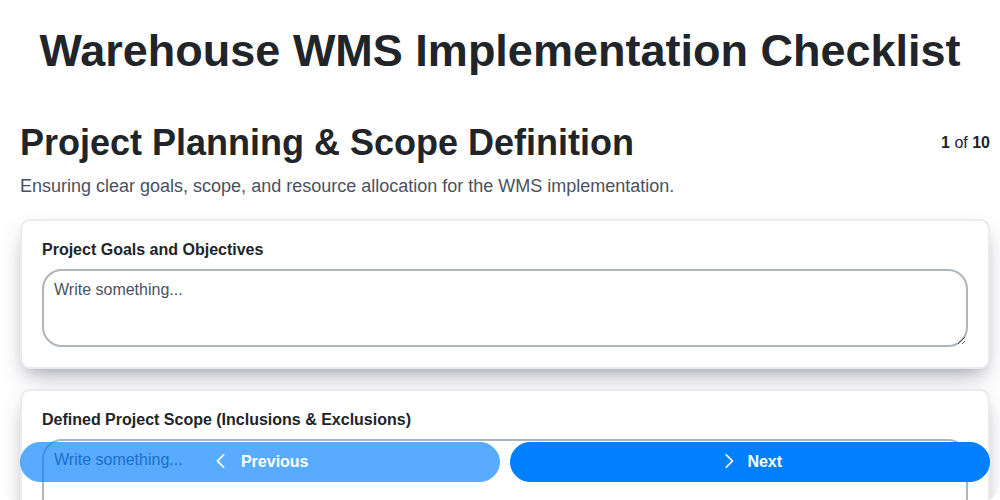
Table of Contents
- Introduction: Why a WMS Checklist is Essential
- 1. Project Planning & Scope Definition: Laying the Foundation
- 2. Hardware & Infrastructure Readiness: Ensuring a Solid Base
- 3. Software Installation & Configuration: Setting Up the System
- 4. Data Migration & Validation: Moving and Verifying Your Data
- 5. Integration with Existing Systems: Connecting the Pieces
- 6. User Training & Documentation: Empowering Your Team
- 7. Testing & Quality Assurance: Identifying and Fixing Issues
- 8. Go-Live & Post-Implementation Support: A Smooth Transition
- 9. Security & Access Control: Protecting Your Warehouse
- 10. Compliance & Regulatory Checks: Staying on the Right Side of the Law
- 11. Risk Assessment and Mitigation
- 12. Performance Monitoring and Optimization
- Conclusion: Achieving WMS Success
- Resources & Links
TLDR: Implementing a Warehouse Management System (WMS) can be complex! This checklist breaks down the process into 11 key steps-from planning and hardware setup to user training and security-to ensure a smooth, successful, and compliant WMS launch. Use it to stay on track, avoid costly mistakes, and maximize your WMS investment.
Introduction: Why a WMS Checklist is Essential
Implementing a Warehouse Management System (WMS) is a significant undertaking, impacting every facet of your warehouse operations. It's more than just installing software; it's a complete overhaul of processes, data, and potentially your entire infrastructure. Without careful planning and execution, even the best WMS can fail to deliver the expected returns, leading to costly delays, frustrated employees, and unmet business goals.
That's where a comprehensive WMS implementation checklist becomes absolutely essential. Think of it as your roadmap to success, ensuring that every critical step is accounted for, potential pitfalls are identified, and responsibilities are clearly defined. Skipping even seemingly minor details can snowball into major problems down the line. A well-defined checklist minimizes risk, keeps the project on track and budget, and ultimately maximizes the value of your WMS investment. It's the foundation for a smooth, successful transition and a future-proof warehouse.
1. Project Planning & Scope Definition: Laying the Foundation
A successful Warehouse Management System (WMS) implementation isn't built on code alone; it's built on meticulous planning. This initial phase is arguably the most crucial. Without a clearly defined scope and robust project plan, you risk scope creep, missed deadlines, and ultimately, a WMS that doesn't meet your business needs.
Here's what needs to be covered:
- Define Clear Objectives: What specific problems are you trying to solve with the WMS? Increased efficiency? Improved inventory accuracy? Reduced labor costs? Quantify these goals - reduce picking errors by 15% is far more valuable than improve accuracy.
- Scope Boundaries: Precisely define what the WMS will and will not manage. Will it cover all product lines? All warehouse locations? Be specific to avoid confusion later.
- Stakeholder Identification & Engagement: Identify all stakeholders - warehouse managers, IT, finance, operations - and establish clear communication channels. Their input is vital.
- Team Formation & Roles: Assign roles and responsibilities - project manager, implementation team, subject matter experts.
- Budget & Timeline: Establish a realistic budget and timeline, factoring in potential risks and contingencies.
- Risk Assessment: Identify potential roadblocks and develop mitigation strategies. This includes considering impacts to existing processes and workflows.
- Process Mapping: Document current warehouse processes to identify areas for improvement and tailor the WMS configuration accordingly.
A well-defined project plan in this phase will act as your roadmap, guiding every subsequent step and increasing the likelihood of a smooth and successful WMS implementation.
2. Hardware & Infrastructure Readiness: Ensuring a Solid Base
A powerful Warehouse Management System (WMS) is only as effective as the infrastructure it runs on. Don't let performance bottlenecks or system failures derail your implementation. This phase focuses on ensuring your warehouse's physical and digital foundations can handle the demands of the new WMS.
Here's what needs to be addressed:
- Network Assessment: Evaluate your current network bandwidth, latency, and stability. The WMS will rely on real-time data exchange; insufficient network capacity leads to slow response times and potential data loss. Consider upgrades or optimizations.
- Server Capacity: Determine if your existing servers (or cloud resources) have the processing power, memory, and storage to support the WMS workload. Factor in future growth.
- Barcode Scanners & Mobile Devices: Verify compatibility of existing scanners and devices with the WMS. Are firmware versions up-to-date? Will new devices be required? Test thoroughly.
- Printers: Ensure printers are compatible with the WMS and capable of generating necessary labels and documents.
- Power & Backup Systems: Assess the reliability of your power supply and ensure adequate backup power (UPS) to prevent data loss and downtime.
- Wireless Infrastructure: For mobile devices, a robust and reliable Wi-Fi network is crucial. Conduct signal strength tests throughout the warehouse.
- Physical Space & Cabling: Adequate space for servers, network equipment, and potentially new hardware is essential. Check cabling infrastructure for proper organization and capacity.
Proactive assessment and preparation in this phase prevent headaches later on and guarantee a smooth, reliable WMS operation.
3. Software Installation & Configuration: Setting Up the System
This phase marks the core of your WMS implementation - actually getting the software running and tailored to your warehouse's specific needs. It's more than just clicking "install." Careful planning and execution are crucial here.
1. Environment Setup: Before installation, ensure your servers (or cloud environment) meet the WMS vendor's minimum requirements. This includes operating system versions, database compatibility, and hardware specifications (RAM, storage, processing power). Deviations can lead to performance issues and instability.
2. Installation: Follow the vendor's provided installation guide meticulously. Don't skip steps, and document every action taken. This documentation becomes invaluable for troubleshooting later. Consider staging environments for initial installations to minimize disruption to your live warehouse operations.
3. Configuration: This is where the WMS truly becomes your WMS. Configuration involves setting up:
- Warehouse Layout: Define zones, locations, storage types (racks, shelves, floor locations), and picking strategies. Accurate representation of your physical warehouse is paramount.
- User Roles & Permissions: Establish distinct user roles with appropriate access levels. Follow the principle of least privilege - users should only have access to what they absolutely need.
- Workflow Design: Configure workflows for receiving, putaway, picking, packing, shipping, and cycle counting. Align these workflows with your operational processes.
- Business Rules: Define business rules for tasks like order prioritization, expiration date management, and lot traceability.
- Device Integration: Configure barcode scanners, mobile devices, and printers for seamless data capture and label generation.
4. Parameterization: Many WMS systems use parameters to control specific behaviors. Carefully review and adjust these parameters to optimize system performance and accuracy. This might involve setting thresholds for order processing times or defining picking priorities.
5. Sandbox Environment Testing: After initial installation and configuration, thoroughly test all functionalities in a sandbox environment that mimics your live operations. This is your opportunity to catch configuration errors and fine-tune processes before they impact real-world activity.
Key Considerations:
- Vendor Collaboration: Work closely with your WMS vendor's implementation team throughout this phase. Their expertise is crucial for optimal configuration.
- Version Control: Maintain version control of configuration files to enable easy rollback in case of unforeseen issues.
- Documentation: Document all configuration changes, including the rationale behind them.
4. Data Migration & Validation: Moving and Verifying Your Data
Data migration is arguably one of the most critical, and potentially fraught, phases of a Warehouse Management System (WMS) implementation. A flawed data migration can cripple your entire operation, leading to order inaccuracies, inventory discrepancies, and frustrated customers. This isn't just about moving data; it's about ensuring its accuracy, completeness, and usability within the new WMS.
Here's a breakdown of key considerations and steps for a successful data migration and validation process:
- Data Audit & Cleansing: Before you even think about moving data, thoroughly audit your existing data. Identify duplicates, inconsistencies, and outdated information. Implement a cleansing process to correct these issues. Garbage in, garbage out - this principle applies doubly so in a WMS implementation.
- Data Mapping: Create a detailed data mapping document. This document defines how each field in your legacy system corresponds to the equivalent field in the new WMS. This is crucial for ensuring data integrity during the transfer.
- Phased Migration Approach: Consider a phased approach to data migration. Migrating a smaller subset of data first allows for testing and refinement of the process before tackling the entire dataset.
- Validation Rules: Define and implement rigorous validation rules. These rules will automatically check for data errors during and after the migration process. Examples include format checks, range checks, and referential integrity checks.
- Data Reconciliation: After the migration, perform thorough data reconciliation. Compare data in the new WMS with the original source system to identify any discrepancies. Implement a process for correcting these errors.
- User Acceptance Testing (UAT) of Data: Don't just rely on automated checks. Have key users examine the migrated data to ensure it's displayed and functioning correctly within the WMS. Their real-world perspective is invaluable.
- Document EVERYTHING: Keep meticulous records of the data migration process, including mapping documents, validation rules, error logs, and reconciliation results. This documentation will be essential for troubleshooting and future updates.
A well-executed data migration and validation process minimizes disruption and maximizes the value of your new WMS. Don't underestimate its importance - invest the time and resources needed to get it right.
5. Integration with Existing Systems: Connecting the Pieces
A Warehouse Management System (WMS) rarely exists in a vacuum. It needs to talk to your existing systems - ERP, accounting software, shipping platforms, e-commerce platforms, and more - to ensure a seamless flow of information and avoid data silos. This integration phase is often underestimated and can be a significant source of delays and headaches if not handled strategically.
Here's what to consider during WMS integration:
- Identify Integration Points: Map out every system that needs to exchange data with the WMS. This includes order information, inventory levels, shipping confirmations, and financial data.
- Define Data Flows: Clearly define what data will be transferred, when it will be transferred, and how it will be formatted. Documenting these data flows is crucial.
- Choose Integration Methods: Options include APIs (Application Programming Interfaces), flat file transfers, EDI (Electronic Data Interchange), or custom integrations. Consider the capabilities of each system and the volume of data being exchanged. APIs generally offer real-time updates and greater flexibility but require more development effort.
- Address Data Mapping & Transformation: Data formats rarely align perfectly. You'll likely need to map fields from one system to another and potentially transform data to ensure consistency and accuracy.
- Testing is Paramount: Rigorous testing of integrations is vital. Simulate real-world scenarios to verify data accuracy, timeliness, and error handling. Focus on edge cases and potential failure points.
- Consider Future Scalability: As your business grows, your integration needs will evolve. Choose integration methods that can adapt to future requirements.
A well-executed integration strategy minimizes errors, improves efficiency, and maximizes the return on your WMS investment.
6. User Training & Documentation: Empowering Your Team
A powerful WMS is only as effective as the team using it. Robust training and comprehensive documentation are essential for a successful implementation and ongoing operation. Neglecting this step is a recipe for user frustration, workarounds, and ultimately, a failure to realize the WMS's full potential.
Beyond the Basics: Don't just show users how to click buttons. Training should focus on why processes are changing and how the WMS improves efficiency and accuracy. This fosters buy-in and encourages adoption.
Key Training Components:
- Role-Based Training: Tailor training modules to specific job functions (e.g., receiving clerks, pickers, supervisors).
- Hands-On Exercises: Allow users to practice in a simulated environment, making mistakes and learning from them without impacting live operations.
- Train the Trainer Approach: Empowering key personnel within each team to become local experts ensures ongoing support and quick answers to common questions.
- Refresher Sessions: Regularly scheduled refresher courses keep skills sharp and introduce new features or process updates.
Documentation is Your Ally:
- User Manuals: Create clear, concise manuals covering all WMS functions.
- Quick Reference Guides: Provide cheat sheets for frequently used tasks.
- FAQ Documents: Address common questions and troubleshooting tips.
- Video Tutorials: Visual demonstrations can be incredibly helpful for complex procedures.
- Accessible Knowledge Base: A centralized repository for all training materials and documentation, easily searchable by all users.
Continuous Improvement: Gather feedback from users after training and update materials accordingly. A living, breathing training program ensures the team remains proficient and adaptable to the evolving WMS landscape. Investing in your people is investing in your WMS success.
7. Testing & Quality Assurance: Identifying and Fixing Issues
Testing isn't just a final step; it's an ongoing process throughout the WMS implementation. A robust testing and quality assurance plan is critical to minimizing disruptions and ensuring a successful go-live. This phase goes beyond basic functionality checks - it's about simulating real-world scenarios and uncovering hidden issues.
What to Include in Your Testing Plan:
- Unit Testing: Focus on individual components and modules of the WMS to verify they function as designed.
- Integration Testing: Verify data flow and functionality between the WMS and integrated systems. This includes testing order processing, inventory updates, and reporting.
- System Testing: Test the entire WMS system as a whole, simulating realistic warehouse workflows like receiving, putaway, picking, packing, and shipping.
- User Acceptance Testing (UAT): This is essential. Involve your warehouse staff - the future users - in testing. Their hands-on experience will uncover usability issues and workflow bottlenecks that developers may have missed. Provide them with test scripts and scenarios that mimic their daily tasks. Encourage them to be critical and provide detailed feedback.
- Performance Testing: Assess system response times and stability under peak load. This helps identify potential bottlenecks and ensures the WMS can handle the volume of transactions.
- Regression Testing: After fixing any bugs, regression testing ensures that the fix didn't introduce new issues or negatively impact existing functionality.
Document Everything: Keep detailed records of all testing activities, including test cases, results, and any identified issues. Use a bug tracking system to manage and prioritize fixes.
Don't Rush: Adequate testing takes time. Rushing this phase is a recipe for disaster and can lead to costly errors and operational downtime after go-live. Prioritize thoroughness over speed. Addressing issues early prevents them from becoming bigger, more complex problems later.
8. Go-Live & Post-Implementation Support: A Smooth Transition
The go-live phase is arguably the most critical, but it's just the start of your Warehouse Management System (WMS) journey. A rushed or poorly supported launch can quickly derail even the most well-planned implementation. Here's what you need to focus on for a smooth transition and ongoing success:
Pre-Go-Live Preparation:
- Go/No-Go Meeting: Conduct a formal review with key stakeholders to assess readiness. Ensure all critical tasks are completed and risks are mitigated.
- Cutover Plan: A detailed, step-by-step plan outlining the exact process for switching from the old system to the new WMS. This should include timelines, responsibilities, and rollback procedures.
- Communication Plan: Keep all users informed about the upcoming change. Explain the benefits, changes to workflows, and contact information for support.
- Shadow Run (Recommended): If feasible, run the new WMS alongside your existing system for a period to identify any unforeseen issues and build confidence.
Post-Implementation Support - The First 30-90 Days:
- Hypercare Team: Dedicate a dedicated support team (a "hypercare" team) immediately after go-live. This team should include representatives from the implementation partner, IT, and key warehouse personnel. They are your first responders.
- Dedicated Helpdesk: Establish a clear point of contact (helpdesk) for users to report issues and ask questions.
- Issue Tracking & Resolution: Implement a robust system for logging, prioritizing, and resolving issues quickly.
- Continuous Monitoring: Closely monitor system performance, data accuracy, and user adoption.
- Regular Check-ins: Schedule regular meetings with users to gather feedback and address any concerns.
- Knowledge Base Development: Start building a knowledge base (FAQ, troubleshooting guides) to empower users and reduce support requests.
- Performance Reviews: After 30 and 90 days, conduct thorough reviews of the implementation's success. Identify areas for improvement and plan for future optimization.
Remember, a successful WMS implementation isn't just about launching the system; it's about ensuring its ongoing effectiveness and maximizing its return on investment.
9. Security & Access Control: Protecting Your Warehouse
Implementing a Warehouse Management System (WMS) dramatically improves efficiency, but it also amplifies the importance of robust security and access control. A WMS holds sensitive data - inventory details, order information, employee records - making it a prime target for both internal and external threats. Neglecting security can lead to data breaches, theft, operational disruptions, and regulatory penalties.
Here's what your WMS implementation checklist must cover in this critical area:
- Role-Based Access Control (RBAC): Define granular user roles with specific permissions. Not everyone needs access to every function. Separate duties to prevent fraud and errors. For example, a picker shouldn't have order creation privileges.
- Authentication & Authorization: Implement strong authentication methods. Consider multi-factor authentication (MFA) for enhanced protection. Regularly review and update user credentials.
- Data Encryption: Ensure data is encrypted both in transit and at rest. This protects sensitive information from unauthorized access, even if a breach occurs.
- Audit Trails: Enable comprehensive audit trails to track user actions within the WMS. This provides visibility into who accessed what data and when, aiding in investigations and identifying potential vulnerabilities.
- Physical Security Integration: Consider integration with physical access control systems (e.g., badge readers, CCTV) to restrict access to warehouse areas where WMS terminals are located.
- Regular Security Assessments: Schedule periodic vulnerability scans and penetration tests to identify and remediate security weaknesses.
- Password Management Policies: Enforce strong password policies, including regular password changes and complexity requirements.
- Vendor Security Practices: Thoroughly vet the WMS vendor's security practices and certifications to ensure alignment with your organization's standards.
Prioritizing security and access control throughout the WMS implementation process is not an afterthought; it's a foundational element of a successful and secure warehouse operation.
10. Compliance & Regulatory Checks: Staying on the Right Side of the Law
Implementing a Warehouse Management System (WMS) isn't just about optimizing processes; it's also about ensuring adherence to relevant regulations and compliance requirements. Failing to do so can lead to hefty fines, legal issues, and reputational damage. This checklist item goes beyond just knowing what regulations exist; it's about proactively incorporating them into your WMS implementation.
Here's what you need to consider:
- Industry-Specific Regulations: Different industries have unique rules. For example, pharmaceutical warehouses face stringent FDA regulations, while food and beverage facilities must comply with FSMA. Identify all applicable regulations for your sector.
- Data Privacy & Security (GDPR, CCPA, etc.): Your WMS will handle sensitive data. Ensure the system's design and configuration align with privacy regulations like GDPR or CCPA, particularly regarding data storage, access controls, and consent management.
- Warehouse Safety Standards (OSHA): The WMS should support safety protocols and potentially track safety data, incidents, and training records to ensure compliance with Occupational Safety and Health Administration (OSHA) regulations.
- Inventory Traceability: Many industries require robust inventory traceability. The WMS must be capable of tracking products throughout the entire warehouse process, including lot numbers, expiration dates, and serial numbers.
- Documentation & Audit Trails: Maintain comprehensive documentation of the WMS implementation, configuration, and any relevant changes. The system itself should generate audit trails to provide a record of user activity and data modifications.
- Regular Reviews: Compliance isn's a one-time event. Establish a schedule for regularly reviewing your WMS configuration and processes to ensure ongoing compliance as regulations evolve.
- Consultation with Experts: Consider consulting with legal counsel or compliance specialists to identify all applicable regulations and ensure your WMS implementation meets their requirements.
By integrating these compliance checks throughout the WMS implementation process, you can minimize risk and demonstrate a commitment to ethical and legal operating practices.
11. Risk Assessment and Mitigation
Implementing a Warehouse Management System (WMS) is a significant undertaking, and proactive risk assessment is critical for success. This isn't just about anticipating problems; it's about developing strategies to mitigate them before they impact your go-live date or operational efficiency.
Common Risks and Mitigation Strategies:
- Scope Creep: Define a crystal-clear scope from the outset and rigorously control any requests for additions. Implement a formal change request process with impact assessments.
- Data Migration Errors: Inaccurate or incomplete data can cripple a WMS. Employ robust data cleansing, validation, and reconciliation processes. Consider phased data migration to minimize disruption.
- Integration Challenges: Unexpected complexities can arise when integrating with existing systems (ERP, shipping platforms, etc.). Prioritize thorough interface testing and dedicated integration specialists.
- User Resistance: Lack of buy-in from warehouse staff is a major risk. Involve users early in the process, address their concerns, and demonstrate the WMS's benefits through training and clear communication.
- Hardware/Infrastructure Issues: Unexpected network problems, server instability, or device failures can halt operations. Conduct thorough infrastructure testing and have contingency plans in place.
- Lack of Internal Expertise: Not having the right internal resources to support the WMS long-term can lead to ongoing issues. Consider ongoing training or dedicated support roles.
- Vendor Dependence: Becoming overly reliant on the WMS vendor for ongoing support and updates. Develop internal knowledge and capabilities to handle routine tasks.
Proactive Steps:
- Regular Risk Workshops: Hold workshops with key stakeholders to identify and prioritize potential risks.
- Risk Register: Document all identified risks, their potential impact, and mitigation strategies in a Risk Register.
- Contingency Planning: Develop backup plans for critical processes and systems.
- Ongoing Monitoring: Continuously monitor potential risks throughout the implementation process.
By actively identifying and mitigating risks, you're significantly increasing the likelihood of a successful WMS implementation that delivers tangible business value.
12. Performance Monitoring and Optimization
Go-live isn't the finish line; it's the starting point for truly realizing the benefits of your Warehouse WMS. Consistent performance monitoring and optimization are crucial for long-term success. This involves actively tracking key performance indicators (KPIs) to identify areas for improvement and ensuring the system continues to meet evolving business needs.
Here's what you should focus on:
- Define KPIs: Establish clear KPIs relevant to your warehouse operations. Examples include order fulfillment accuracy, picking speed, putaway efficiency, inventory turnover rate, and overall system response time.
- Implement Monitoring Tools: Leverage the WMS's built-in reporting capabilities and consider integrating with external monitoring tools for real-time insights.
- Regular Performance Reviews: Schedule regular reviews (weekly, monthly, quarterly) to analyze KPIs and identify trends.
- User Feedback Loop: Establish a formal process for users to report issues and suggest improvements.
- System Tuning: Optimize system configurations based on performance data and user feedback. This might involve adjusting parameters like batch sizes, routing rules, or device settings.
- Hardware Evaluation: Regularly assess hardware performance (scanners, printers, servers) and plan for upgrades as needed.
- Stay Updated: Keep the WMS software updated with the latest patches and releases to benefit from performance enhancements and bug fixes.
- Capacity Planning: Anticipate future growth and plan for necessary infrastructure upgrades to avoid bottlenecks.
Conclusion: Achieving WMS Success
Implementing a Warehouse Management System (WMS) is a significant investment, but the rewards-increased efficiency, accuracy, and visibility-are well worth the effort. This checklist provides a robust framework for navigating the process, but remember that each warehouse environment is unique. Adapt these steps to your specific needs and don't hesitate to seek expert guidance when necessary. Thorough planning, meticulous execution, and ongoing support are the cornerstones of WMS success. By prioritizing each phase, from initial project definition to post-implementation support, you can minimize risks, maximize ROI, and truly transform your warehouse operations into a competitive advantage. Continuous improvement and staying abreast of evolving technology will ensure your WMS remains a valuable asset for years to come.
Resources & Links
- WMS Experts (General WMS Information): A good starting point for understanding Warehouse Management Systems and their benefits. Provides general information about WMS functionality and trends.
- Apick Systems (WMS Solutions): Offers a range of WMS solutions and resources. Check for case studies and white papers related to implementation.
- BluePrism (RPA and WMS Integration): If integration with other systems, particularly automation, is a key focus, Blue Prism provides RPA tools useful for WMS workflows. Provides resources on process automation.
- Oracle WMS Cloud: Oracle is a major WMS provider. Their website offers documentation, case studies, and implementation guides (often behind a registration wall).
- SAP Extended Warehouse Management (EWM): SAP EWM is another leading WMS. Similar to Oracle, explore their website for implementation resources and best practices.
- Infor WMS: Provides insights into Infor's WMS offerings and potential resources for implementation and data migration.
- GS1 (Data Standards): Crucial for data accuracy and consistency during migration. GS1 standards are vital for barcodes and product identification - important for WMS data.
- NIST (Cybersecurity Framework): Relevant for the 'Security & Access Control' section. NIST provides a framework and guidelines for cybersecurity risk management.
- ISO (Compliance Standards): For 'Compliance & Regulatory Checks', ISO provides internationally recognized standards for quality management, environmental management, and more. Check which ones are applicable to your industry.
- Project Management Institute (PMI): Provides resources and guidance on project planning, execution, and monitoring - applicable to the entire WMS implementation project. Good for 'Project Planning & Scope Definition'.
- Gartner (WMS Research): Gartner provides research and analysis of the WMS market. While often behind a paywall, look for free reports and webinars related to WMS selection and implementation.
Frequently Asked Questions
What is a WMS and why do I need one?
A Warehouse Management System (WMS) is software that manages and controls warehouse operations, from the receiving and put-away of goods to picking, packing, and shipping. It's crucial for optimizing warehouse efficiency, accuracy, and visibility, especially as your business grows and order volumes increase. Without a WMS, you risk errors, wasted space, and slower order fulfillment.
What is this checklist designed to help with?
This checklist is designed to guide you through the key phases of a Warehouse Management System (WMS) implementation - from initial planning and selection to go-live and ongoing optimization. It's your roadmap for a successful and less stressful WMS implementation.
What types of businesses benefit most from a WMS?
While almost any business with a warehouse can benefit from a WMS, it's particularly valuable for businesses with high order volumes, complex inventory, multiple locations, stringent traceability requirements, or a need for real-time inventory visibility.
How long does a WMS implementation typically take?
Implementation timelines vary greatly depending on the scope of the project, the complexity of your warehouse operations, and the chosen WMS. Simple implementations might take 3-6 months, while more complex projects can take a year or longer. Careful planning and preparation can significantly impact the timeframe.
What's the difference between 'buy' vs. 'build' a WMS?
'Buy' means purchasing a pre-built WMS from a vendor. It's generally faster and less expensive upfront. 'Build' means developing a custom WMS, offering greater flexibility but requiring significant development resources and time. This checklist addresses both options, but the tasks may differ in complexity.
What does 'change management' mean in the context of a WMS implementation?
Change management refers to the process of preparing your employees for the changes brought about by the WMS. This includes training, communication, and addressing concerns to ensure user adoption and minimize disruption to operations. It's critical for success.
How important is data migration, and what should I consider?
Data migration - transferring your existing warehouse data into the new WMS - is absolutely critical. It's often underestimated. You need to cleanse and validate data, define mapping rules, and have a rollback plan in case of issues. Poor data migration leads to inaccurate inventory and operational problems.
What is 'go-live' and what should I expect?
'Go-live' is the point where you officially switch over to using the new WMS. Expect a period of intense monitoring and troubleshooting. Have a support team readily available to address user questions and resolve any immediate issues. A phased rollout can mitigate risk.
How do I choose the right WMS vendor?
Consider factors like your business size and complexity, budget, integration requirements, vendor reputation, support offerings, and scalability. Request demos, check references, and get detailed proposals before making a decision.
Found this Article helpful?
Comments
There are no comments yet. Be the first to add one!
WMS - Warehouse Management System Solution Demo
Optimize your warehouse operations & boost efficiency! ChecklistGuro's WMS streamlines inventory management, order fulfillment, and shipping. Reduce errors, improve accuracy, & maximize space utilization. Manage it all with our Work OS.
Related Articles

Seamless RFID Integration: Your WMS Checklist Template for Success

Mastering Warehouse Labeling: Your WMS Process Checklist Template
The Ultimate Supply Chain Inventory Accuracy Audit Checklist: A Step-by-Step Guide
Mastering Putaway: Your WMS Optimization Checklist

Mastering Your Yard: A Warehouse WMS Yard Management Checklist Template

Warehouse Data Integrity: Your WMS Checklist Template

WMS System Performance Monitoring Checklist: A Comprehensive Guide
Warehouse WMS Error Handling Checklist: A Proactive Guide to Minimizing Disruptions
We can do it Together
Need help with
Warehouse Management System (WMS)?
Have a question? We're here to help. Please submit your inquiry, and we'll respond promptly.